System Logo : How to Change

   Information
I know that it is not a part of usual personalization, still I am making this tutorial ... who knows , one day it may be helpful to someone :D

WHAT DO YOU NEED :

1. An image manipulating tool, say Photoshop (I used it in the making ot the tuto)
2. Resource Hacker ( get it on Download Resource Hacker 3.4.0 - A freeware utility to view, modify, add, delete and extract resources in 32bit Windows executables. )
3. System File Replacer or even you can do it manually .


   Warning
First of all , go to C:\Windows\Branding\ShellBrd and have a manual copy of shellbrd.dll ; so that you can restore it in future .


The actual tutorial is divided into two parts :
Part : I - Drawing the Logo

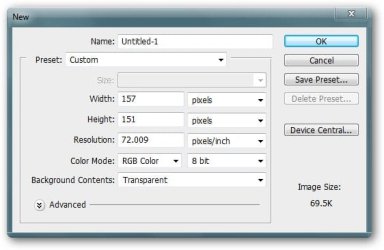
1. Start Photoshop ... open a new document with 157x151 pixels , let the background be transparent at the start .
1.jpg
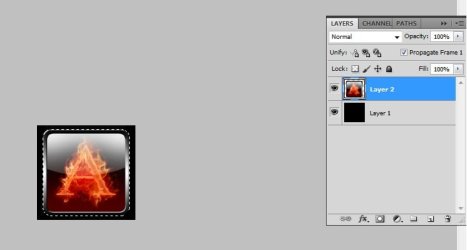
2. Now fill the document with black , place your desired image on it ( You may resize it to fit in the place (Edit>Free Transform ; Hold shift and drag mouse ) . When done , Hold control and click on the logo layer to select the logo (layer 2 in example) .
3.jpg
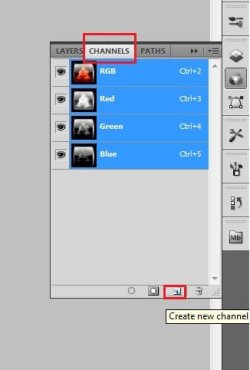
3. Now click on Channels pallet , four are already there ... RGB , red , green and blue . Click at the new channel button at the bottom of the pallet ; it will add a new channel Alpha1 , and at the same time will make the other channels invisible
4.jpg5.JPG
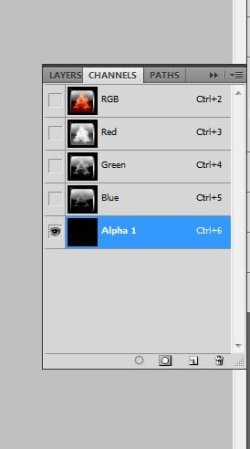
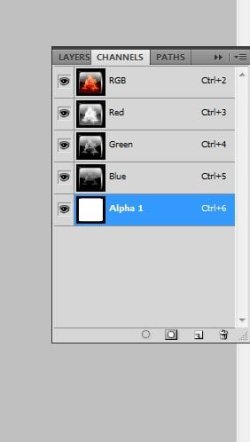
4. Now , with the channles pallet selected , pot the rounded brush tool (size say 100 pixels) , make it sure that the foreground color is white and background color is black , and fill the selected (previously, instep 2) part with white. So now your channels pallet looks like the shot below
7.JPG
5. Now click on the vacant box in front of RGB channel to make the other four layers visible again , Get back to layers pallet and flatten the image . Save it as 32 bit BMP file on Desktop , and the first part is done .


Part : II - Modifying and Replacing

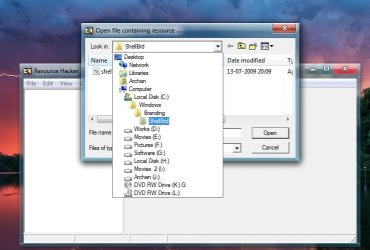
6. Start Resource Hacker .... go to C:\Windows\Branding\ShellBrd , and open shellbrd.dll with it .
8.jpg
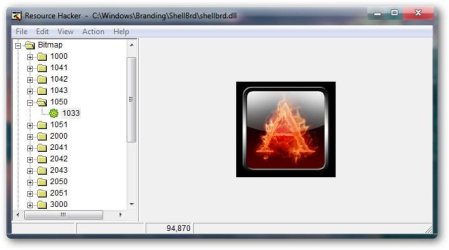
7. Expand Bitmap > 1050 > 1033 ; Cilck on Action > Replace Bitmap , and replace the existing with the just made one .
NOTE: (for 125% resolution it will be 2050>1033 and for 150% it will be 3050>1033)
9.jpg
8. Save the result as shellbrd.dll on desktop .

9. Open System File Replacer, and replace the original dll with the modded one ( you may do it manually too , and you are to take ownership if the file which is shought to be replaced for this purpose ).

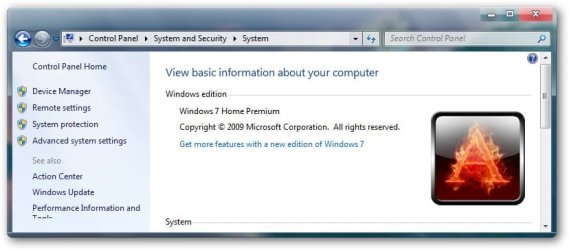
10. Restart your computer , and you are done . This is the result belowthat I got .
sshot-1.jpg


Last edited by a moderator:

My Computer My Computer

Computer type
PC/Desktop
Computer Manufacturer/Model Number
Self Assembled
OS
Microsoft Windows 10 Pro Insider Preview 64-bit
CPU
Intel(R) Core(TM) i3-4130 CPU @ 3.40GHz
Motherboard
Gigabyte Technology Co., Ltd. B85M-D3H
Memory
Corsair Vengence 4GB x2 (8.00GB Dual-Channel DDR3 @ 798MHz)
Graphics Card(s)
2047MB GeForce GTS 450 (ZOTAC International)
Sound Card
Onboard (Realtek High Definition Audio)
Monitor(s) Displays
LG Flatron E2040T
Screen Resolution
1600x900
Hard Drives
Western Digital 1 TB
Seagate 500 GB
PSU
Corsair VS550
Case
Cooler Master K380
Cooling
Cooler Master Seidon 120V Plus
Keyboard
Logitech MK260r
Mouse
Logitech MK260r
Internet Speed
PMPL Broadband
Antivirus
Windows Defender + MBAM
Browser
Firefox
Other Info
Dell Studio 15" Laptop
thanks
 

My Computer My Computer

Computer Manufacturer/Model Number
xXx
OS
Windows 7 Home premum 32bit
CPU
Q9450 @3.4 GHz
Motherboard
Sticker II Extreme
Memory
OCZ4GB
Graphics Card(s)
GTS8800Top
Sound Card
Sound Blaster X-Fi Titanium
Monitor(s) Displays
Samsung P2350
Screen Resolution
1920x1080
Hard Drives
OCZ SSD Vertex2 60GB Seagate 1TB + 500GB
PSU
Enermax Revolution 85+ 1500V
Case
Thermaltake Xaser VI Aluminum
Cooling
http://www.facebook.com/KenUD
Keyboard
Logitech -K270
Mouse
Logitech M505
Internet Speed
Thai 3BB 12Mb
Other Info
OK done

My Computer My Computer

Computer type
PC/Desktop
Computer Manufacturer/Model Number
Self Assembled
OS
Microsoft Windows 10 Pro Insider Preview 64-bit
CPU
Intel(R) Core(TM) i3-4130 CPU @ 3.40GHz
Motherboard
Gigabyte Technology Co., Ltd. B85M-D3H
Memory
Corsair Vengence 4GB x2 (8.00GB Dual-Channel DDR3 @ 798MHz)
Graphics Card(s)
2047MB GeForce GTS 450 (ZOTAC International)
Sound Card
Onboard (Realtek High Definition Audio)
Monitor(s) Displays
LG Flatron E2040T
Screen Resolution
1600x900
Hard Drives
Western Digital 1 TB
Seagate 500 GB
PSU
Corsair VS550
Case
Cooler Master K380
Cooling
Cooler Master Seidon 120V Plus
Keyboard
Logitech MK260r
Mouse
Logitech MK260r
Internet Speed
PMPL Broadband
Antivirus
Windows Defender + MBAM
Browser
Firefox
Other Info
Dell Studio 15" Laptop
Thanks mate, after I changed the "ask for genuine microsoft software logo" to fit new theme I was looking for this. Thank you again for saving me sometime.
 

My Computer My Computer

Computer Manufacturer/Model Number
Self built
OS
Windows 7 Ultimate x64 SP1
CPU
AMD Phenom II x4 960T
Motherboard
MSI 990FXA-GD80
Memory
8gigs 2x4gig
Graphics Card(s)
Gigabyte Geforce GTX 660
Sound Card
N/A
Monitor(s) Displays
23" Acer
Screen Resolution
1920x1080
Hard Drives
Seagate
500gig main
1tb secondary
300gig external
PSU
Corsair CX600
Case
Rosewill Smart One
Cooling
H60 plus 3 120mm fans
Keyboard
A cheap HP
Mouse
logitech G400
Internet Speed
35-Mbps down and 6-Mbps up
Other Info
Nothing is overclocked.
You are welcome mate :)
 

My Computer My Computer

Computer type
PC/Desktop
Computer Manufacturer/Model Number
Self Assembled
OS
Microsoft Windows 10 Pro Insider Preview 64-bit
CPU
Intel(R) Core(TM) i3-4130 CPU @ 3.40GHz
Motherboard
Gigabyte Technology Co., Ltd. B85M-D3H
Memory
Corsair Vengence 4GB x2 (8.00GB Dual-Channel DDR3 @ 798MHz)
Graphics Card(s)
2047MB GeForce GTS 450 (ZOTAC International)
Sound Card
Onboard (Realtek High Definition Audio)
Monitor(s) Displays
LG Flatron E2040T
Screen Resolution
1600x900
Hard Drives
Western Digital 1 TB
Seagate 500 GB
PSU
Corsair VS550
Case
Cooler Master K380
Cooling
Cooler Master Seidon 120V Plus
Keyboard
Logitech MK260r
Mouse
Logitech MK260r
Internet Speed
PMPL Broadband
Antivirus
Windows Defender + MBAM
Browser
Firefox
Other Info
Dell Studio 15" Laptop

My Computer My Computer

Computer type
PC/Desktop
Computer Manufacturer/Model Number
Self Assembled
OS
Microsoft Windows 10 Pro Insider Preview 64-bit
CPU
Intel(R) Core(TM) i3-4130 CPU @ 3.40GHz
Motherboard
Gigabyte Technology Co., Ltd. B85M-D3H
Memory
Corsair Vengence 4GB x2 (8.00GB Dual-Channel DDR3 @ 798MHz)
Graphics Card(s)
2047MB GeForce GTS 450 (ZOTAC International)
Sound Card
Onboard (Realtek High Definition Audio)
Monitor(s) Displays
LG Flatron E2040T
Screen Resolution
1600x900
Hard Drives
Western Digital 1 TB
Seagate 500 GB
PSU
Corsair VS550
Case
Cooler Master K380
Cooling
Cooler Master Seidon 120V Plus
Keyboard
Logitech MK260r
Mouse
Logitech MK260r
Internet Speed
PMPL Broadband
Antivirus
Windows Defender + MBAM
Browser
Firefox
Other Info
Dell Studio 15" Laptop
This is a very nice tutorial with lots of detail.

Also I do wonder how I would do this in Paint.NET or GIMP with regards to the alpha channels?
 
Last edited by a moderator:

My Computer My Computer

Computer type
Laptop
Computer Manufacturer/Model Number
Dell Latitude XT2 Tablet PC
OS
Windows 7 Professional 32-bit SP1
CPU
Intel Mobile Core 2 Duo SU9600 @ 1.60GHz
Motherboard
Dell Inc. 0M374P (Microprocessor)
Memory
3.00GB Dual-Channel DDR3 @ 398MHz (6-6-6-15)
Graphics Card(s)
Intel Mobile Intel 4 Series Express Chipset Family (Dell)
Sound Card
High Definition Audio Device
Monitor(s) Displays
Generic PnP Monitor (1280x800@60Hz)
Screen Resolution
1280 x 800
Hard Drives
232GB TOSHIBA MK2529GSGF (SATA)
Keyboard
HID Keyboard Device; Standard PS/2 Keyboard
Mouse
HID-compliant mouse; PS/2 Compatible Mouse
Antivirus
Norton 360
Browser
Google Chrome, Mozilla Firefox
Other Info
From Piriform Speccy!
Very helpful post Arc...!
Keep posting such useful posts.
 

My Computer My Computer

OS
Windows 7 Home Premium 32bit
Thank you for the tutorial ARC, very informative & helpful.

One question, does the file HAVE to be 157x151 pixels or can it be smaller?
I did get mine to work, but the pic is a little too big in my opinion.

Also, do you know how to get rid of the Question Mark? I've been trying w/o any luck.
 

Attachments

  • System Properties.jpg
    System Properties.jpg
    13.9 KB · Views: 374

My Computer My Computer

Computer type
PC/Desktop
Computer Manufacturer/Model Number
Self built comfuser
OS
10 Pro. 64Bit
CPU
AMD FX 4100, 4-Core Black Edition. Socket AM3+ ~ 3.60GHz
Motherboard
ASUS M5A97 LE R2.0
Memory
2x 4GB Kingston HyperX DDR3-1866 (PC3-14900) - 8GB Total
Graphics Card(s)
ASUS Radeon HD 6670-2GD3
Sound Card
Onboard High Definition Audio Device
Monitor(s) Displays
HP 2009m LCD
Screen Resolution
1600x900, True Color (32bit), 60Hertz
Hard Drives
WD Blue - 1TB, 3D NAND - SATA SSD
PSU
XFX Pro 450W Core Edition - Fully Wired
Case
Antec Super Lanboy
Cooling
Stock CPU fan + 2 (1 front, 1 back) 120mm Antec fans
Keyboard
Logitech MK700/MK710
Mouse
Logitech M705
Internet Speed
Frontier FiOS 50/50
Antivirus
Windows Security
Browser
Vivaldi
Other Info
1x ASUS DRW-24B1ST Multi-DVD Rewriter
1x RocketFish AIO Media Card Reader
1x WD 1TB Passport USB External Drive
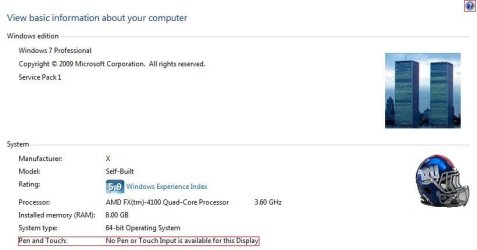
I did a few modifications this morning & was wondering if anyone can answer these questions.

How do I get rid of the items marked in red?
How do I change the wording Windows 7 Professional to Windows 7 Professional w/Service Pack 1
& remove the Service Pack 1 line?
 

Attachments

  • Capture.JPG
    Capture.JPG
    35 KB · Views: 134
Last edited:

My Computer My Computer

Computer type
PC/Desktop
Computer Manufacturer/Model Number
Self built comfuser
OS
10 Pro. 64Bit
CPU
AMD FX 4100, 4-Core Black Edition. Socket AM3+ ~ 3.60GHz
Motherboard
ASUS M5A97 LE R2.0
Memory
2x 4GB Kingston HyperX DDR3-1866 (PC3-14900) - 8GB Total
Graphics Card(s)
ASUS Radeon HD 6670-2GD3
Sound Card
Onboard High Definition Audio Device
Monitor(s) Displays
HP 2009m LCD
Screen Resolution
1600x900, True Color (32bit), 60Hertz
Hard Drives
WD Blue - 1TB, 3D NAND - SATA SSD
PSU
XFX Pro 450W Core Edition - Fully Wired
Case
Antec Super Lanboy
Cooling
Stock CPU fan + 2 (1 front, 1 back) 120mm Antec fans
Keyboard
Logitech MK700/MK710
Mouse
Logitech M705
Internet Speed
Frontier FiOS 50/50
Antivirus
Windows Security
Browser
Vivaldi
Other Info
1x ASUS DRW-24B1ST Multi-DVD Rewriter
1x RocketFish AIO Media Card Reader
1x WD 1TB Passport USB External Drive
Back
Top