SysTray Icons of some programs don't re-appear after Explorer restart

ajfudge

New member
Member
Local time
1:07 AM
Messages
80
Location
Quezon, Philippines
Hi there. I'm wondering why the system tray icons of some programs do not re-appear after restarting Windows Explorer. Examples of programs where this behavior occur are Ditto (clipboard manager) and Magic Disc (virtual optical drive). Note that they are still running, the icons just didn't reappear.

Is this normal? Coz I can't seem to find a working solution to this online. I always set the icons for programs such as those I mentioned to "Show icon and notifications". Help?
 

My Computer My Computer

At a glance

Windows 7 Professional x64 | Windows ME | Win...Intel Mobile Core 2 Duo SU7300 @ 1.30GHz3 GB HDDR3 411MHzMobile Intel 4 Series Express Chipset Family
Computer Manufacturer/Model Number
ASUS UL80A
OS
Windows 7 Professional x64 | Windows ME | Windows 8 Dev Preview
CPU
Intel Mobile Core 2 Duo SU7300 @ 1.30GHz
Motherboard
ASUSTeK Computer Inc. UL80A (Socket 478)
Memory
3 GB HDDR3 411MHz
Graphics Card(s)
Mobile Intel 4 Series Express Chipset Family
Sound Card
Realtek High Definition Audio
Monitor(s) Displays
AU Optronics B140XW02 V1
Screen Resolution
1366x768
Hard Drives
500GB internal
320GB external
Keyboard
cheap keyboard
Mouse
cheap mouse
Dear ajfudge,
Did you check among the hidden icons which you can open by clicking on the small ARROW in the Task bar? If not, kindly get back.

Regards,
sree
 

My Computer My Computer

At a glance

MS Windows 7 Home Premium 64-bit SP1IntelCore [email protected]; Sandy Bridge 32nm Tech.4096Mb RAM; Single ChannelDDR3@665MHz; DRAM F...AMD Radeon HD 6630M; GPU:Whistler;BIOS Core&m...
Computer Manufacturer/Model Number
Sony Vaio C series VPCCB35FN laptop
OS
MS Windows 7 Home Premium 64-bit SP1
CPU
IntelCore [email protected]; Sandy Bridge 32nm Tech.
Motherboard
Sony Vaio Version:C609NJYJ
Memory
4096Mb RAM; Single ChannelDDR3@665MHz; DRAM Freq:662MHz
Graphics Card(s)
AMD Radeon HD 6630M; GPU:Whistler;BIOS Core&mem Clock:123.36
Sound Card
REALTEK High Definition Audio Device; INTEL Display Card
Monitor(s) Displays
Generic PnP Intel HD;Resolution:1920*1040 Pixels; BPP:32bits
Screen Resolution
Current Resolution:1920*1080 Pixels; Monitor Frequency:60Hz
Hard Drives
Internal HD:TOSHIBA MK5061GSY; Real Size:488 GB;NTFS; 3 Partitions; SATA; HEADS:16

External HDD: WD Elements 1023 PORTABLE; Estimated Size: 1TB; NTFS; 3 Partitions
Cooling
Lateral Exhaust with a Cooling Pad Placed Beneath.
Keyboard
Logitech Bluetooth+ Generic Integrated K-B
Mouse
Logitech Bluetooth
Internet Speed
2MBPS
Other Info
1)Trend Micro Titanium Maximum Security Suite Version:3
2)SAS-PRO

3)MBAM--PRO


4)WATERFOX+IE9 +WOT+LINKEXTEND+ DRWEBCUREIT LINK CHECKER

5)SPYWAREBLASTER

6) WINPATROL PLUS

7) SANDBOXIE and
8) A BIT OF COMMON SENSE.
sreedhav,

If you mean the popup system tray icons, yes I did, of course. (I wouldn't be asking about this if I hadn't ;)). That's where Magic Disc resides, while Ditto is placed outside of that popup beside the flag icon.

-AJ
 

My Computer My Computer

At a glance

Windows 7 Professional x64 | Windows ME | Win...Intel Mobile Core 2 Duo SU7300 @ 1.30GHz3 GB HDDR3 411MHzMobile Intel 4 Series Express Chipset Family
Computer Manufacturer/Model Number
ASUS UL80A
OS
Windows 7 Professional x64 | Windows ME | Windows 8 Dev Preview
CPU
Intel Mobile Core 2 Duo SU7300 @ 1.30GHz
Motherboard
ASUSTeK Computer Inc. UL80A (Socket 478)
Memory
3 GB HDDR3 411MHz
Graphics Card(s)
Mobile Intel 4 Series Express Chipset Family
Sound Card
Realtek High Definition Audio
Monitor(s) Displays
AU Optronics B140XW02 V1
Screen Resolution
1366x768
Hard Drives
500GB internal
320GB external
Keyboard
cheap keyboard
Mouse
cheap mouse

My Computer My Computer

At a glance

Windows 10, Home Clean InstallIntel Core2 processsor Q8200(2.33Ghz 1333FSB)...6 gbATI Radeon 256MB HD3650
Computer type
PC/Desktop
Computer Manufacturer/Model Number
Dell XPS 420
OS
Windows 10, Home Clean Install
CPU
Intel Core2 processsor Q8200(2.33Ghz 1333FSB) Quad Core Tech
Motherboard
Dell
Memory
6 gb
Graphics Card(s)
ATI Radeon 256MB HD3650
Sound Card
Intergrated 7.1 Channel Audio
Monitor(s) Displays
Dell SP2009W 20"
Hard Drives
640 GB Serial ATA Hard drive
Cooling
Fan
Keyboard
Dell USB Keyboard
Mouse
Dell Premium Optical USB
Internet Speed
DSL 2.85
Prehaps, when you reboot those programs in question, they are not set to automatically run in services. Check the programs in questions to see if they are running in background. Also, look in msconfig startup programs and task manager processes. You could download SystemInternals Process Explorer to futher monitor their behavior. Driver conflicts, viruses, malware, the effects of using registry cleaners, updates, all can cause odd behavior. You could try running the installed troubleshooting programs, or sfc /scannow in the elevated command prompt. Check Device Manager for conflicts, and take a look at Event Viewer for errors. Look in System Information>Components>Problem Devices. Try running msconfig in selective startup; Add and elimate defferent startups and services items as you reboot. One of them may be the one which is interfering with the icons display. There's no easy way to troubleshoot. You've got to keep looking for where it's hiding. Maybe one of these old timers on here knows of a magic button to easily fix, I do not! Bye now!
 
Last edited:

My Computer My Computer

At a glance

windows 7 home premium 64 bitAMD Phenom(tm) II X4 830 Processor, 2800 Mhz,...12.00 GBATI Radeon 4200
Computer Manufacturer/Model Number
HP/ Pavilion P6751C
OS
windows 7 home premium 64 bit
CPU
AMD Phenom(tm) II X4 830 Processor, 2800 Mhz, 4 core
Motherboard
N-Alvorix-RS880-uATX (Alvorix) motherboard
Memory
12.00 GB
Graphics Card(s)
ATI Radeon 4200
Sound Card
Creative Labs Sound Blaster Recon3D
Monitor(s) Displays
46" Sony TV KDL-46NX810
Screen Resolution
1920x1090P
Hard Drives
1 TB
PSU
Internal 250W
Case
Mid-size ATX
Cooling
1 rear case fan
Keyboard
Logitech USB Wireless K800
Mouse
Logitech USB Wireless M305
Internet Speed
22mb-28mb
I'd say that it would not make a difference, if the programs can be run . All the programs you mentioned need not to start up with windows, and need not to run in background always.

Make it sure that you can run the programs when you want to do it. If so, you need not to be worried.

If you want to add them back, you can follow the Method Two of the tutorial http://www.sevenforums.com/tutorials/1401-startup-programs-change.html (either option , based on your requirement) .
 

My Computer My Computer

At a glance

Microsoft Windows 10 Pro Insider Preview 64-bitIntel(R) Core(TM) i3-4130 CPU @ 3.40GHzCorsair Vengence 4GB x2 (8.00GB Dual-Channel ...2047MB GeForce GTS 450 (ZOTAC International)
Computer type
PC/Desktop
Computer Manufacturer/Model Number
Self Assembled
OS
Microsoft Windows 10 Pro Insider Preview 64-bit
CPU
Intel(R) Core(TM) i3-4130 CPU @ 3.40GHz
Motherboard
Gigabyte Technology Co., Ltd. B85M-D3H
Memory
Corsair Vengence 4GB x2 (8.00GB Dual-Channel DDR3 @ 798MHz)
Graphics Card(s)
2047MB GeForce GTS 450 (ZOTAC International)
Sound Card
Onboard (Realtek High Definition Audio)
Monitor(s) Displays
LG Flatron E2040T
Screen Resolution
1600x900
Hard Drives
Western Digital 1 TB
Seagate 500 GB
PSU
Corsair VS550
Case
Cooler Master K380
Cooling
Cooler Master Seidon 120V Plus
Keyboard
Logitech MK260r
Mouse
Logitech MK260r
Internet Speed
PMPL Broadband
Antivirus
Windows Defender + MBAM
Browser
Firefox
Other Info
Dell Studio 15" Laptop
I ran into a similar problem earlier today, after shutting down a game, half of the tray icons has disappeared, but their exes were still listed in the Task Manager. When I tried to reset them via the customize options, it said that the icons were not currently active, but would be displayed again when they were. I didn't dwell on it too much, because it was easier to simply reboot. Nothing else that I thought of seemed to work.
 

My Computer My Computer

At a glance

W7x64 Pro, SuSe 12.1/** W7 x64 Pro, XP MCEPhenom II 1090T w/Noctua NH-D14 /**4400+ X2 w...2 x 2GB Patriot PGS34g1600LLKA/**4x1GB Corsai...EVGA GTX460 SC/**EVGA 8800GTS
Computer Manufacturer/Model Number
DIY
OS
W7x64 Pro, SuSe 12.1/** W7 x64 Pro, XP MCE
CPU
Phenom II 1090T w/Noctua NH-D14 /**4400+ X2 w/CM Hyper TX 3
Motherboard
ASRock 890FX Deluxe 4/**A8N-SLI
Memory
2 x 2GB Patriot PGS34g1600LLKA/**4x1GB Corsair VS
Graphics Card(s)
EVGA GTX460 SC/**EVGA 8800GTS
Sound Card
Asus Xonar D2X/**Xonar D1
Monitor(s) Displays
Acer X233H, Dell E152FPc /**LG M237-WD
Screen Resolution
1920x1080 & 1024x768/**1980x1080
Hard Drives
WDC 2TB, 1.5TB, 1TB, 500GB,Seagate 500GB , Maxtor 80GB /**500GB Seagate & WDC 1TB Black
PSU
CM RS600 w/ APC BX1000G/**Antec 500 TP w/ APC BX1000
Case
HAF922/**Antec 1040IIB
Cooling
3x200mm, 1x140 and 1x120mm/**5x80mm fans
Keyboard
Logitech Media USB/**Saitek Eclipse
Mouse
Cordless Trackman Wheel/**Ditto
Internet Speed
3.3Mbps
Other Info
SB 560 5.1 w/ Sennheiser RS140/**Creative T20 speakers, Dvico FusionHDTV7 Gold RT, Cisco E3000, HP 5510V AIO, Linksys E3000, Belkin F5U237 hub and **F5D8055 adapter
(** = 2nd rig)
Had a similar problem, perhaps due to the updates?
 

My Computer My Computer

At a glance

Windows 10, Home Clean InstallIntel Core2 processsor Q8200(2.33Ghz 1333FSB)...6 gbATI Radeon 256MB HD3650
Computer type
PC/Desktop
Computer Manufacturer/Model Number
Dell XPS 420
OS
Windows 10, Home Clean Install
CPU
Intel Core2 processsor Q8200(2.33Ghz 1333FSB) Quad Core Tech
Motherboard
Dell
Memory
6 gb
Graphics Card(s)
ATI Radeon 256MB HD3650
Sound Card
Intergrated 7.1 Channel Audio
Monitor(s) Displays
Dell SP2009W 20"
Hard Drives
640 GB Serial ATA Hard drive
Cooling
Fan
Keyboard
Dell USB Keyboard
Mouse
Dell Premium Optical USB
Internet Speed
DSL 2.85
@quickdraw,
Those programs are set to run on startup. They are also running in the background. I'm just bothered why the icons never re-appear after restarting explorer.

@seekermeister,
Exactly the same thing I'm experiencing. While rebooting fixes this, the reason why I'm bothered by this is I can't access the nifty context menu of those programs which can't be accessed by a hotkey, so when they don't reappear I always have to restart those programs to ensure that I can access them easily. (This is especially true on crucial times that I can't afford to reboot).

@arc,
I can terminate those programs with task manager, and I can run it whenever I want. I added those two to my startup because, well, they're pretty useful to my computing needs.

Please note that my "normal" system tray icons are fine (battery, network, volume, flag). Just some programs I set to stay in system tray.

@richc46,
I don't think it's the updates. I have experienced this since I started utilizing the system tray for programs. Perhaps it's the programs' fault?


Thanks for the insights, guys.
 

My Computer My Computer

At a glance

Windows 7 Professional x64 | Windows ME | Win...Intel Mobile Core 2 Duo SU7300 @ 1.30GHz3 GB HDDR3 411MHzMobile Intel 4 Series Express Chipset Family
Computer Manufacturer/Model Number
ASUS UL80A
OS
Windows 7 Professional x64 | Windows ME | Windows 8 Dev Preview
CPU
Intel Mobile Core 2 Duo SU7300 @ 1.30GHz
Motherboard
ASUSTeK Computer Inc. UL80A (Socket 478)
Memory
3 GB HDDR3 411MHz
Graphics Card(s)
Mobile Intel 4 Series Express Chipset Family
Sound Card
Realtek High Definition Audio
Monitor(s) Displays
AU Optronics B140XW02 V1
Screen Resolution
1366x768
Hard Drives
500GB internal
320GB external
Keyboard
cheap keyboard
Mouse
cheap mouse
Here's one more. To recover lost/missing system tray icons.

1. Back up the Registry by creating a restore point.
2. Go to Start > Run (or Windows-key + R), type in regedit and hit OK.
3. Navigate to the key HKEY_CURRENT_USER\Software\Cla sses\Local Settings\Software\Microsoft\Wi ndows\CurrentVersion \TrayNotify.
4. Delete the values IconStreams and PastIconsStream.
5. Open up the Task Manager (Ctrl + Shift + Esc), go to the Processes tab, select explorer.exe and click End Process.
6. Open the Applications tab and click New Task at the bottom-right of the window.
7. In the message box that pops up type in explorer.exe and hit OK.
8. Explorer.exe will reload, and the missing icons should now be back in the system-tray where they belong.
9. Then if the volume bar isnt there, go to taskbar properties (where the volume was gray) and simply tick the box.
 

My Computer My Computer

At a glance

windows 7 home premium 64 bitAMD Phenom(tm) II X4 830 Processor, 2800 Mhz,...12.00 GBATI Radeon 4200
Computer Manufacturer/Model Number
HP/ Pavilion P6751C
OS
windows 7 home premium 64 bit
CPU
AMD Phenom(tm) II X4 830 Processor, 2800 Mhz, 4 core
Motherboard
N-Alvorix-RS880-uATX (Alvorix) motherboard
Memory
12.00 GB
Graphics Card(s)
ATI Radeon 4200
Sound Card
Creative Labs Sound Blaster Recon3D
Monitor(s) Displays
46" Sony TV KDL-46NX810
Screen Resolution
1920x1090P
Hard Drives
1 TB
PSU
Internal 250W
Case
Mid-size ATX
Cooling
1 rear case fan
Keyboard
Logitech USB Wireless K800
Mouse
Logitech USB Wireless M305
Internet Speed
22mb-28mb
........why the system tray icons of some programs do not re-appear after restarting Windows Explorer....
Probably because that is the way that the programs with the missing icons were written... they create the icon once and then never do it again.

........Is this normal?.......
Windows sends out a message that explorer is starting (or in this case, restarting), some programs simply do not "listen" for that message. So for those deaf programs, it is normal for the icons not to show up again until you either:
kill and restart the program that has the missing icon
or reboot the computer.

However, there are programs that do "listen" to that particular operating system message and sometimes their icon will reappear after explorer crashes/restarts and sometimes their icons will not reappear??? I can only guess that this is a timing issue - too many apps setting up icons right after a restart of explorer.
 

My Computer My Computer

At a glance

W7 Pro SP1 64biti78GBIntel HD Graphics
Computer type
Laptop
Computer Manufacturer/Model Number
Employer provided Dell Latitude
OS
W7 Pro SP1 64bit
CPU
i7
Memory
8GB
Graphics Card(s)
Intel HD Graphics
Hard Drives
crappy SSD
Antivirus
Employer mandated Symantec Endpoint Protection
Browser
Pale Moon 64bit, IE11 64bit & Chrome 64bit
I'm currently not on my Windows 7 computer. Try this.
Right-click the taskbar. Right-click properties. Remove the tick from where it says, Hide inactive icons. Click apply. Or leave the tick in the box to hide inactive icons and instead click on Custom. Select the program you want in the list.(If it's there) To the right, you will see a drop down arrow. Click that, then from the drop down box choose always show.
 

My Computer My Computer

At a glance

windows 7 home premium 64 bitAMD Phenom(tm) II X4 830 Processor, 2800 Mhz,...12.00 GBATI Radeon 4200
Computer Manufacturer/Model Number
HP/ Pavilion P6751C
OS
windows 7 home premium 64 bit
CPU
AMD Phenom(tm) II X4 830 Processor, 2800 Mhz, 4 core
Motherboard
N-Alvorix-RS880-uATX (Alvorix) motherboard
Memory
12.00 GB
Graphics Card(s)
ATI Radeon 4200
Sound Card
Creative Labs Sound Blaster Recon3D
Monitor(s) Displays
46" Sony TV KDL-46NX810
Screen Resolution
1920x1090P
Hard Drives
1 TB
PSU
Internal 250W
Case
Mid-size ATX
Cooling
1 rear case fan
Keyboard
Logitech USB Wireless K800
Mouse
Logitech USB Wireless M305
Internet Speed
22mb-28mb
@UsernameIssues,
Thanks for that info. I thought that it could be the program's fault and your answer satisfies confirms it. As for the other programs sitting in my system tray, their icons are consistently present. Just bummed out that there's no other way around this.
 

My Computer My Computer

At a glance

Windows 7 Professional x64 | Windows ME | Win...Intel Mobile Core 2 Duo SU7300 @ 1.30GHz3 GB HDDR3 411MHzMobile Intel 4 Series Express Chipset Family
Computer Manufacturer/Model Number
ASUS UL80A
OS
Windows 7 Professional x64 | Windows ME | Windows 8 Dev Preview
CPU
Intel Mobile Core 2 Duo SU7300 @ 1.30GHz
Motherboard
ASUSTeK Computer Inc. UL80A (Socket 478)
Memory
3 GB HDDR3 411MHz
Graphics Card(s)
Mobile Intel 4 Series Express Chipset Family
Sound Card
Realtek High Definition Audio
Monitor(s) Displays
AU Optronics B140XW02 V1
Screen Resolution
1366x768
Hard Drives
500GB internal
320GB external
Keyboard
cheap keyboard
Mouse
cheap mouse
Microsoft excerpt:
The system tray (in short: systray, nowadays also called taskbar notification area) is the icon strip normally located near the right end of the task bar, next to the clock.
Some Windows 7 installations show a peculiar defect in that some systray icons disappear or, rather, do not appear, when the system is booted and the user logs on. The problem is even more prevalent on systems with autologon. The most frequently affected icons seem to be the speaker icon (sound volume) and the power/energy icon.
 

My Computer My Computer

At a glance

windows 7 home premium 64 bitAMD Phenom(tm) II X4 830 Processor, 2800 Mhz,...12.00 GBATI Radeon 4200
Computer Manufacturer/Model Number
HP/ Pavilion P6751C
OS
windows 7 home premium 64 bit
CPU
AMD Phenom(tm) II X4 830 Processor, 2800 Mhz, 4 core
Motherboard
N-Alvorix-RS880-uATX (Alvorix) motherboard
Memory
12.00 GB
Graphics Card(s)
ATI Radeon 4200
Sound Card
Creative Labs Sound Blaster Recon3D
Monitor(s) Displays
46" Sony TV KDL-46NX810
Screen Resolution
1920x1090P
Hard Drives
1 TB
PSU
Internal 250W
Case
Mid-size ATX
Cooling
1 rear case fan
Keyboard
Logitech USB Wireless K800
Mouse
Logitech USB Wireless M305
Internet Speed
22mb-28mb
It is sad that the OP has explorer.exe crashing from time to time :-(

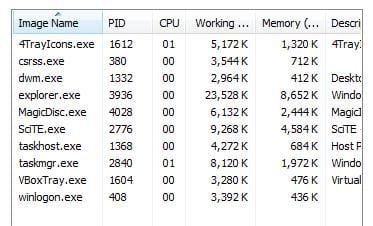
A script that watches for explorer to crash might help the OP. In the video below, MagicDisc restarts faster than Task Manager updates... so I added the Process ID column so that you can see the old and new instance running.


The script "4TrayIcons.exe" uses very little RAM and CPU... but note that there was only 256MB assigned to the W7 32bit VM running that script in the video. Notice the differences in the RAM used by several things when 1.5GB was assigned:
1.5GB.JPG


You can add as many programs as you wish to this one script and it should restart them all. Let me know if you see a flaw in the method/code. I have not been trained for this kind of stuff.
Code:
;AutoIt Version: 3.3.8.1
#NoTrayIcon

While 1 ;loops forever waiting for explorer to crash

    Do ;waits for desktop to disappear
        Sleep(1000)
    Until Not WinExists("Program Manager")

    ;restarts explorer/desktop for you
    Run(@WindowsDir & "\explorer.exe", @WindowsDir)

    ;waits for the desktop to appear
    WinWait("Program Manager", "", 5)

    ;give the desktop time to create the notification area
    Sleep(3000)

    ;;;;first program to close and restart
    ;usually closes on first try, unless the system is busy
    For $i = 1 To 100 ;try 100 times to close the program
        ProcessClose("MagicDisc.exe")
        Sleep(100)
        If Not ProcessExists("MagicDisc.exe") Then ExitLoop
    Next
    Run("C:\Program Files\MagicDisc\MagicDisc.exe")

    ;;;;second program to close and restart
    ;usually closes on first try, unless the system is busy
    For $i = 1 To 100 ;try 100 times to close the program
        ProcessClose("replace-this-name.exe")
        Sleep(100)
        If Not ProcessExists("replace-this-name.exe") Then ExitLoop
    Next
    Run("C:\Program Files\MagicDisc\replace-this-name.exe")

    ;;;;;you can copy/paste/change more code below here for more programs to close & restart


WEnd
You can download AutoIt3 from here. Once installed, try the steps shown in the video below to copy/paste/save/compile the code above.


AutoIt uses UPX to compress the compiled code. That might set off your antivirus tool (more about that here). If it does, delete the compiled file and put the text file in the Startup folder instead. Or you can visit the AutoIt forums to learn how to turn off the UPX compression.

Here is a VirusTotal scan of the compiled code. Only Jiangmin did not like the UPX. Without UPX compression, VirusTotal showed two AV tools that did not like the compiled code. And finally, as a pure text file - no AV tools flagged the code.

But the OP really should find the reason for explorer crashing...

Hope this helps.
 
Last edited:

My Computer My Computer

At a glance

W7 Pro SP1 64biti78GBIntel HD Graphics
Computer type
Laptop
Computer Manufacturer/Model Number
Employer provided Dell Latitude
OS
W7 Pro SP1 64bit
CPU
i7
Memory
8GB
Graphics Card(s)
Intel HD Graphics
Hard Drives
crappy SSD
Antivirus
Employer mandated Symantec Endpoint Protection
Browser
Pale Moon 64bit, IE11 64bit & Chrome 64bit
Back
Top