Why is my D drive included (mandatory) in system image?

DeltaBlast

New member
Local time
12:08 PM
Messages
6
I posted this on the MS forums but found this to be a much better source of experts, so I'm hoping someone here can help me with this:

I want to create a system image of my C drive for backup purposes, but when I use the built-in backup tool, my D drive is also selected and I can't uncheck it. My D drive is filled with videos and stuff and I really do not need that backed up.

This should explain:
http://stuff.digicrap.com/backup.png

Is there a way to check why this is marked as required for the system? Is there a way to make it so that I don't have to backup that drive?

This might have something to do with it: http://stuff.digicrap.com/backup2.png Any ideas on how to change the system tag from D to C?

Thanks!

(original thread here: Why is my D drive included in system image? - Microsoft Answers)
 

My Computer My Computer

At a glance

Windows 7 Ultimate x64
OS
Windows 7 Ultimate x64
It would appear d drive is the bootmgr drive and thus no backup of the system can be properly made without including it. This is why it is tagged as system.

Unfortunately I do not know a way around this that doesn't involve both changing the physical location the drives are plugged into the motherboard at, but also a reformat.

Basically what happens is windows drops the bootmgr on whichever drive the system sees as drive 0.
This is determined by where the drive is physically plugged into the motherboard it is not determined by software, but rather by the system bios.

I believe this to be the cause of your problem, though I am not 100% certain.
 

My Computer My Computer

At a glance

Windows 7 x64Intel i7 2600kG.skill Ripjaw 16gigs @ 1866Nvidia gtx580 (evga)
Computer Manufacturer/Model Number
Insane hobo technologies. ;-)
OS
Windows 7 x64
CPU
Intel i7 2600k
Motherboard
Asrock z68 extreme 4 gen 3
Memory
G.skill Ripjaw 16gigs @ 1866
Graphics Card(s)
Nvidia gtx580 (evga)
Sound Card
Integrated HD audio + hdmi
Monitor(s) Displays
24" ASUS widescreen + 42" insignia
Screen Resolution
1080p (1920x1080)
Hard Drives
128 Samsung 830
256 Samsung 840
3 x 1tb storage drive (various)
1 western digital 1tb (eSATA)
1 Seagate 1tb (eSATA)
PSU
1 kilowatt SLI/Crossfire rated Silverstone modular
Case
NZXT Phantom + additional 220 fan
Cooling
Zalmann
Keyboard
Microsoft wireless 3000 (v2)
Mouse
MS - wireless 5000 (bluetrack)
Internet Speed
depends on if you ask me or my provider.
Other Info
The above information is provided as is, and the author assumes no responsibility for issues it may cause with your sanity or fanboyism.
Might it have something to do with the fact that the C drive is an SSD?
 

My Computer My Computer

At a glance

Windows 7 Ultimate x64
OS
Windows 7 Ultimate x64
I posted this on the MS forums but found this to be a much better source of experts, so I'm hoping someone here can help me with this:

I want to create a system image of my C drive for backup purposes, but when I use the built-in backup tool, my D drive is also selected and I can't uncheck it. My D drive is filled with videos and stuff and I really do not need that backed up.

This should explain:
http://stuff.digicrap.com/backup.png

Is there a way to check why this is marked as required for the system? Is there a way to make it so that I don't have to backup that drive?

This might have something to do with it: http://stuff.digicrap.com/backup2.png Any ideas on how to change the system tag from D to C?

Thanks!

(original thread here: Why is my D drive included in system image? - Microsoft Answers)


Mike told you the same thing up there ( Microsoft Answers) that we are telling you here. The fix is messy and fraught with risk. DO you really want to risk it?
 

My Computer My Computer

At a glance

Win 8 Release candidate 8400[email protected]4 gigsNvidia 9600M
Computer Manufacturer/Model Number
HP Pavillion dv-7 1005 Tx
OS
Win 8 Release candidate 8400
CPU
[email protected]
Memory
4 gigs
Graphics Card(s)
Nvidia 9600M
Sound Card
HD built-in
Monitor(s) Displays
17" Wxga
Screen Resolution
1440x900
Cooling
none
Internet Speed
45Mb down 5Mb up
Mike told you the same thing up there ( Microsoft Answers) that we are telling you here. The fix is messy and fraught with risk. DO you really want to risk it?

...what? So far Mike has posted two replies, one completely missing the question (thinking I wanted to backup C to C) and one asking if I had anything installed on D (I haven't).

So far I haven't seen a fix there or here. I myself posted a link at the MS forums that told to use bootfix, but I tried that to no avail.

My SSD (C: with windows 7) is 100% sure plugged in at SATA 0. I got a completely new mobo along with the SSD and I plugged in the hardware in the correct order. You can even see that in my second screenshot.
The only thing I can imagine is that perhaps it marked D as the system drive because C is an SSD and it had to park it's data at a "regular" drive first before it could load the SSD drivers or something.

But I was kind of hoping that someone knew for certain what would be the cause here, and/or knew a way to change it (perhaps there are 3d party tools that could do this).
 

My Computer My Computer

At a glance

Windows 7 Ultimate x64
OS
Windows 7 Ultimate x64
the troubling part is the bootmgr actually requires it's own little 100mb partition to be made.
You could try pulling the d drive, plugging the windows drive into the port it's currently plugged into. Restart with your windows disk in the drive and see if the startup repair feature can create you a bootmgr out of thin air.

That would be the absolute simplest way I can think of. (plugging the d drive back in after all of this in a different port on the motherboard.

Then there are other ways to do this, you could also try the way we restore the bootmgr after grub has messed with it.
http://www.sevenforums.com/installation-setup/178900-bootmgr-missing-after-grub-install.html

To my knowledge there is no simple click next and it's fixed solution for this.
The windows drive needs to be moved to port 0 on the motherboard before you can even start trying to fix this though.
 

My Computer My Computer

At a glance

Windows 7 x64Intel i7 2600kG.skill Ripjaw 16gigs @ 1866Nvidia gtx580 (evga)
Computer Manufacturer/Model Number
Insane hobo technologies. ;-)
OS
Windows 7 x64
CPU
Intel i7 2600k
Motherboard
Asrock z68 extreme 4 gen 3
Memory
G.skill Ripjaw 16gigs @ 1866
Graphics Card(s)
Nvidia gtx580 (evga)
Sound Card
Integrated HD audio + hdmi
Monitor(s) Displays
24" ASUS widescreen + 42" insignia
Screen Resolution
1080p (1920x1080)
Hard Drives
128 Samsung 830
256 Samsung 840
3 x 1tb storage drive (various)
1 western digital 1tb (eSATA)
1 Seagate 1tb (eSATA)
PSU
1 kilowatt SLI/Crossfire rated Silverstone modular
Case
NZXT Phantom + additional 220 fan
Cooling
Zalmann
Keyboard
Microsoft wireless 3000 (v2)
Mouse
MS - wireless 5000 (bluetrack)
Internet Speed
depends on if you ask me or my provider.
Other Info
The above information is provided as is, and the author assumes no responsibility for issues it may cause with your sanity or fanboyism.

My Computer My Computer

At a glance

Windows 7 Ultimate SP1 64-BitIntel Core i7 870 @ 2.93GHz8Gb Dual-Channel DDR3 @ 664MHznVidia GeForce GTX 460 1024MB dedicated RAM
Computer Manufacturer/Model Number
HP Pavilion Elite 495UK
OS
Windows 7 Ultimate SP1 64-Bit
CPU
Intel Core i7 870 @ 2.93GHz
Motherboard
MSI 2A9C (CPU1)
Memory
8Gb Dual-Channel DDR3 @ 664MHz
Graphics Card(s)
nVidia GeForce GTX 460 1024MB dedicated RAM
Sound Card
Realtek HD Audio
Monitor(s) Displays
HP2310i
Screen Resolution
1920 x 1080
Hard Drives
1x1954GB Hitachi HDS22020ALA 330 (RAID), 1x1954GB Hitachi External for backup and storage
PSU
460W
Case
HP Elite
Cooling
Air cooled
Keyboard
Logitech K750 solar-powered keyboard
Mouse
Logitech Wireless M180 mouse
Internet Speed
2Mb
Other Info
Pure Avanti Flow Internet Radio with iPod Dock, 64Gb iPod, HP USB Speakers, Sony MDR-V500 Headphones, Sony Vaio F-Series Laptop
Any fix will involve risk so make sure your OS/program drive (0) is imaged.
I suggest you
1) Make a system repair CD / DVD (from Backup & restore screen)
2) use free Macrium reflect and make an image of drive 0 so if things go wrong you can reimage and get back to your starting point.
3) then set drive 1 inactive set drive 0 active
4) unplug all drives except drive 0
5) Now you need to rebuild the boot sequence to rely on drive 0 alone.
Option: A
Booting from the system repair CD run Startup Repair 3 times with up to 3 restarts of your PC.
Option: B
I personally prefer this option when I think it is specifically a boot sequence issue.
1) Boot from the System Repair CD
2) Go into the command prompt then specifically address the boot sequence with
>bootrec /fixmbr
>bootrec /fixboot
>bootrec /rebuildBcd
3) Boot your computer

Info on Bootrec

If this goes pear shape then simply reimage drive 0 with Macrium Reflect.
If you want to include a separate "System Reserved" partition on drive 0 then some more steps will be required.

If this seems a little confusing then get back and ask but you don't really want boot files on a separate drive to your OS.

Edit: I saw the reference to you by Mike Hall (via zigzag3143 post). The advice he gives is of course valid. If you have other key system files like the page file on drive 1 then that complicates matters.
 
Last edited:

My Computer My Computer

At a glance

Windows 7x64 Home Premium SP1Intel i7 2600kG.Skill Ripjaws (DDR3-1600) 2x4GBNvidia GeForce GTS 450; Intel HD Graphics 300...
Computer type
PC/Desktop
Computer Manufacturer/Model Number
Own build
OS
Windows 7x64 Home Premium SP1
CPU
Intel i7 2600k
Motherboard
ASUS P8Z68 Deluxe
Memory
G.Skill Ripjaws (DDR3-1600) 2x4GB
Graphics Card(s)
Nvidia GeForce GTS 450; Intel HD Graphics 3000(GT2+)
Monitor(s) Displays
Dell Ultrasharp IPS panel U2311H, Samsung SyncMaster P2350
Screen Resolution
1920x1080
Hard Drives
Samsung 850 Pro SSD 256GB, Samsung SSD 840 120GB, Seagates 1TB Barracuda ST31000528AS x2
PSU
Seasonic M12II 520W
Case
Lian Li Lancool PC-K60
Cooling
Case: 1x120mm, 3x140mm CPU: Hyper 212+
Keyboard
Logitech MK520 (wireless)
Mouse
Logitech MK520
Internet Speed
6-7 Mbps
Antivirus
Norton Security Premium, Malwarebytes on 2 (MSE on 3rd PC)
Browser
FireFox
Other Info
Audio: Logitech Z523 2.1
Mike told you the same thing up there ( Microsoft Answers) that we are telling you here. The fix is messy and fraught with risk. DO you really want to risk it?

...what? So far Mike has posted two replies, one completely missing the question (thinking I wanted to backup C to C) and one asking if I had anything installed on D (I haven't). Mike (and I dont even know him) asked if you had a pagefile or other OS componenet on that drive. YOU DO

So far I haven't seen a fix there or here. I myself posted a link at the MS forums that told to use bootfix, but I tried that to no avail.

My SSD (C: with windows 7) is 100% sure plugged in at SATA 0. I got a completely new mobo along with the SSD and I plugged in the hardware in the correct order. You can even see that in my second screenshot.
The only thing I can imagine is that perhaps it marked D as the system drive because C is an SSD and it had to park it's data at a "regular" drive first before it could load the SSD drivers or something.

But I was kind of hoping that someone knew for certain what would be the cause here, and/or knew a way to change it (perhaps there are 3d party tools that could do this).

You have the partition holding the boot files there. Move it at your own risk.
 

Attachments

  • 3-16-2012 6-59-21 PM.png
    3-16-2012 6-59-21 PM.png
    8.5 KB · Views: 55

My Computer My Computer

At a glance

Win 8 Release candidate 8400[email protected]4 gigsNvidia 9600M
Computer Manufacturer/Model Number
HP Pavillion dv-7 1005 Tx
OS
Win 8 Release candidate 8400
CPU
[email protected]
Memory
4 gigs
Graphics Card(s)
Nvidia 9600M
Sound Card
HD built-in
Monitor(s) Displays
17" Wxga
Screen Resolution
1440x900
Cooling
none
Internet Speed
45Mb down 5Mb up
Mike told you the same thing up there ( Microsoft Answers) that we are telling you here. The fix is messy and fraught with risk. DO you really want to risk it?

...what? So far Mike has posted two replies, one completely missing the question (thinking I wanted to backup C to C) and one asking if I had anything installed on D (I haven't).

So far I haven't seen a fix there or here. I myself posted a link at the MS forums that told to use bootfix, but I tried that to no avail.

My SSD (C: with windows 7) is 100% sure plugged in at SATA 0. I got a completely new mobo along with the SSD and I plugged in the hardware in the correct order. You can even see that in my second screenshot.
The only thing I can imagine is that perhaps it marked D as the system drive because C is an SSD and it had to park it's data at a "regular" drive first before it could load the SSD drivers or something.

But I was kind of hoping that someone knew for certain what would be the cause here, and/or knew a way to change it (perhaps there are 3d party tools that could do this).

I can't confirm this but I have read that on a new system when installing onto a SSD that the other mechanical drives should be removed as Windows will install the bootmanager onto the mechanical drive by default. This may have happened in your case.

Jim :geek:
 

My Computer My Computer

At a glance

Windows 8.1 Pro w/Media Center 64bit, Windows...Phenom II X6 1100TCrucial Balistic 8gb DDR3-1866 CL9MSI R6850 Cyclone IGD5 PE
Computer type
PC/Desktop
Computer Manufacturer/Model Number
Home Built
OS
Windows 8.1 Pro w/Media Center 64bit, Windows 7 HP 64bit
CPU
Phenom II X6 1100T
Motherboard
ASUS M5A99X EVO
Memory
Crucial Balistic 8gb DDR3-1866 CL9
Graphics Card(s)
MSI R6850 Cyclone IGD5 PE
Sound Card
On Board
Monitor(s) Displays
ASUS VE258Q 25" LED with DVI-HDMI-DisplayPort
Screen Resolution
1920 x 1080
Hard Drives
Two WD Cavier Black 2TB Sata III, WD My Book Essential 2TB USB 3.0
PSU
Seasonic X650 80 Plus GOLD Modular
Case
Corsair 400R
Cooling
Antec Kuhler H2O 620, Two 120mm and four 140mm
Keyboard
Logitech K120
Mouse
Logitech Marble Mouse USB, Logitech Precision Game Pad
Internet Speed
15MB
Antivirus
Norton IS 2013, Malwarebytes Pro Beta 2
Browser
IE-11, FF-27
Other Info
APC UPS ES 750, Netgear WNR3500L Gigabit & Wireless N Router with SamKnows Test Program, Motorola SB6120 Gigabit Cable Modem. Brother HL-2170W Laser Printer, Epson V300 Scanner
I can't confirm this but I have read that on a new system when installing onto a SSD that the other mechanical drives should be removed as Windows will install the bootmanager onto the mechanical drive by default. This may have happened in your case.
Jim :geek:

fud at its finest...

stop messing with weird partition schemes while on windows setup or unplug any other drive before installing windows, and let setup create the apropiate one on the current drive, no more problems.
 

My Computer My Computer

At a glance

Microsoft Windows 10 Professional / Windows 7...Intel i5-357016GB DDR3AMD Radeon HD 7850 2GB
Computer type
PC/Desktop
OS
Microsoft Windows 10 Professional / Windows 7 Professional
CPU
Intel i5-3570
Motherboard
Lenovo Mahobay
Memory
16GB DDR3
Graphics Card(s)
AMD Radeon HD 7850 2GB
Sound Card
(1) Realtek HD Audio (2) AMD HD Audio
Monitor(s) Displays
LG LS192WS
Screen Resolution
1440 x 900 @ 32bit color
Hard Drives
(1) SUV300S37A/120G (2) ST3500413AS SATA Disk Device AHCI mode enabled.
PSU
Corsair HX620
Case
Thermaltake V4 Black Edition
Cooling
Cooler Master Hyper 212 + Artic Silver 5 on CPU/GPU
Keyboard
Dell SK-8115
Mouse
Razer Copperhead with MAPED mat (awesome!)
Internet Speed
100 Mbps up/down
Browser
Chrome
I can't confirm this but I have read that on a new system when installing onto a SSD that the other mechanical drives should be removed as Windows will install the bootmanager onto the mechanical drive by default. This may have happened in your case.

Jim :geek:
I would say when installing Windows on any sort of drive you are safer to have all other drives disconnected and the OS drive plugged into Sata Port 0.
 

My Computer My Computer

At a glance

Windows 7x64 Home Premium SP1Intel i7 2600kG.Skill Ripjaws (DDR3-1600) 2x4GBNvidia GeForce GTS 450; Intel HD Graphics 300...
Computer type
PC/Desktop
Computer Manufacturer/Model Number
Own build
OS
Windows 7x64 Home Premium SP1
CPU
Intel i7 2600k
Motherboard
ASUS P8Z68 Deluxe
Memory
G.Skill Ripjaws (DDR3-1600) 2x4GB
Graphics Card(s)
Nvidia GeForce GTS 450; Intel HD Graphics 3000(GT2+)
Monitor(s) Displays
Dell Ultrasharp IPS panel U2311H, Samsung SyncMaster P2350
Screen Resolution
1920x1080
Hard Drives
Samsung 850 Pro SSD 256GB, Samsung SSD 840 120GB, Seagates 1TB Barracuda ST31000528AS x2
PSU
Seasonic M12II 520W
Case
Lian Li Lancool PC-K60
Cooling
Case: 1x120mm, 3x140mm CPU: Hyper 212+
Keyboard
Logitech MK520 (wireless)
Mouse
Logitech MK520
Internet Speed
6-7 Mbps
Antivirus
Norton Security Premium, Malwarebytes on 2 (MSE on 3rd PC)
Browser
FireFox
Other Info
Audio: Logitech Z523 2.1
At Install

Yet another case for unplugging all drives but the target when doing an install.
 

My Computer My Computer

At a glance

win 7 X64 Ultimate SP1I3770KG Skill F3-14900CL9-4GBXL x 4NVIDIA GeForce GTX670 + Intel 4000
Computer Manufacturer/Model Number
BGC (Bob's Garage Crew)
OS
win 7 X64 Ultimate SP1
CPU
I3770K
Motherboard
Asus P8Z77-V Deluxe
Memory
G Skill F3-14900CL9-4GBXL x 4
Graphics Card(s)
NVIDIA GeForce GTX670 + Intel 4000
Sound Card
Realtek HD 5.1 (MOB)
Monitor(s) Displays
Asus VW224T (1)
Screen Resolution
1920 x 1080
Hard Drives
SATA Corsair Force GT 2.5" 180GB (System) Sata 3
OCZ Vertex3 120GB
OCZ Vertex 2 120GB 2.5" SATA II
ST31000524AS 1000.2GB
WD15EARS (External)
PSU
CoolerMaster 1000 Watt
Case
CoolerMaster HAF X
Cooling
CPU -- CoolerMaster 520N
Keyboard
MS Wireless 3000 V2
Mouse
MS Wireless 3000 V2
Internet Speed
Cable
Antivirus
Norton Internet Security
Browser
IE9
Other Info
AMI Bios 1805
OC'd 3%

My Computer My Computer

At a glance

Vista, Windows7, Mint Mate, Zorin, Windows 8from 1.6GHz Duo to i7
Computer Manufacturer/Model Number
HP, Dell, Gateway, Toshiba - 4 laptops and 2 desktops
OS
Vista, Windows7, Mint Mate, Zorin, Windows 8
CPU
from 1.6GHz Duo to i7
Monitor(s) Displays
2x HP w2207
Hard Drives
5x HDD, 7x SSD, 12x Externals
Keyboard
with trackball - no mices
Mouse
Trackball mice
Internet Speed
DSL 6000
Hi all, I was gone for most of the weekend, but I see that it has yielded some excellent replies!

So far, I've gathered from the answers that it is probable that Windows created the boot partition on the D drive instead of on C, and that it probably needs to be moved before I can create a system image without D.

@Maguscreed: Thanks, I'll look into that way, if the way Whs posted fails.

@seavixen32: Or I'll try your way as well :)

@mjf: As this involves messing around with the drives more than the above options, I'll try it if the others fail. Thanks for recommending Macrium Reflect, I'll use it to make an image before messing around :)

@zigzag3413
The text that you highlighted:
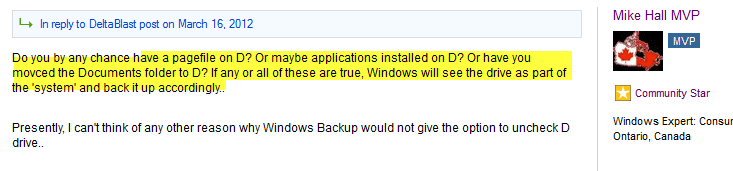
"Do you by any chance have a pagefile on D? Or maybe applications installed on D? Or have you movced the Documents folder to D? If any or all of these are true, Windows Will see the drive as part of the 'system' and bank it up accordingly.."
Pagefily? No. Applications? No. Documents folder? No.
"or other OS componenet on that drive", a line you just added yourself? Yes, *probably*.
From the posts here (all posted after the above comment) I've gathered that it is most likely that the D drive contains the boot partition, due to Windows picking mechanical drives over SSD's. But don't come telling me that Mike told me so at the MSA forum :)
(I just now noticed your signature... I guess it's a personal matter for you ;))

@Phone Man: Ah! This is what I sort of expected, guess it seems to be in the right direction...

@OldMX: Next time I will... I've been installing with multiple drives attached since win 95, never gave problems before so I never thought about it much :P

@mjf: I always use drive 0 for system, but as above, I've never disconnected all the other drives first. The more you know!

@HammerHead: Yup, found out the hard way :P

@whs: Thanks! Your option seems the most easy and straightforward one, I'll try that one first.


So... thanks all for you replies and thinking along with this issue!

I'll go and try the options later today or tomorrow, and I'll post the results of course! :D
 

My Computer My Computer

At a glance

Windows 7 Ultimate x64
OS
Windows 7 Ultimate x64
Just to confirm D indeed contains the Boot partition, according to EasyBCD:

Default: Windows 7
Timeout: 30 seconds
EasyBCD Boot Device: D:\

Entry #1
Name: Windows 7
BCD ID: {current}
Drive: C:\
Bootloader Path: \Windows\system32\winload.exe


and so:

---------------------------
Boot Partition Changed
---------------------------
EasyBCD has successfully made drive C: the new boot partition, and has loaded the new BCD store for modification, should you wish to make any further changes. If this partition is on your first boot disk, you don't need to take any further action. If it's not, you should now turn off your PC and change the boot drive from the BIOS for the changes to take effect.
---------------------------
OK
---------------------------

I'll now go into the bios to see what drive is set to boot from, and I'll edit this post when I come back :p

Edit:

Victory! :D I've changed the drive to boot from in the Bios as said, and:

victory.png


W00t :D

One last small question though: In the bios, it said my SSD was ch6 while my other drives said ch0, ch0, ch1 and ch1.. does that mean that in the end I did plug it in incorrectly? Windows itself says C is Disk0 though...
 
Last edited:

My Computer My Computer

At a glance

Windows 7 Ultimate x64
OS
Windows 7 Ultimate x64
Don't worry about the port. Any port is OK. The only difference is Sata2 or Sata3. If your SSD is a Sata3 SSD, it is better to plug it into a Sata3 port - but it would also work on a Sata2 port. You probably did plug it into the Sata3 port which may be one of the highest ports on the mobo - and that is fine.

The story that one should plug the OS disk into port0 is only significant when you make a fresh install because the Windows 7 installer normally always places the bootmgr on the disk with the lowest port number - as you have seen. But that is easy to fix - as you have also seen.
 

My Computer My Computer

At a glance

Vista, Windows7, Mint Mate, Zorin, Windows 8from 1.6GHz Duo to i7
Computer Manufacturer/Model Number
HP, Dell, Gateway, Toshiba - 4 laptops and 2 desktops
OS
Vista, Windows7, Mint Mate, Zorin, Windows 8
CPU
from 1.6GHz Duo to i7
Monitor(s) Displays
2x HP w2207
Hard Drives
5x HDD, 7x SSD, 12x Externals
Keyboard
with trackball - no mices
Mouse
Trackball mice
Internet Speed
DSL 6000
yeah, I suppose some of my advice was rendered a little useless considering that bios now have a much better boot management in general.
On older systems I still recommend the port 0 method.
 

My Computer My Computer

At a glance

Windows 7 x64Intel i7 2600kG.skill Ripjaw 16gigs @ 1866Nvidia gtx580 (evga)
Computer Manufacturer/Model Number
Insane hobo technologies. ;-)
OS
Windows 7 x64
CPU
Intel i7 2600k
Motherboard
Asrock z68 extreme 4 gen 3
Memory
G.skill Ripjaw 16gigs @ 1866
Graphics Card(s)
Nvidia gtx580 (evga)
Sound Card
Integrated HD audio + hdmi
Monitor(s) Displays
24" ASUS widescreen + 42" insignia
Screen Resolution
1080p (1920x1080)
Hard Drives
128 Samsung 830
256 Samsung 840
3 x 1tb storage drive (various)
1 western digital 1tb (eSATA)
1 Seagate 1tb (eSATA)
PSU
1 kilowatt SLI/Crossfire rated Silverstone modular
Case
NZXT Phantom + additional 220 fan
Cooling
Zalmann
Keyboard
Microsoft wireless 3000 (v2)
Mouse
MS - wireless 5000 (bluetrack)
Internet Speed
depends on if you ask me or my provider.
Other Info
The above information is provided as is, and the author assumes no responsibility for issues it may cause with your sanity or fanboyism.
Just to confirm D indeed contains the Boot partition, according to EasyBCD:

Default: Windows 7
Timeout: 30 seconds
EasyBCD Boot Device: D:\

Entry #1
Name: Windows 7
BCD ID: {current}
Drive: C:\
Bootloader Path: \Windows\system32\winload.exe


and so:

---------------------------
Boot Partition Changed
---------------------------
EasyBCD has successfully made drive C: the new boot partition, and has loaded the new BCD store for modification, should you wish to make any further changes. If this partition is on your first boot disk, you don't need to take any further action. If it's not, you should now turn off your PC and change the boot drive from the BIOS for the changes to take effect.
---------------------------
OK
---------------------------

I'll now go into the bios to see what drive is set to boot from, and I'll edit this post when I come back :p

Edit:

Victory! :D I've changed the drive to boot from in the Bios as said, and:

victory.png


W00t :D

One last small question though: In the bios, it said my SSD was ch6 while my other drives said ch0, ch0, ch1 and ch1.. does that mean that in the end I did plug it in incorrectly? Windows itself says C is Disk0 though...
D and R are still marked ACTIVE so possible boot partitions. Mark them INACTIVE
 

My Computer My Computer

At a glance

Microsoft Windows 7 Home Premium 64-bits 7601...Intel(R) Core(TM) i3 CPU M 370 @ 2.40GHz4,00 GBATI Mobility Radeon HD 5400 Series
Computer type
Laptop
Computer Manufacturer/Model Number
ACER ASPIRE 5742G
OS
Microsoft Windows 7 Home Premium 64-bits 7601 Multiprocessor Free Service Pack 1
CPU
Intel(R) Core(TM) i3 CPU M 370 @ 2.40GHz
Motherboard
Acer Aspire 5742G
Memory
4,00 GB
Graphics Card(s)
ATI Mobility Radeon HD 5400 Series
Sound Card
(1) AMD High Definition Audio Device (2) Realtek High Defi
Screen Resolution
1366 x 768 x 32 bits (4294967296 colors) @ 60 Hz
Hard Drives
WDC WD5000BEVT-22ZAT0
Another thing that can cause huge backups is those useless Libraries. If you have a reference to another drive's data then that gets added to the backup, or at least it was when Win7 first came out and I stopped using Libraries because of it.
 

My Computer My Computer

At a glance

Windows 7
OS
Windows 7
Back
Top