Audio and video playback choppy

liverlee

New member
Local time
4:45 PM
Messages
4
I have a Dell Inspiron 1545 laptop with windows 7 home premium 64 bit installed. The problem is that whenever I play a video through a browser or from the hard drive, the audio and video will stutter for a second or two every 30 seconds.

I've updated windows, installed a codec pack, installed idt high def codec from dell website and still the same problem. Any help would be appreciated.

Regards Liam
 

My Computer My Computer

At a glance

windows 7 home premium 64bit
OS
windows 7 home premium 64bit
Welcome to SevenForums.
Did you check on the background programs that are running. Well shutting down unnecessary programs can make more ram available and hence may speed up your other processes. First step: check your task-bar and close all the programs you are not using currently like by right clicking. Also use Ctrl+Alt+Del and see your task manager. How many processes are running in the processes tab. How much RAM is occupied?
I may be able to help you more with a few more details.
 

My Computer My Computer

At a glance

Windows 7 Ultimate 64-bitIntel i5-7602X2GB Kingstom ValueramnVidia GTX 460
Computer Manufacturer/Model Number
Gigabyte
OS
Windows 7 Ultimate 64-bit
CPU
Intel i5-760
Motherboard
GA-P55-USB3
Memory
2X2GB Kingstom Valueram
Graphics Card(s)
nVidia GTX 460
Sound Card
Onboard
Monitor(s) Displays
Samsung LED BX2050
Screen Resolution
1600X900
Hard Drives
1TB Western Digital. 64 MB cache, 7200rpm
PSU
Mercury 700W
Case
Gigabyte iSolo 210
Cooling
Stock
Keyboard
USB Multimedia
Mouse
Logitech USB Optical
Internet Speed
Broadband: 100MB/s
Other Info
New Home-built PC for personal and moderate gaming. Not Overclocked.
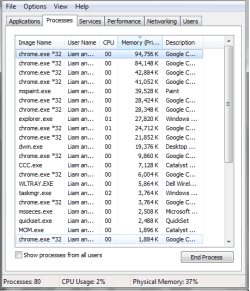
Thanks for the reply. I've opened task manager and it says 83 processes running and cpu usage between 2% and 10%. The only application running is chrome and the problem is still there.
 

My Computer My Computer

At a glance

windows 7 home premium 64bit
OS
windows 7 home premium 64bit
Capture.JPG
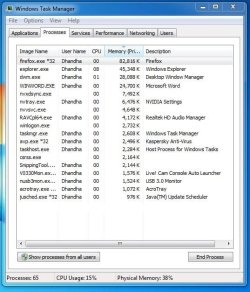
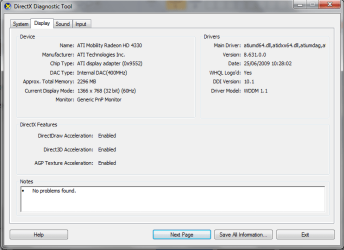
Try posting a screenshot of all the background processes running on your pc from the task manager. 83 is a little more than normal. Your Cpu seems to be idling fine and there is not much going on. I have attached a sample just to help you out. Also tell me which codes is it that you downloaded. I'd recommend not using much of the dell stuff and just to stick to the windows features. It is more than sufficient. Also please do tell me our Graphic card and the current driver version.
You might try updating the drivers. It might not fix the problem but surely improves the performance.
 

My Computer My Computer

At a glance

Windows 7 Ultimate 64-bitIntel i5-7602X2GB Kingstom ValueramnVidia GTX 460
Computer Manufacturer/Model Number
Gigabyte
OS
Windows 7 Ultimate 64-bit
CPU
Intel i5-760
Motherboard
GA-P55-USB3
Memory
2X2GB Kingstom Valueram
Graphics Card(s)
nVidia GTX 460
Sound Card
Onboard
Monitor(s) Displays
Samsung LED BX2050
Screen Resolution
1600X900
Hard Drives
1TB Western Digital. 64 MB cache, 7200rpm
PSU
Mercury 700W
Case
Gigabyte iSolo 210
Cooling
Stock
Keyboard
USB Multimedia
Mouse
Logitech USB Optical
Internet Speed
Broadband: 100MB/s
Other Info
New Home-built PC for personal and moderate gaming. Not Overclocked.
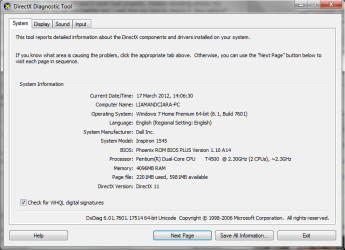
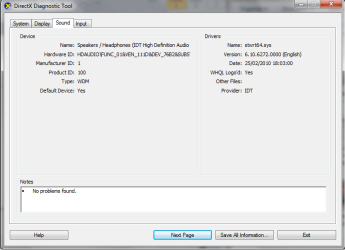
Here are a few images of task manager and what I think is the graphics card. I have installed windows 7 codec pack and idt high def audio codec
 

Attachments

  • task.png
    task.png
    15.5 KB · Views: 34
  • dont know what im doing.png
    dont know what im doing.png
    24.1 KB · Views: 35
  • Untitled.png
    Untitled.png
    18 KB · Views: 26
  • Untitled1.png
    Untitled1.png
    17.2 KB · Views: 22

My Computer My Computer

At a glance

windows 7 home premium 64bit
OS
windows 7 home premium 64bit
I have installed windows 7 codec pack

This is probably the 'imposter pack' that many people are duped into installing when they were actually looking for the Shark007 codecs. It is also probably causing your problems. If that is your case, i suggest you uninstall that pack and get the proper releases from majorgeeks.

32bit Win7codecs

x64Components addon
 

My Computer My Computer

At a glance

Windows 7 Ultimate 64biti7 2600k16GB (4x4) corsair vengeanceIntel HD3000 iGPU / AMD HD6870 1024MB
Computer Manufacturer/Model Number
Selfbuilt
OS
Windows 7 Ultimate 64bit
CPU
i7 2600k
Motherboard
asus P8Z68-V LE
Memory
16GB (4x4) corsair vengeance
Graphics Card(s)
Intel HD3000 iGPU / AMD HD6870 1024MB
Sound Card
bitstreamed to an Onkyo 609
Monitor(s) Displays
Asus VE278 27" LED / Bravia EX7 60" LED
Screen Resolution
native 1080p x2
Hard Drives
4x 2TB int. + 2x 2TB external and a SSD for the boot drive.
PSU
650w Antec
Case
NZXT tempest evo
Cooling
air/stock
Keyboard
Dell
Mouse
logitech m505
Internet Speed
dual: cable/blackberry tether for travel use
Other Info
BD re-writer //
asus notebook G73Jw
There Shark007 has said it. I'd recommend you to use only the windows components with the latest version of ATI drivers. Nothing more is needed. Uninstall the codec pack you just installed. Your directx seems normal.
Optional: Try using a registry cleaner like CCleaner after the uninstall. It will remove all the traces which may be left after the uninstall in the registry and helps improve your windows performance.
If you wish to play files that do not play in the windows media player use other popular free third party players. VLC media player is by far the most efficient and light for the PC. This comes with a preloaded pack of codecs which can play almost any format of audio or video.
 

My Computer My Computer

At a glance

Windows 7 Ultimate 64-bitIntel i5-7602X2GB Kingstom ValueramnVidia GTX 460
Computer Manufacturer/Model Number
Gigabyte
OS
Windows 7 Ultimate 64-bit
CPU
Intel i5-760
Motherboard
GA-P55-USB3
Memory
2X2GB Kingstom Valueram
Graphics Card(s)
nVidia GTX 460
Sound Card
Onboard
Monitor(s) Displays
Samsung LED BX2050
Screen Resolution
1600X900
Hard Drives
1TB Western Digital. 64 MB cache, 7200rpm
PSU
Mercury 700W
Case
Gigabyte iSolo 210
Cooling
Stock
Keyboard
USB Multimedia
Mouse
Logitech USB Optical
Internet Speed
Broadband: 100MB/s
Other Info
New Home-built PC for personal and moderate gaming. Not Overclocked.
Thanks for the replies guys. I've uninstalled windows 7 codec pack, ran ccleaner and installed sharks codec pack, tried watching video on vlc but its still the same. About 10 seconds in and every 30 seconds after that the video will freeze and the sound will stutter for a second.

No big deal but it does get annoying when wearing headphones especially as the laptop is only 3 months old.
 

My Computer My Computer

At a glance

windows 7 home premium 64bit
OS
windows 7 home premium 64bit
After installation it is also required to rightclick the Settings Application shortcut and select 'Run as Administrator' to complete the codec installation.

(just in case you missedthis step)
 

My Computer My Computer

At a glance

Windows 7 Ultimate 64biti7 2600k16GB (4x4) corsair vengeanceIntel HD3000 iGPU / AMD HD6870 1024MB
Computer Manufacturer/Model Number
Selfbuilt
OS
Windows 7 Ultimate 64bit
CPU
i7 2600k
Motherboard
asus P8Z68-V LE
Memory
16GB (4x4) corsair vengeance
Graphics Card(s)
Intel HD3000 iGPU / AMD HD6870 1024MB
Sound Card
bitstreamed to an Onkyo 609
Monitor(s) Displays
Asus VE278 27" LED / Bravia EX7 60" LED
Screen Resolution
native 1080p x2
Hard Drives
4x 2TB int. + 2x 2TB external and a SSD for the boot drive.
PSU
650w Antec
Case
NZXT tempest evo
Cooling
air/stock
Keyboard
Dell
Mouse
logitech m505
Internet Speed
dual: cable/blackberry tether for travel use
Other Info
BD re-writer //
asus notebook G73Jw
Back
Top