
Fallout 3 on Windows 7.

I did, and it doesn't seem to work.

That method worked for me with the x32 version, but I'm just trying it and it's not working for me in x64.... catalyst is failing to detect the hardware and the installer is 'just sitting there'. Perhaps it's a similar detection issue with Nvidia.

I'm going to give driver sweeper a go.


EDIT:

Phew, talk about an uphill battle getting Catalyst 8.12 Drivers to install.

Unfortunately it made no difference. FO3 is still hanging.... :(

At least it *may not* be a driver issue. Then again, I can't even play it in window mode.
 
Last edited:

My Computer

Computer type
PC/Desktop
Computer Manufacturer/Model Number
Systems by SmartEyeball
OS
8 Pro x64
CPU
i7 3770K 4.6GHz
Motherboard
ASUS P8Z77 WS
Memory
16GB G.Skill Trident X 2666mhz
Graphics Card(s)
x2 EVGA 780 Ti Superclocked SLI
Sound Card
SB X-FI Surround 5.1 PRO USB / ATH-AD900 Headphones
Monitor(s) Displays
x3 Dell U2410 / 58" Samsung
Screen Resolution
5760*1200/ 1920*1200
Hard Drives
2x Intel 520 240GB (RAID 0) * 2x WD Caviar Blacks 2TB (RAID 0) * 2TB WD Caviar Black * Sony Optirac DVD
PSU
Silverstone Strider Evolution 1200W
Case
Thermaltake Level 10 GT Snow Edition
Cooling
Noctua NH-D14
Keyboard
Topre Realforce // Ducky Shine MX Black // Filco Ninja TKL
Mouse
Thermaltake Theron (Highly Recommended) + Razer Imperator
Antivirus
MSE
Browser
IE, FF, WaterFox
Other Info
GT Extreme V2 Sim Racing Cockpit + 40" LCD and K/B Mouse stand ▼
Fanatec CSR Elite Wheel + Clubsport V1 Pedals + CSR shifter/7G-H ▼Saitek X52 Pro ▼ TrackIR 5 Pro
Buttkicker v2 Seat Rumbler with Dedicated 5.1 and Sub Woofer attached to frame ▼
=
Bloody Big Grin
I hope this helps someone.

I ran into problem similar to whats mentioned in this thread, where I would launch the game and would just get stuck in a loop with the launcher. Well it turns it if you start adding, removing, changing the location of your documents, and your library settings, the launcher loses track of where "My Games/Fallout 3/" Directory is, and doesn't seem to recreate it, just gets stuck in a loop.

So double check all those settings, change or move your "My Games/Fallout 3" directory and you should be good to go.
 

My Computer

OS
Windows 7
What about those that *don't* have it moved?
 

My Computers

System One System Two

  • Computer type
    PC/Desktop
    Computer Manufacturer/Model Number
    The Beast Model A (homebrew)
    OS
    Windows 11 21H2 Current build
    CPU
    AMD Ryzen 9 3950X
    Motherboard
    MSI MEG X570 GODLIKE
    Memory
    4 * 32 GB - Corsair Vengeance 3600 MHz
    Graphics Card(s)
    EVGA GeForce RTX 3080 Ti XC3 ULTRA GAMING (12G-P5-3955-KR)
    Sound Card
    Realtek® ALC1220 Codec
    Monitor(s) Displays
    2x Eve Spectrum ES07D03 4K Gaming Monitor (Matte) | Eve Spec
    Screen Resolution
    3x 3840 x 2160
    Hard Drives
    3x Samsung 980 Pro NVMe PCIe 4 M.2 2 TB SSD (MZ-V8P2T0B/AM) } 3x Sabrent Rocket NVMe 4.0 1 TB SSD
    PSU
    PC Power & Cooling’s Silencer Series 1050 Watt, 80 Plus Plat
    Case
    Fractal Design Define 7 XL Dark ATX Full Tower Case
    Cooling
    SteelSeries Apex Pro Wired Gaming Keyboard
    Keyboard
    SteelSeries Apex Pro
    Mouse
    Logitech MX Master 3S | MX Master 3 for business
    Internet Speed
    AT&T LightSpeed Gigabit Duplex Ftth
    Antivirus
    Windows Defender + MB 3
    Browser
    Nightly (default) + Firefox (stable),Chrome, Edge
  • Computer type
    PC/Desktop
    System Manufacturer/Model Number
    Dell Latitude E5470
    OS
    ChromeOS Flex Dev Channel (current)
    CPU
    Intel(R) Core(TM) i5-6300U CPU @ 2.40GHz, 2501 Mhz, 2 Core(s), 4 Logical Processor(s)
    Motherboard
    Dell
    Memory
    16 GB
    Graphics Card(s)
    Intel(R) HD Graphics 520
    Sound Card
    Intel(R) HD Graphics 520 + RealTek Audio
    Monitor(s) Displays
    Dell laptop display 15"
    Screen Resolution
    1920 * 1080
    Hard Drives
    Toshiba 128GB M.2 22300 drive
    INTEL Cherryville 520 Series SSDSC2CW180A 180 GB SATA III SSD
    PSU
    Dell
    Case
    Dell
    Cooling
    Dell
    Keyboard
    Dell
    Mouse
    Logitech MX Master 3S (shared w. Sys 1) | Dell TouchPad
    Internet Speed
    AT&T LightSpeed Gigabit Duplex Ftth
thats just worked for me, when I was stuck in a launcher loop.

Another thing is check to make sure permissions are set correct. Give the My Games and Fallout 3 full read write permissions to Everyone. Beyond that I have no clue.
 

My Computer

OS
Windows 7
Chuki, your a champ :) It was a permission problem. It would hang at the point where it would've been writing to the save game. No write access=hang.

I took ownership of the C:\Users\*YOURNAME*\Documents\My Games\Fallout3 folder and gave my username full read/write privileges. I Started a new game and it was past the hang. Save games from Vista work too :)


It's a similar issue to the Vista / S.T.A.L.K.E.R save game problem that occured in one of the patches. The game kept crashing because of write permissions.
 

My Computer

Computer type
PC/Desktop
Computer Manufacturer/Model Number
Systems by SmartEyeball
OS
8 Pro x64
CPU
i7 3770K 4.6GHz
Motherboard
ASUS P8Z77 WS
Memory
16GB G.Skill Trident X 2666mhz
Graphics Card(s)
x2 EVGA 780 Ti Superclocked SLI
Sound Card
SB X-FI Surround 5.1 PRO USB / ATH-AD900 Headphones
Monitor(s) Displays
x3 Dell U2410 / 58" Samsung
Screen Resolution
5760*1200/ 1920*1200
Hard Drives
2x Intel 520 240GB (RAID 0) * 2x WD Caviar Blacks 2TB (RAID 0) * 2TB WD Caviar Black * Sony Optirac DVD
PSU
Silverstone Strider Evolution 1200W
Case
Thermaltake Level 10 GT Snow Edition
Cooling
Noctua NH-D14
Keyboard
Topre Realforce // Ducky Shine MX Black // Filco Ninja TKL
Mouse
Thermaltake Theron (Highly Recommended) + Razer Imperator
Antivirus
MSE
Browser
IE, FF, WaterFox
Other Info
GT Extreme V2 Sim Racing Cockpit + 40" LCD and K/B Mouse stand ▼
Fanatec CSR Elite Wheel + Clubsport V1 Pedals + CSR shifter/7G-H ▼Saitek X52 Pro ▼ TrackIR 5 Pro
Buttkicker v2 Seat Rumbler with Dedicated 5.1 and Sub Woofer attached to frame ▼
=
Bloody Big Grin
Glad I could be of assistance, I was just googling my own problem and found this thread, and then finally fixed my problem. It was a mix of relocating folders in the library and the move from Vista to Win7 did something to the permissions as well.
 

My Computer

OS
Windows 7
Ok,I've got the same launcher crash out as chuki et al,but my Fallout 3/My games file is read-only no matter what I do;ownership change,permissions changed and the GENERAL tab jumps back to read-only next time I open it no matter what it says in the SECURITY tab.Any ideas?
 

My Computer

OS
windows 7
Right your Documents folders, go to security make sure Administrators, and Users, have full access, then go to the My Games folder do the same, then fallout 3 folder and do the same.

If that don't work backup the Fallout 3 Folder, delete and see if the game can recreate it. If that works just cut and paste your saves.
 

My Computer

OS
Windows 7
Ok, I ran into the fallout 3 launcher loop thing. I first messed around with my documents to the point where I couldn't even find it. I made a new profile on windows, and reinstalled the game.

I'm still having trouble with the launcher loop thing. Other games are working fine. Every time the launcher comes up, it does the hardware configuration check and resets everything to the "High Quality" level.

So far I have

Deleted "my games" folder (I moved my saves to a different place, but even if that doesn't work I'll just start anew).
It just creates a new "my games" folder on start up, and continues the loop.
Checked the security tab on each folder and ini file to make sure there is full read/write privileges.
Nothing changed, loop still there.
Checked the security tab for the game and launcher, gave all privileges of read/write.
Nothing changed, loop still there.
Reinstalled the game
Nothing changed, loop still there.

I currently am out of ideas of how to get this game running. Chuki, what is everything you have done from getting the problem to running the game properly; point A to B? I have a feeling that you might have done something you might have thought was trivial at the time, but actually fixed the problem. I have a feeling I know what the problem is, I just have no clue in how to fix it. Is there any way to change the location of the FalloutPrefs.ini?
 

My Computer

OS
Windows Vista/7
Okay, well this is what we know:

Fallout3.exe punts to FalloutLauncher.exe if FalloutLauncher.exe has never been run before. So, the problem lies in the fact that Fallout3.exe and FalloutLauncher.exe always think that this is the first time its been run... hence the Launcher loop.

So the question is where it is that the Launcher stores the information that it has been run before, and whether the problem is that it can't store that information or can't retrieve that information, or both. Unfortunately, Securom complains if you run Process Monitor while the Launcher is starting. And Process Monitor doesn't yield anything I can detect for Fallout3.exe that might explain it...
 

My Computer

OS
Windows Vista
Well trying to fix this issue I did reformat and start anew, only to have the problem surface all over again.

My Documents and stuff are all organized similarly on a separate hard drive.

I have

D:\Documents
D:\Pictures
D:\Music
D:\Videos
you get the point.

I change Win7's documents, pictures, etc... location to point to these folders. This automatically updates the library to point here, since the library by default includes C:\users\username\documents, so I just changed the location of that folder.

I do have both versions of win7 installed, and in Win7 64 I didn't have any problems, but in Win7 32 I did. So I knew it had to be something with the 32bit version, I still couldn't figure it out so I reformatted, upon reformat I could get the game launch but I was greeted by a black screen with audio looping, behind that was an invisable error saying the app had crashed.

I'd relaunch into 64bit and again it worked fine, this is when I started checking file permissions. I simply logged back into 32bit, and set the security tab permissions for the "Everybody" group to full control. I checked each individual file in the My Games/Fallout 3 directory since then I haven't had any issues in 32 or 64bit.
 

My Computer

OS
Windows 7
My security settings all appear to be set to Everyone = Full Control for those directories and files... Had you moved your directories in that new 32-bit install that it worked on?
 

My Computer

OS
Windows Vista
These are the steps I took to get it working in the default folder location. x64 Version.


Right Clicked on the Fallout3 folder in C:\Users\USERNAME\Documents\My Games\Fallout3 and selected properties>security>edit>add then typed in users and gave both my user name and users all permissions.

You really only need to give permission to the Fallout3 Folder itself. Any files and sub-folders should have the same permission properties.

fo3users.PNG


Even though I have allowed my username and users full access, the read only box remains ticked, yet it's still got access.

fo3stillthere.PNG

Fallout3.exe also needs to be "Run as Admin" in the compatibility tab.
 
Last edited:

My Computer

Computer type
PC/Desktop
Computer Manufacturer/Model Number
Systems by SmartEyeball
OS
8 Pro x64
CPU
i7 3770K 4.6GHz
Motherboard
ASUS P8Z77 WS
Memory
16GB G.Skill Trident X 2666mhz
Graphics Card(s)
x2 EVGA 780 Ti Superclocked SLI
Sound Card
SB X-FI Surround 5.1 PRO USB / ATH-AD900 Headphones
Monitor(s) Displays
x3 Dell U2410 / 58" Samsung
Screen Resolution
5760*1200/ 1920*1200
Hard Drives
2x Intel 520 240GB (RAID 0) * 2x WD Caviar Blacks 2TB (RAID 0) * 2TB WD Caviar Black * Sony Optirac DVD
PSU
Silverstone Strider Evolution 1200W
Case
Thermaltake Level 10 GT Snow Edition
Cooling
Noctua NH-D14
Keyboard
Topre Realforce // Ducky Shine MX Black // Filco Ninja TKL
Mouse
Thermaltake Theron (Highly Recommended) + Razer Imperator
Antivirus
MSE
Browser
IE, FF, WaterFox
Other Info
GT Extreme V2 Sim Racing Cockpit + 40" LCD and K/B Mouse stand ▼
Fanatec CSR Elite Wheel + Clubsport V1 Pedals + CSR shifter/7G-H ▼Saitek X52 Pro ▼ TrackIR 5 Pro
Buttkicker v2 Seat Rumbler with Dedicated 5.1 and Sub Woofer attached to frame ▼
=
Bloody Big Grin
thats just worked for me, when I was stuck in a launcher loop.

Another thing is check to make sure permissions are set correct. Give the My Games and Fallout 3 full read write permissions to Everyone. Beyond that I have no clue.

Hmm - weirder and weirder. But this may make sense as to why I have no issues with Fallout 3 - I installed it to a different drive - where the Program Files folder was not restricted - so my permissions may in fact have saved me - but I do this with all my games....

Chuki, your a champ :) It was a permission problem. It would hang at the point where it would've been writing to the save game. No write access=hang.
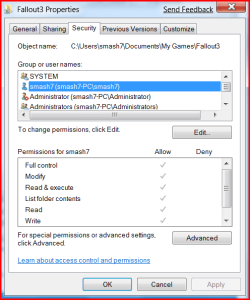
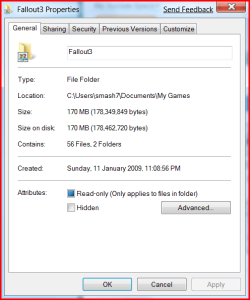
I took ownership of the C:\Users\*YOURNAME*\Documents\My Games\Fallout3 folder and gave my username full read/write privileges. I Started a new game and it was past the hang. Save games from Vista work too :)


It's a similar issue to the Vista / S.T.A.L.K.E.R save game problem that occured in one of the patches. The game kept crashing because of write permissions.

I did not have to do that at all....

But, I have my special folders moved, and I also installed the game itself to the D drive where those folders reside....


Well trying to fix this issue I did reformat and start anew, only to have the problem surface all over again.

My Documents and stuff are all organized similarly on a separate hard drive.

I have

D:\Documents
D:\Pictures
D:\Music
D:\Videos
you get the point.

I change Win7's documents, pictures, etc... location to point to these folders. This automatically updates the library to point here, since the library by default includes C:\users\username\documents, so I just changed the location of that folder.

I do have both versions of win7 installed, and in Win7 64 I didn't have any problems, but in Win7 32 I did. So I knew it had to be something with the 32bit version, I still couldn't figure it out so I reformatted, upon reformat I could get the game launch but I was greeted by a black screen with audio looping, behind that was an invisable error saying the app had crashed.

I'd relaunch into 64bit and again it worked fine, this is when I started checking file permissions. I simply logged back into 32bit, and set the security tab permissions for the "Everybody" group to full control. I checked each individual file in the My Games/Fallout 3 directory since then I haven't had any issues in 32 or 64bit.

Your setup almost mirrors mine- been doing that since Vista after I found out dejectedly that I could not make the installer create those special folders in alternate partitions / drives like XP installer could....


These are the steps I took to get it working in the default folder location. x64 Version.


Right Clicked on the Fallout3 folder in C:\Users\USERNAME\Documents\My Games\Fallout3 and selected properties>security>edit>add then typed in users and gave both my user name and users all permissions.

You really only need to give permission to the Fallout3 Folder itself. Any files and sub-folders should have the same permission properties.

View attachment 2643


Even though I have allowed my username and users full access, the read only box remains ticked, yet it's still got access.

View attachment 2644


I doubt it makes a difference, but I also run fallout3.exe and falloutlauncer.exe as "Run as Admin" in the compatibility tab.

Again, maybe it is because I did not install it to the C:\Program Files or C:\Program Files (X86) directories....
 

My Computers

System One System Two

  • Computer type
    PC/Desktop
    Computer Manufacturer/Model Number
    The Beast Model A (homebrew)
    OS
    Windows 11 21H2 Current build
    CPU
    AMD Ryzen 9 3950X
    Motherboard
    MSI MEG X570 GODLIKE
    Memory
    4 * 32 GB - Corsair Vengeance 3600 MHz
    Graphics Card(s)
    EVGA GeForce RTX 3080 Ti XC3 ULTRA GAMING (12G-P5-3955-KR)
    Sound Card
    Realtek® ALC1220 Codec
    Monitor(s) Displays
    2x Eve Spectrum ES07D03 4K Gaming Monitor (Matte) | Eve Spec
    Screen Resolution
    3x 3840 x 2160
    Hard Drives
    3x Samsung 980 Pro NVMe PCIe 4 M.2 2 TB SSD (MZ-V8P2T0B/AM) } 3x Sabrent Rocket NVMe 4.0 1 TB SSD
    PSU
    PC Power & Cooling’s Silencer Series 1050 Watt, 80 Plus Plat
    Case
    Fractal Design Define 7 XL Dark ATX Full Tower Case
    Cooling
    SteelSeries Apex Pro Wired Gaming Keyboard
    Keyboard
    SteelSeries Apex Pro
    Mouse
    Logitech MX Master 3S | MX Master 3 for business
    Internet Speed
    AT&T LightSpeed Gigabit Duplex Ftth
    Antivirus
    Windows Defender + MB 3
    Browser
    Nightly (default) + Firefox (stable),Chrome, Edge
  • Computer type
    PC/Desktop
    System Manufacturer/Model Number
    Dell Latitude E5470
    OS
    ChromeOS Flex Dev Channel (current)
    CPU
    Intel(R) Core(TM) i5-6300U CPU @ 2.40GHz, 2501 Mhz, 2 Core(s), 4 Logical Processor(s)
    Motherboard
    Dell
    Memory
    16 GB
    Graphics Card(s)
    Intel(R) HD Graphics 520
    Sound Card
    Intel(R) HD Graphics 520 + RealTek Audio
    Monitor(s) Displays
    Dell laptop display 15"
    Screen Resolution
    1920 * 1080
    Hard Drives
    Toshiba 128GB M.2 22300 drive
    INTEL Cherryville 520 Series SSDSC2CW180A 180 GB SATA III SSD
    PSU
    Dell
    Case
    Dell
    Cooling
    Dell
    Keyboard
    Dell
    Mouse
    Logitech MX Master 3S (shared w. Sys 1) | Dell TouchPad
    Internet Speed
    AT&T LightSpeed Gigabit Duplex Ftth
It may have something to do with installing the game to the default directory. I install all my games on my 2nd drive. I.E. all my games are installed under D:\Games

All I did was change the c:\users\username\documents folder to location d:\Documents, 64bit was fine, but I installed it 1st then 32bit, thats when I had problems, once I changed permissions all was well.
 

My Computer

OS
Windows 7
Hmmm.

I left the Users folders on my C Drive, but just change the installation path from C:\... to D:\..., leaving all of the rest the same.

My Documents, Downloads, etc (all special folders) are all on D, but the rest of the user folders are all on C - so only thing I can think of is that the permissions were screwed in your case because of the 2 different OSs sharing the drive....
 

My Computers

System One System Two

  • Computer type
    PC/Desktop
    Computer Manufacturer/Model Number
    The Beast Model A (homebrew)
    OS
    Windows 11 21H2 Current build
    CPU
    AMD Ryzen 9 3950X
    Motherboard
    MSI MEG X570 GODLIKE
    Memory
    4 * 32 GB - Corsair Vengeance 3600 MHz
    Graphics Card(s)
    EVGA GeForce RTX 3080 Ti XC3 ULTRA GAMING (12G-P5-3955-KR)
    Sound Card
    Realtek® ALC1220 Codec
    Monitor(s) Displays
    2x Eve Spectrum ES07D03 4K Gaming Monitor (Matte) | Eve Spec
    Screen Resolution
    3x 3840 x 2160
    Hard Drives
    3x Samsung 980 Pro NVMe PCIe 4 M.2 2 TB SSD (MZ-V8P2T0B/AM) } 3x Sabrent Rocket NVMe 4.0 1 TB SSD
    PSU
    PC Power & Cooling’s Silencer Series 1050 Watt, 80 Plus Plat
    Case
    Fractal Design Define 7 XL Dark ATX Full Tower Case
    Cooling
    SteelSeries Apex Pro Wired Gaming Keyboard
    Keyboard
    SteelSeries Apex Pro
    Mouse
    Logitech MX Master 3S | MX Master 3 for business
    Internet Speed
    AT&T LightSpeed Gigabit Duplex Ftth
    Antivirus
    Windows Defender + MB 3
    Browser
    Nightly (default) + Firefox (stable),Chrome, Edge
  • Computer type
    PC/Desktop
    System Manufacturer/Model Number
    Dell Latitude E5470
    OS
    ChromeOS Flex Dev Channel (current)
    CPU
    Intel(R) Core(TM) i5-6300U CPU @ 2.40GHz, 2501 Mhz, 2 Core(s), 4 Logical Processor(s)
    Motherboard
    Dell
    Memory
    16 GB
    Graphics Card(s)
    Intel(R) HD Graphics 520
    Sound Card
    Intel(R) HD Graphics 520 + RealTek Audio
    Monitor(s) Displays
    Dell laptop display 15"
    Screen Resolution
    1920 * 1080
    Hard Drives
    Toshiba 128GB M.2 22300 drive
    INTEL Cherryville 520 Series SSDSC2CW180A 180 GB SATA III SSD
    PSU
    Dell
    Case
    Dell
    Cooling
    Dell
    Keyboard
    Dell
    Mouse
    Logitech MX Master 3S (shared w. Sys 1) | Dell TouchPad
    Internet Speed
    AT&T LightSpeed Gigabit Duplex Ftth
I've had a little more time to play with it and this is what I've found.

If I try to run the Fallout3 executable the game locks on load. All I get is a black screen. This seems to be the case in Windows XP and Vista compatibility modes also.

If I run the game from the FalloutLauncher the game will start but all I get is audio... no video, just a black screen.

If I change the games settings in FalloutLauncher to Windowed Mode the game boots and plays fine.

I've tried this with the following nVidia drivers: Visa 180.48, Vista 181.20 and the Windows 7 nVidia Beta drivers from the Windows Update page.

So the game works... just not in full screen mode. I do find it strange though that the game CAN load but only from the FalloutLauncher and not the main executable. Weird.
 

My Computer

OS
Windows 7 & OS X 10.6.2 (Hackintosh drive)
CPU
Core i7 266
Motherboard
Gigabyte EX58-UD4P
Memory
6GB
Graphics Card(s)
nVidia 260GT & nVidia 9800GT
Have you installed the Games For Windows Live update, that might help as it worked for GTA4.
 

My Computer

Computer Manufacturer/Model Number
Home Brew
OS
Windows 7 Ultimate Vista Ultimate x64
CPU
Core 2 Duo E8500 3.16Ghz @ 3.8Ghz
Motherboard
eVGA 750i FTW
Memory
2x2Gigs Patriot PC2-6400 LL
Graphics Card(s)
Inno3D GeForce GTX260 216 SP
Monitor(s) Displays
ASUS VW222U 22" 2ms Response time
Screen Resolution
1680x1050
Hard Drives
SATA 150GB
SATA II 250GB
USB IDE 750GB Ext.
PSU
HYTEC 600W & Thermaltake 650W Toughpower Power Exp
Case
Thermaltake Armor LCS (Liquid Cooling System)
Cooling
Liquid Cooling System
Keyboard
Logitech G15 Gaming Keyboard
Mouse
Logitech G9 Gaming Mouse
Have you installed the Games For Windows Live update, that might help as it worked for GTA4.

I've installed Games for Windows Live 2.0, if that's what you're referring to. I haven't been able to find a Games for Windows Live Update per say.
 

My Computer

OS
Windows 7 & OS X 10.6.2 (Hackintosh drive)
CPU
Core i7 266
Motherboard
Gigabyte EX58-UD4P
Memory
6GB
Graphics Card(s)
nVidia 260GT & nVidia 9800GT
Back
Top