New laptop, partition size confusion! Advice please!

marco772

New member
Member
Local time
7:02 PM
Messages
41
Hi,

I recently bought a new laptop with a nice big 750GB HD. Then it broke and had to be sent in for repair.

I now have it back with a new HD and have to reinstall everything from scratch.

The thing is, the guy in the workshop has installed a partition on it and I've never really understood the point of them.

So, before I set about reinstalling things, I have a few questions!

1) The size. He has split it as follows; C drive 339GB and D Drive 339GB. Do this sound right? I always thought one partition was meant to be much smaller but, as I say, I don't really understand it all.

2) The point of it. From what I've read I should keep Windows AND any programs I download on the C drive and then save/keep all my personal stuff (Documents, Music, photos etc...on the D Drive. I understand this keeps it all safe if Windows has a hiccup. Is that all correct?

3) If so, I take it I need to relocate my libraries to the D Drive? (I can Google how to do that) What I don't want to have to do is specify that I want to save in the D Drive everytime I save something, so I assume I can easily set Windows to "default save" to the libraries now relocated in the D partition?
I can probably Google how to do that as well, so a yes or no will do (unless you're feeling super helpful, of course.. ;)).

Right, I think that's about all for now!

Thanks for reading!

Mark
 

My Computer My Computer

At a glance

Windows 7 Ultimate4 GB CorsairNVIDIA GT9800
OS
Windows 7 Ultimate
Memory
4 GB Corsair
Graphics Card(s)
NVIDIA GT9800
You have the major concepts correct.

But questions about "how to partition my hard drive" are like asking "how do I organize my kitchen?". The true answer is: it depends. It depends on what you've got and what you do. Every individual is different.

So, I can't speak for everyone but the reason I keep my OS in it's own small partition is because:

  • Backup Disk images go faster
  • Virus and malware scans go faster
  • General cleanup and maintenance (like defragging) goes faster.
Most people keep the OS and all installed programs on the C: drive. But for W7 and most modern programs you can install programs on another partition without issue.

You can then have as many personal data partitions as you want/need. It all depends on how many pots and pans you have!

If you need help re-partitioning your new hard drive just ask for help here. You can make as many or as few as you need and of whatever size you want. Best to have a plan before you begin though!
 

My Computer My Computer

At a glance

Windows 7 64 Bit Home Premium SP1i7-3820GSkill F3-14900CL9Q - 16GBEVGA GeForce GTX660 - Driver 352.86
Computer type
PC/Desktop
Computer Manufacturer/Model Number
Home Built - Jan 2013
OS
Windows 7 64 Bit Home Premium SP1
CPU
i7-3820
Motherboard
Asus P9X79-PRO - Bios 4608
Memory
GSkill F3-14900CL9Q - 16GB
Graphics Card(s)
EVGA GeForce GTX660 - Driver 352.86
Sound Card
On board Realtek ALC898
Monitor(s) Displays
Acer S271HL
Screen Resolution
1920 x 1080
Hard Drives
#1- Samsung 840 Pro Series
#2- Western Digital WD1002FAEX Sata3 Black
#3- Western Digital WD1002FAEX Sata3 Black
PSU
Corsair CMPSU-850TX-V2 - 850 watt (by Seasonic)
Case
Corsair Obsidian 550D
Cooling
Standard 3 120mm case fans, Cooler Master Hyper 212 EVO
Keyboard
MS KC-0405
Mouse
Intellimouse 5-button
Internet Speed
56 Mbits/Sec (on a good day)
Antivirus
Avast & Malwarebytes
Browser
Firefox
Other Info
Asus DVD - DRW-24B1ST 24X
  1. Many of us use Partition Wizard to make changes to the hard drive, as this tutorial explains: http://www.sevenforums.com/tutorials/93322-partition-wizard-use-bootable-cd.html
  2. Before you start, do make sure you have backed up anything of importance.
  3. You mention libraries: personally I don't bother with them as I have a reasonably small Windows/Applications partition (100GB should do) and a larger partition used purely for storing all my personal data. As mentioned by TVeblen, you can create more than one data partition depending on how organised you like to be.
  4. My system partition is backed up as a system image and my personal data is backed up to an external drive.
  5. If you decide to use Partition Wizard you need to download the ISO and burn it to a blank disc. You then boot into your PW disc, shrink the Windows volume and extend the non-Windows volume to the left to take up the resultant unallocated space. After applying the changes and waiting for PW to complete the tasks you then boot back into Windows.
  6. I recommend using ImgBurn to burn the Partition Wizard ISO to a disc. http://www.imgburn.com/
 

My Computer My Computer

At a glance

Windows 7 Ultimate SP1 64-BitIntel Core i7 870 @ 2.93GHz8Gb Dual-Channel DDR3 @ 664MHznVidia GeForce GTX 460 1024MB dedicated RAM
Computer Manufacturer/Model Number
HP Pavilion Elite 495UK
OS
Windows 7 Ultimate SP1 64-Bit
CPU
Intel Core i7 870 @ 2.93GHz
Motherboard
MSI 2A9C (CPU1)
Memory
8Gb Dual-Channel DDR3 @ 664MHz
Graphics Card(s)
nVidia GeForce GTX 460 1024MB dedicated RAM
Sound Card
Realtek HD Audio
Monitor(s) Displays
HP2310i
Screen Resolution
1920 x 1080
Hard Drives
1x1954GB Hitachi HDS22020ALA 330 (RAID), 1x1954GB Hitachi External for backup and storage
PSU
460W
Case
HP Elite
Cooling
Air cooled
Keyboard
Logitech K750 solar-powered keyboard
Mouse
Logitech Wireless M180 mouse
Internet Speed
2Mb
Other Info
Pure Avanti Flow Internet Radio with iPod Dock, 64Gb iPod, HP USB Speakers, Sony MDR-V500 Headphones, Sony Vaio F-Series Laptop
Aha. Many thanks for that! And indeed, if you could advise me on resetting the partition that would be most helpful (or even link me to an easy to follow and idiotproof guide to doing it!).

I am still assuming that, if I'm just keeping the OS on it and any installed programs, that 339GB is a bit excessive? If I reduce it to, say, 150GB do you think that will be enough? I've been reading some people use as little as 60GB for theirs so I would assume 150GB still leaves a lot of leeway?

I'd only want the two to keep it simple. So OS+programs on one and libraries (photos, docs, music, videos) on the other (D). So not too many pots and pans in this kitchen! :)

Will this mean, if I set D as the default download drive (for library type stuff) then every time I install a program I'll have to manually make sure it saves to the C drive? I can live with that if so, but if there's a way around that...
 

My Computer My Computer

At a glance

Windows 7 Ultimate4 GB CorsairNVIDIA GT9800
OS
Windows 7 Ultimate
Memory
4 GB Corsair
Graphics Card(s)
NVIDIA GT9800
Sorry Seavixen32, only read your reply after I posted mine. That sounds a little intimidating to be honest! Is that really the easiest way to do it? If so I will give it a go, but bear in mind I'm not the most technologically gifted of users! ;)
 

My Computer My Computer

At a glance

Windows 7 Ultimate4 GB CorsairNVIDIA GT9800
OS
Windows 7 Ultimate
Memory
4 GB Corsair
Graphics Card(s)
NVIDIA GT9800
Aha. Many thanks for that! And indeed, if you could advise me on resetting the partition that would be most helpful (or even link me to an easy to follow and idiotproof guide to doing it!).

I am still assuming that, if I'm just keeping the OS on it and any installed programs, that 339GB is a bit excessive? If I reduce it to, say, 150GB do you think that will be enough? I've been reading some people use as little as 60GB for theirs so I would assume 150GB still leaves a lot of leeway?

I'd only want the two to keep it simple. So OS+programs on one and libraries (photos, docs, music, videos) on the other (D). So not too many pots and pans in this kitchen! :)

Will this mean, if I set D as the default download drive (for library type stuff) then every time I install a program I'll have to manually make sure it saves to the C drive? I can live with that if so, but if there's a way around that...

Marco772, as you said the simple way is the best.
I would recommend using the internal microsoft shrink/expand volumes.

First if you don't have anything on the drive D, I would remove the partition, then I would shrink the C drive to what you said (around 160G), then you can creat the New D drive with the added space from the shrunk C and you will have two good partitions.
As Always, make sure that you have any data you value, backed up. Just for a warm fuzzy.

Rich
 

My Computer My Computer

At a glance

Windows 7 Pro x64 SP1Intel Core I716 GigsNVIDIA GeForce GTX 670M
Computer type
Laptop
Computer Manufacturer/Model Number
Toshiba Laptop Qosimo X870
OS
Windows 7 Pro x64 SP1
CPU
Intel Core I7
Motherboard
Toshiba Qosmio
Memory
16 Gigs
Graphics Card(s)
NVIDIA GeForce GTX 670M
Monitor(s) Displays
17.7" laptop
Screen Resolution
1600 x 900
Hard Drives
256 Gig SanDisk SSD for C
256 Gig Intel SSD for D
Internet Speed
50/25 FIOS
Antivirus
Vipre (all you can eat for 10 machines)
Browser
IE and FF
Other Info
I have dos 6.22, wfwg 3.11, win98, 2000 and xp VHD's available for testing. MS's Virtual PC works great.
Sorry Seavixen32, only read your reply after I posted mine. That sounds a little intimidating to be honest! Is that really the easiest way to do it? If so I will give it a go, but bear in mind I'm not the most technologically gifted of users! ;)

The reason I suggested it is because it is more flexible than Microsoft's disk management utility, which only lets you shrink a partition once.

However, MS disk management is easier to use.
 

My Computer My Computer

At a glance

Windows 7 Ultimate SP1 64-BitIntel Core i7 870 @ 2.93GHz8Gb Dual-Channel DDR3 @ 664MHznVidia GeForce GTX 460 1024MB dedicated RAM
Computer Manufacturer/Model Number
HP Pavilion Elite 495UK
OS
Windows 7 Ultimate SP1 64-Bit
CPU
Intel Core i7 870 @ 2.93GHz
Motherboard
MSI 2A9C (CPU1)
Memory
8Gb Dual-Channel DDR3 @ 664MHz
Graphics Card(s)
nVidia GeForce GTX 460 1024MB dedicated RAM
Sound Card
Realtek HD Audio
Monitor(s) Displays
HP2310i
Screen Resolution
1920 x 1080
Hard Drives
1x1954GB Hitachi HDS22020ALA 330 (RAID), 1x1954GB Hitachi External for backup and storage
PSU
460W
Case
HP Elite
Cooling
Air cooled
Keyboard
Logitech K750 solar-powered keyboard
Mouse
Logitech Wireless M180 mouse
Internet Speed
2Mb
Other Info
Pure Avanti Flow Internet Radio with iPod Dock, 64Gb iPod, HP USB Speakers, Sony MDR-V500 Headphones, Sony Vaio F-Series Laptop

My Computer My Computer

At a glance

Windows 7 64 Bit Home Premium SP1i7-3820GSkill F3-14900CL9Q - 16GBEVGA GeForce GTX660 - Driver 352.86
Computer type
PC/Desktop
Computer Manufacturer/Model Number
Home Built - Jan 2013
OS
Windows 7 64 Bit Home Premium SP1
CPU
i7-3820
Motherboard
Asus P9X79-PRO - Bios 4608
Memory
GSkill F3-14900CL9Q - 16GB
Graphics Card(s)
EVGA GeForce GTX660 - Driver 352.86
Sound Card
On board Realtek ALC898
Monitor(s) Displays
Acer S271HL
Screen Resolution
1920 x 1080
Hard Drives
#1- Samsung 840 Pro Series
#2- Western Digital WD1002FAEX Sata3 Black
#3- Western Digital WD1002FAEX Sata3 Black
PSU
Corsair CMPSU-850TX-V2 - 850 watt (by Seasonic)
Case
Corsair Obsidian 550D
Cooling
Standard 3 120mm case fans, Cooler Master Hyper 212 EVO
Keyboard
MS KC-0405
Mouse
Intellimouse 5-button
Internet Speed
56 Mbits/Sec (on a good day)
Antivirus
Avast & Malwarebytes
Browser
Firefox
Other Info
Asus DVD - DRW-24B1ST 24X
Thanks. Just a quick question to be on the safe side. If I shrink the C drive from it's current 339GB down to a still generous 150GB, it won't wipe anything off will it? I'm only using 40GB of it at present but want to allow for further program installations.
Just checking that it will be safe to shrink the partition before doing so!

Ta.
 

My Computer My Computer

At a glance

Windows 7 Ultimate4 GB CorsairNVIDIA GT9800
OS
Windows 7 Ultimate
Memory
4 GB Corsair
Graphics Card(s)
NVIDIA GT9800
Shrinking a partition will not erase any data on the existing partition.

150GB should be ample for your future needs.

All I will say is, backup any personal data first just in case anything does go wrong.
 

My Computer My Computer

At a glance

Windows 7 Ultimate SP1 64-BitIntel Core i7 870 @ 2.93GHz8Gb Dual-Channel DDR3 @ 664MHznVidia GeForce GTX 460 1024MB dedicated RAM
Computer Manufacturer/Model Number
HP Pavilion Elite 495UK
OS
Windows 7 Ultimate SP1 64-Bit
CPU
Intel Core i7 870 @ 2.93GHz
Motherboard
MSI 2A9C (CPU1)
Memory
8Gb Dual-Channel DDR3 @ 664MHz
Graphics Card(s)
nVidia GeForce GTX 460 1024MB dedicated RAM
Sound Card
Realtek HD Audio
Monitor(s) Displays
HP2310i
Screen Resolution
1920 x 1080
Hard Drives
1x1954GB Hitachi HDS22020ALA 330 (RAID), 1x1954GB Hitachi External for backup and storage
PSU
460W
Case
HP Elite
Cooling
Air cooled
Keyboard
Logitech K750 solar-powered keyboard
Mouse
Logitech Wireless M180 mouse
Internet Speed
2Mb
Other Info
Pure Avanti Flow Internet Radio with iPod Dock, 64Gb iPod, HP USB Speakers, Sony MDR-V500 Headphones, Sony Vaio F-Series Laptop
A

I am still assuming that, if I'm just keeping the OS on it and any installed programs, that 339GB is a bit excessive? If I reduce it to, say, 150GB do you think that will be enough? I've been reading some people use as little as 60GB for theirs so I would assume 150GB still leaves a lot of leeway?

339 is excessive. 150 would give you plenty of leeway.

Many use a C of 60 or less and have no problems. It's all a matter of proper management/maintenance and how many apps you need to install to C. I have over 50 applications installed and use less than 30 GB on C.

If I had 678 GB to split up, as you do, I'd probably go with 78 for C and 600 for D--something like that--unless I had an oddball situation. You are the best judge of how much space you need for C.

And you can make a wild guess about how fast your data is growing. If you are not into video files in any form, it's unlikely the occupied space on your data partition will grow rapidly. In such a case, you might give a little more space to C and less to D. Use your own judgement.
 

My Computer My Computer

At a glance

Windows 7 Home Premium SP1, 64-bitIntel Skylake i5-6600K, not overclocked8 GB HyperX DDR4-2666 (2 x 4 GB)none; graphics are integrated on CPU
Computer type
PC/Desktop
Computer Manufacturer/Model Number
Ignatz Special; 4 speed manual gearbox; factory air conditioning; one of one
OS
Windows 7 Home Premium SP1, 64-bit
CPU
Intel Skylake i5-6600K, not overclocked
Motherboard
AsRock Z170M Extreme 4, micro ATX
Memory
8 GB HyperX DDR4-2666 (2 x 4 GB)
Graphics Card(s)
none; graphics are integrated on CPU
Sound Card
onboard: Realtek ALC1150; external: USB Behringer UF0-202
Monitor(s) Displays
Dell S2340M 23 inch IPS
Screen Resolution
1600 x 900
Hard Drives
System: Crucial MX100 series SSD, 128 GB;
Data: Samsung Spinpoint 103SJ, 1 TB;
Backup: WD Caviar Green WD30EZRX-00D8PB0, 3 TB
PSU
Rosewill SilentNight 500 watt fanless, semi-modular
Case
Antec Solo II
Cooling
Noctua NH-U12S; Noctua F12 intake, Noctua S12A exhaust
Keyboard
Microsoft 200 6JH-00001 USB
Mouse
Dell or Microsoft optical wired; USB
Antivirus
Microsoft Security Essentials and Malwarebytes Premium
Browser
Pale Moon
Other Info
All fans PWM; speeds at idle: CPU circa 500 rpm; intake circa 600 rpm; exhaust circa 600 rpm; CPU temps 27 idle and 47 C load in a warm room (27 C/81 F) when running Intel Extreme Tuning Utility stress test.
One thing to mention, as it is an issue we hear about so many times here, is that because of some internal needs of Windows sometimes the Disk Management method will not let you reduce the size of the partition as much as you planned on. This limitation is due to the location of the PageFile and Hibernation Files on the partition.

If you run into this problem you will have to make a decision. Go with what Disk Management will give you, or use Partition Wizard bootable CD to get what you want. Because PW is working outside of the Windows environment, it can do things that Windows cannot.
 

My Computer My Computer

At a glance

Windows 7 64 Bit Home Premium SP1i7-3820GSkill F3-14900CL9Q - 16GBEVGA GeForce GTX660 - Driver 352.86
Computer type
PC/Desktop
Computer Manufacturer/Model Number
Home Built - Jan 2013
OS
Windows 7 64 Bit Home Premium SP1
CPU
i7-3820
Motherboard
Asus P9X79-PRO - Bios 4608
Memory
GSkill F3-14900CL9Q - 16GB
Graphics Card(s)
EVGA GeForce GTX660 - Driver 352.86
Sound Card
On board Realtek ALC898
Monitor(s) Displays
Acer S271HL
Screen Resolution
1920 x 1080
Hard Drives
#1- Samsung 840 Pro Series
#2- Western Digital WD1002FAEX Sata3 Black
#3- Western Digital WD1002FAEX Sata3 Black
PSU
Corsair CMPSU-850TX-V2 - 850 watt (by Seasonic)
Case
Corsair Obsidian 550D
Cooling
Standard 3 120mm case fans, Cooler Master Hyper 212 EVO
Keyboard
MS KC-0405
Mouse
Intellimouse 5-button
Internet Speed
56 Mbits/Sec (on a good day)
Antivirus
Avast & Malwarebytes
Browser
Firefox
Other Info
Asus DVD - DRW-24B1ST 24X

My Computer My Computer

At a glance

Windows 7 Ultimate SP1 64-BitIntel Core i7 870 @ 2.93GHz8Gb Dual-Channel DDR3 @ 664MHznVidia GeForce GTX 460 1024MB dedicated RAM
Computer Manufacturer/Model Number
HP Pavilion Elite 495UK
OS
Windows 7 Ultimate SP1 64-Bit
CPU
Intel Core i7 870 @ 2.93GHz
Motherboard
MSI 2A9C (CPU1)
Memory
8Gb Dual-Channel DDR3 @ 664MHz
Graphics Card(s)
nVidia GeForce GTX 460 1024MB dedicated RAM
Sound Card
Realtek HD Audio
Monitor(s) Displays
HP2310i
Screen Resolution
1920 x 1080
Hard Drives
1x1954GB Hitachi HDS22020ALA 330 (RAID), 1x1954GB Hitachi External for backup and storage
PSU
460W
Case
HP Elite
Cooling
Air cooled
Keyboard
Logitech K750 solar-powered keyboard
Mouse
Logitech Wireless M180 mouse
Internet Speed
2Mb
Other Info
Pure Avanti Flow Internet Radio with iPod Dock, 64Gb iPod, HP USB Speakers, Sony MDR-V500 Headphones, Sony Vaio F-Series Laptop
One thing to mention, as it is an issue we hear about so many times here, is that because of some internal needs of Windows sometimes the Disk Management method will not let you reduce the size of the partition as much as you planned on. This limitation is due to the location of the PageFile and Hibernation Files on the partition.

If you run into this problem you will have to make a decision. Go with what Disk Management will give you, or use Partition Wizard bootable CD to get what you want. Because PW is working outside of the Windows environment, it can do things that Windows cannot.

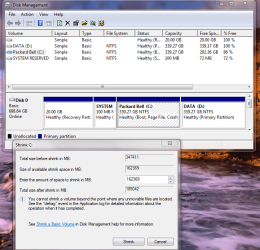
Hmm, this seems to be what has happened! I wanted to shrink it to 150GB, thus reducing it by 189GB, but it seems it'll only let me reduce it by 158GB leaving me with 181GB.

I've attached the photo showing this just to be sure. Does this mean I WILL need to use Partition Wizard as my next easiest option?

Thanks again

Mark
 

Attachments

  • Shrink1.PNG
    Shrink1.PNG
    78.6 KB · Views: 7

My Computer My Computer

At a glance

Windows 7 Ultimate4 GB CorsairNVIDIA GT9800
OS
Windows 7 Ultimate
Memory
4 GB Corsair
Graphics Card(s)
NVIDIA GT9800
Yes, this is the very reason why many of us use Partition Wizard.

It is much more flexible than Windows 7's disk management utility.

Have a look at the tut I linked you to and post back if there is anything you are uncertain about.
 

My Computer My Computer

At a glance

Windows 7 Ultimate SP1 64-BitIntel Core i7 870 @ 2.93GHz8Gb Dual-Channel DDR3 @ 664MHznVidia GeForce GTX 460 1024MB dedicated RAM
Computer Manufacturer/Model Number
HP Pavilion Elite 495UK
OS
Windows 7 Ultimate SP1 64-Bit
CPU
Intel Core i7 870 @ 2.93GHz
Motherboard
MSI 2A9C (CPU1)
Memory
8Gb Dual-Channel DDR3 @ 664MHz
Graphics Card(s)
nVidia GeForce GTX 460 1024MB dedicated RAM
Sound Card
Realtek HD Audio
Monitor(s) Displays
HP2310i
Screen Resolution
1920 x 1080
Hard Drives
1x1954GB Hitachi HDS22020ALA 330 (RAID), 1x1954GB Hitachi External for backup and storage
PSU
460W
Case
HP Elite
Cooling
Air cooled
Keyboard
Logitech K750 solar-powered keyboard
Mouse
Logitech Wireless M180 mouse
Internet Speed
2Mb
Other Info
Pure Avanti Flow Internet Radio with iPod Dock, 64Gb iPod, HP USB Speakers, Sony MDR-V500 Headphones, Sony Vaio F-Series Laptop
Thanks, have downloaded the ISO but probably won't get to play about with it now until tomorrow, but will let you know if I get stuck! :)
 

My Computer My Computer

At a glance

Windows 7 Ultimate4 GB CorsairNVIDIA GT9800
OS
Windows 7 Ultimate
Memory
4 GB Corsair
Graphics Card(s)
NVIDIA GT9800
It's very intuitive.
Boot with the CD, click Resize icon, choose the disk and partition you want to resize, and the drag the slider bar till it says 150GB, and let 'er rip!
 

My Computer My Computer

At a glance

Windows 7 64 Bit Home Premium SP1i7-3820GSkill F3-14900CL9Q - 16GBEVGA GeForce GTX660 - Driver 352.86
Computer type
PC/Desktop
Computer Manufacturer/Model Number
Home Built - Jan 2013
OS
Windows 7 64 Bit Home Premium SP1
CPU
i7-3820
Motherboard
Asus P9X79-PRO - Bios 4608
Memory
GSkill F3-14900CL9Q - 16GB
Graphics Card(s)
EVGA GeForce GTX660 - Driver 352.86
Sound Card
On board Realtek ALC898
Monitor(s) Displays
Acer S271HL
Screen Resolution
1920 x 1080
Hard Drives
#1- Samsung 840 Pro Series
#2- Western Digital WD1002FAEX Sata3 Black
#3- Western Digital WD1002FAEX Sata3 Black
PSU
Corsair CMPSU-850TX-V2 - 850 watt (by Seasonic)
Case
Corsair Obsidian 550D
Cooling
Standard 3 120mm case fans, Cooler Master Hyper 212 EVO
Keyboard
MS KC-0405
Mouse
Intellimouse 5-button
Internet Speed
56 Mbits/Sec (on a good day)
Antivirus
Avast & Malwarebytes
Browser
Firefox
Other Info
Asus DVD - DRW-24B1ST 24X
If you can't get exactly the size you want by using the slider, you can always type the figures in manually.
 

My Computer My Computer

At a glance

Windows 7 Ultimate SP1 64-BitIntel Core i7 870 @ 2.93GHz8Gb Dual-Channel DDR3 @ 664MHznVidia GeForce GTX 460 1024MB dedicated RAM
Computer Manufacturer/Model Number
HP Pavilion Elite 495UK
OS
Windows 7 Ultimate SP1 64-Bit
CPU
Intel Core i7 870 @ 2.93GHz
Motherboard
MSI 2A9C (CPU1)
Memory
8Gb Dual-Channel DDR3 @ 664MHz
Graphics Card(s)
nVidia GeForce GTX 460 1024MB dedicated RAM
Sound Card
Realtek HD Audio
Monitor(s) Displays
HP2310i
Screen Resolution
1920 x 1080
Hard Drives
1x1954GB Hitachi HDS22020ALA 330 (RAID), 1x1954GB Hitachi External for backup and storage
PSU
460W
Case
HP Elite
Cooling
Air cooled
Keyboard
Logitech K750 solar-powered keyboard
Mouse
Logitech Wireless M180 mouse
Internet Speed
2Mb
Other Info
Pure Avanti Flow Internet Radio with iPod Dock, 64Gb iPod, HP USB Speakers, Sony MDR-V500 Headphones, Sony Vaio F-Series Laptop
Hello again! Thanks very much, that did the trick and was as easy as you all said! I now have 120 for the OS and almost 600GB on the data drive. Much more sensible I think!

All I have to do know if find out how to move the Libraries from the C drive to the D (Data) drive and make that the default for saving files/downloads etc...phewee...
 

My Computer My Computer

At a glance

Windows 7 Ultimate4 GB CorsairNVIDIA GT9800
OS
Windows 7 Ultimate
Memory
4 GB Corsair
Graphics Card(s)
NVIDIA GT9800
Back
Top