Solved networking win 7 and vista enterprise

aunty m

New member
Local time
9:34 AM
Messages
9
i have a win 7 home premium and a win vista enterprise

i am trying to network so that i can use the printer that's on the vista. i have read a lot of the posts and have tried all of the solutions that i could find.

the main issue i am having is that it keeps asking me for a "network password" when i try to connect to the vista.

both computers have time and date set accurately
both are in the same "workgroup"
both have the same username and password
both have password protected sharing turned off
both have printer and file sharing turned on
both are listed in the same network (7=lan and vista=wireless)
both virus protections and firewalls have been gone over

if i had hair i would be pulling it out. also i can see the vista listed as a network device and i can ping it.

any new ideas would be greatly appreciated
 

My Computer My Computer

Computer Manufacturer/Model Number
gateway
OS
windows 7 home premium 64bit
CPU
AMD athy2 X 4
Memory
4
Hello aunty m, and welcome to Windows Seven Forums!

In my experience, the "network password" requested would be the "User Name" and "Password" of the Vista user.

Have you followed the 7 "Add a network printer" to connect your 7 computer to the Vista printer?

Cheers!
Robert
 

My Computer My Computer

OS
...
How are you trying to connect to vista, via mapping drive or RDP??

Can you screen shot the prompt?
 

My Computer My Computer

Computer Manufacturer/Model Number
Lenovo ThinkPad T60
OS
Windows 7 Ultimate 64Bit
CPU
GenuineIntel Intel(R) Core(TM) DuoCore T2400 @ 1.83GHz
Motherboard
Intel(R) 82801G (ICH7 Family)
Memory
2.00 GB
Graphics Card(s)
Mobile Intel(R) 945 Express Chipset
Sound Card
SoundMAX Integrated Digital HD Audio
Monitor(s) Displays
ThinkPad Display
Screen Resolution
1400x1050
Hard Drives
100Gb SATA
Keyboard
Standard Keyboard
Mouse
HID-compliant Mouse
Internet Speed
Cable Broadband - 54Mbps
Other Info
Intel(R) PRO/1000 PL Network Connection
11a/b/g Wireless LAN Mini PCI Express Adapter
yes. both computers have the same user account and same password. and when i try to add new printer, it just wont connect to the vista computer. i tried browsing and going straight through the ip add.
 

My Computer My Computer

Computer Manufacturer/Model Number
gateway
OS
windows 7 home premium 64bit
CPU
AMD athy2 X 4
Memory
4
yes. both computers have the same user account and same password. and when i try to add new printer, it just wont connect to the vista computer. i tried browsing and going straight through the ip add.
Next question is: What Firewall are you using?
 

My Computer My Computer

OS
...
If the printer is already installed on W7 and shared out, you do not "add printer" on vista at least not in the usual way.

From Vista type \\windows7name and see what shares you can access.
 

My Computer My Computer

Computer Manufacturer/Model Number
Lenovo ThinkPad T60
OS
Windows 7 Ultimate 64Bit
CPU
GenuineIntel Intel(R) Core(TM) DuoCore T2400 @ 1.83GHz
Motherboard
Intel(R) 82801G (ICH7 Family)
Memory
2.00 GB
Graphics Card(s)
Mobile Intel(R) 945 Express Chipset
Sound Card
SoundMAX Integrated Digital HD Audio
Monitor(s) Displays
ThinkPad Display
Screen Resolution
1400x1050
Hard Drives
100Gb SATA
Keyboard
Standard Keyboard
Mouse
HID-compliant Mouse
Internet Speed
Cable Broadband - 54Mbps
Other Info
Intel(R) PRO/1000 PL Network Connection
11a/b/g Wireless LAN Mini PCI Express Adapter
as far as i know, win 7 home versions don't have RDP.


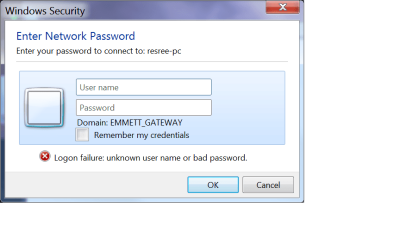
this what pops up again and again and again...
 

My Computer My Computer

Computer Manufacturer/Model Number
gateway
OS
windows 7 home premium 64bit
CPU
AMD athy2 X 4
Memory
4
my screen shots are not appearing..

right now both have windows firewall...

the printer is on the vista, i cant get the box w/7 to access the vista to add the printer because it keeps asking for a network password
 
Last edited:

My Computer My Computer

Computer Manufacturer/Model Number
gateway
OS
windows 7 home premium 64bit
CPU
AMD athy2 X 4
Memory
4
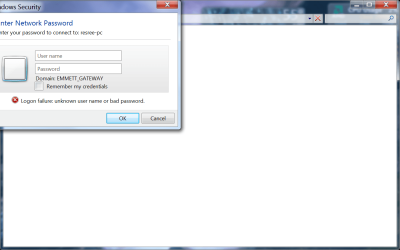
screen shots

hope this worked
 

Attachments

  • screenshot 1.png
    screenshot 1.png
    21.6 KB · Views: 4
  • screenshot 2.png
    screenshot 2.png
    51 KB · Views: 4

My Computer My Computer

Computer Manufacturer/Model Number
gateway
OS
windows 7 home premium 64bit
CPU
AMD athy2 X 4
Memory
4
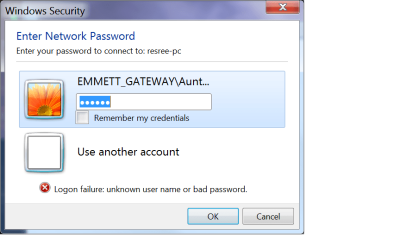
this is the second prompt to appear over and over
 

Attachments

  • screenshot3.png
    screenshot3.png
    27.1 KB · Views: 2

My Computer My Computer

Computer Manufacturer/Model Number
gateway
OS
windows 7 home premium 64bit
CPU
AMD athy2 X 4
Memory
4
A simple "Home Network" for sharing files and printers does not need a "Domain". All that is needed is the "Workgroup". I would suggest removing all references to any Domain that you have created and see if you can connect via your "Workgroup" with the username and password?

Cheers!
Robert
 

My Computer My Computer

OS
...
You are trying to connect to resree-pc using local account, but it is asking for a domain account (emmett_gateware). This won't work unless you setup both pcs to have domain accounts access.

Why not workgroup both machines?

Test access a share folder and see how you go, if you are able to access a folder from one machine on another, sharing a printer is pretty much the same in that you access a share printer as appose to a share folder. \\computername\shareprintername will work.

See if this helps.

http://www.sevenforums.com/tutorials/53830-file-sharing-between-xp-w7-vice-versa.html
 

My Computer My Computer

Computer Manufacturer/Model Number
Lenovo ThinkPad T60
OS
Windows 7 Ultimate 64Bit
CPU
GenuineIntel Intel(R) Core(TM) DuoCore T2400 @ 1.83GHz
Motherboard
Intel(R) 82801G (ICH7 Family)
Memory
2.00 GB
Graphics Card(s)
Mobile Intel(R) 945 Express Chipset
Sound Card
SoundMAX Integrated Digital HD Audio
Monitor(s) Displays
ThinkPad Display
Screen Resolution
1400x1050
Hard Drives
100Gb SATA
Keyboard
Standard Keyboard
Mouse
HID-compliant Mouse
Internet Speed
Cable Broadband - 54Mbps
Other Info
Intel(R) PRO/1000 PL Network Connection
11a/b/g Wireless LAN Mini PCI Express Adapter
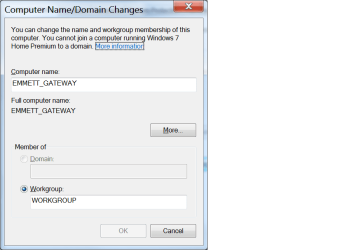
its never been in a domain only in workgroup, and not home group either.
from what i can tell win 7 home premium can't join a "domain" witch makes the other password prompts even more confusing
 

Attachments

  • sc4.png
    sc4.png
    18.4 KB · Views: 3

My Computer My Computer

Computer Manufacturer/Model Number
gateway
OS
windows 7 home premium 64bit
CPU
AMD athy2 X 4
Memory
4
What happens when you put in "resree-pc\username"?
 

My Computer My Computer

Computer Manufacturer/Model Number
Lenovo ThinkPad T60
OS
Windows 7 Ultimate 64Bit
CPU
GenuineIntel Intel(R) Core(TM) DuoCore T2400 @ 1.83GHz
Motherboard
Intel(R) 82801G (ICH7 Family)
Memory
2.00 GB
Graphics Card(s)
Mobile Intel(R) 945 Express Chipset
Sound Card
SoundMAX Integrated Digital HD Audio
Monitor(s) Displays
ThinkPad Display
Screen Resolution
1400x1050
Hard Drives
100Gb SATA
Keyboard
Standard Keyboard
Mouse
HID-compliant Mouse
Internet Speed
Cable Broadband - 54Mbps
Other Info
Intel(R) PRO/1000 PL Network Connection
11a/b/g Wireless LAN Mini PCI Express Adapter
i get these prompts seven different ways, any way i can think of to access a network device will bring up these prompts. if i enter the path manually its the same thing and same thing from the link you posted
 

My Computer My Computer

Computer Manufacturer/Model Number
gateway
OS
windows 7 home premium 64bit
CPU
AMD athy2 X 4
Memory
4
On vista you might need to add the W7 user account and vice versa.

Can you provide screenshots of the permission tab (of the share folder) and same for the security tab?
 

My Computer My Computer

Computer Manufacturer/Model Number
Lenovo ThinkPad T60
OS
Windows 7 Ultimate 64Bit
CPU
GenuineIntel Intel(R) Core(TM) DuoCore T2400 @ 1.83GHz
Motherboard
Intel(R) 82801G (ICH7 Family)
Memory
2.00 GB
Graphics Card(s)
Mobile Intel(R) 945 Express Chipset
Sound Card
SoundMAX Integrated Digital HD Audio
Monitor(s) Displays
ThinkPad Display
Screen Resolution
1400x1050
Hard Drives
100Gb SATA
Keyboard
Standard Keyboard
Mouse
HID-compliant Mouse
Internet Speed
Cable Broadband - 54Mbps
Other Info
Intel(R) PRO/1000 PL Network Connection
11a/b/g Wireless LAN Mini PCI Express Adapter
the main issue i am having is the password prompts. everything else is good on both boxes. if i can figure out what is causing that...got it. can't get some of my symantec options on my vista box to stay checked...just printed a successful test page by turning off symantec. thanks for the help
 

My Computer My Computer

Computer Manufacturer/Model Number
gateway
OS
windows 7 home premium 64bit
CPU
AMD athy2 X 4
Memory
4
Back
Top