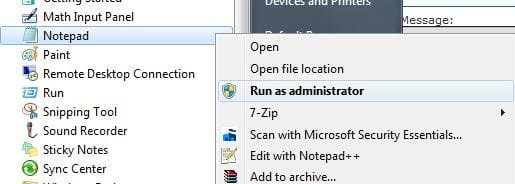
Force notepad to run as administrator

Black Antitoon

New member
Local time
9:32 PM
Messages
11
Hello. This is my first post here.

I'll be short: how do I set the notepad to run always as administrator? It is not possible through the file properties because it says that I cannot use compatibility settings because the program is a part of Windows. Of course I don't care, I just want to permanently set it to run as admin, but it won't let me do so.

I have already tried to use those settings on a link to the notepad, same effect.

Someone will ask me for sure why I need it. I am used to created some temp or test files on the root of C, where only admins can write. This time for example I wanted to try out symbolic links, and I don't want to use a long path for files. Other times I just want to edit a system file. Since the notepad shouldn't be really vulnerable to attacks, I don't see any major risks in doing so.

Can you help me?
Thanks!
 

My Computer My Computer

At a glance

Windows 7 RC1 (build 7100)Pentium 4 660 (3.6 GHz, single core)3 GBNvidia dontremember plus
OS
Windows 7 RC1 (build 7100)
CPU
Pentium 4 660 (3.6 GHz, single core)
Motherboard
Asus P5AD2 deluxe
Memory
3 GB
Graphics Card(s)
Nvidia dontremember plus
Sound Card
Integrated MoBo chip
Monitor(s) Displays
1, 1024x768
Hard Drives
Ok, that's enough
PSU
What?
Case
Enermax something plusplus
Cooling
Air
Good tutorial ----> Here
:thumbsup:
 

My Computer My Computer

At a glance

64-bit Windows 8.1 ProCore(TM) i5 CPU 4330 Haswell @ 3.20GHz12.00 GBIntel(R) HD Graphics
Computer type
PC/Desktop
Computer Manufacturer/Model Number
LENOVO K450 @3.0GHZ
OS
64-bit Windows 8.1 Pro
CPU
Core(TM) i5 CPU 4330 Haswell @ 3.20GHz
Motherboard
LENOVO
Memory
12.00 GB
Graphics Card(s)
Intel(R) HD Graphics
Sound Card
Intel HD integtrated
Monitor(s) Displays
HP 25' ISP Monitor
Screen Resolution
1900/1020
Hard Drives
(1) ST1000DM003-1CH162 (2) Generic STORAGE DEVICE USB Device (3) Generic STORAGE DEVICE USB Device
Internet Speed
100mb down/10mb up
Thank you, this is good, but not exactly what I need. If I start the notepad from the start menu, I still will get errors. Same if I want to edit, for example, the win.ini files, which is not a txt. Of course a partial solution is still better than no solution at all, I will use this if nobody comes up with something better. Thanks. ;)
 

My Computer My Computer

At a glance

Windows 7 RC1 (build 7100)Pentium 4 660 (3.6 GHz, single core)3 GBNvidia dontremember plus
OS
Windows 7 RC1 (build 7100)
CPU
Pentium 4 660 (3.6 GHz, single core)
Motherboard
Asus P5AD2 deluxe
Memory
3 GB
Graphics Card(s)
Nvidia dontremember plus
Sound Card
Integrated MoBo chip
Monitor(s) Displays
1, 1024x768
Hard Drives
Ok, that's enough
PSU
What?
Case
Enermax something plusplus
Cooling
Air
notepad as admin

Hello. This is my first post here.

I'll be short: how do I set the notepad to run always as administrator? It is not possible through the file properties because it says that I cannot use compatibility settings because the program is a part of Windows. Of course I don't care, I just want to permanently set it to run as admin, but it won't let me do so.

I have already tried to use those settings on a link to the notepad, same effect.

Someone will ask me for sure why I need it. I am used to created some temp or test files on the root of C, where only admins can write. This time for example I wanted to try out symbolic links, and I don't want to use a long path for files. Other times I just want to edit a system file. Since the notepad shouldn't be really vulnerable to attacks, I don't see any major risks in doing so.

Can you help me?
Thanks!


Hey

First you dont need to run as admin to write a file to root. Second notepad run as admin is dangerous. anyone can add a virus to a notepad file and have admin rights.

Thirdand I dont suggest it if you want to change notepad go to start access notepad right click and click advanced. On advanced click run as admin done

Ken

edit: Aaron speed edge goes to sf gadget
 
Last edited:

My Computer My Computer

At a glance

Win 8 Release candidate 8400[email protected]4 gigsNvidia 9600M
Computer Manufacturer/Model Number
HP Pavillion dv-7 1005 Tx
OS
Win 8 Release candidate 8400
CPU
[email protected]
Memory
4 gigs
Graphics Card(s)
Nvidia 9600M
Sound Card
HD built-in
Monitor(s) Displays
17" Wxga
Screen Resolution
1440x900
Cooling
none
Internet Speed
45Mb down 5Mb up
You can right click on the notepad and choose run as administrator every time you want to run it as such.

notepad1.JPG


You could also make a shortcut of it on your desktop, right click - properties - Shortcut - Advanced - check Run as admin.


Zigzag beat me to it by a second. :p
 

My Computer My Computer

At a glance

Windows 7 Ultimate x64 SP1Core i7 920 (D0) @ 4Ghz, *26c idle *65c full ...12GB DDR3 Corsair Dominator -CMD12GX3M6A1600C...Zotac Geforce GTX 770
Computer type
PC/Desktop
Computer Manufacturer/Model Number
Airbot 2.0
OS
Windows 7 Ultimate x64 SP1
CPU
Core i7 920 (D0) @ 4Ghz, *26c idle *65c full load on air
Motherboard
Asus P6X58D Premium - Sata 6Gb/s - USB 3.0
Memory
12GB DDR3 Corsair Dominator -CMD12GX3M6A1600C8 at 1600MHz
Graphics Card(s)
Zotac Geforce GTX 770
Sound Card
ASUS Xonar D2X
Monitor(s) Displays
1 LG 24" Flatron W2453V-PF 1 Samsung 24" P2450H both 2ms RT
Screen Resolution
1920x1080@60hz
Hard Drives
1 Samsung 250GB 840 Evo SSD
1 OCZ Vertex2 180GB SSD
1 TB Samsung Spinpoint F1 7200RPM 32MB cache
2 500GB WD Caviar Blacks 7200RPM 32MB cache (WD5001AALS)

Pioneer DVD Burner DVR-S18M
PSU
Corsair HX1000W
Case
Cooler Master HAF 932
Cooling
Case Fans *3 230mm, *1 140mm/CPU - *Tuniq Tower 120 Extreme
Keyboard
Logitech Wireless MK700
Mouse
Logitech Wireless MK700
Internet Speed
DL 15 Mbps UL 0.98 Mbps
Antivirus
None
Browser
Firefox Nightly
Other Info
Processor-7.7 *RAM- 7.9 *Graphics-7.9 *Gaming Graphics- 7.9 *SSD- 7.8 W.E.I final score= 7.7
*Phone- LG Nexus 5
You can right click on the notepad and choose run as administrator every time you want to run it as such.

View attachment 19089


You could also make a shortcut of it on your desktop, right click - properties - Shortcut - Advanced - check Run as admin.


We shouldda thunk of that!! Thanks Airbot!
 

My Computer My Computer

At a glance

64-bit Windows 8.1 ProCore(TM) i5 CPU 4330 Haswell @ 3.20GHz12.00 GBIntel(R) HD Graphics
Computer type
PC/Desktop
Computer Manufacturer/Model Number
LENOVO K450 @3.0GHZ
OS
64-bit Windows 8.1 Pro
CPU
Core(TM) i5 CPU 4330 Haswell @ 3.20GHz
Motherboard
LENOVO
Memory
12.00 GB
Graphics Card(s)
Intel(R) HD Graphics
Sound Card
Intel HD integtrated
Monitor(s) Displays
HP 25' ISP Monitor
Screen Resolution
1900/1020
Hard Drives
(1) ST1000DM003-1CH162 (2) Generic STORAGE DEVICE USB Device (3) Generic STORAGE DEVICE USB Device
Internet Speed
100mb down/10mb up
Hey

First you dont need to run as admin to write a file to root. Second notpad run as admin is dangerous. anyone can add a virus to a notepad file and have admin rights.
First, yes, I do need. Such are the default permissions. I think that altering security permissions in the root of C is more dangerous than running the notepad as admin. Second, txt files do not contain executable code or scripts, and I hope that such a simple program (notepad) is not vulnerable to buffer overflows or similar stuff. We are talking of the notepad, not Internet Explorer. In any case, I have been using XP as administrator for ages without suffering damage from viruses (and meeting very few). Being careful is more important than having UAC turned on for security.

Thrid and I dont suggest it if you want to change notepad go to start accesss notepad right click and click advanced. On advanced click run as admin done
This is half of the solution (only works when I start it manually), but combined which the other half (which only works when I double click on txt files) it will be perfect. Thanks! My problem was that the only way to set to run a program as admin I was aware of was setting it in the compatibility tab, which is disabled for the notepad. I hadn't looked carefully enough to the link properties. Many thanks! :)

You could also make a shortcut of it on your desktop, right click - properties - Shortcut - Advanced - check Run as admin.


Zigzag beat me to it by a second. :p
I'll put such a shortcut in the start menu, thanks! :)
 

My Computer My Computer

At a glance

Windows 7 RC1 (build 7100)Pentium 4 660 (3.6 GHz, single core)3 GBNvidia dontremember plus
OS
Windows 7 RC1 (build 7100)
CPU
Pentium 4 660 (3.6 GHz, single core)
Motherboard
Asus P5AD2 deluxe
Memory
3 GB
Graphics Card(s)
Nvidia dontremember plus
Sound Card
Integrated MoBo chip
Monitor(s) Displays
1, 1024x768
Hard Drives
Ok, that's enough
PSU
What?
Case
Enermax something plusplus
Cooling
Air
Everytime I use notepad I need the administrator token. I am always editing .ini files in a program files directory. So I have to right click then click "run as administrator" every time and then do a file open and navigate to the directory every time.:rolleyes: This is not proper programming technique. I am an administrator on this machine and so therefore I should be able to change anything on it. I OWN the machine. It's mine to do with as I please. I do not want to jump through hoops to do what I need to do. I could even see if notepad were to bring up a UAC confirmation. But just 'Access denied'? I need notepad to automatically run as an administrator but that can't be done. Guess I'll have to find a notepad replacement. Thanks Microshaft. They did it to me again. They gave me the shaft.
 

My Computer My Computer

At a glance

Windows 7 Home Premium 64bit
OS
Windows 7 Home Premium 64bit

My Computer My Computer

At a glance

Windows 7 Ultimate x64 SP1Core i7 920 (D0) @ 4Ghz, *26c idle *65c full ...12GB DDR3 Corsair Dominator -CMD12GX3M6A1600C...Zotac Geforce GTX 770
Computer type
PC/Desktop
Computer Manufacturer/Model Number
Airbot 2.0
OS
Windows 7 Ultimate x64 SP1
CPU
Core i7 920 (D0) @ 4Ghz, *26c idle *65c full load on air
Motherboard
Asus P6X58D Premium - Sata 6Gb/s - USB 3.0
Memory
12GB DDR3 Corsair Dominator -CMD12GX3M6A1600C8 at 1600MHz
Graphics Card(s)
Zotac Geforce GTX 770
Sound Card
ASUS Xonar D2X
Monitor(s) Displays
1 LG 24" Flatron W2453V-PF 1 Samsung 24" P2450H both 2ms RT
Screen Resolution
1920x1080@60hz
Hard Drives
1 Samsung 250GB 840 Evo SSD
1 OCZ Vertex2 180GB SSD
1 TB Samsung Spinpoint F1 7200RPM 32MB cache
2 500GB WD Caviar Blacks 7200RPM 32MB cache (WD5001AALS)

Pioneer DVD Burner DVR-S18M
PSU
Corsair HX1000W
Case
Cooler Master HAF 932
Cooling
Case Fans *3 230mm, *1 140mm/CPU - *Tuniq Tower 120 Extreme
Keyboard
Logitech Wireless MK700
Mouse
Logitech Wireless MK700
Internet Speed
DL 15 Mbps UL 0.98 Mbps
Antivirus
None
Browser
Firefox Nightly
Other Info
Processor-7.7 *RAM- 7.9 *Graphics-7.9 *Gaming Graphics- 7.9 *SSD- 7.8 W.E.I final score= 7.7
*Phone- LG Nexus 5
Everytime I use notepad I need the administrator token. I am always editing .ini files in a program files directory. So I have to right click then click "run as administrator" every time and then do a file open and navigate to the directory every time.:rolleyes: This is not proper programming technique. I am an administrator on this machine and so therefore I should be able to change anything on it. I OWN the machine. It's mine to do with as I please. I do not want to jump through hoops to do what I need to do. I could even see if notepad were to bring up a UAC confirmation. But just 'Access denied'? I need notepad to automatically run as an administrator but that can't be done. Guess I'll have to find a notepad replacement. Thanks Microshaft. They did it to me again. They gave me the shaft.

This is not proper administrator thinking :( If you were thinking as an admin you would realize that Microsoft has done you a favor here.

The problem is if you open up these types of constant-on admin holes in your system then ANY OTHER PROGRAM that is run under your user account also then has potential free admin access to your system through those same programs.

This is VERY insecure.

The reason notepad is locked down is because it is a built in program on every version of windows and extremely well known. It would be one of the very FIRST things a virus (which would be running under your user account) would look to as a vehicle for privilege escalation which you are handing to it on a silver platter.

A true admin realises that when he needs to make admin changes to his system (Even if there are dozens a day) then he purposely raises his privilege to admin level as a conscious action for a limited time for that one purpose.

Yes you ARE the admin of your machine, but don't just hand over that privilege to every single program that runs under your user account, because that privilege should not be /theirs/.
 

My Computer My Computer

At a glance

Windows 7 x64 Ultimatei7 96012 Gig Corsair DominatorNvidia 480
Computer Manufacturer/Model Number
Scratch built
OS
Windows 7 x64 Ultimate
CPU
i7 960
Motherboard
Asus P6X58D
Memory
12 Gig Corsair Dominator
Graphics Card(s)
Nvidia 480
Sound Card
Maudio Delta 44 + breakout box
Monitor(s) Displays
Dell UltraSharp U2410 24in and Samsung 21 dual monitors
Screen Resolution
1920x1200 and 1280x1024
Hard Drives
Primary: Intel X-25M G2 160G SSD
Secondary: Segate baracuda 1.0 TB
HDs in AHCI mode.
PSU
Corasair TX850
Case
Cooler Master HAF
Cooling
Corsair H50
Keyboard
Logitech G15 + N52 game pad
Mouse
Logitech MX518
Internet Speed
15kbs down 4.5kbps up
Other Info
WEI 7.6
CPU & RAM 7.6
Graphics 7.9
Hard disk 7.7
I could understand if it would pop up a UAC box saying "You will need to be an administrator to complete this action". And as for clicking 'Advanced' in the properties and then 'run as administrator', that works for shortcuts, but not the actual application. I would like to be able to double click on a file and have it come up with the UAC box asking me if I want to continue. I am just about ready to turn off UAC. This is EXTREMELY annoying and time wasting. I should be able to click on the .ini file and have it ask me if I want to run this program. But no. I'm already busy enough, but I have to take extra time to call up Notepad as an administrator with no file loaded, File -> Open Navigate to the file and then open it. If it were just one or two files a day, it would be fine. But I do it 30 or 40 times a day. That tends to add up. Guess I'll just have to turn off UAC. Dang it!!!!
 

My Computer My Computer

At a glance

Windows 7 Home Premium 64bit
OS
Windows 7 Home Premium 64bit
Did you even read my whole post?
 

My Computer My Computer

At a glance

Windows 7 Ultimate x64 SP1Core i7 920 (D0) @ 4Ghz, *26c idle *65c full ...12GB DDR3 Corsair Dominator -CMD12GX3M6A1600C...Zotac Geforce GTX 770
Computer type
PC/Desktop
Computer Manufacturer/Model Number
Airbot 2.0
OS
Windows 7 Ultimate x64 SP1
CPU
Core i7 920 (D0) @ 4Ghz, *26c idle *65c full load on air
Motherboard
Asus P6X58D Premium - Sata 6Gb/s - USB 3.0
Memory
12GB DDR3 Corsair Dominator -CMD12GX3M6A1600C8 at 1600MHz
Graphics Card(s)
Zotac Geforce GTX 770
Sound Card
ASUS Xonar D2X
Monitor(s) Displays
1 LG 24" Flatron W2453V-PF 1 Samsung 24" P2450H both 2ms RT
Screen Resolution
1920x1080@60hz
Hard Drives
1 Samsung 250GB 840 Evo SSD
1 OCZ Vertex2 180GB SSD
1 TB Samsung Spinpoint F1 7200RPM 32MB cache
2 500GB WD Caviar Blacks 7200RPM 32MB cache (WD5001AALS)

Pioneer DVD Burner DVR-S18M
PSU
Corsair HX1000W
Case
Cooler Master HAF 932
Cooling
Case Fans *3 230mm, *1 140mm/CPU - *Tuniq Tower 120 Extreme
Keyboard
Logitech Wireless MK700
Mouse
Logitech Wireless MK700
Internet Speed
DL 15 Mbps UL 0.98 Mbps
Antivirus
None
Browser
Firefox Nightly
Other Info
Processor-7.7 *RAM- 7.9 *Graphics-7.9 *Gaming Graphics- 7.9 *SSD- 7.8 W.E.I final score= 7.7
*Phone- LG Nexus 5
Yes, I did. That's why I said it should present the UAC query box. I'm not asking for it to run as an administrator without asking permission. That would be rather insane. I. JUST. DON'T. HAVE. THE. TIME. TO. GO. THROUGH. A. RIGAMAROLE. 30. TIMES. A. DAY. Proper administrator thinking should be, nothing should be able to change possible system files without asking permission from the administrator. That's what I'm asking. For it to pop up the UAC query when I click on one of those files that will be open with Notepad. And then open Notepad as administrator when I click Yes.
 

My Computer My Computer

At a glance

Windows 7 Home Premium 64bit
OS
Windows 7 Home Premium 64bit
No response, eh? Well, took me a day or so of my free time, but rather than turn off UAC, I decided I'd write a little notepad replacement that would require an administrator to run. Took me a day and a half to write it and get the bugs out, but at least now I can double click on an ini file and have it pop the UAC box. When I click yes it opens the file in the app I wrote. Even tells you if the file is read-only.

Pretty sad when users have to write the code that Microsoft should have written in the first place. But I guess they have better things to do. Like writing software that needs to be updated every few days.
 

My Computer My Computer

At a glance

Windows 7 Home Premium 64bit
OS
Windows 7 Home Premium 64bit
select notepad shortcut, rightclick on it and you should see "run as adminstrator" BUT before tempting to click it hold the "shift" button then click on "run as adminstrator" now you can able to run notepad as admin

Bala
 

My Computer My Computer

At a glance

windows 7 x64-bitintel core i5ati radeon premium graphics
Computer Manufacturer/Model Number
hp probook 4520s
OS
windows 7 x64-bit
CPU
intel core i5
Graphics Card(s)
ati radeon premium graphics
This still doesn't solve the problem. I don't need the shortcut. I need inotepad to open as an administrator, after popping the UAC prompt, when I double click on an .ini file in my Program Files folder with the file I double clicked on loaded so I can alter it and then save it there.

I did what you said and then I went to my program files folder and reset the default file to open .ini files to notepad. Then while pressing shift, double clicked on an .ini file. It opened the file in notepad without any administrator prompt and wouldn't let me save there. Access Denied. Which is good since no UAC prompt came up. Even tried it without pressing shift; same result.

But no matter, I'm still able to do what I need to do with the program I wrote. Just seems a shame that customers have to write code that Microshaft should have written in the first place.
 

My Computer My Computer

At a glance

Windows 7 Home Premium 64bit
OS
Windows 7 Home Premium 64bit
This still doesn't solve the problem. I don't need the shortcut. I need inotepad to open as an administrator, after popping the UAC prompt, when I double click on an .ini file in my Program Files folder with the file I double clicked on loaded so I can alter it and then save it there.

I did what you said and then I went to my program files folder and reset the default file to open .ini files to notepad. Then while pressing shift, double clicked on an .ini file. It opened the file in notepad without any administrator prompt and wouldn't let me save there. Access Denied. Which is good since no UAC prompt came up. Even tried it without pressing shift; same result.

But no matter, I'm still able to do what I need to do with the program I wrote. Just seems a shame that customers have to write code that Microshaft should have written in the first place.

I think you need to go cool off. Microsoft has done people many favors because 90% of people that use PC's ARE not experienced with Local drives and other important files that should not be toyed with. THAT is why all this code that prevents access to certain files is in place. If you edit and/or delete a windows file by accident BYE BYE OS. If you are so worried about this go ahead and make your own OS.
 

My Computer My Computer

At a glance

Windows 7 Home Premium 64 bit at home and Win...4gig2: 2gig each
Computer Manufacturer/Model Number
HP
OS
Windows 7 Home Premium 64 bit at home and Windows 7 professional at school.
Memory
4gig
Graphics Card(s)
2: 2gig each
Monitor(s) Displays
1
Screen Resolution
1366/768
Internet Speed
40.6 Mps
And that is why it should pop the UAC. Not only for the user's protection, but for Microsofts as well. If you have seen that UAC box with the warning and still choose to go ahead, well, you were warned. As for making my own OS, why should I do that when I've already paid Microsoft for one that is supposed to be licensed to me and give me, the owner, access to the places I need?

And I'm not wanting to alter files in the Windows directory. Just the Program Files Directory. That may make a program not work right, but it won't affect the OS.
 

My Computer My Computer

At a glance

Windows 7 Home Premium 64bit
OS
Windows 7 Home Premium 64bit
True but playing around in the program files directory can also cause program corruption and ULTIMATELY MAY make a virus I don't know but it's possible. I have seen it happen before. But if you don't want a program just uninstall it simple. Why are you playing around in there anyway is another good question.

As for the access denied you need to change the ownership of the item to you by right clicking: Properties-Security-Edit (OR Advanced if you want to change other settings while your here) add your user name by pressing add and then apply and close the window. Change your user settings to full control and you will not have Access Denied no more :)
 

My Computer My Computer

At a glance

Windows 7 Home Premium 64 bit at home and Win...4gig2: 2gig each
Computer Manufacturer/Model Number
HP
OS
Windows 7 Home Premium 64 bit at home and Windows 7 professional at school.
Memory
4gig
Graphics Card(s)
2: 2gig each
Monitor(s) Displays
1
Screen Resolution
1366/768
Internet Speed
40.6 Mps
Thank you. Now that was helpful. Didn't even think of changing the security settings. Still need to change the settings on about 30 files, but that's a very small price to pay in this instance.

As to why we need to edit these area, that is proprietary information concerning software that was written in-house.

Anyway, thanks again. Problem solved.
 

My Computer My Computer

At a glance

Windows 7 Home Premium 64bit
OS
Windows 7 Home Premium 64bit
Back
Top