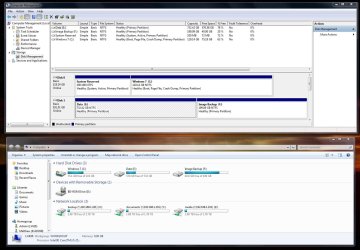
I am about to install another 1Tb HDD into my new build. Currently my system is set up as below (its a W7 64 bit HP setup)
My current 1 Tb drive is split into 2 partitions, E:/ for Data and F:/ for Image backups. When I add in the new 1Tb drive I intend to give half the space to Image backup as I will be imaging other bits and bobs too.
This means that the images on my current F:/ partition will be copied over onto a new 0.5 Tb partition on my new drive. I will then want to expand the current E:/ partition to fill the disk. If that makes sense?
Do you recommend i do this in windows disk manager (if it can even be done in windows disk manager) or should i be using some other recommended tool.
Thanks guys
My Computer
At a glance
W7 Home Prem, Vista home PremIntel E8600 3.3GHz dual core4 GbNvidia - GForce GTX 280 - 1Gb
Computer Manufacturer/Model Number
Manufacturer: Me
OS
W7 Home Prem, Vista home Prem
CPU
Intel E8600 3.3GHz dual core
Motherboard
Asus (need to find model)
Memory
4 Gb
Graphics Card(s)
Nvidia - GForce GTX 280 - 1Gb
Sound Card
Xonar Dx 5.1
Monitor(s) Displays
Hazro flatscreen
Screen Resolution
1920 x 1200
Hard Drives
1 x Samsung Spinpoint F1 300 gb
1 x Samsung Spinpoint F1 1 Tb
1 x Samsung Spinpoint F3 1 Tb
PSU
Later
Case
Infiniti Midi tower
Cooling
later
Keyboard
Logitech G11
Mouse
Logitech G9 Laser
Internet Speed
3mb/s - awful
Other Info
I built this three years ago. It was very fast at the time. Now it's about average but still runs any game I throw at it at max detail.
I would not move WIndowsImageBackup files as it can corrupt them. They must at least be run from their original drive-root location. This is another reason many here choose a more flexible imaging app.
I don't see why Disk Management cannot initialize and partition your new HD.
This means that the images on my current F:/ partition will be copied over onto a new 0.5 Tb partition on my new drive. I will then want to expand the current E:/ partition to fill the disk. If that makes sense?
Hi Matt. Greg asked me to have a look at your situation. Regarding your above question:
1. There is no problem copying the existing Macrium images from one partition/disk to another. During the recovery you just have to point to the new location. For future images you have to define a new definition though (xml file) with the new partition as target because the old location is no more valid.
2. And then you can delete your current F: partition to get the unallocated space and expand E:. Best is to do that with Disk Management.
Last edited:
My Computer
At a glance
Vista, Windows7, Mint Mate, Zorin, Windows 8from 1.6GHz Duo to i7
Computer Manufacturer/Model Number
HP, Dell, Gateway, Toshiba - 4 laptops and 2 desktops
I can confirm what WHS said. I went through a similar exercise last year with no problems. The Macrium images can be anywhere. You can even save yourself the effort of changing any backup definitions if you keep the same folder structure and drive letter.
My Computer
At a glance
Microsoft Windows 7 Home Premium 64-bit Servi...Intel(R) Core(TM) i3 CPU M 330 @ 2.13GHz8 GB DDR3Intel(R) HD Graphics
Computer type
Laptop
Computer Manufacturer/Model Number
Hewlett-Packard/G62-107SA Notebook
OS
Microsoft Windows 7 Home Premium 64-bit Service Pack 1
CPU
Intel(R) Core(TM) i3 CPU M 330 @ 2.13GHz
Motherboard
Hewlett-Packard 1425
Memory
8 GB DDR3
Graphics Card(s)
Intel(R) HD Graphics
Sound Card
Realtek High Definition Audio
Monitor(s) Displays
Builtin
Screen Resolution
1366 x 768 x 32 bits (4294967296 colors) @ 60 Hz
Hard Drives
250 GB SATA Hard Disk Drive 7200 rpm
2TB Seagate GoFlex USB 2 Drive
1TB Iomega Prestige USB 2 Drive
1.5TB Iomega Prestige USB 2 Drive (Samsung)
2TB WD MyBook Live NAS.
1*Samsung 840 EVO 120GB SSD;
1*OCZ Vertex 2 60GB SSD;
2*Samsung F3 SpinPoint 1TB in RAID0;
1*Samsung F1 SpinPoint 1TB;
2*Western Digital 1TB External USB 3.0
1*Western Digital 500GB External USB 3.0
1*Seagate 500GB External USB 2.0
PSU
Thermaltake ToughPower QFan 750W
Case
Thermaltake Element S VK60001W2Z
Cooling
Corsair H60 Water Cooling, 2*230mm and 2*80mm case fans
We have 2 laptops that the wife takes places. On those I always make a couple of images on a different partition of the same SSD. Now if the SSD goes, that's bad luck. That she could not fix on the road anyhow. But if the system goes on the blink it is easy to restore the system in no time. And taking the recovery CD on the road is no big deal. Taking an external disk is another story.
I have now bought a 32GB USB stick. In the future I will use that. I may even put the Macrium recovery program on the same stick.
My Computer
At a glance
Vista, Windows7, Mint Mate, Zorin, Windows 8from 1.6GHz Duo to i7
Computer Manufacturer/Model Number
HP, Dell, Gateway, Toshiba - 4 laptops and 2 desktops
My current 1 Tb drive is split into 2 partitions, E:/ for Data and F:/ for Image backups. When I add in the new 1Tb drive I intend to give half the space to Image backup as I will be imaging other bits and bobs too.
Microsoft Security Essentials and Malwarebytes Premium
Browser
Pale Moon
Other Info
All fans PWM; speeds at idle: CPU circa 500 rpm; intake circa 600 rpm; exhaust circa 600 rpm; CPU temps 27 idle and 47 C load in a warm room (27 C/81 F) when running Intel Extreme Tuning Utility stress test.
Guys - thank you very much for all the really helpfull comments and reassurances. Thanks Greg for asking for WHS's advice on Macrium - appreciate it.
WHS - thanks for the guest appearance and advice - ive watched all your macrium tutorials so you are a bit 'famous' to me as you have videos on the net! hehe
Ignatz: um - no particular reason really. I guess im just anal and like to have a seperate partition so I could....um....i dont know....you caught me.
Is there any point or reason to me having this partition anyone? Or should i just collapse it into my data partition and use a folder as suggested?
Thanks
Matt
My Computer
At a glance
W7 Home Prem, Vista home PremIntel E8600 3.3GHz dual core4 GbNvidia - GForce GTX 280 - 1Gb
Computer Manufacturer/Model Number
Manufacturer: Me
OS
W7 Home Prem, Vista home Prem
CPU
Intel E8600 3.3GHz dual core
Motherboard
Asus (need to find model)
Memory
4 Gb
Graphics Card(s)
Nvidia - GForce GTX 280 - 1Gb
Sound Card
Xonar Dx 5.1
Monitor(s) Displays
Hazro flatscreen
Screen Resolution
1920 x 1200
Hard Drives
1 x Samsung Spinpoint F1 300 gb
1 x Samsung Spinpoint F1 1 Tb
1 x Samsung Spinpoint F3 1 Tb
PSU
Later
Case
Infiniti Midi tower
Cooling
later
Keyboard
Logitech G11
Mouse
Logitech G9 Laser
Internet Speed
3mb/s - awful
Other Info
I built this three years ago. It was very fast at the time. Now it's about average but still runs any game I throw at it at max detail.
I used to do it your way myself, but don't any longer.
It appealed to my over-developed sense of organization.
But---you can appeal to that with a folder structure just as easily.
More than one partition can lead to running out of space due to guessing wrong about what size they should be, but I'll certainly grant you that is much less of an issue in this time of huge drives.
Really, it's mostly personal preference and habit, like a lot of things with PCs.
In my case, my desire for simplicity and most efficient use of space overrode any other reasons.
If you have only one data partition, you only have to back up one data partition. I backup my images just like they were jpgs, videos, or anything else.
My Computer
At a glance
Windows 7 Home Premium SP1, 64-bitIntel Skylake i5-6600K, not overclocked8 GB HyperX DDR4-2666 (2 x 4 GB)none; graphics are integrated on CPU
Computer type
PC/Desktop
Computer Manufacturer/Model Number
Ignatz Special; 4 speed manual gearbox; factory air conditioning; one of one
OS
Windows 7 Home Premium SP1, 64-bit
CPU
Intel Skylake i5-6600K, not overclocked
Motherboard
AsRock Z170M Extreme 4, micro ATX
Memory
8 GB HyperX DDR4-2666 (2 x 4 GB)
Graphics Card(s)
none; graphics are integrated on CPU
Sound Card
onboard: Realtek ALC1150; external: USB Behringer UF0-202
Monitor(s) Displays
Dell S2340M 23 inch IPS
Screen Resolution
1600 x 900
Hard Drives
System: Crucial MX100 series SSD, 128 GB;
Data: Samsung Spinpoint 103SJ, 1 TB;
Backup: WD Caviar Green WD30EZRX-00D8PB0, 3 TB
Microsoft Security Essentials and Malwarebytes Premium
Browser
Pale Moon
Other Info
All fans PWM; speeds at idle: CPU circa 500 rpm; intake circa 600 rpm; exhaust circa 600 rpm; CPU temps 27 idle and 47 C load in a warm room (27 C/81 F) when running Intel Extreme Tuning Utility stress test.