Solved Tray Icon for Network always showing a red X?

pltnfish

New member
Local time
7:27 AM
Messages
13
Location
Calgary
Hello, I am new to SevenForums

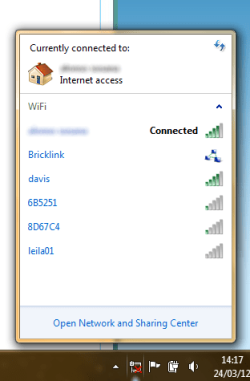
Anyway so up until the beginning of the month my networking tray icon was working fine, showing the bars that show for WiFi and stuff... but now it just shows the LAN connection icon with a red "X" on top of it...

:info: System Specs

Windows 7 Home Premium x64 SP1
6GB of RAM
AMD E-350 Processor 1.60 GHz
 

Attachments
  • Capture.PNG
    Capture.PNG
    12.2 KB · Views: 55

My Computer My Computer

At a glance

Windows 7 Home Premium x646GB
OS
Windows 7 Home Premium x64
Memory
6GB
Screen Resolution
1366x768
Keyboard
CMS
Mouse
Synaptics Pointing Device, HP Wireless Mouse (Sometimes)
Lets try flushing DNS cache and renewing your IP.

Flush the DNS cache and restore MS's Hosts file ...
Copy and paste these lines in Note pad.

@Echo on
pushd\windows\system32\drivers\etc
attrib -h -s -r hosts
echo 127.0.0.1 localhost>HOSTS
attrib +r +h +s hosts
popd
ipconfig /release
ipconfig /renew
ipconfig /flushdns
netsh winsock reset all
netsh int ip reset all
shutdown -r -t 1
del %0

Save as flush.bat to your desktop. Right click on the flush.bat file to run it as Administrator.

Your computer will reboot itself.
 

My Computer My Computer

At a glance

Windows 7 Ult, Windows 8.1 Pro,Q9650-4.275GHz, E8600 4.5GHz, E6750-3.8GHzG.Skill PC2 9600 1200Mhz 5 5 5 15 2TGTX480
Computer type
PC/Desktop
Computer Manufacturer/Model Number
Home built
OS
Windows 7 Ult, Windows 8.1 Pro,
CPU
Q9650-4.275GHz, E8600 4.5GHz, E6750-3.8GHz
Motherboard
Evga 780i FTW
Memory
G.Skill PC2 9600 1200Mhz 5 5 5 15 2T
Graphics Card(s)
GTX480
Sound Card
Asus Xonar D2
Monitor(s) Displays
HannsG
Screen Resolution
1680X1050
Hard Drives
GSkill Phoenix Pro 120GB SSD
PSU
ThermalTake Toughpower 1000Watt modular
Case
ThermalTake XaserV
Cooling
Xigmatek S1283
Keyboard
Logitech G15
Mouse
Logitech G9
Internet Speed
T1
I tried this but it kind of didn't work...


When Windows starts connecting to the network the icon will show properly but as soon as it's done it will just go back to the "X" this does half fix the issue :huh:

here's the network connections control pannel thing screenie
 

Attachments

  • Capture1.PNG
    Capture1.PNG
    57.7 KB · Views: 97

My Computer My Computer

At a glance

Windows 7 Home Premium x646GB
OS
Windows 7 Home Premium x64
Memory
6GB
Screen Resolution
1366x768
Keyboard
CMS
Mouse
Synaptics Pointing Device, HP Wireless Mouse (Sometimes)
I tried this but it kind of didn't work...


When Windows starts connecting to the network the icon will show properly but as soon as it's done it will just go back to the "X" this does half fix the issue :huh:

here's the network connections control pannel thing screenie

You should right click on the LAN connection far left and disable it also. I believe the X is showing you that the LAN cable is disconnected.
 

My Computer My Computer

At a glance

Windows 7 Ult, Windows 8.1 Pro,Q9650-4.275GHz, E8600 4.5GHz, E6750-3.8GHzG.Skill PC2 9600 1200Mhz 5 5 5 15 2TGTX480
Computer type
PC/Desktop
Computer Manufacturer/Model Number
Home built
OS
Windows 7 Ult, Windows 8.1 Pro,
CPU
Q9650-4.275GHz, E8600 4.5GHz, E6750-3.8GHz
Motherboard
Evga 780i FTW
Memory
G.Skill PC2 9600 1200Mhz 5 5 5 15 2T
Graphics Card(s)
GTX480
Sound Card
Asus Xonar D2
Monitor(s) Displays
HannsG
Screen Resolution
1680X1050
Hard Drives
GSkill Phoenix Pro 120GB SSD
PSU
ThermalTake Toughpower 1000Watt modular
Case
ThermalTake XaserV
Cooling
Xigmatek S1283
Keyboard
Logitech G15
Mouse
Logitech G9
Internet Speed
T1

You should right click on the LAN connection far left and disable it also. I believe the X is showing you that the LAN cable is disconnected.


That didn't work... it did the same thing as before: when connecting it'll show the icon correctly, when it's done it'll go back to the LAN Disconnected icon :cry:
 

My Computer My Computer

At a glance

Windows 7 Home Premium x646GB
OS
Windows 7 Home Premium x64
Memory
6GB
Screen Resolution
1366x768
Keyboard
CMS
Mouse
Synaptics Pointing Device, HP Wireless Mouse (Sometimes)
Have you tried looking in your Device Manager to see if there are any yellow marks on any of your other network adaptors?
 

My Computer My Computer

At a glance

Windows 7 Ult, Windows 8.1 Pro,Q9650-4.275GHz, E8600 4.5GHz, E6750-3.8GHzG.Skill PC2 9600 1200Mhz 5 5 5 15 2TGTX480
Computer type
PC/Desktop
Computer Manufacturer/Model Number
Home built
OS
Windows 7 Ult, Windows 8.1 Pro,
CPU
Q9650-4.275GHz, E8600 4.5GHz, E6750-3.8GHz
Motherboard
Evga 780i FTW
Memory
G.Skill PC2 9600 1200Mhz 5 5 5 15 2T
Graphics Card(s)
GTX480
Sound Card
Asus Xonar D2
Monitor(s) Displays
HannsG
Screen Resolution
1680X1050
Hard Drives
GSkill Phoenix Pro 120GB SSD
PSU
ThermalTake Toughpower 1000Watt modular
Case
ThermalTake XaserV
Cooling
Xigmatek S1283
Keyboard
Logitech G15
Mouse
Logitech G9
Internet Speed
T1
Have you tried looking in your Device Manager to see if there are any yellow marks on any of your other network adaptors?

I just went in there, I found a couple of VMWARE drivers
 

My Computer My Computer

At a glance

Windows 7 Home Premium x646GB
OS
Windows 7 Home Premium x64
Memory
6GB
Screen Resolution
1366x768
Keyboard
CMS
Mouse
Synaptics Pointing Device, HP Wireless Mouse (Sometimes)

My Computer My Computer

At a glance

Microsoft Windows 10 Pro Insider Preview 64-bitIntel(R) Core(TM) i3-4130 CPU @ 3.40GHzCorsair Vengence 4GB x2 (8.00GB Dual-Channel ...2047MB GeForce GTS 450 (ZOTAC International)
Computer type
PC/Desktop
Computer Manufacturer/Model Number
Self Assembled
OS
Microsoft Windows 10 Pro Insider Preview 64-bit
CPU
Intel(R) Core(TM) i3-4130 CPU @ 3.40GHz
Motherboard
Gigabyte Technology Co., Ltd. B85M-D3H
Memory
Corsair Vengence 4GB x2 (8.00GB Dual-Channel DDR3 @ 798MHz)
Graphics Card(s)
2047MB GeForce GTS 450 (ZOTAC International)
Sound Card
Onboard (Realtek High Definition Audio)
Monitor(s) Displays
LG Flatron E2040T
Screen Resolution
1600x900
Hard Drives
Western Digital 1 TB
Seagate 500 GB
PSU
Corsair VS550
Case
Cooler Master K380
Cooling
Cooler Master Seidon 120V Plus
Keyboard
Logitech MK260r
Mouse
Logitech MK260r
Internet Speed
PMPL Broadband
Antivirus
Windows Defender + MBAM
Browser
Firefox
Other Info
Dell Studio 15" Laptop
That didn't work :(
 

My Computer My Computer

At a glance

Windows 7 Home Premium x646GB
OS
Windows 7 Home Premium x64
Memory
6GB
Screen Resolution
1366x768
Keyboard
CMS
Mouse
Synaptics Pointing Device, HP Wireless Mouse (Sometimes)
Have you tried looking in your Device Manager to see if there are any yellow marks on any of your other network adaptors?

I just went in there, I found a couple of VMWARE drivers

Are you using virtual machine ware on this machine?

You should try removing the VM drivers with the yellow marks.
 

My Computer My Computer

At a glance

Windows 7 Ult, Windows 8.1 Pro,Q9650-4.275GHz, E8600 4.5GHz, E6750-3.8GHzG.Skill PC2 9600 1200Mhz 5 5 5 15 2TGTX480
Computer type
PC/Desktop
Computer Manufacturer/Model Number
Home built
OS
Windows 7 Ult, Windows 8.1 Pro,
CPU
Q9650-4.275GHz, E8600 4.5GHz, E6750-3.8GHz
Motherboard
Evga 780i FTW
Memory
G.Skill PC2 9600 1200Mhz 5 5 5 15 2T
Graphics Card(s)
GTX480
Sound Card
Asus Xonar D2
Monitor(s) Displays
HannsG
Screen Resolution
1680X1050
Hard Drives
GSkill Phoenix Pro 120GB SSD
PSU
ThermalTake Toughpower 1000Watt modular
Case
ThermalTake XaserV
Cooling
Xigmatek S1283
Keyboard
Logitech G15
Mouse
Logitech G9
Internet Speed
T1

My Computer My Computer

At a glance

Windows 7 Home Premium x646GB
OS
Windows 7 Home Premium x64
Memory
6GB
Screen Resolution
1366x768
Keyboard
CMS
Mouse
Synaptics Pointing Device, HP Wireless Mouse (Sometimes)
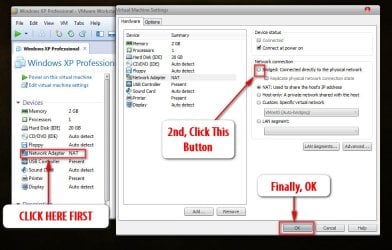
In that case, you mat try the bridged networks for VMs other than NAT , so that they will use the hosts settings.
 

My Computer My Computer

At a glance

Microsoft Windows 10 Pro Insider Preview 64-bitIntel(R) Core(TM) i3-4130 CPU @ 3.40GHzCorsair Vengence 4GB x2 (8.00GB Dual-Channel ...2047MB GeForce GTS 450 (ZOTAC International)
Computer type
PC/Desktop
Computer Manufacturer/Model Number
Self Assembled
OS
Microsoft Windows 10 Pro Insider Preview 64-bit
CPU
Intel(R) Core(TM) i3-4130 CPU @ 3.40GHz
Motherboard
Gigabyte Technology Co., Ltd. B85M-D3H
Memory
Corsair Vengence 4GB x2 (8.00GB Dual-Channel DDR3 @ 798MHz)
Graphics Card(s)
2047MB GeForce GTS 450 (ZOTAC International)
Sound Card
Onboard (Realtek High Definition Audio)
Monitor(s) Displays
LG Flatron E2040T
Screen Resolution
1600x900
Hard Drives
Western Digital 1 TB
Seagate 500 GB
PSU
Corsair VS550
Case
Cooler Master K380
Cooling
Cooler Master Seidon 120V Plus
Keyboard
Logitech MK260r
Mouse
Logitech MK260r
Internet Speed
PMPL Broadband
Antivirus
Windows Defender + MBAM
Browser
Firefox
Other Info
Dell Studio 15" Laptop
In that case, you mat try the bridged networks for VMs other than NAT , so that they will use the hosts settings.

Ok, i'll try to disable them, or uninstall the software, i don't use it.
 

My Computer My Computer

At a glance

Windows 7 Home Premium x646GB
OS
Windows 7 Home Premium x64
Memory
6GB
Screen Resolution
1366x768
Keyboard
CMS
Mouse
Synaptics Pointing Device, HP Wireless Mouse (Sometimes)
First, Try this, and see if it changes the situation :
2012-03-26_182441.jpg
 

My Computer My Computer

At a glance

Microsoft Windows 10 Pro Insider Preview 64-bitIntel(R) Core(TM) i3-4130 CPU @ 3.40GHzCorsair Vengence 4GB x2 (8.00GB Dual-Channel ...2047MB GeForce GTS 450 (ZOTAC International)
Computer type
PC/Desktop
Computer Manufacturer/Model Number
Self Assembled
OS
Microsoft Windows 10 Pro Insider Preview 64-bit
CPU
Intel(R) Core(TM) i3-4130 CPU @ 3.40GHz
Motherboard
Gigabyte Technology Co., Ltd. B85M-D3H
Memory
Corsair Vengence 4GB x2 (8.00GB Dual-Channel DDR3 @ 798MHz)
Graphics Card(s)
2047MB GeForce GTS 450 (ZOTAC International)
Sound Card
Onboard (Realtek High Definition Audio)
Monitor(s) Displays
LG Flatron E2040T
Screen Resolution
1600x900
Hard Drives
Western Digital 1 TB
Seagate 500 GB
PSU
Corsair VS550
Case
Cooler Master K380
Cooling
Cooler Master Seidon 120V Plus
Keyboard
Logitech MK260r
Mouse
Logitech MK260r
Internet Speed
PMPL Broadband
Antivirus
Windows Defender + MBAM
Browser
Firefox
Other Info
Dell Studio 15" Laptop
I have no virtual machines in it now... i'll just un-install it :D
 

My Computer My Computer

At a glance

Windows 7 Home Premium x646GB
OS
Windows 7 Home Premium x64
Memory
6GB
Screen Resolution
1366x768
Keyboard
CMS
Mouse
Synaptics Pointing Device, HP Wireless Mouse (Sometimes)
Does it remove that cross mark ?
 

My Computer My Computer

At a glance

Microsoft Windows 10 Pro Insider Preview 64-bitIntel(R) Core(TM) i3-4130 CPU @ 3.40GHzCorsair Vengence 4GB x2 (8.00GB Dual-Channel ...2047MB GeForce GTS 450 (ZOTAC International)
Computer type
PC/Desktop
Computer Manufacturer/Model Number
Self Assembled
OS
Microsoft Windows 10 Pro Insider Preview 64-bit
CPU
Intel(R) Core(TM) i3-4130 CPU @ 3.40GHz
Motherboard
Gigabyte Technology Co., Ltd. B85M-D3H
Memory
Corsair Vengence 4GB x2 (8.00GB Dual-Channel DDR3 @ 798MHz)
Graphics Card(s)
2047MB GeForce GTS 450 (ZOTAC International)
Sound Card
Onboard (Realtek High Definition Audio)
Monitor(s) Displays
LG Flatron E2040T
Screen Resolution
1600x900
Hard Drives
Western Digital 1 TB
Seagate 500 GB
PSU
Corsair VS550
Case
Cooler Master K380
Cooling
Cooler Master Seidon 120V Plus
Keyboard
Logitech MK260r
Mouse
Logitech MK260r
Internet Speed
PMPL Broadband
Antivirus
Windows Defender + MBAM
Browser
Firefox
Other Info
Dell Studio 15" Laptop
haven't rebooted yet.
 

My Computer My Computer

At a glance

Windows 7 Home Premium x646GB
OS
Windows 7 Home Premium x64
Memory
6GB
Screen Resolution
1366x768
Keyboard
CMS
Mouse
Synaptics Pointing Device, HP Wireless Mouse (Sometimes)
OMG! It just randomly fixed itself! I was typing some code into my wip RTF editor and suddenly works! Thanks for your help guys!
 

My Computer My Computer

At a glance

Windows 7 Home Premium x646GB
OS
Windows 7 Home Premium x64
Memory
6GB
Screen Resolution
1366x768
Keyboard
CMS
Mouse
Synaptics Pointing Device, HP Wireless Mouse (Sometimes)
Following my first post and deleting the VM's plus the subsequent reboots probably had something to do with.

Glad it's working now either way.
 

My Computer My Computer

At a glance

Windows 7 Ult, Windows 8.1 Pro,Q9650-4.275GHz, E8600 4.5GHz, E6750-3.8GHzG.Skill PC2 9600 1200Mhz 5 5 5 15 2TGTX480
Computer type
PC/Desktop
Computer Manufacturer/Model Number
Home built
OS
Windows 7 Ult, Windows 8.1 Pro,
CPU
Q9650-4.275GHz, E8600 4.5GHz, E6750-3.8GHz
Motherboard
Evga 780i FTW
Memory
G.Skill PC2 9600 1200Mhz 5 5 5 15 2T
Graphics Card(s)
GTX480
Sound Card
Asus Xonar D2
Monitor(s) Displays
HannsG
Screen Resolution
1680X1050
Hard Drives
GSkill Phoenix Pro 120GB SSD
PSU
ThermalTake Toughpower 1000Watt modular
Case
ThermalTake XaserV
Cooling
Xigmatek S1283
Keyboard
Logitech G15
Mouse
Logitech G9
Internet Speed
T1
Hi,

I have the same problem. But in my case I don't have any virtual machine installed, I looked into the device manager and there is NO error or yellow marks.

Can you advise me what to do?

Regards,
 

My Computer My Computer

At a glance

Windows 7 Pro
OS
Windows 7 Pro
Back
Top