Athlon PC Desktop Won't display, troubleshoot

hastyle

New member
Member
VIP
Local time
3:40 AM
Messages
112
Athlon PC, Boot but won't display, troubleshoot

Hey guys im trying to help my buddy fix his athlon desktop, Its bootings into windows ( i can hear the sounds) but theres nothing displaying on the monitor, i tried my own monitor, same problem. I tested his videocard in my pc works fine. Any idea what it could be? Ive never ran into anything like this before. Usually its the monitor, but ive tested 2 workings ones. thanks.


specs

amd (not sure which one)
gigabyte ga-m55plus
Generic Corsair memory
BFG geforce 7800.
win7 x86
 

My Computer My Computer

At a glance

windows 7 Ultimate 32bit & 64bitathlon 64 3500+ Venice2x1GB OCZ Gold dual-channel DDR @ 200MHZ 3-3-3-8xfx 8600 gts
Computer Manufacturer/Model Number
Clone
OS
windows 7 Ultimate 32bit & 64bit
CPU
athlon 64 3500+ Venice
Motherboard
Asus A8R-MVP
Memory
2x1GB OCZ Gold dual-channel DDR @ 200MHZ 3-3-3-8
Graphics Card(s)
xfx 8600 gts
Monitor(s) Displays
3007fpw
Screen Resolution
2560x1600
Hard Drives
312.57GB Seagate ST3320620AS
244.20GB Western Digital WDC WD2500KS-00MJB0
488.39GB Western Digital WDC WD5000AAKS-00TMA0
PSU
Antec Truepower 2.0 380watts (came with case)
Case
Antec
Do you know what PSU he has? It's possible that the PSU isn't kicking out enough power for the gfx card, especially as it is a particularly beefy card he has.
 

My Computer My Computer

At a glance

Windows 7 Ultimate 64-bitIntel Core2 Quad Q66008GB Corsair DDR2AMD Radeon HD6600
Computer Manufacturer/Model Number
Self-build
OS
Windows 7 Ultimate 64-bit
CPU
Intel Core2 Quad Q6600
Motherboard
ASUS P5Q PRO
Memory
8GB Corsair DDR2
Graphics Card(s)
AMD Radeon HD6600
Monitor(s) Displays
22" LG HDTV serving as a monitor
Hard Drives
1TB
PSU
Antec 650w
Case
Antec 900
Are you getting a display at all? You mention that you have no display from within Windows (which you assume is working, since you can hear the sounds), but are you getting a display within the BIOS/POST and/or the sign-on message from the card itself? Do you hear any beeps from the system as it is powered on (other than the single OK beep)?
 

My Computer My Computer

At a glance

Windows 8.1 Pro RTM x64Intel Core-i5-3570K 4-core @ 3.4GHz (Ivy Brid...4 x 4GB DDR3-1600 Corsair Vengeance CMZ8GX3M2...MSI GeForce GTX770 Gaming OC 2GB
Computer type
PC/Desktop
Computer Manufacturer/Model Number
Dwarf Dwf/11/2012 r09/2013
OS
Windows 8.1 Pro RTM x64
CPU
Intel Core-i5-3570K 4-core @ 3.4GHz (Ivy Bridge) (OC 4.4GHz)
Motherboard
ASRock Z77 Extreme4-M
Memory
4 x 4GB DDR3-1600 Corsair Vengeance CMZ8GX3M2A1600C9B (16GB)
Graphics Card(s)
MSI GeForce GTX770 Gaming OC 2GB
Sound Card
Realtek High Definition on board solution (ALC 898)
Monitor(s) Displays
ViewSonic VA1912w Widescreen (VGA)
Screen Resolution
1440x900
Hard Drives
OCZ Agility 3 SSD 120GB SATA III x2 (RAID 0)
Samsung HD501LJ 500GB SATA II x2
Hitachi HDS721010CLA332 1TB SATA II
Iomega 1.5TB Ext USB 2.0
WD 2.0TB Ext USB 3.0
PSU
XFX Pro Series 850W Semi-Modular
Case
Gigabyte IF233
Cooling
1 x 120mm Front Inlet 1 x 120mm Rear Exhaust
Keyboard
Microsoft Comfort Curve Keyboard 3000 (USB)
Mouse
Microsoft Comfort Mouse 3000 for Business (USB)
Internet Speed
NetGear DG834Gv3 ADSL Modem/Router (Ethernet) ~4.0 Mb/s (O2)
Antivirus
Avast! 8.0.1497
Browser
IE 11
Other Info
Optical Drive: HL-DT-ST BD-RE BH10LS30 SATA Bluray
Lexmark S305 Printer/Scanner/Copier (USB)
WEI Score: 8.1/8.1/8.5/8.5/8.25
Asus Eee PC 1011PX Netbook (Windows 7 x86 Starter)
Hey Guys thanks for the reply, PSU is an Antec True Power Trio 430 watt. No im not getting any display in bios/post, I dont hear any beeps in the begining, i just let it sit for a few minutes, and i hear the windows 7 login sound.
 
Last edited:

My Computer My Computer

At a glance

windows 7 Ultimate 32bit & 64bitathlon 64 3500+ Venice2x1GB OCZ Gold dual-channel DDR @ 200MHZ 3-3-3-8xfx 8600 gts
Computer Manufacturer/Model Number
Clone
OS
windows 7 Ultimate 32bit & 64bit
CPU
athlon 64 3500+ Venice
Motherboard
Asus A8R-MVP
Memory
2x1GB OCZ Gold dual-channel DDR @ 200MHZ 3-3-3-8
Graphics Card(s)
xfx 8600 gts
Monitor(s) Displays
3007fpw
Screen Resolution
2560x1600
Hard Drives
312.57GB Seagate ST3320620AS
244.20GB Western Digital WDC WD2500KS-00MJB0
488.39GB Western Digital WDC WD5000AAKS-00TMA0
PSU
Antec Truepower 2.0 380watts (came with case)
Case
Antec
Does that motherboard have onboard video? If yes, does it work? You may have to remove the add-in card and reset the BIOS to defaults with the motherboard jumper. I think I would reset the BIOS to defaults regardless. Just make sure you do it with the power off and the PC unplugged from the wall to avoid damaging your motherboard. Also make sure to put the jumper back in the original position before you power up again.
 

My Computer My Computer

At a glance

Windows 10 Education 64 bitAMD Phenom II X4 980 Black Edition Deneb 3.7GHz8GB 4GBx2 Kingston PC10600 DDR3 1333 MemoryZotac NVIDIA Geforce GT640 2 Gig DDR3 PCIe
Computer type
PC/Desktop
Computer Manufacturer/Model Number
Home Built
OS
Windows 10 Education 64 bit
CPU
AMD Phenom II X4 980 Black Edition Deneb 3.7GHz
Motherboard
Asus M4N68T-M V2 µATX Motherboard
Memory
8GB 4GBx2 Kingston PC10600 DDR3 1333 Memory
Graphics Card(s)
Zotac NVIDIA Geforce GT640 2 Gig DDR3 PCIe
Sound Card
VIA VT1708s High Definition Audio 8-channel Onboard
Monitor(s) Displays
22" LG E2242 1080p and 2 19" I-INC AG191D
Screen Resolution
1280x1024 - 1920x1080 - 1280x1024
Hard Drives
Crucial M100 256 GB SSD and 500 GB WD Blue SATA
PSU
Thermaltake TR 620
Case
Power Up Black ATX Mid-Tower Case
Cooling
Stock heatsink and fan
Keyboard
Logitech Wireless K350 Wave
Mouse
Logitech Wireless M570 Trackman Wheel
Internet Speed
80 Mbps Down 30 Mbps Up
Antivirus
Windows Defender
Browser
Internet Explorer 11
Other Info
HP DVD1040e Lightscribe - External USB2
Last edited:

My Computer My Computer

At a glance

windows 7 Ultimate 32bit & 64bitathlon 64 3500+ Venice2x1GB OCZ Gold dual-channel DDR @ 200MHZ 3-3-3-8xfx 8600 gts
Computer Manufacturer/Model Number
Clone
OS
windows 7 Ultimate 32bit & 64bit
CPU
athlon 64 3500+ Venice
Motherboard
Asus A8R-MVP
Memory
2x1GB OCZ Gold dual-channel DDR @ 200MHZ 3-3-3-8
Graphics Card(s)
xfx 8600 gts
Monitor(s) Displays
3007fpw
Screen Resolution
2560x1600
Hard Drives
312.57GB Seagate ST3320620AS
244.20GB Western Digital WDC WD2500KS-00MJB0
488.39GB Western Digital WDC WD5000AAKS-00TMA0
PSU
Antec Truepower 2.0 380watts (came with case)
Case
Antec
Hopefully you took the CMOS reset jumper off before powering up, it will fry the motherboard if left on. Power has to be off to reset it.


While using the onboard VGA did you disable onboard graphics? I have a no display issue with my Athlon socket 939 too. I need to pull the power cable out after powering up once or twice to get my display back. I have only onboard VGA. you might try it, waiting long enough that Windows is booted fully.
 

My Computer My Computer

At a glance

Windows 7 Ultimate X64 SP1Intel i5-2550K, Differing ~4.4-4.8GHz No buil...16GB G.Skill Sniper 1866MHz @ 2133MHz 2x8GBASUS GTX650TIB-DC2OC-2GD5, (650TI Boost)
Computer type
PC/Desktop
Computer Manufacturer/Model Number
Home Built Desktop By DataTech
OS
Windows 7 Ultimate X64 SP1
CPU
Intel i5-2550K, Differing ~4.4-4.8GHz No built in GPU
Motherboard
ASUS P8Z68-V PRO/GEN3
Memory
16GB G.Skill Sniper 1866MHz @ 2133MHz 2x8GB
Graphics Card(s)
ASUS GTX650TIB-DC2OC-2GD5, (650TI Boost)
Sound Card
Onboard Realtek 5-1
Monitor(s) Displays
Samsung P2570HD
Screen Resolution
1920x1080
Hard Drives
Samsung 840 Pro 256GB SSD for OS, 500GB Seagate Constellation (Enterprise drive) for Data
PSU
Corsair HX650W
Case
Inwin Dragon Rider
Cooling
Hyper 212 EVO w/two Noctua fans, push-pull, @1300 RPM
Keyboard
E-Z Eyes, bright yellow keys with large characters
Mouse
steelseries SENSEI Laser Pro Gaming
Internet Speed
48-51Mbs Mbs down, 11 Mbs up Xfinity Cable
Antivirus
Norton Internet Security 2013
Browser
IE 10, Opera, Pale Moon if needed
Other Info
4 case fans, LG BluRay-RE, ASUS DVD-RW, Mr. Fusion power supply, 1.21 gigawatts.
Wow, I left the jump in and turned it on then turned it off right away then took out the jumper off. I thought it had to boot up for a second to reset. still booted up, thank god.

Why would i disable onboard graphics if i'm using the onboard card? to see if there a conflict between the onboard and the geforce card? Not sure what u mean by your last 3 sentences.


Hopefully you took the CMOS reset jumper off before powering up, it will fry the motherboard if left on. Power has to be off to reset it.


While using the onboard VGA did you disable onboard graphics? I have a no display issue with my Athlon socket 939 too. I need to pull the power cable out after powering up once or twice to get my display back. I have only onboard VGA. you might try it, waiting long enough that Windows is booted fully.
 

My Computer My Computer

At a glance

windows 7 Ultimate 32bit & 64bitathlon 64 3500+ Venice2x1GB OCZ Gold dual-channel DDR @ 200MHZ 3-3-3-8xfx 8600 gts
Computer Manufacturer/Model Number
Clone
OS
windows 7 Ultimate 32bit & 64bit
CPU
athlon 64 3500+ Venice
Motherboard
Asus A8R-MVP
Memory
2x1GB OCZ Gold dual-channel DDR @ 200MHZ 3-3-3-8
Graphics Card(s)
xfx 8600 gts
Monitor(s) Displays
3007fpw
Screen Resolution
2560x1600
Hard Drives
312.57GB Seagate ST3320620AS
244.20GB Western Digital WDC WD2500KS-00MJB0
488.39GB Western Digital WDC WD5000AAKS-00TMA0
PSU
Antec Truepower 2.0 380watts (came with case)
Case
Antec
In the old days you had to disable the onboard graphics in order to use an add on card. You had to tell the motherboard that you added a video card and not to use the onboard anymore. Its pretty well automatic these days but you still might have to change a setting in the BIOS. My BIOS has an option to set what card gets initialized first. I have it set to PCIe, PCI, Onboard. It will first look for a PCIe video card. If it doesn't find one it will look for a PCI Video card etc. By default its set to Onboard, PCIe, PCI. If you have a similar setting you may have to change it to PCIe.

EDIT: You were really lucky you didn't fry your motherboard while reseting the BIOS with the jumper.
 

My Computer My Computer

At a glance

Windows 10 Education 64 bitAMD Phenom II X4 980 Black Edition Deneb 3.7GHz8GB 4GBx2 Kingston PC10600 DDR3 1333 MemoryZotac NVIDIA Geforce GT640 2 Gig DDR3 PCIe
Computer type
PC/Desktop
Computer Manufacturer/Model Number
Home Built
OS
Windows 10 Education 64 bit
CPU
AMD Phenom II X4 980 Black Edition Deneb 3.7GHz
Motherboard
Asus M4N68T-M V2 µATX Motherboard
Memory
8GB 4GBx2 Kingston PC10600 DDR3 1333 Memory
Graphics Card(s)
Zotac NVIDIA Geforce GT640 2 Gig DDR3 PCIe
Sound Card
VIA VT1708s High Definition Audio 8-channel Onboard
Monitor(s) Displays
22" LG E2242 1080p and 2 19" I-INC AG191D
Screen Resolution
1280x1024 - 1920x1080 - 1280x1024
Hard Drives
Crucial M100 256 GB SSD and 500 GB WD Blue SATA
PSU
Thermaltake TR 620
Case
Power Up Black ATX Mid-Tower Case
Cooling
Stock heatsink and fan
Keyboard
Logitech Wireless K350 Wave
Mouse
Logitech Wireless M570 Trackman Wheel
Internet Speed
80 Mbps Down 30 Mbps Up
Antivirus
Windows Defender
Browser
Internet Explorer 11
Other Info
HP DVD1040e Lightscribe - External USB2
Hey, in the bios the onboard GPU doesnt have a disable, only has 2 options, Always enable & enable if no ext PEG.

Manual link.
http://www.manualowl.com/m/Gigabyte/GA-M55plus-S3G/Manual/207753


In the old days you had to disable the onboard graphics in order to use an add on card. You had to tell the motherboard that you added a video card and not to use the onboard anymore. Its pretty well automatic these days but you still might have to change a setting in the BIOS. My BIOS has an option to set what card gets initialized first. I have it set to PCIe, PCI, Onboard. It will first look for a PCIe video card. If it doesn't find one it will look for a PCI Video card etc. By default its set to Onboard, PCIe, PCI. If you have a similar setting you may have to change it to PCIe.

EDIT: You were really lucky you didn't fry your motherboard while reseting the BIOS with the jumper.
 

My Computer My Computer

At a glance

windows 7 Ultimate 32bit & 64bitathlon 64 3500+ Venice2x1GB OCZ Gold dual-channel DDR @ 200MHZ 3-3-3-8xfx 8600 gts
Computer Manufacturer/Model Number
Clone
OS
windows 7 Ultimate 32bit & 64bit
CPU
athlon 64 3500+ Venice
Motherboard
Asus A8R-MVP
Memory
2x1GB OCZ Gold dual-channel DDR @ 200MHZ 3-3-3-8
Graphics Card(s)
xfx 8600 gts
Monitor(s) Displays
3007fpw
Screen Resolution
2560x1600
Hard Drives
312.57GB Seagate ST3320620AS
244.20GB Western Digital WDC WD2500KS-00MJB0
488.39GB Western Digital WDC WD5000AAKS-00TMA0
PSU
Antec Truepower 2.0 380watts (came with case)
Case
Antec
Set it to "enable if no ext PEG" and see what happens.
 

My Computer My Computer

At a glance

Windows 10 Education 64 bitAMD Phenom II X4 980 Black Edition Deneb 3.7GHz8GB 4GBx2 Kingston PC10600 DDR3 1333 MemoryZotac NVIDIA Geforce GT640 2 Gig DDR3 PCIe
Computer type
PC/Desktop
Computer Manufacturer/Model Number
Home Built
OS
Windows 10 Education 64 bit
CPU
AMD Phenom II X4 980 Black Edition Deneb 3.7GHz
Motherboard
Asus M4N68T-M V2 µATX Motherboard
Memory
8GB 4GBx2 Kingston PC10600 DDR3 1333 Memory
Graphics Card(s)
Zotac NVIDIA Geforce GT640 2 Gig DDR3 PCIe
Sound Card
VIA VT1708s High Definition Audio 8-channel Onboard
Monitor(s) Displays
22" LG E2242 1080p and 2 19" I-INC AG191D
Screen Resolution
1280x1024 - 1920x1080 - 1280x1024
Hard Drives
Crucial M100 256 GB SSD and 500 GB WD Blue SATA
PSU
Thermaltake TR 620
Case
Power Up Black ATX Mid-Tower Case
Cooling
Stock heatsink and fan
Keyboard
Logitech Wireless K350 Wave
Mouse
Logitech Wireless M570 Trackman Wheel
Internet Speed
80 Mbps Down 30 Mbps Up
Antivirus
Windows Defender
Browser
Internet Explorer 11
Other Info
HP DVD1040e Lightscribe - External USB2
yeah that was the default setting. couldnt get it working with the geforece card. think i might just have to admit defeat! lol


Set it to "enable if no ext PEG" and see what happens.
 

My Computer My Computer

At a glance

windows 7 Ultimate 32bit & 64bitathlon 64 3500+ Venice2x1GB OCZ Gold dual-channel DDR @ 200MHZ 3-3-3-8xfx 8600 gts
Computer Manufacturer/Model Number
Clone
OS
windows 7 Ultimate 32bit & 64bit
CPU
athlon 64 3500+ Venice
Motherboard
Asus A8R-MVP
Memory
2x1GB OCZ Gold dual-channel DDR @ 200MHZ 3-3-3-8
Graphics Card(s)
xfx 8600 gts
Monitor(s) Displays
3007fpw
Screen Resolution
2560x1600
Hard Drives
312.57GB Seagate ST3320620AS
244.20GB Western Digital WDC WD2500KS-00MJB0
488.39GB Western Digital WDC WD5000AAKS-00TMA0
PSU
Antec Truepower 2.0 380watts (came with case)
Case
Antec
It sounds like the BIOS is not detecting that card, and it just defaults to the onboard. If there is a newer BIOS available for that motherboard you could try updating it. Other than that I don't know what to tell you. If you do decide to flash the BIOS read the instructions very carefully before hand and make sure you understand them. Print them out if you have to. If you do it incorrectly you could turn the motherboard into a big paper weight.
 

My Computer My Computer

At a glance

Windows 10 Education 64 bitAMD Phenom II X4 980 Black Edition Deneb 3.7GHz8GB 4GBx2 Kingston PC10600 DDR3 1333 MemoryZotac NVIDIA Geforce GT640 2 Gig DDR3 PCIe
Computer type
PC/Desktop
Computer Manufacturer/Model Number
Home Built
OS
Windows 10 Education 64 bit
CPU
AMD Phenom II X4 980 Black Edition Deneb 3.7GHz
Motherboard
Asus M4N68T-M V2 µATX Motherboard
Memory
8GB 4GBx2 Kingston PC10600 DDR3 1333 Memory
Graphics Card(s)
Zotac NVIDIA Geforce GT640 2 Gig DDR3 PCIe
Sound Card
VIA VT1708s High Definition Audio 8-channel Onboard
Monitor(s) Displays
22" LG E2242 1080p and 2 19" I-INC AG191D
Screen Resolution
1280x1024 - 1920x1080 - 1280x1024
Hard Drives
Crucial M100 256 GB SSD and 500 GB WD Blue SATA
PSU
Thermaltake TR 620
Case
Power Up Black ATX Mid-Tower Case
Cooling
Stock heatsink and fan
Keyboard
Logitech Wireless K350 Wave
Mouse
Logitech Wireless M570 Trackman Wheel
Internet Speed
80 Mbps Down 30 Mbps Up
Antivirus
Windows Defender
Browser
Internet Explorer 11
Other Info
HP DVD1040e Lightscribe - External USB2
ok thanks for the help everyone.
 

My Computer My Computer

At a glance

windows 7 Ultimate 32bit & 64bitathlon 64 3500+ Venice2x1GB OCZ Gold dual-channel DDR @ 200MHZ 3-3-3-8xfx 8600 gts
Computer Manufacturer/Model Number
Clone
OS
windows 7 Ultimate 32bit & 64bit
CPU
athlon 64 3500+ Venice
Motherboard
Asus A8R-MVP
Memory
2x1GB OCZ Gold dual-channel DDR @ 200MHZ 3-3-3-8
Graphics Card(s)
xfx 8600 gts
Monitor(s) Displays
3007fpw
Screen Resolution
2560x1600
Hard Drives
312.57GB Seagate ST3320620AS
244.20GB Western Digital WDC WD2500KS-00MJB0
488.39GB Western Digital WDC WD5000AAKS-00TMA0
PSU
Antec Truepower 2.0 380watts (came with case)
Case
Antec
Sorry for the confusion, alpha covered what I meant. PEG is short for PCI express graphics.

I was explaining I have an Athlon system with onboard graphics too, it is all I use on that machine, no discreet card. IT won't display anything if I power off and then on. I have to power on, wait a length of time, pull the power cable and hit the power button, then my display comes back.
 

My Computer My Computer

At a glance

Windows 7 Ultimate X64 SP1Intel i5-2550K, Differing ~4.4-4.8GHz No buil...16GB G.Skill Sniper 1866MHz @ 2133MHz 2x8GBASUS GTX650TIB-DC2OC-2GD5, (650TI Boost)
Computer type
PC/Desktop
Computer Manufacturer/Model Number
Home Built Desktop By DataTech
OS
Windows 7 Ultimate X64 SP1
CPU
Intel i5-2550K, Differing ~4.4-4.8GHz No built in GPU
Motherboard
ASUS P8Z68-V PRO/GEN3
Memory
16GB G.Skill Sniper 1866MHz @ 2133MHz 2x8GB
Graphics Card(s)
ASUS GTX650TIB-DC2OC-2GD5, (650TI Boost)
Sound Card
Onboard Realtek 5-1
Monitor(s) Displays
Samsung P2570HD
Screen Resolution
1920x1080
Hard Drives
Samsung 840 Pro 256GB SSD for OS, 500GB Seagate Constellation (Enterprise drive) for Data
PSU
Corsair HX650W
Case
Inwin Dragon Rider
Cooling
Hyper 212 EVO w/two Noctua fans, push-pull, @1300 RPM
Keyboard
E-Z Eyes, bright yellow keys with large characters
Mouse
steelseries SENSEI Laser Pro Gaming
Internet Speed
48-51Mbs Mbs down, 11 Mbs up Xfinity Cable
Antivirus
Norton Internet Security 2013
Browser
IE 10, Opera, Pale Moon if needed
Other Info
4 case fans, LG BluRay-RE, ASUS DVD-RW, Mr. Fusion power supply, 1.21 gigawatts.
There is a bios update , description: Disable PCI prefetch

Think i should give it a shot?


GIGABYTE - Motherboard - Socket AM2 - GA-M55plus-S3G (rev. 1.0)

Sorry for the confusion, alpha covered what I meant. PEG is short for PCI express graphics.

I was explaining I have an Athlon system with onboard graphics too, it is all I use on that machine, no discreet card. IT won't display anything if I power off and then on. I have to power on, wait a length of time, pull the power cable and hit the power button, then my display comes back.
 

My Computer My Computer

At a glance

windows 7 Ultimate 32bit & 64bitathlon 64 3500+ Venice2x1GB OCZ Gold dual-channel DDR @ 200MHZ 3-3-3-8xfx 8600 gts
Computer Manufacturer/Model Number
Clone
OS
windows 7 Ultimate 32bit & 64bit
CPU
athlon 64 3500+ Venice
Motherboard
Asus A8R-MVP
Memory
2x1GB OCZ Gold dual-channel DDR @ 200MHZ 3-3-3-8
Graphics Card(s)
xfx 8600 gts
Monitor(s) Displays
3007fpw
Screen Resolution
2560x1600
Hard Drives
312.57GB Seagate ST3320620AS
244.20GB Western Digital WDC WD2500KS-00MJB0
488.39GB Western Digital WDC WD5000AAKS-00TMA0
PSU
Antec Truepower 2.0 380watts (came with case)
Case
Antec
With this issue I would try it, but save a copy of your current BIOS in case. Follow the flash instructions carefully.
Which BIOS is installed now?
 

My Computer My Computer

At a glance

Windows 7 Ultimate X64 SP1Intel i5-2550K, Differing ~4.4-4.8GHz No buil...16GB G.Skill Sniper 1866MHz @ 2133MHz 2x8GBASUS GTX650TIB-DC2OC-2GD5, (650TI Boost)
Computer type
PC/Desktop
Computer Manufacturer/Model Number
Home Built Desktop By DataTech
OS
Windows 7 Ultimate X64 SP1
CPU
Intel i5-2550K, Differing ~4.4-4.8GHz No built in GPU
Motherboard
ASUS P8Z68-V PRO/GEN3
Memory
16GB G.Skill Sniper 1866MHz @ 2133MHz 2x8GB
Graphics Card(s)
ASUS GTX650TIB-DC2OC-2GD5, (650TI Boost)
Sound Card
Onboard Realtek 5-1
Monitor(s) Displays
Samsung P2570HD
Screen Resolution
1920x1080
Hard Drives
Samsung 840 Pro 256GB SSD for OS, 500GB Seagate Constellation (Enterprise drive) for Data
PSU
Corsair HX650W
Case
Inwin Dragon Rider
Cooling
Hyper 212 EVO w/two Noctua fans, push-pull, @1300 RPM
Keyboard
E-Z Eyes, bright yellow keys with large characters
Mouse
steelseries SENSEI Laser Pro Gaming
Internet Speed
48-51Mbs Mbs down, 11 Mbs up Xfinity Cable
Antivirus
Norton Internet Security 2013
Browser
IE 10, Opera, Pale Moon if needed
Other Info
4 case fans, LG BluRay-RE, ASUS DVD-RW, Mr. Fusion power supply, 1.21 gigawatts.
Um, not sure hwo to check the Bios version, I'll run it by my friend and see what he wants to do and i'll make sure i read the manual before doing it.

thanks guys.

With this issue I would try it, but save a copy of your current BIOS in case. Follow the flash instructions carefully.
Which BIOS is installed now?
 
Last edited:

My Computer My Computer

At a glance

windows 7 Ultimate 32bit & 64bitathlon 64 3500+ Venice2x1GB OCZ Gold dual-channel DDR @ 200MHZ 3-3-3-8xfx 8600 gts
Computer Manufacturer/Model Number
Clone
OS
windows 7 Ultimate 32bit & 64bit
CPU
athlon 64 3500+ Venice
Motherboard
Asus A8R-MVP
Memory
2x1GB OCZ Gold dual-channel DDR @ 200MHZ 3-3-3-8
Graphics Card(s)
xfx 8600 gts
Monitor(s) Displays
3007fpw
Screen Resolution
2560x1600
Hard Drives
312.57GB Seagate ST3320620AS
244.20GB Western Digital WDC WD2500KS-00MJB0
488.39GB Western Digital WDC WD5000AAKS-00TMA0
PSU
Antec Truepower 2.0 380watts (came with case)
Case
Antec
A couple of ways to find out your BIOS version.

1. When restarting if you can get a display it will be listed on one of the screens before Windows starts.
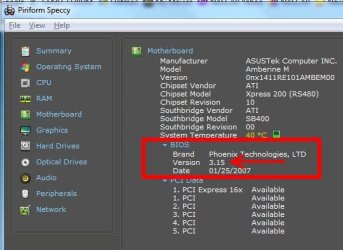
2. Download Speccy - System Information - Free Download let it read the system then click motherboard and will show the version of BIOS.
BIOS speccy.JPG
 

My Computer My Computer

At a glance

Windows 7 Ultimate X64 SP1Intel i5-2550K, Differing ~4.4-4.8GHz No buil...16GB G.Skill Sniper 1866MHz @ 2133MHz 2x8GBASUS GTX650TIB-DC2OC-2GD5, (650TI Boost)
Computer type
PC/Desktop
Computer Manufacturer/Model Number
Home Built Desktop By DataTech
OS
Windows 7 Ultimate X64 SP1
CPU
Intel i5-2550K, Differing ~4.4-4.8GHz No built in GPU
Motherboard
ASUS P8Z68-V PRO/GEN3
Memory
16GB G.Skill Sniper 1866MHz @ 2133MHz 2x8GB
Graphics Card(s)
ASUS GTX650TIB-DC2OC-2GD5, (650TI Boost)
Sound Card
Onboard Realtek 5-1
Monitor(s) Displays
Samsung P2570HD
Screen Resolution
1920x1080
Hard Drives
Samsung 840 Pro 256GB SSD for OS, 500GB Seagate Constellation (Enterprise drive) for Data
PSU
Corsair HX650W
Case
Inwin Dragon Rider
Cooling
Hyper 212 EVO w/two Noctua fans, push-pull, @1300 RPM
Keyboard
E-Z Eyes, bright yellow keys with large characters
Mouse
steelseries SENSEI Laser Pro Gaming
Internet Speed
48-51Mbs Mbs down, 11 Mbs up Xfinity Cable
Antivirus
Norton Internet Security 2013
Browser
IE 10, Opera, Pale Moon if needed
Other Info
4 case fans, LG BluRay-RE, ASUS DVD-RW, Mr. Fusion power supply, 1.21 gigawatts.
Windows 7 displays it on the System Information screen. Type System Information into the start menu search box to find it. BIOS Version/Date will be part way down the page.

EDIT: There may be other updates fixes included in previous BIOS updates not listed for that update. You only need to Flash to the latest one but it includes any and all updates in any previous BIOS releases. Its cumulative as you go to higher versions.
 

My Computer My Computer

At a glance

Windows 10 Education 64 bitAMD Phenom II X4 980 Black Edition Deneb 3.7GHz8GB 4GBx2 Kingston PC10600 DDR3 1333 MemoryZotac NVIDIA Geforce GT640 2 Gig DDR3 PCIe
Computer type
PC/Desktop
Computer Manufacturer/Model Number
Home Built
OS
Windows 10 Education 64 bit
CPU
AMD Phenom II X4 980 Black Edition Deneb 3.7GHz
Motherboard
Asus M4N68T-M V2 µATX Motherboard
Memory
8GB 4GBx2 Kingston PC10600 DDR3 1333 Memory
Graphics Card(s)
Zotac NVIDIA Geforce GT640 2 Gig DDR3 PCIe
Sound Card
VIA VT1708s High Definition Audio 8-channel Onboard
Monitor(s) Displays
22" LG E2242 1080p and 2 19" I-INC AG191D
Screen Resolution
1280x1024 - 1920x1080 - 1280x1024
Hard Drives
Crucial M100 256 GB SSD and 500 GB WD Blue SATA
PSU
Thermaltake TR 620
Case
Power Up Black ATX Mid-Tower Case
Cooling
Stock heatsink and fan
Keyboard
Logitech Wireless K350 Wave
Mouse
Logitech Wireless M570 Trackman Wheel
Internet Speed
80 Mbps Down 30 Mbps Up
Antivirus
Windows Defender
Browser
Internet Explorer 11
Other Info
HP DVD1040e Lightscribe - External USB2
Back
Top