Solved Reformatting & Reinstalling Windows 7 64bit on current HDD/SSD

SeanHogan

New member
Local time
1:25 PM
Messages
20
I just currently bought and set up a SSD (switching from HDD for boosted read speeds), installed Windows 7 onto it, and put drivers on. When prompted to reboot my system once again I noticed that the reboot time jumped from the initial 15 seconds, to about 40. To test just to make sure it wasn't anything, I hard booted it and same thing. It hangs at "Starting Windows" with the flag moving forever. I then installed the rest of my software and whatnot.

So what I would like to do is format the current SSD drive which I am currently using Windows on, and re-install windows onto it. Maybe changing the order in which I install my drivers would make a difference? It's just strange how either my GPU drivers or Motherboard drivers would slow boot time so immensely. How would I go about doing that on the drive I am using?

I have read many forums and How-To's, but none seem to explain about the current one you're using.

Thank you,
Sean
 

My Computer My Computer

At a glance

Windows 7 professional x64
OS
Windows 7 professional x64
I'm not sure I understand why the problem.

If you have a valid Windows installation disc, just boot from that disc and reinstall to the SSD. Disconnect other drives before beginning.

Maybe you can give more details or offer a better explanation.
 

My Computer My Computer

At a glance

Windows 7 Home Premium SP1, 64-bitIntel Skylake i5-6600K, not overclocked8 GB HyperX DDR4-2666 (2 x 4 GB)none; graphics are integrated on CPU
Computer type
PC/Desktop
Computer Manufacturer/Model Number
Ignatz Special; 4 speed manual gearbox; factory air conditioning; one of one
OS
Windows 7 Home Premium SP1, 64-bit
CPU
Intel Skylake i5-6600K, not overclocked
Motherboard
AsRock Z170M Extreme 4, micro ATX
Memory
8 GB HyperX DDR4-2666 (2 x 4 GB)
Graphics Card(s)
none; graphics are integrated on CPU
Sound Card
onboard: Realtek ALC1150; external: USB Behringer UF0-202
Monitor(s) Displays
Dell S2340M 23 inch IPS
Screen Resolution
1600 x 900
Hard Drives
System: Crucial MX100 series SSD, 128 GB;
Data: Samsung Spinpoint 103SJ, 1 TB;
Backup: WD Caviar Green WD30EZRX-00D8PB0, 3 TB
PSU
Rosewill SilentNight 500 watt fanless, semi-modular
Case
Antec Solo II
Cooling
Noctua NH-U12S; Noctua F12 intake, Noctua S12A exhaust
Keyboard
Microsoft 200 6JH-00001 USB
Mouse
Dell or Microsoft optical wired; USB
Antivirus
Microsoft Security Essentials and Malwarebytes Premium
Browser
Pale Moon
Other Info
All fans PWM; speeds at idle: CPU circa 500 rpm; intake circa 600 rpm; exhaust circa 600 rpm; CPU temps 27 idle and 47 C load in a warm room (27 C/81 F) when running Intel Extreme Tuning Utility stress test.
I thought I'd have to reformat the SSD, then re-install windows onto it. When I put the 95 in to reinstall, will it reformat the drive?
 

My Computer My Computer

At a glance

Windows 7 professional x64
OS
Windows 7 professional x64
What drivers are you supplying? You're not changing out drivers given by Win7, are you? This is not XP.

Wait until several rounds of optional Windows Updates deliver drivers before importing any drivers missing in Device Manager.

Only if you are issued Standard VGA for display should you change any in the absence of performance problems.

Look over these steps for getting a perfect reinstall - they're the same for retail: Clean Reinstall - Factory OEM Windows 7
 
The drivers that I'm installing are the ones that come with the motherboard/GPU.

And I'll look into that clean-boot, thank you.
 

My Computer My Computer

At a glance

Windows 7 professional x64
OS
Windows 7 professional x64
I thought I'd have to reformat the SSD, then re-install windows onto it. When I put the 95 in to reinstall, will it reformat the drive?

What's a "95"???

You don't have to reformat. You can if you want to.

You can also use existing partitions or delete existing partitions and create new ones.

All of those are choices offered to you AFTER you begin the reinstall by booting from the installation disc.

If I recall correctly, Windows never tells you it is formatting--it's done automatically at a certain point in the install after your partitions are set.
 

My Computer My Computer

At a glance

Windows 7 Home Premium SP1, 64-bitIntel Skylake i5-6600K, not overclocked8 GB HyperX DDR4-2666 (2 x 4 GB)none; graphics are integrated on CPU
Computer type
PC/Desktop
Computer Manufacturer/Model Number
Ignatz Special; 4 speed manual gearbox; factory air conditioning; one of one
OS
Windows 7 Home Premium SP1, 64-bit
CPU
Intel Skylake i5-6600K, not overclocked
Motherboard
AsRock Z170M Extreme 4, micro ATX
Memory
8 GB HyperX DDR4-2666 (2 x 4 GB)
Graphics Card(s)
none; graphics are integrated on CPU
Sound Card
onboard: Realtek ALC1150; external: USB Behringer UF0-202
Monitor(s) Displays
Dell S2340M 23 inch IPS
Screen Resolution
1600 x 900
Hard Drives
System: Crucial MX100 series SSD, 128 GB;
Data: Samsung Spinpoint 103SJ, 1 TB;
Backup: WD Caviar Green WD30EZRX-00D8PB0, 3 TB
PSU
Rosewill SilentNight 500 watt fanless, semi-modular
Case
Antec Solo II
Cooling
Noctua NH-U12S; Noctua F12 intake, Noctua S12A exhaust
Keyboard
Microsoft 200 6JH-00001 USB
Mouse
Dell or Microsoft optical wired; USB
Antivirus
Microsoft Security Essentials and Malwarebytes Premium
Browser
Pale Moon
Other Info
All fans PWM; speeds at idle: CPU circa 500 rpm; intake circa 600 rpm; exhaust circa 600 rpm; CPU temps 27 idle and 47 C load in a warm room (27 C/81 F) when running Intel Extreme Tuning Utility stress test.
I thought I'd have to reformat the SSD, then re-install windows onto it. When I put the 95 in to reinstall, will it reformat the drive?

What's a "95"???

You don't have to reformat. You can if you want to.

You can also use existing partitions or delete existing partitions and create new ones.

All of those are choices offered to you AFTER you begin the reinstall by booting from the installation disc.

If I recall correctly, Windows never tells you it is formatting--it's done automatically at a certain point in the install after your partitions are set.

Haha, whoops! Sorry, on my blackberry, and held down alt instead of shift....

And okay, that's not that big of a deal then. I didn't know you could delete partitions, and what not within that actual clean install. I thought it had to be done prior.
 

My Computer My Computer

At a glance

Windows 7 professional x64
OS
Windows 7 professional x64
Unplug all other HD's before installing. Choose Custom Install to delete all partitions and click next to have installer create and format one large install partition and begin install.

click to enlarge

Wait to check performance before supplying any drivers that aren't missing after install and optional Updates.
 
I suggest you post a full picture of your Disk Management. One reason could be that the bootmgr landed on the HDD. Before you reinstall, come back. You might first want to do a secure erase.
 

My Computer My Computer

At a glance

Vista, Windows7, Mint Mate, Zorin, Windows 8from 1.6GHz Duo to i7
Computer Manufacturer/Model Number
HP, Dell, Gateway, Toshiba - 4 laptops and 2 desktops
OS
Vista, Windows7, Mint Mate, Zorin, Windows 8
CPU
from 1.6GHz Duo to i7
Monitor(s) Displays
2x HP w2207
Hard Drives
5x HDD, 7x SSD, 12x Externals
Keyboard
with trackball - no mices
Mouse
Trackball mice
Internet Speed
DSL 6000
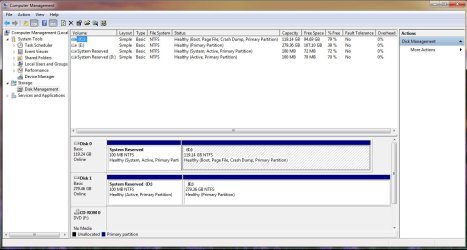
This is a screenshot of my Disk management. I didn't delete or do anything to my other drive while installing windows on this SSD.

The first HDD is the 300GB, while the SSD is the 128GB.
 

Attachments

  • Untitled.jpg
    Untitled.jpg
    100.5 KB · Views: 23
Last edited:

My Computer My Computer

At a glance

Windows 7 professional x64
OS
Windows 7 professional x64
If there's still an OS on E it is now booting off of System Reserved on Disk0 since D has no System flag. This is what happens when you don't unplug the other HD when installing.

Is Disk0 the SSD which you want to install Win7 upon, and do you wish to abandon Disk1?

Unplug Disk1 to see if the performance problems persist.

What do you want to do with Disk1?
 
If there's still an OS on E it is now booting off of System Reserved on Disk0 since D has no System flag. This is what happens when you don't unplug the other HD when installing.

Is Disk0 the SSD which you want to install Win7 upon, and do you wish to abandon Disk1?

You've got it. That's what I want to do. Have the OS on the SSD (Disk 0), while deleting/reformatting my HDD (Disk 1) to use as storage.
 

My Computer My Computer

At a glance

Windows 7 professional x64
OS
Windows 7 professional x64
Unplug DIsk1 to see if performance problems persist. If so reinstall with Disk1 unplugged, following these general steps to get a perfect Clean Reinstall.

You may need to align your SSD using whs' tutorial: SSD Alignment - Windows 7 Forums.
Wolfgang is here if you need his advice.

Once you have Win7 running fine on your SSD, you can plug back in Disk1 to run Diskpart Clean Command then repartition it as you please in Disk Mgmt.
 
The drivers that I'm installing are the ones that come with the motherboard/GPU.

And I'll look into that clean-boot, thank you.

Let windows install any drivers througth windows update. There is no reason to use your discs.
 

My Computer My Computer

At a glance

Windows 10 Pro x64Intel Core i7 6700KGSkill TridentZ RGB 16GB 3600 16-16-16-36EVGA GTX 980 Ti SC x2
Computer type
PC/Desktop
Computer Manufacturer/Model Number
Skylake Special #666
OS
Windows 10 Pro x64
CPU
Intel Core i7 6700K
Motherboard
Asus Sabertooth Z170 Mark 1
Memory
GSkill TridentZ RGB 16GB 3600 16-16-16-36
Graphics Card(s)
EVGA GTX 980 Ti SC x2
Sound Card
Realtek High Definition
Monitor(s) Displays
AOC G2460PG
Screen Resolution
1920 x 1080 144Hz
Hard Drives
Samsung 860 Pro 256GB, Seagate Barracuda 4TB x2
PSU
EVGA 1000 P2, EVGA White Custom Braided Cables
Case
Corsair Vengeance C70 Gunmetal Black
Cooling
Corsair H100i v2, Corsair ML120 x2, Thermal Grizzly Kryonaut
Keyboard
Logitech G910 Orion Spectrum
Mouse
Logitech G700s
Internet Speed
Verizon Fios Quantum Gateway 75/75
Antivirus
Windows Defender, Malwarebytes Free 3.8.3
Browser
Chrome
Other Info
Corsair SP120 x4, LG Blu-ray Drive, Durabrand HT-395 100 Watt Dolby Digital Amp, Corsair H2100 Wireless 7.1 Headset
It is hard to tell becausae you have an active partition on both drives. But it is unlikely that the SSD bootmgr landed on the HDD because the SSD is on Port0. There is also no alignment problem for C because the 100MB partition is in front of it.

I suggest you run Soluto to track down what is the hold up.
 

My Computer My Computer

At a glance

Vista, Windows7, Mint Mate, Zorin, Windows 8from 1.6GHz Duo to i7
Computer Manufacturer/Model Number
HP, Dell, Gateway, Toshiba - 4 laptops and 2 desktops
OS
Vista, Windows7, Mint Mate, Zorin, Windows 8
CPU
from 1.6GHz Duo to i7
Monitor(s) Displays
2x HP w2207
Hard Drives
5x HDD, 7x SSD, 12x Externals
Keyboard
with trackball - no mices
Mouse
Trackball mice
Internet Speed
DSL 6000
Well I unplugged Disk 1 (HDD), and now it turns on in about half the time. Almost as fast as when I freshly installed Win7 fresh off the CD.

When I first turned the system without the HDD plugged in, it said that a driver was successfully installed ( a driver for my SSD). So I rebooted it, and the same speed is happening as when I first unplugged the disc via SATA.

Feels like it's running as it should be!
 
Last edited:

My Computer My Computer

At a glance

Windows 7 professional x64
OS
Windows 7 professional x64
Is there still a running system on Disk1 that you are using. If not, I would deactivate the 100MB partition there - with the bootable CD of partition wizard (last entry on the webpage).
 

My Computer My Computer

At a glance

Vista, Windows7, Mint Mate, Zorin, Windows 8from 1.6GHz Duo to i7
Computer Manufacturer/Model Number
HP, Dell, Gateway, Toshiba - 4 laptops and 2 desktops
OS
Vista, Windows7, Mint Mate, Zorin, Windows 8
CPU
from 1.6GHz Duo to i7
Monitor(s) Displays
2x HP w2207
Hard Drives
5x HDD, 7x SSD, 12x Externals
Keyboard
with trackball - no mices
Mouse
Trackball mice
Internet Speed
DSL 6000
So now that I have It installed fine and running fast on my SSD, I should re-plug back in my HDD, then run Diskpart to wipe everything off of it? Will that keep my current configuration of win7 running complete and fast from the SDD?
 

My Computer My Computer

At a glance

Windows 7 professional x64
OS
Windows 7 professional x64
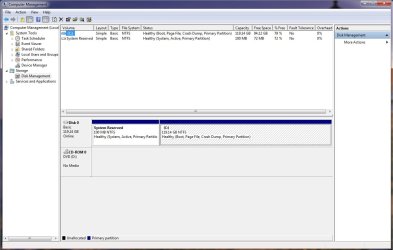
Is there still a running system on Disk1 that you are using. If not, I would deactivate the 100MB partition there - with the bootable CD of partition wizard (last entry on the webpage).

I don't believe so? This is what I get through Disk management when I just checked now.

Keep in mind that my HDD (Disk 1) is still unplugged.
 

Attachments

  • Untitled.jpg
    Untitled.jpg
    87.8 KB · Views: 11

My Computer My Computer

At a glance

Windows 7 professional x64
OS
Windows 7 professional x64
Either wipe HD with Diskpart Clean Command to get it cleanest or just delete the partitions on HD in Disk Management: Partition or Volume - Delete

Then create new HD partitions as you wish: Partition or Volume - Create New

Later the easiest way to regain space as SSD fills up is to move data to the HD and make it accessible by rightclicking to add to Library - Include a Folder - Windows 7 Forums. This will add it to the Documents, Pictures, Video, Downloads, etc. libraries.

I would also store a Win7 backup image to HD to use in place of reinstalls: Backup Complete Computer - Create an Image Backup
 
Back
Top