
You are using an out of date browser. It may not display this or other websites correctly.
You should upgrade or use an alternative browser.
You should upgrade or use an alternative browser.
Solved Reformatting & Reinstalling Windows 7 64bit on current HDD/SSD
- Thread starter SeanHogan
- Start date

- Local time
- 4:44 AM
- Messages
- 50,634
Yes, Unplug the power cable and drain the power button for a few seconds any time you go inside. Then be sure to touch the case before touching any electronics to guard against static discharge which can ruin the mobo or other components.

- Local time
- 4:44 AM
- Messages
- 12,011
Yes. Power off and reconnect the HDD.
You can use diskpart if you want, but a simple deletion of partitions and reformat within Windows Disk Management should work fine.
You can use diskpart if you want, but a simple deletion of partitions and reformat within Windows Disk Management should work fine.
My Computer
At a glance
Windows 7 Home Premium SP1, 64-bitIntel Skylake i5-6600K, not overclocked8 GB HyperX DDR4-2666 (2 x 4 GB)none; graphics are integrated on CPU
- Computer type
- PC/Desktop
- Computer Manufacturer/Model Number
- Ignatz Special; 4 speed manual gearbox; factory air conditioning; one of one
- OS
- Windows 7 Home Premium SP1, 64-bit
- CPU
- Intel Skylake i5-6600K, not overclocked
- Motherboard
- AsRock Z170M Extreme 4, micro ATX
- Memory
- 8 GB HyperX DDR4-2666 (2 x 4 GB)
- Graphics Card(s)
- none; graphics are integrated on CPU
- Sound Card
- onboard: Realtek ALC1150; external: USB Behringer UF0-202
- Monitor(s) Displays
- Dell S2340M 23 inch IPS
- Screen Resolution
- 1600 x 900
- Hard Drives
- System: Crucial MX100 series SSD, 128 GB;
Data: Samsung Spinpoint 103SJ, 1 TB;
Backup: WD Caviar Green WD30EZRX-00D8PB0, 3 TB
- PSU
- Rosewill SilentNight 500 watt fanless, semi-modular
- Case
- Antec Solo II
- Cooling
- Noctua NH-U12S; Noctua F12 intake, Noctua S12A exhaust
- Keyboard
- Microsoft 200 6JH-00001 USB
- Mouse
- Dell or Microsoft optical wired; USB
- Antivirus
- Microsoft Security Essentials and Malwarebytes Premium
- Browser
- Pale Moon
- Other Info
- All fans PWM; speeds at idle: CPU circa 500 rpm; intake circa 600 rpm; exhaust circa 600 rpm; CPU temps 27 idle and 47 C load in a warm room (27 C/81 F) when running Intel Extreme Tuning Utility stress test.

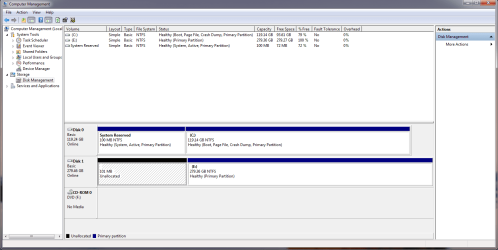
From this picture, it is hard to tell what is on Disk1. But if you believe there is nothing valuable on it, I would just reformat it (fast). That is probably the easiest.Is there still a running system on Disk1 that you are using. If not, I would deactivate the 100MB partition there - with the bootable CD of partition wizard (last entry on the webpage).
I don't believe so? This is what I get through Disk management when I just checked now.
Keep in mind that my HDD (Disk 1) is still unplugged.
And as Greg says, make frequent images of your SSD. I make them 3 times per week with free Macrium. Here is how: http://www.sevenforums.com/tutorials/73828-imaging-free-macrium.html?ltr=I
I would use at least half of the HDD to store those images. But you can make the HDD just 1 single partition and divide it with folders. That gives you the most flexible use of space.
My Computer
At a glance
Vista, Windows7, Mint Mate, Zorin, Windows 8from 1.6GHz Duo to i7
- Computer Manufacturer/Model Number
- HP, Dell, Gateway, Toshiba - 4 laptops and 2 desktops
- OS
- Vista, Windows7, Mint Mate, Zorin, Windows 8
- CPU
- from 1.6GHz Duo to i7
- Monitor(s) Displays
- 2x HP w2207
- Hard Drives
- 5x HDD, 7x SSD, 12x Externals
- Keyboard
- with trackball - no mices
- Mouse
- Trackball mice
- Internet Speed
- DSL 6000
My Computer
At a glance
Windows 7 professional x64
- OS
- Windows 7 professional x64
- Local time
- 4:44 AM
- Messages
- 50,634
Delete the partitions and create new ones using the tutorials I provided, unless you want a 100mb and a 300gb partition for data. 
Are you sure you have all of your data off of the old Win7 partition? You can keep it for awhile to be sure.
Are you sure you have all of your data off of the old Win7 partition? You can keep it for awhile to be sure.
I'm going to Partition it now with the "How to create a new partition" link.
And yep! I'm sure. I just recently built this computer about a month ago, and I didn't have much on it. I moved everything over to my external so I could do this. I wanted the faster OS speeds of an SSD. My HDD Is a 300GB velociraptor from WD. 10,000 RPM. It's pretty fast regardless. Just, well...wanted one.
And yep! I'm sure. I just recently built this computer about a month ago, and I didn't have much on it. I moved everything over to my external so I could do this. I wanted the faster OS speeds of an SSD. My HDD Is a 300GB velociraptor from WD. 10,000 RPM. It's pretty fast regardless. Just, well...wanted one.
My Computer
At a glance
Windows 7 professional x64
- OS
- Windows 7 professional x64
Just fully delete the other partition. Then you will have one contiguous free space.
My Computer
At a glance
Vista, Windows7, Mint Mate, Zorin, Windows 8from 1.6GHz Duo to i7
- Computer Manufacturer/Model Number
- HP, Dell, Gateway, Toshiba - 4 laptops and 2 desktops
- OS
- Vista, Windows7, Mint Mate, Zorin, Windows 8
- CPU
- from 1.6GHz Duo to i7
- Monitor(s) Displays
- 2x HP w2207
- Hard Drives
- 5x HDD, 7x SSD, 12x Externals
- Keyboard
- with trackball - no mices
- Mouse
- Trackball mice
- Internet Speed
- DSL 6000
- Local time
- 4:44 AM
- Messages
- 50,634
It's already deleted which is why it is Unallocated Space. Do the same for the other partition.
Then Create your partition(s).
Then Create your partition(s).
delete the partitions on HD in Disk Management: Partition or Volume - Delete
Then create new HD partitions as you wish: Partition or Volume - Create New
Just fully delete the other partition. Then you will have one contiguous free space.
I'm an idiot. Thanks. Once I stare at something for so long, I start to NOT understand it.
My Computer
At a glance
Windows 7 professional x64
- OS
- Windows 7 professional x64
That happens to most of us. I constantly search for my glasses - that are on my nose, LOL.Just fully delete the other partition. Then you will have one contiguous free space.
I'm an idiot. Thanks. Once I stare at something for so long, I start to NOT understand it.
My Computer
At a glance
Vista, Windows7, Mint Mate, Zorin, Windows 8from 1.6GHz Duo to i7
- Computer Manufacturer/Model Number
- HP, Dell, Gateway, Toshiba - 4 laptops and 2 desktops
- OS
- Vista, Windows7, Mint Mate, Zorin, Windows 8
- CPU
- from 1.6GHz Duo to i7
- Monitor(s) Displays
- 2x HP w2207
- Hard Drives
- 5x HDD, 7x SSD, 12x Externals
- Keyboard
- with trackball - no mices
- Mouse
- Trackball mice
- Internet Speed
- DSL 6000
That happens to most of us. I constantly search for my glasses - that are on my nose, LOL.Just fully delete the other partition. Then you will have one contiguous free space.
I'm an idiot. Thanks. Once I stare at something for so long, I start to NOT understand it.
Oh boy does that sound like me!
Well now I'm going to restart my computer, and see how everything is checking out. (Including boot times)
My Computer
At a glance
Windows 7 professional x64
- OS
- Windows 7 professional x64
The best way to check boot times is in Event Viewer drilling down like this:
Applications and Service Logs
Microsoft
Windows
Diagnostics - performance
Operational
Event ID 100
Applications and Service Logs
Microsoft
Windows
Diagnostics - performance
Operational
Event ID 100
My Computer
At a glance
Vista, Windows7, Mint Mate, Zorin, Windows 8from 1.6GHz Duo to i7
- Computer Manufacturer/Model Number
- HP, Dell, Gateway, Toshiba - 4 laptops and 2 desktops
- OS
- Vista, Windows7, Mint Mate, Zorin, Windows 8
- CPU
- from 1.6GHz Duo to i7
- Monitor(s) Displays
- 2x HP w2207
- Hard Drives
- 5x HDD, 7x SSD, 12x Externals
- Keyboard
- with trackball - no mices
- Mouse
- Trackball mice
- Internet Speed
- DSL 6000
You are welcome. Stick around. This is a fun place to be.
My Computer
At a glance
Vista, Windows7, Mint Mate, Zorin, Windows 8from 1.6GHz Duo to i7
- Computer Manufacturer/Model Number
- HP, Dell, Gateway, Toshiba - 4 laptops and 2 desktops
- OS
- Vista, Windows7, Mint Mate, Zorin, Windows 8
- CPU
- from 1.6GHz Duo to i7
- Monitor(s) Displays
- 2x HP w2207
- Hard Drives
- 5x HDD, 7x SSD, 12x Externals
- Keyboard
- with trackball - no mices
- Mouse
- Trackball mice
- Internet Speed
- DSL 6000