Solved 2Q's 1:Can I delete useless partition? 2:Best backup software?

Robwan

New member
Member
VIP
Local time
10:42 PM
Messages
124
Hi, 2 questions if I may, regarding storage/data

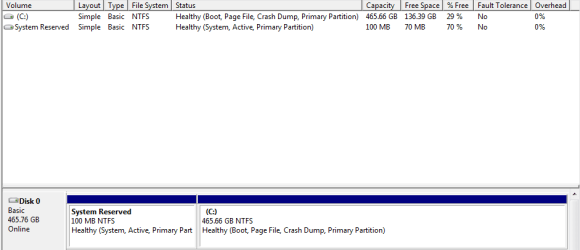
1: Ages ago i stupidly put a windows 7 dvd into my computer already running on win 7 (to test whether the dvd was ok). It automatically made a 100mb partition on my hdd. Its been there for a long time and I've just left as it does no harm, Can i deleted it though? or is it safer just to leave it now as its only 100mb.

2: I just got another sata hdd which i'm using in an usb enclosure for back up purposes. Apart from the normal method of copying my files over every week or so, do you have any recommendations on free software which is more efficient for my backup needs?

Thanks guys!
 

My Computer My Computer

At a glance

Windows 7 Professional 64-bit SP1i7 920 Factory OC 3.4ghz6GB 1600mhz Triple-Channel DDR31535MB GeForce GTX 580
Computer type
PC/Desktop
Computer Manufacturer/Model Number
Custom
OS
Windows 7 Professional 64-bit SP1
CPU
i7 920 Factory OC 3.4ghz
Motherboard
Gigabyte EX58-UD3R
Memory
6GB 1600mhz Triple-Channel DDR3
Graphics Card(s)
1535MB GeForce GTX 580
Sound Card
onboard
Monitor(s) Displays
BenQ GL2460
Screen Resolution
1920x1080@60Hz
Hard Drives
466GB Seagate ST3500418AS ATA Device (SATA)
PSU
corsair tx650w
Case
Antec 300
Cooling
Akasa Nero AK-967
Keyboard
Cheap asda keyboard
Mouse
Gigabyte M6900
Antivirus
MSE
Browser
Chrome

My Computer My Computer

At a glance

Win 7 Pro x64 / Win 10 ProIntel(R) Core(TM) i7-3630QM CPU @ 2.40GHz12 GB(1) Intel(R) HD Graphics 4000 (2) NVIDIA GeFo...
Computer type
Laptop
Computer Manufacturer/Model Number
Sager NP9170
OS
Win 7 Pro x64 / Win 10 Pro
CPU
Intel(R) Core(TM) i7-3630QM CPU @ 2.40GHz
Motherboard
CLEVO P170EM
Memory
12 GB
Graphics Card(s)
(1) Intel(R) HD Graphics 4000 (2) NVIDIA GeForce GTX 675M
Sound Card
(1) Realtek High Definition Audio (2) Intel(R) Display Aud
Monitor(s) Displays
17.3
Screen Resolution
1920x1080
Hard Drives
(1) Samsung 860 EVO 500GB(OS) (1) Samsung 860 EVO 500GB(Data)
Keyboard
Backlite
Antivirus
MSE, Malwarebytes Pro
Browser
Firefox
Other Info
DESKTOP: Custom-built.
OS: Win 10 Pro x64.
CASE: Rosewill R5.
CPU: Intel I5 4670K CPU @ 3.40GHz.
CPU COOLER: Cool Master Hyper 212 EVO.
MOTHERBOARD: Asus Z87-A.
MEMORY: Kingston HyperX 2x4 GB.
GPU: Nvidia Geforce 650 TI.
PSU: Corsair TX750.
DRIVES: (1) Samsung 840 120 GB SSD (2) Western Digital blue 500 GB 7200 RPM.
Post a shot of disk management. The 100 MB partition was made when windows was originally installed . Leave it alone and if it has a drive letter it shouldn`t.
 
Last edited:

My Computer My Computer

At a glance

Windows 10 Pro x64Intel Core i7 6700KGSkill TridentZ RGB 16GB 3600 16-16-16-36EVGA GTX 980 Ti SC x2
Computer type
PC/Desktop
Computer Manufacturer/Model Number
Skylake Special #666
OS
Windows 10 Pro x64
CPU
Intel Core i7 6700K
Motherboard
Asus Sabertooth Z170 Mark 1
Memory
GSkill TridentZ RGB 16GB 3600 16-16-16-36
Graphics Card(s)
EVGA GTX 980 Ti SC x2
Sound Card
Realtek High Definition
Monitor(s) Displays
AOC G2460PG
Screen Resolution
1920 x 1080 144Hz
Hard Drives
Samsung 860 Pro 256GB, Seagate Barracuda 4TB x2
PSU
EVGA 1000 P2, EVGA White Custom Braided Cables
Case
Corsair Vengeance C70 Gunmetal Black
Cooling
Corsair H100i v2, Corsair ML120 x2, Thermal Grizzly Kryonaut
Keyboard
Logitech G910 Orion Spectrum
Mouse
Logitech G700s
Internet Speed
Verizon Fios Quantum Gateway 75/75
Antivirus
Windows Defender, Malwarebytes Free 3.8.3
Browser
Chrome
Other Info
Corsair SP120 x4, LG Blu-ray Drive, Durabrand HT-395 100 Watt Dolby Digital Amp, Corsair H2100 Wireless 7.1 Headset
1. I would leave it for now, as it is only 100 MBs. In the future, you don't have to create it during the install. None of my drives have it.

2. I still consider SyncToy the gold standard for free syncing apps. It's very simple to use, gives you plenty of options, and can be scheduled.
 

My Computer My Computer

At a glance

Windows 7 Ultimate x64 SP1Intel Core i7-260012 GB Patriot Extreme DDR3-1333Nvidia GTX 470
OS
Windows 7 Ultimate x64 SP1
CPU
Intel Core i7-2600
Motherboard
Gigabyte GA-P67A-UD3P-B3
Memory
12 GB Patriot Extreme DDR3-1333
Graphics Card(s)
Nvidia GTX 470
Monitor(s) Displays
Dell UltraSharp 2209WA
Hard Drives
OCZ Agility3 240 GB, WD5001AALS, WD7501AALS
PSU
OCZ ModStream 700W
Case
CoolerMaster HAF 912 Advanced
Cooling
CoolerMaster Hyper 212 Plus

My Computer My Computer

At a glance

Microsoft Windows 7 Home Premium 64-bit Servi...Intel(R) Core(TM) i3 CPU M 330 @ 2.13GHz8 GB DDR3Intel(R) HD Graphics
Computer type
Laptop
Computer Manufacturer/Model Number
Hewlett-Packard/G62-107SA Notebook
OS
Microsoft Windows 7 Home Premium 64-bit Service Pack 1
CPU
Intel(R) Core(TM) i3 CPU M 330 @ 2.13GHz
Motherboard
Hewlett-Packard 1425
Memory
8 GB DDR3
Graphics Card(s)
Intel(R) HD Graphics
Sound Card
Realtek High Definition Audio
Monitor(s) Displays
Builtin
Screen Resolution
1366 x 768 x 32 bits (4294967296 colors) @ 60 Hz
Hard Drives
250 GB SATA Hard Disk Drive 7200 rpm
2TB Seagate GoFlex USB 2 Drive
1TB Iomega Prestige USB 2 Drive
1.5TB Iomega Prestige USB 2 Drive (Samsung)
2TB WD MyBook Live NAS.
Mouse
Logitech Anywhere MX
Internet Speed
152 Mbs download 10 Mbs upload
Antivirus
Norton 360
Browser
Chrome
Thanks guys, some really helpful tips here i'm gonna check out some of those programs.

And sorry i probably didn't explain the 100mb partition issue properly, basically its not from my install of win 7. I already had win 7 installed on my machine for like a year or something with no partitions. Then one day a friend was having trouble installing his win 7 on his machine, so he asked me to test the dvd. Upon putting it in my machine, the normal screen appeared (Autoplay with the 'run setup option') but then it just went ahead and started creating a 100mb partition so i stopped it.

I put a screen shot of it :eek:


I liked FreeFileSync so much I did a video on how to use it. Backup With FreeFileSync - YouTube

Nice tut, u should do one of how get the invisible taskbar, thats awesome! ;)
 

Attachments

  • Capture.PNG
    Capture.PNG
    7.7 KB · Views: 24

My Computer My Computer

At a glance

Windows 7 Professional 64-bit SP1i7 920 Factory OC 3.4ghz6GB 1600mhz Triple-Channel DDR31535MB GeForce GTX 580
Computer type
PC/Desktop
Computer Manufacturer/Model Number
Custom
OS
Windows 7 Professional 64-bit SP1
CPU
i7 920 Factory OC 3.4ghz
Motherboard
Gigabyte EX58-UD3R
Memory
6GB 1600mhz Triple-Channel DDR3
Graphics Card(s)
1535MB GeForce GTX 580
Sound Card
onboard
Monitor(s) Displays
BenQ GL2460
Screen Resolution
1920x1080@60Hz
Hard Drives
466GB Seagate ST3500418AS ATA Device (SATA)
PSU
corsair tx650w
Case
Antec 300
Cooling
Akasa Nero AK-967
Keyboard
Cheap asda keyboard
Mouse
Gigabyte M6900
Antivirus
MSE
Browser
Chrome

My Computer My Computer

At a glance

Microsoft Windows 7 Home Premium 64-bit Servi...Intel(R) Core(TM) i3 CPU M 330 @ 2.13GHz8 GB DDR3Intel(R) HD Graphics
Computer type
Laptop
Computer Manufacturer/Model Number
Hewlett-Packard/G62-107SA Notebook
OS
Microsoft Windows 7 Home Premium 64-bit Service Pack 1
CPU
Intel(R) Core(TM) i3 CPU M 330 @ 2.13GHz
Motherboard
Hewlett-Packard 1425
Memory
8 GB DDR3
Graphics Card(s)
Intel(R) HD Graphics
Sound Card
Realtek High Definition Audio
Monitor(s) Displays
Builtin
Screen Resolution
1366 x 768 x 32 bits (4294967296 colors) @ 60 Hz
Hard Drives
250 GB SATA Hard Disk Drive 7200 rpm
2TB Seagate GoFlex USB 2 Drive
1TB Iomega Prestige USB 2 Drive
1.5TB Iomega Prestige USB 2 Drive (Samsung)
2TB WD MyBook Live NAS.
Mouse
Logitech Anywhere MX
Internet Speed
152 Mbs download 10 Mbs upload
Antivirus
Norton 360
Browser
Chrome
Hope I'm not off topic or missed something, but i think it's worth noting...

I haven't seen any mention of backup imaging the OS and Programs in this thread.
That is different than backing up personal data.

The day a system will not boot, or does not work correctly, having a backup image can be a life saver and save many hours of frustration.
System Restore points may fix an issue, but a backup image is a better option to have available.
A backup image is a complete restorable "copy" of the OS, restore points are not.

An image can restore the OS and programs in < 1 hour without needing to re-install/re-configure/re-activate the OS and programs.
If you re-install Windows and all programs regularly, then you may not need or want backup images.
If being able to recover from an HD fail, Windows fail, etc. is important, then you should consider imaging.

A couple of tutorials about this:
http://www.sevenforums.com/tutorials/663-backup-complete-computer-create-image-backup.html?filter
http://www.sevenforums.com/tutorials/73828-imaging-free-macrium.html?filter
 

My Computer My Computer

At a glance

Multi-Boot W7_Pro_x64 W8.1_Pro_x64 W10_Pro_x6...AMD Athlon II x4 6206GB GSkill DDR2 800AMD 4670 GPU + AMD 4200 IGP
Computer type
PC/Desktop
Computer Manufacturer/Model Number
home built
OS
Multi-Boot W7_Pro_x64 W8.1_Pro_x64 W10_Pro_x64 +Linux_VMs +Chromium_VM
CPU
AMD Athlon II x4 620
Motherboard
Gigabyte GA-MA785G-UD3H
Memory
6GB GSkill DDR2 800
Graphics Card(s)
AMD 4670 GPU + AMD 4200 IGP
Sound Card
on board Realtek ALC889A
Monitor(s) Displays
RCA 40" LCD TV, Insignia 32" LCD TV, HP 15" LCD monitor
Screen Resolution
1680 x 1050
Hard Drives
OCZ Vertex 3 120GB,
Samsung F3 1TB (3),
Several others - WD, Seagate, Hitachi, ...
PSU
Corsair 500 W
Case
Rosewill mid tower
Cooling
CM 90mm rifle
Keyboard
Gyration wireless, Logitech wireless, Dell USB wired
Mouse
Gyration wireless, Logitech wireless, V7 USB wired
Internet Speed
Spectrum - 100Mbps D / 10Mbps U
Antivirus
Avast, MBAM3, EMET, WinPatrol
Browser
Pale Moon, Firefox, IE
Other Info
2 multi-boot PC's
Mainly HTPC/Office/Gen purpose (no gaming).
Trendnet USB KVM.
LG DVD burner/Blue Ray Player.
Tray system for removable SATA backup drives.

Not currently OCd, under-volted.
I use Hybrid sleep, rarely re-boot or shutdown.

Hauppauge HD-PVR, Avermedia PCIe TV Tuner, Hauppauge PCI TV Tuner.
Quite right +1.
 

My Computer My Computer

At a glance

Microsoft Windows 7 Home Premium 64-bit Servi...Intel(R) Core(TM) i3 CPU M 330 @ 2.13GHz8 GB DDR3Intel(R) HD Graphics
Computer type
Laptop
Computer Manufacturer/Model Number
Hewlett-Packard/G62-107SA Notebook
OS
Microsoft Windows 7 Home Premium 64-bit Service Pack 1
CPU
Intel(R) Core(TM) i3 CPU M 330 @ 2.13GHz
Motherboard
Hewlett-Packard 1425
Memory
8 GB DDR3
Graphics Card(s)
Intel(R) HD Graphics
Sound Card
Realtek High Definition Audio
Monitor(s) Displays
Builtin
Screen Resolution
1366 x 768 x 32 bits (4294967296 colors) @ 60 Hz
Hard Drives
250 GB SATA Hard Disk Drive 7200 rpm
2TB Seagate GoFlex USB 2 Drive
1TB Iomega Prestige USB 2 Drive
1.5TB Iomega Prestige USB 2 Drive (Samsung)
2TB WD MyBook Live NAS.
Mouse
Logitech Anywhere MX
Internet Speed
152 Mbs download 10 Mbs upload
Antivirus
Norton 360
Browser
Chrome
For a paid solution for Disk Imaging apps i recommend and use Acronis True Image...

For a Free solution out of all those i tested the top 2 would be Macrium Reflect or CloneZilla...
 

My Computer My Computer

At a glance

Vista Ultimate X64/ Windows 7 Dual-bootQ66004G OCZ PC2 8500 PlatinumEVGA 8800GTS Vid Card
Computer Manufacturer/Model Number
Self-Built
OS
Vista Ultimate X64/ Windows 7 Dual-boot
CPU
Q6600
Motherboard
ASUS P5K
Memory
4G OCZ PC2 8500 Platinum
Graphics Card(s)
EVGA 8800GTS Vid Card
Hard Drives
500G Seagate SATA
200G Seagate SATA
100G WD Caviar SATA
80G WD Caviar IDE
PSU
OCZ Elite 800W PSU
Case
RaidMax Smilodon Case
OK cool I'll look into image backup, sounds good. Many thanks guys :)


Thanks guys, some really helpful tips here i'm gonna check out some of those programs.

I liked FreeFileSync so much I did a video on how to use it. Backup With FreeFileSync - YouTube

Nice tut, u should do one of how get the invisible taskbar, thats awesome! ;)

Thanks Robwan. Invisible taskbar?:confused:

Oh my bad haha, it looked like your task bar was completely invisible, kinda like this Windows 7 Invisible Taskbar by ~4tyn on deviantART
 

My Computer My Computer

At a glance

Windows 7 Professional 64-bit SP1i7 920 Factory OC 3.4ghz6GB 1600mhz Triple-Channel DDR31535MB GeForce GTX 580
Computer type
PC/Desktop
Computer Manufacturer/Model Number
Custom
OS
Windows 7 Professional 64-bit SP1
CPU
i7 920 Factory OC 3.4ghz
Motherboard
Gigabyte EX58-UD3R
Memory
6GB 1600mhz Triple-Channel DDR3
Graphics Card(s)
1535MB GeForce GTX 580
Sound Card
onboard
Monitor(s) Displays
BenQ GL2460
Screen Resolution
1920x1080@60Hz
Hard Drives
466GB Seagate ST3500418AS ATA Device (SATA)
PSU
corsair tx650w
Case
Antec 300
Cooling
Akasa Nero AK-967
Keyboard
Cheap asda keyboard
Mouse
Gigabyte M6900
Antivirus
MSE
Browser
Chrome
Did you ever look at disk management before?

If you didn't - you would not have seen the 100mb.

You can't see it in windows explorer.
 

My Computers My Computers

  • At a glance

    7 X64i5 84002x8gb 3200mhz
    Computer type
    PC/Desktop
    OS
    7 X64
    CPU
    i5 8400
    Motherboard
    gigabyte b365m ds3h
    Memory
    2x8gb 3200mhz
    Hard Drives
    various
    PSU
    pure power 11 400w cm
    Case
    Coolermaster
    Cooling
    cryorig m9i
  • At a glance

    7x64g54008gb ddr4 2400
    Computer type
    PC/Desktop
    OS
    7x64
    CPU
    g5400
    Motherboard
    ga b365m ds3h
    Memory
    8gb ddr4 2400
    PSU
    xfx pro 450w
OK cool I'll look into image backup, sounds good. Many thanks guys :)


Thanks guys, some really helpful tips here i'm gonna check out some of those programs.


Nice tut, u should do one of how get the invisible taskbar, thats awesome! ;)

Thanks Robwan. Invisible taskbar?:confused:

Oh my bad haha, it looked like your task bar was completely invisible, kinda like this Windows 7 Invisible Taskbar by ~4tyn on deviantART

Afraid not. It is white and as transparent as windows will set it.
 

My Computer My Computer

At a glance

Microsoft Windows 7 Home Premium 64-bit Servi...Intel(R) Core(TM) i3 CPU M 330 @ 2.13GHz8 GB DDR3Intel(R) HD Graphics
Computer type
Laptop
Computer Manufacturer/Model Number
Hewlett-Packard/G62-107SA Notebook
OS
Microsoft Windows 7 Home Premium 64-bit Service Pack 1
CPU
Intel(R) Core(TM) i3 CPU M 330 @ 2.13GHz
Motherboard
Hewlett-Packard 1425
Memory
8 GB DDR3
Graphics Card(s)
Intel(R) HD Graphics
Sound Card
Realtek High Definition Audio
Monitor(s) Displays
Builtin
Screen Resolution
1366 x 768 x 32 bits (4294967296 colors) @ 60 Hz
Hard Drives
250 GB SATA Hard Disk Drive 7200 rpm
2TB Seagate GoFlex USB 2 Drive
1TB Iomega Prestige USB 2 Drive
1.5TB Iomega Prestige USB 2 Drive (Samsung)
2TB WD MyBook Live NAS.
Mouse
Logitech Anywhere MX
Internet Speed
152 Mbs download 10 Mbs upload
Antivirus
Norton 360
Browser
Chrome
Hope I'm not off topic or missed something, but i think it's worth noting...

I haven't seen any mention of backup imaging the OS and Programs in this thread.
That is different than backing up personal data.

The day a system will not boot, or does not work correctly, having a backup image can be a life saver and save many hours of frustration.
System Restore points may fix an issue, but a backup image is a better option to have available.
A backup image is a complete restorable "copy" of the OS, restore points are not.

An image can restore the OS and programs in < 1 hour without needing to re-install/re-configure/re-activate the OS and programs.
If you re-install Windows and all programs regularly, then you may not need or want backup images.
If being able to recover from an HD fail, Windows fail, etc. is important, then you should consider imaging.

A couple of tutorials about this:
http://www.sevenforums.com/tutorials/663-backup-complete-computer-create-image-backup.html?filter
http://www.sevenforums.com/tutorials/73828-imaging-free-macrium.html?filter

My hdd is 500gb and my backup external is also 500gb. ive got about 150gb free on my main hdd, so i will be making an image backup of 350gb to the external correct?

After Ive copied the image backup to the external hdd can i use the remaining 150gb for anything i like, such as backing up more recent word documents etc, since i don't want to be doing a new image backup everyday lol.

Thanks
 

My Computer My Computer

At a glance

Windows 7 Professional 64-bit SP1i7 920 Factory OC 3.4ghz6GB 1600mhz Triple-Channel DDR31535MB GeForce GTX 580
Computer type
PC/Desktop
Computer Manufacturer/Model Number
Custom
OS
Windows 7 Professional 64-bit SP1
CPU
i7 920 Factory OC 3.4ghz
Motherboard
Gigabyte EX58-UD3R
Memory
6GB 1600mhz Triple-Channel DDR3
Graphics Card(s)
1535MB GeForce GTX 580
Sound Card
onboard
Monitor(s) Displays
BenQ GL2460
Screen Resolution
1920x1080@60Hz
Hard Drives
466GB Seagate ST3500418AS ATA Device (SATA)
PSU
corsair tx650w
Case
Antec 300
Cooling
Akasa Nero AK-967
Keyboard
Cheap asda keyboard
Mouse
Gigabyte M6900
Antivirus
MSE
Browser
Chrome
Did you ever look at disk management before?

If you didn't - you would not have seen the 100mb.

You can't see it in windows explorer.

Yea you've got a point actually, it was so long time ago, but i seem to remember being sure that it was not there before..I'll probably just leave it though and play safe.
 

My Computer My Computer

At a glance

Windows 7 Professional 64-bit SP1i7 920 Factory OC 3.4ghz6GB 1600mhz Triple-Channel DDR31535MB GeForce GTX 580
Computer type
PC/Desktop
Computer Manufacturer/Model Number
Custom
OS
Windows 7 Professional 64-bit SP1
CPU
i7 920 Factory OC 3.4ghz
Motherboard
Gigabyte EX58-UD3R
Memory
6GB 1600mhz Triple-Channel DDR3
Graphics Card(s)
1535MB GeForce GTX 580
Sound Card
onboard
Monitor(s) Displays
BenQ GL2460
Screen Resolution
1920x1080@60Hz
Hard Drives
466GB Seagate ST3500418AS ATA Device (SATA)
PSU
corsair tx650w
Case
Antec 300
Cooling
Akasa Nero AK-967
Keyboard
Cheap asda keyboard
Mouse
Gigabyte M6900
Antivirus
MSE
Browser
Chrome
Hope I'm not off topic or missed something, but i think it's worth noting...

I haven't seen any mention of backup imaging the OS and Programs in this thread.
That is different than backing up personal data.

The day a system will not boot, or does not work correctly, having a backup image can be a life saver and save many hours of frustration.
System Restore points may fix an issue, but a backup image is a better option to have available.
A backup image is a complete restorable "copy" of the OS, restore points are not.

An image can restore the OS and programs in < 1 hour without needing to re-install/re-configure/re-activate the OS and programs.
If you re-install Windows and all programs regularly, then you may not need or want backup images.
If being able to recover from an HD fail, Windows fail, etc. is important, then you should consider imaging.

A couple of tutorials about this:
http://www.sevenforums.com/tutorials/663-backup-complete-computer-create-image-backup.html?filter
http://www.sevenforums.com/tutorials/73828-imaging-free-macrium.html?filter

My hdd is 500gb and my backup external is also 500gb. ive got about 150gb free on my main hdd, so i will be making an image backup of 350gb to the external correct?

After Ive copied the image backup to the external hdd can i use the remaining 150gb for anything i like, such as backing up more recent word documents etc, since i don't want to be doing a new image backup everyday lol.

Thanks

Yes you can use the rest of the disk for anything you like. The image file will be smaller if you use a third party backup like Macrium Free and is likely to be quicker as well. Whatever you chose don't forget to create the appropriate rescue disk and test that it will boot and can see your image file.
 

My Computer My Computer

At a glance

Microsoft Windows 7 Home Premium 64-bit Servi...Intel(R) Core(TM) i3 CPU M 330 @ 2.13GHz8 GB DDR3Intel(R) HD Graphics
Computer type
Laptop
Computer Manufacturer/Model Number
Hewlett-Packard/G62-107SA Notebook
OS
Microsoft Windows 7 Home Premium 64-bit Service Pack 1
CPU
Intel(R) Core(TM) i3 CPU M 330 @ 2.13GHz
Motherboard
Hewlett-Packard 1425
Memory
8 GB DDR3
Graphics Card(s)
Intel(R) HD Graphics
Sound Card
Realtek High Definition Audio
Monitor(s) Displays
Builtin
Screen Resolution
1366 x 768 x 32 bits (4294967296 colors) @ 60 Hz
Hard Drives
250 GB SATA Hard Disk Drive 7200 rpm
2TB Seagate GoFlex USB 2 Drive
1TB Iomega Prestige USB 2 Drive
1.5TB Iomega Prestige USB 2 Drive (Samsung)
2TB WD MyBook Live NAS.
Mouse
Logitech Anywhere MX
Internet Speed
152 Mbs download 10 Mbs upload
Antivirus
Norton 360
Browser
Chrome
Yes you can use the rest of the disk for anything you like. The image file will be smaller if you use a third party backup like Macrium Free and is likely to be quicker as well. Whatever you chose don't forget to create the appropriate rescue disk and test that it will boot and can see your image file.

Awesome! I just watched the tuts on it. I'm gonne give macrium a go then. One last question, sorry, I take it its a good idea to make a backup image regularly, will this just involve deleting the old one every time and simply making a new one?

thanks
 

My Computer My Computer

At a glance

Windows 7 Professional 64-bit SP1i7 920 Factory OC 3.4ghz6GB 1600mhz Triple-Channel DDR31535MB GeForce GTX 580
Computer type
PC/Desktop
Computer Manufacturer/Model Number
Custom
OS
Windows 7 Professional 64-bit SP1
CPU
i7 920 Factory OC 3.4ghz
Motherboard
Gigabyte EX58-UD3R
Memory
6GB 1600mhz Triple-Channel DDR3
Graphics Card(s)
1535MB GeForce GTX 580
Sound Card
onboard
Monitor(s) Displays
BenQ GL2460
Screen Resolution
1920x1080@60Hz
Hard Drives
466GB Seagate ST3500418AS ATA Device (SATA)
PSU
corsair tx650w
Case
Antec 300
Cooling
Akasa Nero AK-967
Keyboard
Cheap asda keyboard
Mouse
Gigabyte M6900
Antivirus
MSE
Browser
Chrome
Yes you can use the rest of the disk for anything you like. The image file will be smaller if you use a third party backup like Macrium Free and is likely to be quicker as well. Whatever you chose don't forget to create the appropriate rescue disk and test that it will boot and can see your image file.

Awesome! I just watched the tuts on it. I'm gonne give macrium a go then. One last question, sorry, I take it its a good idea to make a backup image regularly, will this just involve deleting the old one every time and simply making a new one?

thanks

Yes you can do that or if you have the room you can keep more than one. I guess that in your case you won't have the room so just delete and rerun the backup. A single backup however is always a risk so if you can get a cheap HDD it would be worth the investment.
 

My Computer My Computer

At a glance

Microsoft Windows 7 Home Premium 64-bit Servi...Intel(R) Core(TM) i3 CPU M 330 @ 2.13GHz8 GB DDR3Intel(R) HD Graphics
Computer type
Laptop
Computer Manufacturer/Model Number
Hewlett-Packard/G62-107SA Notebook
OS
Microsoft Windows 7 Home Premium 64-bit Service Pack 1
CPU
Intel(R) Core(TM) i3 CPU M 330 @ 2.13GHz
Motherboard
Hewlett-Packard 1425
Memory
8 GB DDR3
Graphics Card(s)
Intel(R) HD Graphics
Sound Card
Realtek High Definition Audio
Monitor(s) Displays
Builtin
Screen Resolution
1366 x 768 x 32 bits (4294967296 colors) @ 60 Hz
Hard Drives
250 GB SATA Hard Disk Drive 7200 rpm
2TB Seagate GoFlex USB 2 Drive
1TB Iomega Prestige USB 2 Drive
1.5TB Iomega Prestige USB 2 Drive (Samsung)
2TB WD MyBook Live NAS.
Mouse
Logitech Anywhere MX
Internet Speed
152 Mbs download 10 Mbs upload
Antivirus
Norton 360
Browser
Chrome
Ok got it,Thanks, i really appreciate all your help with this :D
 

My Computer My Computer

At a glance

Windows 7 Professional 64-bit SP1i7 920 Factory OC 3.4ghz6GB 1600mhz Triple-Channel DDR31535MB GeForce GTX 580
Computer type
PC/Desktop
Computer Manufacturer/Model Number
Custom
OS
Windows 7 Professional 64-bit SP1
CPU
i7 920 Factory OC 3.4ghz
Motherboard
Gigabyte EX58-UD3R
Memory
6GB 1600mhz Triple-Channel DDR3
Graphics Card(s)
1535MB GeForce GTX 580
Sound Card
onboard
Monitor(s) Displays
BenQ GL2460
Screen Resolution
1920x1080@60Hz
Hard Drives
466GB Seagate ST3500418AS ATA Device (SATA)
PSU
corsair tx650w
Case
Antec 300
Cooling
Akasa Nero AK-967
Keyboard
Cheap asda keyboard
Mouse
Gigabyte M6900
Antivirus
MSE
Browser
Chrome
Back
Top