Solved Macrium Reflect "Restore" program finds NO files, no *.mrimg files!

Skylark

New member
Member
Local time
7:04 PM
Messages
27
Macrium Reflect "Restore" program finds NO files, no *.mrimg files!

Having carefully customised my new computer, I thought it would be wise to create a backup of my c: drive with all of its customizations. (As my computer is a Dell computer I had already used the Dell backup program to create a Factory Default backup/restore disc on 3 DVDs. And that Factory Default restore set has worked perfectly several times.)

But as people here at SevenForums highly recommend Macrium Reflect, I decided to use Reflect to create an image of my customised c: drive (so as to be able to migrate to a non-Dell computer in future, if necessary). However, even after watching several YouTube videos on how to use Reflect, I did not find using this program easy. For one thing, the videos are of an older version, and the new version has different screen layouts.

Anyway, using Reflect I at least succeeded in creating an image of my c: drive on 3 DVDs, with the suffix "mrimg".

Then I thought it wise to make absolutely sure that this Reflect backup will work in times to come. It didn't. I found that no Restore program had been included on the 3 DVDs. (All they contained was the *.mrimg files.)

So I used Macrium Reflect to install the Linux Restore program onto the 3rd DVD, where some space had been left.

If I now boot the computer from the CD-Rom drive, the Linux Restore program boots up and asks me to select the image file to restore from. However, while the Linux Restore program correctly displays my computer's discs and file directories, including the CD-Rom drive, it sees NO image files. (In fact, it sees no files at all.)

As a solution, Reflect offers the possibility of installing "Windows PE" as the Restore program, but I see that that will involve a 1.7 gigabyte download!

Can anyone tell me why Macrium Reflect's Linux Restore program can't see my *mrimg files on the CD-Rom?

I was given to understand that using Reflect would be so easy!

I'm running "Windows 7 Home Edition".

Many thanks.

:confused: + :o


The solution to the above problem is as follows. I hope many other people will be saved all the hours of misery I have been through by learning that:

1. Your Linux Restore boot program can only be installed on a CD and must be booted from that CD, in your CD-Rom drive.

2. When you want to restore your backup images they must be on a drive separate from your CD-Rom drive.

3. Whatever other drive your backup images are on, that drive must be plugged in to your computer BEFORE you boot up using the Linux Restore CD. Linux Restore will only search for media that are plugged in and available for view WHILE Linux is loading itself.


Most people only have one CD-Rom drive, but if you have two, then place the first disc of your backup set in your second CD-Rom drive, before booting up with Linux Restore in your main CD-Rom drive.
 
Last edited:

My Computer My Computer

At a glance

Windows 7 Home Premium 64 bit
OS
Windows 7 Home Premium 64 bit
A couple of points:

I would NOT store the image on DVDs unless I had absolutely no choice. A hard drive is a much better idea and less prone to problems. I've never even attempted to put the mrimg files on DVDs, but a lot of people on this forum run into difficulties.

Macrium is about as easy as imaging programs get IF you put the image on a hard drive.

I'd make a Linux recovery disk using an entirely separate CD. As I understand it, you used the 3rd DVD you had made. I don't know if that would work correctly. Introducing DVDs into the process is a complication I would try to avoid.
 

My Computer My Computer

At a glance

Windows 7 Home Premium SP1, 64-bitIntel Skylake i5-6600K, not overclocked8 GB HyperX DDR4-2666 (2 x 4 GB)none; graphics are integrated on CPU
Computer type
PC/Desktop
Computer Manufacturer/Model Number
Ignatz Special; 4 speed manual gearbox; factory air conditioning; one of one
OS
Windows 7 Home Premium SP1, 64-bit
CPU
Intel Skylake i5-6600K, not overclocked
Motherboard
AsRock Z170M Extreme 4, micro ATX
Memory
8 GB HyperX DDR4-2666 (2 x 4 GB)
Graphics Card(s)
none; graphics are integrated on CPU
Sound Card
onboard: Realtek ALC1150; external: USB Behringer UF0-202
Monitor(s) Displays
Dell S2340M 23 inch IPS
Screen Resolution
1600 x 900
Hard Drives
System: Crucial MX100 series SSD, 128 GB;
Data: Samsung Spinpoint 103SJ, 1 TB;
Backup: WD Caviar Green WD30EZRX-00D8PB0, 3 TB
PSU
Rosewill SilentNight 500 watt fanless, semi-modular
Case
Antec Solo II
Cooling
Noctua NH-U12S; Noctua F12 intake, Noctua S12A exhaust
Keyboard
Microsoft 200 6JH-00001 USB
Mouse
Dell or Microsoft optical wired; USB
Antivirus
Microsoft Security Essentials and Malwarebytes Premium
Browser
Pale Moon
Other Info
All fans PWM; speeds at idle: CPU circa 500 rpm; intake circa 600 rpm; exhaust circa 600 rpm; CPU temps 27 idle and 47 C load in a warm room (27 C/81 F) when running Intel Extreme Tuning Utility stress test.
Thanks for that. I will bear it in mind. But right now I have the Restore program open my screen and if I click on the C drive in the left pane ("Locate Image") absolutely nothing shows, no directory, nothing. Surely Reflect is simply not reading ANYTHING on my computer?
 

My Computer My Computer

At a glance

Windows 7 Home Premium 64 bit
OS
Windows 7 Home Premium 64 bit
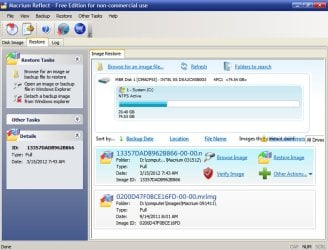
I have 2 Macrium images stored on my PC. One made on Sept 14, 2011 and one from March 15, 2012.

The images are of my C drive and are stored on my D drive. Below is a picture of the Restore tab of Macrium when I open it. You can see that both of the images are recognized in the lower portion of this screen shot.

You say "I have the Restore program open my screen" and nothing shows. Are you referring to what you see when you boot from that boot disc you made or are you referring to a screen as shown below when you open Macrium itself, as opposed to booting from a disc?

If you have no image file stored on your hard drive, you aren't going to see an image file simply by opening Macrium and looking around. What's to see if the image file is stored on a DVD which may be in the closet?

Or am I misunderstanding you entirely?
 

Attachments

  • Untitled-1.jpg
    Untitled-1.jpg
    115.1 KB · Views: 62

My Computer My Computer

At a glance

Windows 7 Home Premium SP1, 64-bitIntel Skylake i5-6600K, not overclocked8 GB HyperX DDR4-2666 (2 x 4 GB)none; graphics are integrated on CPU
Computer type
PC/Desktop
Computer Manufacturer/Model Number
Ignatz Special; 4 speed manual gearbox; factory air conditioning; one of one
OS
Windows 7 Home Premium SP1, 64-bit
CPU
Intel Skylake i5-6600K, not overclocked
Motherboard
AsRock Z170M Extreme 4, micro ATX
Memory
8 GB HyperX DDR4-2666 (2 x 4 GB)
Graphics Card(s)
none; graphics are integrated on CPU
Sound Card
onboard: Realtek ALC1150; external: USB Behringer UF0-202
Monitor(s) Displays
Dell S2340M 23 inch IPS
Screen Resolution
1600 x 900
Hard Drives
System: Crucial MX100 series SSD, 128 GB;
Data: Samsung Spinpoint 103SJ, 1 TB;
Backup: WD Caviar Green WD30EZRX-00D8PB0, 3 TB
PSU
Rosewill SilentNight 500 watt fanless, semi-modular
Case
Antec Solo II
Cooling
Noctua NH-U12S; Noctua F12 intake, Noctua S12A exhaust
Keyboard
Microsoft 200 6JH-00001 USB
Mouse
Dell or Microsoft optical wired; USB
Antivirus
Microsoft Security Essentials and Malwarebytes Premium
Browser
Pale Moon
Other Info
All fans PWM; speeds at idle: CPU circa 500 rpm; intake circa 600 rpm; exhaust circa 600 rpm; CPU temps 27 idle and 47 C load in a warm room (27 C/81 F) when running Intel Extreme Tuning Utility stress test.
Hi, and thanks. I want to test whether I can restore my c: drive (Windows AND my customizations), so I can't restore while being IN Windows, isn't that right? Therefore, I can't do this particular restore operation by using Reflect. Instead I have to use the Linux or Windows PE boot Restore program, isn't that right?

I can boot the Linux Restore program, but as I say it doesn't show any image file, even though I have the image file now sitting in the CD-Rom drive. Interestingly though, it does show a folder structure as existing on the CD-Rom drive disc (on which the image file is sitting), but Linux Restore is not showing any of the contents of any of the folders on the DVD. I can look at the disc inside Windows and, sure enough, the *.mrimg file is sitting there.

By the way, my Linux Restore program is on an entirely separate DVD. (I said earlier that I had popped it onto free space on the 3rd disc of the backup set, but I didn't, I thought better of doing that.)
 

My Computer My Computer

At a glance

Windows 7 Home Premium 64 bit
OS
Windows 7 Home Premium 64 bit
see comments in bold


Hi, and thanks. I want to test whether I can restore my c: drive (Windows AND my customizations), so I can't restore while being IN Windows, isn't that right?

That's correct

Therefore, I can't do this particular restore operation by using Reflect. Instead I have to use the Linux or Windows PE boot Restore program, isn't that right?

Also correct.

I can boot the Linux Restore program, but as I say it doesn't who any image file, even though I have the image file now sitting in the CD-Rom drive.

Open Macrium itself. Make a Linux recovery CD on a separate CD. Boot from that CD and see if you can go several steps into the recovery process.

Report your findings.

The image file "now sitting in the CD-Rom drive" is presumably whatever is on DVD number 3, which you booted from. That may be the problem and why I suggest you use a separate disk. I've never used DVD for imaging, but my understanding is that after you boot from the separate Linux disc, you will be asked to insert Disk 1.

Bottom line--you are in DVD land, which I avoid. Someone else may have further insight.
 

My Computer My Computer

At a glance

Windows 7 Home Premium SP1, 64-bitIntel Skylake i5-6600K, not overclocked8 GB HyperX DDR4-2666 (2 x 4 GB)none; graphics are integrated on CPU
Computer type
PC/Desktop
Computer Manufacturer/Model Number
Ignatz Special; 4 speed manual gearbox; factory air conditioning; one of one
OS
Windows 7 Home Premium SP1, 64-bit
CPU
Intel Skylake i5-6600K, not overclocked
Motherboard
AsRock Z170M Extreme 4, micro ATX
Memory
8 GB HyperX DDR4-2666 (2 x 4 GB)
Graphics Card(s)
none; graphics are integrated on CPU
Sound Card
onboard: Realtek ALC1150; external: USB Behringer UF0-202
Monitor(s) Displays
Dell S2340M 23 inch IPS
Screen Resolution
1600 x 900
Hard Drives
System: Crucial MX100 series SSD, 128 GB;
Data: Samsung Spinpoint 103SJ, 1 TB;
Backup: WD Caviar Green WD30EZRX-00D8PB0, 3 TB
PSU
Rosewill SilentNight 500 watt fanless, semi-modular
Case
Antec Solo II
Cooling
Noctua NH-U12S; Noctua F12 intake, Noctua S12A exhaust
Keyboard
Microsoft 200 6JH-00001 USB
Mouse
Dell or Microsoft optical wired; USB
Antivirus
Microsoft Security Essentials and Malwarebytes Premium
Browser
Pale Moon
Other Info
All fans PWM; speeds at idle: CPU circa 500 rpm; intake circa 600 rpm; exhaust circa 600 rpm; CPU temps 27 idle and 47 C load in a warm room (27 C/81 F) when running Intel Extreme Tuning Utility stress test.
Thanks, ignatzatzonic!


Am currently looking at the separate boot disc with Linux Restore on it, by viewing it in Windows Explorer, and its contents are:

BOOT (folder)
BOOT.CAT
INITRD
KERNEL
MEMTE000.BIN
MEMTEST8.BIN
VERSION

So the above is what is at least getting Linux Restore to boot up. However, once Linux Restore has booted up it does NOT ask me to insert Disc 1 (or any other disc). It asks me to select from its pane the image that I want to restore from . . . but no image shows, although the image is on the DVD in the CD-Rom drive.

But what has emerged now, is that after Linux Restore has booted up, and it shows the folder structure on the DVD on which the Linux Restore program sits, it offers no way of looking at a different disc! So, this tempts me to think I should get Reflect to install the Linux Restore program on the spare space at the end of the 3rd disc of the backup set! It then would have "no excuse" not seeing the image file on the very same disc upon which it itself is sitting? But Reflect will not allow me to install Linux Restore on anything but a fresh separate disc!
 

My Computer My Computer

At a glance

Windows 7 Home Premium 64 bit
OS
Windows 7 Home Premium 64 bit
So, maybe I should get Reflect to install the Linux Restore program on the spare space at the end of the 3rd disc of the backup set? It then has "no excuse" not to see the image file on the very same disc upon which it itself is sitting?
[/COLOR]

I thought you had already put Linux restore program on disc 3 and had no success? That's why I suggested a separate disc.

The fact is, that when dealing with DVDs, no single DVD is going to contain an image file unless the ENTIRE partition can be captured on a single DVD. At best, it will have portions of an image file--as in your case where you used 3 DVDs.

Honestly---there may be a plausible explanation for what is going on but that would have to come from someone experienced in Macrium via DVD. That's not me.

I'd nix the DVD idea entirely and use an HDD.

You can always try the Win PE disc and you may get some other result, but my understanding is that it only provides more "flexibility", so I wouldn't expect anything earthshaking if you try it.
 

My Computer My Computer

At a glance

Windows 7 Home Premium SP1, 64-bitIntel Skylake i5-6600K, not overclocked8 GB HyperX DDR4-2666 (2 x 4 GB)none; graphics are integrated on CPU
Computer type
PC/Desktop
Computer Manufacturer/Model Number
Ignatz Special; 4 speed manual gearbox; factory air conditioning; one of one
OS
Windows 7 Home Premium SP1, 64-bit
CPU
Intel Skylake i5-6600K, not overclocked
Motherboard
AsRock Z170M Extreme 4, micro ATX
Memory
8 GB HyperX DDR4-2666 (2 x 4 GB)
Graphics Card(s)
none; graphics are integrated on CPU
Sound Card
onboard: Realtek ALC1150; external: USB Behringer UF0-202
Monitor(s) Displays
Dell S2340M 23 inch IPS
Screen Resolution
1600 x 900
Hard Drives
System: Crucial MX100 series SSD, 128 GB;
Data: Samsung Spinpoint 103SJ, 1 TB;
Backup: WD Caviar Green WD30EZRX-00D8PB0, 3 TB
PSU
Rosewill SilentNight 500 watt fanless, semi-modular
Case
Antec Solo II
Cooling
Noctua NH-U12S; Noctua F12 intake, Noctua S12A exhaust
Keyboard
Microsoft 200 6JH-00001 USB
Mouse
Dell or Microsoft optical wired; USB
Antivirus
Microsoft Security Essentials and Malwarebytes Premium
Browser
Pale Moon
Other Info
All fans PWM; speeds at idle: CPU circa 500 rpm; intake circa 600 rpm; exhaust circa 600 rpm; CPU temps 27 idle and 47 C load in a warm room (27 C/81 F) when running Intel Extreme Tuning Utility stress test.
OK, thanks, I will give your idea a go, and make a new image backup file on my portable hard drive.

When I then boot up with Linux Restore, and if Linux Restore does SEE the plugged-in portable hard drive, will it show the image file? I suppose I'll just have to wait and see.
 

My Computer My Computer

At a glance

Windows 7 Home Premium 64 bit
OS
Windows 7 Home Premium 64 bit
When I then boot up with Linux Restore, and if Linux Restore does SEE the plugged-in portable hard drive, will it show the image file? I suppose I'll just have to wait and see.

Yeah, that is the acid test. If it won't, it's all pointless. You need to be able to see your image file and your proposed restore destination.

In some cases, the Linux disc won't boot. Your alternative is to make another Linux disc using one of the other methods shown ("compatibility mode" and another that I can't recall). If those fail, you have to go with the Win PE disc.

It can be fussy. At one time, I had to resort to the 3rd method shown in order to get a Linux disc to boot.

But, if it will boot, I've always been able to see my image file on an HDD and my restore destination.

I've always used an internal. You are proposing an external. As far as I recall, that will still work.

But all imaging involves some luck and voodoo. Prepare for it to fail and be willing to do a clean install.
 

My Computer My Computer

At a glance

Windows 7 Home Premium SP1, 64-bitIntel Skylake i5-6600K, not overclocked8 GB HyperX DDR4-2666 (2 x 4 GB)none; graphics are integrated on CPU
Computer type
PC/Desktop
Computer Manufacturer/Model Number
Ignatz Special; 4 speed manual gearbox; factory air conditioning; one of one
OS
Windows 7 Home Premium SP1, 64-bit
CPU
Intel Skylake i5-6600K, not overclocked
Motherboard
AsRock Z170M Extreme 4, micro ATX
Memory
8 GB HyperX DDR4-2666 (2 x 4 GB)
Graphics Card(s)
none; graphics are integrated on CPU
Sound Card
onboard: Realtek ALC1150; external: USB Behringer UF0-202
Monitor(s) Displays
Dell S2340M 23 inch IPS
Screen Resolution
1600 x 900
Hard Drives
System: Crucial MX100 series SSD, 128 GB;
Data: Samsung Spinpoint 103SJ, 1 TB;
Backup: WD Caviar Green WD30EZRX-00D8PB0, 3 TB
PSU
Rosewill SilentNight 500 watt fanless, semi-modular
Case
Antec Solo II
Cooling
Noctua NH-U12S; Noctua F12 intake, Noctua S12A exhaust
Keyboard
Microsoft 200 6JH-00001 USB
Mouse
Dell or Microsoft optical wired; USB
Antivirus
Microsoft Security Essentials and Malwarebytes Premium
Browser
Pale Moon
Other Info
All fans PWM; speeds at idle: CPU circa 500 rpm; intake circa 600 rpm; exhaust circa 600 rpm; CPU temps 27 idle and 47 C load in a warm room (27 C/81 F) when running Intel Extreme Tuning Utility stress test.
Thanks.

If at all possible I want to do a restore using that Macrium image that is stored on the 3 DVDs - because they have the particular state that I want to get back to.

Question: is it possible that when you tell Macrium to make a new Linux Restore boot disc it must LINK that new disc with a particular backup that has already been done? (All that I have done is open Reflect and make a Linux Restore boot disc, so I am wondering if before I do that I need to have on Reflect's screen some reference to the backup in question.) Do you know?

Many thanks for your help.
 

My Computer My Computer

At a glance

Windows 7 Home Premium 64 bit
OS
Windows 7 Home Premium 64 bit
Question: is it possible that when you tell Macrium to make a new Linux Restore boot disc it must LINK that new disc with a particular backup that has already been done? (All that I have done is open Reflect and make a Linux Restore boot disc, so I am wondering if before I do that I need to have on Reflect's screen some reference to the backup in question.)

I very, very seriously doubt it. The Linux discs are intended to work for any and all image files you currently have or may make in the future. I've never even heard a hint from someone that a given Linux disc might be in any way connected to any particular image file. They are "all-purpose".

Some advise to make a new Linux disc periodically as a safety measure against CD degradation or if you change to another newer version of Macrium. I'd also make another one any time I had a significant change in hardware. As I said, the Linux discs can be cranky, depending on your hardware configuration.
 

My Computer My Computer

At a glance

Windows 7 Home Premium SP1, 64-bitIntel Skylake i5-6600K, not overclocked8 GB HyperX DDR4-2666 (2 x 4 GB)none; graphics are integrated on CPU
Computer type
PC/Desktop
Computer Manufacturer/Model Number
Ignatz Special; 4 speed manual gearbox; factory air conditioning; one of one
OS
Windows 7 Home Premium SP1, 64-bit
CPU
Intel Skylake i5-6600K, not overclocked
Motherboard
AsRock Z170M Extreme 4, micro ATX
Memory
8 GB HyperX DDR4-2666 (2 x 4 GB)
Graphics Card(s)
none; graphics are integrated on CPU
Sound Card
onboard: Realtek ALC1150; external: USB Behringer UF0-202
Monitor(s) Displays
Dell S2340M 23 inch IPS
Screen Resolution
1600 x 900
Hard Drives
System: Crucial MX100 series SSD, 128 GB;
Data: Samsung Spinpoint 103SJ, 1 TB;
Backup: WD Caviar Green WD30EZRX-00D8PB0, 3 TB
PSU
Rosewill SilentNight 500 watt fanless, semi-modular
Case
Antec Solo II
Cooling
Noctua NH-U12S; Noctua F12 intake, Noctua S12A exhaust
Keyboard
Microsoft 200 6JH-00001 USB
Mouse
Dell or Microsoft optical wired; USB
Antivirus
Microsoft Security Essentials and Malwarebytes Premium
Browser
Pale Moon
Other Info
All fans PWM; speeds at idle: CPU circa 500 rpm; intake circa 600 rpm; exhaust circa 600 rpm; CPU temps 27 idle and 47 C load in a warm room (27 C/81 F) when running Intel Extreme Tuning Utility stress test.
Thanks, again.

Well, I am now very seriously hacked off!

I went into Windows 7, went into Reflect, selected my backup, and from there made a new Linux Restore boot disc - just in case that boot disc needed to have some information loaded with it.

I then switched off the computer, put the new Linux Restore in the CD-Rom drive, and booted up from the CD-Rom drive. Up comes the Restore screen, the CD-Rom drive is listed and in that drive six folders are listed:

Boot (folder)
dell (folder)
Logs (folder)
preload (folder)
Recovery (folder)
System Volume (folder)

Just to be sure, I look inside each folder but there is no sign of any image. I then put the last disc of the backup set in the CD-Rom drive, and then click Rescan in the Restore Wizard . . . but Restore simply will not obey! It will not budge itself to look into that other drive. It's as if it is saying "Your image has got to be on THIS disc on which the Linux Restore program sits!"

What on earth is it's problem?
 

My Computer My Computer

At a glance

Windows 7 Home Premium 64 bit
OS
Windows 7 Home Premium 64 bit
See comments in bold

I went into Windows 7, went into Reflect, selected my backup, and from there made a new Linux Restore boot disc - just in case that boot disc needed to have some information loaded with it.

I don't follow this. I have no idea what you mean by "selected my backup"??? Just go to "other tasks" menu and then "create rescue media".

I then switched off the computer, put the new Linux Restore in the CD-Rom drive, and booted up from the CD-Rom drive. Up comes the Restore screen, the CD-Rom drive is listed and in that drive six folders are listed:

Boot (folder)
dell (folder)
Logs (folder)
preload (folder)
Recovery (folder)
System Volume (folder)

Just to be sure, I look inside each folder but there is no sign of any image.

Why would you expect an image file to be found in a Linux recovery CD??? The image file is either on your hard drive or on DVDs.

I then put the last disc of the backup set in the CD-Rom drive, and then click Rescan in the Restore Wizard . . . but Restore simply will not obey! It will not budge itself to look into that other drive. It's as if it is saying "Your image has got to be on THIS disc on which the Linux Restore program sits!"

As I understand it, your image file spans 3 DVDs. Why are you putting in the last disc rather than disc 1???

Again, you are in DVD land, with which I am unfamiliar. It may not work with disc 1, but I wouldn't expect anything to be seen on "the last disc".
 

My Computer My Computer

At a glance

Windows 7 Home Premium SP1, 64-bitIntel Skylake i5-6600K, not overclocked8 GB HyperX DDR4-2666 (2 x 4 GB)none; graphics are integrated on CPU
Computer type
PC/Desktop
Computer Manufacturer/Model Number
Ignatz Special; 4 speed manual gearbox; factory air conditioning; one of one
OS
Windows 7 Home Premium SP1, 64-bit
CPU
Intel Skylake i5-6600K, not overclocked
Motherboard
AsRock Z170M Extreme 4, micro ATX
Memory
8 GB HyperX DDR4-2666 (2 x 4 GB)
Graphics Card(s)
none; graphics are integrated on CPU
Sound Card
onboard: Realtek ALC1150; external: USB Behringer UF0-202
Monitor(s) Displays
Dell S2340M 23 inch IPS
Screen Resolution
1600 x 900
Hard Drives
System: Crucial MX100 series SSD, 128 GB;
Data: Samsung Spinpoint 103SJ, 1 TB;
Backup: WD Caviar Green WD30EZRX-00D8PB0, 3 TB
PSU
Rosewill SilentNight 500 watt fanless, semi-modular
Case
Antec Solo II
Cooling
Noctua NH-U12S; Noctua F12 intake, Noctua S12A exhaust
Keyboard
Microsoft 200 6JH-00001 USB
Mouse
Dell or Microsoft optical wired; USB
Antivirus
Microsoft Security Essentials and Malwarebytes Premium
Browser
Pale Moon
Other Info
All fans PWM; speeds at idle: CPU circa 500 rpm; intake circa 600 rpm; exhaust circa 600 rpm; CPU temps 27 idle and 47 C load in a warm room (27 C/81 F) when running Intel Extreme Tuning Utility stress test.
Firstly, answers, ignatzatsonic, to your questions or comments (in bold) are below:

I have no idea what you mean by "selected my backup"??? Just go to "other tasks" menu and then "create rescue media".

Working on the theory that the Restore Boot needed to be linked with a particular backup set, I entered Reflect, found my backup set, brought them to the fore, and then made a new Restore Boot disc. This new disc, however, once used to boot up offered no new possibilities.

Why would you expect an image file to be found in a Linux recovery CD??? The image file is either on your hard drive or on DVDs.

I didn't expect the image to be found IN the Linux Restore screen, but the NAME of the image should appear in the Linux Restore screen.

As I understand it, your image file spans 3 DVDs. Why are you putting in the last disc rather than disc 1???

With some backup systems the vital catalogue information is contained in the last file, if there is more than one. I was just trying all possibilities in order to try and get an image to show in the Linux Restore screen.

And now see next post for the solution of these last dozen harrowing hours! Got out of bed 5 hours ago determined to solve this wretch and at last I have. And thanks for "being there", ignatzatsonic!
 
Last edited:

My Computer My Computer

At a glance

Windows 7 Home Premium 64 bit
OS
Windows 7 Home Premium 64 bit
Macrium Light: solution to DVD hell!

Macrium Reflect Free Edition (64 bit) Version 5, Build 4354 clearly has the following short-coming: when it comes to doing a restore, the Linux Restore program that Reflect Free Edition creates will only allow you to search for a backup image on drives that are connected to your computer AT THE TIME THAT LINUX RESTORE BOOTS UP!

Thus, if your backup image or images are on DVDs and you only have ONE CD-Rom drive, then Reflect Free Edition will not SEE anything you put in the CD-Rom drive AFTER you have booted with Linux Restore.

This means that your image files must be sitting on a drive OTHER THAN the CD-Rom drive, IF you are booting Linux Restore from the CD-Rom drive.

I have solved my problem by plugging my portable USB hard drive into my computer and then copying my set of backup images of my customised c: drive from my three DVDs onto the portable hard drive. (My backup was so big Reflect had stretched it across 3 DVDs, in three different *.mrimg files, 00, 01, and 02, so I copied all three of these files from the 3 DVDs onto the portable hard drive.)

Then, with the portable USB hard drive plugged into the computer I rebooted from the Linux Restore CD. The Linux Restore screen appeared, and, thankfully, it had observed and listed my portable hard drive. I then clicked on the portable hard drive in the Linux Restore screen and there, listed, were the three separate parts of the one backup image of my customised c: drive. I then clicked on the image file ending "00" (the first of the three) and a few clicks later my c: drive was being restored!

I have also learnt that Reflect Free Edition will not allow one to place the Linux Restore program on the same DVD as one of its image files. It insists on placing it on a clean disc. It also insists on placing Linux Restore on CD or DVD. That is, it will not allow you to place it on a portable hard drive.

------------------------------

So, I hope many other people will be saved all the hours of misery I have been through by learning that:

1. Your Linux Restore boot program can only be installed on a CD and must be booted from that CD, in your CD-Rom drive.

2. When you want to restore your backup images they must be on a drive separate from your CD-Rom drive.

3. Whatever other drive your backup images are on, that drive must be plugged in to your computer BEFORE you boot up using the Linux Restore CD. Linux Restore will only search for media that are plugged in and available for view WHILE Linux is loading itself.


Most people only have one CD-Rom drive, but if you have two, then place the first disc of your backup set in your second CD-Rom drive, before booting up with Linux Restore in your main CD-Rom drive.
 

My Computer My Computer

At a glance

Windows 7 Home Premium 64 bit
OS
Windows 7 Home Premium 64 bit
Glad you got it sorted out and a good explanation of what you learned and how to avoid this issue.
 

My Computer My Computer

At a glance

Windows 7 Home Premium SP1, 64-bitIntel Skylake i5-6600K, not overclocked8 GB HyperX DDR4-2666 (2 x 4 GB)none; graphics are integrated on CPU
Computer type
PC/Desktop
Computer Manufacturer/Model Number
Ignatz Special; 4 speed manual gearbox; factory air conditioning; one of one
OS
Windows 7 Home Premium SP1, 64-bit
CPU
Intel Skylake i5-6600K, not overclocked
Motherboard
AsRock Z170M Extreme 4, micro ATX
Memory
8 GB HyperX DDR4-2666 (2 x 4 GB)
Graphics Card(s)
none; graphics are integrated on CPU
Sound Card
onboard: Realtek ALC1150; external: USB Behringer UF0-202
Monitor(s) Displays
Dell S2340M 23 inch IPS
Screen Resolution
1600 x 900
Hard Drives
System: Crucial MX100 series SSD, 128 GB;
Data: Samsung Spinpoint 103SJ, 1 TB;
Backup: WD Caviar Green WD30EZRX-00D8PB0, 3 TB
PSU
Rosewill SilentNight 500 watt fanless, semi-modular
Case
Antec Solo II
Cooling
Noctua NH-U12S; Noctua F12 intake, Noctua S12A exhaust
Keyboard
Microsoft 200 6JH-00001 USB
Mouse
Dell or Microsoft optical wired; USB
Antivirus
Microsoft Security Essentials and Malwarebytes Premium
Browser
Pale Moon
Other Info
All fans PWM; speeds at idle: CPU circa 500 rpm; intake circa 600 rpm; exhaust circa 600 rpm; CPU temps 27 idle and 47 C load in a warm room (27 C/81 F) when running Intel Extreme Tuning Utility stress test.

My Computer My Computer

At a glance

Windows 10 Pro x64 ; Xubuntu x64Intel i7 860 @ 2.80 GHz O/C'ed to 4.0GHz16GB Corsair Vengance DDR3 @ 661 MHz Dual Cha...EVGA NVidia GTX 560 1024MB
Computer type
PC/Desktop
Computer Manufacturer/Model Number
Golden Mk. I.4
OS
Windows 10 Pro x64 ; Xubuntu x64
CPU
Intel i7 860 @ 2.80 GHz O/C'ed to 4.0GHz
Motherboard
Gigabyte P55A-UD3R Rev.1. Award BIOS F13
Memory
16GB Corsair Vengance DDR3 @ 661 MHz Dual Channel (9-9-9-24)
Graphics Card(s)
EVGA NVidia GTX 560 1024MB
Sound Card
Realtek Integrated
Monitor(s) Displays
Dual Samsung SyncMaster 2494HS
Screen Resolution
1920*1080 and 1920*1080
Hard Drives
1*Samsung 840 EVO 120GB SSD;
1*OCZ Vertex 2 60GB SSD;
2*Samsung F3 SpinPoint 1TB in RAID0;
1*Samsung F1 SpinPoint 1TB;
2*Western Digital 1TB External USB 3.0
1*Western Digital 500GB External USB 3.0
1*Seagate 500GB External USB 2.0
PSU
Thermaltake ToughPower QFan 750W
Case
Thermaltake Element S VK60001W2Z
Cooling
Corsair H60 Water Cooling, 2*230mm and 2*80mm case fans
Keyboard
Logitech G110
Mouse
Logitech MX518
Your Linux Restore boot program can only be installed on a CD

You can also place the Linux restore boot program (rescue ISO) on a bootable USB drive too - it doesn't need to be exclusively on a CD/DVD.

http://www.sevenforums.com/tutorials/218920-macrium-reflect-create-bootable-rescue-usb-drive.html

Thanks very much for the workaround method to get Linux Restore onto a USB drive! (However, I've had enough Macrium Misery for one day! :D )
 
Last edited:

My Computer My Computer

At a glance

Windows 7 Home Premium 64 bit
OS
Windows 7 Home Premium 64 bit
A question. When you were looking for the DVD image did you eject the boot disk. Insert the backup DVD, allow it to spin up and press the Rescan button?
 

My Computer My Computer

At a glance

Microsoft Windows 7 Home Premium 64-bit Servi...Intel(R) Core(TM) i3 CPU M 330 @ 2.13GHz8 GB DDR3Intel(R) HD Graphics
Computer type
Laptop
Computer Manufacturer/Model Number
Hewlett-Packard/G62-107SA Notebook
OS
Microsoft Windows 7 Home Premium 64-bit Service Pack 1
CPU
Intel(R) Core(TM) i3 CPU M 330 @ 2.13GHz
Motherboard
Hewlett-Packard 1425
Memory
8 GB DDR3
Graphics Card(s)
Intel(R) HD Graphics
Sound Card
Realtek High Definition Audio
Monitor(s) Displays
Builtin
Screen Resolution
1366 x 768 x 32 bits (4294967296 colors) @ 60 Hz
Hard Drives
250 GB SATA Hard Disk Drive 7200 rpm
2TB Seagate GoFlex USB 2 Drive
1TB Iomega Prestige USB 2 Drive
1.5TB Iomega Prestige USB 2 Drive (Samsung)
2TB WD MyBook Live NAS.
Mouse
Logitech Anywhere MX
Internet Speed
152 Mbs download 10 Mbs upload
Antivirus
Norton 360
Browser
Chrome
Back
Top