Color management app not listing displays in device dropdown

kha0tic

New member
Local time
12:55 AM
Messages
6
I have a curious and troublesome issue. The color management application, colorcpl.exe, is no longer showing my displays in the device dropdown on the Devices tab. The only devices that show in the list are the printers. My displays are visible in Start --> Devices and Printers and in Device Manager. The problem occurs regardless of whether I run colorcpl.exe as a normal user or as the Administrator.

Has anyone seen this before and perhaps knows the fix?
 

My Computer My Computer

At a glance

Windows 7 Home Premium x64
OS
Windows 7 Home Premium x64
Please press Start orb, type Device Manager and hit enter.
In Device Manager open Monitors group. Do you have your displays where?
 

My Computer My Computer

At a glance

Windows 8.1 ; Windows 7 x86 (Dec2008-Jan2013)
Computer type
PC/Desktop
OS
Windows 8.1 ; Windows 7 x86 (Dec2008-Jan2013)
Other Info
"The scale icon at the top right of a post or tutorial is how you can give rep to the member."
Please press Start orb, type Device Manager and hit enter.
In Device Manager open Monitors group. Do you have your displays where?


I already specified that my monitors are visible in the Monitors section of Device Manager
 

My Computer My Computer

At a glance

Windows 7 Home Premium x64
OS
Windows 7 Home Premium x64
Ops, my bad.

Color management - Advanced - Change system defaults. Are displays missing there too?
 

My Computer My Computer

At a glance

Windows 8.1 ; Windows 7 x86 (Dec2008-Jan2013)
Computer type
PC/Desktop
OS
Windows 8.1 ; Windows 7 x86 (Dec2008-Jan2013)
Other Info
"The scale icon at the top right of a post or tutorial is how you can give rep to the member."
Ops, my bad.

Color management - Advanced - Change system defaults. Are displays missing there too?

Yep, they're missing there too
 

My Computer My Computer

At a glance

Windows 7 Home Premium x64
OS
Windows 7 Home Premium x64
Bump. Still not found the solution and been looking everywhere. Perhaps someone else has an idea?
 

My Computer My Computer

At a glance

Windows 7 Home Premium x64
OS
Windows 7 Home Premium x64
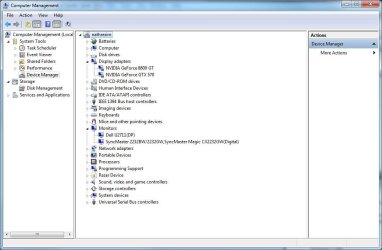
In Device Manager what do you have under Display adapters?

Since in Color management there is a pair - Display and it's adapter (at least for displays), may be a problem is with adapter. Like driver or something else.
 

My Computer My Computer

At a glance

Windows 8.1 ; Windows 7 x86 (Dec2008-Jan2013)
Computer type
PC/Desktop
OS
Windows 8.1 ; Windows 7 x86 (Dec2008-Jan2013)
Other Info
"The scale icon at the top right of a post or tutorial is how you can give rep to the member."
.......
 

Attachments

  • Capture.JPG
    Capture.JPG
    71.2 KB · Views: 38

My Computer My Computer

At a glance

Windows 7 Home Premium x64
OS
Windows 7 Home Premium x64
Did you ever get a solution kha0tic?

I have a similar problem. All was OK with my ATI video card - then it broke and I got an NVIDIA GTX550Ti and now "Display" does not appear as a Device in the Color Management/Devices Panel. I only have Printers and a Scanner showing.

I have done a calibration with X-rite's iProfiler software and have no way to load it. I can see the new profile "Dell U2410 Adobe NVIDIA.icm" under the Color Management/All Profiles tab, so it is there. Color Management just does not think I have a Display. Actually neither of my 2 displays show up.

The 2 displays also appear under CP/Monitors.

Help please...
 
Last edited:

My Computer My Computer

At a glance

Windows 7 Ultimate x64Core i7-34002x4GBNVIDIA GeForce GTX-550 Ti
Computer type
PC/Desktop
Computer Manufacturer/Model Number
Custom
OS
Windows 7 Ultimate x64
CPU
Core i7-3400
Motherboard
ASUS
Memory
2x4GB
Graphics Card(s)
NVIDIA GeForce GTX-550 Ti
Hard Drives
Samsung 830 SSD 240GB
Antivirus
Norton
Browser
IE9
Back
Top