
How do I remove windows 7 from harddrive and questions about SSD

Twisted772

New member
Local time
4:49 PM
Messages
13
Location
Durban
Hi all I am having a little bit of trouble doing things right on my computer not too long ago I restored a system image of my backup to my WDC Hard drive and now I have 2 windows 7 64bit operating systems my hard drives both have windows 7 and obviously this is pointless for me on many levels I also recieved an SSD (Kingston HyperX 120gb) and am wondering if I can make it so that my windows and the programs and all other system files get transferred along with it just my games should remain on the WDC as it is 1tb and my games total to about 380GB is there any way to re-direct it so that my games all read off the WDC? also for the problem I stated earlier normally I would format the hard drive and be done with it but the backup of the system image is there and totals to about 771GB I would like to use that hard drive for that backup incase something unfortunate happens to my data the hard drive contains windows 7 and that's all I want to remove from it the backup must remain any answers would be appreciated.
 

My Computer My Computer

At a glance

Windows 7 Ultimate x64Intel(R) Core(TM) i7-2600K CPU @ 3.40GHz16.0 GB Adata 8GB kit (x2)Gigabyte NVIDIA GeForce GTX 560 Ti + 550 Ti (...
Computer Manufacturer/Model Number
Gigabyte Technology Co., Ltd.
OS
Windows 7 Ultimate x64
CPU
Intel(R) Core(TM) i7-2600K CPU @ 3.40GHz
Motherboard
Z68X-UD3H-B3
Memory
16.0 GB Adata 8GB kit (x2)
Graphics Card(s)
Gigabyte NVIDIA GeForce GTX 560 Ti + 550 Ti (PhysX)
Sound Card
Onboard
Monitor(s) Displays
Samsung T260
Screen Resolution
1920x1200 (60hz)
Hard Drives
Western Digital Green Power 1 TB
Seagate 1.5 TB
Kingston HyperX 120gb
PSU
Coolermaster Silent Pro Gold 1000w
Case
Aerocool XPredator
Cooling
Coolermaster V8
Keyboard
Microsoft Wireless Desktop 2000
Mouse
Microsoft Wireless Desktop 2000
Other Info
There's A Line you cross when bringing your imagination to life. is that line good or bad I can't say I listen to dubstep.
Post a screen shot of Windows Disk Management.

It would help understand what you are talking about if you would use an occasional bit of punctuation, such as a period. And maybe 2 or 3 paragraphs.
 

My Computer My Computer

At a glance

Windows 7 Home Premium SP1, 64-bitIntel Skylake i5-6600K, not overclocked8 GB HyperX DDR4-2666 (2 x 4 GB)none; graphics are integrated on CPU
Computer type
PC/Desktop
Computer Manufacturer/Model Number
Ignatz Special; 4 speed manual gearbox; factory air conditioning; one of one
OS
Windows 7 Home Premium SP1, 64-bit
CPU
Intel Skylake i5-6600K, not overclocked
Motherboard
AsRock Z170M Extreme 4, micro ATX
Memory
8 GB HyperX DDR4-2666 (2 x 4 GB)
Graphics Card(s)
none; graphics are integrated on CPU
Sound Card
onboard: Realtek ALC1150; external: USB Behringer UF0-202
Monitor(s) Displays
Dell S2340M 23 inch IPS
Screen Resolution
1600 x 900
Hard Drives
System: Crucial MX100 series SSD, 128 GB;
Data: Samsung Spinpoint 103SJ, 1 TB;
Backup: WD Caviar Green WD30EZRX-00D8PB0, 3 TB
PSU
Rosewill SilentNight 500 watt fanless, semi-modular
Case
Antec Solo II
Cooling
Noctua NH-U12S; Noctua F12 intake, Noctua S12A exhaust
Keyboard
Microsoft 200 6JH-00001 USB
Mouse
Dell or Microsoft optical wired; USB
Antivirus
Microsoft Security Essentials and Malwarebytes Premium
Browser
Pale Moon
Other Info
All fans PWM; speeds at idle: CPU circa 500 rpm; intake circa 600 rpm; exhaust circa 600 rpm; CPU temps 27 idle and 47 C load in a warm room (27 C/81 F) when running Intel Extreme Tuning Utility stress test.
Sorry about that im really just typing like a mad man but to clarify heres a short summary of what I need done I have 3 harddrives 1 is 1 tb the other is 1.5 tb and the ssd is 120gb. on the 1.5tb I have a backup made by system restore with a system image and It contains windows 7 x64 ultimate I would like to remove all windows files as I have the OS on the 1tb. I want to keep the backup and system image only. As I stated in my previous message I want to move the windows files to my SSD which only has 120gb of space but the thing is I would like to keep my games on the 1tb and use it from there, is it still necessary to post a screenshot or do you get what im trying to do here?
 

My Computer My Computer

At a glance

Windows 7 Ultimate x64Intel(R) Core(TM) i7-2600K CPU @ 3.40GHz16.0 GB Adata 8GB kit (x2)Gigabyte NVIDIA GeForce GTX 560 Ti + 550 Ti (...
Computer Manufacturer/Model Number
Gigabyte Technology Co., Ltd.
OS
Windows 7 Ultimate x64
CPU
Intel(R) Core(TM) i7-2600K CPU @ 3.40GHz
Motherboard
Z68X-UD3H-B3
Memory
16.0 GB Adata 8GB kit (x2)
Graphics Card(s)
Gigabyte NVIDIA GeForce GTX 560 Ti + 550 Ti (PhysX)
Sound Card
Onboard
Monitor(s) Displays
Samsung T260
Screen Resolution
1920x1200 (60hz)
Hard Drives
Western Digital Green Power 1 TB
Seagate 1.5 TB
Kingston HyperX 120gb
PSU
Coolermaster Silent Pro Gold 1000w
Case
Aerocool XPredator
Cooling
Coolermaster V8
Keyboard
Microsoft Wireless Desktop 2000
Mouse
Microsoft Wireless Desktop 2000
Other Info
There's A Line you cross when bringing your imagination to life. is that line good or bad I can't say I listen to dubstep.
No, I don't get it, although English is my mother tongue.

For instance, you say:

"I have a backup made by system restore with a system image".

What does that mean?

System Restore has nothing to do with system images.

System Restore is not a backup.

You can try again with more clarity.

Or post a screenshot and write a few cogent sentences telling us what is in the screen shot.
 

My Computer My Computer

At a glance

Windows 7 Home Premium SP1, 64-bitIntel Skylake i5-6600K, not overclocked8 GB HyperX DDR4-2666 (2 x 4 GB)none; graphics are integrated on CPU
Computer type
PC/Desktop
Computer Manufacturer/Model Number
Ignatz Special; 4 speed manual gearbox; factory air conditioning; one of one
OS
Windows 7 Home Premium SP1, 64-bit
CPU
Intel Skylake i5-6600K, not overclocked
Motherboard
AsRock Z170M Extreme 4, micro ATX
Memory
8 GB HyperX DDR4-2666 (2 x 4 GB)
Graphics Card(s)
none; graphics are integrated on CPU
Sound Card
onboard: Realtek ALC1150; external: USB Behringer UF0-202
Monitor(s) Displays
Dell S2340M 23 inch IPS
Screen Resolution
1600 x 900
Hard Drives
System: Crucial MX100 series SSD, 128 GB;
Data: Samsung Spinpoint 103SJ, 1 TB;
Backup: WD Caviar Green WD30EZRX-00D8PB0, 3 TB
PSU
Rosewill SilentNight 500 watt fanless, semi-modular
Case
Antec Solo II
Cooling
Noctua NH-U12S; Noctua F12 intake, Noctua S12A exhaust
Keyboard
Microsoft 200 6JH-00001 USB
Mouse
Dell or Microsoft optical wired; USB
Antivirus
Microsoft Security Essentials and Malwarebytes Premium
Browser
Pale Moon
Other Info
All fans PWM; speeds at idle: CPU circa 500 rpm; intake circa 600 rpm; exhaust circa 600 rpm; CPU temps 27 idle and 47 C load in a warm room (27 C/81 F) when running Intel Extreme Tuning Utility stress test.
lol okay okay easy now no need to turn this into a fight

First off yes it does go there and look to your left (If your using the category view) Its right there "Create A system image" its backup and restore my bad for saying system restore there's no need for banter about whose english is better frankly I don't care I came here to speak about computers not your "mother tongue".

I mean I have already made a system image on the 1.5tb but there is also an OS (Windows 7) installed I wish to rid myself of all the OS files while retaining the backup files only thus turning this into storage for my backup files.

And lastly I have a new ssd and would like to move the windows on my 1tb to the ssd while keeping the games there so that it can be launched from there and still pickup when I start windows again the second and this issue are two separate ones ....... now do I need to bring out the dictionary or is this good enough teacher?
 

My Computer My Computer

At a glance

Windows 7 Ultimate x64Intel(R) Core(TM) i7-2600K CPU @ 3.40GHz16.0 GB Adata 8GB kit (x2)Gigabyte NVIDIA GeForce GTX 560 Ti + 550 Ti (...
Computer Manufacturer/Model Number
Gigabyte Technology Co., Ltd.
OS
Windows 7 Ultimate x64
CPU
Intel(R) Core(TM) i7-2600K CPU @ 3.40GHz
Motherboard
Z68X-UD3H-B3
Memory
16.0 GB Adata 8GB kit (x2)
Graphics Card(s)
Gigabyte NVIDIA GeForce GTX 560 Ti + 550 Ti (PhysX)
Sound Card
Onboard
Monitor(s) Displays
Samsung T260
Screen Resolution
1920x1200 (60hz)
Hard Drives
Western Digital Green Power 1 TB
Seagate 1.5 TB
Kingston HyperX 120gb
PSU
Coolermaster Silent Pro Gold 1000w
Case
Aerocool XPredator
Cooling
Coolermaster V8
Keyboard
Microsoft Wireless Desktop 2000
Mouse
Microsoft Wireless Desktop 2000
Other Info
There's A Line you cross when bringing your imagination to life. is that line good or bad I can't say I listen to dubstep.
Little confused by what you are saying. Do you have a windows 7 installation on both the 1tb and 1.5tb drive? Either way, don't make this complicated. Just move the backup file to another drive and format it. Then move the backup file back to that drive. No, don't clone your current OS to your new sad, do a clean install and reinstall your games to the second drive.
 

My Computer My Computer

At a glance

Windows 7 Professional 64bitAMD Athlon II X3 44012.0 GB Dual-Channel DDR3 @ 669MHzAMD Radeon HD 6850
OS
Windows 7 Professional 64bit
CPU
AMD Athlon II X3 440
Motherboard
ASUS M4A77TD
Memory
12.0 GB Dual-Channel DDR3 @ 669MHz
Graphics Card(s)
AMD Radeon HD 6850
Sound Card
AMD High Definition Audio Device
Monitor(s) Displays
Dell 317FP, Generic PnP Monitor
Screen Resolution
1920x1080
Hard Drives
112GB OCZ OCZ-AGIL ITY3 SATA Disk Device (SSD)
932GB Western Digital WDC WD10 01FALS-00E3A0 SATA Disk Device (SATA)
466GB Western Digital WDC WD50 01AALS-00L3B2 SATA Disk Device (SATA)
Case
ANTEC 300 ILLUSION
Cooling
CoolerMaster Hyper 212 plus
Other Info
I have two 4GB Corsair XMS3 modules and two 2GB Corsair XMS3 modules.
Thanks I am sorry to all who have suffered the wrath of my terrible punctuation it was an awful awful thing to do and for painting a even worse picture for you

@ tommyg562000 Yes that's exactly whats going on I have 2 of the same os loaded on 2 different drives but nowhere to store my backups you see the file size of my backup totals to exactly 772GB this is why I cannot move it elsewhere, as for installing my windows fresh so your basically saying do not trust the Cloning software provided with my hyperX?
 

My Computer My Computer

At a glance

Windows 7 Ultimate x64Intel(R) Core(TM) i7-2600K CPU @ 3.40GHz16.0 GB Adata 8GB kit (x2)Gigabyte NVIDIA GeForce GTX 560 Ti + 550 Ti (...
Computer Manufacturer/Model Number
Gigabyte Technology Co., Ltd.
OS
Windows 7 Ultimate x64
CPU
Intel(R) Core(TM) i7-2600K CPU @ 3.40GHz
Motherboard
Z68X-UD3H-B3
Memory
16.0 GB Adata 8GB kit (x2)
Graphics Card(s)
Gigabyte NVIDIA GeForce GTX 560 Ti + 550 Ti (PhysX)
Sound Card
Onboard
Monitor(s) Displays
Samsung T260
Screen Resolution
1920x1200 (60hz)
Hard Drives
Western Digital Green Power 1 TB
Seagate 1.5 TB
Kingston HyperX 120gb
PSU
Coolermaster Silent Pro Gold 1000w
Case
Aerocool XPredator
Cooling
Coolermaster V8
Keyboard
Microsoft Wireless Desktop 2000
Mouse
Microsoft Wireless Desktop 2000
Other Info
There's A Line you cross when bringing your imagination to life. is that line good or bad I can't say I listen to dubstep.
What I have pieced together so far:

Your system drive is 1TB. Your backup drive is 1.5TB. You have acquired a 120GB SSD. You have managed to restore a backup of your 1TB drive from your backup drive to your backup drive, hence there are two Windows 7 installations on these two drives, one on each.

You want to remove the Windows 7 installation that you restored from your backup drive to your backup drive, and leave just your backups on your backup drive. You want to move your Windows 7 installation from your 1TB drive to your SSD, but leave your games installations on your 1TB drive.

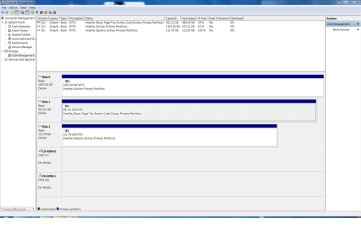
There are way too many assumptions to be made here to try to offer any advice, and I'm not willing to make such assumptions. We need to see a screenshot of your drives as depicted in Disk Management. Right-click on My Computer and select Manage, and when the Computer Management console opens, expand Storage and select Disk Management. Use the Snipping Tool to capture a screenshot of that Disk Management screen, and post it here.

It is quite possible that what you want to accomplish could actually be accomplished, but from the gist of your posts so far, I'm not sure that you have the experience necessary to pull it off (no offense intended).

To sum up, instead of posting further explanations, would you please post a screenshot of Disk Management?
 

My Computer My Computer

At a glance

7 Ultimate x64/7 Home Premium x64Intel i3 550 3.2 GHzCorsair 16 GB DDR3 (4 X 4GB)Intel HD Graphics
Computer Manufacturer/Model Number
Dell Inspiron 580
OS
7 Ultimate x64/7 Home Premium x64
CPU
Intel i3 550 3.2 GHz
Motherboard
Dell/Intel H57
Memory
Corsair 16 GB DDR3 (4 X 4GB)
Graphics Card(s)
Intel HD Graphics
Sound Card
Intel P55 HD Audio
Monitor(s) Displays
LG E2360 LED
Screen Resolution
1920 X 1080
Hard Drives
Seagate 1TB X 2 Internal,
Seagate 1TB eSATA (Backup)
PSU
Dell 300W
Case
Dell Inspiron
Cooling
Dell/Intel
Keyboard
Microsoft Wireless Comfort Keyboard 5000
Mouse
Microsoft Wireless Mouse 5000
Internet Speed
4,000 Mbit DSL
Other Info
Custom Installation -
OS separate on C:
Pagefile Separate on P:
Program Files Separate on U:
Users and ProgramData separate on V:
@ bbearren Thanks for your reply

Your close but the os was installed on the 1.5tb directly from the disk (not my fault) and the backup was there before windows 7 was installed to the 1.5tb, on the 1tb is the windows 7 I am currently using, I could have cleared up the assumptions made by you had you asked me questions about it, you are right about the ssd I want that exact layout windows on the ssd and games on the 1tb, non taken if you dont think im good enough its cool besides I wouldn't need to ask these questions if I was experienced, if you want screenshots of my disk management you got em :
 

Attachments

  • Untitled.jpg
    Untitled.jpg
    162.2 KB · Views: 103

My Computer My Computer

At a glance

Windows 7 Ultimate x64Intel(R) Core(TM) i7-2600K CPU @ 3.40GHz16.0 GB Adata 8GB kit (x2)Gigabyte NVIDIA GeForce GTX 560 Ti + 550 Ti (...
Computer Manufacturer/Model Number
Gigabyte Technology Co., Ltd.
OS
Windows 7 Ultimate x64
CPU
Intel(R) Core(TM) i7-2600K CPU @ 3.40GHz
Motherboard
Z68X-UD3H-B3
Memory
16.0 GB Adata 8GB kit (x2)
Graphics Card(s)
Gigabyte NVIDIA GeForce GTX 560 Ti + 550 Ti (PhysX)
Sound Card
Onboard
Monitor(s) Displays
Samsung T260
Screen Resolution
1920x1200 (60hz)
Hard Drives
Western Digital Green Power 1 TB
Seagate 1.5 TB
Kingston HyperX 120gb
PSU
Coolermaster Silent Pro Gold 1000w
Case
Aerocool XPredator
Cooling
Coolermaster V8
Keyboard
Microsoft Wireless Desktop 2000
Mouse
Microsoft Wireless Desktop 2000
Other Info
There's A Line you cross when bringing your imagination to life. is that line good or bad I can't say I listen to dubstep.
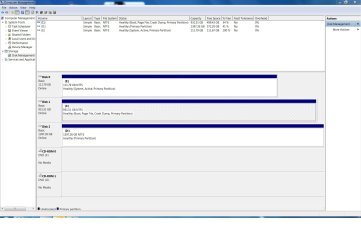
I'd swap the SSD into Disk0 slot so that no preceding HD which is accidentally marked Active can steal it's System Boot files during a Repair. For this reason I'd also mark the HD's Active partitions Inactive now: Partition - Mark as Inactive - Windows 7 Forums

You can move your User data to another HD and link it using Library - Include a Folder - Windows 7 Forums. The best way to organize this is to set up a parallel set of User folders then rightclick to link them to the relevant library.

Once you have it set up as you want, save a Win7 backup image of the SSD to your HD. Delete any OS partitions on HD's once you're sure you have everything.
 
Last edited:
@ gregrocker Thank you for your reply

I Have set both the hard drives to inactive I understand the whole library thing but I seriously would like to avoid re-installing 380GB's of games to my hard drive that would take forever even if I did install some on my ssd it would be one hell of a long ride wouldn't it? but if worse comes to worse I will swallow my lazy attitude and get to it however is this seriously an impossible thing to do? I would much rather avoid having to buy new product keys most of these games have been used on 3 of my computers if anyone knows of a way to make it so that windows can be setup on a ssd while keeping all the game data on the hard drive? and am I doing this whole inactive thing right? :
 

Attachments

  • Untitled.jpg
    Untitled.jpg
    161.1 KB · Views: 24

My Computer My Computer

At a glance

Windows 7 Ultimate x64Intel(R) Core(TM) i7-2600K CPU @ 3.40GHz16.0 GB Adata 8GB kit (x2)Gigabyte NVIDIA GeForce GTX 560 Ti + 550 Ti (...
Computer Manufacturer/Model Number
Gigabyte Technology Co., Ltd.
OS
Windows 7 Ultimate x64
CPU
Intel(R) Core(TM) i7-2600K CPU @ 3.40GHz
Motherboard
Z68X-UD3H-B3
Memory
16.0 GB Adata 8GB kit (x2)
Graphics Card(s)
Gigabyte NVIDIA GeForce GTX 560 Ti + 550 Ti (PhysX)
Sound Card
Onboard
Monitor(s) Displays
Samsung T260
Screen Resolution
1920x1200 (60hz)
Hard Drives
Western Digital Green Power 1 TB
Seagate 1.5 TB
Kingston HyperX 120gb
PSU
Coolermaster Silent Pro Gold 1000w
Case
Aerocool XPredator
Cooling
Coolermaster V8
Keyboard
Microsoft Wireless Desktop 2000
Mouse
Microsoft Wireless Desktop 2000
Other Info
There's A Line you cross when bringing your imagination to life. is that line good or bad I can't say I listen to dubstep.
I don't know of any way you can preserve 380gb of games to run on a 120gb SSD. Even if you imaged only the OS to the SSD, you'd have to figure out a way to redirect the Program Files and registry keys.

You could move your User folders to a HD to later link via Libraries, then uninstall all but 120gb including the OS and preferred Programs on C, image that over to SSD, then reinstall the other programs gradually to HD. It seems like a patchwork mess but you could try it since worst case is you'd have to do a Clean Reinstall which is the preferred path anyway.

It's strange if Win7 isn't yet installed to the SSD why it is marked System Active. It appears to hold the boot files for the HD. How did this happen?
 
Last edited:
Even if you imaged only the OS to the SSD, you'd have to figure out a way to redirect the Program Files and registry keys.

This can indeed be done, but I don't think that the experience level of the OP is up to it (and again, no offense intended). There is a great deal of registry editing involved and Junction Points to create, etc.
 
Last edited:

My Computer My Computer

At a glance

7 Ultimate x64/7 Home Premium x64Intel i3 550 3.2 GHzCorsair 16 GB DDR3 (4 X 4GB)Intel HD Graphics
Computer Manufacturer/Model Number
Dell Inspiron 580
OS
7 Ultimate x64/7 Home Premium x64
CPU
Intel i3 550 3.2 GHz
Motherboard
Dell/Intel H57
Memory
Corsair 16 GB DDR3 (4 X 4GB)
Graphics Card(s)
Intel HD Graphics
Sound Card
Intel P55 HD Audio
Monitor(s) Displays
LG E2360 LED
Screen Resolution
1920 X 1080
Hard Drives
Seagate 1TB X 2 Internal,
Seagate 1TB eSATA (Backup)
PSU
Dell 300W
Case
Dell Inspiron
Cooling
Dell/Intel
Keyboard
Microsoft Wireless Comfort Keyboard 5000
Mouse
Microsoft Wireless Mouse 5000
Internet Speed
4,000 Mbit DSL
Other Info
Custom Installation -
OS separate on C:
Pagefile Separate on P:
Program Files Separate on U:
Users and ProgramData separate on V:
@gregrocker thanks again that clears up alot, I don't know if it does boot should I configure it to boot first in windows or at my bios?

@bbearren I see the more I dig the more my skills come into question once again non-taken but trust me I can handle any amount of work given to me even if it has to do with modifying my registry and is it right that I have my sata drives in ahci mode (all are configured like this from the gsata to the intel sata ports)? I kind of find it weird now that my main drive can be ejected my indeed before I jump to messing with my registry I need to learn more about these things.
 

My Computer My Computer

At a glance

Windows 7 Ultimate x64Intel(R) Core(TM) i7-2600K CPU @ 3.40GHz16.0 GB Adata 8GB kit (x2)Gigabyte NVIDIA GeForce GTX 560 Ti + 550 Ti (...
Computer Manufacturer/Model Number
Gigabyte Technology Co., Ltd.
OS
Windows 7 Ultimate x64
CPU
Intel(R) Core(TM) i7-2600K CPU @ 3.40GHz
Motherboard
Z68X-UD3H-B3
Memory
16.0 GB Adata 8GB kit (x2)
Graphics Card(s)
Gigabyte NVIDIA GeForce GTX 560 Ti + 550 Ti (PhysX)
Sound Card
Onboard
Monitor(s) Displays
Samsung T260
Screen Resolution
1920x1200 (60hz)
Hard Drives
Western Digital Green Power 1 TB
Seagate 1.5 TB
Kingston HyperX 120gb
PSU
Coolermaster Silent Pro Gold 1000w
Case
Aerocool XPredator
Cooling
Coolermaster V8
Keyboard
Microsoft Wireless Desktop 2000
Mouse
Microsoft Wireless Desktop 2000
Other Info
There's A Line you cross when bringing your imagination to life. is that line good or bad I can't say I listen to dubstep.
The boot configuration should be done in BIOS.
Yes, AHCI is the correct mode since all drives are SATA.
As for your main drive now being being ejectable, it is in essence an SDRAM drive. SDRAM is used in USB thumb drives and SD memory cards, which Windows sees as removable drives.
 

My Computer My Computer

At a glance

7 Ultimate x64/7 Home Premium x64Intel i3 550 3.2 GHzCorsair 16 GB DDR3 (4 X 4GB)Intel HD Graphics
Computer Manufacturer/Model Number
Dell Inspiron 580
OS
7 Ultimate x64/7 Home Premium x64
CPU
Intel i3 550 3.2 GHz
Motherboard
Dell/Intel H57
Memory
Corsair 16 GB DDR3 (4 X 4GB)
Graphics Card(s)
Intel HD Graphics
Sound Card
Intel P55 HD Audio
Monitor(s) Displays
LG E2360 LED
Screen Resolution
1920 X 1080
Hard Drives
Seagate 1TB X 2 Internal,
Seagate 1TB eSATA (Backup)
PSU
Dell 300W
Case
Dell Inspiron
Cooling
Dell/Intel
Keyboard
Microsoft Wireless Comfort Keyboard 5000
Mouse
Microsoft Wireless Mouse 5000
Internet Speed
4,000 Mbit DSL
Other Info
Custom Installation -
OS separate on C:
Pagefile Separate on P:
Program Files Separate on U:
Users and ProgramData separate on V:
1. Here is my lilttel guide on how to get rid of the double boot: http://www.sevenforums.com/tutorials/210983-dual-boot-delete-os.html

2. Another guide on how to transfer your OS to a SSD: http://www.sevenforums.com/tutorials/149969-ssd-install-transfer-operating-system.html

3. Prerequisite for an SSD transfer is that your data on your current C drive is less than the size of the SSD. That leaves the games out. Those you have to reinstall and direct to a folder on the HDD during installation. No way around that.
 

My Computer My Computer

At a glance

Vista, Windows7, Mint Mate, Zorin, Windows 8from 1.6GHz Duo to i7
Computer Manufacturer/Model Number
HP, Dell, Gateway, Toshiba - 4 laptops and 2 desktops
OS
Vista, Windows7, Mint Mate, Zorin, Windows 8
CPU
from 1.6GHz Duo to i7
Monitor(s) Displays
2x HP w2207
Hard Drives
5x HDD, 7x SSD, 12x Externals
Keyboard
with trackball - no mices
Mouse
Trackball mice
Internet Speed
DSL 6000
Prerequisite for an SSD transfer is that your data on your current C drive is less than the size of the SSD. That leaves the games out. Those you have to reinstall and direct to a folder on the HDD during installation. No way around that.
Not quite true; see post #13.
 

My Computer My Computer

At a glance

7 Ultimate x64/7 Home Premium x64Intel i3 550 3.2 GHzCorsair 16 GB DDR3 (4 X 4GB)Intel HD Graphics
Computer Manufacturer/Model Number
Dell Inspiron 580
OS
7 Ultimate x64/7 Home Premium x64
CPU
Intel i3 550 3.2 GHz
Motherboard
Dell/Intel H57
Memory
Corsair 16 GB DDR3 (4 X 4GB)
Graphics Card(s)
Intel HD Graphics
Sound Card
Intel P55 HD Audio
Monitor(s) Displays
LG E2360 LED
Screen Resolution
1920 X 1080
Hard Drives
Seagate 1TB X 2 Internal,
Seagate 1TB eSATA (Backup)
PSU
Dell 300W
Case
Dell Inspiron
Cooling
Dell/Intel
Keyboard
Microsoft Wireless Comfort Keyboard 5000
Mouse
Microsoft Wireless Mouse 5000
Internet Speed
4,000 Mbit DSL
Other Info
Custom Installation -
OS separate on C:
Pagefile Separate on P:
Program Files Separate on U:
Users and ProgramData separate on V:
@ bbearren thanks for the info on where to boot.

@ gregrocker I was on dual boot this however was definitely from the 1.5tb which as of recently has been formatted and had the settings on msconfig modified I have backed up my system image from the 1.5 tb onto an external harddrive I tried to boot first with the ssd but its just taking me back to my western digital boot so where do we go from here?

@ whs thanks for the tutorials will read the 2nd one later however my second windows was removed and does not dual boot anymore will it tell me if I left something out? cause I disabled booting from that drive there
 

My Computer My Computer

At a glance

Windows 7 Ultimate x64Intel(R) Core(TM) i7-2600K CPU @ 3.40GHz16.0 GB Adata 8GB kit (x2)Gigabyte NVIDIA GeForce GTX 560 Ti + 550 Ti (...
Computer Manufacturer/Model Number
Gigabyte Technology Co., Ltd.
OS
Windows 7 Ultimate x64
CPU
Intel(R) Core(TM) i7-2600K CPU @ 3.40GHz
Motherboard
Z68X-UD3H-B3
Memory
16.0 GB Adata 8GB kit (x2)
Graphics Card(s)
Gigabyte NVIDIA GeForce GTX 560 Ti + 550 Ti (PhysX)
Sound Card
Onboard
Monitor(s) Displays
Samsung T260
Screen Resolution
1920x1200 (60hz)
Hard Drives
Western Digital Green Power 1 TB
Seagate 1.5 TB
Kingston HyperX 120gb
PSU
Coolermaster Silent Pro Gold 1000w
Case
Aerocool XPredator
Cooling
Coolermaster V8
Keyboard
Microsoft Wireless Desktop 2000
Mouse
Microsoft Wireless Desktop 2000
Other Info
There's A Line you cross when bringing your imagination to life. is that line good or bad I can't say I listen to dubstep.
The SSD listings show it is empty but yet it holds the System Active boot files for the HD. How did this happen? Did you run Repairs on the HD while SSD was plugged in and marked Active?

Or is Win7 installed to the SSD and the listings showing it empty are incorrect?
 
Last edited:
I also recieved an SSD (Kingston HyperX 120gb) and am wondering if I can make it so that my windows and the programs and all other system files get transferred along with it just my games should remain on the WDC
The following isn't quite clear to me: have you actually installed Windows 7 on the SSD?
 

My Computer My Computer

At a glance

7 Ultimate x64/7 Home Premium x64Intel i3 550 3.2 GHzCorsair 16 GB DDR3 (4 X 4GB)Intel HD Graphics
Computer Manufacturer/Model Number
Dell Inspiron 580
OS
7 Ultimate x64/7 Home Premium x64
CPU
Intel i3 550 3.2 GHz
Motherboard
Dell/Intel H57
Memory
Corsair 16 GB DDR3 (4 X 4GB)
Graphics Card(s)
Intel HD Graphics
Sound Card
Intel P55 HD Audio
Monitor(s) Displays
LG E2360 LED
Screen Resolution
1920 X 1080
Hard Drives
Seagate 1TB X 2 Internal,
Seagate 1TB eSATA (Backup)
PSU
Dell 300W
Case
Dell Inspiron
Cooling
Dell/Intel
Keyboard
Microsoft Wireless Comfort Keyboard 5000
Mouse
Microsoft Wireless Mouse 5000
Internet Speed
4,000 Mbit DSL
Other Info
Custom Installation -
OS separate on C:
Pagefile Separate on P:
Program Files Separate on U:
Users and ProgramData separate on V:
Back
Top