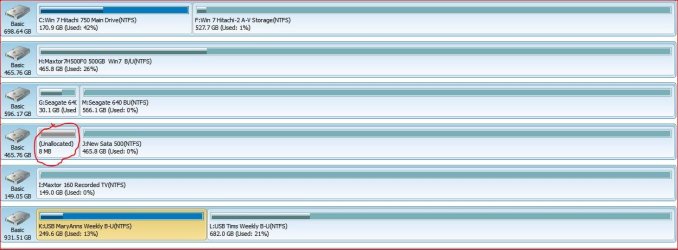
In formating and partitioning the above new drive...I'm getting an unallocated 8 gig section at the front of the rive.. Can not eliminate this by either reforming and/or expanding good partition
Per the attached jpg...non or my other drives have this issue ?
Is it me or the drive ?
Thanks....TRinAZ
Attachments
unallocated.jpg
81.7 KB
· Views: 23
My Computer
At a glance
Windows 7 Pro 64bit SP1AMD FX-6100 Six-Core Processor2ea Corsair-1333MHz-PC3-10666-240-pin-CMX4GX3...NVIDIA GeForce GT 630 - 1023MB (EVGA)
In formating and partitioning the above new drive...I'm getting an unallocated 8 gig section at the front of the rive.. Can not eliminate this by either reforming and/or expanding good partition
Per the attached jpg...non or my other drives have this issue ?
I have read explanations of why that occurs. I don't recall all the details, but if memory serves there isn't much you can do about it. I think some Disk Management/Partition Management programs won't even see it.
You might (?) be able to get around it with a clean or clean all command from Diskpart?
It's so very small, I'd forget about it unless you are obsessive, like me. In which case, others may remember if there is a specific solution.
My Computer
At a glance
Windows 7 Home Premium SP1, 64-bitIntel Skylake i5-6600K, not overclocked8 GB HyperX DDR4-2666 (2 x 4 GB)none; graphics are integrated on CPU
Computer type
PC/Desktop
Computer Manufacturer/Model Number
Ignatz Special; 4 speed manual gearbox; factory air conditioning; one of one
OS
Windows 7 Home Premium SP1, 64-bit
CPU
Intel Skylake i5-6600K, not overclocked
Motherboard
AsRock Z170M Extreme 4, micro ATX
Memory
8 GB HyperX DDR4-2666 (2 x 4 GB)
Graphics Card(s)
none; graphics are integrated on CPU
Sound Card
onboard: Realtek ALC1150; external: USB Behringer UF0-202
Monitor(s) Displays
Dell S2340M 23 inch IPS
Screen Resolution
1600 x 900
Hard Drives
System: Crucial MX100 series SSD, 128 GB;
Data: Samsung Spinpoint 103SJ, 1 TB;
Backup: WD Caviar Green WD30EZRX-00D8PB0, 3 TB
Microsoft Security Essentials and Malwarebytes Premium
Browser
Pale Moon
Other Info
All fans PWM; speeds at idle: CPU circa 500 rpm; intake circa 600 rpm; exhaust circa 600 rpm; CPU temps 27 idle and 47 C load in a warm room (27 C/81 F) when running Intel Extreme Tuning Utility stress test.
Windows likes to create buffer space in the beginning and/or end of a drive to use for tasks like creating Dynamic Disks. If you formatted the drive using Disk Management or the Windows install DVD then that is where it came from.
You can use Partition Wizard Bootable CD to reclaim the space. A very easy and safe operation, provided you will never use Dynamic Disks.