BSOD after upgrading to Windows 7 Ultimate

ocswales

New member
Local time
8:37 PM
Messages
12
Hello!

About a week ago I updated my computer to Windows 7 Ultimate. Since then, 90% of the time, when I boot up the computer a black screen appears on my screen and no desktop shows up. I can't do anything like get to to a task manager but the computer works fine in safe mode. Strangely, if I leave the computer for a couple of hours the black screen disappears and everything works perfectly.

Any help with fixing this problem would be hugely appreciated. Thank you :)
 

My Computer My Computer

At a glance

Windows 7 Ultimate
OS
Windows 7 Ultimate
When does the black screen appear? After windows is starting animation, or after logon?
Has it a blinking cursor? (most of time top-left of screen)
 

My Computer My Computer

At a glance

Microsoft Windows 7 Home Premium 64-bits 7601...Intel(R) Core(TM) i3 CPU M 370 @ 2.40GHz4,00 GBATI Mobility Radeon HD 5400 Series
Computer type
Laptop
Computer Manufacturer/Model Number
ACER ASPIRE 5742G
OS
Microsoft Windows 7 Home Premium 64-bits 7601 Multiprocessor Free Service Pack 1
CPU
Intel(R) Core(TM) i3 CPU M 370 @ 2.40GHz
Motherboard
Acer Aspire 5742G
Memory
4,00 GB
Graphics Card(s)
ATI Mobility Radeon HD 5400 Series
Sound Card
(1) AMD High Definition Audio Device (2) Realtek High Defi
Screen Resolution
1366 x 768 x 32 bits (4294967296 colors) @ 60 Hz
Hard Drives
WDC WD5000BEVT-22ZAT0
It appears after the Windows flag comes up on screen so the logon screen doesn't come up. However, I can log on to my user if I press enter on the log on screen but I just can't see anything because of the black screen. And no, there is no blinking cursor.
 

My Computer My Computer

At a glance

Windows 7 Ultimate
OS
Windows 7 Ultimate
It appears after the Windows flag comes up on screen so the logon screen doesn't come up. However, I can log on to my user if I press enter on the log on screen but I just can't see anything because of the black screen. And no, there is no blinking cursor.
after windows starting flag the logon screen appear after a short black screen. The short black is because switching resolution I think. At least so it should work. If pressing enter now, it logs in under first name listed in logon menu and desktop icons appear.

How do you know it logs on succesfully??? You only see black screen so how do you know?
 

My Computer My Computer

At a glance

Microsoft Windows 7 Home Premium 64-bits 7601...Intel(R) Core(TM) i3 CPU M 370 @ 2.40GHz4,00 GBATI Mobility Radeon HD 5400 Series
Computer type
Laptop
Computer Manufacturer/Model Number
ACER ASPIRE 5742G
OS
Microsoft Windows 7 Home Premium 64-bits 7601 Multiprocessor Free Service Pack 1
CPU
Intel(R) Core(TM) i3 CPU M 370 @ 2.40GHz
Motherboard
Acer Aspire 5742G
Memory
4,00 GB
Graphics Card(s)
ATI Mobility Radeon HD 5400 Series
Sound Card
(1) AMD High Definition Audio Device (2) Realtek High Defi
Screen Resolution
1366 x 768 x 32 bits (4294967296 colors) @ 60 Hz
Hard Drives
WDC WD5000BEVT-22ZAT0
I can hear the log on noise it makes so I can tell it's logged on! The black screen is just in the way and then, after two hours, everything works. I have tried to reinstall Service Pack 1 and done a bunch of other recommended stuff but nothing has worked.
 

My Computer My Computer

At a glance

Windows 7 Ultimate
OS
Windows 7 Ultimate
I can hear the log on noise it makes so I can tell it's logged on! The black screen is just in the way and then, after two hours, everything works. I have tried to reinstall Service Pack 1 and done a bunch of other recommended stuff but nothing has worked.
If course the cool logon sound was appearing in your ears ;-) didn't think of that
 

My Computer My Computer

At a glance

Microsoft Windows 7 Home Premium 64-bits 7601...Intel(R) Core(TM) i3 CPU M 370 @ 2.40GHz4,00 GBATI Mobility Radeon HD 5400 Series
Computer type
Laptop
Computer Manufacturer/Model Number
ACER ASPIRE 5742G
OS
Microsoft Windows 7 Home Premium 64-bits 7601 Multiprocessor Free Service Pack 1
CPU
Intel(R) Core(TM) i3 CPU M 370 @ 2.40GHz
Motherboard
Acer Aspire 5742G
Memory
4,00 GB
Graphics Card(s)
ATI Mobility Radeon HD 5400 Series
Sound Card
(1) AMD High Definition Audio Device (2) Realtek High Defi
Screen Resolution
1366 x 768 x 32 bits (4294967296 colors) @ 60 Hz
Hard Drives
WDC WD5000BEVT-22ZAT0
Is this a laptop or deskop pc?
 

My Computer My Computer

At a glance

Microsoft Windows 7 Home Premium 64-bits 7601...Intel(R) Core(TM) i3 CPU M 370 @ 2.40GHz4,00 GBATI Mobility Radeon HD 5400 Series
Computer type
Laptop
Computer Manufacturer/Model Number
ACER ASPIRE 5742G
OS
Microsoft Windows 7 Home Premium 64-bits 7601 Multiprocessor Free Service Pack 1
CPU
Intel(R) Core(TM) i3 CPU M 370 @ 2.40GHz
Motherboard
Acer Aspire 5742G
Memory
4,00 GB
Graphics Card(s)
ATI Mobility Radeon HD 5400 Series
Sound Card
(1) AMD High Definition Audio Device (2) Realtek High Defi
Screen Resolution
1366 x 768 x 32 bits (4294967296 colors) @ 60 Hz
Hard Drives
WDC WD5000BEVT-22ZAT0
Haha, of course ;) its a desktop pc.
 

My Computer My Computer

At a glance

Windows 7 Ultimate
OS
Windows 7 Ultimate
Uninstall your Display Adapter drivers while in Safe Mode, then reboot, and see if that helps - then download and install a fresh set.
 

My Computer My Computer

At a glance

Win 7 x64 Home Premium (and x86 VirtualBox VM...i3 370M/i7 6500U8GB - finally :)/8GBit's an i3, dude!/dual Intel&nVidia
Computer type
Laptop
Computer Manufacturer/Model Number
Asus K52F or Lenovo B51-80
OS
Win 7 x64 Home Premium (and x86 VirtualBox VM)/Win10
CPU
i3 370M/i7 6500U
Motherboard
Asus/Lenovo
Memory
8GB - finally :)/8GB
Graphics Card(s)
it's an i3, dude!/dual Intel&nVidia
Sound Card
onboard
Monitor(s) Displays
15.6" built-in
Screen Resolution
1366x768/1920x1080
Hard Drives
750GB Seagate internal
Sundry external drives attached to other computers on the local network
1TB SSD on the Lenovo
PSU
n/a
Internet Speed
as much as I can get - usually on a dongle/phone, so <1MB/s
Antivirus
MSE/Defender
Browser
IE11/12/Edge/Chrome/FF(if I must)
I have the same problem....Think it's just screen refresh rate.... :)
 

My Computer My Computer

At a glance

windows 7 home premium x64AMD Athlon 64 x2 5200+7.00GBNVIDIA GeForce 9600GT
OS
windows 7 home premium x64
CPU
AMD Athlon 64 x2 5200+
Motherboard
M2N-SLI DELUXE
Memory
7.00GB
Graphics Card(s)
NVIDIA GeForce 9600GT
Sound Card
High Definition Audio Device
Monitor(s) Displays
Q19wb
Screen Resolution
1400 x 900
Hard Drives
ST325082 0AS SCSI 232.88 GB
Switch off monitor when having no problems and switch on again. Works?
Now do the same when logged on with black screen. Post results.
 

My Computer My Computer

At a glance

Microsoft Windows 7 Home Premium 64-bits 7601...Intel(R) Core(TM) i3 CPU M 370 @ 2.40GHz4,00 GBATI Mobility Radeon HD 5400 Series
Computer type
Laptop
Computer Manufacturer/Model Number
ACER ASPIRE 5742G
OS
Microsoft Windows 7 Home Premium 64-bits 7601 Multiprocessor Free Service Pack 1
CPU
Intel(R) Core(TM) i3 CPU M 370 @ 2.40GHz
Motherboard
Acer Aspire 5742G
Memory
4,00 GB
Graphics Card(s)
ATI Mobility Radeon HD 5400 Series
Sound Card
(1) AMD High Definition Audio Device (2) Realtek High Defi
Screen Resolution
1366 x 768 x 32 bits (4294967296 colors) @ 60 Hz
Hard Drives
WDC WD5000BEVT-22ZAT0
So when I go into Device Manager and I open Display Adapters, should I uninstall NVIDIA GeForce Go 7400?
It won't stop my monitor from working or anything??!
 

My Computer My Computer

At a glance

Windows 7 Ultimate
OS
Windows 7 Ultimate
Kaktussoft: switching the monitor on and off again works fine normally but with the black screen it doesnt change anything :(
 

My Computer My Computer

At a glance

Windows 7 Ultimate
OS
Windows 7 Ultimate
I just uninstalled the display adapter and restarted it. Basically, the actual computer works fine but it looks like it is in safe mode as the screen in fuzzy and everything is bigger. So, I tried to reinstall the driver but the computer told me it had already done that so I just turned the computer off again. Now, I have just restarted the computer but have the black screen again...so I'll have to wait a couple of hours before I see if anything has changed!
 

My Computer My Computer

At a glance

Windows 7 Ultimate
OS
Windows 7 Ultimate
Do you really have to wait a couple of hours??? Very sure?
Computers don't know how long they are power off ;-)

Is the computer/monitor overheated?? that's the only thing I think about if it's always true.
 

My Computer My Computer

At a glance

Microsoft Windows 7 Home Premium 64-bits 7601...Intel(R) Core(TM) i3 CPU M 370 @ 2.40GHz4,00 GBATI Mobility Radeon HD 5400 Series
Computer type
Laptop
Computer Manufacturer/Model Number
ACER ASPIRE 5742G
OS
Microsoft Windows 7 Home Premium 64-bits 7601 Multiprocessor Free Service Pack 1
CPU
Intel(R) Core(TM) i3 CPU M 370 @ 2.40GHz
Motherboard
Acer Aspire 5742G
Memory
4,00 GB
Graphics Card(s)
ATI Mobility Radeon HD 5400 Series
Sound Card
(1) AMD High Definition Audio Device (2) Realtek High Defi
Screen Resolution
1366 x 768 x 32 bits (4294967296 colors) @ 60 Hz
Hard Drives
WDC WD5000BEVT-22ZAT0
Yep! Definitely a couple of hours...it won't respond to anything apart from a hard shut down. And no, the monitor does not appear to be overheating or anything.
 

My Computer My Computer

At a glance

Windows 7 Ultimate
OS
Windows 7 Ultimate
Yep! Definitely a couple of hours...it won't respond to anything apart from a hard shut down. And no, the monitor does not appear to be overheating or anything.
pressing power off button once should normally shutdown the machine. Does it as you see the desktop with icons? Does it when having black screen?
 

My Computer My Computer

At a glance

Microsoft Windows 7 Home Premium 64-bits 7601...Intel(R) Core(TM) i3 CPU M 370 @ 2.40GHz4,00 GBATI Mobility Radeon HD 5400 Series
Computer type
Laptop
Computer Manufacturer/Model Number
ACER ASPIRE 5742G
OS
Microsoft Windows 7 Home Premium 64-bits 7601 Multiprocessor Free Service Pack 1
CPU
Intel(R) Core(TM) i3 CPU M 370 @ 2.40GHz
Motherboard
Acer Aspire 5742G
Memory
4,00 GB
Graphics Card(s)
ATI Mobility Radeon HD 5400 Series
Sound Card
(1) AMD High Definition Audio Device (2) Realtek High Defi
Screen Resolution
1366 x 768 x 32 bits (4294967296 colors) @ 60 Hz
Hard Drives
WDC WD5000BEVT-22ZAT0
It sounds as if you reinstalled teh same set of drivers as are currently failing - you need to download and install a completely new set, from the manufacturer's website.
I do NOT think it's a hardware problem, but a software one, and the system is locking out the drivers for some reason.
 

My Computer My Computer

At a glance

Win 7 x64 Home Premium (and x86 VirtualBox VM...i3 370M/i7 6500U8GB - finally :)/8GBit's an i3, dude!/dual Intel&nVidia
Computer type
Laptop
Computer Manufacturer/Model Number
Asus K52F or Lenovo B51-80
OS
Win 7 x64 Home Premium (and x86 VirtualBox VM)/Win10
CPU
i3 370M/i7 6500U
Motherboard
Asus/Lenovo
Memory
8GB - finally :)/8GB
Graphics Card(s)
it's an i3, dude!/dual Intel&nVidia
Sound Card
onboard
Monitor(s) Displays
15.6" built-in
Screen Resolution
1366x768/1920x1080
Hard Drives
750GB Seagate internal
Sundry external drives attached to other computers on the local network
1TB SSD on the Lenovo
PSU
n/a
Internet Speed
as much as I can get - usually on a dongle/phone, so <1MB/s
Antivirus
MSE/Defender
Browser
IE11/12/Edge/Chrome/FF(if I must)
The power off button does work, I just checked and it does shut down when on the black screen.
NoelDP: so if I just went to the Microsoft website and got a new set?? I'll try that when my computer decides to work again, thank you!
 

My Computer My Computer

At a glance

Windows 7 Ultimate
OS
Windows 7 Ultimate
The power off button does work, I just checked and it does shut down when on the black screen.
NoelDP: so if I just went to the Microsoft website and got a new set?? I'll try that when my computer decides to work again, thank you!
Boot in Safe Mode with Networking (http://www.sevenforums.com/tutorials/666-advanced-boot-options.html)
Download the latest Nvidia Display Driver Drivers - Download NVIDIA Drivers

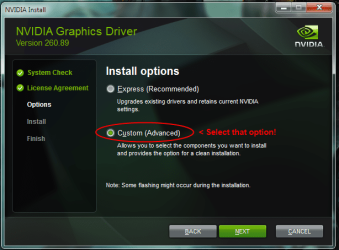
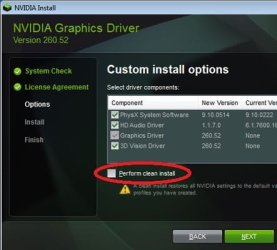
Select 'Custom' and check 'clean install', the additional components such as 3D Vision & HD Audio aren't necessary

nvidia4.png

new_driver3.jpg
 

My Computer My Computer

At a glance

Windows 10 Pro x64, Arch LinuxIntel Core 2 Quad Q8200 OC'd 3.08GHz8GB DDR2 900MhzMSI GT730 2GB GDDR5 (Kepler)
Computer type
PC/Desktop
Computer Manufacturer/Model Number
Custom Build
OS
Windows 10 Pro x64, Arch Linux
CPU
Intel Core 2 Quad Q8200 OC'd 3.08GHz
Motherboard
Asus Rampage formula LGA775
Memory
8GB DDR2 900Mhz
Graphics Card(s)
MSI GT730 2GB GDDR5 (Kepler)
Sound Card
Supreme FX2
Monitor(s) Displays
Samsung LS22F350 LED
Screen Resolution
1080P
Hard Drives
Kingston SSDNow UV400 120GB, 500GB Hitachi, 2TB Samsung, 500GB Seagate FreeAgent, 640GB Samsung, 160GB Toshiba (Arch)
PSU
AeroCool 500W Bronze
Cooling
Cooler Master V6 + 3X fans
Keyboard
Prolink keyboard
Mouse
Logitech M705
Internet Speed
1MiB/s
Browser
Chrome Beta
Back
Top