Unable to install games on Steam

SNinjaMedia

New member
Local time
10:45 AM
Messages
7
A few months after I got my computer refitted with Windows 7, I started getting a window every time I clicked on...say...Internet Explorer. It says: "Choose the program you want to use to open this file:
File: iexplore.exe" Then it shows a bunch of programs. I select "iexplore.exe", but the internet explorer window just opens and closes. Thankfully in the next few days after experiencing this problem, I found a way to get on the internet without the dissappearing window. However, when I bought the game James Bond: Quantum of Solace from Steam(my favorite gaming download site). Unfortunately, when I first launch it after waiting for hours and hours for the download to finish, the window pops up and demands for SteamService.exe. So I locate SteamService.exe(which I know is necessary to help install the game)but the same thing happened. A little window popped up and closed itself all at the same time. This happened for Star Trek Online, and now GTA IV! :mad: Please help me! I would really appreciate it!
P.S. For some reason Default Programs Editor won't open, even when I click the right file and association, so that's completely out of the question.
 

My Computer My Computer

At a glance

Windows 7 Home Premium 32bit
OS
Windows 7 Home Premium 32bit
First off, Welcome to SevenForums.

I'm not sure myself, I'd need a little time to look over the problem, but I'm sure somebody about here could answer quicker.

In the meantime, for your problem specifically with Steam, they have their own forums, so you may find another user who has a had a similar problem, or can help you with yours.
 

My Computer My Computer

At a glance

Windows 7 Ultimate 64bitIntel Core i5 2500k @ 3.3GHz (soon to change)8GB 1333MHz DDR3 (Generic)MSI Nvidia GTX 550 Ti 1024MB GDDR5
Computer Manufacturer/Model Number
Custom Build
OS
Windows 7 Ultimate 64bit
CPU
Intel Core i5 2500k @ 3.3GHz (soon to change)
Motherboard
ASUS P8Z 68-V LX
Memory
8GB 1333MHz DDR3 (Generic)
Graphics Card(s)
MSI Nvidia GTX 550 Ti 1024MB GDDR5
Monitor(s) Displays
Bush TV
Screen Resolution
1920x1080
Hard Drives
OCZ Agility 3 60GB SSD
Seagate Barracuda Sata 3 500GB HDD
PSU
EZCOOL Ambience 80+ 700W
Case
Coolermaster 430 Elite
Cooling
Air
Keyboard
Tesco Multimedia Keyboard
Mouse
Technika wireless mouse
Do you need a screenshot? I could send you a couple. And I'm sure it's a system problem, not a Steam problem, but I'll check anyway. Thanks for your help!
Edit: Nope. I scored the forums and didn't find anything usefull.
 

My Computer My Computer

At a glance

Windows 7 Home Premium 32bit
OS
Windows 7 Home Premium 32bit
A screenshot would be useful, yes. It would be better though if you could upload it to, say, imageshack or another similar service, then include it in your post. If it turns out I can't help, then the picture will be there for anybody else looking into your problem.
 

My Computer My Computer

At a glance

Windows 7 Ultimate 64bitIntel Core i5 2500k @ 3.3GHz (soon to change)8GB 1333MHz DDR3 (Generic)MSI Nvidia GTX 550 Ti 1024MB GDDR5
Computer Manufacturer/Model Number
Custom Build
OS
Windows 7 Ultimate 64bit
CPU
Intel Core i5 2500k @ 3.3GHz (soon to change)
Motherboard
ASUS P8Z 68-V LX
Memory
8GB 1333MHz DDR3 (Generic)
Graphics Card(s)
MSI Nvidia GTX 550 Ti 1024MB GDDR5
Monitor(s) Displays
Bush TV
Screen Resolution
1920x1080
Hard Drives
OCZ Agility 3 60GB SSD
Seagate Barracuda Sata 3 500GB HDD
PSU
EZCOOL Ambience 80+ 700W
Case
Coolermaster 430 Elite
Cooling
Air
Keyboard
Tesco Multimedia Keyboard
Mouse
Technika wireless mouse
Your problem would either be that your save place (usually Local Disk C) is too full for you to install games, or that the game does not the right system specs as yours, making it unable to install. Could you send us a screenshot of the problem please? It would really help us if we knew what the problem was.
 

My Computer My Computer

At a glance

Windows 7 Professional 32-bit (6.1, Build 7600)4096MB RAMRadeon ATI HD4870
Computer Manufacturer/Model Number
Hewlett-Packard
OS
Windows 7 Professional 32-bit (6.1, Build 7600)
Memory
4096MB RAM
Graphics Card(s)
Radeon ATI HD4870
Monitor(s) Displays
NVIDIA GeForce GT220
Screen Resolution
1680 x 1050
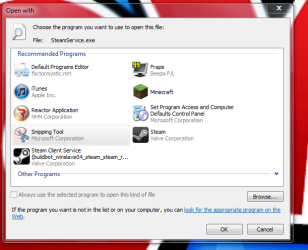
No, I know for a fact I have all the space I need; I installed all 3 games successfully. This wierd window always pops up when I'm about to preform first time set up: (see attachment) Then after I select SteamService.exe (Steam Client Service [buildbot_winslave04_steam_steam_r...), a small window pops up for half a millisecond and then dissappears mysteriously.
 

Attachments

  • Capture.PNG
    Capture.PNG
    31 KB · Views: 19

My Computer My Computer

At a glance

Windows 7 Home Premium 32bit
OS
Windows 7 Home Premium 32bit
No, I know for a fact I have all the space I need; I installed all 3 games successfully. This wierd window always pops up when I'm about to preform first time set up: (see attachment) Then after I select SteamService.exe (Steam Client Service [buildbot_winslave04_steam_steam_r...), a small window pops up for half a millisecond and then dissappears mysteriously.

I seriously don't know why that happens... maybe you should check the Steam forums to see if someone has the same problem.
 

My Computer My Computer

At a glance

Windows 7 Professional 32-bit (6.1, Build 7600)4096MB RAMRadeon ATI HD4870
Computer Manufacturer/Model Number
Hewlett-Packard
OS
Windows 7 Professional 32-bit (6.1, Build 7600)
Memory
4096MB RAM
Graphics Card(s)
Radeon ATI HD4870
Monitor(s) Displays
NVIDIA GeForce GT220
Screen Resolution
1680 x 1050
Well first off, Windows shouldn't be asking you how to open a .exe and then have you choose that same file to open it. If I'm understanding the situation correctly, that seems like a problem in itself and I recommend you create a new thread in the appropriate section of sevenforums to address it. Therefore, the title of this thread is a little misleading as you can install the games (downloading a game in Steam is installing it), you just cannot run the first time setup thus not allowing you to play the game because of the issue with steamservice.exe. I assume the reason you downloaded "Default Programs Editor" was because of the file association issues originally but in my opinion it could be causing more harm than good. Do you remember if there was any significant system change immediately before the file association issues began?
 

My Computer My Computer

At a glance

Windows 7 Ultimate 64-bitIntel Core i5-3570k @ 3.4GHz (OC to 4.0 GHz T...ADATA XPG Gaming Series 8GB DDR3 1600MHz (2x4GB)2x EVGA GTX 770 2GB Superclocked w/ ACX Cooling
Computer type
PC/Desktop
Computer Manufacturer/Model Number
Custom Build
OS
Windows 7 Ultimate 64-bit
CPU
Intel Core i5-3570k @ 3.4GHz (OC to 4.0 GHz Turbo Boost)
Motherboard
MSI Z77A-G45 LGA 1155 Intel Z77 ATX
Memory
ADATA XPG Gaming Series 8GB DDR3 1600MHz (2x4GB)
Graphics Card(s)
2x EVGA GTX 770 2GB Superclocked w/ ACX Cooling
Sound Card
On Board
Monitor(s) Displays
1x ASUS VG248QE 24" 144Hz 1ms LED-LCD 3D Ready
Screen Resolution
1920x1080
Hard Drives
1x Corsair Force Series 3 90GB SATA III SSD (OS);
1x Kingston SSDNow V300 Series 120GB SATA III SSD;
1x Hitachi DS7SAC100 1TB 7200 RPM 32MB Cache SATA II HDD;
1x Hitachi DT01ACA300 3TB 7200 RPM 64MB Cache SATA III HDD
PSU
EVGA Supernova 1000 P2 1000W Fully Modular Platinum Rated
Case
Rosewill Thor V2 White Full Tower
Cooling
CM Hyper 212 EVO (Push); 2x Intake 2x Exhaust Fans
Keyboard
Tt eSports Poseidon Cherry MX Brown Mechanical Keyboard
Mouse
A4Tech X7 F5 Wired Laser Mouse
Internet Speed
120 Mbps down, 40 Mbps up
Antivirus
MSE, Malwarebyte's Anti-Malware Premium
Browser
Google Chrome
Other Info
ASUS RT-N66U Dual-band N900 Gigabit Router;
Netgear WNDA4100 Dual-band N900 USB Adapter
If there was any significant change, I would have remembered it. Unfortunately, I don't remember any change. I'm considering just changing my OS to try to solve the problem. Would this work, or would it cause even more harm? Would it screw up my systems memory?
 

My Computer My Computer

At a glance

Windows 7 Home Premium 32bit
OS
Windows 7 Home Premium 32bit
I seriously don't know why that happens... maybe you should check the Steam forums to see if someone has the same problem.[/QUOTE]

As I said earlier in this post, I already scored the forums and didn't find anything useful. If you could find a thread that I possibly overlooked, please send me link. Thanks for the help!
 

My Computer My Computer

At a glance

Windows 7 Home Premium 32bit
OS
Windows 7 Home Premium 32bit
If you wish to do a "clean install" of Windows 7, it would fix all the issues you've been experiencing, but you will lose all of your data unless you back up what you wish to keep to an external hard drive or USB flash drive. This means you would have to re-download all of the games you currently have installed on Steam or backup all of the games through Steam but you would need an external hard drive/USB flash drive with a large capacity and it would take quite some time. On top of that you would have to re-install every program you currently use after the clean install and you would lose all data for them but once again you could probably back them up, but I've never done that for a clean install. In other words, you lose everything except what you back up. If you want more info on clean installing Windows 7 check out this thread.
 

My Computer My Computer

At a glance

Windows 7 Ultimate 64-bitIntel Core i5-3570k @ 3.4GHz (OC to 4.0 GHz T...ADATA XPG Gaming Series 8GB DDR3 1600MHz (2x4GB)2x EVGA GTX 770 2GB Superclocked w/ ACX Cooling
Computer type
PC/Desktop
Computer Manufacturer/Model Number
Custom Build
OS
Windows 7 Ultimate 64-bit
CPU
Intel Core i5-3570k @ 3.4GHz (OC to 4.0 GHz Turbo Boost)
Motherboard
MSI Z77A-G45 LGA 1155 Intel Z77 ATX
Memory
ADATA XPG Gaming Series 8GB DDR3 1600MHz (2x4GB)
Graphics Card(s)
2x EVGA GTX 770 2GB Superclocked w/ ACX Cooling
Sound Card
On Board
Monitor(s) Displays
1x ASUS VG248QE 24" 144Hz 1ms LED-LCD 3D Ready
Screen Resolution
1920x1080
Hard Drives
1x Corsair Force Series 3 90GB SATA III SSD (OS);
1x Kingston SSDNow V300 Series 120GB SATA III SSD;
1x Hitachi DS7SAC100 1TB 7200 RPM 32MB Cache SATA II HDD;
1x Hitachi DT01ACA300 3TB 7200 RPM 64MB Cache SATA III HDD
PSU
EVGA Supernova 1000 P2 1000W Fully Modular Platinum Rated
Case
Rosewill Thor V2 White Full Tower
Cooling
CM Hyper 212 EVO (Push); 2x Intake 2x Exhaust Fans
Keyboard
Tt eSports Poseidon Cherry MX Brown Mechanical Keyboard
Mouse
A4Tech X7 F5 Wired Laser Mouse
Internet Speed
120 Mbps down, 40 Mbps up
Antivirus
MSE, Malwarebyte's Anti-Malware Premium
Browser
Google Chrome
Other Info
ASUS RT-N66U Dual-band N900 Gigabit Router;
Netgear WNDA4100 Dual-band N900 USB Adapter
Is it possible to install an operation system without losing data, or would I have to use an external hard drive? Also, another issue. The same window comes up asking for SPInstaller when I try updating windows with the service pack. I can't take this any longer. :mad:
 

My Computer My Computer

At a glance

Windows 7 Home Premium 32bit
OS
Windows 7 Home Premium 32bit
Final update: Guess what? I figured out what the problem was! After looking at the problem, my mom suggested that we contact ESET Tech Support (ESET is my antivirus software). So this morning we talked with the representative from ESET, and he identified the problem as a virus which messed up the part of the computer system that associated file types. After some short touch ups, he managed to vanquish the virus and now I can install my games! :D But thanks anyway to the people who posted on this thread to try to help me. Thanks guys!
StealthyNinjaMedia
StealthyNinjaMedia - YouTube
 

My Computer My Computer

At a glance

Windows 7 Home Premium 32bit
OS
Windows 7 Home Premium 32bit
Its a virus that pops up the window to choose the file to open the .exe
 

My Computer My Computer

At a glance

Windows 7 Home Premium x64Intel(R) Core i33,00 GB Dual-ChannelIntel (R) HD Graphics
Computer Manufacturer/Model Number
Samsung R540
OS
Windows 7 Home Premium x64
CPU
Intel(R) Core i3
Motherboard
Samsung R540 Intel BREMEN-C Motherboard BA92-06785A
Memory
3,00 GB Dual-Channel
Graphics Card(s)
Intel (R) HD Graphics
Monitor(s) Displays
1
Screen Resolution
1366 by 768
Hard Drives
313GB SAMSUNG SAMSUNG HM321HI (SATA)
Keyboard
Standard PS/2 Keyboard
Mouse
CANYON OPTICAL MOUSE MS001
Back
Top