New updates to Win 7 every day - really?

Traveler

New member
Local time
4:06 AM
Messages
13
Why does MS send new updates every day? I am so tired of installing new updates. Why can't they get all of their critical updates together in one big rev once each month or so? That is what we did when I was developing software. I feel like MS is just trying to stay relevant. They want people to think they are really doing something.

I have an iPad which never bothers me with updates and has no security problems, so when Apple gets a little better interface for printing to common printers, I will say goodbye to Windows for good! :mad:
 

My Computer My Computer

Computer Manufacturer/Model Number
HP Mini 2140
OS
Win 7 32 bit
Hard Drives
160gb
Windows updates come out once a month, on the 2nd Tuesday of each month. Occasionally they will push out an emergency patch outside of this cycle, but those are rare.

If you are installing updates daily, you must have a new build that needs a lot of updates and it's doing what it can before a reboot. This cycle should stop soon.
 

My Computer My Computer

Computer Manufacturer/Model Number
Self-Built in July 2009
OS
Windows 7 Ultimate x64
CPU
Intel Q9550 2.83Ghz OC'd to 3.40Ghz
Motherboard
Gigabyte GA-EP45-UD3R rev. 1.1, F12 BIOS
Memory
8GB G.Skill PI DDR2-800, 4-4-4-12 timings
Graphics Card(s)
EVGA 1280MB Nvidia GeForce GTX570
Sound Card
Realtek ALC899A 8 channel onboard audio
Monitor(s) Displays
23" Acer x233H
Screen Resolution
1920x1080
Hard Drives
Intel X25-M 80GB Gen 2 SSD
Western Digital 1TB Caviar Black, 32MB cache. WD1001FALS
PSU
Corsair 620HX modular
Case
Antec P182
Cooling
stock
Keyboard
ABS M1 Mechanical
Mouse
Logitech G9 Laser Mouse
Internet Speed
15/2 cable modem
Other Info
Windows and Linux enthusiast. Logitech G35 Headset.
Daily updates to Win 7

New build? I have had this HP Mini with Win 7 on it for a year and a half.
 

My Computer My Computer

Computer Manufacturer/Model Number
HP Mini 2140
OS
Win 7 32 bit
Hard Drives
160gb
Well, there is something wrong if you are getting Windows updates on a daily basis. Are these updates for other applications on your machine (like Java, Firefox, etc)?
 

My Computer My Computer

Computer Manufacturer/Model Number
Self-Built in July 2009
OS
Windows 7 Ultimate x64
CPU
Intel Q9550 2.83Ghz OC'd to 3.40Ghz
Motherboard
Gigabyte GA-EP45-UD3R rev. 1.1, F12 BIOS
Memory
8GB G.Skill PI DDR2-800, 4-4-4-12 timings
Graphics Card(s)
EVGA 1280MB Nvidia GeForce GTX570
Sound Card
Realtek ALC899A 8 channel onboard audio
Monitor(s) Displays
23" Acer x233H
Screen Resolution
1920x1080
Hard Drives
Intel X25-M 80GB Gen 2 SSD
Western Digital 1TB Caviar Black, 32MB cache. WD1001FALS
PSU
Corsair 620HX modular
Case
Antec P182
Cooling
stock
Keyboard
ABS M1 Mechanical
Mouse
Logitech G9 Laser Mouse
Internet Speed
15/2 cable modem
Other Info
Windows and Linux enthusiast. Logitech G35 Headset.
Maybe they are MSE virus definition updates.
Look at your Windows Update History and see what updates you are getting.
 

My Computer My Computer

Computer type
PC/Desktop
Computer Manufacturer/Model Number
home built
OS
Multi-Boot W7_Pro_x64 W8.1_Pro_x64 W10_Pro_x64 +Linux_VMs +Chromium_VM
CPU
AMD Athlon II x4 620
Motherboard
Gigabyte GA-MA785G-UD3H
Memory
6GB GSkill DDR2 800
Graphics Card(s)
AMD 4670 GPU + AMD 4200 IGP
Sound Card
on board Realtek ALC889A
Monitor(s) Displays
RCA 40" LCD TV, Insignia 32" LCD TV, HP 15" LCD monitor
Screen Resolution
1680 x 1050
Hard Drives
OCZ Vertex 3 120GB,
Samsung F3 1TB (3),
Several others - WD, Seagate, Hitachi, ...
PSU
Corsair 500 W
Case
Rosewill mid tower
Cooling
CM 90mm rifle
Keyboard
Gyration wireless, Logitech wireless, Dell USB wired
Mouse
Gyration wireless, Logitech wireless, V7 USB wired
Internet Speed
Spectrum - 100Mbps D / 10Mbps U
Antivirus
Avast, MBAM3, EMET, WinPatrol
Browser
Pale Moon, Firefox, IE
Other Info
2 multi-boot PC's
Mainly HTPC/Office/Gen purpose (no gaming).
Trendnet USB KVM.
LG DVD burner/Blue Ray Player.
Tray system for removable SATA backup drives.

Not currently OCd, under-volted.
I use Hybrid sleep, rarely re-boot or shutdown.

Hauppauge HD-PVR, Avermedia PCIe TV Tuner, Hauppauge PCI TV Tuner.
Could be office updates aswell.
 

My Computer My Computer

Computer type
PC/Desktop
Computer Manufacturer/Model Number
Acer M5641
OS
Windows 7 Home Premium 64bit
CPU
Q6600
Motherboard
Nvidia MCP73PV
Memory
4GB.
Graphics Card(s)
Sapphire Vapor-X 5750
Sound Card
XFI Extreem music
Monitor(s) Displays
Acer X223W
Screen Resolution
1680x1050
Hard Drives
WD10 02FAEX
WD64 00AAKS
PSU
stock 450w
Case
acer
Cooling
stock
Keyboard
Microsoft Digital Media Pro.
Mouse
Logitech MX620
Internet Speed
49.51Mbs down 4.98Mbs up 17.6ms ping
Antivirus
MSE
Browser
Waterfox
Other Info
Shaw Cable
Netgear R6200
They are updates to Win 7, not virus updates. I do not use MS virus apps. But tonite I am too tired to pursue this issue any longer. I will try to get back to it later this week as I leaving on a long trip tomorrow am. Thanks.
 

My Computer My Computer

Computer Manufacturer/Model Number
HP Mini 2140
OS
Win 7 32 bit
Hard Drives
160gb
When you get a chance, post a screen print of your Update History to show what you are getting daily.
 

My Computer My Computer

Computer type
PC/Desktop
Computer Manufacturer/Model Number
home built
OS
Multi-Boot W7_Pro_x64 W8.1_Pro_x64 W10_Pro_x64 +Linux_VMs +Chromium_VM
CPU
AMD Athlon II x4 620
Motherboard
Gigabyte GA-MA785G-UD3H
Memory
6GB GSkill DDR2 800
Graphics Card(s)
AMD 4670 GPU + AMD 4200 IGP
Sound Card
on board Realtek ALC889A
Monitor(s) Displays
RCA 40" LCD TV, Insignia 32" LCD TV, HP 15" LCD monitor
Screen Resolution
1680 x 1050
Hard Drives
OCZ Vertex 3 120GB,
Samsung F3 1TB (3),
Several others - WD, Seagate, Hitachi, ...
PSU
Corsair 500 W
Case
Rosewill mid tower
Cooling
CM 90mm rifle
Keyboard
Gyration wireless, Logitech wireless, Dell USB wired
Mouse
Gyration wireless, Logitech wireless, V7 USB wired
Internet Speed
Spectrum - 100Mbps D / 10Mbps U
Antivirus
Avast, MBAM3, EMET, WinPatrol
Browser
Pale Moon, Firefox, IE
Other Info
2 multi-boot PC's
Mainly HTPC/Office/Gen purpose (no gaming).
Trendnet USB KVM.
LG DVD burner/Blue Ray Player.
Tray system for removable SATA backup drives.

Not currently OCd, under-volted.
I use Hybrid sleep, rarely re-boot or shutdown.

Hauppauge HD-PVR, Avermedia PCIe TV Tuner, Hauppauge PCI TV Tuner.
Maybe they are MSE virus definition updates.
Look at your Windows Update History and see what updates you are getting.

+1 on this cuz i do usually have daily updates for that
 

My Computer My Computer

Computer Manufacturer/Model Number
MSI GT683DXR-427US
OS
Windows 7 Professional
CPU
Intel i7-2630QM
Memory
16GB DDR3
Graphics Card(s)
Nvidia GTX 570M overclocked
Monitor(s) Displays
15.6" HD LCD
Screen Resolution
1920X1080
Hard Drives
60GB OCZ Vertez II SSD
500 GB WD 7200RPM
Mouse
Logitech Anywhere MX
Do the updates say "Windows Defender?" Those updates are daily.
Otherwise we need more information, like the name of the updates you keep getting...
 

My Computer My Computer

Computer type
PC/Desktop
Computer Manufacturer/Model Number
Alienware Aurora ALX R4
OS
Windows 10 Pro (x64)
CPU
Intel Core i7-3930K (3.2GHz - 4.5GHz)
Motherboard
Alienware Aurora-R4 x79
Memory
4x Samsung 4GB PC3-12800 DDR3 (16GB 1600MHz)
Graphics Card(s)
Nvidia Geforce GTX 690
Sound Card
SteelSeries Siberia Elite
Monitor(s) Displays
Dell UltraSharp U3011
Screen Resolution
2560x1600
Hard Drives
Samsung 850 Pro 256 GB, Seagate 1TB Desktop Hybrid HDD, 2x Western Digital 4TB Green HDD
PSU
875W Some Dell PSU <.<
Case
Alienware Aurora ALX
Cooling
Custom Liquid Cooling (EK CPU & GPU blocks) dual EK 480RAD
Keyboard
Logitech G710+ Mechanical
Mouse
Logitech G700s
Internet Speed
Verizon Fios (50 mbps average)
Other Info
Server: Intel NUC D54250WYK: i5-4250U, 16GB, 256 GB mSATA, Windows Server 2012 R2
I'm experiencing a similar problem as the OP, it's seems to install two important updates, and then after that it asks to install 6 updates I have a screenshot to show the problem.
 

Attachments

  • A problem.png
    A problem.png
    35.5 KB · Views: 174

My Computer My Computer

OS
Windows 7 Home Premium x64
Hello criticalpoint and welcome to Seven Forums.

Is this a new PC or new install of Windows?

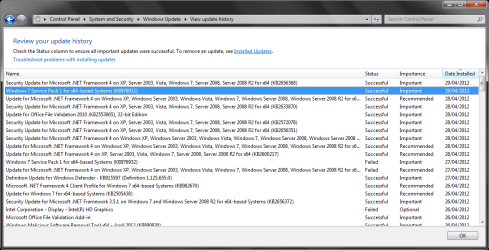
The only duplicates I see in your screen print are for two updates that failed on 04/27.
Those two installed successfully on 04/29.
 

My Computer My Computer

Computer type
PC/Desktop
Computer Manufacturer/Model Number
home built
OS
Multi-Boot W7_Pro_x64 W8.1_Pro_x64 W10_Pro_x64 +Linux_VMs +Chromium_VM
CPU
AMD Athlon II x4 620
Motherboard
Gigabyte GA-MA785G-UD3H
Memory
6GB GSkill DDR2 800
Graphics Card(s)
AMD 4670 GPU + AMD 4200 IGP
Sound Card
on board Realtek ALC889A
Monitor(s) Displays
RCA 40" LCD TV, Insignia 32" LCD TV, HP 15" LCD monitor
Screen Resolution
1680 x 1050
Hard Drives
OCZ Vertex 3 120GB,
Samsung F3 1TB (3),
Several others - WD, Seagate, Hitachi, ...
PSU
Corsair 500 W
Case
Rosewill mid tower
Cooling
CM 90mm rifle
Keyboard
Gyration wireless, Logitech wireless, Dell USB wired
Mouse
Gyration wireless, Logitech wireless, V7 USB wired
Internet Speed
Spectrum - 100Mbps D / 10Mbps U
Antivirus
Avast, MBAM3, EMET, WinPatrol
Browser
Pale Moon, Firefox, IE
Other Info
2 multi-boot PC's
Mainly HTPC/Office/Gen purpose (no gaming).
Trendnet USB KVM.
LG DVD burner/Blue Ray Player.
Tray system for removable SATA backup drives.

Not currently OCd, under-volted.
I use Hybrid sleep, rarely re-boot or shutdown.

Hauppauge HD-PVR, Avermedia PCIe TV Tuner, Hauppauge PCI TV Tuner.
I know this is an old thread, but I am having the exact same issue. I have an HP Mini 210-2145DX. For the past few months, I have had to install Windows Updates every single day, sometimes several times a day. If I do not install the updates, the computer slows way down until I do. I have had to reboot my system three times this morning alone. I have tried changing settings so that updates are done only at one time each week, but it makes no difference. Any ideas on how to stop this?
 

My Computer My Computer

Computer type
PC/Desktop
Computer Manufacturer/Model Number
HP
OS
Windows 7
I too am having this problem. Every night this week (at least 5 nights in a row) before shutting down, windows says its updating 1 of 1 files. I've just checked the update history and the only recent update was yesterday, otherwise it isn't showing any other updates within the week. I've run my antivirus but windows continues to want to update as I'm shutting down. Even now the start button shows the exclamation mark indicating an update is waiting. Normally I wouldn't even have noticed this but its monsoon and once the thunder and lightening hits I need to shut down quick. Waiting for one update every time is kind of frustrating. I've lost too many computers to monsoon :p
 

My Computer My Computer

Computer type
PC/Desktop
Computer Manufacturer/Model Number
custom
OS
Windows 7 home premium
just an update, maybe this will help others. I solved this problem by manually installing the update that I assumed was trying daily to install. Oddly, it did not appear as a failed update any of the days prior, only as a successful update the day before my last post. Just on a whim I did a manual update and now I have no issues with daily updates and I can shut down without delay once the thunder hits .. :huh:
 

My Computer My Computer

Computer type
PC/Desktop
Computer Manufacturer/Model Number
custom
OS
Windows 7 home premium
Following on from SeaRose's experience for anyone else still affected, I'd certainly recommend switching from automatic updates to being notified of updates but not installing them. Then you can identify what you're being prompted to install and see whether it's the same update(s) each day. If it's one you need, install it manually, otherwise hide it. Either way you can then see what happens the next day. In any event, it's always preferable to be in control of the updating process. In addition to asking around here, there are other sites that give advice on each month's updates such as Windows Secrets and AskWoody.

If any problems persist, try posting more details here as to the exact updates that are causing the trouble, i.e. the KB numbers. Hopefully, however, manual installation will resolve the issue.
 

My Computer My Computer

Computer type
PC/Desktop
Computer Manufacturer/Model Number
Custom build by PC Specialist
OS
Windows 7 Home Premium 64
CPU
AMD Phenom II X4 955
Motherboard
Asus M4A78T-E
Memory
8GB Corsair XMS3 DDR3
Graphics Card(s)
Gigabyte Geforce GTX 960 2GB
Sound Card
SB Audigy
Monitor(s) Displays
BenQ 24"
Screen Resolution
1920 x 1080
Hard Drives
500GB Serial ATA
PSU
1010W Quiet Quad Rail
Case
Antec 900
Cooling
Fenrir
Keyboard
Corsair
Mouse
Logitech
Internet Speed
20mbps
Antivirus
MSE plus MBAM 2.x Free
Browser
Chrome
Other Info
Second desktop different spec but similar level.
Back
Top