Windows folder size is huge and taking over my hard drive - by design?

RWP59

New member
Local time
1:58 AM
Messages
4
I've been working on a thorough system cleanup in an attempt to get my hard drive usage down to a minimum. The Windows folder (C: Windows) has been by biggest obstacle. I couldn't believe it was taking up 22GB of space even after running both CCleaner and Windows Disk Cleanup. I've been reading and researching all night, both on this forum and elsewhere and the answer appears to be that "winsxs" (inside the Windows folder and now at 11GB on my system) is designed to continue growing endlessly as it adds more dll files every time you install a program and it never deletes the files even after you've uninstalled the program. This explains why I see reports of people's Windows folder ranging from 10MB to 34MB. Wow, I remember just a couple years ago when WindowsXP, all my programs, documents, photos and audio files only took up 20 to 25GB.

I'm not inclined to be a complainer or criticize people who have built an entire operating system when I still struggle to point, click and make a program work. I'm thoroughly impressed with people who can design, program and create such an impressive and infinitely complex object as an operating system. Nevertheless, it does strike my simplistic, common sense mind as being a bit regressive to go from an OS (XP) that takes up 7GB on my old system to one (7) that takes up 22GB on my new system - and all to run pretty much the same software and do pretty much the same things, at least from a users point of view.

So if I'm understanding this situation correctly (please correct me if I'm wrong and there is a way to clean out some of those dlls and get my OS back to 10-15GB of disk space), then I guess I'm asking that someone pass along the idea of designing future systems so that old dlls can be deleted and the OS will never grow beyond the size of the original install + updates + dlls for just those programs currently installed. Meanwhile, I'll definitely be sticking to XP on my older systems that have less disk space.
 

My Computer My Computer

At a glance

Windows7 64bit Home PremiumAMD Phenom II quad-core4Gb
Computer Manufacturer/Model Number
HP Pavilion dv7
OS
Windows7 64bit Home Premium
CPU
AMD Phenom II quad-core
Memory
4Gb

Attachments

  • brys Snap2011.10.2915h53m07s001.png
    brys Snap2011.10.2915h53m07s001.png
    100.3 KB · Views: 441
  • brys Snap2011.10.2916h00m30s002.png
    brys Snap2011.10.2916h00m30s002.png
    143.4 KB · Views: 202

My Computer My Computer

At a glance

Operating System : Windows 7 Home Premium Edi...Processor : Intel Core 2 Quad Q8300 @ 2500 MHzPhysical Memory :8GB Corsair4x 2GB 800MHz C5 ...Video Card : XFX 6700 AMD
Computer Manufacturer/Model Number
packard bell IXTREME M5722
OS
Operating System : Windows 7 Home Premium Edition 6.01.7600 SP1 (x64)
CPU
Processor : Intel Core 2 Quad Q8300 @ 2500 MHz
Motherboard
Mainboard : Packard Bell (Acer EG43M )
Memory
Physical Memory :8GB Corsair4x 2GB 800MHz C5 DDR2
Graphics Card(s)
Video Card : XFX 6700 AMD
Monitor(s) Displays
Maestro 234DL - BenQ V2220 - BenQ VW2420H
Screen Resolution
Current Display :1920x1080p pixels at 60 Hz in HD LED
Hard Drives
Hard Disks : WDC (1000 GB)
Drive C: (Hard Disk) : 428 GB available on 491 GB
Drive D: (Hard Disk) : 426 GB available on 492 GB
SAMSUNG spinpoint HD103SJ 1000.2 GB
(X 2) KINGSTON SSD NOW V 30GB
PSU
XFX ProSeries 550W PSU
Case
PACKARD BELL IXTREME
Cooling
System Blower Current: 150mA Air Flow16CFM ;Akasa 90mm rear
Keyboard
Gigabyte Aivia K8100
Mouse
TRUST-Wireless Laser Mouse - Carbon edition MI-7770C
Internet Speed
TP-LINK > TL-WN951N / AV500 Gigabit Powerline Adapters
Browser
chrome dev
Other Info
EXTRA COOLING>(FAN CONTROLLER) PC Bay Cooler 3 x 40mm fans; Akasa AK-HD-BL Blue hard drive cooler 2 x 40 mm fan 4500 rpm 29.7 dBA
Bios> American Megatrends Inc.
Version : P01-A1
Date : 08/31/2009
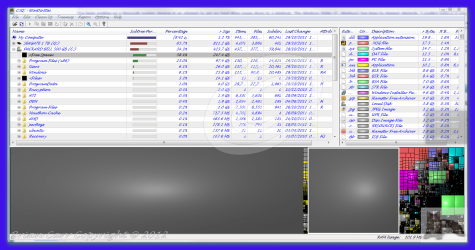
I actually heard about WinDirStat elsewhere on this forum while researching the matter and downloaded and ran it. It confirmed what already appeared to be the case - 21.6GB in the Windows folder and 11.4GB in winsxs (see image below - I hope - if not, it's at 4shared folder - Other). I also heard that the Windows Explorer file size estimate for winsxs might not be accurate, so I took the total amount of data shown to be on the "C" drive (according to "My Computer") and subtracted all of the folders listed within the C drive except the Windows folder. The result showed 21.6GB remaining in the Windows folder, confirming what WinDirState is showing me.

Fortunately I have a large enough hard drive on this system that it's not really a big deal. However, it does show that in the 11 months that I've had this computer, the size of the Windows folder has grown by about 10GB. If that trend keeps up, in a few years I'll find myself rebuilding the system from scratch just to get rid of the bloat in the Windows folder.

Other.html
 

My Computer My Computer

At a glance

Windows7 64bit Home PremiumAMD Phenom II quad-core4Gb
Computer Manufacturer/Model Number
HP Pavilion dv7
OS
Windows7 64bit Home Premium
CPU
AMD Phenom II quad-core
Memory
4Gb
Have to say this is a bit unusual... The size of your winsxs folder is completely within average numbers, but outside of winsxs, the remainder of the Windows folder shouldn't take another 10GB of space. My own Windows folder occupies just about 7GB on my computer, 3.87GB out of which is used by winsxs. (I do run a pretty lean and minimalistic system though, typical numbers will be a bit higher than mine.)

I can only guess that some log files have grown out of bounds, or software that had no business installing files into the Windows folder (except drivers) did just that and then didn't clean up after itself.

Two other possibilities are the C:\Windows\SoftwareDistribution\Download folder, which holds copies of all the Windows updates ever downloaded. For some dumb reason, these updates are never deleted after being installed, even though the contents of the download folder serve no further use. So that's one folder you can completely delete if you wish.

Then there's the question of whether you installed Service Pack 1 some time after first installing Windows 7. If yes, it also leaves a host of backup files that aren't needed if you don't wish to ever uninstall SP1. There's a special command to delete these backups - it escapes me at the moment but someone will fill you in I'm sure.
 

My Computer My Computer

At a glance

Windows 7 Professional SP1 32-bitIntel Core 2 Duo E6600 2.4GHz4GB DDR2-667 (4x1GB in dual-channel config)nVidia GeForce 9800 GT
Computer type
PC/Desktop
Computer Manufacturer/Model Number
Custom-built
OS
Windows 7 Professional SP1 32-bit
CPU
Intel Core 2 Duo E6600 2.4GHz
Motherboard
Asus PL5D2
Memory
4GB DDR2-667 (4x1GB in dual-channel config)
Graphics Card(s)
nVidia GeForce 9800 GT
Sound Card
Creative X-Fi XtremeMusic
Monitor(s) Displays
Acer P236H
Screen Resolution
1920x1200 (DVI)
Hard Drives
OCZ SSD Vertex Plus 60GB SATA (Firmware 3.55), 64MB cache
Hitachi HD321KJ SATA, 320GB, 7200rpm, 16MB cache
PSU
Antec TruePower 2.0
Case
Cooler Master Centurion
Cooling
Too many fans
Keyboard
Standard
Mouse
Microsoft wireless optical mouse
Internet Speed
AT&T U-verse (18mbit/sec)
Antivirus
Microsoft Security Essentials
Browser
Firefox
Other Info
Other devices:
Compaq CQ-60 laptop
Google Nexus 7 (2012) tablet
Nvidia SHIELD tablet (US/LTE)
Hardkernel ODROID-XU single-board computer (Samsung Exynos 5420)

My Computer My Computer

At a glance

Windows 7 Pro-x64i7-2600 3.4GHz - 3.8GHz Turbo8Gb - 2x4GB, Muskin 991770 PC3-1333Integrated Intel HD 2000
Computer type
PC/Desktop
Computer Manufacturer/Model Number
Built 2/11/2011
OS
Windows 7 Pro-x64
CPU
i7-2600 3.4GHz - 3.8GHz Turbo
Motherboard
Intel DH67BL-B3
Memory
8Gb - 2x4GB, Muskin 991770 PC3-1333
Graphics Card(s)
Integrated Intel HD 2000
Sound Card
Integrated Intel 10.1 HD, RealTek ALC892
Monitor(s) Displays
Asus LCD VH222H, Haier HL24XSL2a
Screen Resolution
1920x1080, 1920x1080
Hard Drives
Crucial SSD C300-128Gb,
Western Digital WD5002AALX - 500Gb,
Western Digital WD7501AALS - 750Gb
PSU
Seasonic 650W 80+ Gold Modular
Case
Rosewill Defender
Cooling
Stock CPU, Four 120mm case fans, PCH fan added
Keyboard
Logitech EX100 Y-RBH94 Wireless
Mouse
Logitech EX100 M-RCE95 Wireless
Internet Speed
3.0/1.5 Mbs
Antivirus
Microsoft Security Essentials
Browser
Microsoft Internet Explorer 11
Other Info
Antec Veris Premier-Multimedia IR Station,
Cyber Accoustics-3602 Speakers,
AFT XM-5U Card Reader,
Hauppauge TV-HVR-2250,
Sony LX300 USB Turntable
It still comes close however. Regardless, this is about the contents of the Windows folder outside of winsxs.
 

My Computer My Computer

At a glance

Windows 7 Professional SP1 32-bitIntel Core 2 Duo E6600 2.4GHz4GB DDR2-667 (4x1GB in dual-channel config)nVidia GeForce 9800 GT
Computer type
PC/Desktop
Computer Manufacturer/Model Number
Custom-built
OS
Windows 7 Professional SP1 32-bit
CPU
Intel Core 2 Duo E6600 2.4GHz
Motherboard
Asus PL5D2
Memory
4GB DDR2-667 (4x1GB in dual-channel config)
Graphics Card(s)
nVidia GeForce 9800 GT
Sound Card
Creative X-Fi XtremeMusic
Monitor(s) Displays
Acer P236H
Screen Resolution
1920x1200 (DVI)
Hard Drives
OCZ SSD Vertex Plus 60GB SATA (Firmware 3.55), 64MB cache
Hitachi HD321KJ SATA, 320GB, 7200rpm, 16MB cache
PSU
Antec TruePower 2.0
Case
Cooler Master Centurion
Cooling
Too many fans
Keyboard
Standard
Mouse
Microsoft wireless optical mouse
Internet Speed
AT&T U-verse (18mbit/sec)
Antivirus
Microsoft Security Essentials
Browser
Firefox
Other Info
Other devices:
Compaq CQ-60 laptop
Google Nexus 7 (2012) tablet
Nvidia SHIELD tablet (US/LTE)
Hardkernel ODROID-XU single-board computer (Samsung Exynos 5420)
Windows temporary files
temporary files are usually leftovers from previous installations of various applications or documents once needed by Windows to run certain task. These files can in a time grow large if not deleted once in a while.

Bear in mind that Windows temporary files are not the same as Internet temporary files which specifically belong to Internet Explorer and internet traffic. IE will remain intact.

temp.PNG


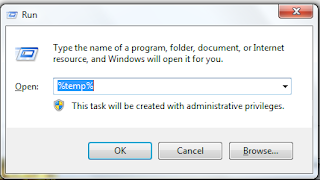
To view temp files press simultaneously win logo+r key to open run box. Type in %temp% and you are going to see the list of your files that can be deleted Simply select them all and press delete key.

Sometimes you are not going to be able to delete a file or two which may be locked due to being in use by Windows Explorer. Do not bother about it just skip that one.

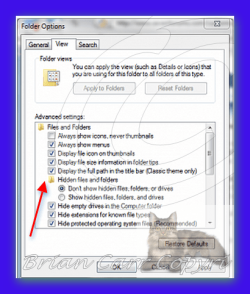
Windows Temp File is located at C:\Users\Owner\AppData\Local\Temp but then to visit this folder & view the content, users will have to turn off the 'hidden files & folder' option.


Attachments

  • brys Snap2011.10.3008h36m13s001.png
    brys Snap2011.10.3008h36m13s001.png
    68.2 KB · Views: 91
Last edited:

My Computer My Computer

At a glance

Operating System : Windows 7 Home Premium Edi...Processor : Intel Core 2 Quad Q8300 @ 2500 MHzPhysical Memory :8GB Corsair4x 2GB 800MHz C5 ...Video Card : XFX 6700 AMD
Computer Manufacturer/Model Number
packard bell IXTREME M5722
OS
Operating System : Windows 7 Home Premium Edition 6.01.7600 SP1 (x64)
CPU
Processor : Intel Core 2 Quad Q8300 @ 2500 MHz
Motherboard
Mainboard : Packard Bell (Acer EG43M )
Memory
Physical Memory :8GB Corsair4x 2GB 800MHz C5 DDR2
Graphics Card(s)
Video Card : XFX 6700 AMD
Monitor(s) Displays
Maestro 234DL - BenQ V2220 - BenQ VW2420H
Screen Resolution
Current Display :1920x1080p pixels at 60 Hz in HD LED
Hard Drives
Hard Disks : WDC (1000 GB)
Drive C: (Hard Disk) : 428 GB available on 491 GB
Drive D: (Hard Disk) : 426 GB available on 492 GB
SAMSUNG spinpoint HD103SJ 1000.2 GB
(X 2) KINGSTON SSD NOW V 30GB
PSU
XFX ProSeries 550W PSU
Case
PACKARD BELL IXTREME
Cooling
System Blower Current: 150mA Air Flow16CFM ;Akasa 90mm rear
Keyboard
Gigabyte Aivia K8100
Mouse
TRUST-Wireless Laser Mouse - Carbon edition MI-7770C
Internet Speed
TP-LINK > TL-WN951N / AV500 Gigabit Powerline Adapters
Browser
chrome dev
Other Info
EXTRA COOLING>(FAN CONTROLLER) PC Bay Cooler 3 x 40mm fans; Akasa AK-HD-BL Blue hard drive cooler 2 x 40 mm fan 4500 rpm 29.7 dBA
Bios> American Megatrends Inc.
Version : P01-A1
Date : 08/31/2009
All good info and I thank you all for it.

In response to 'Corazon' - I do have Service Pack 1 installed, but don't recall if it was there when I bought the system (Nov 2010) or if it was one of the updates that came since. I wasn't aware of the C:\Windows\SoftwareDistribution\Download folder, but just checked it and it's at only 388MB. Nevertheless, I have now removed it, so that helps a little.

In response to 'Brianzion' - My 'Temp' folder is at 350KB. Evidently it's one of the folders I ran across and cleaned up while doing my system maintenance.

As for 'Carwiz' - I had run across a post talking about winsxs being full of a bunch of links so I can't say for sure if it's really 11.4GB like is being reported. However, the overall size of the Windows folder was 21.6GB. That number was double checked by subtracting the size of all other folders in the 'C' drive from the total amount of HD space being used as reported by 'My Computer' and this agrees with the report generated by WinDirStat. I haven't done the same kind of math to verify the size of winsxs and don't intend to seeing as there are hundreds of folders and files in the Windows folder. I just ran WinDirStat again and am pasting below the sizes of all the folders within the Windows folder (limited it to those over 10MB to keep the list shorter).

Main Windows Folder - 21.2 GB (now that the 'software distribution/downlaods' folder has been deleted)

SUB FOLDERS & SIZES
11.4 GB C:\Windows\winsxs
2.4 GB C:\Windows\System32
2.2 GB C:\Windows\Installer
1.7 GB C:\Windows\assembly
1.2 GB C:\Windows\SysWOW64
882.2 MB C:\Windows\Microsoft.NET
172.6 MB C:\Windows\Speech
158.0 MB C:\Windows\SoftwareDistribution
138.3 MB C:\Windows\inf
136.9 MB C:\Windows\IME
112.5 MB C:\Windows\ehome
107.1 MB C:\Windows\Fonts
84.2 MB C:\Windows\ServiceProfiles
62.4 MB C:\Windows\Help
59.5 MB C:\Windows\Performance
57.0 MB C:\Windows\servicing
47.7 MB C:\Windows\Web
37.4 MB C:\Windows\Downloaded Installations
35.9 MB C:\Windows\Logs
29.7 MB C:\Windows\tracing
28.8 MB C:\Windows\Globalization
27.7 MB C:\Windows\Boot
26.3 MB C:\Windows\Prefetch
12.7 MB C:\Windows\Media
12.7 MB C:\Windows\twain_32
10.5 MB C:\Windows\AppPatch

I do have to admit that I've installed and removed a fair amount of software over the last year - mostly seeking the right tools for video editing, DVD authoring, file conversion, etc. Nevertheless, one would hope that would mainly affect the size of the 'Program Files' folder which is outside the Windows folder.
 

My Computer My Computer

At a glance

Windows7 64bit Home PremiumAMD Phenom II quad-core4Gb
Computer Manufacturer/Model Number
HP Pavilion dv7
OS
Windows7 64bit Home Premium
CPU
AMD Phenom II quad-core
Memory
4Gb
If you've ever seen a "Side-by-Side" error in your logs, this is where it originates. Winsxs is used to store DLLs that may be used by more than one program. Because some DLLs were shared across many programs, it was an attempt to stop the "Missing DLL" errors when some off-the-wall utility was un-installed and killed other common DLLs. It also helped stop overlaying newer DLLs with older versions released with some software. This was a major problem with Windows prior to XP. The Winsxs concept started with XP and continues through Windows 8 but if there's any consolation, the move is away from the Winsxs structure.

"Microsoft Visual C++ 2005 and 2008 employ SxS with all C runtime libraries. However, runtime libraries in Visual C++ 2010 no longer use this technology; instead, they include the version number of a DLL in its file name, which means that different versions of one DLL will technically be completely different DLLs now."
 

My Computer My Computer

At a glance

Windows 7 Pro-x64i7-2600 3.4GHz - 3.8GHz Turbo8Gb - 2x4GB, Muskin 991770 PC3-1333Integrated Intel HD 2000
Computer type
PC/Desktop
Computer Manufacturer/Model Number
Built 2/11/2011
OS
Windows 7 Pro-x64
CPU
i7-2600 3.4GHz - 3.8GHz Turbo
Motherboard
Intel DH67BL-B3
Memory
8Gb - 2x4GB, Muskin 991770 PC3-1333
Graphics Card(s)
Integrated Intel HD 2000
Sound Card
Integrated Intel 10.1 HD, RealTek ALC892
Monitor(s) Displays
Asus LCD VH222H, Haier HL24XSL2a
Screen Resolution
1920x1080, 1920x1080
Hard Drives
Crucial SSD C300-128Gb,
Western Digital WD5002AALX - 500Gb,
Western Digital WD7501AALS - 750Gb
PSU
Seasonic 650W 80+ Gold Modular
Case
Rosewill Defender
Cooling
Stock CPU, Four 120mm case fans, PCH fan added
Keyboard
Logitech EX100 Y-RBH94 Wireless
Mouse
Logitech EX100 M-RCE95 Wireless
Internet Speed
3.0/1.5 Mbs
Antivirus
Microsoft Security Essentials
Browser
Microsoft Internet Explorer 11
Other Info
Antec Veris Premier-Multimedia IR Station,
Cyber Accoustics-3602 Speakers,
AFT XM-5U Card Reader,
Hauppauge TV-HVR-2250,
Sony LX300 USB Turntable
Use revo uninstaller when removing a program, its free to download and even scans your hard drive for any leftover registries and dll files which windows built in uninstaller does not
 

My Computer My Computer

At a glance

Windows 7 Ultimate x64
OS
Windows 7 Ultimate x64
Use revo uninstaller

+1; Also, you won't need the .msi files that get left around from various installs. (search for *.msi)

My C:\Windows folder is 3.87 Gb compressed (6.01 G expanded) w/Win7 Ultimate; I deleted everything labelled japanese or chinese; some fonts; movie, sound and picture files and some other stuff: it wasn't easy.
 

My Computer My Computer

At a glance

Windows 7 UltimatePentium Dual-Core CPU E5400 @ 2.70GHz4096MnVidia 8400GS
Computer Manufacturer/Model Number
eMachines ET1831-7
OS
Windows 7 Ultimate
CPU
Pentium Dual-Core CPU E5400 @ 2.70GHz
Motherboard
EMCP73VT-PM
Memory
4096M
Graphics Card(s)
nVidia 8400GS
Sound Card
built-in Realtek
Monitor(s) Displays
Acer 20"
Screen Resolution
1680x1050
Hard Drives
Seagate ST3750528AS ATA 500G
Other Info
Dual-boot with Linux.
Back
Top