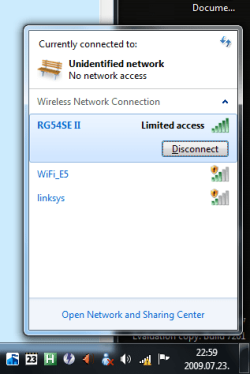
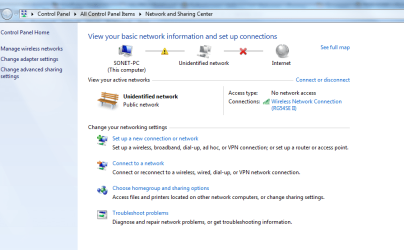
Once more: "No network access - unidentified network"

As said by Ken, 169.254.xx.xx is a bad ip address which is auto-generated by the OS when your router fails to give ip address to the pc. This time, click start and in the start search box, type cmd, then right click on cmd and click Run as Administrator, now in the black window, type netsh reset winsock catalog and press Enter, Restart the pc. If this doesn't work, try a system restore. or else, a clean install.

Thanks, but the cmd.exe says that the command wasn't found.:(
 

My Computer My Computer

OS
Win 7 RC
Command not found? Ok try netsh winsock reset catalog.
 

My Computer My Computer

Computer Manufacturer/Model Number
Samsung NP530U4B-S02IN
OS
Windows® 8 Pro (64-bit)
CPU
Intel® Core™ i5 Processor 2467M (1.60GHz, 3MB L3 Cache)
Motherboard
Samsung Electronics
Memory
6GB DDR3 System Memory at 1,333MHz (on BD 4GB + 2GB x 1)
Graphics Card(s)
AMD Radeon™ HD7550M 1GB DDR3 (Ext. Graphic)
Sound Card
Realtek High Definition Audio
Monitor(s) Displays
35.56cm (14.0) SuperBright 300nit HD LED Display
Screen Resolution
1366x768
Hard Drives
1TB S-ATA II Hard Drive (5400RPM) with ExpressCache 16GB SSD
Internet Speed
sucks
Antivirus
Microsoft Security Essentials
Browser
Google Chrome (Sync enabled)
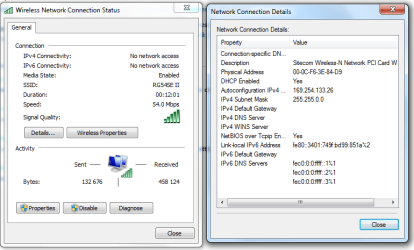
In the clip you showed us the Ip is listed as 169.254.x.x that means the nic is improperly conigured usually because of the driver. could you list you system specs and networking setup ( i haven't been here for the thread)

Ken

Hi Ken, many thanks for your posting. Please s. attachements. HTH.
 

Attachments

My Computer My Computer

OS
Win 7 RC
Command not found? Ok try netsh winsock reset catalog.

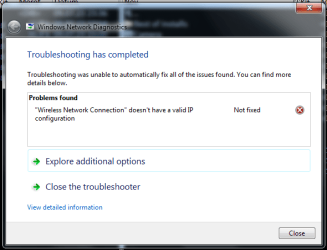
Done and restarted. The problem still persists. The network diagnose says as before: "The LAN-connection has no valid IP-configuration." It's crazy.:(
 

My Computer My Computer

OS
Win 7 RC
hi taurus, i m really very sorry for the late reply. Looking at the problem, nothing has worked so far so i guess a clean install is the only way to fix this issue. :(
 

My Computer My Computer

Computer Manufacturer/Model Number
Samsung NP530U4B-S02IN
OS
Windows® 8 Pro (64-bit)
CPU
Intel® Core™ i5 Processor 2467M (1.60GHz, 3MB L3 Cache)
Motherboard
Samsung Electronics
Memory
6GB DDR3 System Memory at 1,333MHz (on BD 4GB + 2GB x 1)
Graphics Card(s)
AMD Radeon™ HD7550M 1GB DDR3 (Ext. Graphic)
Sound Card
Realtek High Definition Audio
Monitor(s) Displays
35.56cm (14.0) SuperBright 300nit HD LED Display
Screen Resolution
1366x768
Hard Drives
1TB S-ATA II Hard Drive (5400RPM) with ExpressCache 16GB SSD
Internet Speed
sucks
Antivirus
Microsoft Security Essentials
Browser
Google Chrome (Sync enabled)
Hi before you try a clean install, I think that you might have a firewall or a protection solution stoping you from getting an IP address, this happen to me and others before. check for the existance of following software on your laptop : ESET, norton, or any firewall solution. windows firewall doesn't do this as far as I know. also do you remember you installed anything new on the laptop before this started?
 

My Computer My Computer

Computer Manufacturer/Model Number
home made
OS
Windows 7 7264x64(main), 7260x86(secendary), XP SP3 Triple Boot
CPU
Intel Core 2 Duo E7400 2.8Mhz
Motherboard
Intel G33 express chipset
Memory
2GB DD2 667
Graphics Card(s)
Intel(R) 82G33 Graphics and Memory Controller Hub
Sound Card
Realtek Built into the G31
Monitor(s) Displays
19"
Screen Resolution
1280x1024
Hard Drives
320GB SATA (Main), 160GB IDE (Backup)
Case
Gigabyte SETTO
Keyboard
Genius
Mouse
Logitech
Internet Speed
1MB Download, 128k Upload
Hi before you try a clean install, I think that you might have a firewall or a protection solution stoping you from getting an IP address, this happen to me and others before. check for the existance of following software on your laptop : ESET, norton, or any firewall solution. windows firewall doesn't do this as far as I know. also do you remember you installed anything new on the laptop before this started?

No external firewall, no installations or other system changes before the problem started. I'll reinstall Win7 RC.:(
 

My Computer My Computer

OS
Win 7 RC
hi taurus, i m really very sorry for the late reply. Looking at the problem, nothing has worked so far so i guess a clean install is the only way to fix this issue. :(

Many thanks for your help! I'll reinstall Win7 RC.
 

My Computer My Computer

OS
Win 7 RC
You are welcome taurus, sorry to say but some issues are unfixable and they need Os re-installation.
 

My Computer My Computer

Computer Manufacturer/Model Number
Samsung NP530U4B-S02IN
OS
Windows® 8 Pro (64-bit)
CPU
Intel® Core™ i5 Processor 2467M (1.60GHz, 3MB L3 Cache)
Motherboard
Samsung Electronics
Memory
6GB DDR3 System Memory at 1,333MHz (on BD 4GB + 2GB x 1)
Graphics Card(s)
AMD Radeon™ HD7550M 1GB DDR3 (Ext. Graphic)
Sound Card
Realtek High Definition Audio
Monitor(s) Displays
35.56cm (14.0) SuperBright 300nit HD LED Display
Screen Resolution
1366x768
Hard Drives
1TB S-ATA II Hard Drive (5400RPM) with ExpressCache 16GB SSD
Internet Speed
sucks
Antivirus
Microsoft Security Essentials
Browser
Google Chrome (Sync enabled)
This may not be possible since it is a laptop but...

Indeed you are not getting a DHCPed address from your router. There could be a LOT of reasons for that unfortunately.

In the end though, there is one solution that might work if all else fails:
My solution to the problem on my desktop was to manually set a fixed IP address(outside the DHCP range of my router of course) as well as manually setting the DNS and gateway by hand for the adapter.
 

My Computer My Computer

Computer Manufacturer/Model Number
Scratch built
OS
Windows 7 x64 Ultimate
CPU
i7 960
Motherboard
Asus P6X58D
Memory
12 Gig Corsair Dominator
Graphics Card(s)
Nvidia 480
Sound Card
Maudio Delta 44 + breakout box
Monitor(s) Displays
Dell UltraSharp U2410 24in and Samsung 21 dual monitors
Screen Resolution
1920x1200 and 1280x1024
Hard Drives
Primary: Intel X-25M G2 160G SSD
Secondary: Segate baracuda 1.0 TB
HDs in AHCI mode.
PSU
Corasair TX850
Case
Cooler Master HAF
Cooling
Corsair H50
Keyboard
Logitech G15 + N52 game pad
Mouse
Logitech MX518
Internet Speed
15kbs down 4.5kbps up
Other Info
WEI 7.6
CPU & RAM 7.6
Graphics 7.9
Hard disk 7.7
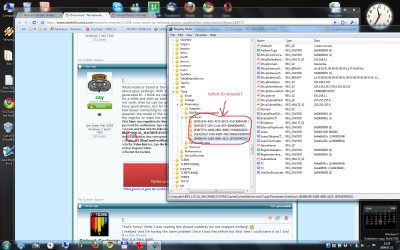
What model or brand is the router? What type of ISP are you on, ie dsl or cable? If cable no need to worry about ppoe settings. With 169, just means that he is not getting an IP from the router, that is an OS generated IP. I think we need some history on this. Did this start right after the upgrade? Or did it work for a while and then go bad? Forgive me if these have been addressed already. If reseting the winsock did not work, then he can try another nic card and see if that helps. I have seen instances where nic cards have good drivers, but for the life of whatever, will not connect. I have also seen where Vista machines had issues connecting to certain models of routers (depending on how old the router is) [hence my question the model of the router], and it had something to do with the dhcp flag settings. I had to edit the registry to make the machine "compatible" wih the router. Toggle this setting and see if it helps
Click Start, type regedit in the Start Search box, and then click regedit in the Programs list. If you are prompted for an administrator password for confirmation, type your password, and click Continue.
ii)Locate and then click the following registry subkey: HKEY_LOCAL_MACHINE\SYSTEM\CurrentControlSet\Services\Tcpip\Parameters\Interfaces\{GUID}. In this registry path, click the (GUID) subkey that corresponds to the network adapter that is connected to the network.
iii)Right-click DhcpConnForceBroadcastFlag, and then click Modify.
iv)In the Value data box, type the broadcast flag (0 or 1), and then click OK.
v)Close Registry Editor.
vi)Restart the machine.
 

My Computer My Computer

Computer Manufacturer/Model Number
Gigabyte
OS
Windows 7 Ultimate
CPU
Intel Core(TM)2 Quad- Q9550, 2.83GHz
Motherboard
G31M-ES2L
Memory
4GB
Graphics Card(s)
ATI Radeon HD4600
Sound Card
On Board:
Monitor(s) Displays
Acer AL2223W, Acer AL1916
Screen Resolution
1680 x 1050, 1280 x 1024
Hard Drives
160GB
350GB
250GB
250GB
PSU
600W
Case
Cooler Master
Keyboard
Microsoft Laser 6000
Mouse
Logitech Optical Trackman
Internet Speed
1.5MB
Other Info
I am also running a quasar gamatron flux capacitor with twin pulse tronic phasers......jk, I have no such stuff.
That's funny! While I was reading this thread suddenly my net stopped working! :D
I realized that I'm having the same problem! Once I had this before but that time i could solve it as I told it in this thread.
Now it is here again.
I've made some pictures for you boys:
pic1.png

pic2.png

pic3.png

pic4.png

pic5.png

I have a 7600 installed on an other partition so I tried to start that and connect with that,
and I found there exactly the same issue as here with the 7201. That 7600 is a 1 day old fresh and clean install, so The problem can not be a driver problem. (I've tried to connect with an other USB wifi card, and it did not solved the problem, so it is not a driver problem.)
I have an other Wireless Router so I tried to use that, but the problem still persists, so It is not a router configuration problem either. But then what else can be? The Windows 7?


If I reset the router and use it without any security option (wep,etc) the connection is OK. But it is not a solution.
I'm running MSE and Windows Firewall on the 7201, and NOTHING on the 7600.
I tried system restore also, but didn't help.
With my laptop running an XP I can still connect to the network without any issue!


Any other idea?
Someone please help!
Thanx in advance!

Zay:
Untitled.png

One more pic:
pic6.png

Trubleshooter says this.

Weird but I still can connect to my neighbor's net.

 

My Computer My Computer

Computer Manufacturer/Model Number
home made
OS
Windows 7 RTM x64
CPU
AMD X2 5000+
Motherboard
Asrock
Memory
4GB
Graphics Card(s)
Nvidia 9400GT
Sound Card
onboard 6Ch
Monitor(s) Displays
Medion 22" + HannSpree 22"
Screen Resolution
1680X1050 + 1920X1080
Hard Drives
Intel SSD 80GB
WD 1.5 TB
WD 1 TB
Samsung 1TB X 3
PSU
noname
Case
noname
Cooling
Zalman
Keyboard
DeLUX multimedia keyboard
Mouse
Microsoft
Internet Speed
25MB/s
I solved my problem by throwing away my wireless router and connecting with cable.
 

My Computer My Computer

Computer Manufacturer/Model Number
home made
OS
Windows 7 RTM x64
CPU
AMD X2 5000+
Motherboard
Asrock
Memory
4GB
Graphics Card(s)
Nvidia 9400GT
Sound Card
onboard 6Ch
Monitor(s) Displays
Medion 22" + HannSpree 22"
Screen Resolution
1680X1050 + 1920X1080
Hard Drives
Intel SSD 80GB
WD 1.5 TB
WD 1 TB
Samsung 1TB X 3
PSU
noname
Case
noname
Cooling
Zalman
Keyboard
DeLUX multimedia keyboard
Mouse
Microsoft
Internet Speed
25MB/s
Hi taurus, check out the troubleshooting link at my sig to see if thats of any good for you.
 

My Computer My Computer

Computer Manufacturer/Model Number
Samsung NP530U4B-S02IN
OS
Windows® 8 Pro (64-bit)
CPU
Intel® Core™ i5 Processor 2467M (1.60GHz, 3MB L3 Cache)
Motherboard
Samsung Electronics
Memory
6GB DDR3 System Memory at 1,333MHz (on BD 4GB + 2GB x 1)
Graphics Card(s)
AMD Radeon™ HD7550M 1GB DDR3 (Ext. Graphic)
Sound Card
Realtek High Definition Audio
Monitor(s) Displays
35.56cm (14.0) SuperBright 300nit HD LED Display
Screen Resolution
1366x768
Hard Drives
1TB S-ATA II Hard Drive (5400RPM) with ExpressCache 16GB SSD
Internet Speed
sucks
Antivirus
Microsoft Security Essentials
Browser
Google Chrome (Sync enabled)
Hi all
Unfortunate but some LAN cards built into laptops are STILL only 32 bit capable so even if it says its working you wont get a connection on a 64 bit OS including VISTA X-64.

For example the Via Velocity gigabit ones won't work with a 64 bit OS whatever Windows says about the drivers.

I don't know but maybe theres some problem with WOW for these ethernet cards.

I got round the problem by using an Agere PCI express ethernet card (you can also get a VERY CHEAP USB===>LAN adapter costs sround 3 USD).

Wireless strangely enough ususally works.

Cheers
jimbo
 

My Computer My Computer

Computer type
PC/Desktop
Computer Manufacturer/Model Number
Custom built, several laptops HP/ASUS
OS
Linux CENTOS 7 / various Windows OS'es and servers
CPU
Intel i7 Intel i5
Memory
8GB, 16GB
Graphics Card(s)
On Motherboard
Sound Card
Realtek HD audio
Monitor(s) Displays
Apple Cinema display, Samsung LCD
Screen Resolution
1920 X 1080
Hard Drives
4 X 1TB SATA
Mouse
Toshiba wireless laser
Internet Speed
> 20MB up
unindentified network no internet acces

Hi dinesh,

many thanks for the prompt reply. Both options were and are activated but unfortunately the problem persists.

Kind regards
Taurus

i have exaxtly the same problem and the network card advanced
options does not mention the WOL speed
it is an annoying problem
when i shutdown and start up ---resetting roouter---even reloading router(sitecom ucode) somtimes it helps until the next system startup

i am going back to windows xp sp3

regards kees van rooy
 

My Computer My Computer

OS
windows 7 rc1 built7100
CPU
amd phenom 2 4500
Motherboard
gigabyte ga-ma78gm-sh2
Memory
2 x 1gb corsair twinx 800mhz highspeed
Graphics Card(s)
ati hd 3600
Sound Card
realtek
Hard Drives
samsung 320 gb spinpoint
PSU
350 watt antec 80 r
Case
antec cube
unidentified network no internet access

the defenite solution for me is---- removing the BONJOUR SERVICE
it installs itself with adobe programs like photoshop

step 1 ---- go to taskmanager goto processes---select all te processes---after that--end process
MSDNRESPONDER.EXE close task manager than open explorer

goto c:\program files (x86)\bonjour and delete the file MSDNresponder.exe
and rename the the mdnsNSP.dll to mdnsNSP.old

restart windows 7

remove the Bonjour folder in C:\Program files (x86)
regards keeeees
 

My Computer My Computer

OS
windows 7 rc1 built7100
CPU
amd phenom 2 4500
Motherboard
gigabyte ga-ma78gm-sh2
Memory
2 x 1gb corsair twinx 800mhz highspeed
Graphics Card(s)
ati hd 3600
Sound Card
realtek
Hard Drives
samsung 320 gb spinpoint
PSU
350 watt antec 80 r
Case
antec cube
the defenite solution for me is---- removing the BONJOUR SERVICE
it installs itself with adobe programs like photoshop

step 1 ---- go to taskmanager goto processes---select all te processes---after that--end process
MSDNRESPONDER.EXE close task manager than open explorer

goto c:\program files (x86)\bonjour and delete the file MSDNresponder.exe
and rename the the mdnsNSP.dll to mdnsNSP.old

restart windows 7

remove the Bonjour folder in C:\Program files (x86)
regards keeeees
bonjour also comes wih itunes. i hate it
 

My Computer My Computer

Computer Manufacturer/Model Number
Samsung NP530U4B-S02IN
OS
Windows® 8 Pro (64-bit)
CPU
Intel® Core™ i5 Processor 2467M (1.60GHz, 3MB L3 Cache)
Motherboard
Samsung Electronics
Memory
6GB DDR3 System Memory at 1,333MHz (on BD 4GB + 2GB x 1)
Graphics Card(s)
AMD Radeon™ HD7550M 1GB DDR3 (Ext. Graphic)
Sound Card
Realtek High Definition Audio
Monitor(s) Displays
35.56cm (14.0) SuperBright 300nit HD LED Display
Screen Resolution
1366x768
Hard Drives
1TB S-ATA II Hard Drive (5400RPM) with ExpressCache 16GB SSD
Internet Speed
sucks
Antivirus
Microsoft Security Essentials
Browser
Google Chrome (Sync enabled)
Back
Top