Win 7 Install CD/DVD Device driver needed?

dek

New member
Local time
1:03 PM
Messages
42
The install stops at the start asking for CD/DVD Device drivers...

Asus P5E Motherboard, installing from SATA DVD, Windows 7 x64 Build 7600.

I have tried the Vista drivers on Asus homepage, they wont accept them, anyone know a solution?

thanks
 

My Computer

Computer Manufacturer/Model Number
ASUS P8P67
OS
Windows 7 x64 sp1, XP x86 sp2
CPU
i7 2600k
Memory
8Gb G.Skill
Graphics Card(s)
ASUS GTX460
Sound Card
Creative Audigy4 PCI
Screen Resolution
1680x1050
Hard Drives
Vertex 3 Raid
PSU
800Watt Fractal Design
Case
Chieftech BX01
it may be worth checking your bios for what you have se your disks to be seen as , there is no reason for it not to see your samsung drives, none whatsoever.
 

My Computer

Computer type
Laptop
Computer Manufacturer/Model Number
Lenovo
OS
Windows 7 Professional 64bit
CPU
Intel Core Quad 9550
Motherboard
Mobile Intel QM87 Express Chipset
Memory
16GB factory installed
Graphics Card(s)
NVIDIA Quadro K2100M
Sound Card
Onboard
Monitor(s) Displays
Apple iMac 27" display
Screen Resolution
2560 x 1440
Hard Drives
160gb factory fitted ssd
512gb pcie m2 2242 ssd
I am confused, you are installing Windows 7 and it is prompting for device drivers for what? The only think I can think of is the drive controller, but that would be included int eh chipset.

At what point is it asking? Is Widows 7 up and running? Or is it asking you this afterryou booted from the DVD and started the install?
 

My Computer

Computer Manufacturer/Model Number
Built Myself
OS
Windows 7 7600.16384 x64
CPU
Intel Core i7 OC'd to 3.20 GHz
Motherboard
Gigabyte
Memory
6GB GSkillz Triple Channel DDR3 OC'd to 1600 MHz
Graphics Card(s)
Nvidia GTX 280
Sound Card
X-Fi Platinum
Monitor(s) Displays
Dual 2001FWP
Screen Resolution
1680x1050 x 2
Hard Drives
System - Dual 150GB Raptors Raid0
Doc Storage - 1TB SATA 32MB cache Samsung
TV Recordings - 1TB SATA 32MB cache Samsung
PSU
Gigawatt Antec
Case
Antec 900
Keyboard
Saitek
Mouse
logitech MX 10000
Internet Speed
30 mb/s
If there is an option in your BIOS like IDE emulation for SATA, try disabling it. There have been reports that this has solved the Driver issue in Vista so should work for Se7en too.

Hope this helps :)


Jeff
 

My Computer

Computer Manufacturer/Model Number
Compaq Desktop
OS
Windows 7 Ultimate x64
CPU
AMD Sempron Dual Core
Memory
3GB
Graphics Card(s)
NVIDIA GeForce 6150SE nForce 430
Screen Resolution
1024x768
Hard Drives
150GB Sata

My Computer

Computer Manufacturer/Model Number
Samsung NP530U4B-S02IN
OS
Windows® 8 Pro (64-bit)
CPU
Intel® Core™ i5 Processor 2467M (1.60GHz, 3MB L3 Cache)
Motherboard
Samsung Electronics
Memory
6GB DDR3 System Memory at 1,333MHz (on BD 4GB + 2GB x 1)
Graphics Card(s)
AMD Radeon™ HD7550M 1GB DDR3 (Ext. Graphic)
Sound Card
Realtek High Definition Audio
Monitor(s) Displays
35.56cm (14.0) SuperBright 300nit HD LED Display
Screen Resolution
1366x768
Hard Drives
1TB S-ATA II Hard Drive (5400RPM) with ExpressCache 16GB SSD
Internet Speed
sucks
Antivirus
Microsoft Security Essentials
Browser
Google Chrome (Sync enabled)
Well, i cant get rid of my system giving me Chassis Intrusion now, i plugged the switch trying to reset the bios, and hooking up an IDE drive to see if that fixed it...

1st of all it asks for CD/DVD device driver at the first Windows 7 GUI Installer, i havnt had this since 7232, all builds up to that one has been ok, and the OS has been stable, but ever since 7232 it asked me about device drivers, i got the first 7600 build and it actually got installed without asking for those drivers during install but the system has been BSOD'ing all the time, like it got past that CD/DVD device drivers at install, BSOD the most on log off...

Now im not quiet sure, it could be my setup since i got OSX on this system and it manages boot from an Active partition wich is not NTFS, but anyways i got it installed pre 7232 and 7 and OSX,XP has been working fine. maybe they did something to the installer.

Anyways i cant get past a good boot i have that damn Chassis Intrusion Alert and there is no option in the bios that i see that i can disable the damn thing, was gonna try a single IDE drive and see how that was going to go. I was amused my self that the 7 install asked for device drivers ever since it first happened, the last time i had to launch chipset drivers during an OS install was with SATA HDD's under XP... its basically the same thing going here now for 7.

I got IDE, RAID and AHCI for selection under SATA tho, damn me about that Chassis Intrusion, i read about it on the net alot of ppl have it with Asus motherboards unable to disable it, this system is as well as useless now and i just saved up money for a new 120hz lcd lol-

thanks guys. ill try it over if i get past that s*** or be getting a new system.

 

My Computer

Computer Manufacturer/Model Number
ASUS P8P67
OS
Windows 7 x64 sp1, XP x86 sp2
CPU
i7 2600k
Memory
8Gb G.Skill
Graphics Card(s)
ASUS GTX460
Sound Card
Creative Audigy4 PCI
Screen Resolution
1680x1050
Hard Drives
Vertex 3 Raid
PSU
800Watt Fractal Design
Case
Chieftech BX01
lol the intrusion alert. It though be in bios, something like open case alert. I forget what they call it exactly.
 

My Computer

Computer Manufacturer/Model Number
Built Myself
OS
Windows 7 7600.16384 x64
CPU
Intel Core i7 OC'd to 3.20 GHz
Motherboard
Gigabyte
Memory
6GB GSkillz Triple Channel DDR3 OC'd to 1600 MHz
Graphics Card(s)
Nvidia GTX 280
Sound Card
X-Fi Platinum
Monitor(s) Displays
Dual 2001FWP
Screen Resolution
1680x1050 x 2
Hard Drives
System - Dual 150GB Raptors Raid0
Doc Storage - 1TB SATA 32MB cache Samsung
TV Recordings - 1TB SATA 32MB cache Samsung
PSU
Gigawatt Antec
Case
Antec 900
Keyboard
Saitek
Mouse
logitech MX 10000
Internet Speed
30 mb/s
lol the intrusion alert. It though be in bios, something like open case alert. I forget what they call it exactly.

the stupiditiy is beyond me, i cant disable it, cleared cmos by switch, battery, pulled the chassis jumper in and out, dont see anything for it in bios, no help on asus homepage
 
Last edited:

My Computer

Computer Manufacturer/Model Number
ASUS P8P67
OS
Windows 7 x64 sp1, XP x86 sp2
CPU
i7 2600k
Memory
8Gb G.Skill
Graphics Card(s)
ASUS GTX460
Sound Card
Creative Audigy4 PCI
Screen Resolution
1680x1050
Hard Drives
Vertex 3 Raid
PSU
800Watt Fractal Design
Case
Chieftech BX01
I ended up just turning it off in bios and making sure that I didn't have anything connected to those pins. then do a re-install. Then again if your system is a complete asus build it could be particular to them- I don't know.

Off topic slightly how are you finding your leopard install? would you rate it over 7 ?

Whould you keep it when retail 7 ships?
 

My Computer

Computer type
Laptop
Computer Manufacturer/Model Number
Lenovo
OS
Windows 7 Professional 64bit
CPU
Intel Core Quad 9550
Motherboard
Mobile Intel QM87 Express Chipset
Memory
16GB factory installed
Graphics Card(s)
NVIDIA Quadro K2100M
Sound Card
Onboard
Monitor(s) Displays
Apple iMac 27" display
Screen Resolution
2560 x 1440
Hard Drives
160gb factory fitted ssd
512gb pcie m2 2242 ssd
I ended up just turning it off in bios and making sure that I didn't have anything connected to those pins. then do a re-install. Then again if your system is a complete asus build it could be particular to them- I don't know.

Off topic slightly how are you finding your leopard install? would you rate it over 7 ?

Whould you keep it when retail 7 ships?

saverio, would u please look up in the bios and tell me under wich menu and what it is called?

u mean in terms of how osx runs on the pc? runs just like a mac, and i probably would not run osx if it wasnt for Logic (audio sequencer). And if i was new with computers then i would go for 7.
 

My Computer

Computer Manufacturer/Model Number
ASUS P8P67
OS
Windows 7 x64 sp1, XP x86 sp2
CPU
i7 2600k
Memory
8Gb G.Skill
Graphics Card(s)
ASUS GTX460
Sound Card
Creative Audigy4 PCI
Screen Resolution
1680x1050
Hard Drives
Vertex 3 Raid
PSU
800Watt Fractal Design
Case
Chieftech BX01
CD-DVD device driver

I had the same issue: couldn't install Windows 7 RC because of that request for a CD/DVD device driver.

I had burned the iso image with the free version of Ashampoo Burning Studio 6.

This laptop, a Thinkpad Z60t, had run Windows 7 beta just fine.

I downloaded another copy of Windows 7 and burned a second image with Ashampoo. That gave me more messages, including not enough disk space.

Finally, I downloaded a third copy of 7 and burned it with ImgBurn. This copy installed without a hitch. Using Windows update, I got all the required drivers except two - the Sierra wireless card (which I don't use anyway) and some "unknown device." I'll keep trying to figure out what the unknown device is and may try to find the Sierra drivers just so I don't see yellow question marks in device manager.

Bottom line: I have to wonder about the quality of the image burns on the first two downloads.
 

My Computer

Computer Manufacturer/Model Number
Lenovo Thinkpad T60z
OS
XP Pro
CPU
1.7 Gh
Motherboard
Intel
Memory
2 gb
Graphics Card(s)
intel
Sound Card
intel
Hard Drives
1
Found the Sierra wireless driver and installed driver for "unknown device." It turned out to be Atmel TPM (Trusted Platform Module). Glad to dispose of those yellow question marks.
 

My Computer

Computer Manufacturer/Model Number
Lenovo Thinkpad T60z
OS
XP Pro
CPU
1.7 Gh
Motherboard
Intel
Memory
2 gb
Graphics Card(s)
intel
Sound Card
intel
Hard Drives
1
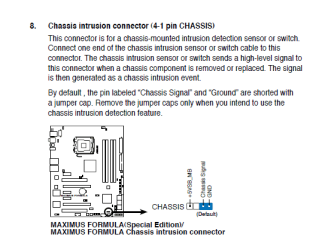
Dek, my appologies, the Chassis Intrusion alert is a jumper related feature

If none of the pins are jumped then the feature is enabled - and any mod to the board sets off the intrusion feature - if you jump the pins indicated in the image below you should solve the problem:
 

Attachments

  • Capture.PNG
    Capture.PNG
    16.1 KB · Views: 161

My Computer

Computer type
Laptop
Computer Manufacturer/Model Number
Lenovo
OS
Windows 7 Professional 64bit
CPU
Intel Core Quad 9550
Motherboard
Mobile Intel QM87 Express Chipset
Memory
16GB factory installed
Graphics Card(s)
NVIDIA Quadro K2100M
Sound Card
Onboard
Monitor(s) Displays
Apple iMac 27" display
Screen Resolution
2560 x 1440
Hard Drives
160gb factory fitted ssd
512gb pcie m2 2242 ssd
Back
Top