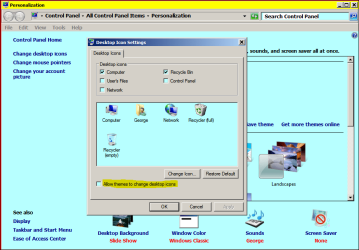
What is it with site icons and windows 7 - keep changing.

durango1

New member
Power User
VIP
Local time
6:27 AM
Messages
119
Hi i had alittle issue back with windows xp when i had that, but eventually the icons would settle down and be correct if i just gave it some time.

But with windows7 it really is a pain. No only do my site icons (of my websites) not show up correctly, they keep changing to this default earth globe. I finally have to change them back manually by using change icon and browse and finding the icon on my system.

Then just now i added a new subdomain and all of a sudden all the icons for that whole domain changed to the one i just added, im like WTH. so i checked the link tag on the site and it was correct.

Makes me wonder what my users and customers are dealing with, they dont have the luxury of just assigning my site ico file manually.

So two questions:

What is the deal here, why do they change?

Why does windows make this so complicated. If there is a link tag in the file that says the icon should be this ico file on the site then WTH is the problem and why cant windows handle such a simple task?

Thanks.
 

My Computer My Computer

At a glance

Windows 7 Professional 64bitCore i712GBAMD Radeon HD7670 1GB
Computer type
PC/Desktop
Computer Manufacturer/Model Number
HP Pav HPE h9-1110t
OS
Windows 7 Professional 64bit
CPU
Core i7
Memory
12GB
Graphics Card(s)
AMD Radeon HD7670 1GB
Hard Drives
160GB Main OS only Solid State
500GB Secondary
160GB Slave SCSI with interface board and cable
1 TB external HD
Cooling
Air
Mouse
Razor Mamba
Do this:-

RR.PNG
 

My Computer My Computer

At a glance

Win7 H.Prem. 32bit+SP1
Computer Manufacturer/Model Number
Look in my Signature.
OS
Win7 H.Prem. 32bit+SP1
Do this:-
I just viewed my personalization settings and the box has been unchecked for some time. Yet sometimes my desktop icons change but eventually go back to what they should be.
 

My Computer My Computer

At a glance

Windows 8 Pro w/MC 32-bitIntel Atom 1.86 GHz2 GBIntel GMA 500
Computer type
PC/Desktop
Computer Manufacturer/Model Number
OQO 2+
OS
Windows 8 Pro w/MC 32-bit
CPU
Intel Atom 1.86 GHz
Motherboard
OQO 2+
Memory
2 GB
Graphics Card(s)
Intel GMA 500
Sound Card
IDT
Monitor(s) Displays
LCD
Screen Resolution
800 x 480 (portable) 1280 x 1024 (docked)
Hard Drives
64 GB SSD
PSU
9 Ah Battery (portable) or OQO Brick (docked)
Case
Shirt Pocket Sized
Cooling
Tiny Fan
Keyboard
Slide out (portable) DiNovo Edge (docked)
Mouse
Eraser head (portable) Logitech Bluetooth (docked)
Internet Speed
WWAN or 802.11G (portable) T1 (docked)
Browser
IE 10
Other Info
DVD-RW OQO Docking Station

My Computer My Computer

At a glance

Win7 H.Prem. 32bit+SP1
Computer Manufacturer/Model Number
Look in my Signature.
OS
Win7 H.Prem. 32bit+SP1
Thanks i made the changes to both, lets see what happens. Appreciate the help. :)
 

My Computer My Computer

At a glance

Windows 7 Professional 64bitCore i712GBAMD Radeon HD7670 1GB
Computer type
PC/Desktop
Computer Manufacturer/Model Number
HP Pav HPE h9-1110t
OS
Windows 7 Professional 64bit
CPU
Core i7
Memory
12GB
Graphics Card(s)
AMD Radeon HD7670 1GB
Hard Drives
160GB Main OS only Solid State
500GB Secondary
160GB Slave SCSI with interface board and cable
1 TB external HD
Cooling
Air
Mouse
Razor Mamba
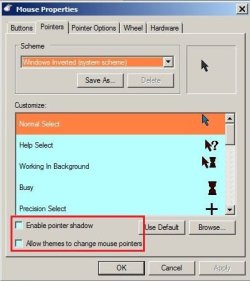
Hi roncerr, did you change these setting also ?...
They were checked, so I just unchecked them. Can't see the connection between mouse pointers and internet icons but might as well try it. Thanks.
 

My Computer My Computer

At a glance

Windows 8 Pro w/MC 32-bitIntel Atom 1.86 GHz2 GBIntel GMA 500
Computer type
PC/Desktop
Computer Manufacturer/Model Number
OQO 2+
OS
Windows 8 Pro w/MC 32-bit
CPU
Intel Atom 1.86 GHz
Motherboard
OQO 2+
Memory
2 GB
Graphics Card(s)
Intel GMA 500
Sound Card
IDT
Monitor(s) Displays
LCD
Screen Resolution
800 x 480 (portable) 1280 x 1024 (docked)
Hard Drives
64 GB SSD
PSU
9 Ah Battery (portable) or OQO Brick (docked)
Case
Shirt Pocket Sized
Cooling
Tiny Fan
Keyboard
Slide out (portable) DiNovo Edge (docked)
Mouse
Eraser head (portable) Logitech Bluetooth (docked)
Internet Speed
WWAN or 802.11G (portable) T1 (docked)
Browser
IE 10
Other Info
DVD-RW OQO Docking Station
Hi roncerr, did you change these setting also ?...
They were checked, so I just unchecked them. Can't see the connection between mouse pointers and internet icons but might as well try it. Thanks.
Well I made all the changes suggested, even though my icons were properly showing the internet icons for this forum (Browsers and Mail) and for Google at the time. A week has past and now the desktop icons have just changed to generic as shown:
 

Attachments

  • Icons Lost.JPG
    Icons Lost.JPG
    10.2 KB · Views: 293

My Computer My Computer

At a glance

Windows 8 Pro w/MC 32-bitIntel Atom 1.86 GHz2 GBIntel GMA 500
Computer type
PC/Desktop
Computer Manufacturer/Model Number
OQO 2+
OS
Windows 8 Pro w/MC 32-bit
CPU
Intel Atom 1.86 GHz
Motherboard
OQO 2+
Memory
2 GB
Graphics Card(s)
Intel GMA 500
Sound Card
IDT
Monitor(s) Displays
LCD
Screen Resolution
800 x 480 (portable) 1280 x 1024 (docked)
Hard Drives
64 GB SSD
PSU
9 Ah Battery (portable) or OQO Brick (docked)
Case
Shirt Pocket Sized
Cooling
Tiny Fan
Keyboard
Slide out (portable) DiNovo Edge (docked)
Mouse
Eraser head (portable) Logitech Bluetooth (docked)
Internet Speed
WWAN or 802.11G (portable) T1 (docked)
Browser
IE 10
Other Info
DVD-RW OQO Docking Station
Well I made all the changes suggested, even though my icons were properly showing the internet icons for this forum (Browsers and Mail) and for Google at the time. A week has past and now the desktop icons have just changed to generic as shown:
Are they desktop or taskbar icons ?
 

My Computer My Computer

At a glance

Win7 H.Prem. 32bit+SP1
Computer Manufacturer/Model Number
Look in my Signature.
OS
Win7 H.Prem. 32bit+SP1
Well I made all the changes suggested, even though my icons were properly showing the internet icons for this forum (Browsers and Mail) and for Google at the time. A week has past and now the desktop icons have just changed to generic as shown:
Are they desktop or taskbar icons ?
Desktop.
 

My Computer My Computer

At a glance

Windows 8 Pro w/MC 32-bitIntel Atom 1.86 GHz2 GBIntel GMA 500
Computer type
PC/Desktop
Computer Manufacturer/Model Number
OQO 2+
OS
Windows 8 Pro w/MC 32-bit
CPU
Intel Atom 1.86 GHz
Motherboard
OQO 2+
Memory
2 GB
Graphics Card(s)
Intel GMA 500
Sound Card
IDT
Monitor(s) Displays
LCD
Screen Resolution
800 x 480 (portable) 1280 x 1024 (docked)
Hard Drives
64 GB SSD
PSU
9 Ah Battery (portable) or OQO Brick (docked)
Case
Shirt Pocket Sized
Cooling
Tiny Fan
Keyboard
Slide out (portable) DiNovo Edge (docked)
Mouse
Eraser head (portable) Logitech Bluetooth (docked)
Internet Speed
WWAN or 802.11G (portable) T1 (docked)
Browser
IE 10
Other Info
DVD-RW OQO Docking Station
This is some of my desktp icons, the others are at default settings.

RR.JPG
 

My Computer My Computer

At a glance

Win7 H.Prem. 32bit+SP1
Computer Manufacturer/Model Number
Look in my Signature.
OS
Win7 H.Prem. 32bit+SP1
I've seen the behavior of icons changing on desktop shortcuts too... except mine are related to shortcuts that point to targets that are not connected to the computer yet since my VPN connection has not started yet.

Once you have a connection to the internet, does selecting the desktop and pressing F5 help?
 

My Computer My Computer

At a glance

W7 Pro SP1 64biti78GBIntel HD Graphics
Computer type
Laptop
Computer Manufacturer/Model Number
Employer provided Dell Latitude
OS
W7 Pro SP1 64bit
CPU
i7
Memory
8GB
Graphics Card(s)
Intel HD Graphics
Hard Drives
crappy SSD
Antivirus
Employer mandated Symantec Endpoint Protection
Browser
Pale Moon 64bit, IE11 64bit & Chrome 64bit
This is some of my desktop icons, the others are at default settings....
I think the misunderstanding is becoming clear. Your 3 desktop icons are all shortcuts to programs in Windows Explorer. I don't have a problem with the PROGRAM icons which are stable. The problem is with SITE icons (i.e. icons that point to a url) in which the type of file is designated "Internet Shortcut" pointing to a specific url like http://google.com. I have a mixture of both types on my desktop.

BTW starting today, the icons fixed themselves. No doubt they will revert back to generic in a few days, but for now they are working (It's interesting that the Amazon shortcut was stable while the other two turned generic for a while.):
 

Attachments

  • Icons Back.JPG
    Icons Back.JPG
    10.3 KB · Views: 72

My Computer My Computer

At a glance

Windows 8 Pro w/MC 32-bitIntel Atom 1.86 GHz2 GBIntel GMA 500
Computer type
PC/Desktop
Computer Manufacturer/Model Number
OQO 2+
OS
Windows 8 Pro w/MC 32-bit
CPU
Intel Atom 1.86 GHz
Motherboard
OQO 2+
Memory
2 GB
Graphics Card(s)
Intel GMA 500
Sound Card
IDT
Monitor(s) Displays
LCD
Screen Resolution
800 x 480 (portable) 1280 x 1024 (docked)
Hard Drives
64 GB SSD
PSU
9 Ah Battery (portable) or OQO Brick (docked)
Case
Shirt Pocket Sized
Cooling
Tiny Fan
Keyboard
Slide out (portable) DiNovo Edge (docked)
Mouse
Eraser head (portable) Logitech Bluetooth (docked)
Internet Speed
WWAN or 802.11G (portable) T1 (docked)
Browser
IE 10
Other Info
DVD-RW OQO Docking Station
...Once you have a connection to the internet, does selecting the desktop and pressing F5 help?
No, refreshing the desktop makes no difference. Neither does rebooting or anything in particular, as far as I can tell.
 

My Computer My Computer

At a glance

Windows 8 Pro w/MC 32-bitIntel Atom 1.86 GHz2 GBIntel GMA 500
Computer type
PC/Desktop
Computer Manufacturer/Model Number
OQO 2+
OS
Windows 8 Pro w/MC 32-bit
CPU
Intel Atom 1.86 GHz
Motherboard
OQO 2+
Memory
2 GB
Graphics Card(s)
Intel GMA 500
Sound Card
IDT
Monitor(s) Displays
LCD
Screen Resolution
800 x 480 (portable) 1280 x 1024 (docked)
Hard Drives
64 GB SSD
PSU
9 Ah Battery (portable) or OQO Brick (docked)
Case
Shirt Pocket Sized
Cooling
Tiny Fan
Keyboard
Slide out (portable) DiNovo Edge (docked)
Mouse
Eraser head (portable) Logitech Bluetooth (docked)
Internet Speed
WWAN or 802.11G (portable) T1 (docked)
Browser
IE 10
Other Info
DVD-RW OQO Docking Station
Back
Top