Solved Can I pin an internet shortcut to the taskbar alone?

Dorfdad

New member
Member
Power User
VIP
Local time
5:26 AM
Messages
204
Location
Philadelphia, PA
I have a couple of WEB based applications that I want to pin to the Taskbar directly. I do not wish to have them pined under Firefox or Chrome etc..

I want the link and Icon posted alone on the taskbar. This was possible in older versions of windows however in 7 it forces the program icon to the taskbar and pin the link under the right click for it.

Does anyone know a way to do this?
 

My Computer My Computer

OS
Windows 7 7264
CPU
AMD Phenon X4955 Black Edition 3.2 Quad Core
Motherboard
ASUS M4A79T Deluxe AM3 DDR3 AMD 790FX ATX AMD Motherboard
Memory
8GB CORSAIR XMS3 DHX 4GB 240-Pin DDR3 SDRAM DDR3 1600
Graphics Card(s)
SAPPHIRE Radeon HD 4890 1GB 256-bit GDDR5 PCI Exp 2.0 16x
Sound Card
Onboard Asus
Monitor(s) Displays
Hanns G 28" Widscreen Baby!
Screen Resolution
1900x1200
Hard Drives
Western Digital Caviar Black WD1001FALS 1TB 7200 RPM 32MB Cache SATA 3.0Gb

Western Digital 320gb 7200 RPM 16MB Cache
PSU
CORSAIR CMPSU-750TX 750W ATX12V / EPS12V
Case
Custom Made ATX
Cooling
Air
Keyboard
Microsoft Wired for gaming
Mouse
Wired for gaming 2200
Internet Speed
Comcast 24GB

My Computer My Computer

Computer Manufacturer/Model Number
Custom Assembled
OS
Windows 7 Build 7600.16385 (Clean Install)
CPU
AMD Black Edition AMD Phenom X3 8750 / 2.4 GHz processor
Motherboard
Gigabyte GA-MA78GM-S2H 780G Socket AM2+ onboard VGA 8 channe
Memory
Kingston 4GB (4x1GB) DDR2 1066MHz/PC2-8500 Hyperx Memory
Graphics Card(s)
Intergrated ATI HD3200
Sound Card
Realtek High Definition Audio
Monitor(s) Displays
Acer 19"
Screen Resolution
1280 x 1024
Hard Drives
2 x Maxtor STM3250310AS 250GB SATAII 7200rpm 8MB Cache

3 x 500gb Seagate External HDD
PSU
CM eXtreme Power 460W PSU
Case
Coolermaster Elite 330 Black Case
Keyboard
Zippy Multimedia
Mouse
Logitech MX™518 Gaming-Grade Optical Mouse
Internet Speed
8Mbps down / 1Mbps up
Other Info
I haz floppyz
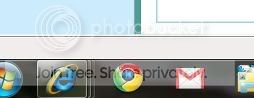
do you mean like this?

this.jpg

the gmail icon open gmail in chrome
 

My Computer My Computer

OS
Vista & Win 7
CPU
AMD Turion 64X2
Memory
2GB
Screen Resolution
1280x800
yes like that
 

My Computer My Computer

OS
Windows 7 7264
CPU
AMD Phenon X4955 Black Edition 3.2 Quad Core
Motherboard
ASUS M4A79T Deluxe AM3 DDR3 AMD 790FX ATX AMD Motherboard
Memory
8GB CORSAIR XMS3 DHX 4GB 240-Pin DDR3 SDRAM DDR3 1600
Graphics Card(s)
SAPPHIRE Radeon HD 4890 1GB 256-bit GDDR5 PCI Exp 2.0 16x
Sound Card
Onboard Asus
Monitor(s) Displays
Hanns G 28" Widscreen Baby!
Screen Resolution
1900x1200
Hard Drives
Western Digital Caviar Black WD1001FALS 1TB 7200 RPM 32MB Cache SATA 3.0Gb

Western Digital 320gb 7200 RPM 16MB Cache
PSU
CORSAIR CMPSU-750TX 750W ATX12V / EPS12V
Case
Custom Made ATX
Cooling
Air
Keyboard
Microsoft Wired for gaming
Mouse
Wired for gaming 2200
Internet Speed
Comcast 24GB
oh that's easy. at least on chrome. i don't think you can do it with firefox.

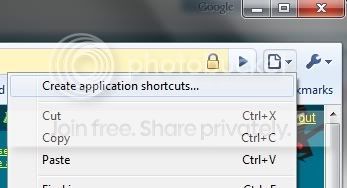
first go to the site you want to make a link for. then click the page button. click 'create application shortcut...'
gmail1.jpg


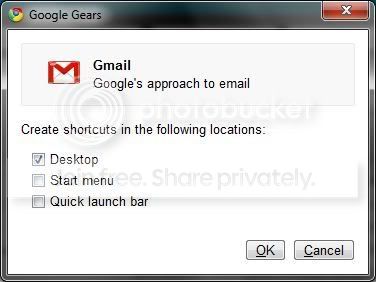
then it will ask you where you want to put the shortcut. make sure 'desktop' is checked. then click 'ok'.

gmail2.jpg


now drag the 'shortcut' you created to the taskbar. and your done.
 

My Computer My Computer

OS
Vista & Win 7
CPU
AMD Turion 64X2
Memory
2GB
Screen Resolution
1280x800
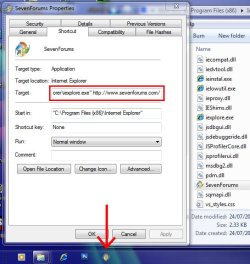
You could always create a new shortcut to Internet Explorer itself then right-click the new shortcut and put the web address after the speachmarks in the 'Target:' box, then pin the shortcut to the taskbar.

PinURL.jpg


So the full command in the 'Target' would look something along these lines:
Code:
"C:\Program Files (x86)\Internet Explorer\iexplore.exe" [URL]http://www.sevenforums.com/[/URL]


The only problem being is when you open the link, the selection box that shows the active window in the taskbar will merge into IE's window stack..
Like so: (Notice no highlight/selection around the SevenForums logo)
NoBox.jpg
 

My Computer My Computer

Computer Manufacturer/Model Number
Self Built
OS
XP Pro SP3 x86/Vista SP2 x64/Win7 x64 Triple-boot
CPU
AMD64 X2 AM2 5000+
Motherboard
Asus MSN-X Plus
Memory
Corsair TWX 2Gb (2x1Gb) DDR2 800Mhz
Graphics Card(s)
PCI-X 2.0 Inno3D (NVidia) 9500GT 1Gb DDR2
Sound Card
Onboard Realtec ALC662-GR
Monitor(s) Displays
Relisys 17' CRT (model unknown)
Screen Resolution
1024x768
Hard Drives
750Gb Samsung 7200-3Gb/s 32Mb Cache SATA
PSU
500W
Cooling
Standard AMD CPU Fan, One side, front and rear case fan.
Keyboard
Microsoft Multimedia Keyboard
Mouse
Samsung Optical
Internet Speed
10M
You could always create a new shortcut to Internet Explorer itself then right-click the new shortcut and put the web address after the speachmarks in the 'Target:' box, then pin the shortcut to the taskbar.

i bet this work with firefox
*edit* yup

The only problem being is when you open the link, the selection box that shows the active window in the taskbar will merge into IE's window stack..
Like so: (Notice no highlight/selection around the SevenForums logo)
View attachment 19623

this happens with chrome and firefox
 

My Computer My Computer

OS
Vista & Win 7
CPU
AMD Turion 64X2
Memory
2GB
Screen Resolution
1280x800
Thanks for the tips I am using the Chrome idea with some success. Weird because some times the apps do launch in there own highlighted tab on the bottom and other times in the Chrome window.
 

My Computer My Computer

OS
Windows 7 7264
CPU
AMD Phenon X4955 Black Edition 3.2 Quad Core
Motherboard
ASUS M4A79T Deluxe AM3 DDR3 AMD 790FX ATX AMD Motherboard
Memory
8GB CORSAIR XMS3 DHX 4GB 240-Pin DDR3 SDRAM DDR3 1600
Graphics Card(s)
SAPPHIRE Radeon HD 4890 1GB 256-bit GDDR5 PCI Exp 2.0 16x
Sound Card
Onboard Asus
Monitor(s) Displays
Hanns G 28" Widscreen Baby!
Screen Resolution
1900x1200
Hard Drives
Western Digital Caviar Black WD1001FALS 1TB 7200 RPM 32MB Cache SATA 3.0Gb

Western Digital 320gb 7200 RPM 16MB Cache
PSU
CORSAIR CMPSU-750TX 750W ATX12V / EPS12V
Case
Custom Made ATX
Cooling
Air
Keyboard
Microsoft Wired for gaming
Mouse
Wired for gaming 2200
Internet Speed
Comcast 24GB
Reviving this thread as it is the first hit for "pin internet shortcut to taskbar windows 7."

Been working on this problem for a couple of days and finally found that the Prism extension for Firefox is a good solution to this issue. Allows you to make Chrome-style application shortcuts any web page.
 

My Computer My Computer

OS
windows 7
You can just pin it to the IE jump list.

Jimmy
 

My Computer My Computer

Computer Manufacturer/Model Number
Power Spec- Micro Electronics,Inc.
OS
Windows 7 64-bit
CPU
Intel i7
Motherboard
Intel
Memory
12 gigs
Graphics Card(s)
AMD Radeon HD 6900 series
Sound Card
AMD High Definition Audio Device
Monitor(s) Displays
Gateway FHX2300
Screen Resolution
1920x1080
Hard Drives
Samsung HD204UI 2 terabytes used for storage
SSD G2 Series 64 GB System drive
IE
Pinning a site takes seconds: click the icon to the left of the web address in One Box, or the tab for the website, or the website's icon on the New Tab page, and then drag it to the taskbar. That's it. Once a site is pinned, it shows up as its own thumbnail, separate from Internet Explorer.
 

My Computer My Computer

Computer Manufacturer/Model Number
dell latitude e6510
OS
windows 7 pro x64
CPU
i5
Motherboard
Dell
Memory
8 gb
Graphics Card(s)
intel HD
Sound Card
IDT HD
this way is much simpler, use this as your shortcut target

C:\Windows\System32\cmd.exe /c start /min "c:/Program Files (x86)/Mozilla Firefox/firefox.exe" https://www.paypal.com ^& exit


you can have multiple shortcuts like this too
 
Last edited:

My Computer My Computer

Computer type
PC/Desktop
Computer Manufacturer/Model Number
asus
OS
windows 8 pr0 x64
CPU
amd phenom II x4
Motherboard
m4a78t-e
Memory
8GB DDR3
Graphics Card(s)
on board
Sound Card
on board
Hard Drives
SSD - OCZ 120GB
PSU
400W
Case
rackmount 4U
Cooling
FANS
Keyboard
one that lights up blue when i press scroll lock
only change

https://www.paypal.com

can be changed to whatever

this method will open an anoying cmd popup window but i have minimized it with /min (so you cant see it) and it closes when you close firefox with the ^& exit
 
Last edited:

My Computer My Computer

Computer type
PC/Desktop
Computer Manufacturer/Model Number
asus
OS
windows 8 pr0 x64
CPU
amd phenom II x4
Motherboard
m4a78t-e
Memory
8GB DDR3
Graphics Card(s)
on board
Sound Card
on board
Hard Drives
SSD - OCZ 120GB
PSU
400W
Case
rackmount 4U
Cooling
FANS
Keyboard
one that lights up blue when i press scroll lock
Back
Top