SFC /SCANNOW Command - System File Checker

How to Repair Windows 7 System Files with System File Checker


   Information
The sfc /scannow command (System File Checker) scans the integrity of all protected Windows 7 system files and replaces incorrect corrupted, changed/modified, or damaged versions with the correct versions if possible.

   Tip
If you get the Windows Resource Protection Could Not Start the Repair Service error when trying to run SFC, then make sure that the Windows Modules Installer service is enabled, click on Start, and set to Manual.

Services - Start or Disable

OR

Copy and paste the command below in the elevated command prompt, and press Enter. After the Windows Modules Installer service has started, try running the SFC command again

net start trustedinstaller

   Note
The KB3022345, KB3035583, and KB3068708 updates will cause SFC to give you a false mismatch message in SFC for files related to these updates.

You can safely ignore these results in your SFC details since it will not affect SFC from being able to repair other system files.

   Warning
Be aware that if you have modified your system files as in theming explorer/system files, running sfc /scannow will revert the system files such as explorer.exe back to it's default state. Make the appropriate backups of your system files that you have modified for theming if you wish to save them before running sfc /scannow.


:note: For the updated Windows 10 tutorial, please see - SFC Command - Run in Windows 10 - Windows 10 Tutorials

CONTENTS:
  • Option One: To Run the SFC /SCANNOW Command at Boot
  • Option Two: To Run the SFC /SCANNOW Command in Windows 7
  • Option Three: How to See and Read Only the "SFC" Scan Results from the CBS.LOG


OPTION ONE

To Run the SFC /SCANNOW Command at Boot


1. For how, see METHOD TWO at this link: SFC /SCANNOW : Run in Command Prompt at Boot

   Note
Using OPTION TWO below is recommended if able.

If you would like to get help with your SFC issue, then be sure to upload and attach your sfcdetails.txt file from OPTION THREE below in your post.


OPTION TWO

To Run the SFC /SCANNOW Command in Windows 7


1. Open an elevated command prompt or an elevated PowerShell, and do step 2 or 3 below for what type of scan you would like to run.


2. To Scan and Repair System Files
NOTE: Scans the integrity of all protected system files and repairs the system files if needed. Please see red WARNING box at the top of this tutorial.
A) In the elevated command prompt, type sfc /scannow, press Enter, and go to step 4 below. (see screenshot below)
NOTE: This may take a little bit to finish.
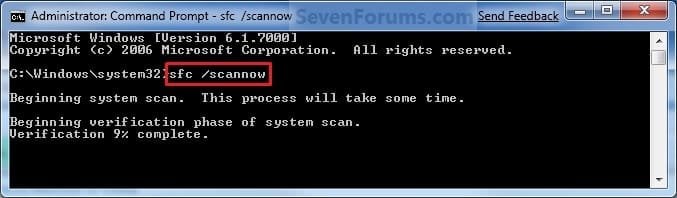
Command-1.jpg
3. To Only Verify if the System Files are Corrupted
NOTE: Scans and only verifies the integrity of all proteced system files only. This command will not change your system files as in the red WARNING box at the top of this tutorial.
A) In the elevated command prompt, type sfc /verifyonly, press Enter, and go to step 4 below.
4. When the scan is complete, hopefully you will see all is ok like the screenshot below.

   Note

  • If SFC could not fix something, then run the command again to see if it may be able to the next time. Sometimes it may take running the sfc /scannow command 3 or more times to completely fix everything that it's able to.
  • If not, then download and run the 32-bit (x86) or 64-bit (x64) System Update Readiness Tool for your same installed 32-bit or 64-bit Windows 7, restart the PC afterwards, and try the sfc /scannow command again.
  • If still not, then try using OPTION ONE above to run the sfc /scannow command at boot.
  • If still not, then you can attempt to run a System Restore using a restore point dated before the bad file occured to fix it. You may need to repeat doing a System Restore until you find a older restore point that may work.
  • If still not, then you can use the steps in the TIP box in the OPTION THREE section below to manually replace the files that SFC could not fix if there are not to many fix.
  • If there are to many files to manually fix, or you prefer not to use OPTION THREE below, then you could do a repair install without losing anything.
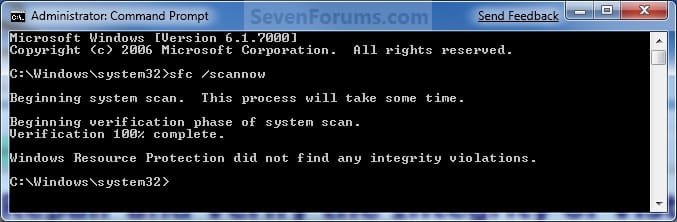
If you would like to get help with your SFC issue, then be sure to upload and attach your sfcdetails.txt file from OPTION THREE below in your post.


Finished.jpg
5. When done, close the elevated command prompt.


OPTION THREE

How to See and Read Only the "SFC" Scan Results from the CBS.LOG


   Note
When SFC runs, it logs it's actions into the C:\Windows\Logs\CBS\CBS.log. The steps in this option will show you how to see only the specific SFC entries with the [SR] tags in this CBS.log. This can be helpful to show you what files SFC could not fix automatically if you wanted to try and manually replace them.

1. Open an "elevated command prompt" (right click -> Run as administrator).

2. In the elevated command prompt, copy and paste the command below, and press Enter. (See screenshot below)
NOTE: This will place a sfcdetails.txt file on your desktop with only the SFC scan result details from the CBS.LOG in it.
Code:
findstr /c:"[SR]" %windir%\Logs\CBS\CBS.log >"%userprofile%\Desktop\sfcdetails.txt"
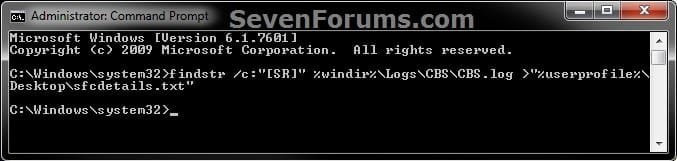
sfcdetails.jpg
3. Close the elevated command prompt.

4. Open the sfcdetails.txt file on your desktop to see the SFC scan details in the CBS.LOG.

5. You can safely delete the sfcdetails.txt file afterwards if you like.
   Tip
If you need to replace a corrupted system file that SFC cannot fix, then this will show you how to by extracting a new copy directly from your Windows 7 installation DVD.

Extract Files from Windows 7 Installation DVD


That's it,
Shawn


Last edited:
Hi Brink,
Downloaded the malware program thanks, but frustration still reigns on running the program as with MSE and some other programs it starts to run ok but then freezes and does not complete (Not Responding) I cannot even run scannow at boot as in your tutorial it worked once but now no longer responds !

Garry
 

My Computer My Computer

Computer Manufacturer/Model Number
acer aspire ax3810
OS
Home Premium 32 bit
CPU
e5200
Memory
3 GB
Graphics Card(s)
X4500
Garry,

You could try scanning your system with the online Bitdefender or ESET scanner.

If that will not run for you, then you might see if you may be able to create and use a 32-bit Windows Defender Offline bootable USB flash drive to boot from and scan your system with at boot.

If you had system protection turned on, then you could also do a system restore at boot using a restore point dated before you had this issue to hopefully undo and fix it for you.
 

My Computer My Computer

Computer type
PC/Desktop
Computer Manufacturer/Model Number
Self built custom
OS
64-bit Windows 11 Pro for Workstations
CPU
Intel i7-8700K OC'd to 5 GHz
Motherboard
ASUS ROG Maximus XI Formula Z390
Memory
64 GB (4x16GB) G.SKILL TridentZ RGB DDR4 3600 MHz
Graphics Card(s)
ASUS ROG-STRIX-GTX1080TI-O11G-GAMING
Sound Card
Integrated
Monitor(s) Displays
2 x Samsung Odyssey G7 27"
Screen Resolution
2560x1440
Hard Drives
1TB Samsung 990 PRO M.2,
4TB Samsung 990 PRO PRO M.2,
TerraMaster F8 SSD Plus NAS
PSU
Seasonic Prime Titanium 850W
Case
Thermaltake Core P3
Cooling
Corsair Hydro H115i
Keyboard
Logitech wireless K800
Mouse
Logitech MX Master 4
Internet Speed
2 Gb/s Download and 100 Mb/s Upload
Antivirus
Malwarebyte Anti-Malware Premium
Browser
Google Chrome
Other Info
Logitech Z625 speaker system,
Logitech BRIO 4K Pro webcam,
HP Color LaserJet Pro MFP M477fdn,
APC SMART-UPS RT 1000 XL - SURT1000XLI,
Galaxy S23 Plus phone
What about changes...

Having looked at the log file after a 'verifyonly' run, I noted how many 'changes' there are in my system. I find it near impossible to decide which, if any, are the result of all those security permissions granted to change system files when installing apps and programs. Hate to have to redo all that after a repair only to see them all on the next 'verify' run.
Any ideas? or am I way not-understanding what's going on here??

Thanks
 

My Computer My Computer

OS
Windows 7
Hello John, and welcome to Seven Forums.

If you would upload your sfcdetails.txt file from OPTION THREE, I'll be happy to take a look at it to help. :)
 

My Computer My Computer

Computer type
PC/Desktop
Computer Manufacturer/Model Number
Self built custom
OS
64-bit Windows 11 Pro for Workstations
CPU
Intel i7-8700K OC'd to 5 GHz
Motherboard
ASUS ROG Maximus XI Formula Z390
Memory
64 GB (4x16GB) G.SKILL TridentZ RGB DDR4 3600 MHz
Graphics Card(s)
ASUS ROG-STRIX-GTX1080TI-O11G-GAMING
Sound Card
Integrated
Monitor(s) Displays
2 x Samsung Odyssey G7 27"
Screen Resolution
2560x1440
Hard Drives
1TB Samsung 990 PRO M.2,
4TB Samsung 990 PRO PRO M.2,
TerraMaster F8 SSD Plus NAS
PSU
Seasonic Prime Titanium 850W
Case
Thermaltake Core P3
Cooling
Corsair Hydro H115i
Keyboard
Logitech wireless K800
Mouse
Logitech MX Master 4
Internet Speed
2 Gb/s Download and 100 Mb/s Upload
Antivirus
Malwarebyte Anti-Malware Premium
Browser
Google Chrome
Other Info
Logitech Z625 speaker system,
Logitech BRIO 4K Pro webcam,
HP Color LaserJet Pro MFP M477fdn,
APC SMART-UPS RT 1000 XL - SURT1000XLI,
Galaxy S23 Plus phone
Not required. Got much better after some investigation and moving the text file to my desktop (removed the chaff from the problem). Thanks for the offer, and thanks more for the article. Great help.
 

My Computer My Computer

OS
Windows 7
That's great news John. I'm happy to hear that you got it sorted. :)
 

My Computer My Computer

Computer type
PC/Desktop
Computer Manufacturer/Model Number
Self built custom
OS
64-bit Windows 11 Pro for Workstations
CPU
Intel i7-8700K OC'd to 5 GHz
Motherboard
ASUS ROG Maximus XI Formula Z390
Memory
64 GB (4x16GB) G.SKILL TridentZ RGB DDR4 3600 MHz
Graphics Card(s)
ASUS ROG-STRIX-GTX1080TI-O11G-GAMING
Sound Card
Integrated
Monitor(s) Displays
2 x Samsung Odyssey G7 27"
Screen Resolution
2560x1440
Hard Drives
1TB Samsung 990 PRO M.2,
4TB Samsung 990 PRO PRO M.2,
TerraMaster F8 SSD Plus NAS
PSU
Seasonic Prime Titanium 850W
Case
Thermaltake Core P3
Cooling
Corsair Hydro H115i
Keyboard
Logitech wireless K800
Mouse
Logitech MX Master 4
Internet Speed
2 Gb/s Download and 100 Mb/s Upload
Antivirus
Malwarebyte Anti-Malware Premium
Browser
Google Chrome
Other Info
Logitech Z625 speaker system,
Logitech BRIO 4K Pro webcam,
HP Color LaserJet Pro MFP M477fdn,
APC SMART-UPS RT 1000 XL - SURT1000XLI,
Galaxy S23 Plus phone
Source Files Corrupted?

Having run sfc following Brinks's great tutorial several times now, and looked at the "SFC Details.txt" I have found out that the SFC cannot replace many of my corrupted files due to the source files being corrupted..

I have run SFC from the desktop about a dozen times, and from the boot about the same amount of times, but it will repair no further due to these source files being somehow mysteriously corrupt.

The resulting message in SFC states that "Windows resource protection found corrupt files but was unable to fix some of them.." in the SFC Details text, the reason is that the source files are corrupt too.

I should point out that although there are a few corrupt/damaged files that SFC is picking up, W764 seems to be ticking over nicely and the corrupt files seem to be stuff like chinese language packs, games of chess etc. and nothing seems to be disfunctional in my daily use of the OS.

However just knowing that something isn't quite right about the system as a result of the SFC showing them up has me now set on fixing it. :) - Am I now up the proverbial creek without a paddle? There are quite a lot of corrupt source files in the report.

It seemed to me that if you could "Point.." SFC to a different place for those replacement system reserve files (Like you used ta cud in XP..) then maybe I could snaffle an non-corrupt copy of W764's System reserve folders and SFC could use that as it's source..

Wouldnt it be great if there were an online copy of those files that you point SFC too? - Dream on. This is Real Life. :)

I do prefer to repair as opposed to re-installing and if anyone has thoughts along these lines, I'd be happy to get started on thrashing a plan out to tinker with SFC's reserve files if it's even possible.. ? :D
 

My Computer My Computer

Computer Manufacturer/Model Number
Self Built
OS
W7 64
CPU
E6600 Dual Core
Motherboard
XFX nForce 790i Ultra
Memory
2 X 1 GB Crucial Ballistix 12864BE2009
Graphics Card(s)
ATI Radeon HD4800 on Catalyst 10.7
Sound Card
Creative SB X-Fi Gamers Edition
Monitor(s) Displays
32 Philips LCD HD Flat TV
Hard Drives
2x500GB Hitachi Sata II in RAID 0 Config to 931.52GB
PSU
Hiper 600 Watt
Case
Antec 900
Hello Soxmis,

If that's all that SFS found is wrong, then it doesn't seem to be anything to be worried about. Unless one knows what they are doing, trying to manually replace the unfixable files could risk causing more issues. It's just not really worth the risk unless the unfixable files are causing issues that prevent Windows from running properly. :)

Hope this helps,
Shawn
 

My Computer My Computer

Computer type
PC/Desktop
Computer Manufacturer/Model Number
Self built custom
OS
64-bit Windows 11 Pro for Workstations
CPU
Intel i7-8700K OC'd to 5 GHz
Motherboard
ASUS ROG Maximus XI Formula Z390
Memory
64 GB (4x16GB) G.SKILL TridentZ RGB DDR4 3600 MHz
Graphics Card(s)
ASUS ROG-STRIX-GTX1080TI-O11G-GAMING
Sound Card
Integrated
Monitor(s) Displays
2 x Samsung Odyssey G7 27"
Screen Resolution
2560x1440
Hard Drives
1TB Samsung 990 PRO M.2,
4TB Samsung 990 PRO PRO M.2,
TerraMaster F8 SSD Plus NAS
PSU
Seasonic Prime Titanium 850W
Case
Thermaltake Core P3
Cooling
Corsair Hydro H115i
Keyboard
Logitech wireless K800
Mouse
Logitech MX Master 4
Internet Speed
2 Gb/s Download and 100 Mb/s Upload
Antivirus
Malwarebyte Anti-Malware Premium
Browser
Google Chrome
Other Info
Logitech Z625 speaker system,
Logitech BRIO 4K Pro webcam,
HP Color LaserJet Pro MFP M477fdn,
APC SMART-UPS RT 1000 XL - SURT1000XLI,
Galaxy S23 Plus phone
If it aint broke... Don't fix it.

Hi Shawn,

I don't know how you find the time to reply to all these posts, but sincerely, thanks for finding the time to reply to mine.

I think you have once again hit the nail on the head. I'm just going to leave it alone as the OS runs smoothly and has done for 3 years now, so if SFC finds the odd thing broke, but I never use it..

I'm letting it pass.

Many thanks.

John.
 

My Computer My Computer

Computer Manufacturer/Model Number
Self Built
OS
W7 64
CPU
E6600 Dual Core
Motherboard
XFX nForce 790i Ultra
Memory
2 X 1 GB Crucial Ballistix 12864BE2009
Graphics Card(s)
ATI Radeon HD4800 on Catalyst 10.7
Sound Card
Creative SB X-Fi Gamers Edition
Monitor(s) Displays
32 Philips LCD HD Flat TV
Hard Drives
2x500GB Hitachi Sata II in RAID 0 Config to 931.52GB
PSU
Hiper 600 Watt
Case
Antec 900
You're most welcome John. :)
 

My Computer My Computer

Computer type
PC/Desktop
Computer Manufacturer/Model Number
Self built custom
OS
64-bit Windows 11 Pro for Workstations
CPU
Intel i7-8700K OC'd to 5 GHz
Motherboard
ASUS ROG Maximus XI Formula Z390
Memory
64 GB (4x16GB) G.SKILL TridentZ RGB DDR4 3600 MHz
Graphics Card(s)
ASUS ROG-STRIX-GTX1080TI-O11G-GAMING
Sound Card
Integrated
Monitor(s) Displays
2 x Samsung Odyssey G7 27"
Screen Resolution
2560x1440
Hard Drives
1TB Samsung 990 PRO M.2,
4TB Samsung 990 PRO PRO M.2,
TerraMaster F8 SSD Plus NAS
PSU
Seasonic Prime Titanium 850W
Case
Thermaltake Core P3
Cooling
Corsair Hydro H115i
Keyboard
Logitech wireless K800
Mouse
Logitech MX Master 4
Internet Speed
2 Gb/s Download and 100 Mb/s Upload
Antivirus
Malwarebyte Anti-Malware Premium
Browser
Google Chrome
Other Info
Logitech Z625 speaker system,
Logitech BRIO 4K Pro webcam,
HP Color LaserJet Pro MFP M477fdn,
APC SMART-UPS RT 1000 XL - SURT1000XLI,
Galaxy S23 Plus phone
what else is??

I've replaced my login screen and SFC /verifyonly reflects that as a corrupt file. This is ok because I know why it finds it corrupt. None of my other files show to be bad.

However, I have some concern that, if some of the inconsequential source files are corrupt for an unknown reason, others may be corrupt also. In that case, as long as your operating files are OK, SFC will find no issues, even if the other OS source files are corrupt. That means you may not know that you don't have a working source file until you need it.

Or do I understand the operation of SFC incorrectly?
 

My Computer My Computer

OS
Windows 7
Hello John,

Yep, you pretty much got it down. Basically SFC just preforms an integrity check on all Windows system files. If any have been modified by you or anything else, or has been found to be corrupted, then SFC will replace those file with a clean copy from the OS source files (cab) if able to and if you ran the SFC /SCANNOW command. If the OS source files are also corrupted, then SFC will be unable to replace (repair) the file. In that case, you could manually extract and replace the found to be corrupted system files from your retail Windows 7 installation disc if they are causing a issue and need to be replaced for Windows to run properly.
 

My Computer My Computer

Computer type
PC/Desktop
Computer Manufacturer/Model Number
Self built custom
OS
64-bit Windows 11 Pro for Workstations
CPU
Intel i7-8700K OC'd to 5 GHz
Motherboard
ASUS ROG Maximus XI Formula Z390
Memory
64 GB (4x16GB) G.SKILL TridentZ RGB DDR4 3600 MHz
Graphics Card(s)
ASUS ROG-STRIX-GTX1080TI-O11G-GAMING
Sound Card
Integrated
Monitor(s) Displays
2 x Samsung Odyssey G7 27"
Screen Resolution
2560x1440
Hard Drives
1TB Samsung 990 PRO M.2,
4TB Samsung 990 PRO PRO M.2,
TerraMaster F8 SSD Plus NAS
PSU
Seasonic Prime Titanium 850W
Case
Thermaltake Core P3
Cooling
Corsair Hydro H115i
Keyboard
Logitech wireless K800
Mouse
Logitech MX Master 4
Internet Speed
2 Gb/s Download and 100 Mb/s Upload
Antivirus
Malwarebyte Anti-Malware Premium
Browser
Google Chrome
Other Info
Logitech Z625 speaker system,
Logitech BRIO 4K Pro webcam,
HP Color LaserJet Pro MFP M477fdn,
APC SMART-UPS RT 1000 XL - SURT1000XLI,
Galaxy S23 Plus phone
That said, it leaves SoxmisUK in a quandry. If he has a lot of files indicating corrupt without a reason why, it seems he should take some measures to restore his source files before a problem erupts, no? "If it ain't broke, don't fix it" is not valid with such indications that it is, indeed, broke - or at least breaking.
So... how does one reconstruct source files? Something I'll look into unless you have the answer already.
 

My Computer My Computer

OS
Windows 7
John,

If you modify a system file, then it would be found as corrupted by SFC since it's no longer default. It does not always mean that there are serious issues just because system files are found to be corrupted. You should always investigate why to be safe though. If SFC is not able to restore them back to default, then you could always do what's in the yellow TIP box at the bottom of OPTION THREE in the tutorial to manually replace them if you like. It's just a matter of weighing one's own experience to be comfortable to do so or not, and if the corrupted file(s) is worth the trouble. That's all. :)
 

My Computer My Computer

Computer type
PC/Desktop
Computer Manufacturer/Model Number
Self built custom
OS
64-bit Windows 11 Pro for Workstations
CPU
Intel i7-8700K OC'd to 5 GHz
Motherboard
ASUS ROG Maximus XI Formula Z390
Memory
64 GB (4x16GB) G.SKILL TridentZ RGB DDR4 3600 MHz
Graphics Card(s)
ASUS ROG-STRIX-GTX1080TI-O11G-GAMING
Sound Card
Integrated
Monitor(s) Displays
2 x Samsung Odyssey G7 27"
Screen Resolution
2560x1440
Hard Drives
1TB Samsung 990 PRO M.2,
4TB Samsung 990 PRO PRO M.2,
TerraMaster F8 SSD Plus NAS
PSU
Seasonic Prime Titanium 850W
Case
Thermaltake Core P3
Cooling
Corsair Hydro H115i
Keyboard
Logitech wireless K800
Mouse
Logitech MX Master 4
Internet Speed
2 Gb/s Download and 100 Mb/s Upload
Antivirus
Malwarebyte Anti-Malware Premium
Browser
Google Chrome
Other Info
Logitech Z625 speaker system,
Logitech BRIO 4K Pro webcam,
HP Color LaserJet Pro MFP M477fdn,
APC SMART-UPS RT 1000 XL - SURT1000XLI,
Galaxy S23 Plus phone
Hello Brink Could You Please help me out with this.

I am using win 7 home premium x64

I ran the sfc /scannow and got the message that some files were corrupt but it was unable to fix it.I ran the command again 3 times as instructed but to no avail.

Then i ran the verify command sfc /verifyonly and got the attached Log and Screenshot.

So could You please help me out as to which files of my System are corrupted and how should I fix them.

Thanks :)
 

Attachments

  • sfcdetails.txt
    sfcdetails.txt
    233.3 KB · Views: 376
  • Sfc.jpg
    Sfc.jpg
    108.3 KB · Views: 240

My Computer My Computer

OS
Windows 7 Home Premium x64
Hello Immortal, and welcome to Seven Forums.

The file below is the one that cannot be fixed. It appears to be part of the Microsoft-Windows-IME-Simplified-Chinese language pack.

C:\Windows\IME\IMESC5\DICTS\PINTLGB.IMD

If you are not having any issues with it, then I wouldn't worry about it since this file is not critical. If you are, then you could use the yellow TIP box at the bottom of OPTION TWO to manually replace it.

Hope this helps,
Shawn
 
Last edited:

My Computer My Computer

Computer type
PC/Desktop
Computer Manufacturer/Model Number
Self built custom
OS
64-bit Windows 11 Pro for Workstations
CPU
Intel i7-8700K OC'd to 5 GHz
Motherboard
ASUS ROG Maximus XI Formula Z390
Memory
64 GB (4x16GB) G.SKILL TridentZ RGB DDR4 3600 MHz
Graphics Card(s)
ASUS ROG-STRIX-GTX1080TI-O11G-GAMING
Sound Card
Integrated
Monitor(s) Displays
2 x Samsung Odyssey G7 27"
Screen Resolution
2560x1440
Hard Drives
1TB Samsung 990 PRO M.2,
4TB Samsung 990 PRO PRO M.2,
TerraMaster F8 SSD Plus NAS
PSU
Seasonic Prime Titanium 850W
Case
Thermaltake Core P3
Cooling
Corsair Hydro H115i
Keyboard
Logitech wireless K800
Mouse
Logitech MX Master 4
Internet Speed
2 Gb/s Download and 100 Mb/s Upload
Antivirus
Malwarebyte Anti-Malware Premium
Browser
Google Chrome
Other Info
Logitech Z625 speaker system,
Logitech BRIO 4K Pro webcam,
HP Color LaserJet Pro MFP M477fdn,
APC SMART-UPS RT 1000 XL - SURT1000XLI,
Galaxy S23 Plus phone
Thanks for the help Brink I thought as if there were some important files missing but now I m relieved

Thanks Again mate :)
 

My Computer My Computer

OS
Windows 7 Home Premium x64
You're most welcome. :)
 

My Computer My Computer

Computer type
PC/Desktop
Computer Manufacturer/Model Number
Self built custom
OS
64-bit Windows 11 Pro for Workstations
CPU
Intel i7-8700K OC'd to 5 GHz
Motherboard
ASUS ROG Maximus XI Formula Z390
Memory
64 GB (4x16GB) G.SKILL TridentZ RGB DDR4 3600 MHz
Graphics Card(s)
ASUS ROG-STRIX-GTX1080TI-O11G-GAMING
Sound Card
Integrated
Monitor(s) Displays
2 x Samsung Odyssey G7 27"
Screen Resolution
2560x1440
Hard Drives
1TB Samsung 990 PRO M.2,
4TB Samsung 990 PRO PRO M.2,
TerraMaster F8 SSD Plus NAS
PSU
Seasonic Prime Titanium 850W
Case
Thermaltake Core P3
Cooling
Corsair Hydro H115i
Keyboard
Logitech wireless K800
Mouse
Logitech MX Master 4
Internet Speed
2 Gb/s Download and 100 Mb/s Upload
Antivirus
Malwarebyte Anti-Malware Premium
Browser
Google Chrome
Other Info
Logitech Z625 speaker system,
Logitech BRIO 4K Pro webcam,
HP Color LaserJet Pro MFP M477fdn,
APC SMART-UPS RT 1000 XL - SURT1000XLI,
Galaxy S23 Plus phone
Brink , i try run sfc /scannow ~ and the result is "Windows Resource Protection did not find any integrity violations" is that mean my System / OS it's fine ? nothing wrong or dangerous right?
 

My Computer My Computer

OS
Windows 7 Home Premium 64bit
Hello sle3pingz,

That would mean that the SFC scan did not find any issues (corrupted or modified) with only your Windows system files. :)
 

My Computer My Computer

Computer type
PC/Desktop
Computer Manufacturer/Model Number
Self built custom
OS
64-bit Windows 11 Pro for Workstations
CPU
Intel i7-8700K OC'd to 5 GHz
Motherboard
ASUS ROG Maximus XI Formula Z390
Memory
64 GB (4x16GB) G.SKILL TridentZ RGB DDR4 3600 MHz
Graphics Card(s)
ASUS ROG-STRIX-GTX1080TI-O11G-GAMING
Sound Card
Integrated
Monitor(s) Displays
2 x Samsung Odyssey G7 27"
Screen Resolution
2560x1440
Hard Drives
1TB Samsung 990 PRO M.2,
4TB Samsung 990 PRO PRO M.2,
TerraMaster F8 SSD Plus NAS
PSU
Seasonic Prime Titanium 850W
Case
Thermaltake Core P3
Cooling
Corsair Hydro H115i
Keyboard
Logitech wireless K800
Mouse
Logitech MX Master 4
Internet Speed
2 Gb/s Download and 100 Mb/s Upload
Antivirus
Malwarebyte Anti-Malware Premium
Browser
Google Chrome
Other Info
Logitech Z625 speaker system,
Logitech BRIO 4K Pro webcam,
HP Color LaserJet Pro MFP M477fdn,
APC SMART-UPS RT 1000 XL - SURT1000XLI,
Galaxy S23 Plus phone
Back
Top