
Solved New folder called 46fcfa8d71b296bf75ae25dbc5eb4f created on external h

caleb97

New member
Member
Local time
10:13 PM
Messages
47
Location
UK
Hi,

Today when I opened my external hard drive in explorer I discovered a new folder had been created in it named 46fcfa8d71b296bf75ae25dbc5eb4f.

Initially I had to get permission to open the folder. It contains several sub-folders, files and setup information. I've attached a screenshot so you can see what all the files are called.
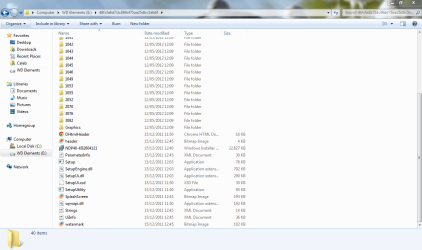
Capture.PNG

I've run an AVG scan on the folder and it's showing nothing suspicious, I would just like to know what this folder is an whether I can delete it or not.

Thanks in advance,
Caleb
 
Last edited:

My Computer My Computer

At a glance

Windows 7 Home Premium 32bit SP1AMD Athlon 64 X2 TK-572GB (1GBx2) DDR2 PC2-5300 SO-DIMMATI Radeon X1200
Computer type
Laptop
Computer Manufacturer/Model Number
Toshiba Equium A210-1C4 Laptop
OS
Windows 7 Home Premium 32bit SP1
CPU
AMD Athlon 64 X2 TK-57
Motherboard
AMD SB600
Memory
2GB (1GBx2) DDR2 PC2-5300 SO-DIMM
Graphics Card(s)
ATI Radeon X1200
Sound Card
Realtek HD Audio
Monitor(s) Displays
15.4" Toshiba TruBrite Laptop LCD Display
Screen Resolution
1280 x 800
Hard Drives
80GB Hitachi TravelStar 5K250/
1TB Western Digital Elements USB
Case
Toshiba A200 Series
Mouse
Microsoft Comfort 500 Optical Mouse
Internet Speed
3.5 Mbps Download/0.6 Mbps Upload
Other Info
Avast! Free Antivirus
Microsoft Office 2010
I think you should be safe to delete this, they are normally folders left over from windows updates. If you have the external drive connected when the update is installed, the folder might be created there. They're meant to be deleted once the update is finished but sometimes there not.

As it's not on your main drive and not in the WINDOWS folder, you should be fine to delete. I recommend you create a backup of it somewhere else, for example in your my documents folder or, preferably, another external HDD. Monitor the computer and if there are issues, move it back to the original location. After about a month, you should be fine to permanently delete it.

Can I delete these randomly named folders?

Stephen
 

My Computer My Computer

At a glance

Windows 7 Home Premium 64bit (O.E.M)Intel Core i7 2630QM @2.00GHz6GB DDR3Intel Intergrated Graphics 3000, nVidia GT525...
Computer Manufacturer/Model Number
Dell XPS 15 L502x
OS
Windows 7 Home Premium 64bit (O.E.M)
CPU
Intel Core i7 2630QM @2.00GHz
Memory
6GB DDR3
Graphics Card(s)
Intel Intergrated Graphics 3000, nVidia GT525M (1GB)
Screen Resolution
1366x768
Hard Drives
750GB Seagate 7200rpm
Keyboard
Backlit Dell XPS 15 L502x Keyboard
Mouse
Microsoft Wireless Mobile Mouse 4000
Internet Speed
2.5 Mb/s down, 0.36 up
I think you should be safe to delete this, they are normally folders left over from windows updates. If you have the external drive connected when the update is installed, the folder might be created there. They're meant to be deleted once the update is finished but sometimes there not.

As it's not on your main drive and not in the WINDOWS folder, you should be fine to delete. I recommend you create a backup of it somewhere else, for example in your my documents folder or, preferably, another external HDD. Monitor the computer and if there are issues, move it back to the original location. After about a month, you should be fine to permanently delete it.

Can I delete these randomly named folders?

Stephen

Thanks for your help Stephen,

I tried deleting the file but it said I needed permission. After a while of taking ownership and editing permissions I gave up and deleted it from within a Ubuntu live CD.

The computer seems to be still working.

Thanks again for your help,
Caleb:D
 
Last edited:

My Computer My Computer

At a glance

Windows 7 Home Premium 32bit SP1AMD Athlon 64 X2 TK-572GB (1GBx2) DDR2 PC2-5300 SO-DIMMATI Radeon X1200
Computer type
Laptop
Computer Manufacturer/Model Number
Toshiba Equium A210-1C4 Laptop
OS
Windows 7 Home Premium 32bit SP1
CPU
AMD Athlon 64 X2 TK-57
Motherboard
AMD SB600
Memory
2GB (1GBx2) DDR2 PC2-5300 SO-DIMM
Graphics Card(s)
ATI Radeon X1200
Sound Card
Realtek HD Audio
Monitor(s) Displays
15.4" Toshiba TruBrite Laptop LCD Display
Screen Resolution
1280 x 800
Hard Drives
80GB Hitachi TravelStar 5K250/
1TB Western Digital Elements USB
Case
Toshiba A200 Series
Mouse
Microsoft Comfort 500 Optical Mouse
Internet Speed
3.5 Mbps Download/0.6 Mbps Upload
Other Info
Avast! Free Antivirus
Microsoft Office 2010
You're most welcome. It feels good when I can help someone.

Stephen
 

My Computer My Computer

At a glance

Windows 7 Home Premium 64bit (O.E.M)Intel Core i7 2630QM @2.00GHz6GB DDR3Intel Intergrated Graphics 3000, nVidia GT525...
Computer Manufacturer/Model Number
Dell XPS 15 L502x
OS
Windows 7 Home Premium 64bit (O.E.M)
CPU
Intel Core i7 2630QM @2.00GHz
Memory
6GB DDR3
Graphics Card(s)
Intel Intergrated Graphics 3000, nVidia GT525M (1GB)
Screen Resolution
1366x768
Hard Drives
750GB Seagate 7200rpm
Keyboard
Backlit Dell XPS 15 L502x Keyboard
Mouse
Microsoft Wireless Mobile Mouse 4000
Internet Speed
2.5 Mb/s down, 0.36 up
Back
Top