JavaScript is disabled. For a better experience, please enable JavaScript in your browser before proceeding.
You are using an out of date browser. It may not display this or other websites correctly.
You should upgrade or use an
alternative browser .
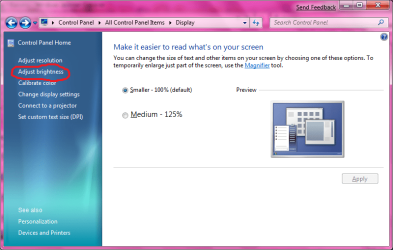
Adjust Brightness brings up Power Plan settings!
I just noticed that in Display properties, the Adjust Brightness brings up the power plan settings....
Untitled.png
50.2 KB
· Views: 4,733
Computer Manufacturer/Model Number ENIAC OS Windows 7 RC 7100 32bit/64bit CPU Intel Core2Duo E4500 2.20 GHz Motherboard ASUS P5LD2-X/1333 Memory 2x1GB Kinsgston DDR2 800MHz Graphics Card(s) Nvidia 8500GT Sound Card Onboard High Definition Audio Device Monitor(s) Displays Sony Bravia 42" Case LINKW 2222 Cooling Standard Intel Keyboard Some cheap one Mouse Microsoft Intellimouse something Internet Speed 24MBps ADSL
Administrator
Staff member
Hello Limneos,
What build is this from?
That window is different than in the 7000 Beta build version, but it works fine here.
Computer type PC/Desktop Computer Manufacturer/Model Number Self built custom OS 64-bit Windows 11 Pro for Workstations CPU Intel i7-8700K OC'd to 5 GHz Motherboard ASUS ROG Maximus XI Formula Z390 Memory 64 GB (4x16GB) G.SKILL TridentZ RGB DDR4 3600 MHz Graphics Card(s) ASUS ROG-STRIX-GTX1080TI-O11G-GAMING Sound Card Integrated Monitor(s) Displays 2 x Samsung Odyssey G7 27" Screen Resolution 2560x1440 Hard Drives 1TB Samsung 990 PRO M.2, PSU Seasonic Prime Titanium 850W Case Thermaltake Core P3 Cooling Corsair Hydro H115i Keyboard Logitech wireless K800 Mouse Logitech MX Master 4 Internet Speed 2 Gb/s Download and 100 Mb/s Upload Antivirus Malwarebyte Anti-Malware Premium Browser Google Chrome Other Info Logitech Z625 speaker system,
Yeah, I too do not have the Adjust Brightness option....
Computer Manufacturer/Model Number Dell 8400 OS Windows 7 Beta 1 b7000 CPU Intel Pentium 4 Memory 4GB Graphics Card(s) ATI Radeon HD3450 Sound Card Creative SoundBlaster Audigy 2 Monitor(s) Displays Acer AL2016W Screen Resolution 1680x1050 Hard Drives 1x500GB Case Dell 8400 Cooling Standard Keyboard Dell Multimedia Keyboard Mouse Logitech MediaPlay Internet Speed Comcastic!
----------------------
VIP
SF Team
Computer type PC/Desktop Computer Manufacturer/Model Number Airbot 2.0 OS Windows 7 Ultimate x64 SP1 CPU Core i7 920 (D0) @ 4Ghz, *26c idle *65c full load on air Motherboard Asus P6X58D Premium - Sata 6Gb/s - USB 3.0 Memory 12GB DDR3 Corsair Dominator -CMD12GX3M6A1600C8 at 1600MHz Graphics Card(s) Zotac Geforce GTX 770 Sound Card ASUS Xonar D2X Monitor(s) Displays 1 LG 24" Flatron W2453V-PF 1 Samsung 24" P2450H both 2ms RT Screen Resolution 1920x1080@60hz Hard Drives 1 Samsung 250GB 840 Evo SSD PSU Corsair HX1000W Case Cooler Master HAF 932 Cooling Case Fans *3 230mm, *1 140mm/CPU - *Tuniq Tower 120 Extreme Keyboard Logitech Wireless MK700 Mouse Logitech Wireless MK700 Internet Speed DL 15 Mbps UL 0.98 Mbps Antivirus None Browser Firefox Nightly Other Info Processor-7.7 *RAM- 7.9 *Graphics-7.9 *Gaming Graphics- 7.9 *SSD- 7.8 W.E.I final score= 7.7
MIA
Guru
VIP
Thread Starter
Hello Limneos,
What build is this from?
That window is different than in the 7000 Beta build version, but it works fine here.
View attachment 2724
Hmm...It's the pre-beta 7000 build, not the official one...but I think it's because it's a notebook...I have adjust brightness in Windows Mobility Center which works, I guess it's a bug but you need to have a notebook to see the "Adjust Brightness" link
Computer Manufacturer/Model Number ENIAC OS Windows 7 RC 7100 32bit/64bit CPU Intel Core2Duo E4500 2.20 GHz Motherboard ASUS P5LD2-X/1333 Memory 2x1GB Kinsgston DDR2 800MHz Graphics Card(s) Nvidia 8500GT Sound Card Onboard High Definition Audio Device Monitor(s) Displays Sony Bravia 42" Case LINKW 2222 Cooling Standard Intel Keyboard Some cheap one Mouse Microsoft Intellimouse something Internet Speed 24MBps ADSL
Administrator
Staff member
I'm not sure since I do not have a laptop.
However, if you like you can get the Beta verision here with a product key to activate it. Hopefully it will work better for you.
Download the Windows 7 Beta
Computer type PC/Desktop Computer Manufacturer/Model Number Self built custom OS 64-bit Windows 11 Pro for Workstations CPU Intel i7-8700K OC'd to 5 GHz Motherboard ASUS ROG Maximus XI Formula Z390 Memory 64 GB (4x16GB) G.SKILL TridentZ RGB DDR4 3600 MHz Graphics Card(s) ASUS ROG-STRIX-GTX1080TI-O11G-GAMING Sound Card Integrated Monitor(s) Displays 2 x Samsung Odyssey G7 27" Screen Resolution 2560x1440 Hard Drives 1TB Samsung 990 PRO M.2, PSU Seasonic Prime Titanium 850W Case Thermaltake Core P3 Cooling Corsair Hydro H115i Keyboard Logitech wireless K800 Mouse Logitech MX Master 4 Internet Speed 2 Gb/s Download and 100 Mb/s Upload Antivirus Malwarebyte Anti-Malware Premium Browser Google Chrome Other Info Logitech Z625 speaker system,
I just noticed that in Display properties, the Adjust Brightness brings up the power plan settings....
Yes, and at the bottom of that screen you can adjust the brightness. Seems logical to me.
PS: I have the Adjust Brightness option too on my notebook
Computer Manufacturer/Model Number Dell Vostro 1510 OS Windows 7 Build 7100 32-bit, Windows Vista 32-bit CPU Intel Core Duo T8100 2,1GHz Memory 3GB Graphics Card(s) NVIDIA GeForce 8400M GS Screen Resolution 1440x900 Hard Drives 250GB
MIA
Guru
VIP
Thread Starter
I'm not sure since I do not have a laptop.
However, if you like you can get the Beta verision here with a product key to activate it. Hopefully it will work better for you.
Download the Windows 7 Beta
Thanks Brink, I have both versions downloaded since Friday and a bunch of keys...(I was even giving away keys to some desperate people that night
)
I just left that notebook (of my girlfriend) as it was, all my other PCs have the official beta, in which by the way, I see no difference at all with the 7000 "pre-beta". I believe it's the same install in every single file.
hethoofd, if it has brightness at the bottom, then I must have missed that. I thought it brought up an irrelevant page.
Computer Manufacturer/Model Number ENIAC OS Windows 7 RC 7100 32bit/64bit CPU Intel Core2Duo E4500 2.20 GHz Motherboard ASUS P5LD2-X/1333 Memory 2x1GB Kinsgston DDR2 800MHz Graphics Card(s) Nvidia 8500GT Sound Card Onboard High Definition Audio Device Monitor(s) Displays Sony Bravia 42" Case LINKW 2222 Cooling Standard Intel Keyboard Some cheap one Mouse Microsoft Intellimouse something Internet Speed 24MBps ADSL
it appears that after reading a boatload of posts that if your graphics card cant handle aero like my old intel card in my toughbook cf 18 and intel didnt or is not going to upgrade the driver, screen brightness adjustment just wont happen I thank god at least on my toughbook it set at high screen brightness the only problem is that on this laptop it is super bright even brighter that your most common bear




 )
)