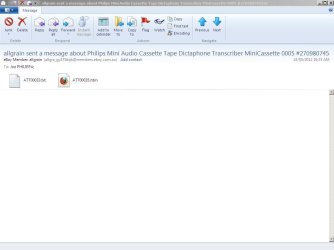
email body shown as attachment

Start> In search box type

%temp%

That is the temp folder. Any temp downloads, etc. it all goes to temp. Some removes itself after, some after a time, some never. A Guy
 

My Computer My Computer

Computer type
PC/Desktop
OS
Windows 10 Home x64
CPU
INTEL Core i5-750 Quad-Core 3.37GHz
Motherboard
ASUS P7P55D
Memory
HyperX Fury Black Series 8GB (2 x 4GB) 1866Mhz
Graphics Card(s)
EVGA GeForce GTX 750 Superclocked 1GB 128-Bit GDDR5
Monitor(s) Displays
LG 32MA68HY 32" IPS
Screen Resolution
1920 x 1080
Hard Drives
Samsung 840 Evo 120GB, SEAGATE 500GB Barracuda® 7200.12, SATA 3 Gb/s, 7200 RPM, 16MB cache
PSU
ANTEC TruePower New TP-550, 80 PLUS, 550W
Case
ANTEC Three Hundred Illusion
Cooling
COOLER MASTER Hyper 212 Plus, 4 x 120mm 1 x 140mm Noctua's
Internet Speed
85 + Mbps
Antivirus
Avast
Browser
Vivaldi
I thought I had it licked, but the phenomenon keeps coming an going, in a way that to me looks inconsistent. So I have a screen shot for you now.
In the meantime, some emails in my junk folder now refuse to be deleted for an 'unknown reason'.
 

Attachments

  • Attachments.JPG
    Attachments.JPG
    45.9 KB · Views: 11

My Computer My Computer

OS
Win7 Ultimate x32
CPU
AMD Athlon(tm) II X2 260 Processor
Motherboard
ASRock N68-VS3 UCC
Memory
4Gb of which 3.75Gb usable
Graphics Card(s)
NVIDIA GeForce GT 520
Sound Card
(1) NVIDIA High Definition Audio (2) High Definition Audio
Monitor(s) Displays
ViewSonic VA1938 & LG 566LM, both Generic PnP Monitors
Screen Resolution
1366x768 ; 1024x768
Hard Drives
SAMSUNG HD080HJ SCSI Disk Device
Thanks for the pic.
I see Mozilla is your default browser there. Have you tried clearing the browsing history and see if the problem still persists?. Let us know.
 

My Computer My Computer

Computer type
PC/Desktop
Computer Manufacturer/Model Number
Self assembled
OS
Windows 10 Home 64Bit
CPU
Intel Core i5 10400 @ 2.90GHz
Motherboard
Intel Corporation DG41WV (PROCESSOR)
Memory
8.00GB Single-Channel Unknown @ 1329MHz (16-20-20-38)
Sound Card
Realtek High Definition Audio
Monitor(s) Displays
DELL E170S
Screen Resolution
1280x1024 pixels
Hard Drives
931GB TOSHIBA DT01ACA100 (SATA)
238GB TEAM TM8PS7256G (SATA SSD)
Case
Nothing Fancy
Cooling
Fans
Keyboard
A4 Tech Co LTD
Mouse
A4 Tech Co Ltd/Logitech
Internet Speed
25 Mbps
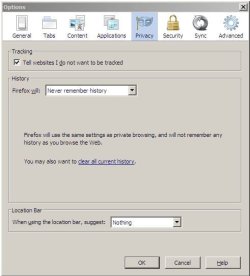
I haven't cleared Firefox history because of the setting as shown in the attachment.
 

Attachments

  • FFHistory.JPG
    FFHistory.JPG
    33 KB · Views: 7

My Computer My Computer

OS
Win7 Ultimate x32
CPU
AMD Athlon(tm) II X2 260 Processor
Motherboard
ASRock N68-VS3 UCC
Memory
4Gb of which 3.75Gb usable
Graphics Card(s)
NVIDIA GeForce GT 520
Sound Card
(1) NVIDIA High Definition Audio (2) High Definition Audio
Monitor(s) Displays
ViewSonic VA1938 & LG 566LM, both Generic PnP Monitors
Screen Resolution
1366x768 ; 1024x768
Hard Drives
SAMSUNG HD080HJ SCSI Disk Device

My Computer My Computer

Computer type
PC/Desktop
Computer Manufacturer/Model Number
Self assembled
OS
Windows 10 Home 64Bit
CPU
Intel Core i5 10400 @ 2.90GHz
Motherboard
Intel Corporation DG41WV (PROCESSOR)
Memory
8.00GB Single-Channel Unknown @ 1329MHz (16-20-20-38)
Sound Card
Realtek High Definition Audio
Monitor(s) Displays
DELL E170S
Screen Resolution
1280x1024 pixels
Hard Drives
931GB TOSHIBA DT01ACA100 (SATA)
238GB TEAM TM8PS7256G (SATA SSD)
Case
Nothing Fancy
Cooling
Fans
Keyboard
A4 Tech Co LTD
Mouse
A4 Tech Co Ltd/Logitech
Internet Speed
25 Mbps
"Is your computer up-to-date?" I presume so - it is all automatic. If I actually detect an update option, I take it.
"Do you have Service Pack 1 installed?" The evidence is in the attachment.
I could follow the instructions for sending you my specifications up to the 'Save Changes' which I can see in the screen shot, but not in the page that opened when I logged in to SevenForums.
 

My Computer My Computer

OS
Win7 Ultimate x32
CPU
AMD Athlon(tm) II X2 260 Processor
Motherboard
ASRock N68-VS3 UCC
Memory
4Gb of which 3.75Gb usable
Graphics Card(s)
NVIDIA GeForce GT 520
Sound Card
(1) NVIDIA High Definition Audio (2) High Definition Audio
Monitor(s) Displays
ViewSonic VA1938 & LG 566LM, both Generic PnP Monitors
Screen Resolution
1366x768 ; 1024x768
Hard Drives
SAMSUNG HD080HJ SCSI Disk Device

My Computer My Computer

Computer type
PC/Desktop
Computer Manufacturer/Model Number
Self assembled
OS
Windows 10 Home 64Bit
CPU
Intel Core i5 10400 @ 2.90GHz
Motherboard
Intel Corporation DG41WV (PROCESSOR)
Memory
8.00GB Single-Channel Unknown @ 1329MHz (16-20-20-38)
Sound Card
Realtek High Definition Audio
Monitor(s) Displays
DELL E170S
Screen Resolution
1280x1024 pixels
Hard Drives
931GB TOSHIBA DT01ACA100 (SATA)
238GB TEAM TM8PS7256G (SATA SSD)
Case
Nothing Fancy
Cooling
Fans
Keyboard
A4 Tech Co LTD
Mouse
A4 Tech Co Ltd/Logitech
Internet Speed
25 Mbps
I clicked on Save Changes - did that automatically send it to you ?
 

My Computer My Computer

OS
Win7 Ultimate x32
CPU
AMD Athlon(tm) II X2 260 Processor
Motherboard
ASRock N68-VS3 UCC
Memory
4Gb of which 3.75Gb usable
Graphics Card(s)
NVIDIA GeForce GT 520
Sound Card
(1) NVIDIA High Definition Audio (2) High Definition Audio
Monitor(s) Displays
ViewSonic VA1938 & LG 566LM, both Generic PnP Monitors
Screen Resolution
1366x768 ; 1024x768
Hard Drives
SAMSUNG HD080HJ SCSI Disk Device
I clicked on Save Changes - did that automatically send it to you ?

It doesn't send it to me, we have to click on the small text below your post My System Specs

Have you tried uninstalling and re-installing WLM and see if the problem is still there?
 

My Computer My Computer

Computer type
PC/Desktop
Computer Manufacturer/Model Number
Self assembled
OS
Windows 10 Home 64Bit
CPU
Intel Core i5 10400 @ 2.90GHz
Motherboard
Intel Corporation DG41WV (PROCESSOR)
Memory
8.00GB Single-Channel Unknown @ 1329MHz (16-20-20-38)
Sound Card
Realtek High Definition Audio
Monitor(s) Displays
DELL E170S
Screen Resolution
1280x1024 pixels
Hard Drives
931GB TOSHIBA DT01ACA100 (SATA)
238GB TEAM TM8PS7256G (SATA SSD)
Case
Nothing Fancy
Cooling
Fans
Keyboard
A4 Tech Co LTD
Mouse
A4 Tech Co Ltd/Logitech
Internet Speed
25 Mbps
Luckily all the information was still there when I re-opened Internet Explorer !

I have thought of, but not yet DONE a re-install of W.L.M. One reason for my hesitancy is a fear of loss of data. If you can give me a method of doing this procedure that does not interfere with my email store and contacts list, then I'm willing to try it.

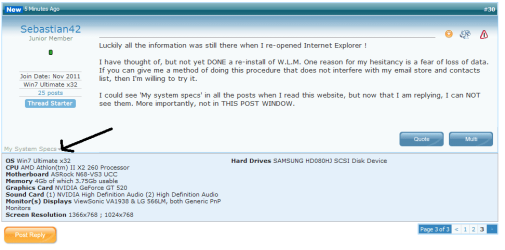
I could see 'My system specs' in all the posts when I read this website, but now that I am replying, I can NOT see them. More importantly, not in THIS POST WINDOW.
 

My Computer My Computer

OS
Win7 Ultimate x32
CPU
AMD Athlon(tm) II X2 260 Processor
Motherboard
ASRock N68-VS3 UCC
Memory
4Gb of which 3.75Gb usable
Graphics Card(s)
NVIDIA GeForce GT 520
Sound Card
(1) NVIDIA High Definition Audio (2) High Definition Audio
Monitor(s) Displays
ViewSonic VA1938 & LG 566LM, both Generic PnP Monitors
Screen Resolution
1366x768 ; 1024x768
Hard Drives
SAMSUNG HD080HJ SCSI Disk Device
Luckily all the information was still there when I re-opened Internet Explorer !

I have thought of, but not yet DONE a re-install of W.L.M. One reason for my hesitancy is a fear of loss of data. If you can give me a method of doing this procedure that does not interfere with my email store and contacts list, then I'm willing to try it.

I could see 'My system specs' in all the posts when I read this website, but now that I am replying, I can NOT see them. More importantly, not in THIS POST WINDOW.

Follow the steps here: How do I import and export email, contacts, and calendars with Windows Live Mail? - Import Email Messages or Back Up and Restore Windows Live Mail (Click on show all and scroll down for the steps)

This may also be of help:http://www.trickyways.com/2010/10/how-to-export-windows-live-mail-2011-messages/

System specs are shown when you click that arrow: see attachment.
 

Attachments

  • Capture.PNG
    Capture.PNG
    19.1 KB · Views: 6

My Computer My Computer

Computer type
PC/Desktop
Computer Manufacturer/Model Number
Self assembled
OS
Windows 10 Home 64Bit
CPU
Intel Core i5 10400 @ 2.90GHz
Motherboard
Intel Corporation DG41WV (PROCESSOR)
Memory
8.00GB Single-Channel Unknown @ 1329MHz (16-20-20-38)
Sound Card
Realtek High Definition Audio
Monitor(s) Displays
DELL E170S
Screen Resolution
1280x1024 pixels
Hard Drives
931GB TOSHIBA DT01ACA100 (SATA)
238GB TEAM TM8PS7256G (SATA SSD)
Case
Nothing Fancy
Cooling
Fans
Keyboard
A4 Tech Co LTD
Mouse
A4 Tech Co Ltd/Logitech
Internet Speed
25 Mbps
I noticed that not only MY System Specs showed when I clicked in the right place, but so are yours in YOUR posts. THAT is solved !
A lot of water has passed under the bridge since we last exchanged messages :
I think I had told you that another problem had developped in W.L.M. - I was unable to delete some messages in my junk folder. Research suggested deletion of the mail store and that relaunching of W.L.M. would rebuild the mail store - and then I'd be able to delete them. So I cloned my system to another drive and deleted the mail store, only to find that it was NOT recreated. Since the data was gone, I thought I had nothing to lose by trying to re-install W.L.M. So I uninstalled W.L.M. and tried to re-install it from a standalone version of Windows Live Essentials, but that got aborted by an error "Couldn't install Mail. An unknown error occurred : 0>o80040605
Source: WLXSuite" So I went back to the source of the clone without any progress.
 

My Computer My Computer

OS
Win7 Ultimate x32
CPU
AMD Athlon(tm) II X2 260 Processor
Motherboard
ASRock N68-VS3 UCC
Memory
4Gb of which 3.75Gb usable
Graphics Card(s)
NVIDIA GeForce GT 520
Sound Card
(1) NVIDIA High Definition Audio (2) High Definition Audio
Monitor(s) Displays
ViewSonic VA1938 & LG 566LM, both Generic PnP Monitors
Screen Resolution
1366x768 ; 1024x768
Hard Drives
SAMSUNG HD080HJ SCSI Disk Device

My Computer My Computer

Computer type
PC/Desktop
Computer Manufacturer/Model Number
Self assembled
OS
Windows 10 Home 64Bit
CPU
Intel Core i5 10400 @ 2.90GHz
Motherboard
Intel Corporation DG41WV (PROCESSOR)
Memory
8.00GB Single-Channel Unknown @ 1329MHz (16-20-20-38)
Sound Card
Realtek High Definition Audio
Monitor(s) Displays
DELL E170S
Screen Resolution
1280x1024 pixels
Hard Drives
931GB TOSHIBA DT01ACA100 (SATA)
238GB TEAM TM8PS7256G (SATA SSD)
Case
Nothing Fancy
Cooling
Fans
Keyboard
A4 Tech Co LTD
Mouse
A4 Tech Co Ltd/Logitech
Internet Speed
25 Mbps
To make sure we are not at cross-purposes - what 2nd problem is there no stable fix for ? (inability to delete SOME emails for the Junk folder ?)

Are you suggesting a repair-install for Win7 rather than for W.L.M. ? - I noticed that there was a repair option in Windows live Essentials.

I don't understand : "...a 2nd thread ...URL... for the error you are getting now".
 

My Computer My Computer

OS
Win7 Ultimate x32
CPU
AMD Athlon(tm) II X2 260 Processor
Motherboard
ASRock N68-VS3 UCC
Memory
4Gb of which 3.75Gb usable
Graphics Card(s)
NVIDIA GeForce GT 520
Sound Card
(1) NVIDIA High Definition Audio (2) High Definition Audio
Monitor(s) Displays
ViewSonic VA1938 & LG 566LM, both Generic PnP Monitors
Screen Resolution
1366x768 ; 1024x768
Hard Drives
SAMSUNG HD080HJ SCSI Disk Device
by second issue i meant this part.

So I uninstalled W.L.M. and tried to re-install it from a standalone version of Windows Live Essentials, but that got aborted by an error "Couldn't install Mail. An unknown error occurred : 0>o80040605
Source: WLXSuite" So I went back to the source of the clone without any progress.

Quick question: Do you have wlm installed now or is it uninstalled?
 

My Computer My Computer

Computer type
PC/Desktop
Computer Manufacturer/Model Number
Self assembled
OS
Windows 10 Home 64Bit
CPU
Intel Core i5 10400 @ 2.90GHz
Motherboard
Intel Corporation DG41WV (PROCESSOR)
Memory
8.00GB Single-Channel Unknown @ 1329MHz (16-20-20-38)
Sound Card
Realtek High Definition Audio
Monitor(s) Displays
DELL E170S
Screen Resolution
1280x1024 pixels
Hard Drives
931GB TOSHIBA DT01ACA100 (SATA)
238GB TEAM TM8PS7256G (SATA SSD)
Case
Nothing Fancy
Cooling
Fans
Keyboard
A4 Tech Co LTD
Mouse
A4 Tech Co Ltd/Logitech
Internet Speed
25 Mbps
On the CLONE that I made of this system, WLM was UNinstalled and then failed to re-install. What I'm writing you from, has not been 'touched'.
 

My Computer My Computer

OS
Win7 Ultimate x32
CPU
AMD Athlon(tm) II X2 260 Processor
Motherboard
ASRock N68-VS3 UCC
Memory
4Gb of which 3.75Gb usable
Graphics Card(s)
NVIDIA GeForce GT 520
Sound Card
(1) NVIDIA High Definition Audio (2) High Definition Audio
Monitor(s) Displays
ViewSonic VA1938 & LG 566LM, both Generic PnP Monitors
Screen Resolution
1366x768 ; 1024x768
Hard Drives
SAMSUNG HD080HJ SCSI Disk Device

My Computer My Computer

Computer type
PC/Desktop
Computer Manufacturer/Model Number
Self assembled
OS
Windows 10 Home 64Bit
CPU
Intel Core i5 10400 @ 2.90GHz
Motherboard
Intel Corporation DG41WV (PROCESSOR)
Memory
8.00GB Single-Channel Unknown @ 1329MHz (16-20-20-38)
Sound Card
Realtek High Definition Audio
Monitor(s) Displays
DELL E170S
Screen Resolution
1280x1024 pixels
Hard Drives
931GB TOSHIBA DT01ACA100 (SATA)
238GB TEAM TM8PS7256G (SATA SSD)
Case
Nothing Fancy
Cooling
Fans
Keyboard
A4 Tech Co LTD
Mouse
A4 Tech Co Ltd/Logitech
Internet Speed
25 Mbps
I have experimented with Messenger before and REALLY DO NOT want to go that way.
I also tried Thunderbird. I messed with email clients for a month or more at the beginning of the year and have decided that W.L.M. is the way to go.
 

My Computer My Computer

OS
Win7 Ultimate x32
CPU
AMD Athlon(tm) II X2 260 Processor
Motherboard
ASRock N68-VS3 UCC
Memory
4Gb of which 3.75Gb usable
Graphics Card(s)
NVIDIA GeForce GT 520
Sound Card
(1) NVIDIA High Definition Audio (2) High Definition Audio
Monitor(s) Displays
ViewSonic VA1938 & LG 566LM, both Generic PnP Monitors
Screen Resolution
1366x768 ; 1024x768
Hard Drives
SAMSUNG HD080HJ SCSI Disk Device
You don't have too install anything else then. deselect the rest and just download windows live mail from it.
 

My Computer My Computer

Computer type
PC/Desktop
Computer Manufacturer/Model Number
Self assembled
OS
Windows 10 Home 64Bit
CPU
Intel Core i5 10400 @ 2.90GHz
Motherboard
Intel Corporation DG41WV (PROCESSOR)
Memory
8.00GB Single-Channel Unknown @ 1329MHz (16-20-20-38)
Sound Card
Realtek High Definition Audio
Monitor(s) Displays
DELL E170S
Screen Resolution
1280x1024 pixels
Hard Drives
931GB TOSHIBA DT01ACA100 (SATA)
238GB TEAM TM8PS7256G (SATA SSD)
Case
Nothing Fancy
Cooling
Fans
Keyboard
A4 Tech Co LTD
Mouse
A4 Tech Co Ltd/Logitech
Internet Speed
25 Mbps
I thought I had it licked, but the phenomenon keeps coming an going, in a way that to me looks inconsistent. So I have a screen shot for you now.
In the meantime, some emails in my junk folder now refuse to be deleted for an 'unknown reason'.
That looks like the sort of thing that happens when you opt to read messages in plain text only. When implemented, the body of the message appears as plain text and hyperlinks. The HTML part is put in a file and positioned just as shown in your screenshot. Occasionally though, an e-mail doesn't have any plain text content to display. Then the e-mail looks just the same as your screenshot (no body text/hyperlinks).

That might be useless information but since no luck so far, you could just look into this setting. Maybe tick the box and apply and untick the box and apply. See if it might give things a kick.

Options > Mail > Read (tab) > Read all messages in plain text.
 

My Computer My Computer

OS
Windows 7 Home Premium 64-bit SP1
CPU
Intel Quad Core 2.5 Ghz
Motherboard
Asus P5Q-EM
Memory
4 GB DDR2
Graphics Card(s)
ATI Radeon 3800 HD
Monitor(s) Displays
BenQG2222HDL
Screen Resolution
1920x1080
Hard Drives
2 X 500GB Western Digital
Internet Speed
30 MB
Back
Top