Solved Distorted screen on occasional startup

fredcoupon

New member
Local time
9:26 AM
Messages
8
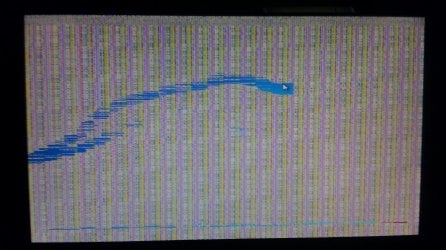
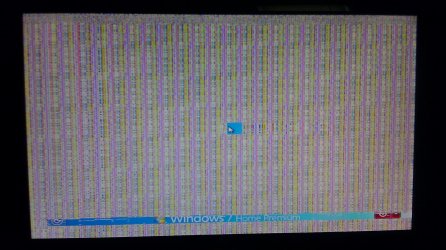
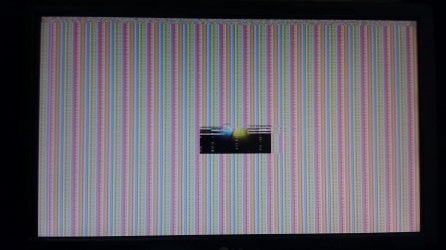
I just bought a new computer a week ago, but sometimes when I turn it on, the screen is distorted as shown in the attached files. I am able to use the mouse and keyboard, but the screen is not displaying well.

The monitor and display adapter drivers are updated.

Here are the specs:
OS Name: Windows 7 Home Premium
System type: 64-bit OS
Manufacturer: ASUSTeK Computer INC.
Motherboard Model: ASUS CM6850
Motherboard Chipset: Intel H67 (Cougar Point) [B3]
Processor: Intel(R) Core(TM) i7-2600 CPU @ 3.40GHz 3.40GHz
RAM: 8 GB
Video Card: nVIDIA GeForce GT 520 (GF119) [AsusTek]
Video Chipset and Memory: nVIDIA GeForce GT 520 (GF119), 2048 MBytes of DDR3 SDRAM
BIOS Manufacturer: American Megatrends

Monitor Name: LG W2053 (Analog)
(Monitor bought separately a year ago)

I would appreciate any help with the problem.
IMAG0093.jpg

IMAG0100.jpg

IMAG0094.jpg
 

My Computer My Computer

Computer Manufacturer/Model Number
Dell/XPS 8300
OS
Windows 7 Home Premium 64bit
CPU
Intel Core I7-2600
Motherboard
DELL 0Y2MRG
Memory
12288 MB Type DDR3 SDRAM
Graphics Card(s)
ATI/AMD Radeon HD 6450
Sound Card
Realtek High Definition Audio
Monitor(s) Displays
DELL S2230MX
Screen Resolution
1920 x 1080
Hard Drives
ST31000524AS
I have to learn to read the entire post clearly!!!

Could be the monitor or the new computer, hard to say which.

Do you have another monitor you can connect and use for awhile? If it fails then the computer is defective and needs to be replaced. If not then the monitor is the problem
 

My Computer My Computer

Computer type
PC/Desktop
Computer Manufacturer/Model Number
Lenovo IdeaCenter 450
OS
Windows 10 Pro X64
CPU
Intel Quad Core i7-4770 @ 3.4Ghz
Memory
16.0GB PC3-12800 DDR3 SDRAM 1600 MHz
Graphics Card(s)
Intel Integrated HD Graphics
Sound Card
Realtek HD Audio
Monitor(s) Displays
HP 22" LCD
Screen Resolution
1680 x 1050
Hard Drives
250GB Samsung EVO SATA-3 SSD
2TB Seagate ST2000DM001 SATA-2
1.5TB Seagate ST3150041AS SATA
Keyboard
Dell USB
Mouse
Lenovo USB
Internet Speed
Cable via Road Runner 3MB Upload, 30MB Download
Antivirus
Windows Defender, MBAM Pro, MBAE
Browser
Seamonkey
Other Info
UEFI/GPT
PLDS DVD-RW DH16AERSH
Thanks for the quick response. I will borrow another monitor and see if the startup problem still occurs.
 

My Computer My Computer

Computer Manufacturer/Model Number
Dell/XPS 8300
OS
Windows 7 Home Premium 64bit
CPU
Intel Core I7-2600
Motherboard
DELL 0Y2MRG
Memory
12288 MB Type DDR3 SDRAM
Graphics Card(s)
ATI/AMD Radeon HD 6450
Sound Card
Realtek High Definition Audio
Monitor(s) Displays
DELL S2230MX
Screen Resolution
1920 x 1080
Hard Drives
ST31000524AS
I just bought a new computer a week ago, but sometimes when I turn it on, the screen is distorted as shown in the attached files. I am able to use the mouse and keyboard, but the screen is not displaying well.

The monitor and display adapter drivers are updated.

Here are the specs:
OS Name: Windows 7 Home Premium
System type: 64-bit OS
Manufacturer: ASUSTeK Computer INC.
Motherboard Model: ASUS CM6850
Motherboard Chipset: Intel H67 (Cougar Point) [B3]
Processor: Intel(R) Core(TM) i7-2600 CPU @ 3.40GHz 3.40GHz
RAM: 8 GB
Video Card: nVIDIA GeForce GT 520 (GF119) [AsusTek]
Video Chipset and Memory: nVIDIA GeForce GT 520 (GF119), 2048 MBytes of DDR3 SDRAM
BIOS Manufacturer: American Megatrends

Monitor Name: LG W2053 (Analog)
(Monitor bought separately a year ago)

I would appreciate any help with the problem.
View attachment 213954

View attachment 213955

View attachment 213957

The only time I have seen the display appear like your attachments is when a monitor was failing. There could be other reasons, but that's the only time I have seen it.
 

My Computer My Computer

Computer type
PC/Desktop
Computer Manufacturer/Model Number
Custom Built
OS
Windows 7 Professional x64
CPU
Intel i5 quad processor
Motherboard
DP67BG
Memory
16 GB
Graphics Card(s)
Radeon HD 5770
Sound Card
Realtek High Definition Audio
Monitor(s) Displays
Samsung SyncMaster
Screen Resolution
1920X1080
Hard Drives
WD 2TB (SATA Internal)
WD 1TB (USB External)
PSU
Corsair GS800
Case
Tower (Generic)
Cooling
3 Internal Fans
Keyboard
MS Wireless
Mouse
MS Optical Wired
Internet Speed
54 mbps
Antivirus
Emsisoft
Browser
IE-Version 9, Palemoon-Version 24.2.0
I bought a new Dell monitor but that didn't solve the problem, so I just returned the computer and replaced it with a new one. Unfortunately, I'm having some problems with that one too, posted here

Thanks for your help though guys.
 

My Computer My Computer

Computer Manufacturer/Model Number
Dell/XPS 8300
OS
Windows 7 Home Premium 64bit
CPU
Intel Core I7-2600
Motherboard
DELL 0Y2MRG
Memory
12288 MB Type DDR3 SDRAM
Graphics Card(s)
ATI/AMD Radeon HD 6450
Sound Card
Realtek High Definition Audio
Monitor(s) Displays
DELL S2230MX
Screen Resolution
1920 x 1080
Hard Drives
ST31000524AS
Back
Top