Network Starts with "Limited Access" and then Connects after 1 Minute

Dreamre

New member
Local time
5:25 PM
Messages
4
Network Starts with "Limited Access" and then Connects after 1 Minute

Prior to this issue , I had ESET Smart Security 4 installed and everything seemed fine. After updating to ESET Smart Security 5, it seemed to be that every time I turn on both my desktop and laptop (both running Windows 7 Professional x64) the network would say "No Connection" (on my desktop via ethernet) and "Limited Access" (on my laptop via WiFi). After a minute, both computers would then connect.

I'm pretty sure this program somehow changed the way my network adapter connects with my networks.

Here's what I tried doing:

1. I tried to uninstall ESET Smart Security 5 (using their manual removal tool and tried to delete the remaining registry keys) and this problem still persists.
2. I tried to boot up my laptop in SafeMode with networking and this problem still persists.
3. I tried to reset my TCP/IP settings via cmd and through Window's reset utility -- still nothing
4. I tried to do a system restore, but it has been over a month after my update -- so that doesn't work either
5. I checked Window's network services and made sure it's on automatic

I'm not sure what I'm doing wrong.

Thanks for all your help!
 

My Computer My Computer

At a glance

Windows 7 Professional x64
OS
Windows 7 Professional x64
Welcome to Seven Forums,

Just to verify, there are 2 computers affected in your network - wired and wireless connection?

Have you tried to Power Cycle your devices?

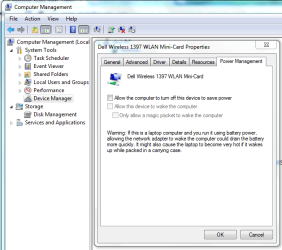
Disabling the Network Adapter's Power Management from Device Manager might also help, please see attached file.

If the above suggestions didn't work and all the computers in your network are affected updating the router's firmware to the latest might also help.
 

Attachments

  • Power Mgmt-Capture.PNG
    Power Mgmt-Capture.PNG
    29.2 KB · Views: 20

My Computer My Computer

At a glance

Win7 & Win8 64bitIntel i5
Computer Manufacturer/Model Number
Lenovo Desktop/Samsung Laptop
OS
Win7 & Win8 64bit
CPU
Intel i5
Internet Speed
Charter-20 Mbps
Antivirus
Avast
Browser
FF, IE9 and Chrome
Thanks for the quick reply!

Yes, these are two different computers, however they are both on different networks. I know that my network settings were altered somehow -- however, I'm just unsure how to reset it.

Just to add, this only happens when the computers are turned on. When I take my laptop from sleep, I don't experience any delays in connecting.
 

My Computer My Computer

At a glance

Windows 7 Professional x64
OS
Windows 7 Professional x64
Please try my suggestions in Post#2, skip the router firmware update and follow the rest then post an update.
 

My Computer My Computer

At a glance

Win7 & Win8 64bitIntel i5
Computer Manufacturer/Model Number
Lenovo Desktop/Samsung Laptop
OS
Win7 & Win8 64bit
CPU
Intel i5
Internet Speed
Charter-20 Mbps
Antivirus
Avast
Browser
FF, IE9 and Chrome
Please try my suggestions in Post#2, skip the router firmware update and follow the rest then post an update.

The power settings are off and the problem still persists.

Thanks!
 

My Computer My Computer

At a glance

Windows 7 Professional x64
OS
Windows 7 Professional x64
I doubt that this is the issue - but installing ESET Smart Security 5 changes the service named IKE and AuthIP IPsec Keying Modules from manual to automatic. Uninstalling ESET Smart Security 5 does not change that setting back (for me).
 

My Computer My Computer

At a glance

W7 Pro SP1 64biti78GBIntel HD Graphics
Computer type
Laptop
Computer Manufacturer/Model Number
Employer provided Dell Latitude
OS
W7 Pro SP1 64bit
CPU
i7
Memory
8GB
Graphics Card(s)
Intel HD Graphics
Hard Drives
crappy SSD
Antivirus
Employer mandated Symantec Endpoint Protection
Browser
Pale Moon 64bit, IE11 64bit & Chrome 64bit

My Computer My Computer

At a glance

Win7 & Win8 64bitIntel i5
Computer Manufacturer/Model Number
Lenovo Desktop/Samsung Laptop
OS
Win7 & Win8 64bit
CPU
Intel i5
Internet Speed
Charter-20 Mbps
Antivirus
Avast
Browser
FF, IE9 and Chrome
Well, I finally figured it out!

I did another clean uninstall in safe mode with Eset's removal tool and then I re-opened the utility and realized that not everything was uninstalled. I proceeded to use the utility again until all old Eset files were removed.

I then uninstalled the network card on my laptop/desktop and proceeded to reinstall them.

Everything is back to normal now. Thanks for all your help!
 

My Computer My Computer

At a glance

Windows 7 Professional x64
OS
Windows 7 Professional x64
Thanks for letting us know. Great news!
Well, I finally figured it out!

I did another clean uninstall in safe mode with Eset's removal tool and then I re-opened the utility and realized that not everything was uninstalled. I proceeded to use the utility again until all old Eset files were removed.

I then uninstalled the network card on my laptop/desktop and proceeded to reinstall them.

Everything is back to normal now. Thanks for all your help!
 

My Computer My Computer

At a glance

Win7 & Win8 64bitIntel i5
Computer Manufacturer/Model Number
Lenovo Desktop/Samsung Laptop
OS
Win7 & Win8 64bit
CPU
Intel i5
Internet Speed
Charter-20 Mbps
Antivirus
Avast
Browser
FF, IE9 and Chrome
Back
Top