Solved Laptop cannot see other PC's but Network Map Shows them

dmw

New member
Local time
6:16 AM
Messages
5
I have a home network called 'workgroup' on my win 7 laptop i see my xp desktop and my win home server machine. I used to be able to see these machine under the 'network folder' in the explorer but now the laptop cannot find or detect them. I have checked that home group is not being used, that the windows firewall is off, that the advanced setup for the home network has discovery turned on. The other machines on the network see each other so it is a problem with some setting in the win 7 machine that has changed because it used to work fine.
 

My Computer My Computer

At a glance

win 7 home premium 64 bit
OS
win 7 home premium 64 bit
Hi, hope you enjoy these forums.

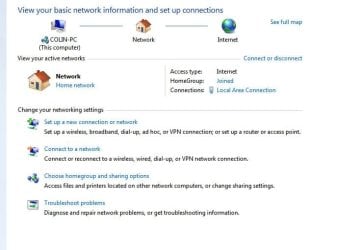
Try this, go to control panel, network, network and sharing and go with the first option which will start the network wizardy thing. Answer the questions and keep everything crossed.
Make sure the Group name is the same as the other PC's and the others are setup for sharing, you may need to run the wizard on those too. The screen should look pretty much like this.


Capture.JPG


Give it a wiz ! sorry awful pun intended.
:)
 

My Computer My Computer

At a glance

Windows 7 home premium x64AMD FX-4100 AM3+ 3.6GHz 12MB Black EditionCrsair vengeance 12Gb DDR3 1600MHz CL9Asus GTX 560 1GB
Computer Manufacturer/Model Number
DIY
OS
Windows 7 home premium x64
CPU
AMD FX-4100 AM3+ 3.6GHz 12MB Black Edition
Motherboard
Asus M5A97 Pro
Memory
Crsair vengeance 12Gb DDR3 1600MHz CL9
Graphics Card(s)
Asus GTX 560 1GB
Sound Card
Realtek onboard
Monitor(s) Displays
Hanns G 1680x1050 native
Hard Drives
OCZ 128Gb Petrol ssd
2x500 Gb Samsung
PSU
OCZ StealthXstream II 500W
Internet Speed
8Mb or better
Tried it with the set up new connection but since i am already on the network and working fine it does not come up with unconfigured devices. The win 7 machine works fine with the only exception not being able to see the other machines.
 

My Computer My Computer

At a glance

win 7 home premium 64 bit
OS
win 7 home premium 64 bit
Just about any anti virus software or third party firewalls can create rules to block other machines on the network.

I would check out your A/V software first.
 

My Computer My Computer

At a glance

Windows 7 Ult, Windows 8.1 Pro,Q9650-4.275GHz, E8600 4.5GHz, E6750-3.8GHzG.Skill PC2 9600 1200Mhz 5 5 5 15 2TGTX480
Computer type
PC/Desktop
Computer Manufacturer/Model Number
Home built
OS
Windows 7 Ult, Windows 8.1 Pro,
CPU
Q9650-4.275GHz, E8600 4.5GHz, E6750-3.8GHz
Motherboard
Evga 780i FTW
Memory
G.Skill PC2 9600 1200Mhz 5 5 5 15 2T
Graphics Card(s)
GTX480
Sound Card
Asus Xonar D2
Monitor(s) Displays
HannsG
Screen Resolution
1680X1050
Hard Drives
GSkill Phoenix Pro 120GB SSD
PSU
ThermalTake Toughpower 1000Watt modular
Case
ThermalTake XaserV
Cooling
Xigmatek S1283
Keyboard
Logitech G15
Mouse
Logitech G9
Internet Speed
T1
Turned off the microsoft security essential which is my A/V and no difference. Also when it worked previously the A/V was on.
 

My Computer My Computer

At a glance

win 7 home premium 64 bit
OS
win 7 home premium 64 bit
Turned off the microsoft security essential which is my A/V and no difference. Also when it worked previously the A/V was on.

MSE won't cause these types of problems. You should leave the Windows firewall turned on.

You might try looking in the Advanced Network settings and make sure network discovery is turned on and other networking services are turned on.

You might also try looking at the services.msc to make sure the ones related to networking are turned on and set to either automatic or manual.
 

My Computer My Computer

At a glance

Windows 7 Ult, Windows 8.1 Pro,Q9650-4.275GHz, E8600 4.5GHz, E6750-3.8GHzG.Skill PC2 9600 1200Mhz 5 5 5 15 2TGTX480
Computer type
PC/Desktop
Computer Manufacturer/Model Number
Home built
OS
Windows 7 Ult, Windows 8.1 Pro,
CPU
Q9650-4.275GHz, E8600 4.5GHz, E6750-3.8GHz
Motherboard
Evga 780i FTW
Memory
G.Skill PC2 9600 1200Mhz 5 5 5 15 2T
Graphics Card(s)
GTX480
Sound Card
Asus Xonar D2
Monitor(s) Displays
HannsG
Screen Resolution
1680X1050
Hard Drives
GSkill Phoenix Pro 120GB SSD
PSU
ThermalTake Toughpower 1000Watt modular
Case
ThermalTake XaserV
Cooling
Xigmatek S1283
Keyboard
Logitech G15
Mouse
Logitech G9
Internet Speed
T1
  • Like
Reactions: dmw
Good suggestion on services, all were already correct so not a solution however good to know.
 

My Computer My Computer

At a glance

win 7 home premium 64 bit
OS
win 7 home premium 64 bit

My Computer My Computer

At a glance

Windows 7 Ult, Windows 8.1 Pro,Q9650-4.275GHz, E8600 4.5GHz, E6750-3.8GHzG.Skill PC2 9600 1200Mhz 5 5 5 15 2TGTX480
Computer type
PC/Desktop
Computer Manufacturer/Model Number
Home built
OS
Windows 7 Ult, Windows 8.1 Pro,
CPU
Q9650-4.275GHz, E8600 4.5GHz, E6750-3.8GHz
Motherboard
Evga 780i FTW
Memory
G.Skill PC2 9600 1200Mhz 5 5 5 15 2T
Graphics Card(s)
GTX480
Sound Card
Asus Xonar D2
Monitor(s) Displays
HannsG
Screen Resolution
1680X1050
Hard Drives
GSkill Phoenix Pro 120GB SSD
PSU
ThermalTake Toughpower 1000Watt modular
Case
ThermalTake XaserV
Cooling
Xigmatek S1283
Keyboard
Logitech G15
Mouse
Logitech G9
Internet Speed
T1
Check netbios over TCPIP is enabled on all machines and UPNP is enabled on the router.
 

My Computer My Computer

At a glance

Windows 7 Ultimate x64AMD turion 64x2 TL-64 2.2GhzSodimm DDR2 4GBATI Radeon 1250 128MB IGP
Computer Manufacturer/Model Number
HP Compaq 6715B
OS
Windows 7 Ultimate x64
CPU
AMD turion 64x2 TL-64 2.2Ghz
Motherboard
HC030
Memory
Sodimm DDR2 4GB
Graphics Card(s)
ATI Radeon 1250 128MB IGP
Hard Drives
Fujitsu Siemens 500GB sata 3.0 Gb/s
When a Win 7 machine cannot see other XP or WHS based machines all the usual Netbios TCP/IP, Homegroup turned off, and turning network discovery on is the first thing to do. If it still does not work then the real fix is likely what I found to be a registry entry that somehow gets a state change that causes the issue.
Registry Location:
HKEY_LOCAL_MACHINE\SYSTEM\CurrentControlSet\Services\Netbt\Parameters
Key: DhcpNodeType
Value Type: REG_DWORD - Number
Valid Range: 1,2,4,8 (B -node, P-node, M-node, H-node) Mine was at 2 which is wrong it needs to be 8
Default: 1 or 8 based on the WINS server configuration
Description: This optional parameter specifies the NBT node type. It is written by the DHCP client service, if enabled. This parameter determines what methods NetBT uses to register and resolve names. A B-node system uses broadcasts. A P -node system uses only point- to-point name queries to a name server (WINS). An M -node system broadcasts first, and then queries the name server. An H -node system queries the name server first, and then broadcasts. Resolution through LMHOSTS and/or DNS, if enabled, follows these methods. If this key is not present, the system defaults to B -node if there are no WINS servers configured for the network. The system defaults to H -node if there is at least one WINS server configured.

 

My Computer My Computer

At a glance

win 7 home premium 64 bit
OS
win 7 home premium 64 bit
Hmmm... interesting glad it is solved yol.:D
 

My Computer My Computer

At a glance

Windows 7 Ultimate x64AMD turion 64x2 TL-64 2.2GhzSodimm DDR2 4GBATI Radeon 1250 128MB IGP
Computer Manufacturer/Model Number
HP Compaq 6715B
OS
Windows 7 Ultimate x64
CPU
AMD turion 64x2 TL-64 2.2Ghz
Motherboard
HC030
Memory
Sodimm DDR2 4GB
Graphics Card(s)
ATI Radeon 1250 128MB IGP
Hard Drives
Fujitsu Siemens 500GB sata 3.0 Gb/s
Back
Top