Solved removing "press any key to continue"?

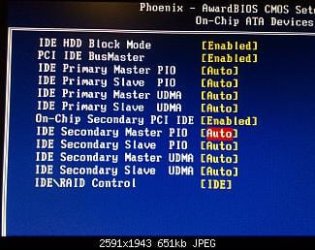
What other options are available besides Auto for the IDE Primary/Secondary you're using? Maybe if you chose the actual device it would skip the menu screen.
View attachment 215206


Tried master PIO Mode 0 and slave PIO Mode 1 with no success.
 
Last edited:

My Computer My Computer

At a glance

Microsoft Windows 7 Ultimate 64-bit Service P...Intel(R) Core(TM)2 Quad Q 9550 @ 2.83 GHz4x1024 GB DDR2 Corsair PC2-6400 800 MhzMSI TwiFrozer II 1024MB GDDR5
Computer type
PC/Desktop
Computer Manufacturer/Model Number
Homebuilt,Quadcore processor on Asus MB
OS
Microsoft Windows 7 Ultimate 64-bit Service Pack 1
CPU
Intel(R) Core(TM)2 Quad Q 9550 @ 2.83 GHz
Motherboard
ASUS P5B-Deluxe Wi-Fi Edition
Memory
4x1024 GB DDR2 Corsair PC2-6400 800 Mhz
Graphics Card(s)
MSI TwiFrozer II 1024MB GDDR5
Sound Card
Realtek ALC883 @ Intel 82801HB ICH8 - High Def
Monitor(s) Displays
Asus VW195 [19" LCD]
Screen Resolution
1440x860 pixels
Hard Drives
OCZ Vertex Plus Series SATA II 2.5" SSD 128GB-

Westarn Digital SATA II 250GB
PSU
Corsair CX600W
Case
Custom built,cut and painted
Cooling
Xigmatek Gaia 2x120mm fan
Keyboard
MS Generic
Mouse
MS Optical 6000
Internet Speed
never enough
Antivirus
ESET Smart Security 6.0.306.0
Does pressing Ctrl - J while the pausing boot screen is displayed do anything?
 

My Computer My Computer

At a glance

Windows 7 Ultimate x64
OS
Windows 7 Ultimate x64
Did BIOS reset,connected OD at the end of IDE cable jumpered as master,connected second HD in the middle jumpered as slave.Have detection but not any drives.Where are the settings offering AHCI, IDE, SATA, RAID, etc.?
First I want to just confirm that both the IDE HD and OD show in BIOS but they do not show in Windows?
where can i set RAID mode for the Onboard JMB361 Mode of Integrated Peripherals in BIOS?
This would be the setting "IDE\RAID Control".

What other options are available besides Auto for the IDE Primary/Secondary you're using? Maybe if you chose the actual device it would skip the menu screen.
I think Greg's referring to manually setting the drive under this section, he can correct me if I'm wrong
MSI_StdCMOS.JPG

And under one of the IDE drives here what options do you have for "Access Mode"?

Does pressing Ctrl - J while the pausing boot screen is displayed do anything?
Most likly need the "IDE\RAID Control" set to RAID for this to do anything but try it set as IDE as well to cover everything. This should open the RAID setup screen although the manual states to press it during POST but that pause screen is probably still part of the POST.
 

My Computer My Computer

At a glance

Windows 7 Ultimate x64Intel Pentium Dual Core E5200 2.5GHz (3.77GHz...Corsair 4GB DDR2 (4x1GB CM2X1024-6400C4)Palit GeForce GTS 250 (1024MB)
Computer Manufacturer/Model Number
Self built
OS
Windows 7 Ultimate x64
CPU
Intel Pentium Dual Core E5200 2.5GHz (3.77GHz OC)
Motherboard
Asus P5Q-E
Memory
Corsair 4GB DDR2 (4x1GB CM2X1024-6400C4)
Graphics Card(s)
Palit GeForce GTS 250 (1024MB)
Sound Card
On Board (ADI AD2000B 8ch HD)
Monitor(s) Displays
Samsung 32in LCD TV
Screen Resolution
1360x768
Hard Drives
2 x 1TB Samsung 103SJ (Raid0)
2 x External 500GB Samsung 502IJ (NexStar 3 HD Enclosures)
PSU
550W Antec Neo HE 550
Case
Antec P180
Cooling
Xigmatex Red Scorpion CPU Cooler. 3x120mm Fans
Keyboard
Logitech MX5000 Laser (Combo)
Mouse
Logitech MX5000 Laser (Combo)
Internet Speed
ADSL2+ (avg 10 Mbps Down, 0.80 Mbps up)
Other Info
Gigabyte GN-WP01GS 54g Wireless Lan Card
Does pressing Ctrl - J while the pausing boot screen is displayed do anything?
Most likly need the "IDE\RAID Control" set to RAID for this to do anything but try it set as IDE as well to cover everything. This should open the RAID setup screen although the manual states to press it during POST but that pause screen is probably still part of the POST.

Yes, I was "grasping" there. I too think that pause screen is part of the post and it was worth a shot to try it.

Maybe the OP needs to select IDE PRIMARY MASTER and IDE PRIMARY SLAVE and set them to autodetect. It may be the default values won't detect...
 

My Computer My Computer

At a glance

Windows 7 Ultimate x64
OS
Windows 7 Ultimate x64
I having a little trouble understanding these settings
Msi_ATA.jpg

From the manual
Primary/Secondary Master/Slave PIO
The four IDE PIO (Programmed Input/Output) fields let you set a PIO mode (0-4) for
each of the four IDE devices that the onboard IDE interface supports.....
There's only one IDE port and 1 SATA port controlled by the JMicron and 4 SATA ports controlled by the Intel, any thoughts?

What does the "On-Chip Secondary PCI IDE" enable/disable?
The "IDE\RAID Control" set to disable appears to disable the IDE port.

Yes, I was "grasping" there. I too think that pause screen is part of the post and it was worth a shot to try it.
Can't hurt or shouldn't hurt.
 

My Computer My Computer

At a glance

Windows 7 Ultimate x64Intel Pentium Dual Core E5200 2.5GHz (3.77GHz...Corsair 4GB DDR2 (4x1GB CM2X1024-6400C4)Palit GeForce GTS 250 (1024MB)
Computer Manufacturer/Model Number
Self built
OS
Windows 7 Ultimate x64
CPU
Intel Pentium Dual Core E5200 2.5GHz (3.77GHz OC)
Motherboard
Asus P5Q-E
Memory
Corsair 4GB DDR2 (4x1GB CM2X1024-6400C4)
Graphics Card(s)
Palit GeForce GTS 250 (1024MB)
Sound Card
On Board (ADI AD2000B 8ch HD)
Monitor(s) Displays
Samsung 32in LCD TV
Screen Resolution
1360x768
Hard Drives
2 x 1TB Samsung 103SJ (Raid0)
2 x External 500GB Samsung 502IJ (NexStar 3 HD Enclosures)
PSU
550W Antec Neo HE 550
Case
Antec P180
Cooling
Xigmatex Red Scorpion CPU Cooler. 3x120mm Fans
Keyboard
Logitech MX5000 Laser (Combo)
Mouse
Logitech MX5000 Laser (Combo)
Internet Speed
ADSL2+ (avg 10 Mbps Down, 0.80 Mbps up)
Other Info
Gigabyte GN-WP01GS 54g Wireless Lan Card
I see only a single IDE connector on that board. No secondary channel (although the only channel is labeled as IDE1 rather than IDE0). I was thinking that the secondary channel options aren't even relevant for this model board. Maybe he should disable the "On-chip secondary PCI/IDE"
 

My Computer My Computer

At a glance

Windows 7 Ultimate x64
OS
Windows 7 Ultimate x64
Maybe the OP needs to select IDE PRIMARY MASTER and IDE PRIMARY SLAVE and set them to autodetect. It may be the default values won't detect (currently appearing as "NONE").
 

My Computer My Computer

At a glance

Windows 7 Ultimate x64
OS
Windows 7 Ultimate x64
I see only a single IDE connector on that board. No secondary channel (although the only channel is labeled as IDE1 rather than IDE0). I was thinking that the secondary channel options aren't even relevant for this model board. Maybe he should disable the "On-chip secondary PCI/IDE"
I first thought the "On-chip secondary PCI/IDE" was referring to enabling/disabling the JMicron controller (IDE/SATA1) but the "IDE\RAID Control" seems to do that. Maybe both do.

It would be intresting to know what happens when he disables the "On-chip secondary PCI/IDE", does the JMircon detection screen disapper?

Also as you can see in my screenshot in Post #83 there is 6 drives listed but from my calculations the board can support up to 7 drives just to add more confusion (5 SATA, 2 IDE). We do though have to take into consideration that I referring to the manual for my info and manuals are not always accurate and also depend on BIOS versions.

Maybe the OP needs to select IDE PRIMARY MASTER and IDE PRIMARY SLAVE and set them to autodetect. It may be the default values won't detect (currently appearing as "NONE").
If your referring to the screenshot I posted in Post #83 then that was taken from the manual but if the OP is indeed displaying none then setting all Drives as Auto should be able to detect them or at least the Optical Drive.

@proudtobegreek
We are talking about the MSI P965 Neo (MS-7235) listed in your specs right?
 

My Computer My Computer

At a glance

Windows 7 Ultimate x64Intel Pentium Dual Core E5200 2.5GHz (3.77GHz...Corsair 4GB DDR2 (4x1GB CM2X1024-6400C4)Palit GeForce GTS 250 (1024MB)
Computer Manufacturer/Model Number
Self built
OS
Windows 7 Ultimate x64
CPU
Intel Pentium Dual Core E5200 2.5GHz (3.77GHz OC)
Motherboard
Asus P5Q-E
Memory
Corsair 4GB DDR2 (4x1GB CM2X1024-6400C4)
Graphics Card(s)
Palit GeForce GTS 250 (1024MB)
Sound Card
On Board (ADI AD2000B 8ch HD)
Monitor(s) Displays
Samsung 32in LCD TV
Screen Resolution
1360x768
Hard Drives
2 x 1TB Samsung 103SJ (Raid0)
2 x External 500GB Samsung 502IJ (NexStar 3 HD Enclosures)
PSU
550W Antec Neo HE 550
Case
Antec P180
Cooling
Xigmatex Red Scorpion CPU Cooler. 3x120mm Fans
Keyboard
Logitech MX5000 Laser (Combo)
Mouse
Logitech MX5000 Laser (Combo)
Internet Speed
ADSL2+ (avg 10 Mbps Down, 0.80 Mbps up)
Other Info
Gigabyte GN-WP01GS 54g Wireless Lan Card
If your referring to the screenshot I posted in Post #83 then that was taken from the manual but if the OP is indeed displaying none then setting all Drives as Auto should be able to detect them or at least the Optical Drive.

@proudtobegreek
We are talking about the MSI P965 Neo (MS-7235) listed in your specs right?

all drives are set to auto/yes this is my MB

Maybe the OP needs to select IDE PRIMARY MASTER and IDE PRIMARY SLAVE and set them to autodetect. It may be the default values won't detect (currently appearing as "NONE").

they are on autodetect,when searching manualy,does not detect and becomes auto by its own

The "IDE\RAID Control" set to disable appears to disable the IDE port.

does not harm in anyway,just takes the detection away


First I want to just confirm that both the IDE HD and OD show in BIOS but they do not show in Windows?

They dont show up in BIOS and windows

Does pressing Ctrl - J while the pausing boot screen is displayed do anything?

did nothing with IDE-RAID controller set to RAID and secondary IDE channel disabled
 

My Computer My Computer

At a glance

Microsoft Windows 7 Ultimate 64-bit Service P...Intel(R) Core(TM)2 Quad Q 9550 @ 2.83 GHz4x1024 GB DDR2 Corsair PC2-6400 800 MhzMSI TwiFrozer II 1024MB GDDR5
Computer type
PC/Desktop
Computer Manufacturer/Model Number
Homebuilt,Quadcore processor on Asus MB
OS
Microsoft Windows 7 Ultimate 64-bit Service Pack 1
CPU
Intel(R) Core(TM)2 Quad Q 9550 @ 2.83 GHz
Motherboard
ASUS P5B-Deluxe Wi-Fi Edition
Memory
4x1024 GB DDR2 Corsair PC2-6400 800 Mhz
Graphics Card(s)
MSI TwiFrozer II 1024MB GDDR5
Sound Card
Realtek ALC883 @ Intel 82801HB ICH8 - High Def
Monitor(s) Displays
Asus VW195 [19" LCD]
Screen Resolution
1440x860 pixels
Hard Drives
OCZ Vertex Plus Series SATA II 2.5" SSD 128GB-

Westarn Digital SATA II 250GB
PSU
Corsair CX600W
Case
Custom built,cut and painted
Cooling
Xigmatek Gaia 2x120mm fan
Keyboard
MS Generic
Mouse
MS Optical 6000
Internet Speed
never enough
Antivirus
ESET Smart Security 6.0.306.0
The single IDE connector on the motherboard picture is labeled as IDE1 (rather than IDE0). I wonder if the BIOS really treats this port as the secondary channel. Should we be looking at the settings related to IDE Secondary?

Can you post screenshots of the relevant BIOS screens so that we can see how things are currently set?

Which BIOS screen shows your booting SATA drive?

And Duzzy asked "And under one of the IDE drives here what options do you have for "Access Mode"?" but I don't think you've answered that (the manual doesn't seem to list the options that are available). That item should appear after selecting any of the IDE entries on this screen:

http://www.sevenforums.com/attachme...moving-press-any-key-continue-msi_stdcmos.jpg
 

My Computer My Computer

At a glance

Windows 7 Ultimate x64
OS
Windows 7 Ultimate x64
@proud: Could you export your System Information (msinfo32.exe) to a text file and post it here? You can strip out the WER info at the end of the report. When you post it, please wrap it in a code box so it doesn't overflow the thread
[code]
System Information
[/code]

Thanks

If SATA ports are set to emulate an IDE device, BIOS might report the SATA drive as Master on a non-physical IDE port
Your IDE drive should report as IDE0 Master, your optical should report IDE0 Slave, your SATA might report as IDE1 Master
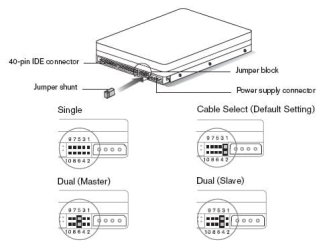
Check that your IDE port is enabled and recheck your jumpers - "Master and Slave" or CS
Check your Boot order - 1) Optical 2) Sata - nothing else
 

Attachments

  • WD PATA jumpers_current.jpg
    WD PATA jumpers_current.jpg
    18.7 KB · Views: 2
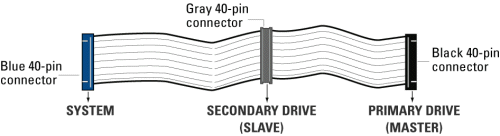
  • WD PATA cable.gif
    WD PATA cable.gif
    12.6 KB · Views: 4

My Computer My Computer

At a glance

x64 (6.3.9600) Win8.1 Pro & soon dual boot x6...AMD A6-3420M APU with Radeon(tm) HD Graphics6.00 GBAMD Radeon(TM) HD 6520G
Computer type
Laptop
Computer Manufacturer/Model Number
HP Pavilion dv6-6c10us
OS
x64 (6.3.9600) Win8.1 Pro & soon dual boot x64 (6.1.7601) Win7_SP1 HomePrem
CPU
AMD A6-3420M APU with Radeon(tm) HD Graphics
Motherboard
Hewlett-Packard 1805
Memory
6.00 GB
Graphics Card(s)
AMD Radeon(TM) HD 6520G
Sound Card
(1) AMD High Definition Audio Device (2) IDT High Definiti
Monitor(s) Displays
HP W2072a 20" LCD (1600 x 900) @ 60 Hz
Screen Resolution
1366 x 768 x 32 bits (4294967296 colors) @ 60 Hz
Hard Drives
ST640LM0 00 HM641JI SATA Disk Device
Keyboard
Logitech k520 wireless KB
Mouse
Logitech m320 wireless mouse (bundled with KB)
Internet Speed
15/5 | 54 MB Wireless 'n'
Antivirus
Realtime: Defender or Avast | On-demand: Malwarebytes, ESET
Browser
IE 11 on Win8, IE 10 on win 7
Other Info
Media: [Gimp, Audacity, VLC] || Comm: [WEmail 2012, Skype] || Productivity: [OpenOffice,| Textpad] || Utils: [Sysinternals, cCleaner, Speccy, Defraggler]
On-Chip Secondary PCI IDE: allows you to enable or disable the secondary controller. You might disable the controller if you were to add a higher performance or specialized controller.

Enabled: Secondary HDD controller is used.
Disabled: Secondary HDD controller is NOT not used.

Enabled is the default.
 

My Computer My Computer

At a glance

x64 (6.3.9600) Win8.1 Pro & soon dual boot x6...AMD A6-3420M APU with Radeon(tm) HD Graphics6.00 GBAMD Radeon(TM) HD 6520G
Computer type
Laptop
Computer Manufacturer/Model Number
HP Pavilion dv6-6c10us
OS
x64 (6.3.9600) Win8.1 Pro & soon dual boot x64 (6.1.7601) Win7_SP1 HomePrem
CPU
AMD A6-3420M APU with Radeon(tm) HD Graphics
Motherboard
Hewlett-Packard 1805
Memory
6.00 GB
Graphics Card(s)
AMD Radeon(TM) HD 6520G
Sound Card
(1) AMD High Definition Audio Device (2) IDT High Definiti
Monitor(s) Displays
HP W2072a 20" LCD (1600 x 900) @ 60 Hz
Screen Resolution
1366 x 768 x 32 bits (4294967296 colors) @ 60 Hz
Hard Drives
ST640LM0 00 HM641JI SATA Disk Device
Keyboard
Logitech k520 wireless KB
Mouse
Logitech m320 wireless mouse (bundled with KB)
Internet Speed
15/5 | 54 MB Wireless 'n'
Antivirus
Realtime: Defender or Avast | On-demand: Malwarebytes, ESET
Browser
IE 11 on Win8, IE 10 on win 7
Other Info
Media: [Gimp, Audacity, VLC] || Comm: [WEmail 2012, Skype] || Productivity: [OpenOffice,| Textpad] || Utils: [Sysinternals, cCleaner, Speccy, Defraggler]
If you load the default BIOS settings then everything that is required is typically set correctly and there is no need to change anything to do the basics.

I would double check the jumpers and IDE cable like Slartybart suggested and also check the cable has not come loose from the board. If you have spare power connectors for the drives I would also suggest trying them in case the current ones you are using have been damaged and check they are also connected properly.
 

My Computer My Computer

At a glance

Windows 7 Ultimate x64Intel Pentium Dual Core E5200 2.5GHz (3.77GHz...Corsair 4GB DDR2 (4x1GB CM2X1024-6400C4)Palit GeForce GTS 250 (1024MB)
Computer Manufacturer/Model Number
Self built
OS
Windows 7 Ultimate x64
CPU
Intel Pentium Dual Core E5200 2.5GHz (3.77GHz OC)
Motherboard
Asus P5Q-E
Memory
Corsair 4GB DDR2 (4x1GB CM2X1024-6400C4)
Graphics Card(s)
Palit GeForce GTS 250 (1024MB)
Sound Card
On Board (ADI AD2000B 8ch HD)
Monitor(s) Displays
Samsung 32in LCD TV
Screen Resolution
1360x768
Hard Drives
2 x 1TB Samsung 103SJ (Raid0)
2 x External 500GB Samsung 502IJ (NexStar 3 HD Enclosures)
PSU
550W Antec Neo HE 550
Case
Antec P180
Cooling
Xigmatex Red Scorpion CPU Cooler. 3x120mm Fans
Keyboard
Logitech MX5000 Laser (Combo)
Mouse
Logitech MX5000 Laser (Combo)
Internet Speed
ADSL2+ (avg 10 Mbps Down, 0.80 Mbps up)
Other Info
Gigabyte GN-WP01GS 54g Wireless Lan Card
@Duzzy: I agree, the default BIOS settings should do the trick. I think PTBG tried that without success - I was simply offering an alternative to test. There seems to be a mismatch somewhere (no kidding!) and eliminating possibilities, one by one, is the best way I know of troubleshooting.

I'm wondering if the system thinks it needs drivers and is waiting for the media to be inserted. I'm fairly sure that Windows 7 doesn't need drivers unless RAID is configured. I'm looking at ways to either "complete" the wait for media or fool Windows. You can emulate IDE for SATA drives - that would fool Windows, but it also adds overhead and downgrades the SATA performance.

This is where I'm heading, any thoughts?

@proudtobegreek (PTBG): I strongly recommend that you bring your machine up-to-date if you haven't already done that. I suggest this because it looks to me, from your screen shots, that your running your system on a back-level BIOS.

Live Update at MSI should make it easy. It's a download zip file.
You could also just go to the support/download/BIOSpage and manage the updates yourself.
Live Update 5 is a powerful update tool with user-friendly interface, provides an automatic scan and download for your MSI products. Using this service to keep your system in the most updated environment.

Live Update 5 supports the following MSI product lines and items:
Mainboards: Drivers/BIOS/Utilities;
Graphics Cards: Drivers/BIOS​
Thanks for being so patient, this is a sticky wicket!

@proudtobegreek (PTBG): Don't try the workaround outlined below just yet, there might be a better solution. This is only a PROPOSED workaround to try at a later time. I, or someone else, need to determine if it is simply a case of waiting for the media. If that is the case, preventing the request for media is the real solution. More research is needed.
BIOS might have different names/locations/options for the settings, so you might have to look around.

BIOS => Integrated Peripherals => SATA ports => Enabled
What mode are the SATA ports?

  • IDE/PATA Emulation
  • SATA (native)
  • AHCI
  • RAID
Note: SATA, AHCI and RAID modes might be listed as one option with sub options. Or your BIOS might only have IDE / RAID / DISABLE

Workaround: Set the mode to IDE/PATA Emulation
Windows no longer thinks it needs a driver.

Boot Priority: optical drive, System/Boot drive (your SATA)
no other boot devices should be listed at this time.
Save & Exit BIOS​
 

My Computer My Computer

At a glance

x64 (6.3.9600) Win8.1 Pro & soon dual boot x6...AMD A6-3420M APU with Radeon(tm) HD Graphics6.00 GBAMD Radeon(TM) HD 6520G
Computer type
Laptop
Computer Manufacturer/Model Number
HP Pavilion dv6-6c10us
OS
x64 (6.3.9600) Win8.1 Pro & soon dual boot x64 (6.1.7601) Win7_SP1 HomePrem
CPU
AMD A6-3420M APU with Radeon(tm) HD Graphics
Motherboard
Hewlett-Packard 1805
Memory
6.00 GB
Graphics Card(s)
AMD Radeon(TM) HD 6520G
Sound Card
(1) AMD High Definition Audio Device (2) IDT High Definiti
Monitor(s) Displays
HP W2072a 20" LCD (1600 x 900) @ 60 Hz
Screen Resolution
1366 x 768 x 32 bits (4294967296 colors) @ 60 Hz
Hard Drives
ST640LM0 00 HM641JI SATA Disk Device
Keyboard
Logitech k520 wireless KB
Mouse
Logitech m320 wireless mouse (bundled with KB)
Internet Speed
15/5 | 54 MB Wireless 'n'
Antivirus
Realtime: Defender or Avast | On-demand: Malwarebytes, ESET
Browser
IE 11 on Win8, IE 10 on win 7
Other Info
Media: [Gimp, Audacity, VLC] || Comm: [WEmail 2012, Skype] || Productivity: [OpenOffice,| Textpad] || Utils: [Sysinternals, cCleaner, Speccy, Defraggler]
@ptbg: You might also look at utility offerings at WD - download the ones you need and see what they can tell you. I'm going to leave it up to you to find utilities for your other devices including your system. I'm sure that other mfrs offer these things. The trick is to diagnose, ask questions, and apply recommendations one at a time, if it solves your problem, great, if not back off what was recommended. As you know, this is tedious work, you have to be meticulous in recording how it was before changes are made.

I'm not so good at remembering the changes that work, even if I put it in a file, or write it down. Short term, I'm fine - write it down, change it, test it, reset if it didn't work.........
it's the next time I need to apply it that causes me great consternation. :D
 

My Computer My Computer

At a glance

x64 (6.3.9600) Win8.1 Pro & soon dual boot x6...AMD A6-3420M APU with Radeon(tm) HD Graphics6.00 GBAMD Radeon(TM) HD 6520G
Computer type
Laptop
Computer Manufacturer/Model Number
HP Pavilion dv6-6c10us
OS
x64 (6.3.9600) Win8.1 Pro & soon dual boot x64 (6.1.7601) Win7_SP1 HomePrem
CPU
AMD A6-3420M APU with Radeon(tm) HD Graphics
Motherboard
Hewlett-Packard 1805
Memory
6.00 GB
Graphics Card(s)
AMD Radeon(TM) HD 6520G
Sound Card
(1) AMD High Definition Audio Device (2) IDT High Definiti
Monitor(s) Displays
HP W2072a 20" LCD (1600 x 900) @ 60 Hz
Screen Resolution
1366 x 768 x 32 bits (4294967296 colors) @ 60 Hz
Hard Drives
ST640LM0 00 HM641JI SATA Disk Device
Keyboard
Logitech k520 wireless KB
Mouse
Logitech m320 wireless mouse (bundled with KB)
Internet Speed
15/5 | 54 MB Wireless 'n'
Antivirus
Realtime: Defender or Avast | On-demand: Malwarebytes, ESET
Browser
IE 11 on Win8, IE 10 on win 7
Other Info
Media: [Gimp, Audacity, VLC] || Comm: [WEmail 2012, Skype] || Productivity: [OpenOffice,| Textpad] || Utils: [Sysinternals, cCleaner, Speccy, Defraggler]

My Computer My Computer

At a glance

x64 (6.3.9600) Win8.1 Pro & soon dual boot x6...AMD A6-3420M APU with Radeon(tm) HD Graphics6.00 GBAMD Radeon(TM) HD 6520G
Computer type
Laptop
Computer Manufacturer/Model Number
HP Pavilion dv6-6c10us
OS
x64 (6.3.9600) Win8.1 Pro & soon dual boot x64 (6.1.7601) Win7_SP1 HomePrem
CPU
AMD A6-3420M APU with Radeon(tm) HD Graphics
Motherboard
Hewlett-Packard 1805
Memory
6.00 GB
Graphics Card(s)
AMD Radeon(TM) HD 6520G
Sound Card
(1) AMD High Definition Audio Device (2) IDT High Definiti
Monitor(s) Displays
HP W2072a 20" LCD (1600 x 900) @ 60 Hz
Screen Resolution
1366 x 768 x 32 bits (4294967296 colors) @ 60 Hz
Hard Drives
ST640LM0 00 HM641JI SATA Disk Device
Keyboard
Logitech k520 wireless KB
Mouse
Logitech m320 wireless mouse (bundled with KB)
Internet Speed
15/5 | 54 MB Wireless 'n'
Antivirus
Realtime: Defender or Avast | On-demand: Malwarebytes, ESET
Browser
IE 11 on Win8, IE 10 on win 7
Other Info
Media: [Gimp, Audacity, VLC] || Comm: [WEmail 2012, Skype] || Productivity: [OpenOffice,| Textpad] || Utils: [Sysinternals, cCleaner, Speccy, Defraggler]
Is floppy enabled, but no floppy connected ? This could be a 'halt on error' although usually have to press an F key to continue past that.
 

My Computer My Computer

At a glance

Windows 7 pro x64 SP1Intel i7-2600k o/c to 4.6GHz8GB Mushkin 1866MHzNvidia GTX 750 Ti 2GB
Computer type
PC/Desktop
Computer Manufacturer/Model Number
self build
OS
Windows 7 pro x64 SP1
CPU
Intel i7-2600k o/c to 4.6GHz
Motherboard
MSI Z68-GD80
Memory
8GB Mushkin 1866MHz
Graphics Card(s)
Nvidia GTX 750 Ti 2GB
Sound Card
integrated
Monitor(s) Displays
Liyama ProLite 27"
Screen Resolution
1920*1080 px
Hard Drives
Seagate 2TB
PSU
Coolermaster GX 750W
Case
Antec 300 case + 5 fans
Cooling
Dark Rock Pro
Internet Speed
62Mbit down 18Mbit up
Antivirus
MSE
Browser
Firefox
Other Info
Blackgold BGT3650 Quad HD TV card. Also have various 3770 + 4770K render boxes.
Bought myself a new 40 pin(no 80 was available)IDE cable,connected OD at the end(CS),BIOS saw it,came up in windows,fully functional.Connected WDC at the end of IDE(CS),BIOS saw it,came up in windows,fully functional.Tried both,none of jumper settings could see WDC,only optical.
Floppy not connected but halt on any error is disabled
default settings did not solve any problem,before or after new cable
no loose ends,tried four different power supplies,natha
only have IDE / RAID / DISABLE under section Integrated Peripherals
Enabled: Secondary HDD controller is used.
Trying to be helpful by answering questions that i understand,this aint no high-end power super duper user replying,dont want to offend anybody by that.
 

My Computer My Computer

At a glance

Microsoft Windows 7 Ultimate 64-bit Service P...Intel(R) Core(TM)2 Quad Q 9550 @ 2.83 GHz4x1024 GB DDR2 Corsair PC2-6400 800 MhzMSI TwiFrozer II 1024MB GDDR5
Computer type
PC/Desktop
Computer Manufacturer/Model Number
Homebuilt,Quadcore processor on Asus MB
OS
Microsoft Windows 7 Ultimate 64-bit Service Pack 1
CPU
Intel(R) Core(TM)2 Quad Q 9550 @ 2.83 GHz
Motherboard
ASUS P5B-Deluxe Wi-Fi Edition
Memory
4x1024 GB DDR2 Corsair PC2-6400 800 Mhz
Graphics Card(s)
MSI TwiFrozer II 1024MB GDDR5
Sound Card
Realtek ALC883 @ Intel 82801HB ICH8 - High Def
Monitor(s) Displays
Asus VW195 [19" LCD]
Screen Resolution
1440x860 pixels
Hard Drives
OCZ Vertex Plus Series SATA II 2.5" SSD 128GB-

Westarn Digital SATA II 250GB
PSU
Corsair CX600W
Case
Custom built,cut and painted
Cooling
Xigmatek Gaia 2x120mm fan
Keyboard
MS Generic
Mouse
MS Optical 6000
Internet Speed
never enough
Antivirus
ESET Smart Security 6.0.306.0
It's clear you wish to pursue this and it would be good to find out for the record if this is the default behavior for the mobo. So I would contact via email their Tech Support to ask the question as directly as possible if there is a way to avoid that boot screen.

Please let us know what they say.
 
@proud: Could you export your System Information (msinfo32.exe) to a text file and post it here? You can strip out the WER info at the end of the report. When you post it, please wrap it in a code box so it doesn't overflow the thread
[code]
System Information
[/code]

Thanks

If SATA ports are set to emulate an IDE device, BIOS might report the SATA drive as Master on a non-physical IDE port
Your IDE drive should report as IDE0 Master, your optical should report IDE0 Slave, your SATA might report as IDE1 Master
Check that your IDE port is enabled and recheck your jumpers - "Master and Slave" or CS
Check your Boot order - 1) Optical 2) Sata - nothing else

please tell how to 'wrap it up in acode",i exported a 395kb file.
 

My Computer My Computer

At a glance

Microsoft Windows 7 Ultimate 64-bit Service P...Intel(R) Core(TM)2 Quad Q 9550 @ 2.83 GHz4x1024 GB DDR2 Corsair PC2-6400 800 MhzMSI TwiFrozer II 1024MB GDDR5
Computer type
PC/Desktop
Computer Manufacturer/Model Number
Homebuilt,Quadcore processor on Asus MB
OS
Microsoft Windows 7 Ultimate 64-bit Service Pack 1
CPU
Intel(R) Core(TM)2 Quad Q 9550 @ 2.83 GHz
Motherboard
ASUS P5B-Deluxe Wi-Fi Edition
Memory
4x1024 GB DDR2 Corsair PC2-6400 800 Mhz
Graphics Card(s)
MSI TwiFrozer II 1024MB GDDR5
Sound Card
Realtek ALC883 @ Intel 82801HB ICH8 - High Def
Monitor(s) Displays
Asus VW195 [19" LCD]
Screen Resolution
1440x860 pixels
Hard Drives
OCZ Vertex Plus Series SATA II 2.5" SSD 128GB-

Westarn Digital SATA II 250GB
PSU
Corsair CX600W
Case
Custom built,cut and painted
Cooling
Xigmatek Gaia 2x120mm fan
Keyboard
MS Generic
Mouse
MS Optical 6000
Internet Speed
never enough
Antivirus
ESET Smart Security 6.0.306.0
Back
Top