Solved oxc000000e Boot failed-required device is inaccessible (Windows 7)

What applications are you afraid to loose? What do you mean by genius all the time?

Windows genuine and office and McAfee antivirus with Licence key that lenovo register it!
you think my partition in drive recovery is corrupt ? why told me none of them are working now anyway?

Also how i create 70gb. please tell me step by step. also if recovery partition doesn't work after reinstall windows. why i keep it?
 

My Computer My Computer

OS
Windows 7 Home Premium 64bit
Dear Kaktussoft . no answer? i'm wait for your replay
 

My Computer My Computer

OS
Windows 7 Home Premium 64bit
windows license key you have. it's on COA stciker. MCafee is not that good. Use microsoft security essentials instead.

You should have made recovery dvd's and write down licence information before problems did occur. Don't cry now.
 

My Computer My Computer

Computer type
Laptop
Computer Manufacturer/Model Number
ACER ASPIRE 5742G
OS
Microsoft Windows 7 Home Premium 64-bits 7601 Multiprocessor Free Service Pack 1
CPU
Intel(R) Core(TM) i3 CPU M 370 @ 2.40GHz
Motherboard
Acer Aspire 5742G
Memory
4,00 GB
Graphics Card(s)
ATI Mobility Radeon HD 5400 Series
Sound Card
(1) AMD High Definition Audio Device (2) Realtek High Defi
Screen Resolution
1366 x 768 x 32 bits (4294967296 colors) @ 60 Hz
Hard Drives
WDC WD5000BEVT-22ZAT0
I think your windows partition is a great mess now. Recovery partition doesn't work because you refreshed MBR, did getdataback... I don't know. It's not needed anayway
 

My Computer My Computer

Computer type
Laptop
Computer Manufacturer/Model Number
ACER ASPIRE 5742G
OS
Microsoft Windows 7 Home Premium 64-bits 7601 Multiprocessor Free Service Pack 1
CPU
Intel(R) Core(TM) i3 CPU M 370 @ 2.40GHz
Motherboard
Acer Aspire 5742G
Memory
4,00 GB
Graphics Card(s)
ATI Mobility Radeon HD 5400 Series
Sound Card
(1) AMD High Definition Audio Device (2) Realtek High Defi
Screen Resolution
1366 x 768 x 32 bits (4294967296 colors) @ 60 Hz
Hard Drives
WDC WD5000BEVT-22ZAT0
There is another way to Boot Recovery Partition using EasyBCD

But I have no confidence that you will complete the steps since I gave you specific repairs steps three times which you ignored and kept reporting back something else.

Do you ever plan to reply to me specific results of the specific steps I gave you, repeatedly?
 
windows license key you have. it's on COA stciker

what's your mean? can't use Product key on below laptop for install another windows genuine?

But I have no confidence that you will complete the steps since I gave you specific repairs steps three times which you ignored and kept reporting back something else.

Do you ever plan to reply to me specific results of the specific steps I gave you, repeatedly?

i did all thing you said me. what's you tell me and i don't it?

now .. what's solution? please step by step. 1- 2 - 3-

i can't write english like you. sorry
 

My Computer My Computer

OS
Windows 7 Home Premium 64bit
Dear gregrocker. if i'll find a friend that have DVD Recovery Disk. can i use it for recovery to factory setting?
what's about license key windows is same on both laptop?
 

My Computer My Computer

OS
Windows 7 Home Premium 64bit
Did you mark the Win7 System Reserved partition Active and then Rebuild MBR as shown in these video tutorials?
How to Set Active/Inactive partition -Partition Wizard Video Help.
Partition Wizard Rebuild MBR Video Help.

If Win7 fails to start did you then run Startup Repair - Run 3 Separate Times?

If these fail, change the Active flag to Win7 partition and try the above steps again.

If these fail you can follow these steps to Clean Reinstall - Factory OEM Windows 7 if you have a COA sticker with Product Key to use on the machine.


Is this clear? Please ask any specific questions if not.
 
Last edited:
Did you mark the Win7 partition Active and then Rebuild MBR as shown in these video tutorials?
How to Set Active/Inactive partition -Partition Wizard Video Help.
Partition Wizard Rebuild MBR Video Help.

If Win7 fails to start did you then run Startup Repair - Run 3 Separate Times?

If these fail, change the Active flag to Win7 partition and try the above steps again.

If these fail you can follow these steps to Clean Reinstall - Factory OEM Windows 7 if you have a COA sticker with Product Key to use on the machine.


Is this clear? Please ask any specific questions if not.

Windows 7 partition Active is where? 200 MB System reserved partition or where windows 7 installed like Drive C.

Also Before i did rebuild MBR for Disk 1 and like video. do it again?
 

My Computer My Computer

OS
Windows 7 Home Premium 64bit
First set the Active flag on System Reserved, then Rebuild MBR. If it' doesn't start run the 3 separate Startup Repairs.

If those steps fail, move the Active flag to the Win7 partition to try both procedures again.

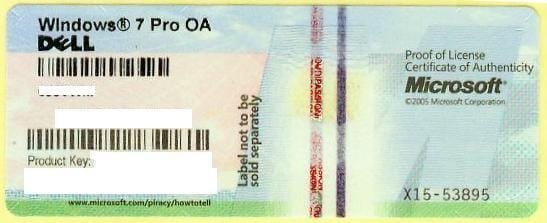
Do you have Product Key on COA sticker?
 

Attachments

  • 1270558000_86224332_1-Pictures-of--Buying-Windows-7-Prof-COA-Sticker-Only-100pcs-up-Needed.jpg
    1270558000_86224332_1-Pictures-of--Buying-Windows-7-Prof-COA-Sticker-Only-100pcs-up-Needed.jpg
    21.2 KB · Views: 0
First set the Active flag on System Reserved, then Rebuild MBR. If it' doesn't start run the 3 separate Startup Repairs.

If those steps fail, move the Active flag to the Win7 partition to try both procedures again.

Do you have Product Key on COA sticker?

YES! it's include license key. i set active flag on system reserved and then rebuild MBR and no load windows!

File:\Windows\system32\drivers\msahci.sys
0xc000000f
Windows failed to load beacuse a critical system driver is missing or corrupt.
 

My Computer My Computer

OS
Windows 7 Home Premium 64bit
Would you please acknowledge you followed ALL Of the steps given and not just the first one? You have not yet replied if you ran Startup Repair 3 times. This is getting to be ridiculous - I must have asked you five times.

There is no substitute for being thorough here. You canot miss a step.
 
Use Partition Wizard to set the partition Active. Then you can run Startup Repair from DVD System Recovery Options.

Run Startup Repair 3 separate times.

I used PW and active Windows 7 Partition.(where windows 7 is installed and no 200mb partition) then when boot from hard disk show error: "BOOTMGR is missing"
Press Cntrl+Alt+Del to restart
 

My Computer My Computer

OS
Windows 7 Home Premium 64bit
Also when Boot with DVD Installed for first time tell me need restart and fix it.
for two time in (Startup recovery option) Find Windows 7 Home premium and C:\ and next and on Startup repair. tell me need restart and fix.

still error 0xc000000f

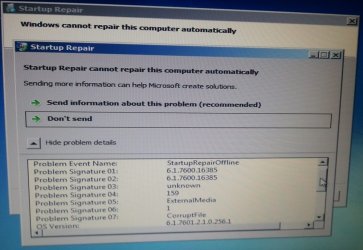
for three time on startup repair:

2012-06-07 10.31.09.jpg

i clicked in "view diagnostic and repair details"

Test Performed
.
.
.
.
root cause found:
boot critical file: c:\windows\system32\drivers\msahci.sys is corrupt.
repair action: File repair
result: failed error code : 0x2

repair action: system file integrity check and repair
result: failed error code : 0x2.

can i copy file msahci.sys from another computer to this computer and then boot it again?
 

My Computer My Computer

OS
Windows 7 Home Premium 64bit
bcd, bootmgr all is fine! Only problem within windows itself. (as I told you before that files is missing or corrupt)

in recovery environment->command prompt:
Code:
dir/s  \msahci.sys
post output
 

My Computer My Computer

Computer type
Laptop
Computer Manufacturer/Model Number
ACER ASPIRE 5742G
OS
Microsoft Windows 7 Home Premium 64-bits 7601 Multiprocessor Free Service Pack 1
CPU
Intel(R) Core(TM) i3 CPU M 370 @ 2.40GHz
Motherboard
Acer Aspire 5742G
Memory
4,00 GB
Graphics Card(s)
ATI Mobility Radeon HD 5400 Series
Sound Card
(1) AMD High Definition Audio Device (2) Realtek High Defi
Screen Resolution
1366 x 768 x 32 bits (4294967296 colors) @ 60 Hz
Hard Drives
WDC WD5000BEVT-22ZAT0
You get error code 0x2. I assume this is the windows error code(?) So file not found. Is file in c:\windows\system32\drivers ?

dir c:\windows\system32\drivers\msahci.sys

Any files in that folder?

dir c:\windows\system32\drivers

ERROR_INVALID_FUNCTION1 (0x1)Incorrect function.
ERROR_FILE_NOT_FOUND2 (0x2)The system cannot find the file specified.
ERROR_PATH_NOT_FOUND3 (0x3)The system cannot find the path specified.
ERROR_TOO_MANY_OPEN_FILES4 (0x4)The system cannot open the file.
ERROR_ACCESS_DENIED5 (0x5)Access is denied.
 

My Computer My Computer

Computer type
Laptop
Computer Manufacturer/Model Number
ACER ASPIRE 5742G
OS
Microsoft Windows 7 Home Premium 64-bits 7601 Multiprocessor Free Service Pack 1
CPU
Intel(R) Core(TM) i3 CPU M 370 @ 2.40GHz
Motherboard
Acer Aspire 5742G
Memory
4,00 GB
Graphics Card(s)
ATI Mobility Radeon HD 5400 Series
Sound Card
(1) AMD High Definition Audio Device (2) Realtek High Defi
Screen Resolution
1366 x 768 x 32 bits (4294967296 colors) @ 60 Hz
Hard Drives
WDC WD5000BEVT-22ZAT0
bcd, bootmgr all is fine! Only problem within windows itself. (as I told you before that files is missing or corrupt)

in recovery environment->command prompt:
Code:
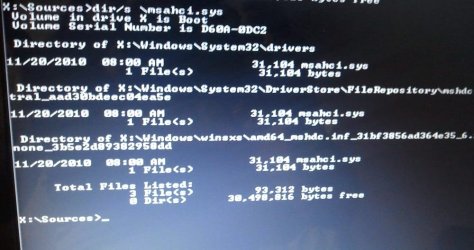
dir/s  \msahci.sys
post output

X:\Sources> dir/s \msahci.sys

result:
2012-06-07 11.16.57.jpg
 

My Computer My Computer

OS
Windows 7 Home Premium 64bit
You get error code 0x2. I assume this is the windows error code(?) So file not found. Is file in c:\windows\system32\drivers ?

dir c:\windows\system32\drivers\msahci.sys

Any files in that folder?

dir c:\windows\system32\drivers

ERROR_INVALID_FUNCTION1 (0x1)Incorrect function.
ERROR_FILE_NOT_FOUND2 (0x2)The system cannot find the file specified.
ERROR_PATH_NOT_FOUND3 (0x3)The system cannot find the path specified.
ERROR_TOO_MANY_OPEN_FILES4 (0x4)The system cannot open the file.
ERROR_ACCESS_DENIED5 (0x5)Access is denied.

dir c:\windows\system32\drivers\msahci.sys

Directory of X:\windows\system32\drivers

1 File found

dir c:\windows\system32\drivers

190 Files Found
 

My Computer My Computer

OS
Windows 7 Home Premium 64bit
Back
Top