
PSU upgrade for Ati Radeon HD3850

VincentStrike

New member
Member
Local time
11:23 AM
Messages
79
Location
Finland
:cry::cry:So... I bought this Corsair 600W CX V2 Builder Series, ATX-virtalähde, 80Plus | 65.00e - Jimms.fi Which has 24 pins and my motherboard is 20 pins [ATX]. I am thinking of sending it back to Jimms for refund. I want to buy a new one for my new pc case [PSU: , standard PS/2 -power supply slot].

So for the Ati Radeon HD3850 and my motherboard is: Google-kuvahaun tulos kohteessa http://www.ourtech.co.uk/shop/aceraspir-1326811772-16850.jpg


Please choose a good PSU from here for me PC-komponentit / Virtalähteet / ATX 520W - 775W - Jimms.fi
I wanna see what would you recommend for me and which isn't gonna explode :D


Let me see what would you recommend for me so i won't buy wrong PSU with wrong cables. :)
 

My Computer My Computer

At a glance

Windows 7 64 bitAMD Athlon(tm) II X2 215 Processor 2.70 GHz4gb RAM (3.75 In use)Nvidia Integrated Geforce 9200
Computer Manufacturer/Model Number
Acer Aspire X1301
OS
Windows 7 64 bit
CPU
AMD Athlon(tm) II X2 215 Processor 2.70 GHz
Motherboard
Acer Aspire
Memory
4gb RAM (3.75 In use)
Graphics Card(s)
Nvidia Integrated Geforce 9200
Monitor(s) Displays
Philips 192E
Screen Resolution
1368 x 766 (Recommended)
Hard Drives
HDD 1TB
Internet Speed
110MB/S (11 - 12MB Download per second.)
:cry::cry:So... I bought this Corsair 600W CX V2 Builder Series, ATX-virtalähde, 80Plus | 65.00e - Jimms.fi Which has 24 pins and my motherboard is 20 pins [ATX]. I am thinking of sending it back to Jimms for refund. I want to buy a new one for my new pc case [PSU: , standard PS/2 -power supply slot].

This should not be necessary. The last 4 pins in the connector should detach, turning your 24pin connector into a 20 pin connector.

If that doesn't work, you can get an adapter to switch from 24pin to 20 pin
http://www.google.com/products/cata...a=X&ei=xvrQT92TNKjU2AXSpL2oDw&ved=0CHUQ8wIwAg
 

My Computer My Computer

At a glance

Windows 7 Ultimate x64Intel Q9550 2.83Ghz OC'd to 3.40Ghz8GB G.Skill PI DDR2-800, 4-4-4-12 timingsEVGA 1280MB Nvidia GeForce GTX570
Computer Manufacturer/Model Number
Self-Built in July 2009
OS
Windows 7 Ultimate x64
CPU
Intel Q9550 2.83Ghz OC'd to 3.40Ghz
Motherboard
Gigabyte GA-EP45-UD3R rev. 1.1, F12 BIOS
Memory
8GB G.Skill PI DDR2-800, 4-4-4-12 timings
Graphics Card(s)
EVGA 1280MB Nvidia GeForce GTX570
Sound Card
Realtek ALC899A 8 channel onboard audio
Monitor(s) Displays
23" Acer x233H
Screen Resolution
1920x1080
Hard Drives
Intel X25-M 80GB Gen 2 SSD
Western Digital 1TB Caviar Black, 32MB cache. WD1001FALS
PSU
Corsair 620HX modular
Case
Antec P182
Cooling
stock
Keyboard
ABS M1 Mechanical
Mouse
Logitech G9 Laser Mouse
Internet Speed
15/2 cable modem
Other Info
Windows and Linux enthusiast. Logitech G35 Headset.
:cry::cry:So... I bought this Corsair 600W CX V2 Builder Series, ATX-virtalähde, 80Plus | 65.00e - Jimms.fi Which has 24 pins and my motherboard is 20 pins [ATX]. I am thinking of sending it back to Jimms for refund. I want to buy a new one for my new pc case [PSU: , standard PS/2 -power supply slot].

This should not be necessary. The last 4 pins in the connector should detach, turning your 24pin connector into a 20 pin connector.

If that doesn't work, you can get an adapter to switch from 24pin to 20 pin
StarTech.com 20 Pin ATX Power Supply to 24 Pin Motherboard Adatper Power connector adapter - power 20 pin ATX - M - power 24 pin main output - F - 6 in - PC

I don't really know... I don't even know where i put the cables in what slot xD, and i've seen in some of the PSU's there is 20 pins & 20 + 4 pins & 24pins. And that Corsair what i got is 24 pin
 

My Computer My Computer

At a glance

Windows 7 64 bitAMD Athlon(tm) II X2 215 Processor 2.70 GHz4gb RAM (3.75 In use)Nvidia Integrated Geforce 9200
Computer Manufacturer/Model Number
Acer Aspire X1301
OS
Windows 7 64 bit
CPU
AMD Athlon(tm) II X2 215 Processor 2.70 GHz
Motherboard
Acer Aspire
Memory
4gb RAM (3.75 In use)
Graphics Card(s)
Nvidia Integrated Geforce 9200
Monitor(s) Displays
Philips 192E
Screen Resolution
1368 x 766 (Recommended)
Hard Drives
HDD 1TB
Internet Speed
110MB/S (11 - 12MB Download per second.)

My Computer My Computer

At a glance

Windows 7 Ultimate x64Intel Q9550 2.83Ghz OC'd to 3.40Ghz8GB G.Skill PI DDR2-800, 4-4-4-12 timingsEVGA 1280MB Nvidia GeForce GTX570
Computer Manufacturer/Model Number
Self-Built in July 2009
OS
Windows 7 Ultimate x64
CPU
Intel Q9550 2.83Ghz OC'd to 3.40Ghz
Motherboard
Gigabyte GA-EP45-UD3R rev. 1.1, F12 BIOS
Memory
8GB G.Skill PI DDR2-800, 4-4-4-12 timings
Graphics Card(s)
EVGA 1280MB Nvidia GeForce GTX570
Sound Card
Realtek ALC899A 8 channel onboard audio
Monitor(s) Displays
23" Acer x233H
Screen Resolution
1920x1080
Hard Drives
Intel X25-M 80GB Gen 2 SSD
Western Digital 1TB Caviar Black, 32MB cache. WD1001FALS
PSU
Corsair 620HX modular
Case
Antec P182
Cooling
stock
Keyboard
ABS M1 Mechanical
Mouse
Logitech G9 Laser Mouse
Internet Speed
15/2 cable modem
Other Info
Windows and Linux enthusiast. Logitech G35 Headset.
These connectors only plug in 1 way. You cannot plug them into the wrong spot.

Yes, i know what you mean, but when i plug it in there is 4 pins too much. My motherboard is 20 pin.
 

My Computer My Computer

At a glance

Windows 7 64 bitAMD Athlon(tm) II X2 215 Processor 2.70 GHz4gb RAM (3.75 In use)Nvidia Integrated Geforce 9200
Computer Manufacturer/Model Number
Acer Aspire X1301
OS
Windows 7 64 bit
CPU
AMD Athlon(tm) II X2 215 Processor 2.70 GHz
Motherboard
Acer Aspire
Memory
4gb RAM (3.75 In use)
Graphics Card(s)
Nvidia Integrated Geforce 9200
Monitor(s) Displays
Philips 192E
Screen Resolution
1368 x 766 (Recommended)
Hard Drives
HDD 1TB
Internet Speed
110MB/S (11 - 12MB Download per second.)
i understand. usually you just unhook the last 4 pins from the connector in your power supply, plug the 20 pins into your mobo and just leave the 4 pin extras just dangling there.
 

My Computer My Computer

At a glance

Windows 7 Ultimate x64Intel Q9550 2.83Ghz OC'd to 3.40Ghz8GB G.Skill PI DDR2-800, 4-4-4-12 timingsEVGA 1280MB Nvidia GeForce GTX570
Computer Manufacturer/Model Number
Self-Built in July 2009
OS
Windows 7 Ultimate x64
CPU
Intel Q9550 2.83Ghz OC'd to 3.40Ghz
Motherboard
Gigabyte GA-EP45-UD3R rev. 1.1, F12 BIOS
Memory
8GB G.Skill PI DDR2-800, 4-4-4-12 timings
Graphics Card(s)
EVGA 1280MB Nvidia GeForce GTX570
Sound Card
Realtek ALC899A 8 channel onboard audio
Monitor(s) Displays
23" Acer x233H
Screen Resolution
1920x1080
Hard Drives
Intel X25-M 80GB Gen 2 SSD
Western Digital 1TB Caviar Black, 32MB cache. WD1001FALS
PSU
Corsair 620HX modular
Case
Antec P182
Cooling
stock
Keyboard
ABS M1 Mechanical
Mouse
Logitech G9 Laser Mouse
Internet Speed
15/2 cable modem
Other Info
Windows and Linux enthusiast. Logitech G35 Headset.
i understand. usually you just unhook the last 4 pins from the connector in your power supply, plug the 20 pins into your mobo and just leave the 4 pin extras just dangling there.

Okay. But there is other cable's i don't know where i have to put all of them...Should i post a picture of the cables in my new PSU and of the motherboard? So anyone of you could help me :)
 

My Computer My Computer

At a glance

Windows 7 64 bitAMD Athlon(tm) II X2 215 Processor 2.70 GHz4gb RAM (3.75 In use)Nvidia Integrated Geforce 9200
Computer Manufacturer/Model Number
Acer Aspire X1301
OS
Windows 7 64 bit
CPU
AMD Athlon(tm) II X2 215 Processor 2.70 GHz
Motherboard
Acer Aspire
Memory
4gb RAM (3.75 In use)
Graphics Card(s)
Nvidia Integrated Geforce 9200
Monitor(s) Displays
Philips 192E
Screen Resolution
1368 x 766 (Recommended)
Hard Drives
HDD 1TB
Internet Speed
110MB/S (11 - 12MB Download per second.)
Your power supply has the following connections

Liitännät:
- 1 x 24pin ATX (This goes to motherboard, and you disconnect the 4 pins at the end to make it a 20 pin connection)
- 1 x 8pin ATX 12V (this optionally goes to a single or double 4 pin ATX power connection on mobo. Usually a single 4 pin) (may not use at all)

- 2 x 6+2pin PCI-E (this goes to video cards)
- 6 x SATA (these plug into SATA drives)
- 4 x Molex (these plug into fans and hard drives/optical drives with molex connectors)
- 1 x Floppy (this goes to floppy)
 

My Computer My Computer

At a glance

Windows 7 Ultimate x64Intel Q9550 2.83Ghz OC'd to 3.40Ghz8GB G.Skill PI DDR2-800, 4-4-4-12 timingsEVGA 1280MB Nvidia GeForce GTX570
Computer Manufacturer/Model Number
Self-Built in July 2009
OS
Windows 7 Ultimate x64
CPU
Intel Q9550 2.83Ghz OC'd to 3.40Ghz
Motherboard
Gigabyte GA-EP45-UD3R rev. 1.1, F12 BIOS
Memory
8GB G.Skill PI DDR2-800, 4-4-4-12 timings
Graphics Card(s)
EVGA 1280MB Nvidia GeForce GTX570
Sound Card
Realtek ALC899A 8 channel onboard audio
Monitor(s) Displays
23" Acer x233H
Screen Resolution
1920x1080
Hard Drives
Intel X25-M 80GB Gen 2 SSD
Western Digital 1TB Caviar Black, 32MB cache. WD1001FALS
PSU
Corsair 620HX modular
Case
Antec P182
Cooling
stock
Keyboard
ABS M1 Mechanical
Mouse
Logitech G9 Laser Mouse
Internet Speed
15/2 cable modem
Other Info
Windows and Linux enthusiast. Logitech G35 Headset.
Your power supply has the following connections

Liitännät:
- 1 x 24pin ATX (This goes to motherboard, and you disconnect the 4 pins at the end to make it a 20 pin connection)
- 1 x 8pin ATX 12V (this optionally goes to a single or double 4 pin ATX power connection on mobo. Usually a single 4 pin) (may not use at all)

- 2 x 6+2pin PCI-E (this goes to video cards)
- 6 x SATA (these plug into SATA drives)
- 4 x Molex (these plug into fans and hard drives/optical drives with molex connectors)
- 1 x Floppy (this goes to floppy)


This is how the atx cable looks like: Google-kuvahaun tulos kohteessa http://www.nordichardware.com/skrivelser_img/432/psu.atx.jpg

And Are you sure you are not talking about Google-kuvahaun tulos kohteessa http://www.smps.us/atx-connector-20-24pin.jpeg ?
 

My Computer My Computer

At a glance

Windows 7 64 bitAMD Athlon(tm) II X2 215 Processor 2.70 GHz4gb RAM (3.75 In use)Nvidia Integrated Geforce 9200
Computer Manufacturer/Model Number
Acer Aspire X1301
OS
Windows 7 64 bit
CPU
AMD Athlon(tm) II X2 215 Processor 2.70 GHz
Motherboard
Acer Aspire
Memory
4gb RAM (3.75 In use)
Graphics Card(s)
Nvidia Integrated Geforce 9200
Monitor(s) Displays
Philips 192E
Screen Resolution
1368 x 766 (Recommended)
Hard Drives
HDD 1TB
Internet Speed
110MB/S (11 - 12MB Download per second.)
Here is a 20 pin + 4 pin connector and you can see this disconnects

EnermaxLiberty500W_ATXConnection.jpg


And here is a mobo with a 4 pin ATX plug in addition to the 20/24 pin ATX connector
http://www.nvnews.net/vbulletin/attachment.php?attachmentid=21094&stc=1&d=1160847208
 

My Computer My Computer

At a glance

Windows 7 Ultimate x64Intel Q9550 2.83Ghz OC'd to 3.40Ghz8GB G.Skill PI DDR2-800, 4-4-4-12 timingsEVGA 1280MB Nvidia GeForce GTX570
Computer Manufacturer/Model Number
Self-Built in July 2009
OS
Windows 7 Ultimate x64
CPU
Intel Q9550 2.83Ghz OC'd to 3.40Ghz
Motherboard
Gigabyte GA-EP45-UD3R rev. 1.1, F12 BIOS
Memory
8GB G.Skill PI DDR2-800, 4-4-4-12 timings
Graphics Card(s)
EVGA 1280MB Nvidia GeForce GTX570
Sound Card
Realtek ALC899A 8 channel onboard audio
Monitor(s) Displays
23" Acer x233H
Screen Resolution
1920x1080
Hard Drives
Intel X25-M 80GB Gen 2 SSD
Western Digital 1TB Caviar Black, 32MB cache. WD1001FALS
PSU
Corsair 620HX modular
Case
Antec P182
Cooling
stock
Keyboard
ABS M1 Mechanical
Mouse
Logitech G9 Laser Mouse
Internet Speed
15/2 cable modem
Other Info
Windows and Linux enthusiast. Logitech G35 Headset.
Here is a 20 pin + 4 pin connector and you can see this disconnects

EnermaxLiberty500W_ATXConnection.jpg


And here is a mobo with a 4 pin ATX plug in addition to the 20/24 pin ATX connector
http://www.nvnews.net/vbulletin/attachment.php?attachmentid=21094&stc=1&d=1160847208

That picture...made me look like a f0000000l :D.
Okay, i got another question too as you saw my motherboardi in the start of the thread. In my new case there is 4x 2 pins + 2x 1 pins + (led fan in front) Can you do some kind of a paint or somehow so i can know where the heck i plug them :D
 

My Computer My Computer

At a glance

Windows 7 64 bitAMD Athlon(tm) II X2 215 Processor 2.70 GHz4gb RAM (3.75 In use)Nvidia Integrated Geforce 9200
Computer Manufacturer/Model Number
Acer Aspire X1301
OS
Windows 7 64 bit
CPU
AMD Athlon(tm) II X2 215 Processor 2.70 GHz
Motherboard
Acer Aspire
Memory
4gb RAM (3.75 In use)
Graphics Card(s)
Nvidia Integrated Geforce 9200
Monitor(s) Displays
Philips 192E
Screen Resolution
1368 x 766 (Recommended)
Hard Drives
HDD 1TB
Internet Speed
110MB/S (11 - 12MB Download per second.)
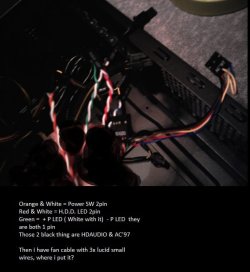
So... You know the button which turns on your computer. I have 2 buttons my CoolerMaster Elite 430 ATX-kotelo, musta | 59.00e - Jimms.fi you can see them in the left side. And of those comes 5 cables. 3 cables are 2 pin and the last 2 cables are 1 pin. So can you show from my motherboard there i plug them??
 

My Computer My Computer

At a glance

Windows 7 64 bitAMD Athlon(tm) II X2 215 Processor 2.70 GHz4gb RAM (3.75 In use)Nvidia Integrated Geforce 9200
Computer Manufacturer/Model Number
Acer Aspire X1301
OS
Windows 7 64 bit
CPU
AMD Athlon(tm) II X2 215 Processor 2.70 GHz
Motherboard
Acer Aspire
Memory
4gb RAM (3.75 In use)
Graphics Card(s)
Nvidia Integrated Geforce 9200
Monitor(s) Displays
Philips 192E
Screen Resolution
1368 x 766 (Recommended)
Hard Drives
HDD 1TB
Internet Speed
110MB/S (11 - 12MB Download per second.)
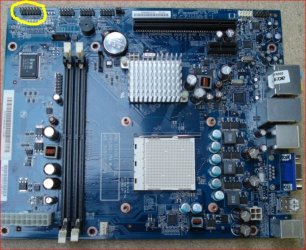
Looks like they should go here,

fpheader.JPG

There should be labels around the pin group identifying which is which, then it is just a matter of matching up the connectors from the front panel (they should also be labeled).
 

My Computer My Computer

At a glance

Win 7 Ultimate x64FX-8350 @ 4.6 GHz so farADATA XPG V1 Series Black 8GB DDR3 1600Sapphire R9 270x Dual-X
Computer type
PC/Desktop
Computer Manufacturer/Model Number
Me
OS
Win 7 Ultimate x64
CPU
FX-8350 @ 4.6 GHz so far
Motherboard
Asus M5A97 EVO
Memory
ADATA XPG V1 Series Black 8GB DDR3 1600
Graphics Card(s)
Sapphire R9 270x Dual-X
Sound Card
Xonar DGX w/ Corsair Vengence 1300
Monitor(s) Displays
Acer S232HL Abid
Screen Resolution
1920x1080
Hard Drives
120 GB OCZ Vertex 3
500 GB Seagate 7200.12
PSU
Antec Earthwatts 650W Green
Case
Antec Three Hundred
Cooling
Cooler Master 212 EVO
Keyboard
Logitech G510
Mouse
Logitech G500s
Internet Speed
35000/3000
Looks like they should go here,

View attachment 215540

There should be labels around the pin group identifying which is which, then it is just a matter of matching up the connectors from the front panel (they should also be labeled).

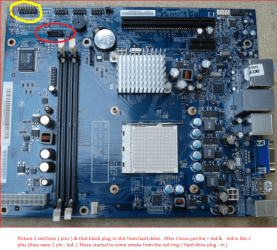
I'm gonna post a picture the pins i'm talking about so you can tell me easier where to i put each one. Just a moment :)
 

My Computer My Computer

At a glance

Windows 7 64 bitAMD Athlon(tm) II X2 215 Processor 2.70 GHz4gb RAM (3.75 In use)Nvidia Integrated Geforce 9200
Computer Manufacturer/Model Number
Acer Aspire X1301
OS
Windows 7 64 bit
CPU
AMD Athlon(tm) II X2 215 Processor 2.70 GHz
Motherboard
Acer Aspire
Memory
4gb RAM (3.75 In use)
Graphics Card(s)
Nvidia Integrated Geforce 9200
Monitor(s) Displays
Philips 192E
Screen Resolution
1368 x 766 (Recommended)
Hard Drives
HDD 1TB
Internet Speed
110MB/S (11 - 12MB Download per second.)
Picture

Here is the picture after all hard work :D Valokuva0254.jpg

So can you show with paint or somehow where i put each wire? :) I appreciate your all help! :)

And btw you said i should plug in the last 4 pins in the 24 pin cable to the white slot...I don't think the 4 ''add'' pins gonna reach there :D
 

My Computer My Computer

At a glance

Windows 7 64 bitAMD Athlon(tm) II X2 215 Processor 2.70 GHz4gb RAM (3.75 In use)Nvidia Integrated Geforce 9200
Computer Manufacturer/Model Number
Acer Aspire X1301
OS
Windows 7 64 bit
CPU
AMD Athlon(tm) II X2 215 Processor 2.70 GHz
Motherboard
Acer Aspire
Memory
4gb RAM (3.75 In use)
Graphics Card(s)
Nvidia Integrated Geforce 9200
Monitor(s) Displays
Philips 192E
Screen Resolution
1368 x 766 (Recommended)
Hard Drives
HDD 1TB
Internet Speed
110MB/S (11 - 12MB Download per second.)
Here is the picture after all hard work :D View attachment 215542

So can you show with paint or somehow where i put each wire? :) I appreciate your all help! :)

And btw you said i should plug in the last 4 pins in the 24 pin cable to the white slot...I don't think the 4 ''add'' pins gonna reach there :D

The 4 pin block that splits off the 20+4 pin ATX power connector DOES NOT go there. It's not used at all.

There's a separate 12V supply for the CPU. For the Corsair CX600, it's a 4+4 pin connector that can either be used as an 8 pin (on newer motherboards) or split to give you the 4 pin one. USE THAT.

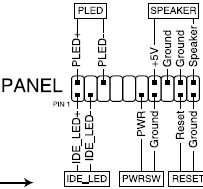
I haven't found any service manual online for the Acer X1301. On standard ATX motherboards, the switches and indicator lines all go to a single block. If you're lucky, what goes where will be printed on the motherboard. (It'll be quite small printing.)
 

Attachments

  • Untitled.png
    Untitled.png
    3.2 KB · Views: 31

My Computer My Computer

At a glance

Windows 7 Pro X64 SP1Intel Core I7-3930k16 GB Gskill DDR3-2133eVGA GTX680
Computer Manufacturer/Model Number
homegrown
OS
Windows 7 Pro X64 SP1
CPU
Intel Core I7-3930k
Motherboard
Asus P9X79 Pro
Memory
16 GB Gskill DDR3-2133
Graphics Card(s)
eVGA GTX680
Sound Card
Creative X-Fi Titanium
Monitor(s) Displays
As PA246Q
Screen Resolution
1920 X 1200
Hard Drives
Corsair Force GT, 120 GB
WDC 1.5TB Caviar Black
PSU
PCP&C Silencer 750 Crossfire
Case
Silverstone FT02
Cooling
Noctua NH-D14
Keyboard
cheap Logitech USB
Mouse
Microsoft Intellimouse Explorer (old optical) USB
Internet Speed
6Mb cable
Other Info
Pioneer BDR-205
Samsung SH-203B
Monsoon 5.1 speakers
Here is the picture after all hard work :D View attachment 215542

So can you show with paint or somehow where i put each wire? :) I appreciate your all help! :)

And btw you said i should plug in the last 4 pins in the 24 pin cable to the white slot...I don't think the 4 ''add'' pins gonna reach there :D

The 4 pin block that splits off the 20+4 pin ATX power connector DOES NOT go there. It's not used at all.

There's a separate 12V supply for the CPU. For the Corsair CX600, it's a 4+4 pin connector that can either be used as an 8 pin (on newer motherboards) or split to give you the 4 pin one. USE THAT.

I haven't found any service manual online for the Acer X1301. On standard ATX motherboards, the switches and indicator lines all go to a single block. If you're lucky, what goes where will be printed on the motherboard. (It'll be quite small printing.)


What the f*** happened?! When i did those + i only put 2x 1 pin leds on the motherboard suddenly the computer start running and there was fffff much smoke coming out of my motherboard hard drive cable......!?!?!? What did i do wrong? And now when i put all pieces back to normal in this old case, my cpu fan starts running without turning computer on
 

My Computer My Computer

At a glance

Windows 7 64 bitAMD Athlon(tm) II X2 215 Processor 2.70 GHz4gb RAM (3.75 In use)Nvidia Integrated Geforce 9200
Computer Manufacturer/Model Number
Acer Aspire X1301
OS
Windows 7 64 bit
CPU
AMD Athlon(tm) II X2 215 Processor 2.70 GHz
Motherboard
Acer Aspire
Memory
4gb RAM (3.75 In use)
Graphics Card(s)
Nvidia Integrated Geforce 9200
Monitor(s) Displays
Philips 192E
Screen Resolution
1368 x 766 (Recommended)
Hard Drives
HDD 1TB
Internet Speed
110MB/S (11 - 12MB Download per second.)
When i did those + i only put 2x 1 pin leds on the motherboard

Please rewrite that so we have half a chance of understanding what you did.

What you have written is impenetrable. What you may have done is unknown.
 

My Computer My Computer

At a glance

Windows 7 Home Premium SP1, 64-bitIntel Skylake i5-6600K, not overclocked8 GB HyperX DDR4-2666 (2 x 4 GB)none; graphics are integrated on CPU
Computer type
PC/Desktop
Computer Manufacturer/Model Number
Ignatz Special; 4 speed manual gearbox; factory air conditioning; one of one
OS
Windows 7 Home Premium SP1, 64-bit
CPU
Intel Skylake i5-6600K, not overclocked
Motherboard
AsRock Z170M Extreme 4, micro ATX
Memory
8 GB HyperX DDR4-2666 (2 x 4 GB)
Graphics Card(s)
none; graphics are integrated on CPU
Sound Card
onboard: Realtek ALC1150; external: USB Behringer UF0-202
Monitor(s) Displays
Dell S2340M 23 inch IPS
Screen Resolution
1600 x 900
Hard Drives
System: Crucial MX100 series SSD, 128 GB;
Data: Samsung Spinpoint 103SJ, 1 TB;
Backup: WD Caviar Green WD30EZRX-00D8PB0, 3 TB
PSU
Rosewill SilentNight 500 watt fanless, semi-modular
Case
Antec Solo II
Cooling
Noctua NH-U12S; Noctua F12 intake, Noctua S12A exhaust
Keyboard
Microsoft 200 6JH-00001 USB
Mouse
Dell or Microsoft optical wired; USB
Antivirus
Microsoft Security Essentials and Malwarebytes Premium
Browser
Pale Moon
Other Info
All fans PWM; speeds at idle: CPU circa 500 rpm; intake circa 600 rpm; exhaust circa 600 rpm; CPU temps 27 idle and 47 C load in a warm room (27 C/81 F) when running Intel Extreme Tuning Utility stress test.
Smoke

When i did those + i only put 2x 1 pin leds on the motherboard

Please rewrite that so we have half a chance of understanding what you did.

What you have written is impenetrable. What you may have done is unknown.

You can see from previous post the picture of cables white and green one i put in the pins and then started this smoke
This is what i mean...:cry: nimetön.png
 

My Computer My Computer

At a glance

Windows 7 64 bitAMD Athlon(tm) II X2 215 Processor 2.70 GHz4gb RAM (3.75 In use)Nvidia Integrated Geforce 9200
Computer Manufacturer/Model Number
Acer Aspire X1301
OS
Windows 7 64 bit
CPU
AMD Athlon(tm) II X2 215 Processor 2.70 GHz
Motherboard
Acer Aspire
Memory
4gb RAM (3.75 In use)
Graphics Card(s)
Nvidia Integrated Geforce 9200
Monitor(s) Displays
Philips 192E
Screen Resolution
1368 x 766 (Recommended)
Hard Drives
HDD 1TB
Internet Speed
110MB/S (11 - 12MB Download per second.)
According to the picture in your post #15, the green and white connectors are for the power LED on the front of the case.

You connected the green and white wires to 2 pins on the motherboard.

Question: why did you choose those particular pins on the motherboard rather than some other 2 pins? Did you have a reason or did you just choose 2 random pins?
 

My Computer My Computer

At a glance

Windows 7 Home Premium SP1, 64-bitIntel Skylake i5-6600K, not overclocked8 GB HyperX DDR4-2666 (2 x 4 GB)none; graphics are integrated on CPU
Computer type
PC/Desktop
Computer Manufacturer/Model Number
Ignatz Special; 4 speed manual gearbox; factory air conditioning; one of one
OS
Windows 7 Home Premium SP1, 64-bit
CPU
Intel Skylake i5-6600K, not overclocked
Motherboard
AsRock Z170M Extreme 4, micro ATX
Memory
8 GB HyperX DDR4-2666 (2 x 4 GB)
Graphics Card(s)
none; graphics are integrated on CPU
Sound Card
onboard: Realtek ALC1150; external: USB Behringer UF0-202
Monitor(s) Displays
Dell S2340M 23 inch IPS
Screen Resolution
1600 x 900
Hard Drives
System: Crucial MX100 series SSD, 128 GB;
Data: Samsung Spinpoint 103SJ, 1 TB;
Backup: WD Caviar Green WD30EZRX-00D8PB0, 3 TB
PSU
Rosewill SilentNight 500 watt fanless, semi-modular
Case
Antec Solo II
Cooling
Noctua NH-U12S; Noctua F12 intake, Noctua S12A exhaust
Keyboard
Microsoft 200 6JH-00001 USB
Mouse
Dell or Microsoft optical wired; USB
Antivirus
Microsoft Security Essentials and Malwarebytes Premium
Browser
Pale Moon
Other Info
All fans PWM; speeds at idle: CPU circa 500 rpm; intake circa 600 rpm; exhaust circa 600 rpm; CPU temps 27 idle and 47 C load in a warm room (27 C/81 F) when running Intel Extreme Tuning Utility stress test.
Back
Top