
PSU upgrade for Ati Radeon HD3850

According to the picture in your post #15, the green and white connectors are for the power LED on the front of the case.

You connected the green and white wires to 2 pins on the motherboard.

Question: why did you choose those particular pins on the motherboard rather than some other 2 pins? Did you have a reason or did you just choose 2 random pins?


I just put the green and white cable next to each other without sw power or w/e it is. Then started the smoking :D...It's good if you guys help me so i can learn more xD
 

My Computer My Computer

At a glance

Windows 7 64 bitAMD Athlon(tm) II X2 215 Processor 2.70 GHz4gb RAM (3.75 In use)Nvidia Integrated Geforce 9200
Computer Manufacturer/Model Number
Acer Aspire X1301
OS
Windows 7 64 bit
CPU
AMD Athlon(tm) II X2 215 Processor 2.70 GHz
Motherboard
Acer Aspire
Memory
4gb RAM (3.75 In use)
Graphics Card(s)
Nvidia Integrated Geforce 9200
Monitor(s) Displays
Philips 192E
Screen Resolution
1368 x 766 (Recommended)
Hard Drives
HDD 1TB
Internet Speed
110MB/S (11 - 12MB Download per second.)
What are the answers to the 2 questions I asked in post 20?
 

My Computer My Computer

At a glance

Windows 7 Home Premium SP1, 64-bitIntel Skylake i5-6600K, not overclocked8 GB HyperX DDR4-2666 (2 x 4 GB)none; graphics are integrated on CPU
Computer type
PC/Desktop
Computer Manufacturer/Model Number
Ignatz Special; 4 speed manual gearbox; factory air conditioning; one of one
OS
Windows 7 Home Premium SP1, 64-bit
CPU
Intel Skylake i5-6600K, not overclocked
Motherboard
AsRock Z170M Extreme 4, micro ATX
Memory
8 GB HyperX DDR4-2666 (2 x 4 GB)
Graphics Card(s)
none; graphics are integrated on CPU
Sound Card
onboard: Realtek ALC1150; external: USB Behringer UF0-202
Monitor(s) Displays
Dell S2340M 23 inch IPS
Screen Resolution
1600 x 900
Hard Drives
System: Crucial MX100 series SSD, 128 GB;
Data: Samsung Spinpoint 103SJ, 1 TB;
Backup: WD Caviar Green WD30EZRX-00D8PB0, 3 TB
PSU
Rosewill SilentNight 500 watt fanless, semi-modular
Case
Antec Solo II
Cooling
Noctua NH-U12S; Noctua F12 intake, Noctua S12A exhaust
Keyboard
Microsoft 200 6JH-00001 USB
Mouse
Dell or Microsoft optical wired; USB
Antivirus
Microsoft Security Essentials and Malwarebytes Premium
Browser
Pale Moon
Other Info
All fans PWM; speeds at idle: CPU circa 500 rpm; intake circa 600 rpm; exhaust circa 600 rpm; CPU temps 27 idle and 47 C load in a warm room (27 C/81 F) when running Intel Extreme Tuning Utility stress test.

My Computer My Computer

At a glance

Windows 7 64 bitAMD Athlon(tm) II X2 215 Processor 2.70 GHz4gb RAM (3.75 In use)Nvidia Integrated Geforce 9200
Computer Manufacturer/Model Number
Acer Aspire X1301
OS
Windows 7 64 bit
CPU
AMD Athlon(tm) II X2 215 Processor 2.70 GHz
Motherboard
Acer Aspire
Memory
4gb RAM (3.75 In use)
Graphics Card(s)
Nvidia Integrated Geforce 9200
Monitor(s) Displays
Philips 192E
Screen Resolution
1368 x 766 (Recommended)
Hard Drives
HDD 1TB
Internet Speed
110MB/S (11 - 12MB Download per second.)

My Computer My Computer

At a glance

Windows 7 Home Premium SP1, 64-bitIntel Skylake i5-6600K, not overclocked8 GB HyperX DDR4-2666 (2 x 4 GB)none; graphics are integrated on CPU
Computer type
PC/Desktop
Computer Manufacturer/Model Number
Ignatz Special; 4 speed manual gearbox; factory air conditioning; one of one
OS
Windows 7 Home Premium SP1, 64-bit
CPU
Intel Skylake i5-6600K, not overclocked
Motherboard
AsRock Z170M Extreme 4, micro ATX
Memory
8 GB HyperX DDR4-2666 (2 x 4 GB)
Graphics Card(s)
none; graphics are integrated on CPU
Sound Card
onboard: Realtek ALC1150; external: USB Behringer UF0-202
Monitor(s) Displays
Dell S2340M 23 inch IPS
Screen Resolution
1600 x 900
Hard Drives
System: Crucial MX100 series SSD, 128 GB;
Data: Samsung Spinpoint 103SJ, 1 TB;
Backup: WD Caviar Green WD30EZRX-00D8PB0, 3 TB
PSU
Rosewill SilentNight 500 watt fanless, semi-modular
Case
Antec Solo II
Cooling
Noctua NH-U12S; Noctua F12 intake, Noctua S12A exhaust
Keyboard
Microsoft 200 6JH-00001 USB
Mouse
Dell or Microsoft optical wired; USB
Antivirus
Microsoft Security Essentials and Malwarebytes Premium
Browser
Pale Moon
Other Info
All fans PWM; speeds at idle: CPU circa 500 rpm; intake circa 600 rpm; exhaust circa 600 rpm; CPU temps 27 idle and 47 C load in a warm room (27 C/81 F) when running Intel Extreme Tuning Utility stress test.
I just choosed random pins.........

I'm really dumb....

Hmmmmmmmm...................

9 down and 1 to go. Over to you, Dorothy Kilgallen.


Do you have any clue what name are those 2 pins in right top corner what my friend has circled for me? (black and white) Or do i have to shut down my pc and open again... ?
 

My Computer My Computer

At a glance

Windows 7 64 bitAMD Athlon(tm) II X2 215 Processor 2.70 GHz4gb RAM (3.75 In use)Nvidia Integrated Geforce 9200
Computer Manufacturer/Model Number
Acer Aspire X1301
OS
Windows 7 64 bit
CPU
AMD Athlon(tm) II X2 215 Processor 2.70 GHz
Motherboard
Acer Aspire
Memory
4gb RAM (3.75 In use)
Graphics Card(s)
Nvidia Integrated Geforce 9200
Monitor(s) Displays
Philips 192E
Screen Resolution
1368 x 766 (Recommended)
Hard Drives
HDD 1TB
Internet Speed
110MB/S (11 - 12MB Download per second.)
My Computer My Computer

At a glance

Windows 7 64 bitAMD Athlon(tm) II X2 215 Processor 2.70 GHz4gb RAM (3.75 In use)Nvidia Integrated Geforce 9200
Computer Manufacturer/Model Number
Acer Aspire X1301
OS
Windows 7 64 bit
CPU
AMD Athlon(tm) II X2 215 Processor 2.70 GHz
Motherboard
Acer Aspire
Memory
4gb RAM (3.75 In use)
Graphics Card(s)
Nvidia Integrated Geforce 9200
Monitor(s) Displays
Philips 192E
Screen Resolution
1368 x 766 (Recommended)
Hard Drives
HDD 1TB
Internet Speed
110MB/S (11 - 12MB Download per second.)
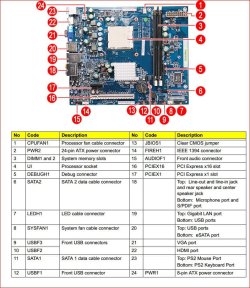
No idea which pins are which. Looking at this picture of the motherboard,

http://www.wassy.net/ebay/Aspire MB/P1020505.JPG

which is of large enough size, when zoomed in there are no markings at all around the block where the front panel connectors go. I can tell you that the one I pointed you to is for the front panel from reading this,

http://support.acer.com/acerpanam/Manuals/acer/2010/ServiceGuides/SG_Aspire_X1301_BOOK.pdf

x1300mobo.JPG

but even the manual doesn't specify which pins are which. Sort of what happens when working with an OEM motherboard. I have a feeling that on that model Acer uses a standard case (for them) that has all the front panel connections in a single jumper block, with no need for having it marked around the pins on the motherboard. With that said, unless those pins follow the layout like in the picture bobkn posted,

http://www.sevenforums.com/hardware-devices/233849-psu-upgrade-ati-radeon-hd3850-2.html#post1955488

there is no way for us to tell you which one is which.

I just choosed random pins i put led + sw power and reset in the same place.

You can see from previous post the picture of cables white and green one i put in the pins and then started this smoke

Keep doing things like that and it won't matter which pins are which as you will be buying a new motherboard after frying this one.
 

My Computer My Computer

At a glance

Win 7 Ultimate x64FX-8350 @ 4.6 GHz so farADATA XPG V1 Series Black 8GB DDR3 1600Sapphire R9 270x Dual-X
Computer type
PC/Desktop
Computer Manufacturer/Model Number
Me
OS
Win 7 Ultimate x64
CPU
FX-8350 @ 4.6 GHz so far
Motherboard
Asus M5A97 EVO
Memory
ADATA XPG V1 Series Black 8GB DDR3 1600
Graphics Card(s)
Sapphire R9 270x Dual-X
Sound Card
Xonar DGX w/ Corsair Vengence 1300
Monitor(s) Displays
Acer S232HL Abid
Screen Resolution
1920x1080
Hard Drives
120 GB OCZ Vertex 3
500 GB Seagate 7200.12
PSU
Antec Earthwatts 650W Green
Case
Antec Three Hundred
Cooling
Cooler Master 212 EVO
Keyboard
Logitech G510
Mouse
Logitech G500s
Internet Speed
35000/3000
Back
Top