Solved oxc000000e Boot failed-required device is inaccessible (Windows 7)

Please update the following values:

aStor [start = 0] =>doubleclick on start and change value to 3
msahci [start = 0]=>doubleclick on start and change value to 3
pciide [start = 3]=>doubleclick on start and change value to 0

Please remember that you changed it!! Do it in controlset001 and controlset002. Now click on "Restored_HKLM" and do file->"unload hive". load the hive again and check if the values did change!! if so enter bios and set sata to ide, save that setting and reboot normally. please post results
 

My Computer My Computer

Computer type
Laptop
Computer Manufacturer/Model Number
ACER ASPIRE 5742G
OS
Microsoft Windows 7 Home Premium 64-bits 7601 Multiprocessor Free Service Pack 1
CPU
Intel(R) Core(TM) i3 CPU M 370 @ 2.40GHz
Motherboard
Acer Aspire 5742G
Memory
4,00 GB
Graphics Card(s)
ATI Mobility Radeon HD 5400 Series
Sound Card
(1) AMD High Definition Audio Device (2) Realtek High Defi
Screen Resolution
1366 x 768 x 32 bits (4294967296 colors) @ 60 Hz
Hard Drives
WDC WD5000BEVT-22ZAT0
value 3 means "don't start". We don't need msahci and iastor (belongs to ahci) now. That's why I don't want you to start it.

pciide is standard ide driver.
 

My Computer My Computer

Computer type
Laptop
Computer Manufacturer/Model Number
ACER ASPIRE 5742G
OS
Microsoft Windows 7 Home Premium 64-bits 7601 Multiprocessor Free Service Pack 1
CPU
Intel(R) Core(TM) i3 CPU M 370 @ 2.40GHz
Motherboard
Acer Aspire 5742G
Memory
4,00 GB
Graphics Card(s)
ATI Mobility Radeon HD 5400 Series
Sound Card
(1) AMD High Definition Audio Device (2) Realtek High Defi
Screen Resolution
1366 x 768 x 32 bits (4294967296 colors) @ 60 Hz
Hard Drives
WDC WD5000BEVT-22ZAT0
Please update the following values:

aStor [start = 0] =>doubleclick on start and change value to 3
msahci [start = 0]=>doubleclick on start and change value to 3
pciide [start = 3]=>doubleclick on start and change value to 0

Please remember that you changed it!! Do it in controlset001 and controlset002. Now click on "Restored_HKLM" and do file->"unload hive". load the hive again and check if the values did change!! if so enter bios and set sata to ide, save that setting and reboot normally. please post results

i do it. result same (blue screen 0x00000007B)
 

My Computer My Computer

OS
Windows 7 Home Premium 64bit
sure you did save it? sure you set sata to ide bios?
 

My Computer My Computer

Computer type
Laptop
Computer Manufacturer/Model Number
ACER ASPIRE 5742G
OS
Microsoft Windows 7 Home Premium 64-bits 7601 Multiprocessor Free Service Pack 1
CPU
Intel(R) Core(TM) i3 CPU M 370 @ 2.40GHz
Motherboard
Acer Aspire 5742G
Memory
4,00 GB
Graphics Card(s)
ATI Mobility Radeon HD 5400 Series
Sound Card
(1) AMD High Definition Audio Device (2) Realtek High Defi
Screen Resolution
1366 x 768 x 32 bits (4294967296 colors) @ 60 Hz
Hard Drives
WDC WD5000BEVT-22ZAT0
if still not working. set sata to ahci in bios again. and set registry settings back to what they were
 

My Computer My Computer

Computer type
Laptop
Computer Manufacturer/Model Number
ACER ASPIRE 5742G
OS
Microsoft Windows 7 Home Premium 64-bits 7601 Multiprocessor Free Service Pack 1
CPU
Intel(R) Core(TM) i3 CPU M 370 @ 2.40GHz
Motherboard
Acer Aspire 5742G
Memory
4,00 GB
Graphics Card(s)
ATI Mobility Radeon HD 5400 Series
Sound Card
(1) AMD High Definition Audio Device (2) Realtek High Defi
Screen Resolution
1366 x 768 x 32 bits (4294967296 colors) @ 60 Hz
Hard Drives
WDC WD5000BEVT-22ZAT0
sure you did save it? sure you set sata to ide bios?

what's mean you "save" in registry or bios? in registry do unload hive and then load hive system for check value. it's was changed! also bios is ide!
 

My Computer My Computer

OS
Windows 7 Home Premium 64bit
if still not working. set sata to ahci in bios again. and set registry settings back to what they were

it's mean goto regedit and then load hive and then Restored_HKLM. set it and then unload hive ?

aStor [start = 3] =>doubleclick on start and change value to 0
msahci [start = 3]=>doubleclick on start and change value to 0
pciide [start = 0]=>doubleclick on start and change value to 3

is that your mean?
 

My Computer My Computer

OS
Windows 7 Home Premium 64bit
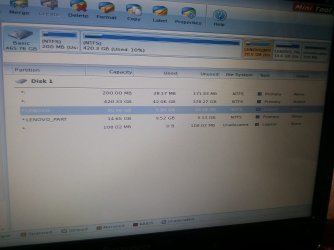
if it's not problem and i'll can make update windows with my license key (under laptop). and download from site Microsoft . please help me for make new partition. i don't need more 50gb for Drive C ( where windows installed)

Also should i delete hidden partition? it's 15gb!
 

My Computer My Computer

OS
Windows 7 Home Premium 64bit
first delete 200MB partition you don't use it now anyways. You moved boot stuff to 420GB partition. Do that first. then shrink 420GB partition by 70GB (if you want new win7 to be 70GB). Make a new primary partition in that unallocated space. format it as ntfs (default cluster size). mark that partition active. now apply all changes. Post camshot of final results
 

My Computer My Computer

Computer type
Laptop
Computer Manufacturer/Model Number
ACER ASPIRE 5742G
OS
Microsoft Windows 7 Home Premium 64-bits 7601 Multiprocessor Free Service Pack 1
CPU
Intel(R) Core(TM) i3 CPU M 370 @ 2.40GHz
Motherboard
Acer Aspire 5742G
Memory
4,00 GB
Graphics Card(s)
ATI Mobility Radeon HD 5400 Series
Sound Card
(1) AMD High Definition Audio Device (2) Realtek High Defi
Screen Resolution
1366 x 768 x 32 bits (4294967296 colors) @ 60 Hz
Hard Drives
WDC WD5000BEVT-22ZAT0
You were afraid to lose ms office and mc afee? more application were on laptop automatically?
 

My Computer My Computer

Computer type
Laptop
Computer Manufacturer/Model Number
ACER ASPIRE 5742G
OS
Microsoft Windows 7 Home Premium 64-bits 7601 Multiprocessor Free Service Pack 1
CPU
Intel(R) Core(TM) i3 CPU M 370 @ 2.40GHz
Motherboard
Acer Aspire 5742G
Memory
4,00 GB
Graphics Card(s)
ATI Mobility Radeon HD 5400 Series
Sound Card
(1) AMD High Definition Audio Device (2) Realtek High Defi
Screen Resolution
1366 x 768 x 32 bits (4294967296 colors) @ 60 Hz
Hard Drives
WDC WD5000BEVT-22ZAT0
first delete 200MB partition you don't use it now anyways. You moved boot stuff to 420GB partition. Do that first. then shrink 420GB partition by 70GB (if you want new win7 to be 70GB). Make a new primary partition in that unallocated space. format it as ntfs (default cluster size). mark that partition active. now apply all changes. Post camshot of final results

2012-06-08 14.59.19.jpg

Also after install Home Premium OEM windows 7 can i update windows without problem? i don't apply with Partition wizard if it's okay tell me apply it
 

My Computer My Computer

OS
Windows 7 Home Premium 64bit
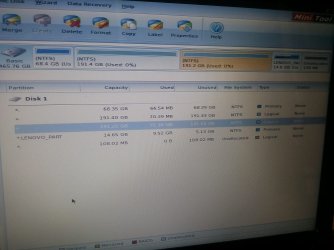
2 partitions both 191GB??? I thought it was 420GB total? why both 60MB used?????? did you format the old win7 partition as well??
 

My Computer My Computer

Computer type
Laptop
Computer Manufacturer/Model Number
ACER ASPIRE 5742G
OS
Microsoft Windows 7 Home Premium 64-bits 7601 Multiprocessor Free Service Pack 1
CPU
Intel(R) Core(TM) i3 CPU M 370 @ 2.40GHz
Motherboard
Acer Aspire 5742G
Memory
4,00 GB
Graphics Card(s)
ATI Mobility Radeon HD 5400 Series
Sound Card
(1) AMD High Definition Audio Device (2) Realtek High Defi
Screen Resolution
1366 x 768 x 32 bits (4294967296 colors) @ 60 Hz
Hard Drives
WDC WD5000BEVT-22ZAT0
don't apply!!! just undo everything and reboot. show camshot how it's now
 

My Computer My Computer

Computer type
Laptop
Computer Manufacturer/Model Number
ACER ASPIRE 5742G
OS
Microsoft Windows 7 Home Premium 64-bits 7601 Multiprocessor Free Service Pack 1
CPU
Intel(R) Core(TM) i3 CPU M 370 @ 2.40GHz
Motherboard
Acer Aspire 5742G
Memory
4,00 GB
Graphics Card(s)
ATI Mobility Radeon HD 5400 Series
Sound Card
(1) AMD High Definition Audio Device (2) Realtek High Defi
Screen Resolution
1366 x 768 x 32 bits (4294967296 colors) @ 60 Hz
Hard Drives
WDC WD5000BEVT-22ZAT0
2 partitions both 191GB??? I thought it was 420GB total? why both 60MB used?????? did you format the old win7 partition as well??

i want have 3 partiton is that possible? one for windows 70gb and other every 190gb. also i don't format it. after apply first delete old partiton then make 3 partiton 70gb and 190gb and 190gb and then format all 3 partitions and then active 70gb partition.
 

My Computer My Computer

OS
Windows 7 Home Premium 64bit
please step by step tell me. example delete all old partitions then reboot....
 

My Computer My Computer

OS
Windows 7 Home Premium 64bit
send screenshot as it is now. please reboot first or undo everything
 

My Computer My Computer

Computer type
Laptop
Computer Manufacturer/Model Number
ACER ASPIRE 5742G
OS
Microsoft Windows 7 Home Premium 64-bits 7601 Multiprocessor Free Service Pack 1
CPU
Intel(R) Core(TM) i3 CPU M 370 @ 2.40GHz
Motherboard
Acer Aspire 5742G
Memory
4,00 GB
Graphics Card(s)
ATI Mobility Radeon HD 5400 Series
Sound Card
(1) AMD High Definition Audio Device (2) Realtek High Defi
Screen Resolution
1366 x 768 x 32 bits (4294967296 colors) @ 60 Hz
Hard Drives
WDC WD5000BEVT-22ZAT0
don't touch lenovo, lenovo_part and the last 102MB unused space, Leave them as they are now.
  1. delete 200MB partition.
  2. shrink 420GB partition by 70GB or whatever size you want. 70GB unallocated space appears
  3. create a NTFS PRIMARY partition in that unallocated space
  4. mark that new partition as active.
send camshot
Delete Partition - Partition Wizard Help Video
How to Move/Resize Partition with partition manager? Partition Wizard Move/Resize Partition Video Help.
=>resize from right
How to Create Partition with partition manager? Partition Wizard Create Partition Video Help
=>create a PRIMARY parition!! or convert it to primary Video help on how to set partition as Primary or Logical.
How to Format Partition with partition magic? Partition Wizard Format Partition Video Help.
 

My Computer My Computer

Computer type
Laptop
Computer Manufacturer/Model Number
ACER ASPIRE 5742G
OS
Microsoft Windows 7 Home Premium 64-bits 7601 Multiprocessor Free Service Pack 1
CPU
Intel(R) Core(TM) i3 CPU M 370 @ 2.40GHz
Motherboard
Acer Aspire 5742G
Memory
4,00 GB
Graphics Card(s)
ATI Mobility Radeon HD 5400 Series
Sound Card
(1) AMD High Definition Audio Device (2) Realtek High Defi
Screen Resolution
1366 x 768 x 32 bits (4294967296 colors) @ 60 Hz
Hard Drives
WDC WD5000BEVT-22ZAT0
what's mean shrink 420gb? unallocated space before 700000 mb or unalocate space after 700000 mb ?

i don't understand your mean
 

My Computer My Computer

OS
Windows 7 Home Premium 64bit
better after, but before is also an option. Shrink means make smaller, so resize
 

My Computer My Computer

Computer type
Laptop
Computer Manufacturer/Model Number
ACER ASPIRE 5742G
OS
Microsoft Windows 7 Home Premium 64-bits 7601 Multiprocessor Free Service Pack 1
CPU
Intel(R) Core(TM) i3 CPU M 370 @ 2.40GHz
Motherboard
Acer Aspire 5742G
Memory
4,00 GB
Graphics Card(s)
ATI Mobility Radeon HD 5400 Series
Sound Card
(1) AMD High Definition Audio Device (2) Realtek High Defi
Screen Resolution
1366 x 768 x 32 bits (4294967296 colors) @ 60 Hz
Hard Drives
WDC WD5000BEVT-22ZAT0
Back
Top