
Solved resizing Recovery partition after a warranty service

fredthewise

New member
Local time
12:17 PM
Messages
12
I sent my Asus K52Je to the warranty service last month, for a HD issue.

When returned, the HD was strangely partitioned:
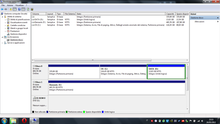


Now, the Disk 0 has:
- a first (hidden) and not recognized partition: a 336 GB (!) RECOVERY;
- C:\ is the 116 GB NTFS
- D:\ is the 13.6 GB NTFS.

Should I resize the RECOVERY partition without any problem??
And after that, could I extend the C:\ partition? (I don't want to lose my licence and prefer not to use the 9-DVD-recovery tool...)

thank you.
 

My Computer My Computer

At a glance

Win7 Prof x64
Computer Manufacturer/Model Number
Asus K52JE
OS
Win7 Prof x64
You will under no circumstances lose your Win7 license as long as you have a genuine Win7 COA sticker on the machine. You can reinstall this in any way you wish and MS will protect you, which is why they put the Product Key on the COA sticker - you should back it up now in case it rubs off.

In fact most tech enthusiasts prefer to get rid of the bloatware by Clean Reinstalling Factory OEM Windows 7. Everything needed is in the blue link. Asus may not support a Clean Reinstall but they cannot void your hardware warranty. I would simply not tell them if I reinstall. You'll get better support here anyway.

With such incompetent partitioning I wonder if Recovery will even run. Can you cue it up to see? I would also make the Recovery disks now so you have a backup if you want the preinstalled Win7. Another backup is to save a Win7 backup image of your customized install: Backup Complete Computer - Create an Image Backup. With these backups you may feel you can afford to delete the Recovery partition.

Either way you'll want to shrink it. I'd use Disk mgmt first to see how much it wants to shrink it. But you'll need to use free Partition Wizard bootable CD to safely Resize C to the left afterwards, which can also be used to shrink Recovery more if Disk Mgmt bumps into files in the way. You'll need to leave ample breathing room for Recovery to function. Partition Wizard Move/Resize Partition Video Help.

Personally I would rely on Recovery disks if i ever needed to fall back to factory condition to resell the unit. Otherwise I'd rely on a Win7 backup image of a factory install after I Clean Up Factory Bloatware, or for the very best performance I'd Clean Reinstall.
 
Last edited:
You will under no circumstances lose your Win7 license as long as you have a genuine Win7 COA sticker on the machine. You can reinstall this in any way you wish and MS will protect you, which is why they put the Product Key on the COA sticker - you should back it up now in case it rubs off.

whoo, that's perfect!

With such incompetent partitioning I wonder if Recovery will even run. Can you cue it up to see? I would also make the Recovery disks now so you have a backup if you want the preinstalled Win7. Another backup is to save a Win7 backup image of your customized install: Backup Complete Computer - Create an Image Backup. With these backups you may feel you can afford to delete the Recovery partition.

I was also thinking of getting rid of that mess, cleaning up everything.
thank you, I'll first prepare the disks, then try the recovery and eventually try to shrink the partitions.
I'll update with the results.. thanks for now!
 

My Computer My Computer

At a glance

Win7 Prof x64
Computer Manufacturer/Model Number
Asus K52JE
OS
Win7 Prof x64
Keep us posted.


News:
I phoned the Asus support, they say I am free to format/partition the unit as I wish, being aware that I'll lose (if I don't have recovery dvd's) my asus windows license.

After that, I mentioned the COA sticker. The guy said something like this:

"If you didn't create the recovery dvds as we recommend to do in the very beginning of the PC's life, you'll not be able to use the COA sticker windows license because that function only with asus windows version (???) BUT you are free to install another windows license of your property"

Now, I didn't catch the meaning of this phrase: isn't the COA sticker useful for a universal windows license?? ...:sarc:
In any case I'm gonna completely reset the HD...
 

My Computer My Computer

At a glance

Win7 Prof x64
Computer Manufacturer/Model Number
Asus K52JE
OS
Win7 Prof x64
Not surprising that you were given misinformation by Asus Tech Support. OEM's will often do whatever they can to scare you away from a Clean Reinstall to enforce their sponsors' bloatware, but in this case he went further and lied about the COA sticker Product Key.

OEM's are required to affix the COA sticker to the machine to prove they're including Genuine Windows, and so that users can exercise their rights granted by MS to Clean Reinstall the OS which they have purchased. When doing this MS will always protect you by assuring it gets activated in their servers, completely removing the OS from the purview of incompetent tech support.

Follow these steps to get a perfect Clean Reinstall - Factory OEM Windows 7 and continue to get your support here where we have the full backing of MS for assuring best performance of Win7.
 
other NEWS! :D :D

Without pain, I succeeded in shrinking the Recovery Partition to around 6GB
Now I could prepare my recovery DVD's (only 2 needed) and then format the entire windows partition with a clean Win7 DVD.
Furthermore, the COA sticker code worked, here's my confirmation of the incompetence of the Asus Tech Support :sick:.

So got a clean reinstall without losing the recovery partition, the best I could have hoped.


Again, thank you very much for your support!!
 

My Computer My Computer

At a glance

Win7 Prof x64
Computer Manufacturer/Model Number
Asus K52JE
OS
Win7 Prof x64
Some pc manufacturers seem to make a habit of giving out misinformation.
I was told by Dell that my pc thats only a few years old would not be compatible with an SSD and that I should upgrade to one of their shiny new models! Yeahhhh right, nice try! :-D
 

My Computer My Computer

At a glance

Win 7 Ultimate, Win 8.1 Pro, Linux Mint 19 Ci...Intel i5 4690KCorsair Vengeance LP 32GB DDR3MSI GTX 1060 GAMING X 6GB
Computer type
PC/Desktop
Computer Manufacturer/Model Number
Custom Build
OS
Win 7 Ultimate, Win 8.1 Pro, Linux Mint 19 Cinnamon (All 64-Bit)
CPU
Intel i5 4690K
Motherboard
Gigabyte Z97X-UD3H
Memory
Corsair Vengeance LP 32GB DDR3
Graphics Card(s)
MSI GTX 1060 GAMING X 6GB
Sound Card
Onboard
Hard Drives
Samsung 850 EVO 250GB SSD (x2)
Samsung 860 EVO 1TB SSD (x2)
Crucial MX300 525GB SSD
WD Blue 2TB 5400rpm Intellipark Disabled (x2)
PSU
Corsair HX750i
Case
Phanteks Enthoo Pro
Cooling
CM Hyper 212 EVO on CPU, Noctua Redux NF-P14S 1500rpm (x6)
Keyboard
Corsair K70 RGB LUX
Mouse
Corsair Sabre RGB
Antivirus
Avast Free, MalwareBytes, SAS & CryptoPrevent
Browser
Chrome
Other Info
StarTech PEXESAT322I 2 Port PCI-E SATA Card
ASUS PCE-AC56 Dual-band AC1300 Wireless Card
Akasa FC.Six Manual Fan Controller
And a Partridge in a Pear Tree!
The only question remains if Recovery will still run after a clean reinstall, as it often won't. You can try queuing it up to see.

If not since you have the disks you can delete the partition and claim the space for C or another partition.
 
Greg, I always thought they made the recovery partitions a specific size for a reason? When doing a recovery do a lot of files get expanded in the process?
When I got my Dell I was told that it's probably best not to mess with the size of it.
 

My Computer My Computer

At a glance

Win 7 Ultimate, Win 8.1 Pro, Linux Mint 19 Ci...Intel i5 4690KCorsair Vengeance LP 32GB DDR3MSI GTX 1060 GAMING X 6GB
Computer type
PC/Desktop
Computer Manufacturer/Model Number
Custom Build
OS
Win 7 Ultimate, Win 8.1 Pro, Linux Mint 19 Cinnamon (All 64-Bit)
CPU
Intel i5 4690K
Motherboard
Gigabyte Z97X-UD3H
Memory
Corsair Vengeance LP 32GB DDR3
Graphics Card(s)
MSI GTX 1060 GAMING X 6GB
Sound Card
Onboard
Hard Drives
Samsung 850 EVO 250GB SSD (x2)
Samsung 860 EVO 1TB SSD (x2)
Crucial MX300 525GB SSD
WD Blue 2TB 5400rpm Intellipark Disabled (x2)
PSU
Corsair HX750i
Case
Phanteks Enthoo Pro
Cooling
CM Hyper 212 EVO on CPU, Noctua Redux NF-P14S 1500rpm (x6)
Keyboard
Corsair K70 RGB LUX
Mouse
Corsair Sabre RGB
Antivirus
Avast Free, MalwareBytes, SAS & CryptoPrevent
Browser
Chrome
Other Info
StarTech PEXESAT322I 2 Port PCI-E SATA Card
ASUS PCE-AC56 Dual-band AC1300 Wireless Card
Akasa FC.Six Manual Fan Controller
And a Partridge in a Pear Tree!
I have my doubts, but his OEM did an incompetent repair which left recovery absurdly large, so he really had no choice.


OP was advised to test if it would run, make Recovery Disks and even save a Win7 backup image to cover all his bases before shrinking or deleting it if it isn't wanted.

I would have deleted it myself, and still would. He may want to see if it will even run. It does need some breathing room to do so.

Since it shows empty, I would unhide System and Hidden files in Control Panel>Folder Options>View, give Recov partition a drive letter, and see if there's anything even there:
Drive Letter - Add, Change, or Remove in Windows 7 - Windows 7 Forums
 
I have my doubts, but his OEM did an incompetent repair which left recovery absurdly large, so he really had no choice.


OP was advised to test if it would run, make Recovery Disks and even save a Win7 backup image to cover all his bases before shrinking or deleting it if it isn't wanted.

I would have deleted it myself, and still would. He may want to see if it will even run. It does need some breathing room to do so.

Since it shows empty, I would unhide System and Hidden files in Control Panel>Folder Options>View, give Recov partition a drive letter, and see if there's anything even there:
Drive Letter - Add, Change, or Remove in Windows 7 - Windows 7 Forums


I confirm that with my new configuration (the recovery partition shrinked has now just 6GB) the recovery works :D
I'll keep some extra GB free in order to put an extra OS in the next days...

btw, here's the new layout: (sorry for the huge pic)

24w5w9i
 

My Computer My Computer

At a glance

Win7 Prof x64
Computer Manufacturer/Model Number
Asus K52JE
OS
Win7 Prof x64
When you unhide System and Hidden Files in Control Panel and issue a drive letter to Recovery in Disk Mgmt, then what size is the actual Recovery contents? Rightclick the drive in Computer to look at Properties.

How did you confirm it works?
 
When you unhide System and Hidden Files in Control Panel and issue a drive letter to Recovery in Disk Mgmt, then what size is the actual Recovery contents? Rightclick the drive in Computer to look at Properties.

I cannot unhide neither assign a drive letter; I can only delete that volume.


How did you confirm it works?

I tried to boot the recovery partition and it started the procedure with the initial steps, correctly. Do you assert it could not work? Because it needs some extra space?
 

My Computer My Computer

At a glance

Win7 Prof x64
Computer Manufacturer/Model Number
Asus K52JE
OS
Win7 Prof x64
Remember that you can also do a superior Clean Reinstall - Factory OEM Windows 7

yeah, I actually did a Clean Reinstall using a personal (and bloatware-free :) Win7 DVD.
The only thing is that I kept there the recovery partition; I thought it would already be there in case of warranty assistance... that's laziness, I admit...
 

My Computer My Computer

At a glance

Win7 Prof x64
Computer Manufacturer/Model Number
Asus K52JE
OS
Win7 Prof x64
Back
Top