Solved removing "press any key to continue"?

My Computer My Computer

Computer type
PC/Desktop
OS
Windows 10 Home x64
CPU
INTEL Core i5-750 Quad-Core 3.37GHz
Motherboard
ASUS P7P55D
Memory
HyperX Fury Black Series 8GB (2 x 4GB) 1866Mhz
Graphics Card(s)
EVGA GeForce GTX 750 Superclocked 1GB 128-Bit GDDR5
Monitor(s) Displays
LG 32MA68HY 32" IPS
Screen Resolution
1920 x 1080
Hard Drives
Samsung 840 Evo 120GB, SEAGATE 500GB Barracuda® 7200.12, SATA 3 Gb/s, 7200 RPM, 16MB cache
PSU
ANTEC TruePower New TP-550, 80 PLUS, 550W
Case
ANTEC Three Hundred Illusion
Cooling
COOLER MASTER Hyper 212 Plus, 4 x 120mm 1 x 140mm Noctua's
Internet Speed
85 + Mbps
Antivirus
Avast
Browser
Vivaldi
Nothing complicated,just became practical.And a lot of googlin of course.Since i couldnt find anything JM-related in BIOS,besides ctrl-j option,found it under device manager,disabled,uninstalled,cleared-deleted all grayed out old drivers,took off IDE cable,reconnected,reinstalled,devices were installed by windows(7 is damned good at that) and there it was.Must have been a so called driver conflict,had nothing to loose,one way or the other.At the downside,we are exactly where we started,140 posts after,but i have learned a lot from this.Thread title still there...
 

My Computer My Computer

Computer type
PC/Desktop
Computer Manufacturer/Model Number
Homebuilt,Quadcore processor on Asus MB
OS
Microsoft Windows 7 Ultimate 64-bit Service Pack 1
CPU
Intel(R) Core(TM)2 Quad Q 9550 @ 2.83 GHz
Motherboard
ASUS P5B-Deluxe Wi-Fi Edition
Memory
4x1024 GB DDR2 Corsair PC2-6400 800 Mhz
Graphics Card(s)
MSI TwiFrozer II 1024MB GDDR5
Sound Card
Realtek ALC883 @ Intel 82801HB ICH8 - High Def
Monitor(s) Displays
Asus VW195 [19" LCD]
Screen Resolution
1440x860 pixels
Hard Drives
OCZ Vertex Plus Series SATA II 2.5" SSD 128GB-

Westarn Digital SATA II 250GB
PSU
Corsair CX600W
Case
Custom built,cut and painted
Cooling
Xigmatek Gaia 2x120mm fan
Keyboard
MS Generic
Mouse
MS Optical 6000
Internet Speed
never enough
Antivirus
ESET Smart Security 6.0.306.0
@ptbg: Can you post what is in your registry for the following keys (if they exist)
HKLM,System\CurrentControlSet\Services\JRAID
HKLM,System\CurrentControlSet\Services\JGOGO

I'm looking at a few things in the install process
1) ; RaidAPShowStateAtSysBoot = 2
-> customize this feature with setup.ini and DO NOT show RAID AP window when system boot

2) ShowDiskInfoForNonRaidMode=1
-> BIG guess: default in file: 0

3) SplashTime=0
-> IDE Detect time is what I'm really looking for? default in file: 5

I cannot locate any description of the install settings for JMicron or where they are stored. I do not have JMicron on my machine, so I cannot explore further without your assistance.

It is imperative to backup your registry and create a restore point before making any changes. DO NOT MAKE ANY CHANGES - what I'm posting now is a best guess, but it is a GUESS. This is more of a query, than an epiphany-I'm fishing for information, not thinking out loud.

I need to see what's defined in the registry for JMicron FIRST. There might be a simple ini or inf file modification that doesn't require changes to the registry. I know we can make the change in the install files and that might be the way to go anyway.

Could you also post screen shots from Speccy, relative to the JMicron controller (Storage, CD-ROM/DVD, IDE, RAID?, etc). And finally, what version of JMicron did you re-install to solve the two IDE issue where only WD or NEC was visible?
Δεν μιλούν την ελληνική γλώσσα. Αυτό μεταφράζεται μέσω του Google.
Θα έχουν πολύ ασθενή μέσω αυτής της διαδικασίας. Σας ευχαριστώ.
Ελπίζω ειλικρινά ότι θα βρούμε μια λύση.

νομοσχέδιο


I do not speak the Greek language. This is translated through Google.
You have been very patient through this process. Thank you.
I sincerely hope that we find a solution.

Bill
 

My Computer My Computer

Computer type
Laptop
Computer Manufacturer/Model Number
HP Pavilion dv6-6c10us
OS
x64 (6.3.9600) Win8.1 Pro & soon dual boot x64 (6.1.7601) Win7_SP1 HomePrem
CPU
AMD A6-3420M APU with Radeon(tm) HD Graphics
Motherboard
Hewlett-Packard 1805
Memory
6.00 GB
Graphics Card(s)
AMD Radeon(TM) HD 6520G
Sound Card
(1) AMD High Definition Audio Device (2) IDT High Definiti
Monitor(s) Displays
HP W2072a 20" LCD (1600 x 900) @ 60 Hz
Screen Resolution
1366 x 768 x 32 bits (4294967296 colors) @ 60 Hz
Hard Drives
ST640LM0 00 HM641JI SATA Disk Device
Keyboard
Logitech k520 wireless KB
Mouse
Logitech m320 wireless mouse (bundled with KB)
Internet Speed
15/5 | 54 MB Wireless 'n'
Antivirus
Realtime: Defender or Avast | On-demand: Malwarebytes, ESET
Browser
IE 11 on Win8, IE 10 on win 7
Other Info
Media: [Gimp, Audacity, VLC] || Comm: [WEmail 2012, Skype] || Productivity: [OpenOffice,| Textpad] || Utils: [Sysinternals, cCleaner, Speccy, Defraggler]
This is for both Sb, and ptbg:
@ptbg: Can you post what is in your registry for the following keys (if they exist)
HKLM,System\CurrentControlSet\Services\JRAID
HKLM,System\CurrentControlSet\Services\JGOGO
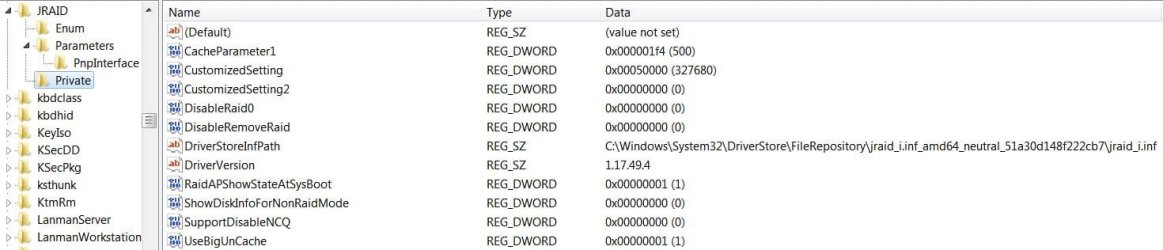
Sb you asked me a day or so ago about my JRAID, and JGOGO keys, this is what I have:
JRAID Enum.JPGJRAID Param.JPGJRAID PnP.JPGJRAID Private.JPG

The answer you seek:
I need to see what's defined in the registry for JMicron FIRST. There might be a simple ini or inf file modification that doesn't require changes to the registry. I know we can make the change in the install files and that might be the way to go anyway.
May be located in the Private Key (Bottom right pix) at ShowDiskInfoForNonRaidMode, the zero value may have to be changed to a one (1) to stop the POST Screen from showing.

   Note
For ptbg.

Since Sb, and others have been helping more than myself, please refer to them before taking any action!


From what I have been reading the Press any Key to continue is a timed event, and even if you defeat the Jmicron screen from showing the event, it will still take several to five seconds to process before the POST is finished.

From gregrocker:
If so then it may not be a boot menu but a controller screen showing the attached HD's
Source: http://www.sevenforums.com/customization/231479-removing-press-any-key-continue.html#post1944406


The situation arises from the way the P965 chip was designed. See Bold Underline:
It is very important to notice that the single ATA/133 port available on this motherboard is controlled by the JMicron chip, not by the chipset. This means that if you still have a parallel IDE optical drive it will only be recognized on Windows after you install the JMicron driver.
The problem is that this driver comes on the motherboard CD-ROM, and you won’t be able to install it, as the system does not recognize your optical drive. You can download the driver from the net, however the driver for the on-board LAN port is also on the CD-ROM… The only option you have is to copy the JMicron driver from the CD to a floppy disk or a USB pen drive using another PC.

This problem happens not only with this motherboard from MSI, but also with all other motherboards based on Intel P965 chipset
we’ve seen to date. Of course if you have a SATA optical drive you won’t face this problem, if you install it on a port controlled by the south bridge chip, of course.

Source under Fig. 3 here: MSI P965 Platinum Motherboard Review | Hardware Secrets
More on the JMB361: http://www.hardwaresecrets.com/datasheets/JMB361.pdf
I have also been reading that the Jmicron controller will act this way as long as the drive is IDE, no matter if it is a HDD or ODD.

I have yet to run across as to why Jmicron designed their controller this way.
 

My Computer My Computer

Computer type
PC/Desktop
Computer Manufacturer/Model Number
Gateway DX4831-01e (Mid-Tower Desktop)
OS
Originally Win 7 Hm Prem x64 Ver 6.1.7600 Build 7601-SP1 | Upgraded to Windows 10 December 14, 2019
CPU
Intel i3 530 2.93GHz, 2933MHz 2 Cores 4 Logical Processors
Motherboard
Gateway H57M01 133 megahertz
Memory
6GB of 1,333MHz DDR3 SDRAM
Graphics Card(s)
32MB Intel Graphics Media Accelerator HD IGChip
Sound Card
Realtek High Definition Audio
Monitor(s) Displays
Gateway HX2000 20inch TFT active matrix TN
Screen Resolution
1600 x 900 x 59 hertz
Hard Drives
WDC WD10EADS-00M2B0 [HDD] (1000.20 GB) -- drive 0,
HL-DT-ST DVDRAM GH41N [CD-ROM dr]
Four card readers, and Four USB 2.0
PSU
300watts.
Case
Mid-Tower Desktop
Cooling
Stock from Gateway
Keyboard
Natural Ergonomic Keyboard 4000, see Other Info
Mouse
Orig. Gateway wore out now using Insignia USB wired optical
Internet Speed
Vz FIOS 10ms png 57.64Mbps down 65.53Mbps up Speedtest.org
Antivirus
Zamana Anti-logger with Anti-malware, MSE, Windows Firewall,
Browser
IE11.0.9600.19399-Upd ver11.0.135, Firefox 68.0.1 x64
Other Info
System Specs by Belarc.

BIOS: American Megatrends Inc. P01-A0 11/17/2009

Replaced the MS 'Natural' Standard PS/2 Enhanced 101-102 Keyboard with a new Natural Ergonomic Keyboard 4000 on August 1st 2014.

Canon Pixma MG3222 Printer.

Updated to IE11 on 12102015 | Fios Quantum Router g1100

Additional AV: SpywareBlaster, manual Mbam, SAS
@Anak
Do you get a "Press any key" prompt for your JMicron?

What mothernoard is your JMicron controller on or do you have a link to a BIOS file for the MB is this is not the Gateway DX4831e?

Do you know what JMicron chip is used, eg JMB361, JMB363 etc...?
 

My Computer My Computer

Computer Manufacturer/Model Number
Self built
OS
Windows 7 Ultimate x64
CPU
Intel Pentium Dual Core E5200 2.5GHz (3.77GHz OC)
Motherboard
Asus P5Q-E
Memory
Corsair 4GB DDR2 (4x1GB CM2X1024-6400C4)
Graphics Card(s)
Palit GeForce GTS 250 (1024MB)
Sound Card
On Board (ADI AD2000B 8ch HD)
Monitor(s) Displays
Samsung 32in LCD TV
Screen Resolution
1360x768
Hard Drives
2 x 1TB Samsung 103SJ (Raid0)
2 x External 500GB Samsung 502IJ (NexStar 3 HD Enclosures)
PSU
550W Antec Neo HE 550
Case
Antec P180
Cooling
Xigmatex Red Scorpion CPU Cooler. 3x120mm Fans
Keyboard
Logitech MX5000 Laser (Combo)
Mouse
Logitech MX5000 Laser (Combo)
Internet Speed
ADSL2+ (avg 10 Mbps Down, 0.80 Mbps up)
Other Info
Gigabyte GN-WP01GS 54g Wireless Lan Card
@Anak
Do you get a "Press any key" prompt for your JMicron?
No. I do get a Product splash screen, but it goes by so fast I can't tell what it says. Though, I can see that it doesn't have any drives listed like the OP.
Purchased new 2years ago, and its been like that from day1.

What mothernoard is your JMicron controller on or do you have a link to a BIOS file for the MB is this is not the Gateway DX4831e?
My Intel MB is listed in my System Specs.

I would have to research for the BIOS link.

It is the DX4831-01e.

Do you know what JMicron chip is used, eg JMB361, JMB363 etc...?
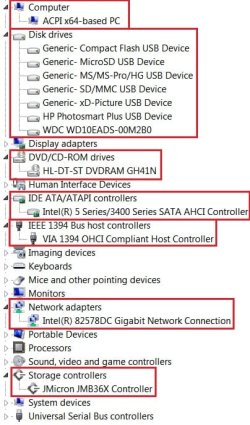
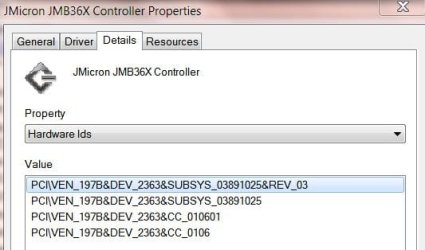
Maybe this will help:
JmicronDeviceManager.jpgJMprop.JPGJMprop1.JPG

By the HDW ID it is a 363.
 

My Computer My Computer

Computer type
PC/Desktop
Computer Manufacturer/Model Number
Gateway DX4831-01e (Mid-Tower Desktop)
OS
Originally Win 7 Hm Prem x64 Ver 6.1.7600 Build 7601-SP1 | Upgraded to Windows 10 December 14, 2019
CPU
Intel i3 530 2.93GHz, 2933MHz 2 Cores 4 Logical Processors
Motherboard
Gateway H57M01 133 megahertz
Memory
6GB of 1,333MHz DDR3 SDRAM
Graphics Card(s)
32MB Intel Graphics Media Accelerator HD IGChip
Sound Card
Realtek High Definition Audio
Monitor(s) Displays
Gateway HX2000 20inch TFT active matrix TN
Screen Resolution
1600 x 900 x 59 hertz
Hard Drives
WDC WD10EADS-00M2B0 [HDD] (1000.20 GB) -- drive 0,
HL-DT-ST DVDRAM GH41N [CD-ROM dr]
Four card readers, and Four USB 2.0
PSU
300watts.
Case
Mid-Tower Desktop
Cooling
Stock from Gateway
Keyboard
Natural Ergonomic Keyboard 4000, see Other Info
Mouse
Orig. Gateway wore out now using Insignia USB wired optical
Internet Speed
Vz FIOS 10ms png 57.64Mbps down 65.53Mbps up Speedtest.org
Antivirus
Zamana Anti-logger with Anti-malware, MSE, Windows Firewall,
Browser
IE11.0.9600.19399-Upd ver11.0.135, Firefox 68.0.1 x64
Other Info
System Specs by Belarc.

BIOS: American Megatrends Inc. P01-A0 11/17/2009

Replaced the MS 'Natural' Standard PS/2 Enhanced 101-102 Keyboard with a new Natural Ergonomic Keyboard 4000 on August 1st 2014.

Canon Pixma MG3222 Printer.

Updated to IE11 on 12102015 | Fios Quantum Router g1100

Additional AV: SpywareBlaster, manual Mbam, SAS
@Anak - thanks for all of the info. The IDE detect time accepts a value from 0-35 in 5 second intervals. (edit: time specified is for each device - a 5 second detect time = 10 second delay for 2 devices). I agree that if you simply turn off the JMicron screen, you will still get the "delay", but you won't see the prompt. When the timer expires, the boot continues (????). So setting the IDE detect to zero and not displaying the screen might work around the issue.
@Duzzy: ptbg has the JM361 chip - you were probably asking Anak.
@ptbg:That's a good question.... what happens if you don't hit any key - does the boot continue, or is it in pause until you actually hit a key?

There are a few simple solutions, all eliminate the need for the JMicron IDE controller - it should be completely uninstalled if you decide to spend the money.
1) buy an IDE-SATA adapter - connect to available SATA connectors
2) buy a PCI IDE controller card, drive your IDE device off that
 
Last edited:

My Computer My Computer

Computer type
Laptop
Computer Manufacturer/Model Number
HP Pavilion dv6-6c10us
OS
x64 (6.3.9600) Win8.1 Pro & soon dual boot x64 (6.1.7601) Win7_SP1 HomePrem
CPU
AMD A6-3420M APU with Radeon(tm) HD Graphics
Motherboard
Hewlett-Packard 1805
Memory
6.00 GB
Graphics Card(s)
AMD Radeon(TM) HD 6520G
Sound Card
(1) AMD High Definition Audio Device (2) IDT High Definiti
Monitor(s) Displays
HP W2072a 20" LCD (1600 x 900) @ 60 Hz
Screen Resolution
1366 x 768 x 32 bits (4294967296 colors) @ 60 Hz
Hard Drives
ST640LM0 00 HM641JI SATA Disk Device
Keyboard
Logitech k520 wireless KB
Mouse
Logitech m320 wireless mouse (bundled with KB)
Internet Speed
15/5 | 54 MB Wireless 'n'
Antivirus
Realtime: Defender or Avast | On-demand: Malwarebytes, ESET
Browser
IE 11 on Win8, IE 10 on win 7
Other Info
Media: [Gimp, Audacity, VLC] || Comm: [WEmail 2012, Skype] || Productivity: [OpenOffice,| Textpad] || Utils: [Sysinternals, cCleaner, Speccy, Defraggler]
@ptbg:Take no action until someone says "Go for it" and that someone would probably be me (I seem to have taken the lead on this issue). If you decide not to heed my request - then I guess I'm done. Thanks for understanding that we're at a critical moment. Your system is stable, you don't want to undo the work you've already done. I certainly do not want to post another 50 or more comments.

@EyesWatching: What if...
  • all remnants of JMicron are removed from ptbg's machine (DevMgr, ControllPanel=>P&F, rename JM driver(s) and JM folder(s), the registry....
  • DO NOT reinstall JM.
  • System is restarted... Windows finds new hardware, installs what it knows or prompts for install media.
  • Quit the device install here. ptbg only needs the IDE support-he doesn't use RAID. How to prevent Windows asking about the device every time is easy I think.
  • if necessary Install JM IDE only - the sample inf file below uses mshdc.inf, needs pciide_Inst. I don't know to what the pciide_Inst refers. It might be in the main inf.
I'll keep digging-asking for feedback. Does this sound reasonable?

There is IDEDrvSetup.exe in the JMB36X_WHQL_R1.17.59.00\Application folder - maybe it's all ptbg needs

From the JMB36X_WHQL_R1.17.59.00\Application\jmide folder in the MSI JMicron update download
Code:
; Copyright (c) 1993-1999 Microsoft Corporation
;
; DDK Sample INF File for PCIIDE
;

[version]
Signature="$WINDOWS NT$"
Class=hdc
ClassGuid={4D36E96A-E325-11CE-BFC1-08002BE10318}
Provider=%JMICRON%
CatalogFile=jmide.cat
DriverVer=09/16/2006, 1.00.00.00

[SourceDisksNames]
[SourceDisksFiles]

[ControlFlags]
ExcludeFromSelect=*

[Manufacturer]
%JMICRON%=JM.Mfg,NTamd64

[JM.Mfg]
;%PCI\CC_0101.DeviceDesc% = jmide_Inst,,PCI\CC_0101    ;Compatible Device ID for generic Dual PCI IDE 
%PCI\CC_0101.DeviceDesc% = jmide_Inst , PCI\VEN_197B&DEV_2361&CC_0101
%PCI\CC_0101.DeviceDesc% = jmide_Inst , PCI\VEN_197B&DEV_2363&CC_0101
%PCI\CC_0101.DeviceDesc% = jmide_Inst , PCI\VEN_197B&DEV_2365&CC_0101
%PCI\CC_0101.DeviceDesc% = jmide_Inst , PCI\VEN_197B&DEV_2366&CC_0101
%PCI\CC_0101.DeviceDesc% = jmide_Inst , PCI\VEN_197B&DEV_2368&CC_0101
%PCI\CC_0101.DeviceDesc_37x% = jmide_Inst , PCI\VEN_197B&DEV_2370&CC_0101
%PCI\CC_0101.DeviceDesc_37x% = jmide_Inst , PCI\VEN_197B&DEV_2371&CC_0101
%PCI\CC_0101.DeviceDesc_37x% = jmide_Inst , PCI\VEN_197B&DEV_2372&CC_0101
%PCI\CC_0101.DeviceDesc_37x% = jmide_Inst , PCI\VEN_197B&DEV_2373&CC_0101

[JM.Mfg.NTamd64]
;%PCI\CC_0101.DeviceDesc% = jmide_Inst,,PCI\CC_0101    ;Compatible Device ID for generic Dual PCI IDE 
%PCI\CC_0101.DeviceDesc% = jmide_Inst , PCI\VEN_197B&DEV_2361&CC_0101
%PCI\CC_0101.DeviceDesc% = jmide_Inst , PCI\VEN_197B&DEV_2363&CC_0101
%PCI\CC_0101.DeviceDesc% = jmide_Inst , PCI\VEN_197B&DEV_2365&CC_0101
%PCI\CC_0101.DeviceDesc% = jmide_Inst , PCI\VEN_197B&DEV_2366&CC_0101
%PCI\CC_0101.DeviceDesc% = jmide_Inst , PCI\VEN_197B&DEV_2368&CC_0101
%PCI\CC_0101.DeviceDesc_37x% = jmide_Inst , PCI\VEN_197B&DEV_2370&CC_0101
%PCI\CC_0101.DeviceDesc_37x% = jmide_Inst , PCI\VEN_197B&DEV_2371&CC_0101
%PCI\CC_0101.DeviceDesc_37x% = jmide_Inst , PCI\VEN_197B&DEV_2372&CC_0101
%PCI\CC_0101.DeviceDesc_37x% = jmide_Inst , PCI\VEN_197B&DEV_2373&CC_0101

;****************************************************
; Generic Dual PCI IDE Controller 
[jmide_Inst]
[hl]Include=mshdc.inf[/hl]
Needs=pciide_Inst

[jmide_Inst.Services]
Include=mshdc.inf
[hl]Needs=pciide_Inst.Services[/hl]

[Strings]
JMICRON="JMicron Technology Corp."
PCI\CC_0101.DeviceDesc  = "JMB36X Standard Dual Channel PCIE IDE Controller"
PCI\CC_0101.DeviceDesc_37x  = "JMB37X Standard Dual Channel PCIE IDE Controller"

.
What's in the MSI download JM update (Application Folder tree)?
Code:
 Volume in drive C has no label.
 Volume Serial Number is DA94-0FD2

 Directory of Extract_MSI-jmApplicationFolder

06/13/12  16:02    <DIR>          .
06/13/12  16:02    <DIR>          ..
06/13/12  16:00    <DIR>          Application
06/13/12  16:02                 0 JMapplication.txt
               1 File(s)              0 bytes

 Directory of Extract_MSI-jmApplicationFolder\Application

06/13/12  16:00    <DIR>          .
06/13/12  16:00    <DIR>          ..
06/13/12  16:00           319,984 DIFxAPI.dll
06/13/12  16:00            39,512 IDEDrvSetup.exe
06/13/12  16:00    <DIR>          jmide
06/13/12  16:00    <DIR>          res
06/13/12  16:00    <DIR>          x64
06/13/12  16:00            10,840 xIDE64Setup.exe
06/13/12  16:00             9,304 xIDESetup.exe
06/13/12  16:00            34,392 xInsD64.dll
06/13/12  16:00            35,416 xInsDrv.dll
06/13/12  16:00            43,608 xInsIDE.exe
06/13/12  16:00            20,056 xLhDrv.dll
06/13/12  16:00            21,080 xLink.exe
06/13/12  16:00           162,392 xRaidAPI.dll
06/13/12  16:00         1,976,920 xRaidSetup.exe
              11 File(s)      2,673,504 bytes

 Directory of Extract_MSI-jmApplicationFolder\Application\jmide

06/13/12  16:00    <DIR>          .
06/13/12  16:00    <DIR>          ..
06/13/12  16:00            11,099 jmide.cat
06/13/12  16:00             2,367 jmide.inf
               2 File(s)         13,466 bytes

 Directory of Extract_MSI-jmApplicationFolder\Application\res

06/13/12  16:00    <DIR>          .
06/13/12  16:00    <DIR>          ..
06/13/12  16:00            38,072 aboutLogo.bmp
06/13/12  16:00            33,536 AboutTitle.bmp
06/13/12  16:00            38,072 controllerLogo.bmp
06/13/12  16:00         2,567,168 processing.avi
06/13/12  16:00            11,808 RaidCompanyLogo.bmp
06/13/12  16:00         1,646,820 RaidGUI.bmp
06/13/12  16:00             2,238 RaidLogo.ico
06/13/12  16:00            43,976 RaidWndTitle.bmp
06/13/12  16:00            28,160 Thumbs.db
06/13/12  16:00            60,608 wizardLogo.bmp
              10 File(s)      4,470,458 bytes

 Directory of Extract_MSI-jmApplicationFolder\Application\x64

06/13/12  16:00    <DIR>          .
06/13/12  16:00    <DIR>          ..
06/13/12  16:00           522,224 DIFxAPI.dll
06/13/12  16:00            21,592 xLhD64.dll
               2 File(s)        543,816 bytes

     Total Files Listed:
              26 File(s)      7,701,244 bytes
              14 Dir(s)  100,062,646,272 bytes free
.
 
Last edited:

My Computer My Computer

Computer type
Laptop
Computer Manufacturer/Model Number
HP Pavilion dv6-6c10us
OS
x64 (6.3.9600) Win8.1 Pro & soon dual boot x64 (6.1.7601) Win7_SP1 HomePrem
CPU
AMD A6-3420M APU with Radeon(tm) HD Graphics
Motherboard
Hewlett-Packard 1805
Memory
6.00 GB
Graphics Card(s)
AMD Radeon(TM) HD 6520G
Sound Card
(1) AMD High Definition Audio Device (2) IDT High Definiti
Monitor(s) Displays
HP W2072a 20" LCD (1600 x 900) @ 60 Hz
Screen Resolution
1366 x 768 x 32 bits (4294967296 colors) @ 60 Hz
Hard Drives
ST640LM0 00 HM641JI SATA Disk Device
Keyboard
Logitech k520 wireless KB
Mouse
Logitech m320 wireless mouse (bundled with KB)
Internet Speed
15/5 | 54 MB Wireless 'n'
Antivirus
Realtime: Defender or Avast | On-demand: Malwarebytes, ESET
Browser
IE 11 on Win8, IE 10 on win 7
Other Info
Media: [Gimp, Audacity, VLC] || Comm: [WEmail 2012, Skype] || Productivity: [OpenOffice,| Textpad] || Utils: [Sysinternals, cCleaner, Speccy, Defraggler]
HKLM,System\CurrentControlSet\Services\JRAID
HKLM,System\CurrentControlSet\Services\JGOGO
Those keys do not exist in registry

I installed the EXE file from zipped R1.17.37.01 JMB 36X windrv,
while uninstalled,i had no IDE drives at all

View attachment 216467

View attachment 216468

View attachment 216469

what happens if you don't hit any key?Keeps on booting normally.
καλη προσπαθεια!
 
Last edited:

My Computer My Computer

Computer type
PC/Desktop
Computer Manufacturer/Model Number
Homebuilt,Quadcore processor on Asus MB
OS
Microsoft Windows 7 Ultimate 64-bit Service Pack 1
CPU
Intel(R) Core(TM)2 Quad Q 9550 @ 2.83 GHz
Motherboard
ASUS P5B-Deluxe Wi-Fi Edition
Memory
4x1024 GB DDR2 Corsair PC2-6400 800 Mhz
Graphics Card(s)
MSI TwiFrozer II 1024MB GDDR5
Sound Card
Realtek ALC883 @ Intel 82801HB ICH8 - High Def
Monitor(s) Displays
Asus VW195 [19" LCD]
Screen Resolution
1440x860 pixels
Hard Drives
OCZ Vertex Plus Series SATA II 2.5" SSD 128GB-

Westarn Digital SATA II 250GB
PSU
Corsair CX600W
Case
Custom built,cut and painted
Cooling
Xigmatek Gaia 2x120mm fan
Keyboard
MS Generic
Mouse
MS Optical 6000
Internet Speed
never enough
Antivirus
ESET Smart Security 6.0.306.0
Just curious, have you timed the delay screen?

I think the problem with drive detection you encountered after you started this thread may have been initiated with the changing of jumpering and placement of the two drives on the IDE cable. Removal and reinstall of the driver may have resolved it (good call!).

Whatever initiated the problem and what the resolution truly was, you're apparently now back to where you were when you started the thread.

I had been thinking the Jmicron detection screen was only a part of the BIOS POST, but apparently data from the OS is also called on to complete. Have you tried setting the following value to 0 as Anak mentioned?

ShowDiskInfoForNonRaidMode

I would think the detection screen is appearing by default, therefore allowing management of your setup. That particular reg key may be the way to bypass the screen if you're setup for IDE, and therefore have nothing to "manage" anyway.

Before doing so, make sure you know how to mess with the registry (backing up, changing, restoring).
 

My Computer My Computer

OS
Windows 7 Ultimate x64
I am also glad to see you have both drives working again.

The questions I asked Anak were out of curiosity more than anything else.

I really should have posted earlier. As I said in #Post 43,
Well to me at least, your out of luck.
The Jmicron detection screen is part of the BIOS POST and the RAID setup screen.

I took it one step further and can say for certain the JMicron's firmware is included in your BIOS file as an Option Rom. Using a BIOS mod tool I was able to extract a file called "jmb361_1.06.63_raid.bin" from the BIOS file. Now I'm no reverse engineerer but opening the file with notepad reaveals the following text,
PCIE-to-SATAII/IDE RAID Controller BIOSv1.06.62 Copyright (C) 2005 JMicron Technology. http://www.jmicron.com Detecting drives, please wait ... Detect drives done, no any drive found. Press any key to continue ... Press <Ctrl-J> to enter RAID Setup Utility ... Save to Disk & Exit (Y/N)? Y DEGRADED/REBUILD DRIVE DETECTED. IT IS SUGGESTED TO REBUILD IN THE OPERATION SYSTEM TO PRESREVE THE COMPLETENESS OF YOUR DATA. Be careful, it is not raid mode now,but there is still raid structure in the hard disk [TAB]-Switch Window []-Select ITEM [ENTER]-Action [ESC]-Exit [TAB]-Switch Window []-Select DISK [ENTER]-Detail [ESC]-Exit [TAB]-Switch Window []-Select RAID [ENTER]-Detail [ESC]-Exit
As you can see these are the strings that are displayed on the JMicron detection screen.

Now how can a driver effect the JMicron's detection screen? The screen is processed before any OS, driver or registry keys are loaded and there is no rom file or rom flashing tools included with the driver.
1) RaidAPShowStateAtSysBoot = 2
2) ShowDiskInfoForNonRaidMode=1
3) SplashTime=0
All these things must be to do with the Windows RAID application. The following is a good guess,

1 - Not entirly sure but may have somthing to do with the RAID app showing on boot or just loading to the taskbar.

2 - Determines if disk info is shown in the RAID app when set to IDE in BIOS.

3 - How long to display the splash screen when opening the RAID app.


BTW if you want the latest JMB36x driver it can be downloaded from ftp://driver.jmicron.com.tw/SATA_Controller/Windows/

Not really any changes that will effect you but the ReleaseNotes are at the bottom of the page if you wish to review the changes.
 

My Computer My Computer

Computer Manufacturer/Model Number
Self built
OS
Windows 7 Ultimate x64
CPU
Intel Pentium Dual Core E5200 2.5GHz (3.77GHz OC)
Motherboard
Asus P5Q-E
Memory
Corsair 4GB DDR2 (4x1GB CM2X1024-6400C4)
Graphics Card(s)
Palit GeForce GTS 250 (1024MB)
Sound Card
On Board (ADI AD2000B 8ch HD)
Monitor(s) Displays
Samsung 32in LCD TV
Screen Resolution
1360x768
Hard Drives
2 x 1TB Samsung 103SJ (Raid0)
2 x External 500GB Samsung 502IJ (NexStar 3 HD Enclosures)
PSU
550W Antec Neo HE 550
Case
Antec P180
Cooling
Xigmatex Red Scorpion CPU Cooler. 3x120mm Fans
Keyboard
Logitech MX5000 Laser (Combo)
Mouse
Logitech MX5000 Laser (Combo)
Internet Speed
ADSL2+ (avg 10 Mbps Down, 0.80 Mbps up)
Other Info
Gigabyte GN-WP01GS 54g Wireless Lan Card
@Duzzy: Thanks for the "reverse engineering". At least ptbg's machine has been "improved" by a number of changes chasing down this issue.

@ptbg: Thanks for posting the Speccy screenshots.

Now for a little clean up after this seemingly futile attempt to resolve the "press any key" issue.

I was looking through the System Information you posted earlier and I see a number of extraneous programs you might have downloaded trying to fix the issue. There are some others I'm not familiar with, but you only need one AV program (plus MalwareBytes) - you have two.

This recommendation has nothing to to with the "press any key" issue - it's simply housekeeping. Removing some of the programs should improve your system performance (Acronis has scheduled updates & backups - I don't know if you have storage for backups, so why run it). There are a number of Startup programs that could be disabled.
Removing others might prevent future problems (third party bots, blasters, tune-ups). I personally tend to only trust a few vendors for GREAT software and I use only what I absolutely need on my system.
Pgms I don't think you need
-- your decision though.
Puran Defrag (Windows 7 defrag is fine)
Spybot (unnecessary)
SpywareBlaster (unnecessary)
TuneUp Utilities 2012 (unnecessary)
Acronis (unnecessary - Yeah, I know... I pointed you to Acronis on WD)

Pgms I think are redundant or unnecessary
-- You might have these by choice or they came with you machine. You will have to decide if you need them.

????? Aomei Partition Assistant Home Edition 4.0: Free Partition Magic alternative - AOMEI Partition Assistant is magic partition manager software for Windows 8/7/Vista/XP and Server 2000/2003/2008

????? gBurner: is a powerful and easy-to-use CD/DVD/BD burning software, which allows you to create data, audio and video CDs, DVDs and Blu-ray Discs, make bootable data discs, create multisession discs. gBurner is also a disc image file processing software, which allows you to open, create, edit, extract, convert and burn disc image files.

????? HFSExplorer: View Mac OS X files from a Windows partition

????? Oracle VM VirtualBox: enables desktop or laptop computers to simultaneously run multiple operating systems, allowing users to get the most flexibility and utilization out of their PCs.
Note: See the tutorials on virtualization in Windows 7

????? RocketDock: is a smoothly animated, alpha blended application launcher. It provides a nice clean interface to drop shortcuts on for easy access and organization.

????? Sophos: Award Winning Antivirus, Email Spam Protection and Endpoint Management Software for Windows, Mac and Linux

????? ESET\ESET Smart Security: complete Internet security suite, built on the award-winning ThreatSense antivirus and antispyware engine.

????? Unlocker: If you've ever been unable to delete a file in Windows, and can't figure out what program's using it, Unlocker is the solution. Simply right-click the folder or file and select Unlocker. If the folder or file is locked, a window listing of lockers will appear.

Startup items
everest.exe - shortcut (might just be in the wrong folder)
taskmgr.exe - shortcut (might just be in the wrong folder)
RocketDock - gone if you uninstall
SpybotSD TeaTimer - gone if you uninstall
egui - ESET security (depending on which security pkg you choose, this one should stay, or gone if you decide on Sophos)

If you could change the IDE detection time to 0 seconds and stop displaying the JMicron screen, that would "solve" the issue, but there doesn't seem to be a way to access those settings. Per Duzzy, it is controlled solely by the BIOS and I agree, no driver or registry entry is going to change that. I was thinking the install settings affected the BIOS - which Duzzy points out... "There is no flash in the update"

The best and least expensive solution is probably to purchase a PCI IDE card (around 12-14 euros) as I mentioned in post #147 and completely ignore the JMicron controller (disable/uninstall).

A more expensive solution would be to purchase a larger SATA drive, connect it to an available Intel SATA connector, move your data from the WD to the new drive, exchange the IDE cable you bought for an IDE-SATA adapter cable and hook up your NEC OD to an available Intel SATA connector and completely ignore the JMicron controller (disable/uninstall).

A third solution would be to purchase external cases and drive the WD and NEC off USB ports and completely ignore the JMicron controller (disable/uninstall).

I sure am good at spending your money, aren't I. The key to all of the above solutions is to completely ignore the JMicron controller (disable/uninstall).

Duzzy's evaluation is sound. I presumed there was a flash in the JMicron update...ooops, notice I didn't ASSume - thank you very much Duz, for looking deeper!

Μπορείτε επίσης φίλος μου, κι εσείς. Είμαστε όλοι μάθησης - Γεια σου ... Είμαι ακόμα εκμάθηση της ελληνικής γλώσσας! | You too my friend, you too. We're all learning - hey... I'm even learning Greek!
 
Last edited:

My Computer My Computer

Computer type
Laptop
Computer Manufacturer/Model Number
HP Pavilion dv6-6c10us
OS
x64 (6.3.9600) Win8.1 Pro & soon dual boot x64 (6.1.7601) Win7_SP1 HomePrem
CPU
AMD A6-3420M APU with Radeon(tm) HD Graphics
Motherboard
Hewlett-Packard 1805
Memory
6.00 GB
Graphics Card(s)
AMD Radeon(TM) HD 6520G
Sound Card
(1) AMD High Definition Audio Device (2) IDT High Definiti
Monitor(s) Displays
HP W2072a 20" LCD (1600 x 900) @ 60 Hz
Screen Resolution
1366 x 768 x 32 bits (4294967296 colors) @ 60 Hz
Hard Drives
ST640LM0 00 HM641JI SATA Disk Device
Keyboard
Logitech k520 wireless KB
Mouse
Logitech m320 wireless mouse (bundled with KB)
Internet Speed
15/5 | 54 MB Wireless 'n'
Antivirus
Realtime: Defender or Avast | On-demand: Malwarebytes, ESET
Browser
IE 11 on Win8, IE 10 on win 7
Other Info
Media: [Gimp, Audacity, VLC] || Comm: [WEmail 2012, Skype] || Productivity: [OpenOffice,| Textpad] || Utils: [Sysinternals, cCleaner, Speccy, Defraggler]
A single post,would be too poor to express,how i feel about all of you people who really tried to help me solve a four,maybe five second issue.I ll probably stick with the cheapest solution,buy a PCI card for now and later get rid off all that old IDE junk.It might seem like an oscar nomination speach,but i wanna thank every single one,i even went all 16 pages through,just not to miss anyone.REALLY BIG THANKS to
WHS
3D Jed
Trucidation
Thorsen
Anak
Hopalong X
A guy
Petey 7
gregrocker
Duzzy
F5ing
and that greek speakin old man called Slartybart
Gonna be around,maybe help is needed,resizing my taskbar...

αυτο ειναι ενα ανεκδοτο
 

My Computer My Computer

Computer type
PC/Desktop
Computer Manufacturer/Model Number
Homebuilt,Quadcore processor on Asus MB
OS
Microsoft Windows 7 Ultimate 64-bit Service Pack 1
CPU
Intel(R) Core(TM)2 Quad Q 9550 @ 2.83 GHz
Motherboard
ASUS P5B-Deluxe Wi-Fi Edition
Memory
4x1024 GB DDR2 Corsair PC2-6400 800 Mhz
Graphics Card(s)
MSI TwiFrozer II 1024MB GDDR5
Sound Card
Realtek ALC883 @ Intel 82801HB ICH8 - High Def
Monitor(s) Displays
Asus VW195 [19" LCD]
Screen Resolution
1440x860 pixels
Hard Drives
OCZ Vertex Plus Series SATA II 2.5" SSD 128GB-

Westarn Digital SATA II 250GB
PSU
Corsair CX600W
Case
Custom built,cut and painted
Cooling
Xigmatek Gaia 2x120mm fan
Keyboard
MS Generic
Mouse
MS Optical 6000
Internet Speed
never enough
Antivirus
ESET Smart Security 6.0.306.0
One point I should make - you will get the "any key" prompt until you disable the JMicron controller

I hope you're not joking about resizing your taskbar - ROTFLMAO

Αλλά σας είπα, δεν μιλάω ελληνικά,;)

Thanks for your help - couldn't have done it without you.
 

My Computer My Computer

Computer type
Laptop
Computer Manufacturer/Model Number
HP Pavilion dv6-6c10us
OS
x64 (6.3.9600) Win8.1 Pro & soon dual boot x64 (6.1.7601) Win7_SP1 HomePrem
CPU
AMD A6-3420M APU with Radeon(tm) HD Graphics
Motherboard
Hewlett-Packard 1805
Memory
6.00 GB
Graphics Card(s)
AMD Radeon(TM) HD 6520G
Sound Card
(1) AMD High Definition Audio Device (2) IDT High Definiti
Monitor(s) Displays
HP W2072a 20" LCD (1600 x 900) @ 60 Hz
Screen Resolution
1366 x 768 x 32 bits (4294967296 colors) @ 60 Hz
Hard Drives
ST640LM0 00 HM641JI SATA Disk Device
Keyboard
Logitech k520 wireless KB
Mouse
Logitech m320 wireless mouse (bundled with KB)
Internet Speed
15/5 | 54 MB Wireless 'n'
Antivirus
Realtime: Defender or Avast | On-demand: Malwarebytes, ESET
Browser
IE 11 on Win8, IE 10 on win 7
Other Info
Media: [Gimp, Audacity, VLC] || Comm: [WEmail 2012, Skype] || Productivity: [OpenOffice,| Textpad] || Utils: [Sysinternals, cCleaner, Speccy, Defraggler]
That all makes sense as far as BIOS still having control before passing it to the HD for booting. That said, I think it's worth a shot to think about changing the value of this regkey (back up the registry first):

ShowDiskInfoForNonRaidMode

The BIOS on some boards can be written to while the OS is running (SMBIOS), and maybe that key is "key" to the issue.

I think I'd have a hard time deciding to buy another card I'd likely have no future use for and considering I already had the functionality to begin with (albeit with a 5 sec delay). But if I was going to do it I think I'd get a PCI-E card rather than a PCI.
 

My Computer My Computer

OS
Windows 7 Ultimate x64
Was a pleasure watching everyone help in this thread. Rep all around :thumbsup:

A Guy
 

My Computer My Computer

Computer type
PC/Desktop
OS
Windows 10 Home x64
CPU
INTEL Core i5-750 Quad-Core 3.37GHz
Motherboard
ASUS P7P55D
Memory
HyperX Fury Black Series 8GB (2 x 4GB) 1866Mhz
Graphics Card(s)
EVGA GeForce GTX 750 Superclocked 1GB 128-Bit GDDR5
Monitor(s) Displays
LG 32MA68HY 32" IPS
Screen Resolution
1920 x 1080
Hard Drives
Samsung 840 Evo 120GB, SEAGATE 500GB Barracuda® 7200.12, SATA 3 Gb/s, 7200 RPM, 16MB cache
PSU
ANTEC TruePower New TP-550, 80 PLUS, 550W
Case
ANTEC Three Hundred Illusion
Cooling
COOLER MASTER Hyper 212 Plus, 4 x 120mm 1 x 140mm Noctua's
Internet Speed
85 + Mbps
Antivirus
Avast
Browser
Vivaldi
Was a pleasure watching everyone help in this thread. Rep all around :thumbsup:

A Guy

Yep, it was pretty cool the way it all went down!
 

My Computer My Computer

OS
Windows 7 Ultimate x64
I really couldnt find key ShowDiskInfoForNonRaidMode,i dont mind messing with the editor
 

My Computer My Computer

Computer type
PC/Desktop
Computer Manufacturer/Model Number
Homebuilt,Quadcore processor on Asus MB
OS
Microsoft Windows 7 Ultimate 64-bit Service Pack 1
CPU
Intel(R) Core(TM)2 Quad Q 9550 @ 2.83 GHz
Motherboard
ASUS P5B-Deluxe Wi-Fi Edition
Memory
4x1024 GB DDR2 Corsair PC2-6400 800 Mhz
Graphics Card(s)
MSI TwiFrozer II 1024MB GDDR5
Sound Card
Realtek ALC883 @ Intel 82801HB ICH8 - High Def
Monitor(s) Displays
Asus VW195 [19" LCD]
Screen Resolution
1440x860 pixels
Hard Drives
OCZ Vertex Plus Series SATA II 2.5" SSD 128GB-

Westarn Digital SATA II 250GB
PSU
Corsair CX600W
Case
Custom built,cut and painted
Cooling
Xigmatek Gaia 2x120mm fan
Keyboard
MS Generic
Mouse
MS Optical 6000
Internet Speed
never enough
Antivirus
ESET Smart Security 6.0.306.0
While in Regedit use F3 to search for jraid. Then navigate through it's keys/subkeys to see if you can find a key that may correspond.
 

My Computer My Computer

OS
Windows 7 Ultimate x64
Thank you for the big thanks, I think we are all happy to have helped.

I personally wouldn't buy a PCI card I would just live with it for now untill you can afford to upgrade to a SATA Hard Drive and SATA Optical Drive, it just depends on how much it really bothers you.

Good luck in the future and I look forward to helping you again with anything else if I can.
 

My Computer My Computer

Computer Manufacturer/Model Number
Self built
OS
Windows 7 Ultimate x64
CPU
Intel Pentium Dual Core E5200 2.5GHz (3.77GHz OC)
Motherboard
Asus P5Q-E
Memory
Corsair 4GB DDR2 (4x1GB CM2X1024-6400C4)
Graphics Card(s)
Palit GeForce GTS 250 (1024MB)
Sound Card
On Board (ADI AD2000B 8ch HD)
Monitor(s) Displays
Samsung 32in LCD TV
Screen Resolution
1360x768
Hard Drives
2 x 1TB Samsung 103SJ (Raid0)
2 x External 500GB Samsung 502IJ (NexStar 3 HD Enclosures)
PSU
550W Antec Neo HE 550
Case
Antec P180
Cooling
Xigmatex Red Scorpion CPU Cooler. 3x120mm Fans
Keyboard
Logitech MX5000 Laser (Combo)
Mouse
Logitech MX5000 Laser (Combo)
Internet Speed
ADSL2+ (avg 10 Mbps Down, 0.80 Mbps up)
Other Info
Gigabyte GN-WP01GS 54g Wireless Lan Card
Back
Top