Solved How to prevent driver from loading at boot or to service Win7 offline

leb7

New member
Local time
8:44 AM
Messages
2
I hope these forums are still read by enough knowledgeable people... my issue is with a Win 7 install, but I suppose it could apply to any kind of Windows version.
Ok, so I bricked my Windows install by installing a SATA driver for a PCIe eSATA card, and I think that it also messed with my onboard SATA chipset to which my boot drive is connected. I now get a BSOD on boot when loading that driver. Additionnaly, my drive is encrypted, so when getting a command prompt from the Startup Repair environement, I cannot read the drive content.

Safe boot (configured with bcdedit from startup repair) fails as well (same BSOD when loading the sata driver)

I can however access the boot drive by plugging into an external enclosure and software decrypt it on another machine. I know which driver is the culprit. So, I would like to remove it or replace it with a working version. But I assume there is more to it than just modifying the content of \Windows\System32\DriverStore\FileRepository\asstahci64.inf_amd64_neutral_30c4790c3b822e82

I also found out you can load the registry from that other windows install by doing Load Hive in regedit, but that's as fas as I went. I don't know what needs to be modified where to either :


  • change the driver files for asstahci64 and registry references to a version that I know worked before
  • somehow edit the config and registry to avoid loading this driver at boot
Even though I know I am at no risk of losing data (no personal data is on that boot drive), I would still like to try everything possible before having to reinstall Windows, because there is a good decade of usage and look-and-feel config that I forgot how I managed to get to...

Any suggestion? Thanks in advance.
 

My Computers My Computers

  • At a glance

    Windows 7 Ultimate x64
    OS
    Windows 7 Ultimate x64
  • Computer type
    PC/Desktop
1. check in system32\config\regback folder . If there are copies of the hives in there from before the problem you can copy them from system32\config\regback to system32\config ( rename the existing hives first to avoid overwriting)

OR

If you have restore point from before you installed the bad driver you could do a system restore


OR

you could just copy out the system32\config folder from a shadow copy ( which is created you make a restore point ) .
Then rename the the system32\config folder on the sick disk to someting like config-bad .
Then copy the config folder you salvaged from the shadow copy into sick disk \windows\system32

you can view and copy things out of shadow copies easily with a tiny portable free program ShadowCopyView - Shadow copy viewer for Windows 10/8/7/Vista


otherwise

1. Rt click the system hive and select copy. Rt click in the same config folder and select paste so you now have system - copy as a backup

2. load the system hive in a registry editor and search for the culprit

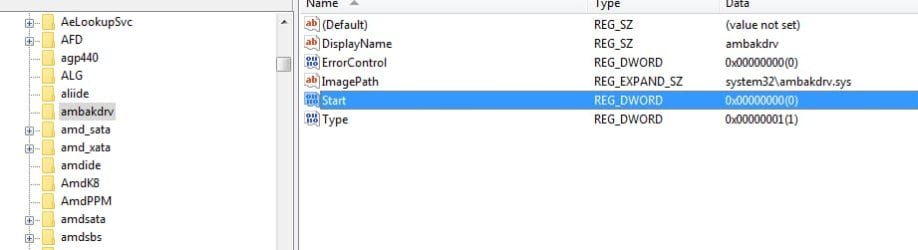
just for illustration using ambakdrv as an example:

service start type change to 4 to disable

Dble click on it
change it to 4
ok

ambakdrv1.jpg


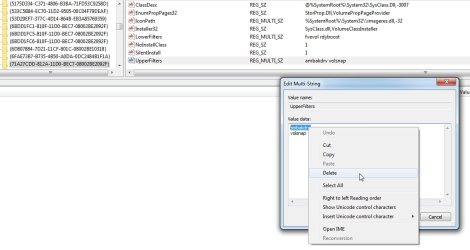
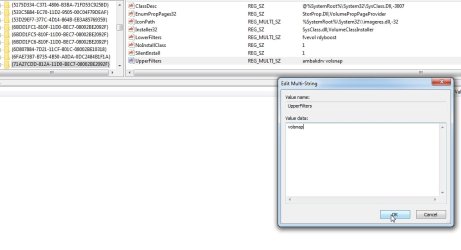
if there is a filter remove it but if there are other filters delete only the culprit leaving the others there

ambakdrv-3.jpg


ambakdrv-4.jpg


ambakdrv-5.jpg


ambakdrv-6.jpg
 
Last edited:

My Computers My Computers

  • At a glance

    7 X64i5 84002x8gb 3200mhz
    Computer type
    PC/Desktop
    OS
    7 X64
    CPU
    i5 8400
    Motherboard
    gigabyte b365m ds3h
    Memory
    2x8gb 3200mhz
    Hard Drives
    various
    PSU
    pure power 11 400w cm
    Case
    Coolermaster
    Cooling
    cryorig m9i
  • At a glance

    7x64g54008gb ddr4 2400
    Computer type
    PC/Desktop
    OS
    7x64
    CPU
    g5400
    Motherboard
    ga b365m ds3h
    Memory
    8gb ddr4 2400
    PSU
    xfx pro 450w
Thank you so much for the quick and detailed that is giving me hope. :-)

1. check in system32\config\regback folder . If there are copies of the hives in there from before the problem you can copy them from system32\config\regback to system32\config ( rename the existing hives first to avoid overwriting)

Indeed, there is a backup from 4 days before the issue. It contains :

DEFAULT
SAM
SECURITY
SOFTWARE
SYSTEM

however, one file that is in the current config folder is not present in the regback folder : COMPONENTS ; can I leave it as is?
Also, if I can copy the 5 files above, should I do anything with the *.LOG1 files that are present in the current config folder?
thanks again

- - - Updated - - -

It worked! Simply copied all hives from regbak folder back into config (all done from another machine), plugged it back in and booted fine. Tank you so much!
 

My Computers My Computers

  • At a glance

    Windows 7 Ultimate x64
    OS
    Windows 7 Ultimate x64
  • Computer type
    PC/Desktop
T
It worked! Simply copied all hives from regbak folder back into config (all done from another machine), plugged it back in and booted fine. Tank you so much!

well done

:D
 

My Computers My Computers

  • At a glance

    7 X64i5 84002x8gb 3200mhz
    Computer type
    PC/Desktop
    OS
    7 X64
    CPU
    i5 8400
    Motherboard
    gigabyte b365m ds3h
    Memory
    2x8gb 3200mhz
    Hard Drives
    various
    PSU
    pure power 11 400w cm
    Case
    Coolermaster
    Cooling
    cryorig m9i
  • At a glance

    7x64g54008gb ddr4 2400
    Computer type
    PC/Desktop
    OS
    7x64
    CPU
    g5400
    Motherboard
    ga b365m ds3h
    Memory
    8gb ddr4 2400
    PSU
    xfx pro 450w
Back
Top