No audio - Faulty mobo ?

GoCards

New member
Local time
3:07 PM
Messages
4
I am having some issues with my computer regarding sound. I don't have any of it!

My computer was recently RMA'd due to a faulty PSU and video card. I just received it back and the speakers that I used before no longer work. I figured it was a driver issue and simply downloaded the RealTek drivers but it didn't fix the problem.

The AMD card comes with its own drivers. I had problems in the past with their HD audio codecs and tried uninstalling them but that didn't seem to fix it either.

I went into device manager and located that there were drivers installed and they checked out.

I checked for hidden or disabled devices in "Playback devices" and didn't find any.

Things I've tried:

Installing audio drivers.
Uninstalling and reinstalling audio drivers.
System restore.
Checking proper connection of speakers.
Verification that speakers work.

By just looking at the audio mixer, it would appear that the system is playing sounds because there is activity in the mixer when a song or other sounds are playing. The problem is there is nothing coming from the speakers. :(

Is it possible that my audio ports on the motherboard could be faulty? I think I've run through all the options as thoroughly as possible but if there is anything I missed or something else you could suggest I will gladly give it a shot.

Thanks for your time and input.

Related component brands;
Asus P67-M Mobo
HIS 6850
Win7 64 bit
Dell soundbar speakers
 
Last edited:

My Computer My Computer

At a glance

Windows 7 64 bit
OS
Windows 7 64 bit
What type of speaker setup are you using? How is this setup hooked up? Does the speaker system have an independent volume control if so is it turned on and all the way up?
 

My Computer My Computer

At a glance

Windows 7 Ultimate 64 bitAMD Phenom II X4 965 Black EditionGSkill 4 X 2 GB PC 8500XFX Radeon HD 6790 D
Computer Manufacturer/Model Number
Custom built
OS
Windows 7 Ultimate 64 bit
CPU
AMD Phenom II X4 965 Black Edition
Motherboard
Gigabyte GA-MA790X-DS4
Memory
GSkill 4 X 2 GB PC 8500
Graphics Card(s)
XFX Radeon HD 6790 D
Sound Card
On board RealTek HD
Monitor(s) Displays
Dual monitors:Samsung SyncMaster S20B300
Screen Resolution
1600 X 900
Hard Drives
Seagate Barracuda 1TB (primary)
Seagate Barracuda 2 X 320 GB
PSU
Ultra X4 750 watt fully modular
Case
Thermaltake Overseer RX 1 full tower
Cooling
Core-Contact 92 mm CPU Cooler
Keyboard
Logitech G510
Mouse
Razor DeathAdder
Internet Speed
50/5 Mbps UL/DL
Other Info
Optical: Super Muliti DVD burner w/lightscribe, Hauppauge WinTV HVR-1800
Welcome to Seven Forums.
A simple mistake is to not re-connect the audio leads properly. Is audio missing from both the front and rear connections? Make sure you have the HD Audio enabled.
Those who worked on it may not have re-connected the board leads right too.
 

My Computer My Computer

At a glance

Windows 7 Ultimate X64 SP1Intel i5-2550K, Differing ~4.4-4.8GHz No buil...16GB G.Skill Sniper 1866MHz @ 2133MHz 2x8GBASUS GTX650TIB-DC2OC-2GD5, (650TI Boost)
Computer type
PC/Desktop
Computer Manufacturer/Model Number
Home Built Desktop By DataTech
OS
Windows 7 Ultimate X64 SP1
CPU
Intel i5-2550K, Differing ~4.4-4.8GHz No built in GPU
Motherboard
ASUS P8Z68-V PRO/GEN3
Memory
16GB G.Skill Sniper 1866MHz @ 2133MHz 2x8GB
Graphics Card(s)
ASUS GTX650TIB-DC2OC-2GD5, (650TI Boost)
Sound Card
Onboard Realtek 5-1
Monitor(s) Displays
Samsung P2570HD
Screen Resolution
1920x1080
Hard Drives
Samsung 840 Pro 256GB SSD for OS, 500GB Seagate Constellation (Enterprise drive) for Data
PSU
Corsair HX650W
Case
Inwin Dragon Rider
Cooling
Hyper 212 EVO w/two Noctua fans, push-pull, @1300 RPM
Keyboard
E-Z Eyes, bright yellow keys with large characters
Mouse
steelseries SENSEI Laser Pro Gaming
Internet Speed
48-51Mbs Mbs down, 11 Mbs up Xfinity Cable
Antivirus
Norton Internet Security 2013
Browser
IE 10, Opera, Pale Moon if needed
Other Info
4 case fans, LG BluRay-RE, ASUS DVD-RW, Mr. Fusion power supply, 1.21 gigawatts.
in addition ,open the realtek hd audio manager in control panel and make sure the jack that you have your speakers plugged into is active or allocated.
 

My Computer My Computer

At a glance

Microsoft Windows 7 Home Premium 64-bit 7600IIx4 amd athelon 635 processor2x2gbati radeon HD 5450
Computer Manufacturer/Model Number
Hewlett packard/p6512uk
OS
Microsoft Windows 7 Home Premium 64-bit 7600
CPU
IIx4 amd athelon 635 processor
Motherboard
FOXCONN 2AA9
Memory
2x2gb
Graphics Card(s)
ati radeon HD 5450
Sound Card
(1) Realtek High Definition Audio (2) AMD High Definition
Monitor(s) Displays
samsung lcd tv 32"
Screen Resolution
1360x 768
Hard Drives
(1) WDC WD10 01FAES-60Z2A0 SATA Disk Device (2) Maxtor OneTouch USB Device (3) ST310003 33AS USB Device (4) WD My Book 1111 USB Device
PSU
?
Cooling
air!
Keyboard
wireless hp
Mouse
wireless Hp,optical
Internet Speed
1.10mb/s
Antivirus
MSE
Browser
Firefox
Welcome to Seven Forums.
A simple mistake is to not re-connect the audio leads properly. Is audio missing from both the front and rear connections? Make sure you have the HD Audio enabled.
Those who worked on it may not have re-connected the board leads right too.

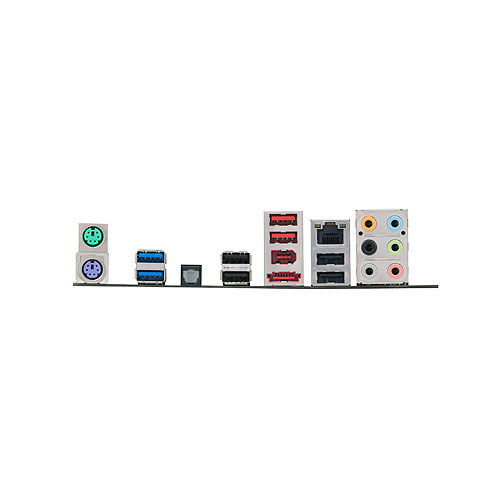
I have 6 audio jacks on this motherboard as seen below.

rktjkYIHkkLRbtaW_500.jpg

My speaker are connected to the green jack. This speaker setup worked fine this way before being RMA'd. Out of desperation, I tried the other ports with no luck.

I am unsure of the board leads to audio ports. I do believe these ports are soldered to the PCB on the motherboard.


in addition ,open the realtek hd audio manager in control panel and make sure the jack that you have your speakers plugged into is active or allocated.


It appears to be active but there is no sound coming from the speakers. These speakers due work, the volume is on, and everything is connected correctly.


What type of speaker setup are you using? How is this setup hooked up? Does the speaker system have an independent volume control if so is it turned on and all the way up?

My setup now is a DellAS501. The speakers have a power supply connector on the speakers and an internal cable coming from the back of the speaker that is correctly attached to the audio port on the back of the computer. It does have an independent volume control which is turned on.


Thank you all for the advice.
 

My Computer My Computer

At a glance

Windows 7 64 bit
OS
Windows 7 64 bit
Do you have a power supply connected to the speakers?
 

My Computer My Computer

At a glance

Win7 Home Premium 64 bitAMD Phenom II X2 555 Black4 GB Kingston DDR2 800Sapphire ATI Raedon HD6570 2GB DDR3
Computer Manufacturer/Model Number
ME
OS
Win7 Home Premium 64 bit
CPU
AMD Phenom II X2 555 Black
Motherboard
Gigabyte GA-MA770-UD3
Memory
4 GB Kingston DDR2 800
Graphics Card(s)
Sapphire ATI Raedon HD6570 2GB DDR3
Sound Card
Built in
Monitor(s) Displays
HP 2010i
Screen Resolution
1600x900
Hard Drives
2 WD 500GB Caviar blue
1 WD 250GB
1 WD 80GB (usb)
Case
Antec P-160
Cooling
Hyper 212 EVO
Keyboard
Logitech K320
Mouse
Logitech Trackman Wheel Optical
if you right click on the green jack does it show anything, i recall on an old system i had that right clicking that panel gave an option, may not in your case. but give it a try.
 

My Computer My Computer

At a glance

Microsoft Windows 7 Home Premium 64-bit 7600IIx4 amd athelon 635 processor2x2gbati radeon HD 5450
Computer Manufacturer/Model Number
Hewlett packard/p6512uk
OS
Microsoft Windows 7 Home Premium 64-bit 7600
CPU
IIx4 amd athelon 635 processor
Motherboard
FOXCONN 2AA9
Memory
2x2gb
Graphics Card(s)
ati radeon HD 5450
Sound Card
(1) Realtek High Definition Audio (2) AMD High Definition
Monitor(s) Displays
samsung lcd tv 32"
Screen Resolution
1360x 768
Hard Drives
(1) WDC WD10 01FAES-60Z2A0 SATA Disk Device (2) Maxtor OneTouch USB Device (3) ST310003 33AS USB Device (4) WD My Book 1111 USB Device
PSU
?
Cooling
air!
Keyboard
wireless hp
Mouse
wireless Hp,optical
Internet Speed
1.10mb/s
Antivirus
MSE
Browser
Firefox
if you right click on the green jack does it show anything, i recall on an old system i had that right clicking that panel gave an option, may not in your case. but give it a try.

I'll give that a shot when I get back home. Thanks.
 

My Computer My Computer

At a glance

Windows 7 64 bit
OS
Windows 7 64 bit
Back
Top