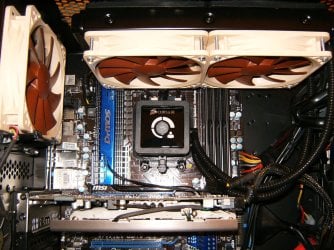
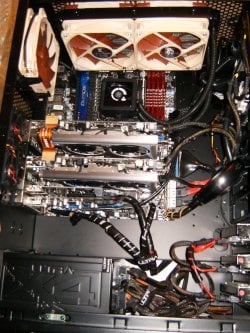
cpu chassis fan configuration. which is correct?

karlog22

New member
Local time
10:21 PM
Messages
35
Hi, this is the my cpu cooling setup. Please tell me if its right.


dsc0043vd.jpg


dsc0046hxn.jpg


I'm not sure which is rotating in what direction(intake or exhaust). But the top fan of the twin rear fan setup makes a lot of noise.. wonder if the wrong directions are causing it or something else..?
 

My Computer

Computer type
PC/Desktop
OS
Microsoft Windows 7 Ultimate 64-bit 7601 Multiprocessor Free Service Pack 1
CPU
Intel(R) Core(TM)2 Quad CPU Q6600 @ 2.40GHz
Motherboard
Intel Corporation DG33FB
Memory
8.00 GB
Graphics Card(s)
NVIDIA GeForce 7300 SE/7200 GS
Sound Card
(1) Bluetooth Hands-free Audio Device (2) Realtek High Def
Screen Resolution
1440 x 900 x 32 bits (4294967296 colors) @ 74 Hz
Hard Drives
ST3400620AS ATA Device
karlog22, welcome to SF.
The top fan is the PSU fan and it's spinning either for high load or high temps. Looking at the dust build up I would hit the intake fans, mobo, and PSU with compressed air. I suspect that a high amount of dust is creating the noise as the PSU fan is working to cool. Oh and the rear case fans are in push/pull arrangement. Do you have a front mounted intake fan and or how and where is the cool air coming into the case?
 

My Computer

Computer type
PC/Desktop
Computer Manufacturer/Model Number
A blend of brains, brawn and dumb luck.
OS
Windows 7 Ultimate 64
CPU
i7 3770k OC'd 4.6 @ 1.17v, also FX 8120 & i5 miniITX
Motherboard
MSI P67A-GD80 b3
Memory
32 gb G.Skill Sniper DDR3 10-12-12-31 @ 2133
Graphics Card(s)
XFX Radeon 7870 2GB DDR5
Sound Card
Sound Blaster Z Series Card
Monitor(s) Displays
(2) LG LED 23" 1920 x 1080 2ms Monitors via mini d-port
Screen Resolution
1680 X 1050 p
Hard Drives
Samsung 256 gb 830 SSD sata III
(1) 1 tb WD Black
(2) 1 tb Hitachi deskmates/sata II
(2) 1 tb WD green/sata II
(2) 3 tb Seagate Barracuda
(1) 120 gb OCZ Vertex SS
(1) Drobo 5N w/5 Seagate 3tb
PSU
EVGA modular 1000G2 80% gold rating & APC 1200 RS
Case
CoolerMaster Storm Styker
Cooling
7 case fans 140mm & 120mm, NZXT Kraken X60
Keyboard
(2) Logitech Illuminated Keyboards (1) usb (1) wireless
Mouse
Logitech G700 & T-BC21 - nano nx for the laptop
Internet Speed
Basic 120mbps down
Antivirus
Trend Micro Titanium Max Security & Malwarebytes Premium
Browser
Chrome and IE 10
Other Info
5 Noctua case fans + 3 Noctua in p/p on NZXT cooler
Integrated hot swap drive bays for 2.5" Drives
(2) Lite-on dvd/cd/Blu Ray optical 22X
Integrated fan controller and led on/off
HP Officejet Pro 8630 all-n-one
Hot-swappable 3.5" hard drive bay
Netgear Nighthawk router
Asus USB 3 & sata 6 PCIe card
Vantec IDE to sata adptr./Ultra sata adptr
Lenovo L420 i5 lappy with m sata
Drobo 5N advanced NAS
Fans wear out over time so its time to replace it. The bushings go bad and the fans make a grinding or howling sound.
Those fans should be blowing out of he case as well.
 

My Computer

Computer Manufacturer/Model Number
HAL-9000
OS
Windows 7 Ultimate 64bit
CPU
Intel i7 3770K
Motherboard
Asus Sabertooth Z77
Memory
16GB DDR3 1333 Corsair XMS3
Graphics Card(s)
XFX HD6950 2GB EyeFinity
Sound Card
Logitech G35 & Sennheiser PC135 & VIA HD
Monitor(s) Displays
23" HP 2310e, 23" Samsung B2230, 21.5" Viewsonic
Screen Resolution
5760x1080
Hard Drives
16TB of Storage
128GB & 256GB Crucial M4 SSD's, 2X 1TB WD Black, 3x 2TB WD, 3x 2TB Samsung F4, 1.5TB Seagate, WD 500GB,
PSU
Antec True Power New 650watt
Case
Cooler Master HAF-932
Cooling
Corsair H60 Hydro Cooler, 3x 230mm Fans, 2x120mm Fan
Keyboard
Logitech G15 and G13
Mouse
Logitech G700 Gaming Mouse
Internet Speed
50/10 Mbit
Other Info
Speakers : Alesis M1 Active Mk2 Studio Monitors , APC RS 1200 UPS, HP 4500DN Color Laser, HP P1006 mono Laser, Kodak 8500 Dye-Sub, Epson 1280 inkjet, Epson Worforce 610 MFC
karlog22, welcome to SF.
The top fan is the PSU fan and it's spinning either for high load or high temps. Looking at the dust build up I would hit the intake fans, mobo, and PSU with compressed air. I suspect that a high amount of dust is creating the noise as the PSU fan is working to cool. Oh and the rear case fans are in push/pull arrangement. Do you have a front mounted intake fan and or how and where is the cool air coming into the case?

hi.. there are no front mounted fans.. the fans shown in the pics are the only ones present.. i've no idea where is the cool air coming from.. i bought this as assembled one.. few days ago my maintainence guy replaced the 1st of the rear twin fans as it stopped working.. since then.. the new one's been noisy..i don't remember in which direction was the earlier one setup..
 

My Computer

Computer type
PC/Desktop
OS
Microsoft Windows 7 Ultimate 64-bit 7601 Multiprocessor Free Service Pack 1
CPU
Intel(R) Core(TM)2 Quad CPU Q6600 @ 2.40GHz
Motherboard
Intel Corporation DG33FB
Memory
8.00 GB
Graphics Card(s)
NVIDIA GeForce 7300 SE/7200 GS
Sound Card
(1) Bluetooth Hands-free Audio Device (2) Realtek High Def
Screen Resolution
1440 x 900 x 32 bits (4294967296 colors) @ 74 Hz
Hard Drives
ST3400620AS ATA Device
Fans wear out over time so its time to replace it. The bushings go bad and the fans make a grinding or howling sound.
Those fans should be blowing out of he case as well.

Hi.. the top one which is making noise is a new one.. the earlier one did not function properly... my maintenance guy fixed this new one.. and dunno if he did this in the same direction.. :confused:
 

My Computer

Computer type
PC/Desktop
OS
Microsoft Windows 7 Ultimate 64-bit 7601 Multiprocessor Free Service Pack 1
CPU
Intel(R) Core(TM)2 Quad CPU Q6600 @ 2.40GHz
Motherboard
Intel Corporation DG33FB
Memory
8.00 GB
Graphics Card(s)
NVIDIA GeForce 7300 SE/7200 GS
Sound Card
(1) Bluetooth Hands-free Audio Device (2) Realtek High Def
Screen Resolution
1440 x 900 x 32 bits (4294967296 colors) @ 74 Hz
Hard Drives
ST3400620AS ATA Device
Karlog22, The two fans under the PSU are installed in opposite directions? With all the side panels on the front air intake will be enhanced with all rear fans pulling case air and exhausting out the rear. Please take a tissue and find which fan is reversed and switch it around. To my eyes the upper case fan is pulling air in from the rear and the lower is exhausting out the rear......set them both up for exhaust and if still loud then replace. I would clean the fan blades, mobo, case and PSU with compressed air and a old tooth brush.
 
Last edited:

My Computer

Computer type
PC/Desktop
Computer Manufacturer/Model Number
A blend of brains, brawn and dumb luck.
OS
Windows 7 Ultimate 64
CPU
i7 3770k OC'd 4.6 @ 1.17v, also FX 8120 & i5 miniITX
Motherboard
MSI P67A-GD80 b3
Memory
32 gb G.Skill Sniper DDR3 10-12-12-31 @ 2133
Graphics Card(s)
XFX Radeon 7870 2GB DDR5
Sound Card
Sound Blaster Z Series Card
Monitor(s) Displays
(2) LG LED 23" 1920 x 1080 2ms Monitors via mini d-port
Screen Resolution
1680 X 1050 p
Hard Drives
Samsung 256 gb 830 SSD sata III
(1) 1 tb WD Black
(2) 1 tb Hitachi deskmates/sata II
(2) 1 tb WD green/sata II
(2) 3 tb Seagate Barracuda
(1) 120 gb OCZ Vertex SS
(1) Drobo 5N w/5 Seagate 3tb
PSU
EVGA modular 1000G2 80% gold rating & APC 1200 RS
Case
CoolerMaster Storm Styker
Cooling
7 case fans 140mm & 120mm, NZXT Kraken X60
Keyboard
(2) Logitech Illuminated Keyboards (1) usb (1) wireless
Mouse
Logitech G700 & T-BC21 - nano nx for the laptop
Internet Speed
Basic 120mbps down
Antivirus
Trend Micro Titanium Max Security & Malwarebytes Premium
Browser
Chrome and IE 10
Other Info
5 Noctua case fans + 3 Noctua in p/p on NZXT cooler
Integrated hot swap drive bays for 2.5" Drives
(2) Lite-on dvd/cd/Blu Ray optical 22X
Integrated fan controller and led on/off
HP Officejet Pro 8630 all-n-one
Hot-swappable 3.5" hard drive bay
Netgear Nighthawk router
Asus USB 3 & sata 6 PCIe card
Vantec IDE to sata adptr./Ultra sata adptr
Lenovo L420 i5 lappy with m sata
Drobo 5N advanced NAS
Hi You were right.. i changed them both to exhaust.. but now.. the processor temp went up by 5-7deg C is this normal?

iduscrsht.jpg


these are my new readings..+/- 2-4 deg c.
Are these normal?.
I'm running windows 7 64 bit
core 2 Quad Q6600 @2.4Ghz
intel Dg33FBC
8 gb ram DDR2 @800 bus speed
400Gb Sata
and nvidia 256 mb graphics controller GeForce 7200GS(no fan)
What type of cooling set up would u recommend... is my current status normal.(optimized)
All these 3 yrs old.
what are ur recommendations?
 

My Computer

Computer type
PC/Desktop
OS
Microsoft Windows 7 Ultimate 64-bit 7601 Multiprocessor Free Service Pack 1
CPU
Intel(R) Core(TM)2 Quad CPU Q6600 @ 2.40GHz
Motherboard
Intel Corporation DG33FB
Memory
8.00 GB
Graphics Card(s)
NVIDIA GeForce 7300 SE/7200 GS
Sound Card
(1) Bluetooth Hands-free Audio Device (2) Realtek High Def
Screen Resolution
1440 x 900 x 32 bits (4294967296 colors) @ 74 Hz
Hard Drives
ST3400620AS ATA Device
The noise is gone though.. thanks to linnemeyerhere :Dand Zepher:D on this note..
Please take a look at my specs and tell me if these are normal.. I do run my PC continuously..:)
 

My Computer

Computer type
PC/Desktop
OS
Microsoft Windows 7 Ultimate 64-bit 7601 Multiprocessor Free Service Pack 1
CPU
Intel(R) Core(TM)2 Quad CPU Q6600 @ 2.40GHz
Motherboard
Intel Corporation DG33FB
Memory
8.00 GB
Graphics Card(s)
NVIDIA GeForce 7300 SE/7200 GS
Sound Card
(1) Bluetooth Hands-free Audio Device (2) Realtek High Def
Screen Resolution
1440 x 900 x 32 bits (4294967296 colors) @ 74 Hz
Hard Drives
ST3400620AS ATA Device
karlog22,
Did you blow out the fins and clean the CPU fan? It's the most important one. Those temps seem a bit high to me but you don't mention the ambient temp when you took the temp shot. Also when was the last time you mounted this CPU cooler, maybe it could benefit from a fresh application of premium thermal compound ?
 

My Computer

Computer type
PC/Desktop
Computer Manufacturer/Model Number
A blend of brains, brawn and dumb luck.
OS
Windows 7 Ultimate 64
CPU
i7 3770k OC'd 4.6 @ 1.17v, also FX 8120 & i5 miniITX
Motherboard
MSI P67A-GD80 b3
Memory
32 gb G.Skill Sniper DDR3 10-12-12-31 @ 2133
Graphics Card(s)
XFX Radeon 7870 2GB DDR5
Sound Card
Sound Blaster Z Series Card
Monitor(s) Displays
(2) LG LED 23" 1920 x 1080 2ms Monitors via mini d-port
Screen Resolution
1680 X 1050 p
Hard Drives
Samsung 256 gb 830 SSD sata III
(1) 1 tb WD Black
(2) 1 tb Hitachi deskmates/sata II
(2) 1 tb WD green/sata II
(2) 3 tb Seagate Barracuda
(1) 120 gb OCZ Vertex SS
(1) Drobo 5N w/5 Seagate 3tb
PSU
EVGA modular 1000G2 80% gold rating & APC 1200 RS
Case
CoolerMaster Storm Styker
Cooling
7 case fans 140mm & 120mm, NZXT Kraken X60
Keyboard
(2) Logitech Illuminated Keyboards (1) usb (1) wireless
Mouse
Logitech G700 & T-BC21 - nano nx for the laptop
Internet Speed
Basic 120mbps down
Antivirus
Trend Micro Titanium Max Security & Malwarebytes Premium
Browser
Chrome and IE 10
Other Info
5 Noctua case fans + 3 Noctua in p/p on NZXT cooler
Integrated hot swap drive bays for 2.5" Drives
(2) Lite-on dvd/cd/Blu Ray optical 22X
Integrated fan controller and led on/off
HP Officejet Pro 8630 all-n-one
Hot-swappable 3.5" hard drive bay
Netgear Nighthawk router
Asus USB 3 & sata 6 PCIe card
Vantec IDE to sata adptr./Ultra sata adptr
Lenovo L420 i5 lappy with m sata
Drobo 5N advanced NAS
karlog22,
Did you blow out the fins and clean the CPU fan? It's the most important one. Those temps seem a bit high to me but you don't mention the ambient temp when you took the temp shot. Also when was the last time you mounted this CPU cooler, maybe it could benefit from a fresh application of premium thermal compound ?

hi this new fan mounting was about 5 months ago.. these are the latest readings..
ambient temperature around 34 deg C
should i purchase a new CPU cabin with better airflow setup(front rear and top fans)? I don't have a blower.. or dryer..:( so. cleaned it as much as i could... Its a strange thing that.. my CPU used to be cooler and more silent when there was actually lot of dust:sarc:. dunno why.. and what is this thermal compound u mentioned.. (forgive me i don't have an idea:) about it). does it have something to do with the processor or?

iduscrsht.jpg
 

My Computer

Computer type
PC/Desktop
OS
Microsoft Windows 7 Ultimate 64-bit 7601 Multiprocessor Free Service Pack 1
CPU
Intel(R) Core(TM)2 Quad CPU Q6600 @ 2.40GHz
Motherboard
Intel Corporation DG33FB
Memory
8.00 GB
Graphics Card(s)
NVIDIA GeForce 7300 SE/7200 GS
Sound Card
(1) Bluetooth Hands-free Audio Device (2) Realtek High Def
Screen Resolution
1440 x 900 x 32 bits (4294967296 colors) @ 74 Hz
Hard Drives
ST3400620AS ATA Device
Thermal compound or thermal paste is a material that is used to enhance the surface heat transfer from the CPU to the radiator fins that the fan is blowing cooler air over to keep the CPU cool. I would say that the paste or thermal compound isn't likely bad but it can dry up and does benefit from being re-applied after both surfaces are cleaned properly. There are lots of great You-tube videos available to tutor you on this process. In regards to a new case for air flow it's hard for me to guide you as I don't really have a great overall view of your case now and I don't know what kind of budget you have. When you add up a case, some fans, new thermal paste and your time and energy for a few hundred more you may be able to get a whole new rig. I would think about where you want to take this hobby and if you see yourself wanting to learn more and be very hands on then invest in a great case and PSU by a premier manufacturer. Then transfer what you have over and when your wallet recovers then look into a new mobo, CPU, ram and graphics card if you are so compelled.
 

My Computer

Computer type
PC/Desktop
Computer Manufacturer/Model Number
A blend of brains, brawn and dumb luck.
OS
Windows 7 Ultimate 64
CPU
i7 3770k OC'd 4.6 @ 1.17v, also FX 8120 & i5 miniITX
Motherboard
MSI P67A-GD80 b3
Memory
32 gb G.Skill Sniper DDR3 10-12-12-31 @ 2133
Graphics Card(s)
XFX Radeon 7870 2GB DDR5
Sound Card
Sound Blaster Z Series Card
Monitor(s) Displays
(2) LG LED 23" 1920 x 1080 2ms Monitors via mini d-port
Screen Resolution
1680 X 1050 p
Hard Drives
Samsung 256 gb 830 SSD sata III
(1) 1 tb WD Black
(2) 1 tb Hitachi deskmates/sata II
(2) 1 tb WD green/sata II
(2) 3 tb Seagate Barracuda
(1) 120 gb OCZ Vertex SS
(1) Drobo 5N w/5 Seagate 3tb
PSU
EVGA modular 1000G2 80% gold rating & APC 1200 RS
Case
CoolerMaster Storm Styker
Cooling
7 case fans 140mm & 120mm, NZXT Kraken X60
Keyboard
(2) Logitech Illuminated Keyboards (1) usb (1) wireless
Mouse
Logitech G700 & T-BC21 - nano nx for the laptop
Internet Speed
Basic 120mbps down
Antivirus
Trend Micro Titanium Max Security & Malwarebytes Premium
Browser
Chrome and IE 10
Other Info
5 Noctua case fans + 3 Noctua in p/p on NZXT cooler
Integrated hot swap drive bays for 2.5" Drives
(2) Lite-on dvd/cd/Blu Ray optical 22X
Integrated fan controller and led on/off
HP Officejet Pro 8630 all-n-one
Hot-swappable 3.5" hard drive bay
Netgear Nighthawk router
Asus USB 3 & sata 6 PCIe card
Vantec IDE to sata adptr./Ultra sata adptr
Lenovo L420 i5 lappy with m sata
Drobo 5N advanced NAS

My Computer

Computer type
PC/Desktop
Computer Manufacturer/Model Number
A blend of brains, brawn and dumb luck.
OS
Windows 7 Ultimate 64
CPU
i7 3770k OC'd 4.6 @ 1.17v, also FX 8120 & i5 miniITX
Motherboard
MSI P67A-GD80 b3
Memory
32 gb G.Skill Sniper DDR3 10-12-12-31 @ 2133
Graphics Card(s)
XFX Radeon 7870 2GB DDR5
Sound Card
Sound Blaster Z Series Card
Monitor(s) Displays
(2) LG LED 23" 1920 x 1080 2ms Monitors via mini d-port
Screen Resolution
1680 X 1050 p
Hard Drives
Samsung 256 gb 830 SSD sata III
(1) 1 tb WD Black
(2) 1 tb Hitachi deskmates/sata II
(2) 1 tb WD green/sata II
(2) 3 tb Seagate Barracuda
(1) 120 gb OCZ Vertex SS
(1) Drobo 5N w/5 Seagate 3tb
PSU
EVGA modular 1000G2 80% gold rating & APC 1200 RS
Case
CoolerMaster Storm Styker
Cooling
7 case fans 140mm & 120mm, NZXT Kraken X60
Keyboard
(2) Logitech Illuminated Keyboards (1) usb (1) wireless
Mouse
Logitech G700 & T-BC21 - nano nx for the laptop
Internet Speed
Basic 120mbps down
Antivirus
Trend Micro Titanium Max Security & Malwarebytes Premium
Browser
Chrome and IE 10
Other Info
5 Noctua case fans + 3 Noctua in p/p on NZXT cooler
Integrated hot swap drive bays for 2.5" Drives
(2) Lite-on dvd/cd/Blu Ray optical 22X
Integrated fan controller and led on/off
HP Officejet Pro 8630 all-n-one
Hot-swappable 3.5" hard drive bay
Netgear Nighthawk router
Asus USB 3 & sata 6 PCIe card
Vantec IDE to sata adptr./Ultra sata adptr
Lenovo L420 i5 lappy with m sata
Drobo 5N advanced NAS
Back
Top