Sound unmanageably loud

SnakeTheFox

Banned
Local time
11:31 AM
Messages
5
Yesterday I upgraded from Windows XP SP3 to Windows 7 and while the transition was mostly smooth, I'm beginning to regret the change as a result of the seemingly (and unnecessarily) simplified volume controls on Windows 7.

I'm using a Creative X-Fi Fatality Professional series sound card (yes, up-to-date drivers) and a 2.1 Klipsch desktop sound system, and while I've had no problems on Windows XP, the sound is ear-rapingly loud on Windows 7. Turning the master volume down only does so much, as even at settings of 8 or 10 my speakers still explode with noise if the speakers volume dial is twisted up even 1/50th of its potential. Setting volume below a setting of 5 results in sound being completely muted.

I've searched assorted threads on this forum and others, and it seems to be a result of the lack of a "Wave" setting on Windows 7 to "fine tune" volume options. Most replies on other threads also seem to mention it being a driver issue, but considering the posters of these threads use a myriad of differing brands and models and are still having this issue I'm pretty sure it's a result of Microsoft removing the "Wave" setting more than anything else.

I am aware that you can go into Sound from Control Panel and tweak individual channels but the fact remains that I cannot find a way to tweak sounds to non-ear-shattering levels on Windows 7 without some kind of more specific controls than merely master volume. Creative Drivers seem to use whatever Windows-specific options are available, so the "wave" setting that used to be in my Creative Console Launcher are now just as non-existent as the ones in Windows volume control.

If it comes right down to it, I'll sooner reinstall XP again than go through the expense of purchasing a new sound card or speaker system just because Windows 7 doesn't want to accommodate it properly.

So what are my options here? Is there any kind of 3rd party volume control I can download that will allow me to set my audio settings more appropriately?
 

My Computer My Computer

OS
Windows 7 Professional x64
CPU
Intel Core 2 Duo E7200 stock @ 2.53GHz
Motherboard
Gigabyte Model EP43-DS3L
Memory
4gb DDR2 (2x2GB)
Graphics Card(s)
Nvidia 9800GTX+
Sound Card
Creative X-Fi Fatality Professional
To be clear, have you clicked on the speaker Properties, Levels and adjusted the Front setting below 100?
 

My Computer My Computer

Computer type
PC/Desktop
Computer Manufacturer/Model Number
Custom Build
OS
Windows 7 Home Premium 64 bit
CPU
Intel Core i7-4790
Motherboard
GA-Z87X-D3H
Memory
G.SKILL 8GB (2 x 4GB) DDR3 F3-10666CL9D-8GBNT
Graphics Card(s)
AMD Radeon R7 250
Sound Card
Realtek ALC892
Monitor(s) Displays
Samsung UN32EH5000, Dell 1703FPT
Screen Resolution
1920 x 1080, 1280 x 1024
Hard Drives
WD5003AZEX
WD10EZEX
Samsung HD103SJ
Samsung 128 GB 840 PRO
PSU
SeaSonic M12II SS-500GM
Case
Fractal Design Define R4
Cooling
Zalman CNPS9900ALED
Keyboard
Logitech K800
Mouse
Logitech M705
Internet Speed
16 Mbps
Antivirus
Avast
Browser
Firefox
Other Info
Bose Companion 2 Multimedia Speakers
To be clear, have you clicked on the speaker Properties, Levels and adjusted the Front setting below 100?

There is no "Front" setting, there is "Play Control" which seems to be master volume, Microphone FP, Digital In, MIDI Synth, and Line-In 1/Mic. All are set to 7 currently. There is also a "Balance" button next to all of them, in the case of Play Control this adjusts individual sound channels (L, R, C, Sub, RL, RR, SL, and SR.), but again all these individual channels are set to 7.
 

My Computer My Computer

OS
Windows 7 Professional x64
CPU
Intel Core 2 Duo E7200 stock @ 2.53GHz
Motherboard
Gigabyte Model EP43-DS3L
Memory
4gb DDR2 (2x2GB)
Graphics Card(s)
Nvidia 9800GTX+
Sound Card
Creative X-Fi Fatality Professional
When you bring up the Windows sound manager and click on your Creative device, there isn't a Properties tab?

Capture.PNG
 

My Computer My Computer

Computer type
PC/Desktop
Computer Manufacturer/Model Number
Custom Build
OS
Windows 7 Home Premium 64 bit
CPU
Intel Core i7-4790
Motherboard
GA-Z87X-D3H
Memory
G.SKILL 8GB (2 x 4GB) DDR3 F3-10666CL9D-8GBNT
Graphics Card(s)
AMD Radeon R7 250
Sound Card
Realtek ALC892
Monitor(s) Displays
Samsung UN32EH5000, Dell 1703FPT
Screen Resolution
1920 x 1080, 1280 x 1024
Hard Drives
WD5003AZEX
WD10EZEX
Samsung HD103SJ
Samsung 128 GB 840 PRO
PSU
SeaSonic M12II SS-500GM
Case
Fractal Design Define R4
Cooling
Zalman CNPS9900ALED
Keyboard
Logitech K800
Mouse
Logitech M705
Internet Speed
16 Mbps
Antivirus
Avast
Browser
Firefox
Other Info
Bose Companion 2 Multimedia Speakers
When you bring up the Windows sound manager and click on your Creative device, there isn't a Properties tab?

View attachment 217096

There is a properties tab, but the contents of that tab is what I posted prior.

3g9dg.jpg
 

My Computer My Computer

OS
Windows 7 Professional x64
CPU
Intel Core 2 Duo E7200 stock @ 2.53GHz
Motherboard
Gigabyte Model EP43-DS3L
Memory
4gb DDR2 (2x2GB)
Graphics Card(s)
Nvidia 9800GTX+
Sound Card
Creative X-Fi Fatality Professional
right click on the speaker icon in the systems tray and select open volume mixer, that may help.
 

My Computer My Computer

Computer Manufacturer/Model Number
Hewlett packard/p6512uk
OS
Microsoft Windows 7 Home Premium 64-bit 7600
CPU
IIx4 amd athelon 635 processor
Motherboard
FOXCONN 2AA9
Memory
2x2gb
Graphics Card(s)
ati radeon HD 5450
Sound Card
(1) Realtek High Definition Audio (2) AMD High Definition
Monitor(s) Displays
samsung lcd tv 32"
Screen Resolution
1360x 768
Hard Drives
(1) WDC WD10 01FAES-60Z2A0 SATA Disk Device (2) Maxtor OneTouch USB Device (3) ST310003 33AS USB Device (4) WD My Book 1111 USB Device
PSU
?
Cooling
air!
Keyboard
wireless hp
Mouse
wireless Hp,optical
Internet Speed
1.10mb/s
Antivirus
MSE
Browser
Firefox
right click on the speaker icon in the systems tray and select open volume mixer, that may help.

Volume mixer consists of master volume and program specific volumes (which are limited by master volume). I appreciate the answer, but it should be obvious from reading the OP that this is the first thing I had tried. The problem is that master volume cannot be quiet enough, and with no more specific way to adjust volume than a simple master volume control, I cannot properly tune my systems audio to a tolerable level.

I'm getting the sneaking suspicion that I may be better off reverting to XP until 7 has all its kinks worked out.
 

My Computer My Computer

OS
Windows 7 Professional x64
CPU
Intel Core 2 Duo E7200 stock @ 2.53GHz
Motherboard
Gigabyte Model EP43-DS3L
Memory
4gb DDR2 (2x2GB)
Graphics Card(s)
Nvidia 9800GTX+
Sound Card
Creative X-Fi Fatality Professional
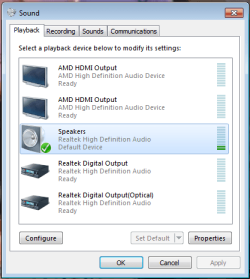
Have you considered the on-board Realtek audio?

Capture2.PNG
 

My Computer My Computer

Computer type
PC/Desktop
Computer Manufacturer/Model Number
Custom Build
OS
Windows 7 Home Premium 64 bit
CPU
Intel Core i7-4790
Motherboard
GA-Z87X-D3H
Memory
G.SKILL 8GB (2 x 4GB) DDR3 F3-10666CL9D-8GBNT
Graphics Card(s)
AMD Radeon R7 250
Sound Card
Realtek ALC892
Monitor(s) Displays
Samsung UN32EH5000, Dell 1703FPT
Screen Resolution
1920 x 1080, 1280 x 1024
Hard Drives
WD5003AZEX
WD10EZEX
Samsung HD103SJ
Samsung 128 GB 840 PRO
PSU
SeaSonic M12II SS-500GM
Case
Fractal Design Define R4
Cooling
Zalman CNPS9900ALED
Keyboard
Logitech K800
Mouse
Logitech M705
Internet Speed
16 Mbps
Antivirus
Avast
Browser
Firefox
Other Info
Bose Companion 2 Multimedia Speakers
Have you considered the on-board Realtek audio?

View attachment 217099

I haven't tried it, but I didn't buy a $150 dollar 128 channel sound card to listen to stuff on onboard audio. Like I said, if Windows 7 wont work with my current setup I'll merely revert to XP until it's improved. I'm just trying to see if there's any way to fix this, such as the possibility of 3rd party sound management software (not driver software), or something else I haven't thought of.
 

My Computer My Computer

OS
Windows 7 Professional x64
CPU
Intel Core 2 Duo E7200 stock @ 2.53GHz
Motherboard
Gigabyte Model EP43-DS3L
Memory
4gb DDR2 (2x2GB)
Graphics Card(s)
Nvidia 9800GTX+
Sound Card
Creative X-Fi Fatality Professional
Use NirCmd to set Windows system volume

You can use NirCmd to set your Windows 7 system volume. The command I use is "nircmd.exe setsysvolume 75". You can find a copy of NirCmd on CNet here: http://download.cnet.com/NirCmd/3000-2094_4-77191.html

http://download.cnet.com/NirCmd/3000-2094_4-77191.html
 

My Computer My Computer

Computer type
PC/Desktop
Computer Manufacturer/Model Number
HP
OS
Windows 7
Back
Top