Solved Accidentally switched off computer - busy installing win updates

blouogies

New member
Local time
3:27 PM
Messages
6
Hi

I have a problem with my pc. I have made a stupid mistake. My pc was busy installing windows updates BUT I was in a rush and thought it was finished. So I unplugged the pc and boom it hit me it was still busy installing. Blond moment!

So when I turned it on again the next morning it took me to system restore and I though ok now the problem is sorted because it restarted and everything look ok.

BUT when I shut down it was busy installing updates again so I waited and though ok this is normal and it switch off it self like it was suppose.

The next day I turned my pc back on again and guess what is took me to system restore again. This keeps on happening now. Please help how can I fix this issue???
 

My Computer My Computer

OS
Windows 7 Pro 32bit
Hello blouogies and welcome to Seven Forums.

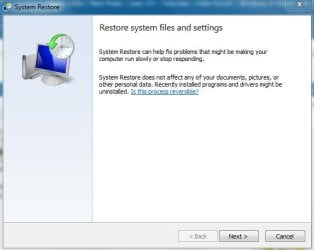
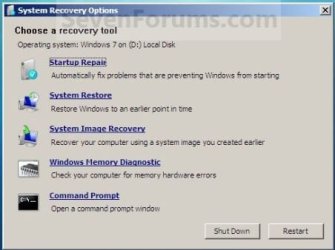
When your computer "takes you to system restore" are you saying it's automatically selecting a restore point for you to use or are you seeing either a restore screen or a recovery screen?

restore.JPG recovery.JPG

Have you tried to manually access System Restore to select a restore point of your own choosing (option one) to a date/time before the blond moment? :)

http://www.sevenforums.com/tutorials/700-system-restore.html

If you aren't able to access other restore points I'd suggest running a System File Checker scan from an elevated command prompt (option two) to see if your computer sufered any damaged or corrupt system files during the unintentional shut down. If any problems are noted run the scan 3 times rebooting in between each scan.

http://www.sevenforums.com/tutorials/1538-sfc-scannow-command-system-file-checker.html

Please post back if any of this helps or not.
 

My Computer My Computer

Computer type
Laptop
Computer Manufacturer/Model Number
Sony Vaio VPCEB47GM Laptop
OS
Win 7 Pro 64-bit
CPU
Intel i5 2.4 Ghz
Memory
8GB DDR3
Graphics Card(s)
Intel HD 3000
Sound Card
IDT High Definition
Monitor(s) Displays
15.6 WGXA Anti-Glare LED
Screen Resolution
1280x800
Hard Drives
640Gb 7200rpm
Antivirus
MSE
Browser
Opera (primary) with IE9 backup
Thanks for the reply marsmimar

Ok I did do the start up repair and that is the way it fixed my pc every time until the windows update again.

I tried to manually access System Restore to select a restore point but it only has till the 25th and the blond moment occurred 15 June '12.

I did run the SFC /SCANNOW Command - System File Checker
and it said - Windows Resource Protection did not find any integrity violations.

I have stopped my windows update now to prevent this from happening every time after a restart.

Any other ideas please!
 

My Computer My Computer

OS
Windows 7 Pro 32bit
I tried to manually access System Restore to select a restore point but it only has till the 25th and the blond moment occurred 15 June '12.
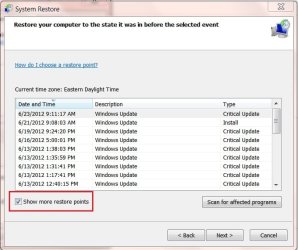
Just to be sure, did you have "Show more restore points" checked?

See red box:
More restore points.jpg
 

My Computer My Computer

Computer type
PC/Desktop
Computer Manufacturer/Model Number
Gateway DX4831-01e (Mid-Tower Desktop)
OS
Originally Win 7 Hm Prem x64 Ver 6.1.7600 Build 7601-SP1 | Upgraded to Windows 10 December 14, 2019
CPU
Intel i3 530 2.93GHz, 2933MHz 2 Cores 4 Logical Processors
Motherboard
Gateway H57M01 133 megahertz
Memory
6GB of 1,333MHz DDR3 SDRAM
Graphics Card(s)
32MB Intel Graphics Media Accelerator HD IGChip
Sound Card
Realtek High Definition Audio
Monitor(s) Displays
Gateway HX2000 20inch TFT active matrix TN
Screen Resolution
1600 x 900 x 59 hertz
Hard Drives
WDC WD10EADS-00M2B0 [HDD] (1000.20 GB) -- drive 0,
HL-DT-ST DVDRAM GH41N [CD-ROM dr]
Four card readers, and Four USB 2.0
PSU
300watts.
Case
Mid-Tower Desktop
Cooling
Stock from Gateway
Keyboard
Natural Ergonomic Keyboard 4000, see Other Info
Mouse
Orig. Gateway wore out now using Insignia USB wired optical
Internet Speed
Vz FIOS 10ms png 57.64Mbps down 65.53Mbps up Speedtest.org
Antivirus
Zamana Anti-logger with Anti-malware, MSE, Windows Firewall,
Browser
IE11.0.9600.19399-Upd ver11.0.135, Firefox 68.0.1 x64
Other Info
System Specs by Belarc.

BIOS: American Megatrends Inc. P01-A0 11/17/2009

Replaced the MS 'Natural' Standard PS/2 Enhanced 101-102 Keyboard with a new Natural Ergonomic Keyboard 4000 on August 1st 2014.

Canon Pixma MG3222 Printer.

Updated to IE11 on 12102015 | Fios Quantum Router g1100

Additional AV: SpywareBlaster, manual Mbam, SAS
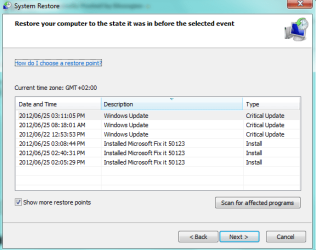
Yes I did tick it.

Have a look here.
 

Attachments

  • restore.png
    restore.png
    15.7 KB · Views: 15

My Computer My Computer

OS
Windows 7 Pro 32bit

My Computer My Computer

Computer type
PC/Desktop
Computer Manufacturer/Model Number
Gateway DX4831-01e (Mid-Tower Desktop)
OS
Originally Win 7 Hm Prem x64 Ver 6.1.7600 Build 7601-SP1 | Upgraded to Windows 10 December 14, 2019
CPU
Intel i3 530 2.93GHz, 2933MHz 2 Cores 4 Logical Processors
Motherboard
Gateway H57M01 133 megahertz
Memory
6GB of 1,333MHz DDR3 SDRAM
Graphics Card(s)
32MB Intel Graphics Media Accelerator HD IGChip
Sound Card
Realtek High Definition Audio
Monitor(s) Displays
Gateway HX2000 20inch TFT active matrix TN
Screen Resolution
1600 x 900 x 59 hertz
Hard Drives
WDC WD10EADS-00M2B0 [HDD] (1000.20 GB) -- drive 0,
HL-DT-ST DVDRAM GH41N [CD-ROM dr]
Four card readers, and Four USB 2.0
PSU
300watts.
Case
Mid-Tower Desktop
Cooling
Stock from Gateway
Keyboard
Natural Ergonomic Keyboard 4000, see Other Info
Mouse
Orig. Gateway wore out now using Insignia USB wired optical
Internet Speed
Vz FIOS 10ms png 57.64Mbps down 65.53Mbps up Speedtest.org
Antivirus
Zamana Anti-logger with Anti-malware, MSE, Windows Firewall,
Browser
IE11.0.9600.19399-Upd ver11.0.135, Firefox 68.0.1 x64
Other Info
System Specs by Belarc.

BIOS: American Megatrends Inc. P01-A0 11/17/2009

Replaced the MS 'Natural' Standard PS/2 Enhanced 101-102 Keyboard with a new Natural Ergonomic Keyboard 4000 on August 1st 2014.

Canon Pixma MG3222 Printer.

Updated to IE11 on 12102015 | Fios Quantum Router g1100

Additional AV: SpywareBlaster, manual Mbam, SAS
One more suggestion concerning Windows Updates. If you have a lot of updates to install (let's say more than five) I think it's better to install just a few at a time. Start with the critical/important updates, then the recommended, and finally the optional. Keep track of the KB numbers and install the first group of 3 - 5. Reboot the computer to make sure everything is OK. If it is, install the next group and reboot.

If any problems are noted you'll know which group to uninstall (that's why you kept a record of the KB numbers for each group.) Install the updates one at a time rebooting after each one. They'll either all install correctly or you'll know which specific update is the problem. Save it for last and continue with the next group. Yes, it's a lot slower this way but it usually results in a better update experience.
 

My Computer My Computer

Computer type
Laptop
Computer Manufacturer/Model Number
Sony Vaio VPCEB47GM Laptop
OS
Win 7 Pro 64-bit
CPU
Intel i5 2.4 Ghz
Memory
8GB DDR3
Graphics Card(s)
Intel HD 3000
Sound Card
IDT High Definition
Monitor(s) Displays
15.6 WGXA Anti-Glare LED
Screen Resolution
1280x800
Hard Drives
640Gb 7200rpm
Antivirus
MSE
Browser
Opera (primary) with IE9 backup
That's what I do.

  • Usually the small security ones first.
  • System updates.
  • Security Updates for the .NET Framework, start with the lowest version, and finish with 4.
  • Then the IE browser update.
  • Windows Malicious Software Removal Tool.
Still strange the OP didn't have restore points, I had one for everyone I installed (7).

EDIT:
I wonder if the OP has restore points turned off? :rolleyes:
 

My Computer My Computer

Computer type
PC/Desktop
Computer Manufacturer/Model Number
Gateway DX4831-01e (Mid-Tower Desktop)
OS
Originally Win 7 Hm Prem x64 Ver 6.1.7600 Build 7601-SP1 | Upgraded to Windows 10 December 14, 2019
CPU
Intel i3 530 2.93GHz, 2933MHz 2 Cores 4 Logical Processors
Motherboard
Gateway H57M01 133 megahertz
Memory
6GB of 1,333MHz DDR3 SDRAM
Graphics Card(s)
32MB Intel Graphics Media Accelerator HD IGChip
Sound Card
Realtek High Definition Audio
Monitor(s) Displays
Gateway HX2000 20inch TFT active matrix TN
Screen Resolution
1600 x 900 x 59 hertz
Hard Drives
WDC WD10EADS-00M2B0 [HDD] (1000.20 GB) -- drive 0,
HL-DT-ST DVDRAM GH41N [CD-ROM dr]
Four card readers, and Four USB 2.0
PSU
300watts.
Case
Mid-Tower Desktop
Cooling
Stock from Gateway
Keyboard
Natural Ergonomic Keyboard 4000, see Other Info
Mouse
Orig. Gateway wore out now using Insignia USB wired optical
Internet Speed
Vz FIOS 10ms png 57.64Mbps down 65.53Mbps up Speedtest.org
Antivirus
Zamana Anti-logger with Anti-malware, MSE, Windows Firewall,
Browser
IE11.0.9600.19399-Upd ver11.0.135, Firefox 68.0.1 x64
Other Info
System Specs by Belarc.

BIOS: American Megatrends Inc. P01-A0 11/17/2009

Replaced the MS 'Natural' Standard PS/2 Enhanced 101-102 Keyboard with a new Natural Ergonomic Keyboard 4000 on August 1st 2014.

Canon Pixma MG3222 Printer.

Updated to IE11 on 12102015 | Fios Quantum Router g1100

Additional AV: SpywareBlaster, manual Mbam, SAS
Hi

Ok I think I know what is the problem. I installed all my updates one by one and restarted. Until I came across this one:Cumulative Security Update for Internet Explorer 9 for Windows 7 (KB2699988)

When I install this ons my windows must do a restore. I tried it two times and every time the same thing happen.

Should I hide this update or what should I do to fix this?


And how do I check this:
EDIT:
I wonder if the OP has restore points turned off?
 

My Computer My Computer

OS
Windows 7 Pro 32bit

My Computer My Computer

Computer type
Laptop
Computer Manufacturer/Model Number
Sony Vaio VPCEB47GM Laptop
OS
Win 7 Pro 64-bit
CPU
Intel i5 2.4 Ghz
Memory
8GB DDR3
Graphics Card(s)
Intel HD 3000
Sound Card
IDT High Definition
Monitor(s) Displays
15.6 WGXA Anti-Glare LED
Screen Resolution
1280x800
Hard Drives
640Gb 7200rpm
Antivirus
MSE
Browser
Opera (primary) with IE9 backup
No it install and when I restart it wont start normally it does a restore and that is the only way to get working on my windows!
 

My Computer My Computer

OS
Windows 7 Pro 32bit

My Computer My Computer

Computer type
PC/Desktop
Computer Manufacturer/Model Number
Custom Asus Build
OS
Microsoft Windows 8.1 Pro 64-bit
CPU
Intel(R) Core(TM) i3-4130 CPU @ 3.40GHz
Motherboard
B85M-E
Memory
8.00 GB
Graphics Card(s)
None
Sound Card
Realtek High Definition Audio
Monitor(s) Displays
Asus 23.6" Monitor
Screen Resolution
1920 x 1080 x 32 bits (4294967296 colors) @ 60 Hz
Hard Drives
INTEL SSDSC2BW180A4
Samsung SSD 840 PRO Series
PSU
Seasonic S12II-380Bronze
Case
Lian Li
Cooling
Fan, Passive
Keyboard
Logitech K120
Mouse
Microsoft Touch Mouse
Internet Speed
4ms Ping, 19.0 Mbps Download, 19.0 Mbps Upload
Antivirus
Eset Endpoint
Browser
Internet Explorer, Chrome
Hi

Ok I think I know what is the problem. I installed all my updates one by one and restarted. Until I came across this one:Cumulative Security Update for Internet Explorer 9 for Windows 7 (KB2699988)

When I install this ons my windows must do a restore. I tried it two times and every time the same thing happen.

Should I hide this update or what should I do to fix this?
It appears Microsoft (MS) is being inundated with complaints about the KB2699988 update especially if the user has DFX Audio Enhancer version 10 installed on the computer - Workaround

Intermixed in the following two links are posts where the user does not have DFX installed.
Latest Cumulative Security Update for Internet Explorer 9 for Windows 7 (KB2699988) makes IE9 unusable - TechNet

After installing KB2699988, Internet Explorer 9 is no longer - Microsoft Answers


IMHO, MS's eyes were bigger than their stomach, in trying to use this GDR to fix problems that stem all the way back to IE6, and XP, See Applies to: MS12-037: Cumulative Security Update for Internet Explorer: June 12, 2012
Hotfixes

Security update 2699988 packages for Windows XP and for Windows Server 2003 include Internet Explorer hotfix files and general distribution release (GDR) files. If no existing Internet Explorer files are from the hotfix environment, security update 2699988 installs the GDR files.

Hotfixes are intended to correct only the problems that are described in the Microsoft Knowledge Base articles that are associated with the hotfixes. Apply hotfixes only to systems that are experiencing these specific problems.

These hotfixes may receive additional testing. Therefore, if you are not severely affected by this problem, we recommend that you wait for the next service pack that contains these hotfixes. For more information about how to install the hotfixes that are included in security update 2699988, click the following article number to view the article in the Microsoft Knowledge Base: 897225 How to install hotfixes that are included in cumulative security updates for Internet Explorer
Source: MS12-037: Cumulative Security Update for Internet Explorer: June 12, 2012
MS should be painfully aware of the problems that IE9 caused when it first came out March 14th of last year but they still insisted on producing this all inclusive GDR.
We have KB2699988 installed on our machine with no problems, but we only have IE8.

I would remove KB2699988 for now, and hide it the next time it shows up in Windows Updates then wait to re-install until you hear the issues have been addressed.


And how do I check this:
EDIT:
I wonder if the OP has restore points turned off?
See Information box, and Example for: http://www.sevenforums.com/tutorials/81500-system-restore-enable-disable.html to determine.

To reach System Restore:
Control Panel\All Control Panel Items\System\Click on System Protection, left Panel

If any of the buttons on the System Protection Tab; System Restore\Configure\Create are grayed out then System Restore is Disabled if not then it is Enabled.
 

My Computer My Computer

Computer type
PC/Desktop
Computer Manufacturer/Model Number
Gateway DX4831-01e (Mid-Tower Desktop)
OS
Originally Win 7 Hm Prem x64 Ver 6.1.7600 Build 7601-SP1 | Upgraded to Windows 10 December 14, 2019
CPU
Intel i3 530 2.93GHz, 2933MHz 2 Cores 4 Logical Processors
Motherboard
Gateway H57M01 133 megahertz
Memory
6GB of 1,333MHz DDR3 SDRAM
Graphics Card(s)
32MB Intel Graphics Media Accelerator HD IGChip
Sound Card
Realtek High Definition Audio
Monitor(s) Displays
Gateway HX2000 20inch TFT active matrix TN
Screen Resolution
1600 x 900 x 59 hertz
Hard Drives
WDC WD10EADS-00M2B0 [HDD] (1000.20 GB) -- drive 0,
HL-DT-ST DVDRAM GH41N [CD-ROM dr]
Four card readers, and Four USB 2.0
PSU
300watts.
Case
Mid-Tower Desktop
Cooling
Stock from Gateway
Keyboard
Natural Ergonomic Keyboard 4000, see Other Info
Mouse
Orig. Gateway wore out now using Insignia USB wired optical
Internet Speed
Vz FIOS 10ms png 57.64Mbps down 65.53Mbps up Speedtest.org
Antivirus
Zamana Anti-logger with Anti-malware, MSE, Windows Firewall,
Browser
IE11.0.9600.19399-Upd ver11.0.135, Firefox 68.0.1 x64
Other Info
System Specs by Belarc.

BIOS: American Megatrends Inc. P01-A0 11/17/2009

Replaced the MS 'Natural' Standard PS/2 Enhanced 101-102 Keyboard with a new Natural Ergonomic Keyboard 4000 on August 1st 2014.

Canon Pixma MG3222 Printer.

Updated to IE11 on 12102015 | Fios Quantum Router g1100

Additional AV: SpywareBlaster, manual Mbam, SAS
Thank you Anak

I have hiden it till it is sorted out!!

My system restore is enable.

Thank you for everyone's help!!!!

You guys Rock!:D
 

My Computer My Computer

OS
Windows 7 Pro 32bit
Glad to hear things are working. Great news! Thanks for posting back. :thumbsup:
 

My Computer My Computer

Computer type
Laptop
Computer Manufacturer/Model Number
Sony Vaio VPCEB47GM Laptop
OS
Win 7 Pro 64-bit
CPU
Intel i5 2.4 Ghz
Memory
8GB DDR3
Graphics Card(s)
Intel HD 3000
Sound Card
IDT High Definition
Monitor(s) Displays
15.6 WGXA Anti-Glare LED
Screen Resolution
1280x800
Hard Drives
640Gb 7200rpm
Antivirus
MSE
Browser
Opera (primary) with IE9 backup
Thank you Anak

I have hiden it till it is sorted out!!

My system restore is enable.

Thank you for everyone's help!!!!

You guys Rock!:D
Your welcome blouogies!
I echo marsmimar's sentiments, great to hear your system is stable now, and posting back to let us know. Thank you!


I recall that you did not have enough restore points:
I tried to manually access System Restore to select a restore point but it only has till the 25th and the blond moment occurred 15 June '12.
As you have experienced, it would be in your best interests if you had more points to work with.
My general rule of thumb is to have enough points to overlap the previous months release of Windows Updates.

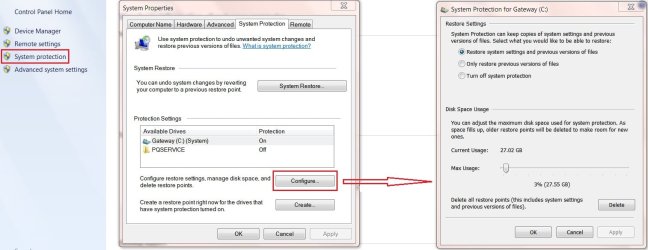
Currently I have 29 dating back to the 17th of May, 26 that deal with Windows Updates, and three with programs that I installed.

If you would like to increase the amount of points follow this tutorial: http://www.sevenforums.com/tutorials/335-system-protection-change-disk-space-usage.html
It should be noted that this increase will depend on how large your HDD is, mine is 1TB, and I have allocated 27GB to give me those 29 points.

With only six showing in your Snip attachment it would seem that you are only allocating maybe 8GB. I would at least double that, then use your machine at least until the next round of updates to see how many you now have in reserve.
It will take a while depending on the amount of activity on your machine, see information box here: http://www.sevenforums.com/tutorials/697-system-restore-point-create.html

Here is how I have mine set:
Re3storePoints.jpg


Oh! And don't forget to click on Apply, and then OK. ;)
 

My Computer My Computer

Computer type
PC/Desktop
Computer Manufacturer/Model Number
Gateway DX4831-01e (Mid-Tower Desktop)
OS
Originally Win 7 Hm Prem x64 Ver 6.1.7600 Build 7601-SP1 | Upgraded to Windows 10 December 14, 2019
CPU
Intel i3 530 2.93GHz, 2933MHz 2 Cores 4 Logical Processors
Motherboard
Gateway H57M01 133 megahertz
Memory
6GB of 1,333MHz DDR3 SDRAM
Graphics Card(s)
32MB Intel Graphics Media Accelerator HD IGChip
Sound Card
Realtek High Definition Audio
Monitor(s) Displays
Gateway HX2000 20inch TFT active matrix TN
Screen Resolution
1600 x 900 x 59 hertz
Hard Drives
WDC WD10EADS-00M2B0 [HDD] (1000.20 GB) -- drive 0,
HL-DT-ST DVDRAM GH41N [CD-ROM dr]
Four card readers, and Four USB 2.0
PSU
300watts.
Case
Mid-Tower Desktop
Cooling
Stock from Gateway
Keyboard
Natural Ergonomic Keyboard 4000, see Other Info
Mouse
Orig. Gateway wore out now using Insignia USB wired optical
Internet Speed
Vz FIOS 10ms png 57.64Mbps down 65.53Mbps up Speedtest.org
Antivirus
Zamana Anti-logger with Anti-malware, MSE, Windows Firewall,
Browser
IE11.0.9600.19399-Upd ver11.0.135, Firefox 68.0.1 x64
Other Info
System Specs by Belarc.

BIOS: American Megatrends Inc. P01-A0 11/17/2009

Replaced the MS 'Natural' Standard PS/2 Enhanced 101-102 Keyboard with a new Natural Ergonomic Keyboard 4000 on August 1st 2014.

Canon Pixma MG3222 Printer.

Updated to IE11 on 12102015 | Fios Quantum Router g1100

Additional AV: SpywareBlaster, manual Mbam, SAS
Back
Top