
7 freezes while browsing Internet

Last edited:

My Computer

Computer Manufacturer/Model Number
HP Pavillion dv-7 1005 Tx
OS
Win 8 Release candidate 8400
CPU
[email protected]
Memory
4 gigs
Graphics Card(s)
Nvidia 9600M
Sound Card
HD built-in
Monitor(s) Displays
17" Wxga
Screen Resolution
1440x900
Cooling
none
Internet Speed
45Mb down 5Mb up

My Computer

OS
Windows 7
CPU
Core 2 Duo E8400
Motherboard
Asus P5K
Memory
2 gb ddr2 800 MHz Kingston
Graphics Card(s)
Asus Nvidia GeForce 8800 GT top
Sound Card
Realtek int.
Monitor(s) Displays
Asus 19" LCD
Hard Drives
320 gb HDD
Case
Asus Vento A8
Amarganth, petrossa

Could we get your networking info, what browser, and spec info abt what happens. If you guys want to get this rolling you could also go into event viewer (type event viewer into search) and see what errors that are relevant to this, snip a pic and upload it.

Ken

network: ethernet, netgear router, broadband adsl.

Specific:
windows 7600 RTM
Browers tried: IE8, Firefox, Opera.
Tried all 3 at the same time, or in quick succession.

You either click on a favorite, or enter address directly. Sometimes a bit of loading starts and it freezes, or nothing happens.
It can take anything from a couple of minutes to getting irritated and reboot to Vista.

No specific events are noted in the event viewer.

Running Vista now since it's too annoying
 

My Computer

Computer Manufacturer/Model Number
me and myself
OS
vista x64/ win 7 x64
CPU
phenom 9950 BE
Motherboard
ASUS M2A-VM HDMI
Memory
8 gb
Graphics Card(s)
nvidia gts 250
Sound Card
realtek HD onboard
Monitor(s) Displays
dual hd 19" tft
Screen Resolution
1440x900
Hard Drives
2 x 500 gb WDC
1 x 500 gb Seagate
1 x 1000 gb Seagate
1 80 gb raptor
1 usb 160 gb
Cooling
standard issue
Keyboard
logitech g11
Mouse
usb wireless MS laser 6000
Internet Speed
18 mb (according to my provider :)
Finally, after hours of going through the logs and identifying the errors and what's causing them I found one thing that might be the troublemaker, I erased it and VOILA, no freezes anymore, at least not up till now. The program that caused the trouble was non other than NERO BURNING ROM. That said, does anyone know some other good burning software?

If another freeze happens I'll be sure to post again, hope this is the end of my problems.

:( i don't have Nero installed. So i'll try to do a clean install when the final release come sout and see what that does. Till then i'll use Vista

I use magic iso, it burns anything anywhere anytime
 

My Computer

Computer Manufacturer/Model Number
me and myself
OS
vista x64/ win 7 x64
CPU
phenom 9950 BE
Motherboard
ASUS M2A-VM HDMI
Memory
8 gb
Graphics Card(s)
nvidia gts 250
Sound Card
realtek HD onboard
Monitor(s) Displays
dual hd 19" tft
Screen Resolution
1440x900
Hard Drives
2 x 500 gb WDC
1 x 500 gb Seagate
1 x 1000 gb Seagate
1 80 gb raptor
1 usb 160 gb
Cooling
standard issue
Keyboard
logitech g11
Mouse
usb wireless MS laser 6000
Internet Speed
18 mb (according to my provider :)
:( i don't have Nero installed. So i'll try to do a clean install when the final release come sout and see what that does. Till then i'll use Vista

I use magic iso, it burns anything anywhere anytime

Well I'm using RTM version so I guess you could say I'm using the final release.

Update: Nero didn't solve the problem, erasing Nero that is. So I got REALLY frustrated. I went on to search for more errors as there were 3 more popping up ALL the time. One of them was a failure to boot 2 services, both protection services for a game. I erased the game but it didn't help. The next one was the one that says the system cannot contact www.msftncsi.com, DAMN, I thought I must have a virus or something that is trying to connect to a website. However, it turns out Microsoft themselves are the culprits!!! Anyway, NCSI is like a service that connects to a site to see if you're internet connection is still active and if it functions. No need for that, and really no need for someone on their part to know my ip. Anyway, I had to edit the registry to disable NCSI. I did so, and no freezes on my part anymore. At least for now. I really hope I solved the problem (caused by Microsoft in the first place). If not I'll be sure to post again, and if so I'll post again to confirm. Hope this helps someone.

To disable NCSI use the registry editor, then go to HKEY_LOCAL_MACHINE\SYSTEM\CurrentControlSet\NlaSvc\Parameters\Internet and there you will find EnableActiveProbing, edit it to a value of 0, reboot system, and the problem should be solved.
 

My Computer

OS
Windows 7
CPU
Core 2 Duo E8400
Motherboard
Asus P5K
Memory
2 gb ddr2 800 MHz Kingston
Graphics Card(s)
Asus Nvidia GeForce 8800 GT top
Sound Card
Realtek int.
Monitor(s) Displays
Asus 19" LCD
Hard Drives
320 gb HDD
Case
Asus Vento A8
Editing the registry did not help.

Next and final try: The only error left is the one saying my IPv6 cannot alocate enough
memory, stupid cause I have 2 gigs. Anyway, I will try to disable it (the ipv6) and run on IPv4 and see if it helps.
 

My Computer

OS
Windows 7
CPU
Core 2 Duo E8400
Motherboard
Asus P5K
Memory
2 gb ddr2 800 MHz Kingston
Graphics Card(s)
Asus Nvidia GeForce 8800 GT top
Sound Card
Realtek int.
Monitor(s) Displays
Asus 19" LCD
Hard Drives
320 gb HDD
Case
Asus Vento A8
I might have missed this is in earlier post, but have any of you guys tried running win 7 in diagnostic mode or safe mode with networking?
 
Last edited:

My Computer

Computer Manufacturer/Model Number
Gigabyte
OS
Windows 7 Ultimate
CPU
Intel Core(TM)2 Quad- Q9550, 2.83GHz
Motherboard
G31M-ES2L
Memory
4GB
Graphics Card(s)
ATI Radeon HD4600
Sound Card
On Board:
Monitor(s) Displays
Acer AL2223W, Acer AL1916
Screen Resolution
1680 x 1050, 1280 x 1024
Hard Drives
160GB
350GB
250GB
250GB
PSU
600W
Case
Cooler Master
Keyboard
Microsoft Laser 6000
Mouse
Logitech Optical Trackman
Internet Speed
1.5MB
Other Info
I am also running a quasar gamatron flux capacitor with twin pulse tronic phasers......jk, I have no such stuff.
Editing the registry did not help.

Next and final try: The only error left is the one saying my IPv6 cannot alocate enough
memory, stupid cause I have 2 gigs. Anyway, I will try to disable it (the ipv6) and run on IPv4 and see if it helps.

i have 8gb, but i'll try disabling the ip6 over ip4. Have a vaque recollection reading thats crap.
 

My Computer

Computer Manufacturer/Model Number
me and myself
OS
vista x64/ win 7 x64
CPU
phenom 9950 BE
Motherboard
ASUS M2A-VM HDMI
Memory
8 gb
Graphics Card(s)
nvidia gts 250
Sound Card
realtek HD onboard
Monitor(s) Displays
dual hd 19" tft
Screen Resolution
1440x900
Hard Drives
2 x 500 gb WDC
1 x 500 gb Seagate
1 x 1000 gb Seagate
1 80 gb raptor
1 usb 160 gb
Cooling
standard issue
Keyboard
logitech g11
Mouse
usb wireless MS laser 6000
Internet Speed
18 mb (according to my provider :)
i have 8gb, but i'll try disabling the ip6 over ip4. Have a vaque recollection reading thats crap.

Up till now I haven't had a problem, no freezing, tho I'm not certain yet it worked so I'll have to wait to tomorrow to be certain.
 

My Computer

OS
Windows 7
CPU
Core 2 Duo E8400
Motherboard
Asus P5K
Memory
2 gb ddr2 800 MHz Kingston
Graphics Card(s)
Asus Nvidia GeForce 8800 GT top
Sound Card
Realtek int.
Monitor(s) Displays
Asus 19" LCD
Hard Drives
320 gb HDD
Case
Asus Vento A8
Nope, still freezes. Well, that's it, I'm out of ideas...and desperate. I really don't want to go back to Vista, so any ideas are welcome...
 

My Computer

OS
Windows 7
CPU
Core 2 Duo E8400
Motherboard
Asus P5K
Memory
2 gb ddr2 800 MHz Kingston
Graphics Card(s)
Asus Nvidia GeForce 8800 GT top
Sound Card
Realtek int.
Monitor(s) Displays
Asus 19" LCD
Hard Drives
320 gb HDD
Case
Asus Vento A8
Try getting rid of some of the extra files.:geek:
 

My Computer

Computer Manufacturer/Model Number
Custom
OS
Windows 7 Professional 32-bit
CPU
Intel(R) Pentium(R) D CPU 3.00 GHz
Motherboard
Asus P5B-VM
Memory
Kingston DDR2 3 gigs total Dual channels Symmetric
Graphics Card(s)
NVIDIA GeForce 8600 GT
Sound Card
Hi defonition Sound max
Monitor(s) Displays
CisNet
Screen Resolution
1280*1024
Hard Drives
WDC WD16000AA-00L7A0 SATA DRIVE
WDC IDE Drive 80 gigs.
PSU
Raidmax 380 watt
Case
Generic brand
Cooling
Standard fan
Keyboard
Logitech Cordless desktop EX100
Mouse
Logitech Cordless desktop EX100
Internet Speed
5.0 mbs
Other Info
MSE anti-virus
There are no extra files to get rid of, the problem was there from the clean install.

Did a scan with S&D, no probs, did a scan with Nod32, no probs. BIG SIGH I don't know what to do.
 

My Computer

OS
Windows 7
CPU
Core 2 Duo E8400
Motherboard
Asus P5K
Memory
2 gb ddr2 800 MHz Kingston
Graphics Card(s)
Asus Nvidia GeForce 8800 GT top
Sound Card
Realtek int.
Monitor(s) Displays
Asus 19" LCD
Hard Drives
320 gb HDD
Case
Asus Vento A8
Try running a diffrent browser I use Netscape navigator:D and yes I know they discontinued it but I got it of Cnet.
 

My Computer

Computer Manufacturer/Model Number
Custom
OS
Windows 7 Professional 32-bit
CPU
Intel(R) Pentium(R) D CPU 3.00 GHz
Motherboard
Asus P5B-VM
Memory
Kingston DDR2 3 gigs total Dual channels Symmetric
Graphics Card(s)
NVIDIA GeForce 8600 GT
Sound Card
Hi defonition Sound max
Monitor(s) Displays
CisNet
Screen Resolution
1280*1024
Hard Drives
WDC WD16000AA-00L7A0 SATA DRIVE
WDC IDE Drive 80 gigs.
PSU
Raidmax 380 watt
Case
Generic brand
Cooling
Standard fan
Keyboard
Logitech Cordless desktop EX100
Mouse
Logitech Cordless desktop EX100
Internet Speed
5.0 mbs
Other Info
MSE anti-virus
Try running a diffrent browser I use Netscape navigator:D and yes I know they discontinued it but I got it of Cnet.

as Arg mentioned, and me too it's not the browser. We both tried different browsers.

Arg, did you also disable the IPhelper service in services.msc?
 

My Computer

Computer Manufacturer/Model Number
me and myself
OS
vista x64/ win 7 x64
CPU
phenom 9950 BE
Motherboard
ASUS M2A-VM HDMI
Memory
8 gb
Graphics Card(s)
nvidia gts 250
Sound Card
realtek HD onboard
Monitor(s) Displays
dual hd 19" tft
Screen Resolution
1440x900
Hard Drives
2 x 500 gb WDC
1 x 500 gb Seagate
1 x 1000 gb Seagate
1 80 gb raptor
1 usb 160 gb
Cooling
standard issue
Keyboard
logitech g11
Mouse
usb wireless MS laser 6000
Internet Speed
18 mb (according to my provider :)
as Arg mentioned, and me too it's not the browser. We both tried different browsers.

Arg, did you also disable the IPhelper service in services.msc?

No, does it help?
 

My Computer

OS
Windows 7
CPU
Core 2 Duo E8400
Motherboard
Asus P5K
Memory
2 gb ddr2 800 MHz Kingston
Graphics Card(s)
Asus Nvidia GeForce 8800 GT top
Sound Card
Realtek int.
Monitor(s) Displays
Asus 19" LCD
Hard Drives
320 gb HDD
Case
Asus Vento A8
No, does it help?

well, as you also have noticed the freezing isn't exactly predictable. I also put my puter to sleep to only wake it if i do some actual surfing/work.

So it sleeps more then not :)

Given these caveats i haven't had a freeze since i disabled the Iphelper service (and unticked ip6 over ip4 in properties)

Fingers crossed, i'll now in a couple of days. But (or this is wishful thinking) overal the DNS lookup seems quicker now.
 

My Computer

Computer Manufacturer/Model Number
me and myself
OS
vista x64/ win 7 x64
CPU
phenom 9950 BE
Motherboard
ASUS M2A-VM HDMI
Memory
8 gb
Graphics Card(s)
nvidia gts 250
Sound Card
realtek HD onboard
Monitor(s) Displays
dual hd 19" tft
Screen Resolution
1440x900
Hard Drives
2 x 500 gb WDC
1 x 500 gb Seagate
1 x 1000 gb Seagate
1 80 gb raptor
1 usb 160 gb
Cooling
standard issue
Keyboard
logitech g11
Mouse
usb wireless MS laser 6000
Internet Speed
18 mb (according to my provider :)
well, as you also have noticed the freezing isn't exactly predictable. I also put my puter to sleep to only wake it if i do some actual surfing/work.

So it sleeps more then not :)

Given these caveats i haven't had a freeze since i disabled the Iphelper service (and unticked ip6 over ip4 in properties)

Fingers crossed, i'll now in a couple of days. But (or this is wishful thinking) overal the DNS lookup seems quicker now.

Hmmm, could you tell me how to disable the IPhelper?
 

My Computer

OS
Windows 7
CPU
Core 2 Duo E8400
Motherboard
Asus P5K
Memory
2 gb ddr2 800 MHz Kingston
Graphics Card(s)
Asus Nvidia GeForce 8800 GT top
Sound Card
Realtek int.
Monitor(s) Displays
Asus 19" LCD
Hard Drives
320 gb HDD
Case
Asus Vento A8
Hmmm, could you tell me how to disable the IPhelper?

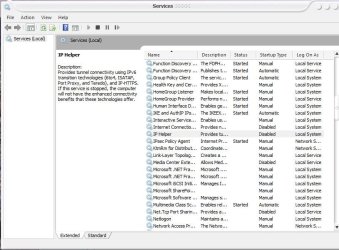
type services.msc in the search bar, you get a list with all running services.
Scroll down till you find: IPHelper, right click and choose disabled from the dropdown menu. click on Stop to stop it.
 

Attachments

  • services.JPG
    services.JPG
    82.1 KB · Views: 220

My Computer

Computer Manufacturer/Model Number
me and myself
OS
vista x64/ win 7 x64
CPU
phenom 9950 BE
Motherboard
ASUS M2A-VM HDMI
Memory
8 gb
Graphics Card(s)
nvidia gts 250
Sound Card
realtek HD onboard
Monitor(s) Displays
dual hd 19" tft
Screen Resolution
1440x900
Hard Drives
2 x 500 gb WDC
1 x 500 gb Seagate
1 x 1000 gb Seagate
1 80 gb raptor
1 usb 160 gb
Cooling
standard issue
Keyboard
logitech g11
Mouse
usb wireless MS laser 6000
Internet Speed
18 mb (according to my provider :)
Well I haven't had a crash since this morning, disabling the iphelper is just an addon... I think Windows solved the problem by itself. When I woke up I had 3 updates ready to be installed, one of them was an update for my WLAN PCI adapter driver, nothing big just 300 kb, however I really hope that solved the problem, if not then I hope disabling the iphelper did. Haven't had a crash so far but still pesimistic since there were periods without freezes already that deceived. All that remains is to wait and hope...
 

My Computer

OS
Windows 7
CPU
Core 2 Duo E8400
Motherboard
Asus P5K
Memory
2 gb ddr2 800 MHz Kingston
Graphics Card(s)
Asus Nvidia GeForce 8800 GT top
Sound Card
Realtek int.
Monitor(s) Displays
Asus 19" LCD
Hard Drives
320 gb HDD
Case
Asus Vento A8
A

Im glad you finally have some encouraging signs. let us know

Ken
 

My Computer

Computer Manufacturer/Model Number
HP Pavillion dv-7 1005 Tx
OS
Win 8 Release candidate 8400
CPU
[email protected]
Memory
4 gigs
Graphics Card(s)
Nvidia 9600M
Sound Card
HD built-in
Monitor(s) Displays
17" Wxga
Screen Resolution
1440x900
Cooling
none
Internet Speed
45Mb down 5Mb up
Back
Top