Unable to connect to many websites - please help

Autoimmunity

New member
Local time
2:28 AM
Messages
5
Ok, So I've had this problem for quite a while now and have tried to solve it without asking anywhere but I'm dumbfounded on what to do next.

My computer simply will not connect to certain websites, particularly youtube.com, no matter what browser I use. I have checked the hosts file, run a malware scan, pinged youtube using DOS (and gotten a response) and taken my wireless router out of the equation, all to the same result: nothing.

If there is anything else I can do to possibly resolve this problem please assist me.

PS: I would also like to mention that I was told that this could be a problem with my ISP.
I do not believe this is the case due to every other device on my network being able to access youtube. This includes my Xbox, smartphone, iPad, and laptop, all with no problems. My main PC is the only device I have that has this problem.
 

My Computer My Computer

At a glance

Windows 7 Home Premium 64bit
OS
Windows 7 Home Premium 64bit
Hello auto, and welcome to Sevenforums!

I may not know a whole lot on exactly what is causing you the problems, but we can troubleshoot a bit to see if we can't find what's going on inside. If youtube works on everything else, then it isn't an ISP problem.

First, are you using the latest version of internet explorer (9)? Do you have the same trouble with another web browser such as firefox or chrome?

Second, Do you have every single "important" update installed, and all internet explorer or web browser - related "optional" updates installed? And have you updated all add-ons for all web browsers that you use, especially flash player and java?
Just what are all the add-ons that you have installed, especially any security add-ons. Please list them for me. Do you have any tracking protection lists that you might have enabled? Disable all of those tracking protection lists and check to see if it all works now (may need to restart IE).

Now we go a little deeper so gird up your skirt and let's trudge:
What antivirus/antimalware software(s) are you running? Some antivirus/malware programs can hinder normal operation, so you might consider disabling all security features temporarily and navigating to a SAFE website, such as youtube, that you've been having trouble with. If you are able to use it well, then the problem lies with your security software(s).
:note:Note: If you've installed another firewall other than the pre-installed windows firewall, disable it now. I would go as far as removing it, but it is up to you. Windows firewall works perfectly fine (often better), and you shouldn't have to disable it at all during our tests.
:note:Also note: Re-enable everything if the problem persists. Update your antivirus software and do a full scan on your system to make sure it is malware free. If you do not have an antivirus software, use mine: http://www.microsoft.com/security/pc-security/mse.aspx

If not, we continue on:
Try resetting IE9*: Reset Internet Explorer settings in Internet Explorer 9
*BUT FIRST: save all of your favorites (if you have them): Import or export favorites in Internet Explorer

Let me know how all of this turns out!
 

My Computer My Computer

At a glance

Microsoft Windows 8.1 Pro 64-bitIntel(R) Core(TM) i3-4130 CPU @ 3.40GHz8.00 GBNone
Computer type
PC/Desktop
Computer Manufacturer/Model Number
Custom Asus Build
OS
Microsoft Windows 8.1 Pro 64-bit
CPU
Intel(R) Core(TM) i3-4130 CPU @ 3.40GHz
Motherboard
B85M-E
Memory
8.00 GB
Graphics Card(s)
None
Sound Card
Realtek High Definition Audio
Monitor(s) Displays
Asus 23.6" Monitor
Screen Resolution
1920 x 1080 x 32 bits (4294967296 colors) @ 60 Hz
Hard Drives
INTEL SSDSC2BW180A4
Samsung SSD 840 PRO Series
PSU
Seasonic S12II-380Bronze
Case
Lian Li
Cooling
Fan, Passive
Keyboard
Logitech K120
Mouse
Microsoft Touch Mouse
Internet Speed
4ms Ping, 19.0 Mbps Download, 19.0 Mbps Upload
Antivirus
Eset Endpoint
Browser
Internet Explorer, Chrome
Yes, I am using IE9 and latest updates of Flash, Java, etc. No matter what browser I use I get a "cannot display the webpage" screen.

I'm using Malwarebytes anti-malware and I have run a full scan recently with no malicious software detected.

I have no firewalls enabled, even the default windows firewall is disabled.
 

My Computer My Computer

At a glance

Windows 7 Home Premium 64bit
OS
Windows 7 Home Premium 64bit
That is quite a list I provided, including links and all. Surely you haven't gone through all of it just yet, or have you?

Even with malwarebytes, I would recommend a lightweight antivirus solution. The free malwarebytes doesn't have real-time protection as an antivirus does, and the paid for version isn't as good. Don't get me wrong, Malwarebytes is perfect in addition to an antivirus product. It picks up any slack left behind. Again, MSE is a good option but there are many different kinds of antiviruses. Choice is yours. Whatever your choice, please run this safety tool to check for malware (as an added precaution): Microsoft Safety Scanner - Antivirus | Remove Spyware, Malware, Viruses Free
:warn: Make sure you never have two ANTIVIRUS softwares installed at the same time, as conflicts may arise. Note that Malwarebytes is not an antivirus product, so it is completely exempt in this regard.

AFTER you finished everything else in the list I provided earlier, we shall continue:
Are you running off a home location with standard modem>router setup? Are you running wireless or wired? Does it make a difference if you switch between the two?

Failing everything (and with your confirmation that you did, in fact, do everything), the only other options are to do a repair install (I can help you on that front) or a clean install. I would think a clean install would be quite extreme at this point so hold off on that till the very last.

Oh, and there is also restore points if you know of a time when your computer was acting fine and you want to take it back there: http://www.sevenforums.com/tutorials/700-system-restore.html
:info: Read the tutorial carefully just what you will lose if you choose to restore.

If every single thing to this point fails, then post a screenshot of both your installed programs and web browser add-ons (internet explorer).
 

My Computer My Computer

At a glance

Microsoft Windows 8.1 Pro 64-bitIntel(R) Core(TM) i3-4130 CPU @ 3.40GHz8.00 GBNone
Computer type
PC/Desktop
Computer Manufacturer/Model Number
Custom Asus Build
OS
Microsoft Windows 8.1 Pro 64-bit
CPU
Intel(R) Core(TM) i3-4130 CPU @ 3.40GHz
Motherboard
B85M-E
Memory
8.00 GB
Graphics Card(s)
None
Sound Card
Realtek High Definition Audio
Monitor(s) Displays
Asus 23.6" Monitor
Screen Resolution
1920 x 1080 x 32 bits (4294967296 colors) @ 60 Hz
Hard Drives
INTEL SSDSC2BW180A4
Samsung SSD 840 PRO Series
PSU
Seasonic S12II-380Bronze
Case
Lian Li
Cooling
Fan, Passive
Keyboard
Logitech K120
Mouse
Microsoft Touch Mouse
Internet Speed
4ms Ping, 19.0 Mbps Download, 19.0 Mbps Upload
Antivirus
Eset Endpoint
Browser
Internet Explorer, Chrome
Please try to flush the DNS by using the following command and try again.

IPCONFIG /FLUSHDNS

Also empty your local cache, history etc.
 

My Computer My Computer

At a glance

Windows 7 Ultimate x64
Computer Manufacturer/Model Number
Dell Inspiron 15
OS
Windows 7 Ultimate x64

My Computer My Computer

At a glance

Microsoft Windows 8.1 Pro 64-bitIntel(R) Core(TM) i3-4130 CPU @ 3.40GHz8.00 GBNone
Computer type
PC/Desktop
Computer Manufacturer/Model Number
Custom Asus Build
OS
Microsoft Windows 8.1 Pro 64-bit
CPU
Intel(R) Core(TM) i3-4130 CPU @ 3.40GHz
Motherboard
B85M-E
Memory
8.00 GB
Graphics Card(s)
None
Sound Card
Realtek High Definition Audio
Monitor(s) Displays
Asus 23.6" Monitor
Screen Resolution
1920 x 1080 x 32 bits (4294967296 colors) @ 60 Hz
Hard Drives
INTEL SSDSC2BW180A4
Samsung SSD 840 PRO Series
PSU
Seasonic S12II-380Bronze
Case
Lian Li
Cooling
Fan, Passive
Keyboard
Logitech K120
Mouse
Microsoft Touch Mouse
Internet Speed
4ms Ping, 19.0 Mbps Download, 19.0 Mbps Upload
Antivirus
Eset Endpoint
Browser
Internet Explorer, Chrome
Ok, I just realized that I forgot to include the fact that I have AVG Internet Security installed as well, so I DO have an anti-virus software.
 

My Computer My Computer

At a glance

Windows 7 Home Premium 64bit
OS
Windows 7 Home Premium 64bit
Oh, thats fine. AVG is getting better as an antivirus than it used to be, but do follow through all of the steps I've listed in all previous posts, including temporarily disabling AVG to see if it is the cause of any of the problems.
 

My Computer My Computer

At a glance

Microsoft Windows 8.1 Pro 64-bitIntel(R) Core(TM) i3-4130 CPU @ 3.40GHz8.00 GBNone
Computer type
PC/Desktop
Computer Manufacturer/Model Number
Custom Asus Build
OS
Microsoft Windows 8.1 Pro 64-bit
CPU
Intel(R) Core(TM) i3-4130 CPU @ 3.40GHz
Motherboard
B85M-E
Memory
8.00 GB
Graphics Card(s)
None
Sound Card
Realtek High Definition Audio
Monitor(s) Displays
Asus 23.6" Monitor
Screen Resolution
1920 x 1080 x 32 bits (4294967296 colors) @ 60 Hz
Hard Drives
INTEL SSDSC2BW180A4
Samsung SSD 840 PRO Series
PSU
Seasonic S12II-380Bronze
Case
Lian Li
Cooling
Fan, Passive
Keyboard
Logitech K120
Mouse
Microsoft Touch Mouse
Internet Speed
4ms Ping, 19.0 Mbps Download, 19.0 Mbps Upload
Antivirus
Eset Endpoint
Browser
Internet Explorer, Chrome
Disable AVG and Windows Firewall.

Does this solve the problem?
 

My Computer My Computer

At a glance

Windows 7 Home Premium 64bitIntel Core i5-2450M CPU @ 2.50GHZ4GB Of RAMNVIDIA Geforce GT 525M with CUDA
Computer Manufacturer/Model Number
Toshiba
OS
Windows 7 Home Premium 64bit
CPU
Intel Core i5-2450M CPU @ 2.50GHZ
Motherboard
????
Memory
4GB Of RAM
Graphics Card(s)
NVIDIA Geforce GT 525M with CUDA
Sound Card
NVIDIA High Definition Audio and Conexant Smart Audio HD
Monitor(s) Displays
Generic PnP Monitor
Hard Drives
750GB of Hard Drive
Disable AVG and Windows Firewall.

Does this solve the problem?

No, Unfortunately not.

Also, I have run a full scan for malware, nothing detected.
AVG and Firewalls aren't the problem, browsers aren't, I have flushed the DNS.

Is there anything I can do to fix this problem without resetting my PC in some way?
 

My Computer My Computer

At a glance

Windows 7 Home Premium 64bit
OS
Windows 7 Home Premium 64bit
...I have checked the hosts file, run a malware scan, pinged youtube using DOS (and gotten a response)...
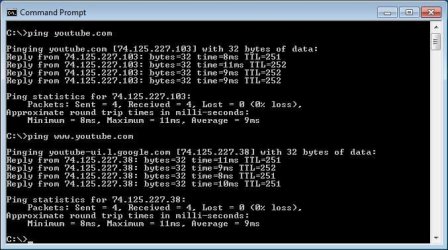
Do you have a HOST file with lots of entries or just the stock one? If you have more entries in your HOST file than the stock HOST file has, do any of them block google? For testing, you can rename the HOST file.

And when you pinged youtube, did you ping youtube.com or www.youtube.com?

You mentioned that your laptop (on the same network) can get to youtube - compare the ping response from your laptop to the computer that is not working. In other words, does pinging www.youtube.com get you a google server name?

ping.JPG
 

My Computer My Computer

At a glance

W7 Pro SP1 64biti78GBIntel HD Graphics
Computer type
Laptop
Computer Manufacturer/Model Number
Employer provided Dell Latitude
OS
W7 Pro SP1 64bit
CPU
i7
Memory
8GB
Graphics Card(s)
Intel HD Graphics
Hard Drives
crappy SSD
Antivirus
Employer mandated Symantec Endpoint Protection
Browser
Pale Moon 64bit, IE11 64bit & Chrome 64bit

My Computer My Computer

At a glance

Microsoft Windows 8.1 Pro 64-bitIntel(R) Core(TM) i3-4130 CPU @ 3.40GHz8.00 GBNone
Computer type
PC/Desktop
Computer Manufacturer/Model Number
Custom Asus Build
OS
Microsoft Windows 8.1 Pro 64-bit
CPU
Intel(R) Core(TM) i3-4130 CPU @ 3.40GHz
Motherboard
B85M-E
Memory
8.00 GB
Graphics Card(s)
None
Sound Card
Realtek High Definition Audio
Monitor(s) Displays
Asus 23.6" Monitor
Screen Resolution
1920 x 1080 x 32 bits (4294967296 colors) @ 60 Hz
Hard Drives
INTEL SSDSC2BW180A4
Samsung SSD 840 PRO Series
PSU
Seasonic S12II-380Bronze
Case
Lian Li
Cooling
Fan, Passive
Keyboard
Logitech K120
Mouse
Microsoft Touch Mouse
Internet Speed
4ms Ping, 19.0 Mbps Download, 19.0 Mbps Upload
Antivirus
Eset Endpoint
Browser
Internet Explorer, Chrome
I get the same response for both pings.

With regards to a repair install, I don't think that's possible due to the fact that Windows 7 was pre-loaded when I bought the computer, so I son't have a disc.

If there is no way for me to fix this problem, then thanks for the help anyways. It isn't too big of a deal, It's just something I would like fixed.
 

My Computer My Computer

At a glance

Windows 7 Home Premium 64bit
OS
Windows 7 Home Premium 64bit
I get the same response for both pings....
Are you saying that you get the same response that I showed in my screenshot?
Or are you saying that you get the same response on the desktop and the laptop?
Or are you saying that you get the same return for youtube.com that you for www.youtube.com?
(Those returns should be different.)


...With regards to a repair install, I don't think that's possible due to the fact that Windows 7 was pre-loaded when I bought the computer, so I son't have a disc....
Take a look at the link provided for a repair install. The 3rd bullet in the Warning section has a link showing where you can download a W7 DVD with SP1 already incorporated. As long as you have a valid Certificate of Authenticity affixed to your computer, you could even do a clean install - if you wish.
I like this website for downloading W7 SP1 OS DVDs:
http://heidoc.net/joomla/technology-science/microsoft/14-windows-7-direct-download-links


Do you have a HOST file with lots of entries or just the stock one? If you have more entries in your HOST file than the stock HOST file has, do any of them block google? For testing, you can rename the HOST file.
 

My Computer My Computer

At a glance

W7 Pro SP1 64biti78GBIntel HD Graphics
Computer type
Laptop
Computer Manufacturer/Model Number
Employer provided Dell Latitude
OS
W7 Pro SP1 64bit
CPU
i7
Memory
8GB
Graphics Card(s)
Intel HD Graphics
Hard Drives
crappy SSD
Antivirus
Employer mandated Symantec Endpoint Protection
Browser
Pale Moon 64bit, IE11 64bit & Chrome 64bit
If the above advice does not work for you then you can also try flushing out and resetting the network connections by following the instructions below...

Open Notepad and copy/paste the entire contents of the codebox below into Notepad:

Code:
@Echo on 
pushd\windows\system32\drivers\etc 
attrib -h -s -r hosts 
echo 127.0.0.1 localhost>HOSTS 
attrib +r +h +s hosts 
popd 
ipconfig /release 
ipconfig /renew 
ipconfig /flushdns 
netsh winsock reset all 
netsh int ip reset all 
shutdown -r -t 1 
del %0
Save this as reset.bat and choose to Save as type: - All Files then close the Notepad file.

Right click on reset.bat and select 'Run as Administrator'.

Your computer will automatically reboot during the process. The batch file will auto delete itself once it has run.

Please note - Any additional entries that you may have added to the host file will need re-entering.
 

My Computer My Computer

At a glance

Windows 7/LinuxAthlon 64 x2 6000+4Gb Dual ChannelGeforce 8400
Computer Manufacturer/Model Number
Custom - PC Specialist
OS
Windows 7/Linux
CPU
Athlon 64 x2 6000+
Motherboard
ASUS M3N78 PRO
Memory
4Gb Dual Channel
Graphics Card(s)
Geforce 8400
Sound Card
On Board
Monitor(s) Displays
BenQ G2222HDL
Screen Resolution
1920x1080
Hard Drives
1Gb Spinpoint F3/740Gb Western Digital
640Gb Western Digital
PSU
National Grid
Case
Yes
Cooling
Stock Cooler
Keyboard
Saitek Eclipse II
Mouse
Microsoft Laser Mouse
Internet Speed
50Mb
Back
Top