BSOD 0x00000050 perhaps Chrome related

matthewoutram

New member
Local time
11:32 AM
Messages
6
Shortly after boot-up, perhaps 2-3 times a week, I get BSOD on my Lenovo X301 laptop running W7x64. Laptop has run fine for several years, no hardware changes or BIOS changes.

Chrome seems to crash too, so may be related (also new fault). I use AVG Free.

DMP attached in ZIP, no clue how to read it or proceed.

I ran SFC and it says OK - what next?

Thanks
Matt.

C:\Windows\system32>SFC /verifyonly

Beginning system scan. This process will take some time.

Beginning verification phase of system scan.
Verification 100% complete.

Windows Resource Protection did not find any integrity violations.
 

My Computer My Computer

At a glance

64bit Win7
OS
64bit Win7

My Computer My Computer

At a glance

Windows 10 Pro x64, Arch LinuxIntel Core 2 Quad Q8200 OC'd 3.08GHz8GB DDR2 900MhzMSI GT730 2GB GDDR5 (Kepler)
Computer type
PC/Desktop
Computer Manufacturer/Model Number
Custom Build
OS
Windows 10 Pro x64, Arch Linux
CPU
Intel Core 2 Quad Q8200 OC'd 3.08GHz
Motherboard
Asus Rampage formula LGA775
Memory
8GB DDR2 900Mhz
Graphics Card(s)
MSI GT730 2GB GDDR5 (Kepler)
Sound Card
Supreme FX2
Monitor(s) Displays
Samsung LS22F350 LED
Screen Resolution
1080P
Hard Drives
Kingston SSDNow UV400 120GB, 500GB Hitachi, 2TB Samsung, 500GB Seagate FreeAgent, 640GB Samsung, 160GB Toshiba (Arch)
PSU
AeroCool 500W Bronze
Cooling
Cooler Master V6 + 3X fans
Keyboard
Prolink keyboard
Mouse
Logitech M705
Internet Speed
1MiB/s
Browser
Chrome Beta
Adding the other files the forum requests.

The system is running full version of Win7x64 and the drive is TrueCrypted.

Also, I left the utility running 1 hour and it never finished, as below.

The Resource and Performance Monitor "save as" never lit up either.

I will run the memtest overnight as suggested.

Matt.

04/07/2012 19:53:26.77

* * * H E L L O from jcgriff2 * * *


username matt
Windows OS Windows_NT
PC

Number of Proc's 2


----------- We will begin in 5 seconds. . . .
C:\Windows\minidump\061812-33602-01.dmp
C:\Windows\minidump\062312-32245-01.dmp
C:\Windows\minidump\070412-27378-01.dmp
C:\Windows\minidump\dbghelp.dll
C:\Windows\minidump\MdpView.exe
C:\Windows\minidump\readme.txt
6 file(s) copied.
1 file(s) copied.

Copying mini Kernel Memory Dump files. .


1 file(s) copied.

04/07/2012 Running Driver Query . . . driverquery - verbose output
19:53:50.01
program 1 of 3. . . executing

Searching for Drivers . . .


This may take 1 - 2 minutes. . . . E X E C U T I N G ...


04/07/2012 Running Driver Query . . . driverquery - verbose output
19:54:32.03
program 1 of 3. . . D O N E
program 2 of 3. . . executing


04/07/2012 Running Driver Query . . . driverquery - verbose output
19:54:32.06
program 1 of 3. . . D O N E
program 2 of 3. . . D O N E
program 3 of 3. . . EXECUTING . . . please wait. . .
 

My Computer My Computer

At a glance

64bit Win7
OS
64bit Win7
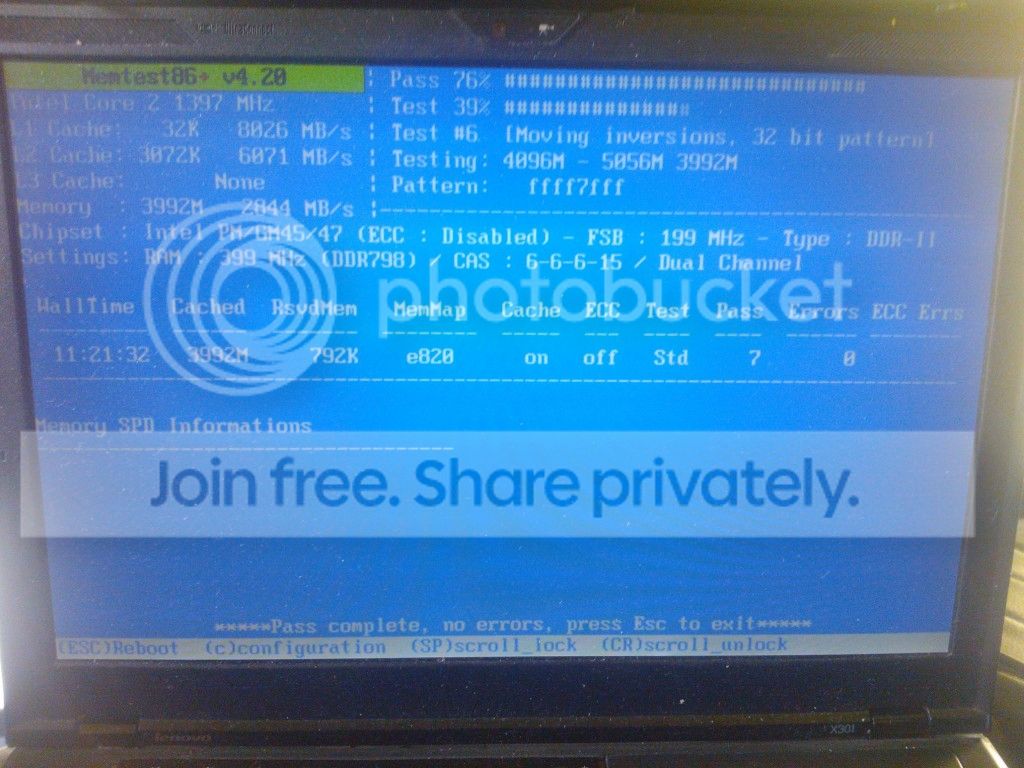
I ran the memory checker with no luck - no errors are found:

temporary.jpg


I suspect it is a bad driver from a recent update...but I do not know how to discover what to do next??

Can anyone help me?

Thanks
Matt.
 

My Computer My Computer

At a glance

64bit Win7
OS
64bit Win7

My Computer My Computer

At a glance

64bit Win7
OS
64bit Win7
Your single dump points to memory corruption. I'd recommend testing your RAM for at least 7 Passes
http://www.sevenforums.com/tutorials/105647-ram-test-memtest86.html

Update any obsolete Lenovo drivers especially the Power Manager Driver, remove any Vista drivers if any.
Lenovo Support - Download Drivers and Software (US)

I have a couple more dumps I can attached if that would be useful?

How do I remove the drivers you suggest?

Thanks for replying,
Matt.
Yes, upload them.

If you think that your issue is related to a recent update you should perform a system restore
http://www.sevenforums.com/tutorials/700-system-restore.html

You can remove the driver from the device manager or from a regular uninstall. I would however suggest you to update it since that driver may be essential for your system's power management. http://www.sevenforums.com/tutorials/77761-programs-features-uninstall-change-program.html
 

My Computer My Computer

At a glance

Windows 10 Pro x64, Arch LinuxIntel Core 2 Quad Q8200 OC'd 3.08GHz8GB DDR2 900MhzMSI GT730 2GB GDDR5 (Kepler)
Computer type
PC/Desktop
Computer Manufacturer/Model Number
Custom Build
OS
Windows 10 Pro x64, Arch Linux
CPU
Intel Core 2 Quad Q8200 OC'd 3.08GHz
Motherboard
Asus Rampage formula LGA775
Memory
8GB DDR2 900Mhz
Graphics Card(s)
MSI GT730 2GB GDDR5 (Kepler)
Sound Card
Supreme FX2
Monitor(s) Displays
Samsung LS22F350 LED
Screen Resolution
1080P
Hard Drives
Kingston SSDNow UV400 120GB, 500GB Hitachi, 2TB Samsung, 500GB Seagate FreeAgent, 640GB Samsung, 160GB Toshiba (Arch)
PSU
AeroCool 500W Bronze
Cooling
Cooler Master V6 + 3X fans
Keyboard
Prolink keyboard
Mouse
Logitech M705
Internet Speed
1MiB/s
Browser
Chrome Beta
Your single dump points to memory corruption. I'd recommend testing your RAM for at least 7 Passes
http://www.sevenforums.com/tutorials/105647-ram-test-memtest86.html

Update any obsolete Lenovo drivers especially the Power Manager Driver, remove any Vista drivers if any.
Lenovo Support - Download Drivers and Software (US)

I have a couple more dumps I can attached if that would be useful?

How do I remove the drivers you suggest?

Thanks for replying,
Matt.
Yes, upload them.

If you think that your issue is related to a recent update you should perform a system restore
http://www.sevenforums.com/tutorials/700-system-restore.html

You can remove the driver from the device manager or from a regular uninstall. I would however suggest you to update it since that driver may be essential for your system's power management. http://www.sevenforums.com/tutorials/77761-programs-features-uninstall-change-program.html

Attached. Which Driver should I be looking at, there are hundreds?

Matt.
 

My Computer My Computer

At a glance

64bit Win7
OS
64bit Win7
It's the Lenovo Power Manager Driver (Tppwr64v.sys). I noticed that your crashes were always caused when your Bluetooth service was active/running. The issue could be related to the Broadcom Bluetooth L2CAP driver which appears to be fairly old, that needs to be updated. The Lenovo Support & driver website should usually provide a newer version.
 

My Computer My Computer

At a glance

Windows 10 Pro x64, Arch LinuxIntel Core 2 Quad Q8200 OC'd 3.08GHz8GB DDR2 900MhzMSI GT730 2GB GDDR5 (Kepler)
Computer type
PC/Desktop
Computer Manufacturer/Model Number
Custom Build
OS
Windows 10 Pro x64, Arch Linux
CPU
Intel Core 2 Quad Q8200 OC'd 3.08GHz
Motherboard
Asus Rampage formula LGA775
Memory
8GB DDR2 900Mhz
Graphics Card(s)
MSI GT730 2GB GDDR5 (Kepler)
Sound Card
Supreme FX2
Monitor(s) Displays
Samsung LS22F350 LED
Screen Resolution
1080P
Hard Drives
Kingston SSDNow UV400 120GB, 500GB Hitachi, 2TB Samsung, 500GB Seagate FreeAgent, 640GB Samsung, 160GB Toshiba (Arch)
PSU
AeroCool 500W Bronze
Cooling
Cooler Master V6 + 3X fans
Keyboard
Prolink keyboard
Mouse
Logitech M705
Internet Speed
1MiB/s
Browser
Chrome Beta
I ran SlimDrivers and took all the options and updated 26 drivers - I'll report back if there is another DMP.

Matt.
 

My Computer My Computer

At a glance

64bit Win7
OS
64bit Win7
Back
Top