Volume on computer is ridiculously low....Pleas help.

pegs204

New member
Local time
2:51 AM
Messages
3
I've had my computer for a few months now and for some reason the volume stopped being loud. It's not just a "little off." It's really quiet. I can barely hear the frickin thing.

I've tried everything (all the obvious things a relatively computer-savvy person would try) I can't understand it. Below are some relevant photos. PLEASE HELP!!!!

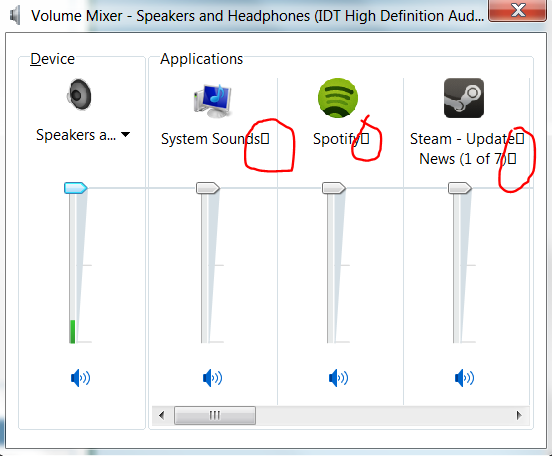
Picture of the volume controls. Why are those boxes next to the volume sources? Also, the green bar is as loud as it gets. No joke. Unless I use VLC to pump up the sound, this is as loud as it gets from normal playback of media....
VIwfM.png


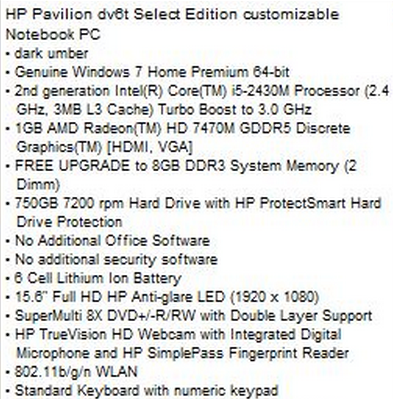
Specs of my computer (if this helps)...
eLrfQ.png


Please HELP! It's getting really obnoxious.
 

My Computer My Computer

OS
Windows 7 64 bit
Have you added/removed anything recently? If this is a recent problem, System Restore may fix it.

System Restore can be accessed from Start/Programs/Accessories/System Tools. Select a restore point that is BEFORE you had the problem. System Restore will not delete any user data or e-mails but any updates or new programs will have to be reinstalled (or if they were uninstalled they will have to be uninstalled again). System Restore has an undo function if it doesn't fix it.
 

My Computer My Computer

Computer type
PC/Desktop
Computer Manufacturer/Model Number
My Own Build
OS
Windows 10 64 bit
CPU
Intel i7 6700K
Motherboard
ASUS ROG Maximus VIII Hero
Memory
16GB Corsair Dominator
Graphics Card(s)
Intel CPU Graphics
Sound Card
RealTek
Monitor(s) Displays
27" Dell S2719dgf
Screen Resolution
2560X1440
Hard Drives
1 TB Samsung 850 EVO SSD for Win 10 Pro
500GB Samsung 850 EVO SSD for Win 10 Insider
2 TB drive for backup
PSU
EVGA Supernova 750G2
Case
BeQuiet Silent Base 600
Cooling
Deepcool Captain 120EX
Keyboard
Microsoft Wireless 2000
Mouse
Microsoft wireless
Internet Speed
100 MB/sec (Cable)
Antivirus
Microsoft Defender and Malwarebytes
Browser
Edge/Firefox
Other Info
Cakewalk (Sonar) by BandLab and Studio One 4.1 Pro recording studio software. MOTU 896Mk3 Hybrid recording interface, Frontier Tranzport wireless control unit, Behringer X-Touch Control Surface.
Five USB connected optical drives for CD Audio production using Nero BurningROM
@pegs204
The solution to your problem is likely this one. If that doesn't do the trick let me know and I have another that will definitely fix it.

I have to admit to having the same problem and although resolved, it has now developed into something else. Since using the fix cited above Windows system sounds are back to normal however; my own custom sounds are really quiet. How can Windows drop the volume of some files while retaining it in others? I should add that Windows system sounds are WAV format while my own are MP3's. Maybe that's where the problem lies but if so, how does one tweak Windows to stop that from happening?
 

My Computer My Computer

Computer Manufacturer/Model Number
Alienware M17x R2
OS
Windows 7 Ultimate x64
CPU
i7 Q840
Motherboard
M17x
Memory
8 GB
Graphics Card(s)
2 x ATI Radeon H5780
Sound Card
ATI HD Audio
Hard Drives
2 x 500 GB in RAID 0
you could try converting the mp3's to wav then see if the levels change.
 

My Computer My Computer

Computer Manufacturer/Model Number
Hewlett packard/p6512uk
OS
Microsoft Windows 7 Home Premium 64-bit 7600
CPU
IIx4 amd athelon 635 processor
Motherboard
FOXCONN 2AA9
Memory
2x2gb
Graphics Card(s)
ati radeon HD 5450
Sound Card
(1) Realtek High Definition Audio (2) AMD High Definition
Monitor(s) Displays
samsung lcd tv 32"
Screen Resolution
1360x 768
Hard Drives
(1) WDC WD10 01FAES-60Z2A0 SATA Disk Device (2) Maxtor OneTouch USB Device (3) ST310003 33AS USB Device (4) WD My Book 1111 USB Device
PSU
?
Cooling
air!
Keyboard
wireless hp
Mouse
wireless Hp,optical
Internet Speed
1.10mb/s
Antivirus
MSE
Browser
Firefox
System Restore will not delete any user data or e-mails

fireberd, I'm not saying you are wrong but I would like to know how that is possible? As far as I am aware, System Restore takes a snapshot of the drive. When restoring it rolls back to the image you have selected and anything that has been added since that snapshot was taken is lost. It offers no option to select files which should not be restored to a previous date.

I use Rollback Rx which works a bit like System Restore except that you can specify files and/or folders which must be retained. It does that by taking a snapshot at the time of restoring and after restoration it replaces all files and folders you specified from the latest snapshot. Another advantage it has is that you can mount any snapshot as a virtual drive, view it in Windows Explorer, and recover any data you had not specified to be retained.
 

My Computer My Computer

Computer Manufacturer/Model Number
Alienware M17x R2
OS
Windows 7 Ultimate x64
CPU
i7 Q840
Motherboard
M17x
Memory
8 GB
Graphics Card(s)
2 x ATI Radeon H5780
Sound Card
ATI HD Audio
Hard Drives
2 x 500 GB in RAID 0
you could try converting the mp3's to wav then see if the levels change.

Yes, I had thought of that boohbah but, as they always played perfectly prior to the Windows 7 bug that dropped the volume level, I prefer to locate the source of the problem and eliminate it rather than adapting the system to accept and live with it.
 

My Computer My Computer

Computer Manufacturer/Model Number
Alienware M17x R2
OS
Windows 7 Ultimate x64
CPU
i7 Q840
Motherboard
M17x
Memory
8 GB
Graphics Card(s)
2 x ATI Radeon H5780
Sound Card
ATI HD Audio
Hard Drives
2 x 500 GB in RAID 0
System Restore will not delete any user data or e-mails

fireberd, I'm not saying you are wrong but I would like to know how that is possible?

System Restore rolls back system files, registry keys, and installed programs.

It's not to be confused with a backup or an image restoration which are more comprehensive.

I use System Restore regularly and have never lost any personal files, although I do keep backups and could restore if it did not work as advertised.
 

My Computer My Computer

Computer type
PC/Desktop
Computer Manufacturer/Model Number
Ignatz Special; 4 speed manual gearbox; factory air conditioning; one of one
OS
Windows 7 Home Premium SP1, 64-bit
CPU
Intel Skylake i5-6600K, not overclocked
Motherboard
AsRock Z170M Extreme 4, micro ATX
Memory
8 GB HyperX DDR4-2666 (2 x 4 GB)
Graphics Card(s)
none; graphics are integrated on CPU
Sound Card
onboard: Realtek ALC1150; external: USB Behringer UF0-202
Monitor(s) Displays
Dell S2340M 23 inch IPS
Screen Resolution
1600 x 900
Hard Drives
System: Crucial MX100 series SSD, 128 GB;
Data: Samsung Spinpoint 103SJ, 1 TB;
Backup: WD Caviar Green WD30EZRX-00D8PB0, 3 TB
PSU
Rosewill SilentNight 500 watt fanless, semi-modular
Case
Antec Solo II
Cooling
Noctua NH-U12S; Noctua F12 intake, Noctua S12A exhaust
Keyboard
Microsoft 200 6JH-00001 USB
Mouse
Dell or Microsoft optical wired; USB
Antivirus
Microsoft Security Essentials and Malwarebytes Premium
Browser
Pale Moon
Other Info
All fans PWM; speeds at idle: CPU circa 500 rpm; intake circa 600 rpm; exhaust circa 600 rpm; CPU temps 27 idle and 47 C load in a warm room (27 C/81 F) when running Intel Extreme Tuning Utility stress test.
System Restore is a great tool. Its saved my butt several times. Its also made me look like "supertech" working on client's PC's.

My suggestion still stands to use it and see if it fixes the problem. As I noted, System Restore has an undo function if it doesn't help.
 

My Computer My Computer

Computer type
PC/Desktop
Computer Manufacturer/Model Number
My Own Build
OS
Windows 10 64 bit
CPU
Intel i7 6700K
Motherboard
ASUS ROG Maximus VIII Hero
Memory
16GB Corsair Dominator
Graphics Card(s)
Intel CPU Graphics
Sound Card
RealTek
Monitor(s) Displays
27" Dell S2719dgf
Screen Resolution
2560X1440
Hard Drives
1 TB Samsung 850 EVO SSD for Win 10 Pro
500GB Samsung 850 EVO SSD for Win 10 Insider
2 TB drive for backup
PSU
EVGA Supernova 750G2
Case
BeQuiet Silent Base 600
Cooling
Deepcool Captain 120EX
Keyboard
Microsoft Wireless 2000
Mouse
Microsoft wireless
Internet Speed
100 MB/sec (Cable)
Antivirus
Microsoft Defender and Malwarebytes
Browser
Edge/Firefox
Other Info
Cakewalk (Sonar) by BandLab and Studio One 4.1 Pro recording studio software. MOTU 896Mk3 Hybrid recording interface, Frontier Tranzport wireless control unit, Behringer X-Touch Control Surface.
Five USB connected optical drives for CD Audio production using Nero BurningROM
@pegs204
The solution to your problem is likely this one. If that doesn't do the trick let me know and I have another that will definitely fix it.

I have to admit to having the same problem and although resolved, it has now developed into something else. Since using the fix cited above Windows system sounds are back to normal however; my own custom sounds are really quiet. How can Windows drop the volume of some files while retaining it in others? I should add that Windows system sounds are WAV format while my own are MP3's. Maybe that's where the problem lies but if so, how does one tweak Windows to stop that from happening?


Yea. I tried that before. I just tried it again. What's your other solution? BTW, this isn't just on MP3s and such. It's more annoying when watching online media (HBO GO, Netflix, Youtube, etc.).

I'll wait for your response before trying the nuke option and system restoring the thing. Thanks for your help so far.

Anybody got any other suggestions? Anybody know what those boxes mean? I have a feeling they're some weird bug but I'm not sure.
 

My Computer My Computer

OS
Windows 7 64 bit
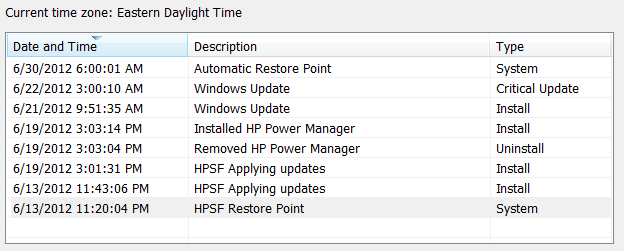
Also, I just checked out the system restore function. I'm afraid it won't work. As you can see below, the restore points don't go back far enough to when the problem began (seemingly) which was at least a month and a half ago.

AjGDc.png
 

My Computer My Computer

OS
Windows 7 64 bit
When you right click on the little speaker (lower right of taskbar) select play back divices. How many options do you have? If you have more than one select them one at a time and tick test. The one that works the best right click and set as default.
 

My Computer My Computer

Computer type
PC/Desktop
Computer Manufacturer/Model Number
Home made Desktop
OS
Windows 10 Pro. 64/ version 1709 Windows 7 Pro/64
CPU
Intel i7-6800K @ 4.3
Motherboard
ASUS X-99 Deluxe II
Memory
Corsair Platinum 16 gig @2400
Graphics Card(s)
EVGA GTX 1070 OC
Monitor(s) Displays
Asus 27" LED LCD/VE278Q
Screen Resolution
1920-1080 or 1280-720 HDMI
Hard Drives
INTEL SSD 730-240 Gb Sata 3.0/
PSU
EVGA Platium 1200W
Case
Phanteks Luxe Tempered Glass 8 fans/ one radiator
Cooling
XSPC/ Water Cooled CPU
Keyboard
Das 4 Professional
Mouse
Logitech M705/MX Anywhere 2-S
Internet Speed
100 mbits
Antivirus
Microsoft Security Essentials/ Malwarebytes Premium 3.0/ SAS
Browser
I.E. 11 default/Firefox/ ISP Time Warner Cable/Spectrum
Other Info
LG BluRay Burner/
Sound system-KLipsch-THX/
Icy Dock ssd Hot Swap bays.
Back
Top