Windows 7 Firewalls

Deleted694

Account closed by request
What is a bestest way to detect what firewall/s I am running on my computer? I have troubles using Darkbasic network registration tool:mad::confused:. Somehow my firewall blocks it.
 

My Computer

OS
Windows 7 Home Premium 64bit
Motherboard
ASUS
Memory
8 Gt
Graphics Card(s)
Nvidia GeForce GTX 560 Ti
Sound Card
Soundblaster Recon 3D PciE
Monitor(s) Displays
ViewSonic HDMI 1080P Full HD
Screen Resolution
1280 x 1024
Keyboard
USED HP USB KEYBOARD
Mouse
Logitech PS2
Internet Speed
50M WLAN CABLE
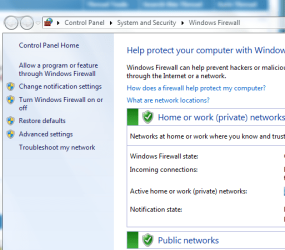
As in this picture:
Capture.PNG

To the far left of the image, using the windows firewall, you can choose to "Allow a program or feature through Windows Firewall".

I recommend only having 1 firewall installed, and only using the built-in windows firewall. Other firewalls really don't perform as well as the windows one. I would remove any other firewall.

If you prefer another firewall, make sure the windows firewall is completely disabled, or conflicts may happen.

I do not know what other firewalls you have installed, but if it is only the built in windows firewall, then the solution is easy.
 

My Computer

Computer type
PC/Desktop
Computer Manufacturer/Model Number
Custom Asus Build
OS
Microsoft Windows 8.1 Pro 64-bit
CPU
Intel(R) Core(TM) i3-4130 CPU @ 3.40GHz
Motherboard
B85M-E
Memory
8.00 GB
Graphics Card(s)
None
Sound Card
Realtek High Definition Audio
Monitor(s) Displays
Asus 23.6" Monitor
Screen Resolution
1920 x 1080 x 32 bits (4294967296 colors) @ 60 Hz
Hard Drives
INTEL SSDSC2BW180A4
Samsung SSD 840 PRO Series
PSU
Seasonic S12II-380Bronze
Case
Lian Li
Cooling
Fan, Passive
Keyboard
Logitech K120
Mouse
Microsoft Touch Mouse
Internet Speed
4ms Ping, 19.0 Mbps Download, 19.0 Mbps Upload
Antivirus
Eset Endpoint
Browser
Internet Explorer, Chrome
I have also AVAST! virus software installed. Does this program contain firewall?
 

My Computer

OS
Windows 7 Home Premium 64bit
Motherboard
ASUS
Memory
8 Gt
Graphics Card(s)
Nvidia GeForce GTX 560 Ti
Sound Card
Soundblaster Recon 3D PciE
Monitor(s) Displays
ViewSonic HDMI 1080P Full HD
Screen Resolution
1280 x 1024
Keyboard
USED HP USB KEYBOARD
Mouse
Logitech PS2
Internet Speed
50M WLAN CABLE
I have also AVAST! virus software installed. Does this program contain firewall?


No it has no firewall mate...But as mentioned above all you really need is the Windows 7 firewall... If you have a router this will also add additional protection...your router (hardware firewall) Windows firewall (Software firewall) more than enough for you :)

This is a good site for testing your firewall secuirty...it has a leak test in there some place, also its good a very good port scanner

https://www.grc.com/x/ne.dll?bh0bkyd2

Hope this helps

:)
 

My Computer

OS
windows 7 home premium x64
CPU
AMD Athlon 64 x2 5200+
Motherboard
M2N-SLI DELUXE
Memory
7.00GB
Graphics Card(s)
NVIDIA GeForce 9600GT
Sound Card
High Definition Audio Device
Monitor(s) Displays
Q19wb
Screen Resolution
1400 x 900
Hard Drives
ST325082 0AS SCSI 232.88 GB
How can I detect what programs I am running including firewalls?

Question:
I have also service called Windows Defender? Does it contain firewall?
I have SSBD Secuirty center service? What is this?
I MpsSvc service called Windows Firewall. Is this my firewall?


Question 2:
Is there any analyzer to detect my firewalls what I have on?
 
Last edited:

My Computer

OS
Windows 7 Home Premium 64bit
Motherboard
ASUS
Memory
8 Gt
Graphics Card(s)
Nvidia GeForce GTX 560 Ti
Sound Card
Soundblaster Recon 3D PciE
Monitor(s) Displays
ViewSonic HDMI 1080P Full HD
Screen Resolution
1280 x 1024
Keyboard
USED HP USB KEYBOARD
Mouse
Logitech PS2
Internet Speed
50M WLAN CABLE
You should always know what you install on your own computer. Avast is an antivirus software, which is good to have, but you should only have 1 of those.

Windows comes with windows firewall built in, and you should only have 1 of those.

Windows defender should be disabled, because it runs in the event that you do not have an antivirus software, but you do have one. You have avast, so disable defender. Defender isn't very good, avast is much better.

I do not personally know of any security detecting programs. If you would like, you can take a screenshot of all of your installed programs, and I can tell you what security programs you have installed. Here is how to do that and to upload the picture here, if that is something you want to do:
http://www.sevenforums.com/tutorials/9733-screenshots-files-upload-post-seven-forums.html - use the "Snipping Tool" feature as said in the tutorial instead of MS paint (click it to find out how).

credits:
Tutorial created by Brink
 

My Computer

Computer type
PC/Desktop
Computer Manufacturer/Model Number
Custom Asus Build
OS
Microsoft Windows 8.1 Pro 64-bit
CPU
Intel(R) Core(TM) i3-4130 CPU @ 3.40GHz
Motherboard
B85M-E
Memory
8.00 GB
Graphics Card(s)
None
Sound Card
Realtek High Definition Audio
Monitor(s) Displays
Asus 23.6" Monitor
Screen Resolution
1920 x 1080 x 32 bits (4294967296 colors) @ 60 Hz
Hard Drives
INTEL SSDSC2BW180A4
Samsung SSD 840 PRO Series
PSU
Seasonic S12II-380Bronze
Case
Lian Li
Cooling
Fan, Passive
Keyboard
Logitech K120
Mouse
Microsoft Touch Mouse
Internet Speed
4ms Ping, 19.0 Mbps Download, 19.0 Mbps Upload
Antivirus
Eset Endpoint
Browser
Internet Explorer, Chrome
If you goto CCleaner and goto the tools tab, then to the startup tab...you'll a tab for windows, on the bottom right their is a tab saying save to text file...do that and post....also goto the unistall tab above the start up tab, then save to txt file....again upload... :)
 

My Computer

OS
windows 7 home premium x64
CPU
AMD Athlon 64 x2 5200+
Motherboard
M2N-SLI DELUXE
Memory
7.00GB
Graphics Card(s)
NVIDIA GeForce 9600GT
Sound Card
High Definition Audio Device
Monitor(s) Displays
Q19wb
Screen Resolution
1400 x 900
Hard Drives
ST325082 0AS SCSI 232.88 GB
Start and type in Windows Firewall and tick on it. You will find there the state of Windows Firewall. On or Off.
Next. Start and tick All Programs. You should know all of them. If not Google the ones you don't and find out what they are and whether you want them or not. If your not sure please ask. Don't remove anything your not sure of.
As DustSailor has posted you should always know what is on your own computer.
You can also go to Start and type in Programs and you will get another list of programs.
I say again don't remove anything you are not sure of.
 
Last edited:

My Computer

Computer type
PC/Desktop
Computer Manufacturer/Model Number
Home made Desktop
OS
Windows 10 Pro. 64/ version 1709 Windows 7 Pro/64
CPU
Intel i7-6800K @ 4.3
Motherboard
ASUS X-99 Deluxe II
Memory
Corsair Platinum 16 gig @2400
Graphics Card(s)
EVGA GTX 1070 OC
Monitor(s) Displays
Asus 27" LED LCD/VE278Q
Screen Resolution
1920-1080 or 1280-720 HDMI
Hard Drives
INTEL SSD 730-240 Gb Sata 3.0/
PSU
EVGA Platium 1200W
Case
Phanteks Luxe Tempered Glass 8 fans/ one radiator
Cooling
XSPC/ Water Cooled CPU
Keyboard
Das 4 Professional
Mouse
Logitech M705/MX Anywhere 2-S
Internet Speed
100 mbits
Antivirus
Microsoft Security Essentials/ Malwarebytes Premium 3.0/ SAS
Browser
I.E. 11 default/Firefox/ ISP Time Warner Cable/Spectrum
Other Info
LG BluRay Burner/
Sound system-KLipsch-THX/
Icy Dock ssd Hot Swap bays.
If you goto CCleaner and goto the tools tab, then to the startup tab...you'll a tab for windows, on the bottom right their is a tab saying save to text file...do that and post....also goto the unistall tab above the start up tab, then save to txt file....again upload... :)
Mate, you've posted in the wrong thread again lol
 

My Computer

Computer type
PC/Desktop
Computer Manufacturer/Model Number
Custom Asus Build
OS
Microsoft Windows 8.1 Pro 64-bit
CPU
Intel(R) Core(TM) i3-4130 CPU @ 3.40GHz
Motherboard
B85M-E
Memory
8.00 GB
Graphics Card(s)
None
Sound Card
Realtek High Definition Audio
Monitor(s) Displays
Asus 23.6" Monitor
Screen Resolution
1920 x 1080 x 32 bits (4294967296 colors) @ 60 Hz
Hard Drives
INTEL SSDSC2BW180A4
Samsung SSD 840 PRO Series
PSU
Seasonic S12II-380Bronze
Case
Lian Li
Cooling
Fan, Passive
Keyboard
Logitech K120
Mouse
Microsoft Touch Mouse
Internet Speed
4ms Ping, 19.0 Mbps Download, 19.0 Mbps Upload
Antivirus
Eset Endpoint
Browser
Internet Explorer, Chrome
If you goto CCleaner and goto the tools tab, then to the startup tab...you'll a tab for windows, on the bottom right their is a tab saying save to text file...do that and post....also goto the unistall tab above the start up tab, then save to txt file....again upload... :)
Mate, you've posted in the wrong thread again lol

No no this time dude! Just want to see what he got installed on his computer...Your saying he should know whats on there...just very curious to see whats installed and whats on his start up!
 

My Computer

OS
windows 7 home premium x64
CPU
AMD Athlon 64 x2 5200+
Motherboard
M2N-SLI DELUXE
Memory
7.00GB
Graphics Card(s)
NVIDIA GeForce 9600GT
Sound Card
High Definition Audio Device
Monitor(s) Displays
Q19wb
Screen Resolution
1400 x 900
Hard Drives
ST325082 0AS SCSI 232.88 GB
My bad. I wasn't aware he had Ccleaner installed :o
Sorry
 

My Computer

Computer type
PC/Desktop
Computer Manufacturer/Model Number
Custom Asus Build
OS
Microsoft Windows 8.1 Pro 64-bit
CPU
Intel(R) Core(TM) i3-4130 CPU @ 3.40GHz
Motherboard
B85M-E
Memory
8.00 GB
Graphics Card(s)
None
Sound Card
Realtek High Definition Audio
Monitor(s) Displays
Asus 23.6" Monitor
Screen Resolution
1920 x 1080 x 32 bits (4294967296 colors) @ 60 Hz
Hard Drives
INTEL SSDSC2BW180A4
Samsung SSD 840 PRO Series
PSU
Seasonic S12II-380Bronze
Case
Lian Li
Cooling
Fan, Passive
Keyboard
Logitech K120
Mouse
Microsoft Touch Mouse
Internet Speed
4ms Ping, 19.0 Mbps Download, 19.0 Mbps Upload
Antivirus
Eset Endpoint
Browser
Internet Explorer, Chrome

My Computer

OS
windows 7 home premium x64
CPU
AMD Athlon 64 x2 5200+
Motherboard
M2N-SLI DELUXE
Memory
7.00GB
Graphics Card(s)
NVIDIA GeForce 9600GT
Sound Card
High Definition Audio Device
Monitor(s) Displays
Q19wb
Screen Resolution
1400 x 900
Hard Drives
ST325082 0AS SCSI 232.88 GB
In Bleeping Computer forums is a utility called SecurityCheck. It lists every security program what is on your computer.

My SecurityCheck log looks like this:
Log is modified and shortened for helping analysis.
Windows 7 x64 (UAC is disabled!)
avast! Free Antivirus
MVPS Hosts File
Spybot - Search & destroy
Secunia PSI (3.0.0.2004) This program is great. It autopatches all obsolete programs.
Emsisoft Anti-Malware a2service.exe

In this log there is NO Windows Firewall. It did not show up there but it is up and running in my computer.

I can also recommend Trend Micro HijackThis program. Whoa. Good tool there.
You are talking about CCleaner. What is it?
 
Last edited:

My Computer

OS
Windows 7 Home Premium 64bit
Motherboard
ASUS
Memory
8 Gt
Graphics Card(s)
Nvidia GeForce GTX 560 Ti
Sound Card
Soundblaster Recon 3D PciE
Monitor(s) Displays
ViewSonic HDMI 1080P Full HD
Screen Resolution
1280 x 1024
Keyboard
USED HP USB KEYBOARD
Mouse
Logitech PS2
Internet Speed
50M WLAN CABLE
It is a useful tool if you know what you are doing. It can delete registry keys, so there is always the chance it will mistakenly delete a key you need. But it is good in the event you know you want to completely remove a program and all its registry items, you just have to make sure you don't delete anything else.
 

My Computer

Computer type
PC/Desktop
Computer Manufacturer/Model Number
Custom Asus Build
OS
Microsoft Windows 8.1 Pro 64-bit
CPU
Intel(R) Core(TM) i3-4130 CPU @ 3.40GHz
Motherboard
B85M-E
Memory
8.00 GB
Graphics Card(s)
None
Sound Card
Realtek High Definition Audio
Monitor(s) Displays
Asus 23.6" Monitor
Screen Resolution
1920 x 1080 x 32 bits (4294967296 colors) @ 60 Hz
Hard Drives
INTEL SSDSC2BW180A4
Samsung SSD 840 PRO Series
PSU
Seasonic S12II-380Bronze
Case
Lian Li
Cooling
Fan, Passive
Keyboard
Logitech K120
Mouse
Microsoft Touch Mouse
Internet Speed
4ms Ping, 19.0 Mbps Download, 19.0 Mbps Upload
Antivirus
Eset Endpoint
Browser
Internet Explorer, Chrome
I have question:
My program needs port: Standard SSL, 443. How to enable that port for that program?

Update:
I used that GRC port scanner and all of ports are in STEALTH mode. This is good.
 
Last edited:

My Computer

OS
Windows 7 Home Premium 64bit
Motherboard
ASUS
Memory
8 Gt
Graphics Card(s)
Nvidia GeForce GTX 560 Ti
Sound Card
Soundblaster Recon 3D PciE
Monitor(s) Displays
ViewSonic HDMI 1080P Full HD
Screen Resolution
1280 x 1024
Keyboard
USED HP USB KEYBOARD
Mouse
Logitech PS2
Internet Speed
50M WLAN CABLE
I have question:
My program needs port: Standard SSL, 443. How to enable that port for that program?

Update:
I used that GRC port scanner and all of ports are in STEALTH mode. This is good.


What bit of software is being blocked from using 443? What firewall are you using ?
 

My Computer

OS
windows 7 home premium x64
CPU
AMD Athlon 64 x2 5200+
Motherboard
M2N-SLI DELUXE
Memory
7.00GB
Graphics Card(s)
NVIDIA GeForce 9600GT
Sound Card
High Definition Audio Device
Monitor(s) Displays
Q19wb
Screen Resolution
1400 x 900
Hard Drives
ST325082 0AS SCSI 232.88 GB
I use Windows Firewall and software is Dark Basic registration software.
 

My Computer

OS
Windows 7 Home Premium 64bit
Motherboard
ASUS
Memory
8 Gt
Graphics Card(s)
Nvidia GeForce GTX 560 Ti
Sound Card
Soundblaster Recon 3D PciE
Monitor(s) Displays
ViewSonic HDMI 1080P Full HD
Screen Resolution
1280 x 1024
Keyboard
USED HP USB KEYBOARD
Mouse
Logitech PS2
Internet Speed
50M WLAN CABLE

My Computer

OS
windows 7 home premium x64
CPU
AMD Athlon 64 x2 5200+
Motherboard
M2N-SLI DELUXE
Memory
7.00GB
Graphics Card(s)
NVIDIA GeForce 9600GT
Sound Card
High Definition Audio Device
Monitor(s) Displays
Q19wb
Screen Resolution
1400 x 900
Hard Drives
ST325082 0AS SCSI 232.88 GB
Back
Top